Está a executar campanhas de códigos QR com RA em eventos, mas tem dificuldade em saber o que realmente funciona? Sem as métricas certas, os dados de leitura ficam por utilizar enquanto as oportunidades de envolvimento escapam. Este guia explica quais as métricas importantes, como interpretá-las e como transformar esses dados em melhores resultados para eventos.
O Que Torna o Rastreamento de Códigos QR com RA Diferente
Os códigos QR tradicionais indicam quantas pessoas leram um código e, de forma geral, onde estavam quando o fizeram. Os códigos QR com RA vão mais longe. Como a experiência se desenrola dentro da própria leitura – através de modelos 3D, sobreposições de vídeo, elementos espaciais – há mais momentos significativos para medir.
A principal diferença é que os códigos QR com RA exigem o rastreamento de ambos envolvimento inicial (a leitura) e interação imersiva (tempo de permanência, interações com objetos 3D, movimento espacial). Uma contagem de leitura padrão apenas indica que alguém iniciou a experiência. O tempo de permanência, a profundidade da interação e o comportamento pós-leitura indicam se a experiência ressoou.
Em média, as campanhas WebAR registam tempos de permanência entre 60 a 120 segundos – muito mais longos do que as interações breves típicas dos códigos QR padrão. Essa janela de envolvimento estendida cria um rasto de dados mais rico, mas apenas se souber o que capturar.
As Métricas Essenciais a Rastrear
Antes de configurar qualquer infraestrutura de rastreamento, estabeleça o que o sucesso significa para o seu evento específico. Uma ativação de reconhecimento de marca tem KPIs diferentes de um stand de geração de leads. Uma vez que os seus objetivos estejam claros, cada métrica tem um papel definido.
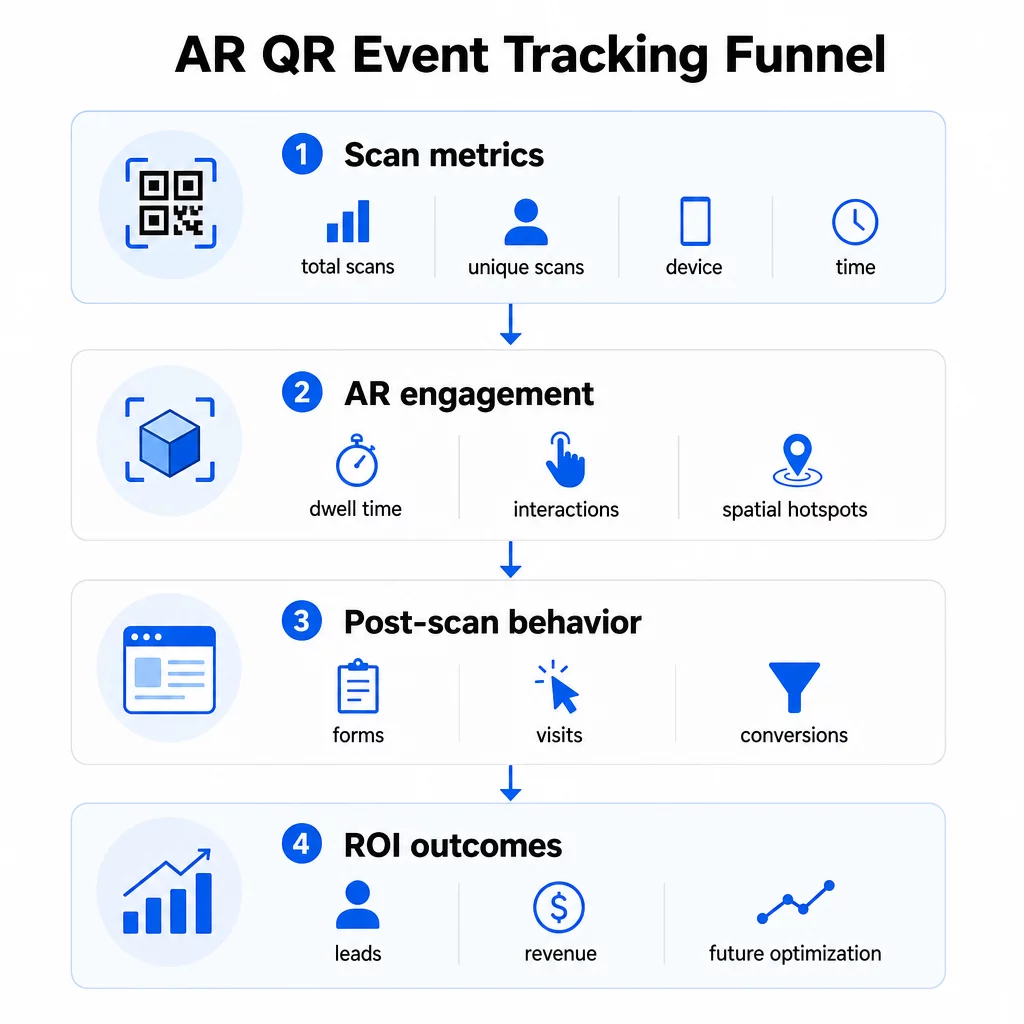
Métricas ao nível da leitura formam a base:
- TOTAL DE ESCANEAMENTOS – alcance geral e volume de envolvimento
- Leituras únicas – número aproximado de participantes individuais que interagiram
- Frequência de digitalização (total ÷ únicos) – se as pessoas estão retornando à experiência, o que sinaliza interesse genuíno
- Hora e data da leitura – os períodos de pico de engajamento ajudam a identificar quais sessões, estandes ou horários geraram mais atividade
- Dados do dispositivo e do SO – saber se seu público está predominantemente em iOS ou Android permite otimizar a página de destino e a experiência de RA para o tipo de dispositivo dominante
- Dados de geolocalização – os dados de leitura em nível de cidade ou região revelam onde o engajamento é maior, útil para eventos em vários locais ou decisões futuras de localização de eventos
Métricas específicas de RA aprofundar:
- Tempo de permanência – quanto tempo os usuários permanecem dentro da experiência de RA, não apenas na página de destino
- Análise espacial – quais áreas físicas do seu local ou estande geraram a maior atividade de leitura
- Eventos de interação 3D – se os usuários giraram um modelo de produto, acionaram um vídeo ou completaram um elemento interativo
Comportamento pós-digitalização fecha o ciclo:
- Envios de formulários, registos ou downloads que se seguiram à digitalização
- Taxa de rejeição e tempo na página para o destino da página de destino
- Conversões ligadas a objetivos específicos da campanha (compra de bilhetes, inscrições em newsletters, pedidos de demonstração)
Para eventos B2B em particular, as métricas mais valiosas são novos leads de qualidade gerados, novas contas envolvidas e receita eventual atribuída ao evento. Os dados de digitalização alimentam o topo desse funil, mas as conversões pós-digitalização determinam o ROI.
Monitorize Cada Leitura em Tempo Real Use o Painel de controlo do Pageloot Analytics para monitorizar o total de digitalizações, digitalizações únicas, tipos de dispositivos e locais de digitalização à medida que acontecem durante o seu evento – sem necessidade de configuração técnica.
Configurar a Sua Infraestrutura de Rastreamento
Obter dados precisos requer algumas decisões antes do seu evento entrar em direto.
Use códigos QR dinâmicos
Os códigos QR estáticos codificam um destino fixo e não fornecem rastreamento. Os códigos QR dinâmicos encaminham as digitalizações através de um redirecionamento, que é onde os metadados da digitalização – tempo, dispositivo, localização – são registados. O Gerador de QR Code Dinâmico da Pageloot cria códigos que rastreiam automaticamente as taxas de digitalização, dados de localização e outras métricas, e permite-lhe atualizar o URL de destino sem reimprimir materiais. Para eventos de vários dias onde os horários ou as chamadas para ação podem mudar, esta flexibilidade é essencial.
Adicionar Parâmetros UTM para Rastreamento Pós-Digitalização
Anexar parâmetros UTM aos URLs de destino do seu código QR permite que ferramentas como o Google Analytics 4 distingam o tráfego impulsionado por QR de outras fontes e meçam o que acontece após a digitalização. Um URL bem estruturado parece-se com:
`https://yoursite.com/event-page?utm``source=event`stand&utmmedium=qrcódigo&utmcampanha=conferência2025`
Usar valores descritivos de `utm`source` (por exemplo, `main`palcostand`, `balcão de`receção`) permite comparar o desempenho em diferentes locais de colocação no mesmo evento. Mantenha as convenções de nomenclatura consistentes – minúsculas, sublinhados em vez de espaços – para que os seus relatórios GA4 permaneçam limpos e filtráveis. O guia sobre parâmetros UTM para códigos QR aborda esta configuração em detalhe.
Conecte os Seus Dados de Presença
Se estiver a usar códigos QR para check-ins de eventos, os seus dados de presença e os seus dados de envolvimento podem ser lidos em conjunto. O código QR de presença sistema regista as chegadas em tempo real, o que lhe permite cruzar quem fez o check-in com quem digitalizou a sua experiência de RA e completou uma ação pós-digitalização. Isto é particularmente útil para calcular taxas de conversão verdadeiras, em vez de apenas taxas de digitalização para página de destino.
Para recolher respostas estruturadas – feedback, registos, inquéritos pós-evento – emparelhe os seus códigos QR com o Google Forms usando o Gerador de QR Code do Google Forms. Os dados de submissão do formulário integram-se diretamente com o Google Sheets para análise imediata.
Simplifique os Check-Ins de Eventos O Gerador de Código QR para Eventos Pageloot permite criar bilhetes rastreáveis, horários interativos e pontos de contato de engajamento – tudo gerenciável a partir de um único painel.
Como Interpretar Seus Dados de Leitura
Coletar métricas só é útil se você souber o que elas estão lhe dizendo. Veja como ler os padrões mais comuns.
Baixo número total de leituras não significa automaticamente que a oferta falhou. Verifique primeiro o posicionamento – o código está ao nível dos olhos, impresso grande o suficiente, com uma chamada para ação clara por perto? Contraste ruim ou um código não marcado é a causa mais comum de baixas taxas de leitura, não o conteúdo por trás dele. O guia para engajamento com códigos QR usando mapas de calor explica como diagnosticar problemas de posicionamento usando dados de densidade de leitura.
Alto número total de leituras, mas baixo número de leituras únicas sugere que um pequeno grupo está lendo repetidamente. Isso pode indicar entusiasmo genuíno, ou pode significar que seu código QR está em um local onde as mesmas pessoas passam por ele várias vezes. O contexto importa aqui.
Alto número de leituras únicas, mas alta taxa de rejeição na página de destino aponta para uma incompatibilidade entre a expectativa que o código QR cria e o que os usuários encontram após a leitura. Revise o conteúdo da página de destino e certifique-se de que ele corresponda ao contexto onde o código é exibido.
Tempo de permanência forte com baixa conversão é comum em experiências de RA onde a interação é agradável, mas a chamada para ação não é proeminente o suficiente. Revise onde a CTA aparece dentro da experiência e se os usuários a estão alcançando antes de sair.
Dados geográficos de leitura do seu análise de geolocalização pode revelar quais áreas de um local com várias salas ou de um pavilhão de feiras geraram mais atividade, ajudando você a decidir o posicionamento do estande e os níveis de pessoal para eventos futuros.
Padrões de digitalização baseados no tempo identificar janelas de pico de engajamento. Se a maioria das digitalizações ocorrer nos 20 minutos após um orador principal mencionar sua ativação, você terá um sinal claro sobre o que está impulsionando o tráfego. Use essa informação para programar postagens em mídias sociais ou rotações de equipe de acordo.
Equipes que coordenam sessões em torno desses períodos de pico de engajamento podem usar agendamento de eventos ferramentas para organizar horários de eventos, disponibilidade e coordenação de participantes.
Escolhendo entre Pageloot e GA4
A maioria dos eventos se beneficia do uso de ambas as ferramentas em combinação, com cada uma lidando com uma camada distinta de rastreamento.
| RECURSO | Pageloot | Google Analytics 4 |
|---|---|---|
| Análise de digitalização em tempo real | Dados instantâneos de nível de digitalização (geolocalização, dispositivo, tempo) | Disponível via relatório em tempo real; requer configuração de UTM |
| Métricas específicas de RA | Tempo de permanência, análise espacial em níveis suportados | Limitado a métricas da web; requer eventos personalizados |
| Rastreamento de digitalização único | Deduplicação de dispositivo integrada | Baseado em sessão/usuário; difícil de vincular apenas a digitalizações físicas |
| Esforço de integração | Baixo – plug-and-play com redirecionamentos dinâmicos | Mais alto – precisa de parâmetros UTM e scripts de rastreamento |
| Preços | $10–$50+/mês | Gratuito (versão padrão) |
Use o Pageloot quando você precisa de informações imediatas durante o evento: quem está digitalizando, de onde, em qual dispositivo e por quanto tempo estão interagindo. Não requer alterações no código do seu site e é projetado em torno de métricas específicas de QR, incluindo análise espacial e tempo de permanência.
Use o GA4 quando você precisa entender a jornada do cliente pós-clique – o que os usuários fizeram depois de chegar à sua página, se converteram e como o evento contribuiu para metas de campanha de longo prazo. A melhores ferramentas para rastreamento de eventos com código QR página compara as opções de plataforma em mais detalhes.
Para conferências de vários dias ou eventos de networking, executar ambos em paralelo oferece feedback imediato de engajamento através do Pageloot e atribuição de conversão através do GA4.
Considerações de Privacidade
As campanhas de código QR de RA coletam dados pessoais automaticamente após a digitalização – isso pode incluir endereços IP, identificadores de dispositivo, carimbos de data/hora e dados de localização precisos. De acordo com as leis de privacidade estaduais dos EUA, como CCPA e VCPA, você é obrigado a divulgar quais dados são coletados, como são usados e oferecer mecanismos de opt-out.
Na prática, isso significa:
- Atualize seu aviso de privacidade do evento para descrever o que acontece quando um código QR é digitalizado
- Divulgue qualquer rastreamento de geolocalização preciso ou segmentação comportamental pela sua plataforma de QR
- Audite as práticas de dados do seu provedor de código QR, incluindo períodos de retenção e compartilhamento com terceiros
- Obtenha consentimento explícito antes de coletar dados de localização baseados em GPS
O guia de análise de geolocalização aborda os requisitos de conformidade de privacidade em mais detalhes, incluindo a distinção entre rastreamento baseado em IP e baseado em GPS e quando cada um requer o consentimento do usuário.
Usando Dados para Otimizar Eventos Futuros
O valor do rastreamento se acumula quando você o usa iterativamente. Antes do seu próximo evento, compare o desempenho entre posicionamentos, horários e tipos de conteúdo de RA para identificar o que gerou o engajamento mais significativo – não apenas o maior número de digitalizações.
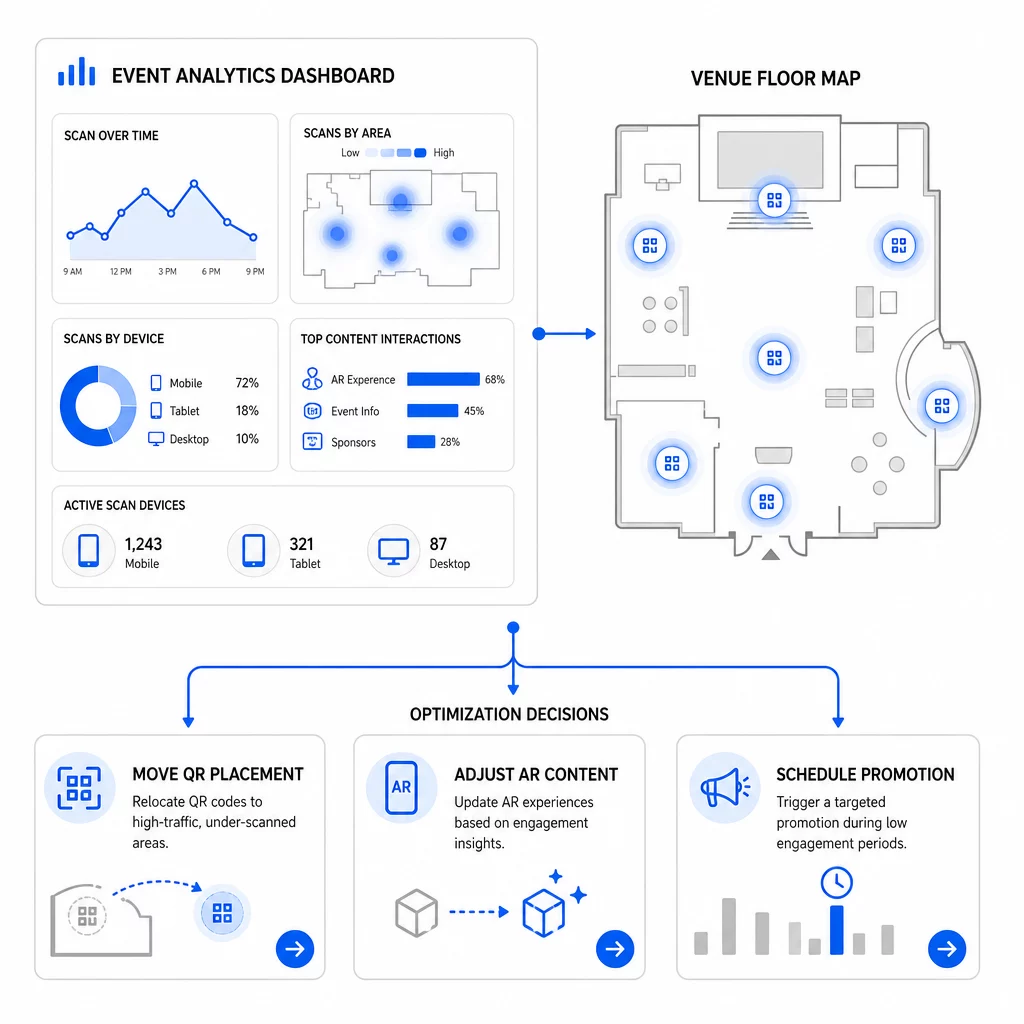
Otimizações específicas a considerar:
- Realocar códigos QR de áreas de baixa digitalização para posições próximas a saídas de sessões de alto tráfego ou áreas de registro
- Ajustar o conteúdo de RA com base nos elementos interativos que apresentaram o maior tempo de permanência
- Refinar o posicionamento da CTA da sua página de destino com base em onde os usuários desistem
- Agendar promoções de apoio e ativações de equipe em torno dos períodos de pico de digitalização
- Focar o investimento em eventos futuros em regiões geográficas onde as taxas de digitalização para conversão foram mais fortes
Comparar métricas chave antes e depois de cada mudança é a única maneira confiável de validar se uma otimização realmente melhorou os resultados. O guia de painéis de análise de códigos QR explica como estruturar essas comparações dentro de um painel de rastreamento.
A visão mais ampla sobre como os códigos QR de RA transformam eventos vale a pena revisar se você ainda está na fase de planejamento – particularmente em torno da definição de objetivos antes de escolher quais métricas priorizar.
Rastrear o sucesso de eventos com códigos QR de RA não é apenas contar digitalizações. É sobre construir uma imagem clara do comportamento do participante ao longo de toda a jornada: quem engajou, onde o fez, quão profundamente interagiu e o que fez em seguida. Configure códigos dinâmicos com a tag UTM apropriada antes do evento, monitore métricas espaciais e de permanência em tempo real e use dados de conversão pós-evento para aprimorar a próxima campanha.
Comece a Rastrear Suas Campanhas de Eventos Crie códigos QR de RA dinâmicos e rastreáveis com o Pageloot pacote completo de recursos QR e monitore cada leitura a partir de um único painel. Teste gratuito de 14 dias, sem necessidade de cartão de crédito.
Perguntas frequentes
As métricas mais importantes são o total de digitalizações, digitalizações únicas, frequência de digitalização, hora e data da digitalização, dados do dispositivo e SO, geolocalização e tempo de permanência na experiência de RA. O comportamento pós-digitalização – taxa de rejeição, tempo na página, envios de formulário e conversões – completa o quadro, mostrando se as digitalizações se traduziram em resultados significativos.
As duas ferramentas servem a propósitos diferentes. Pageloot captura metadados de nível de digitalização em tempo real – tipo de dispositivo, localização, tempo de permanência – sem exigir quaisquer alterações no código do site. O Google Analytics 4 rastreia o que acontece após a digitalização: comportamento da página, eventos de conversão e a jornada mais ampla do cliente. Para eventos onde tanto o engajamento imediato quanto as conversões subsequentes importam, usar ambos em conjunto oferece a visão mais completa.
Códigos QR estáticos codificam um URL fixo e não fornecem dados de rastreamento. Códigos QR dinâmicos direcionam as leituras através de um redirecionamento que registra automaticamente metadados de tempo, dispositivo e localização. Eles também permitem que você atualize o URL de destino ou o conteúdo vinculado sem reimprimir materiais – útil para eventos de vários dias onde os horários ou chamadas para ação mudam. Você pode aprender mais sobre como isso funciona na página do gerador de código QR dinâmico.