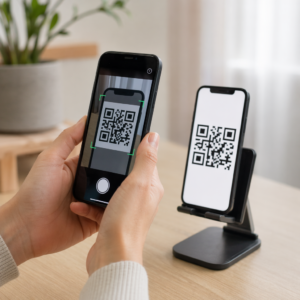
Etkinliklerde AR özellikli QR kod kampanyaları yürütüyor ancak neyin gerçekten işe yaradığını anlamakta zorlanıyor musunuz? Doğru metrikler olmadan, tarama verileri kullanılmadan kalır ve etkileşim fırsatları kaçar. Bu kılavuz size hangi metriklerin önemli olduğunu, bunları nasıl okuyacağınızı ve bu verileri daha iyi etkinlik sonuçlarına nasıl dönüştüreceğinizi anlatıyor.
AR QR Kod Takibini Farklı Kılan Nedir
Geleneksel QR kodları size kaç kişinin bir kodu taradığını ve genel olarak bunu yaptıklarında nerede olduklarını söyler. AR özellikli QR kodları daha da ileri gider. Deneyim, 3D modeller, video katmanları, uzamsal öğeler aracılığıyla taramanın içinde geliştiği için ölçülecek daha anlamlı anlar vardır.
Temel fark, AR QR kodlarının her ikisini de takip etmeyi gerektirmesidir: ilk etkileşim (tarama) ve sürükleyici etkileşim (kalma süresi, 3D nesne etkileşimleri, uzamsal hareket). Standart bir tarama sayısı yalnızca birinin deneyimi başlattığını söyler. Kalma süresi, etkileşim derinliği ve tarama sonrası davranış, deneyimin yankı uyandırıp uyandırmadığını gösterir.
Ortalama olarak, WebAR kampanyaları 60 ila 120 saniye arasında kalma süreleri görür – bu, standart QR kodlarına özgü kısa etkileşimlerden çok daha uzundur. Bu uzatılmış etkileşim penceresi, daha zengin bir veri izi oluşturur, ancak yalnızca neyi yakalayacağınızı biliyorsanız.
Takip Edilmesi Gereken Temel Metrikler
Herhangi bir takip altyapısı kurmadan önce, belirli etkinliğiniz için başarının neye benzediğini belirleyin. Bir marka bilinirliği aktivasyonunun, bir potansiyel müşteri oluşturma standından farklı KPI'ları vardır. Hedefleriniz netleştiğinde, her metrik tanımlanmış bir role sahip olur.
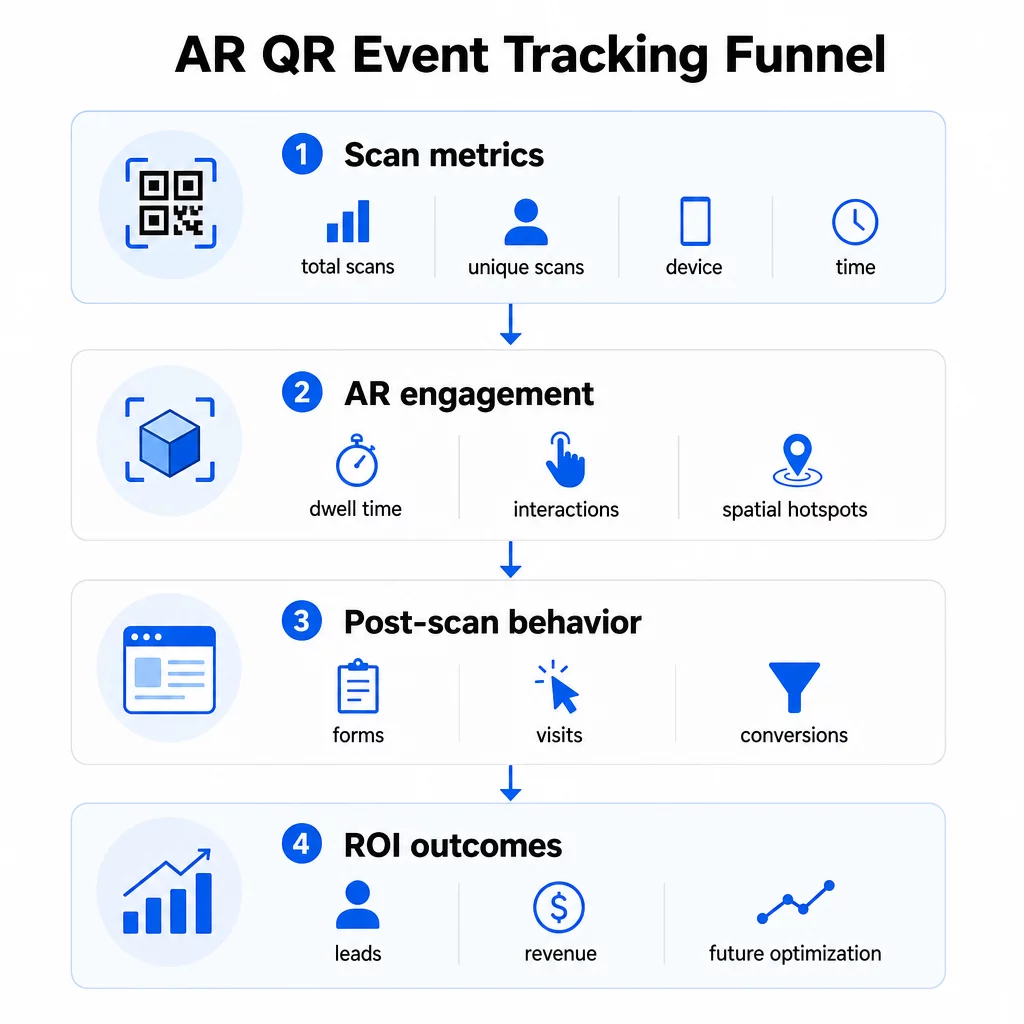
Tarama düzeyindeki metrikler temeli oluşturur:
- TOPLAM TARAMA – genel erişim ve etkileşim hacmi
- Benzersiz tarama sayısı – etkileşimde bulunan yaklaşık bireysel katılımcı sayısı
- Tarama sıklığı (toplam ÷ tekil) – kişilerin deneyime geri dönüp dönmediği, bu da gerçek ilgiyi gösterir
- Tarama zamanı ve tarihi – en yoğun etkileşim pencereleri, hangi oturumların, stantların veya zaman dilimlerinin en çok etkinliği sağladığını belirlemenize yardımcı olur
- Cihaz ve İşletim Sistemi verileri – kitlenizin ağırlıklı olarak iOS veya Android kullandığını bilmek, açılış sayfasını ve AR deneyimini baskın cihaz türü için optimize etmenizi sağlar
- Coğrafi konum verileri – şehir veya bölge düzeyindeki tarama verileri, etkileşimin en yüksek olduğu yerleri ortaya çıkarır; bu, çok mekanlı etkinlikler veya gelecekteki etkinlik yerleştirme kararları için faydalıdır
AR'a özel metrikler daha derine inin:
- Kalma süresi – kullanıcıların sadece açılış sayfasında değil, AR deneyiminin içinde ne kadar kaldığı
- Mekansal analizler – mekanınızın veya standınızın hangi fiziksel alanlarının en çok tarama etkinliği oluşturduğu
- 3D etkileşim olayları – kullanıcıların bir ürün modelini döndürüp döndürmediği, bir videoyu tetikleyip tetiklemediği veya etkileşimli bir öğeyi tamamlayıp tamamlamadığı
Tarama sonrası davranış döngüyü kapatır:
- Taramayı takip eden form gönderimleri, kayıtlar veya indirmeler
- Açılış sayfası hedefi için hemen çıkma oranı ve sayfada kalma süresi
- Belirli kampanya hedeflerine bağlı dönüşümler (bilet satın alımları, bülten kayıtları, demo talepleri)
Özellikle B2B etkinlikleri için en değerli metrikler, oluşturulan yeni kaliteli potansiyel müşteriler, etkileşim kurulan yeni hesaplar ve etkinliğe atfedilen nihai gelirdir. Tarama verileri bu huninin üst kısmını besler, ancak tarama sonrası dönüşümler yatırım getirisini belirler.
Her Taramayı Gerçek Zamanlı Takip Edin Kullan Pageloot Analitik paneli etkinliğiniz sırasında gerçekleşen toplam taramaları, benzersiz taramaları, cihaz türlerini ve tarama konumlarını izlemek için – teknik kurulum gerektirmez.
İzleme Altyapınızı Kurma
Doğru veri elde etmek, etkinliğiniz başlamadan önce birkaç karar gerektirir.
Dinamik QR Kodlarını Kullanın
Statik QR kodları sabit bir hedefi kodlar ve izleme sağlamaz. Dinamik QR kodları, taramaları bir yönlendirme aracılığıyla yönlendirir; tarama meta verileri – zaman, cihaz, konum – burada kaydedilir. Dinamik QR Kod Oluşturucu Pageloot'tan, tarama oranlarını, konum verilerini ve diğer metrikleri otomatik olarak izleyen kodlar oluşturur ve hedef URL'yi materyalleri yeniden basmadan güncellemenizi sağlar. Programların veya eylem çağrılarının değişebileceği çok günlük etkinlikler için bu esneklik çok önemlidir.
Tarama Sonrası İzleme İçin UTM Parametreleri Ekleme
QR kodu hedef URL'lerinize UTM parametreleri eklemek, Google Analytics 4 gibi araçların QR kaynaklı trafiği diğer kaynaklardan ayırmasına ve tarama sonrası ne olduğunu ölçmesine olanak tanır. İyi yapılandırılmış bir URL şöyle görünür:
`https://yoursite.com/event-page?utm``source=event`stant&utmmedium=qrkodu&utmkampanya=konferans2025`
Açıklayıcı `utm` kullanarak`source` değerleri (örn., `ana``sahne``stant`, `kayıt`masası`) aynı etkinlikteki farklı yerleşim konumları arasındaki performansı karşılaştırmanıza olanak tanır. GA4 raporlarınızın düzenli ve filtrelenebilir kalması için adlandırma kurallarını tutarlı tutun – küçük harf, boşluk yerine alt çizgi kullanın. Rehberde QR kodları için UTM parametreleri bu kurulum ayrıntılı olarak ele alınmaktadır.
Katılım Verilerinizi Bağlayın
Etkinlik girişleri için QR kodları kullanıyorsanız, katılım verileriniz ve etkileşim verileriniz birlikte okunabilir. katılım QR kodu sistemi, gelişleri gerçek zamanlı olarak kaydeder; bu da kimin giriş yaptığını, kimin AR deneyiminizi taradığını ve tarama sonrası bir eylemi tamamladığını çapraz referanslamanıza olanak tanır. Bu, yalnızca taramadan açılış sayfasına oranları yerine gerçek dönüşüm oranlarını hesaplamak için özellikle faydalıdır.
Yapılandırılmış yanıtları (geri bildirim, kayıtlar, etkinlik sonrası anketler) toplamak için QR kodlarınızı Google Formlar ile Google Form QR Kod Oluşturucu. kullanarak eşleştirin. Form gönderim verileri, anında analiz için doğrudan Google E-Tablolar ile entegre olur.
Etkinlik Girişlerini Kolaylaştırın Bu Pageloot Etkinlik QR Kodu Oluşturucu izlenebilir biletler, etkileşimli programlar ve etkileşim noktaları oluşturmanızı sağlar – hepsi tek bir panodan yönetilebilir.
Tarama Verilerinizi Nasıl Yorumlarsınız?
Metrik toplamak, size ne söylediklerini bildiğinizde ancak işe yarar. İşte en yaygın kalıpları nasıl okuyacağınız.
Düşük toplam tarama sayısı otomatik olarak teklifin başarısız olduğu anlamına gelmez. Önce yerleşimi kontrol edin – kod göz hizasında mı, yeterince büyük basılmış mı, yakınında net bir harekete geçirici mesaj var mı? Kötü kontrast veya işaretsiz bir kod, düşük tarama oranlarının en yaygın nedenidir, arkasındaki içerik değil. ısı haritalarıyla QR kodu etkileşimi rehberi tarama yoğunluğu verilerini kullanarak yerleşim sorunlarını nasıl teşhis edeceğinizi açıklar.
Yüksek toplam tarama sayısı ancak düşük benzersiz tarama sayısı küçük bir grubun tekrar tekrar tarama yaptığını gösterir. Bu, gerçek bir coşkuyu işaret edebileceği gibi, QR kodunuzun aynı kişilerin birden fazla geçtiği bir konumda olduğu anlamına da gelebilir. Burada bağlam önemlidir.
Yüksek benzersiz tarama sayısı ancak yüksek hemen çıkma oranı açılış sayfasında, QR kodunun yarattığı beklenti ile kullanıcıların taradıktan sonra buldukları arasında bir uyumsuzluğa işaret eder. Açılış sayfası içeriğini tekrar gözden geçirin ve kodun görüntülendiği bağlamla eşleştiğinden emin olun.
Düşük dönüşümle güçlü kalma süresi etkileşimin keyifli olduğu ancak harekete geçirici mesajın yeterince belirgin olmadığı AR deneyimlerinde yaygındır. CTA'nın deneyim içinde nerede göründüğünü ve kullanıcıların çıkmadan önce ona ulaşıp ulaşmadığını gözden geçirin.
Coğrafi tarama verileri sizin konum analizi çok odalı bir mekanın veya fuar alanının hangi bölgelerinin en çok etkinliği sağladığını ortaya çıkarabilir, bu da gelecekteki etkinlikler için stant yerleşimi ve personel seviyelerini belirlemenize yardımcı olur.
Zamana dayalı tarama modelleri en yüksek etkileşim pencerelerini belirleyin. Çoğu tarama, bir ana konuşmacının aktivasyonunuzdan bahsetmesinden sonraki 20 dakika içinde gerçekleşiyorsa, trafiği neyin yönlendirdiğine dair net bir sinyaliniz var demektir. Bu bilgiyi sosyal medya gönderilerini veya personel rotasyonlarını buna göre zamanlamak için kullanın.
Bu en yoğun etkileşim zaman dilimleri etrafında oturumları koordine eden ekipler kullanabilir etkinlik planlama etkinlik saatlerini, müsaitliği ve katılımcı koordinasyonunu düzenlemek için araçlar.
Pageloot ve GA4 Arasında Seçim Yapmak
Çoğu etkinlik, her biri farklı bir izleme katmanını ele alacak şekilde her iki aracı birlikte kullanmaktan faydalanır.
| ÖZELLİK | Pageloot | Google Analytics 4 |
|---|---|---|
| Gerçek zamanlı tarama analizi | Anlık tarama düzeyinde veriler (coğrafi konum, cihaz, zaman) | Gerçek Zamanlı rapor aracılığıyla kullanılabilir; UTM kurulumu gerektirir |
| AR'a özel metrikler | Desteklenen katmanlarda kalma süresi, mekansal analiz | Web metrikleriyle sınırlıdır; özel etkinlikler gerektirir |
| Benzersiz tarama takibi | Dahili cihaz tekilleştirme | Oturum/kullanıcı tabanlı; yalnızca fiziksel taramalara bağlamak zordur |
| Entegrasyon çabası | Düşük – dinamik yönlendirmelerle tak ve çalıştır | Daha yüksek – UTM parametreleri ve izleme komut dosyaları gerektirir |
| Fiyatlandırma | $10–$50+/ay | Ücretsiz (standart sürüm) |
Pageloot'u kullanın etkinlik sırasında anında bilgiye ihtiyaç duyduğunuzda: kim tarıyor, nereden, hangi cihazda ve ne kadar süreyle etkileşimde bulunuyor. Web sitenizin kodunda herhangi bir değişiklik gerektirmez ve mekansal analizler ile kalış süresi dahil olmak üzere QR'a özel metrikler etrafında tasarlanmıştır.
GA4'ü kullanın sayfanıza indikten sonra kullanıcıların ne yaptığını, dönüşüm sağlayıp sağlamadıklarını ve etkinliğin uzun vadeli kampanya hedeflerine nasıl katkıda bulunduğunu anlamanız gerektiğinde. QR kodlu etkinlik takibi için en iyi araçlar sayfa platform seçeneklerini daha ayrıntılı olarak karşılaştırır.
Çok günlük konferanslar veya ağ oluşturma etkinlikleri için, her ikisini paralel çalıştırmak, Pageloot aracılığıyla anında etkileşim geri bildirimi ve GA4 aracılığıyla dönüşüm ilişkilendirmesi sağlar.
Gizlilik Hususları
AR QR kod kampanyaları, tarama anında otomatik olarak kişisel veri toplar – bu, IP adreslerini, cihaz tanımlayıcılarını, zaman damgalarını ve hassas konum verilerini içerebilir. CCPA ve VCPA gibi ABD eyalet gizlilik yasaları uyarınca, hangi verilerin toplandığını, nasıl kullanıldığını açıklamanız ve vazgeçme mekanizmaları sunmanız gerekmektedir.
Pratik olarak bu şu anlama gelir:
- Bir QR kodu tarandığında ne olduğunu açıklamak için etkinlik gizlilik bildiriminizi güncelleyin
- QR platformunuz tarafından yapılan herhangi bir hassas coğrafi konum takibini veya davranışsal hedeflemeyi açıklayın
- QR kod sağlayıcınızın veri uygulamalarını, saklama sürelerini ve üçüncü taraf paylaşımını denetleyin
- GPS tabanlı konum verilerini toplamadan önce açık rıza alın
Bu coğrafi konum analizi rehberi IP tabanlı ve GPS tabanlı takip arasındaki ayrım ve her birinin ne zaman kullanıcı onayı gerektirdiği dahil olmak üzere gizlilik uyumluluk gereksinimlerini daha ayrıntılı olarak kapsar.
Verileri Kullanarak Gelecek Etkinlikleri Optimize Etme
İzlemenin değeri, onu yinelemeli olarak kullandığınızda katlanarak artar. Bir sonraki etkinliğinizden önce, en anlamlı etkileşimi (sadece en çok taramayı değil) neyin sağladığını belirlemek için yerleşimler, zaman dilimleri ve AR içerik türleri arasındaki performansı karşılaştırın.
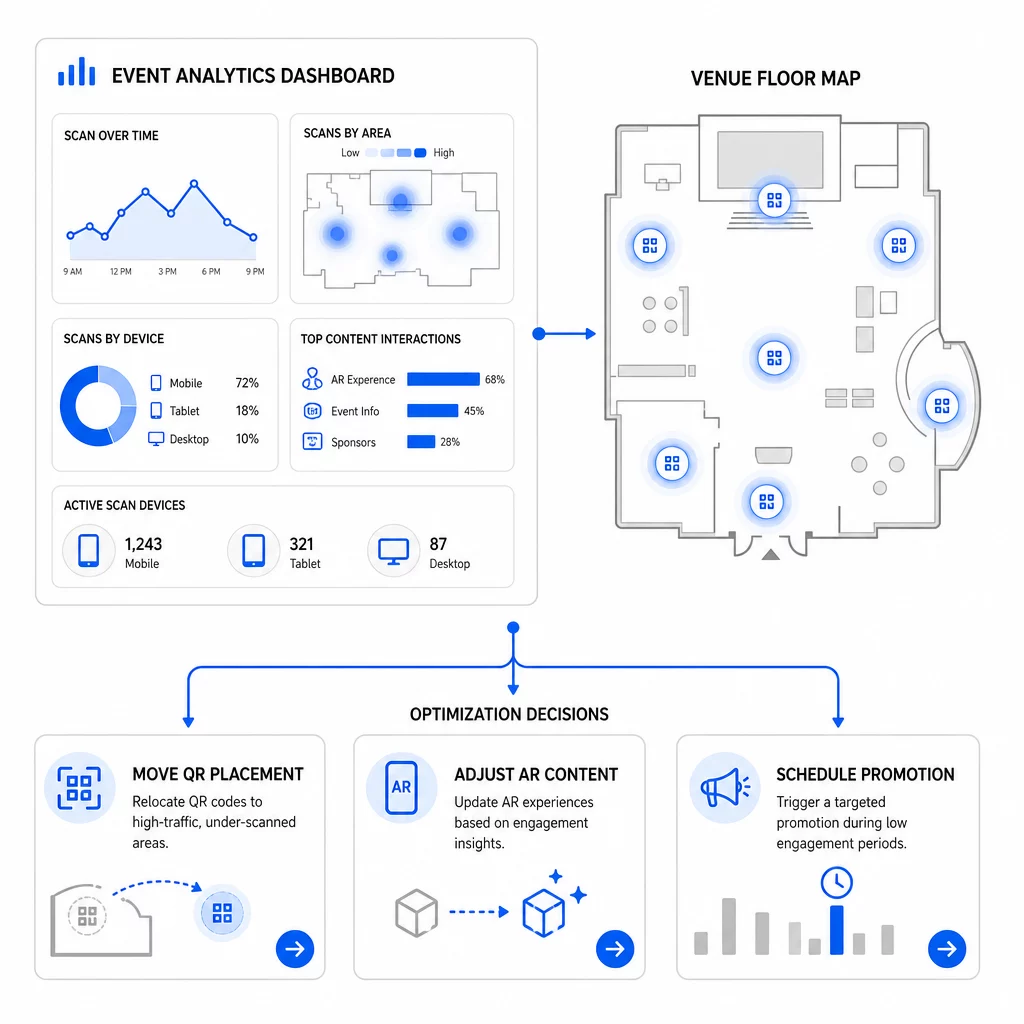
Dikkate alınması gereken belirli optimizasyonlar:
- QR kodlarını düşük tarama alanlarından, yoğun trafikli oturum çıkışlarına veya kayıt alanlarına yakın konumlara taşıyın
- En yüksek kalma süresini gösteren etkileşimli öğelere göre AR içeriğini ayarlayın
- Kullanıcıların ayrıldığı yerlere göre açılış sayfası CTA yerleşiminizi iyileştirin
- Destekleyici promosyonları ve personel aktivasyonlarını yoğun tarama pencereleri etrafında planlayın
- Gelecekteki etkinlik yatırımını, taramadan dönüşüm oranlarının en güçlü olduğu coğrafi bölgelere odaklayın
Her değişiklikten önce ve sonra temel metrikleri karşılaştırmak, bir optimizasyonun sonuçları gerçekten iyileştirip iyileştirmediğini doğrulamak için tek güvenilir yoldur. QR kodu analitik panoları rehberi bir izleme panosu içinde bu karşılaştırmaların nasıl yapılandırılacağını anlatır.
Daha geniş resim olan AR QR kodlarının etkinlikleri nasıl dönüştürdüğü planlama aşamasındaysanız – özellikle hangi metrikleri önceliklendireceğinizi seçmeden önce hedefleri tanımlama konusunda – gözden geçirmeye değerdir.
AR QR kodlarıyla etkinlik başarısını izlemek sadece taramaları saymakla ilgili değildir. Katılımcı davranışının tüm yolculuk boyunca net bir resmini oluşturmakla ilgilidir: kim etkileşime girdi, nerede yaptı, ne kadar derinlemesine etkileşim kurdu ve sonra ne yaptı. Etkinlikten önce uygun UTM etiketlemesi ile dinamik kodlar kurun, mekansal ve kalma metriklerini gerçek zamanlı olarak izleyin ve bir sonraki kampanyayı keskinleştirmek için etkinlik sonrası dönüşüm verilerini kullanın.
Etkinlik Kampanyalarınızı İzlemeye Başlayın Pageloot ile dinamik, izlenebilir AR QR kodları oluşturun tam QR özellik paketi ve her taramayı tek bir kontrol panelinden izleyin. Ücretsiz 14 günlük deneme, kredi kartı gerekmez.
Sıkça sorulan sorular
En önemli metrikler toplam tarama sayısı, benzersiz tarama sayısı, tarama sıklığı, tarama zamanı ve tarihi, cihaz ve işletim sistemi verileri, coğrafi konum ve AR deneyimi içindeki kalma süresidir. Tarama sonrası davranış – hemen çıkma oranı, sayfada kalma süresi, form gönderimleri ve dönüşümler – taramaların anlamlı sonuçlara dönüşüp dönüşmediğini göstererek tabloyu tamamlar.
İki araç farklı amaçlara hizmet eder. Pageloot, gerçek zamanlı olarak tarama düzeyinde meta verileri (cihaz türü, konum, kalma süresi) herhangi bir web sitesi kodu değişikliği gerektirmeden yakalar. Google Analytics 4, taramadan sonra ne olduğunu izler: sayfa davranışı, dönüşüm olayları ve daha geniş müşteri yolculuğu. Hem anlık etkileşimin hem de sonraki dönüşümlerin önemli olduğu olaylar için, ikisini birlikte kullanmak size en eksiksiz görünümü sağlar.
Statik QR kodları sabit bir URL'yi kodlar ve izleme verisi sağlamaz. Dinamik QR kodları, taramaları zaman, cihaz ve konum meta verilerini otomatik olarak kaydeden bir yönlendirme aracılığıyla yönlendirir. Ayrıca, hedef URL'yi veya bağlantılı içeriği materyalleri yeniden basmadan güncellemenize olanak tanır – programların veya eylem çağrılarının değiştiği çok günlük etkinlikler için kullanışlıdır. Bunun nasıl çalıştığı hakkında daha fazla bilgiyi dinamik QR kod oluşturucu sayfasında bulabilirsiniz.