Pokrećete li kampanje s QR kodovima omogućenim za AR na događajima, ali se mučite shvatiti što zapravo funkcionira? Bez pravih metrika, podaci o skeniranju ostaju neiskorišteni dok prilike za angažman prolaze. Ovaj vodič vas provodi kroz koje su metrike važne, kako ih čitati i kako te podatke pretvoriti u bolje ishode događaja.
Što praćenje AR QR kodova čini drugačijim
Tradicionalni QR kodovi govore vam koliko je ljudi skeniralo kod i, općenito, gdje su bili kada su to učinili. QR kodovi omogućeni za AR idu dalje. Budući da se iskustvo odvija unutar samog skeniranja – kroz 3D modele, video prekrivanja, prostorne elemente – postoji više smislenih trenutaka za mjerenje.
Ključna razlika je u tome što AR QR kodovi zahtijevaju praćenje oboje početnog angažmana (skeniranja) i impresivne interakcije (vrijeme zadržavanja, interakcije s 3D objektima, prostorno kretanje). Standardni broj skeniranja samo vam govori da je netko započeo iskustvo. Vrijeme zadržavanja, dubina interakcije i ponašanje nakon skeniranja govore vam je li to odjeknulo.
U prosjeku, WebAR kampanje bilježe vrijeme zadržavanja između 60 i 120 sekundi – znatno duže od kratkih interakcija tipičnih za standardne QR kodove. Taj produženi prozor angažmana stvara bogatiji trag podataka, ali samo ako znate što uhvatiti.
Ključne metrike za praćenje
Prije postavljanja bilo kakve infrastrukture za praćenje, utvrdite kako uspjeh izgleda za vaš specifični događaj. Aktivacija za svijest o brendu ima drugačije KPI-jeve od štanda za generiranje potencijalnih klijenata. Jednom kada su vaši ciljevi jasni, svaka metrika ima definiranu ulogu.
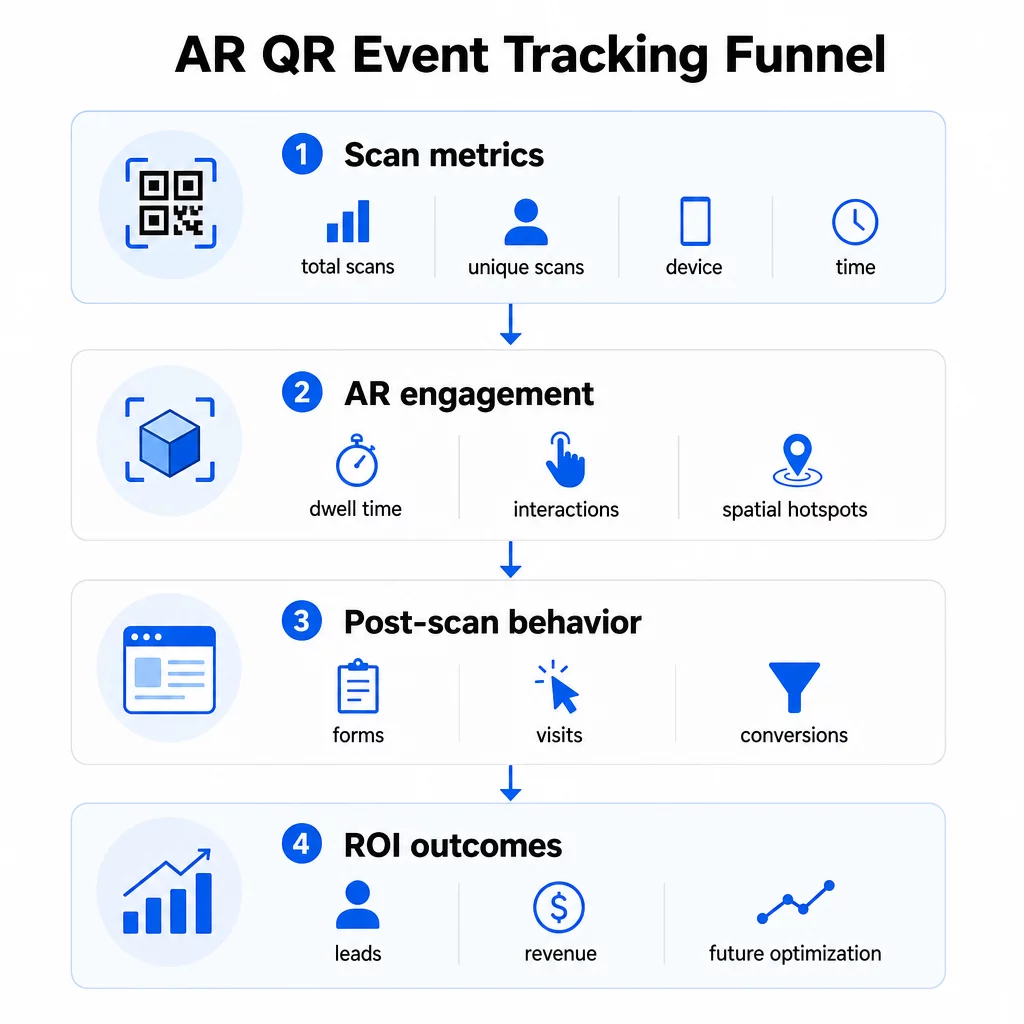
Metrike na razini skeniranja čine temelj:
- UKUPNO SKENIRANJA – ukupni doseg i volumen angažmana
- Jedinstvena skeniranja – približan broj pojedinačnih posjetitelja koji su ostvarili interakciju
- Učestalost skeniranja (ukupno ÷ jedinstveno) – vraćaju li se ljudi iskustvu, što signalizira istinski interes
- Vrijeme i datum skeniranja – vrhunci angažmana pomažu vam identificirati koje su sesije, štandovi ili vremenski termini potaknuli najviše aktivnosti
- Podaci o uređaju i OS-u – znajući je li vaša publika pretežno na iOS-u ili Androidu, omogućuje vam optimizaciju odredišne stranice i AR iskustva za dominantni tip uređaja
- Geolokacijski podaci – podaci o skeniranju na razini grada ili regije otkrivaju gdje je angažman najveći, korisno za događaje na više lokacija ili odluke o budućem smještaju događaja
Metrike specifične za AR idite dublje:
- Vrijeme zadržavanja – koliko dugo korisnici ostaju unutar AR iskustva, a ne samo na odredišnoj stranici
- Prostorna analitika – koja su fizička područja vašeg prostora ili štanda generirala najviše aktivnosti skeniranja
- Događaji 3D interakcije – jesu li korisnici rotirali model proizvoda, pokrenuli video ili dovršili interaktivni element
Ponašanje nakon skeniranja zatvara krug:
- Predaje obrazaca, registracije ili preuzimanja koja su uslijedila nakon skeniranja
- Stopa napuštanja stranice i vrijeme provedeno na stranici za odredišnu stranicu
- Konverzije vezane uz specifične ciljeve kampanje (kupnja ulaznica, prijave na newsletter, zahtjevi za demo)
Posebno za B2B događaje, najvrjednije metrike su generirani novi kvalitetni potencijalni klijenti, angažirani novi računi i eventualni prihod pripisan događaju. Podaci o skeniranju hrane vrh tog lijevka, ali konverzije nakon skeniranja određuju ROI.
Pratite svako skeniranje u stvarnom vremenu Koristiti Pageloot Analytics nadzorna ploča za praćenje ukupnog broja skeniranja, jedinstvenih skeniranja, vrsta uređaja i lokacija skeniranja kako se događaju tijekom vašeg događaja – nije potrebna tehnička postavka.
Postavljanje vaše infrastrukture za praćenje
Dobivanje točnih podataka zahtijeva nekoliko odluka prije nego što vaš događaj krene uživo.
Koristite dinamičke QR kodove
Statički QR kodovi kodiraju fiksno odredište i ne pružaju praćenje. Dinamički QR kodovi usmjeravaju skeniranja putem preusmjeravanja, gdje se bilježe metapodaci skeniranja – vrijeme, uređaj, lokacija. Dinamični QR kod generator iz Pageloota stvara kodove koji automatski prate stope skeniranja, podatke o lokaciji i druge metrike, te vam omogućuje ažuriranje odredišnog URL-a bez ponovnog ispisa materijala. Za višednevne događaje gdje se rasporedi ili pozivi na akciju mogu mijenjati, ova je fleksibilnost ključna.
Dodajte UTM parametre za praćenje nakon skeniranja
Pridruživanje UTM parametara vašim odredišnim URL-ovima QR koda omogućuje alatima poput Google Analytics 4 da razlikuju promet pokrenut QR kodom od drugih izvora i mjere što se događa nakon skeniranja. Dobro strukturiran URL izgleda ovako:
`https://yoursite.com/event-page?utm``source=event`štand&utmmedium=qrkod&utmcampaign=conference2025`
Korištenje opisnih `utmsource` vrijednosti (npr. `mainstagebooth`, `registrationdesk`) omogućuje vam usporedbu performansi na različitim lokacijama postavljanja na istom događaju. Držite se dosljednih konvencija imenovanja – mala slova, podvlake umjesto razmaka – kako bi vaša GA4 izvješća ostala čista i filtrabilna. Vodič o UTM parametara za QR kodove detaljno pokriva ovo postavljanje.
Povežite svoje podatke o prisutnosti
Ako koristite QR kodove za prijave na događaje, vaši podaci o prisutnosti i podaci o angažmanu mogu se čitati zajedno. Sustav QR koda za prisutnost bilježi dolaske u stvarnom vremenu, što vam omogućuje unakrsnu provjeru tko se prijavio u odnosu na to tko je skenirao vaše AR iskustvo i dovršio radnju nakon skeniranja. Ovo je posebno korisno za izračunavanje pravih stopa konverzije, a ne samo stopa skeniranja do odredišne stranice.
Za prikupljanje strukturiranih odgovora – povratnih informacija, registracija, anketa nakon događaja – uparite svoje QR kodove s Google obrascima koristeći Google obrazac QR kod generator. Podaci o predaji obrasca izravno se integriraju s Google tablicama za trenutnu analizu.
Pojednostavite prijave na događaje The Pageloot Generator QR kodova za događaje omogućuje vam stvaranje ulaznica koje se mogu pratiti, interaktivnih rasporeda i dodirnih točaka za angažman – sve to upravljivo s jedne nadzorne ploče.
Kako tumačiti podatke o skeniranju
Prikupljanje metrika korisno je samo ako znate što vam govore. Evo kako čitati najčešće obrasce.
Mali ukupan broj skeniranja ne znači automatski da je ponuda propala. Prvo provjerite smještaj – je li kod u razini očiju, dovoljno velik, s jasnim pozivom na akciju u blizini? Loš kontrast ili neoznačen kod najčešći su uzrok niskih stopa skeniranja, a ne sadržaj iza njega. The vodič za angažman s QR kodovima pomoću toplinskih karata objašnjava kako dijagnosticirati probleme s postavljanjem pomoću podataka o gustoći skeniranja.
Velik ukupan broj skeniranja, ali mali broj jedinstvenih skeniranja sugerira da mala grupa skenira više puta. To može ukazivati na iskreni entuzijazam, ili može značiti da je vaš QR kod na lokaciji gdje isti ljudi prolaze pored njega više puta. Ovdje je važan kontekst.
Velik broj jedinstvenih skeniranja, ali visoka stopa napuštanja na odredišnoj stranici ukazuje na neusklađenost između očekivanja koja postavlja QR kod i onoga što korisnici pronađu nakon skeniranja. Ponovno pregledajte sadržaj odredišne stranice i provjerite odgovara li kontekstu u kojem je kod prikazan.
Dugo zadržavanje uz nisku konverziju je uobičajeno u AR iskustvima gdje je interakcija ugodna, ali poziv na akciju nije dovoljno istaknut. Pregledajte gdje se CTA pojavljuje unutar iskustva i dosežu li ga korisnici prije izlaska.
Geografski podaci o skeniranju iz vašeg geolokacijsku analitiku mogu otkriti koja su područja višekatnog prostora ili sajamskog poda generirala najviše aktivnosti, pomažući vam da odlučite o postavljanju štandova i razini osoblja za buduće događaje.
Vremenski obrasci skeniranja identificirajte vrhunce angažmana. Ako se većina skeniranja dogodi unutar 20 minuta nakon što glavni govornik spomene vašu aktivaciju, imate jasan signal o tome što pokreće promet. Koristite te informacije za usklađivanje objava na društvenim mrežama ili rotacije osoblja.
Timovi koji koordiniraju sesije oko ovih razdoblja najveće angažiranosti mogu koristiti zakazivanje događaja alate za organizaciju vremena događaja, dostupnosti i koordinacije sudionika.
Odabir između Pageloota i GA4
Većina događaja ima koristi od kombinirane upotrebe oba alata, pri čemu svaki obrađuje zaseban sloj praćenja.
| ZNAČAJKA | Pageloot | Google Analytics 4 |
|---|---|---|
| Analitika skeniranja u stvarnom vremenu | Trenutni podaci na razini skeniranja (geo, uređaj, vrijeme) | Dostupno putem izvješća u stvarnom vremenu; zahtijeva UTM postavljanje |
| Metrike specifične za AR | Vrijeme zadržavanja, prostorna analitika na podržanim razinama | Ograničeno na web metrike; zahtijeva prilagođene događaje |
| Praćenje jedinstvenih skeniranja | Ugrađena deduplikacija uređaja | Temeljeno na sesijama/korisnicima; teško se isključivo povezuje s fizičkim skeniranjima |
| Napor integracije | Nizak – plug-and-play s dinamičkim preusmjeravanjima | Viši – potrebni su UTM parametri i skripte za praćenje |
| Cijene | $10–$50+/mjesec | Slobodno (standardna verzija) |
Koristite Pageloot kada vam je potreban trenutačni uvid tijekom događaja: tko skenira, odakle, na kojem uređaju i koliko dugo se angažiraju. Ne zahtijeva nikakve promjene u kodu vaše web stranice i dizajniran je oko metrika specifičnih za QR, uključujući prostornu analitiku i vrijeme zadržavanja.
Koristite GA4 kada trebate razumjeti putovanje korisnika nizvodno – što su korisnici radili nakon što su sletjeli na vašu stranicu, jesu li se konvertirali i kako je događaj pridonio dugoročnim ciljevima kampanje. The najboljih alata za praćenje događaja putem QR koda stranica detaljnije uspoređuje opcije platformi.
Za višednevne konferencije ili događaje umrežavanja, paralelno pokretanje oba pruža vam trenutačne povratne informacije o angažmanu putem Pageloota i atribuciju konverzija putem GA4.
Razmatranja privatnosti
AR QR kod kampanje automatski prikupljaju osobne podatke prilikom skeniranja – to može uključivati IP adrese, identifikatore uređaja, vremenske oznake i precizne podatke o lokaciji. Prema američkim državnim zakonima o privatnosti kao što su CCPA i VCPA, dužni ste otkriti koji se podaci prikupljaju, kako se koriste i ponuditi mehanizme za odustajanje.
Praktično, to znači:
- Ažurirajte svoju obavijest o privatnosti događaja kako biste opisali što se događa kada se skenira QR kod
- Otkrijte svako precizno praćenje geolokacije ili bihevioralno ciljanje od strane vaše QR platforme
- Pregledajte prakse podataka vašeg pružatelja QR kodova, uključujući razdoblja zadržavanja i dijeljenje s trećim stranama
- Pribavite izričitu suglasnost prije prikupljanja podataka o lokaciji temeljenih na GPS-u
The vodič za geolokacijsku analitiku detaljnije pokriva zahtjeve usklađenosti s privatnošću, uključujući razliku između praćenja temeljenog na IP-u i GPS-u te kada svaki zahtijeva pristanak korisnika.
Korištenje podataka za optimizaciju budućih događaja
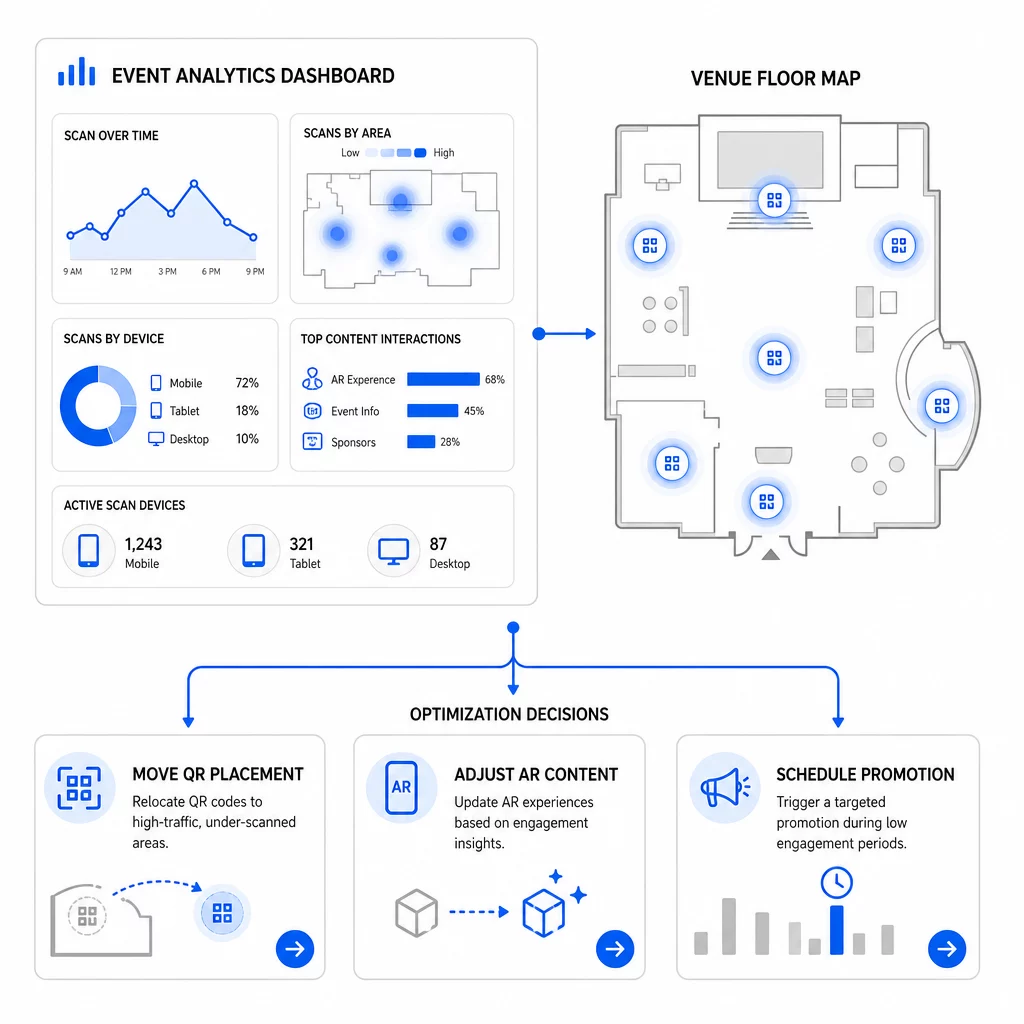
Vrijednost praćenja se povećava kada ga koristite iterativno. Prije vašeg sljedećeg događaja, usporedite izvedbu na različitim lokacijama, vremenskim terminima i vrstama AR sadržaja kako biste identificirali što je potaknulo najsmisleniji angažman – ne samo najveći broj skeniranja.
Specifične optimizacije koje treba uzeti u obzir:
- Premjestite QR kodove iz područja s niskim brojem skeniranja na pozicije blizu izlaza iz sesija s velikim prometom ili područja za registraciju
- Prilagodite AR sadržaj na temelju toga koji su interaktivni elementi pokazali najdulje vrijeme zadržavanja
- Doradite smještaj CTA-a na odredišnoj stranici na temelju toga gdje korisnici odustaju
- Zakažite prateće promocije i aktivacije osoblja oko razdoblja najvećeg broja skeniranja
- Usmjerite buduća ulaganja u događaje na geografske regije gdje su stope skeniranja u konverziju bile najjače
Usporedba ključnih metrika prije i poslije svake promjene jedini je pouzdan način za provjeru je li optimizacija doista poboljšala rezultate. Vodič za analitičke nadzorne ploče QR kodova objašnjava kako strukturirati ove usporedbe unutar nadzorne ploče za praćenje.
Šira slika o tome kako AR QR kodovi transformiraju događaje vrijedi pregledati ako ste još uvijek u fazi planiranja – posebno u vezi s definiranjem ciljeva prije odabira metrika koje ćete prioritizirati.
Praćenje uspjeha događaja s AR QR kodovima nije samo brojanje skeniranja. Radi se o stvaranju jasne slike ponašanja posjetitelja tijekom cijelog putovanja: tko se angažirao, gdje su to učinili, koliko su duboko interagirali i što su učinili sljedeće. Postavite dinamičke kodove s pravilnim UTM označavanjem prije događaja, pratite prostorne metrike i metrike zadržavanja u stvarnom vremenu te koristite podatke o konverzijama nakon događaja kako biste poboljšali sljedeću kampanju.
Započnite praćenje svojih kampanja događaja Stvorite dinamične AR QR kodove koji se mogu pratiti uz Pagelootov potpuni paket QR značajki i pratite svako skeniranje s jedne nadzorne ploče. Besplatna proba od 14 dana, kreditna kartica nije potrebna.
Često postavljana pitanja
Najvažnije metrike su ukupan broj skeniranja, jedinstvena skeniranja, učestalost skeniranja, vrijeme i datum skeniranja, podaci o uređaju i OS-u, geolokacija i vrijeme zadržavanja unutar AR iskustva. Ponašanje nakon skeniranja – stopa napuštanja, vrijeme provedeno na stranici, slanje obrazaca i konverzije – upotpunjuje sliku pokazujući jesu li se skeniranja pretvorila u značajne ishode.
Dva alata služe različitim svrhama. Pageloot bilježi metapodatke na razini skeniranja u stvarnom vremenu – vrstu uređaja, lokaciju, vrijeme zadržavanja – bez potrebe za promjenama koda web stranice. Google Analytics 4 prati što se događa nakon skeniranja: ponašanje na stranici, događaje konverzije i šire putovanje korisnika. Za događaje gdje su važni i trenutni angažman i naknadne konverzije, korištenje oba zajedno daje vam najpotpuniji pregled.
Statični QR kodovi kodiraju fiksni URL i ne pružaju podatke o praćenju. Dinamični QR kodovi preusmjeravaju skeniranja putem preusmjeravanja koje automatski bilježi vrijeme, uređaj i metapodatke lokacije. Također vam omogućuju ažuriranje odredišnog URL-a ili povezanog sadržaja bez ponovnog ispisa materijala – korisno za višednevne događaje gdje se rasporedi ili pozivi na akciju mijenjaju. Više o tome kako ovo funkcionira možete saznati na stranici generatora dinamičnih QR kodova.