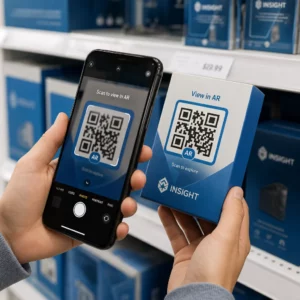
Czy prowadzisz kampanie z kodami QR obsługującymi AR na wydarzeniach, ale masz trudności z określeniem, co faktycznie działa? Bez odpowiednich wskaźników dane ze skanów pozostają niewykorzystane, podczas gdy możliwości zaangażowania umykają. Ten przewodnik pokaże Ci, które wskaźniki są ważne, jak je odczytywać i jak przekształcić te dane w lepsze wyniki wydarzeń.
Co wyróżnia śledzenie kodów QR AR
Tradycyjne kody QR informują, ile osób zeskanowało kod i, ogólnie, gdzie się znajdowały, gdy to zrobiły. Kody QR obsługujące AR idą dalej. Ponieważ doświadczenie rozwija się wewnątrz samego skanu – poprzez modele 3D, nakładki wideo, elementy przestrzenne – istnieje więcej znaczących momentów do zmierzenia.
Kluczowa różnica polega na tym, że kody QR AR wymagają śledzenia zarówno początkowego zaangażowania (skanu) i immersyjnej interakcji (czasu przebywania, interakcji z obiektami 3D, ruchu przestrzennego). Standardowa liczba skanów informuje jedynie, że ktoś rozpoczął doświadczenie. Czas przebywania, głębokość interakcji i zachowanie po skanowaniu mówią, czy doświadczenie rezonowało.
Średnio, kampanie WebAR odnotowują czasy przebywania od 60 do 120 sekund – znacznie dłużej niż krótkie interakcje typowe dla standardowych kodów QR. To wydłużone okno zaangażowania tworzy bogatszy ślad danych, ale tylko wtedy, gdy wiesz, co rejestrować.
Kluczowe wskaźniki do śledzenia
Przed skonfigurowaniem jakiejkolwiek infrastruktury śledzącej, określ, co oznacza sukces dla Twojego konkretnego wydarzenia. Aktywacja świadomości marki ma inne KPI niż stoisko do generowania leadów. Gdy Twoje cele są jasne, każdy wskaźnik ma określoną rolę.
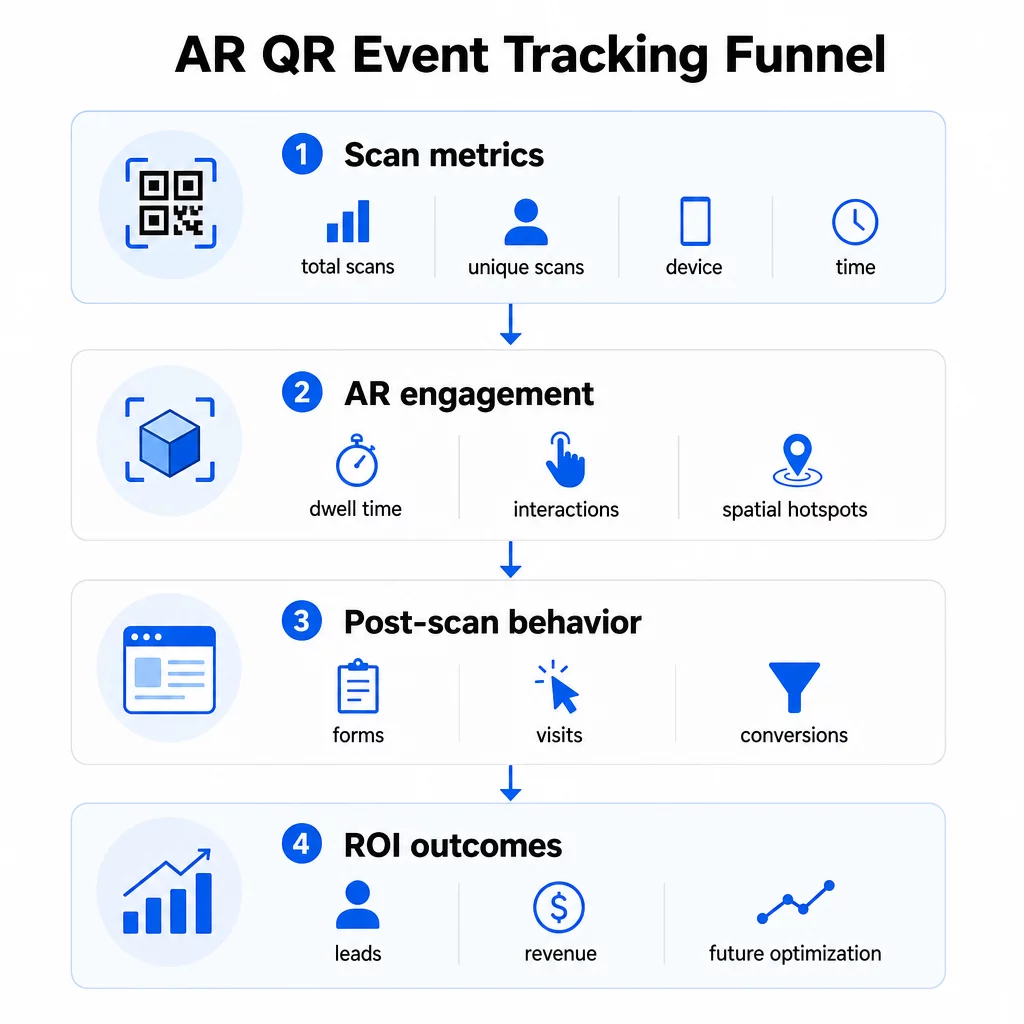
Metryki na poziomie skanu stanowią podstawę:
- ŁĄCZNIE SKANÓW – ogólny zasięg i wolumen zaangażowania
- Unikalne skany – przybliżona liczba indywidualnych uczestników, którzy weszli w interakcję
- Częstotliwość skanowania (suma ÷ unikalni) – czy ludzie wracają do doświadczenia, co sygnalizuje prawdziwe zainteresowanie
- Czas i data skanowania – szczytowe okna zaangażowania pomagają zidentyfikować, które sesje, stoiska lub przedziały czasowe generowały największą aktywność
- Dane urządzenia i systemu operacyjnego – wiedza, czy Twoja publiczność korzysta głównie z iOS czy Androida, pozwala zoptymalizować stronę docelową i doświadczenie AR pod kątem dominującego typu urządzenia
- Dane geolokalizacyjne – dane skanowania na poziomie miasta lub regionu ujawniają, gdzie zaangażowanie jest najwyższe, co jest przydatne w przypadku wydarzeń w wielu miejscach lub decyzji dotyczących przyszłego umiejscowienia wydarzeń
Metryki specyficzne dla AR zagłębić się:
- Czas przebywania – jak długo użytkownicy pozostają w doświadczeniu AR, a nie tylko na stronie docelowej
- Analiza przestrzenna – które fizyczne obszary Twojego miejsca lub stoiska generowały najwięcej aktywności skanowania
- Zdarzenia interakcji 3D – czy użytkownicy obracali model produktu, uruchomili wideo lub ukończyli interaktywny element
Zachowanie po skanowaniu zamyka pętlę:
- Wysłane formularze, rejestracje lub pobrania, które nastąpiły po skanowaniu
- Współczynnik odrzuceń i czas spędzony na stronie docelowej
- Konwersje związane z konkretnymi celami kampanii (zakup biletów, zapisy do newslettera, prośby o demo)
W przypadku wydarzeń B2B, najbardziej wartościowymi metrykami są nowe, wysokiej jakości leady, zaangażowane nowe konta oraz ostateczny przychód przypisany do wydarzenia. Dane ze skanowania zasilają górną część tego lejka, ale konwersje po skanowaniu decydują o zwrocie z inwestycji.
Śledź Każde Skanowanie w Czasie Rzeczywistym Użyj Panel analityczny Pageloot do monitorowania całkowitej liczby skanów, unikalnych skanów, typów urządzeń i lokalizacji skanowania w czasie rzeczywistym podczas wydarzenia – bez konieczności konfiguracji technicznej.
Konfiguracja infrastruktury śledzenia
Uzyskanie dokładnych danych wymaga podjęcia kilku decyzji, zanim wydarzenie zostanie uruchomione.
Użyj dynamicznych kodów QR
Statyczne kody QR kodują stałe miejsce docelowe i nie zapewniają śledzenia. Dynamiczne kody QR kierują skany przez przekierowanie, gdzie rejestrowane są metadane skanowania – czas, urządzenie, lokalizacja. System Generator dynamicznych kodów QR od Pageloot tworzy kody, które automatycznie śledzą wskaźniki skanowania, dane o lokalizacji i inne metryki, a także umożliwia aktualizację docelowego adresu URL bez konieczności ponownego drukowania materiałów. W przypadku wydarzeń wielodniowych, gdzie harmonogramy lub wezwania do działania mogą się zmieniać, ta elastyczność jest kluczowa.
Dodaj parametry UTM do śledzenia po skanowaniu
Dołączenie parametrów UTM do docelowych adresów URL kodów QR pozwala narzędziom takim jak Google Analytics 4 odróżnić ruch pochodzący z kodów QR od innych źródeł i mierzyć, co dzieje się po skanowaniu. Dobrze skonstruowany adres URL wygląda następująco:
`https://yoursite.com/event-page?utm`source=eventstoisko&utmmedium=qrkod&utmcampaign=konferencja2025`
Używanie opisowych `utmsource` wartości (np. `głównescenastoisko`, `rejestracjabiurko`) pozwala porównać wydajność w różnych miejscach na tym samym wydarzeniu. Zachowaj spójne konwencje nazewnictwa – małe litery, podkreślenia zamiast spacji – aby Twoje raporty GA4 pozostały przejrzyste i możliwe do filtrowania. Przewodnik na temat parametrów UTM dla kodów QR szczegółowo opisuje tę konfigurację.
Połącz swoje dane o frekwencji
Jeśli używasz kodów QR do odpraw na wydarzeniach, Twoje dane o frekwencji i dane o zaangażowaniu mogą być odczytywane razem. System kodów QR do rejestracji obecności rejestruje przybycia w czasie rzeczywistym, co pozwala na porównanie osób, które się zameldowały, z tymi, które zeskanowały Twoje doświadczenie AR i wykonały akcję po skanowaniu. Jest to szczególnie przydatne do obliczania rzeczywistych współczynników konwersji, a nie tylko współczynników skanowania do strony docelowej.
Do zbierania ustrukturyzowanych odpowiedzi – opinii, rejestracji, ankiet po wydarzeniu – połącz swoje kody QR z Formularzami Google, używając Generator kodów QR do Google Forms. Dane z przesłanych formularzy integrują się bezpośrednio z Arkuszami Google w celu natychmiastowej analizy.
Usprawnij odprawy na wydarzeniach Plik Generator kodów QR Pageloot Event pozwala tworzyć bilety z możliwością śledzenia, interaktywne harmonogramy i punkty zaangażowania – wszystko zarządzane z jednego pulpitu nawigacyjnego.
Jak interpretować dane ze skanowania
Zbieranie metryk jest użyteczne tylko wtedy, gdy wiesz, co one mówią. Oto jak odczytywać najczęstsze wzorce.
Niska całkowita liczba skanów nie oznacza automatycznie, że oferta się nie powiodła. Najpierw sprawdź umiejscowienie – czy kod jest na wysokości wzroku, wydrukowany wystarczająco duży, z wyraźnym wezwaniem do działania w pobliżu? Słaby kontrast lub nieoznaczony kod to najczęstsza przyczyna niskich wskaźników skanowania, a nie treść, która się za nim kryje. Ten przewodnik po zaangażowaniu z kodami QR z mapami cieplnymi wyjaśnia, jak diagnozować problemy z umiejscowieniem, używając danych o gęstości skanowania.
Wysoka całkowita liczba skanów, ale niska liczba unikalnych skanów sugeruje, że mała grupa skanuje wielokrotnie. Może to wskazywać na prawdziwy entuzjazm, lub może oznaczać, że Twój kod QR znajduje się w miejscu, gdzie te same osoby przechodzą obok niego wielokrotnie. Kontekst ma tutaj znaczenie.
Wysoka liczba unikalnych skanów, ale wysoki współczynnik odrzuceń na stronie docelowej wskazuje na niezgodność między oczekiwaniami, jakie budzi kod QR, a tym, co użytkownicy znajdują po zeskanowaniu. Przejrzyj ponownie treść strony docelowej i upewnij się, że pasuje ona do kontekstu, w którym wyświetlany jest kod.
Długi czas przebywania z niską konwersją jest powszechne w doświadczeniach AR, gdzie interakcja jest przyjemna, ale wezwanie do działania nie jest wystarczająco widoczne. Sprawdź, gdzie CTA pojawia się w ramach doświadczenia i czy użytkownicy docierają do niego przed wyjściem.
Geograficzne dane skanowania z Twojego analitykę geolokalizacyjną może ujawnić, które obszary wielopokojowego obiektu lub hali targowej generowały największą aktywność, pomagając Ci zdecydować o rozmieszczeniu stoisk i poziomie zatrudnienia na przyszłe wydarzenia.
Wzorce skanowania oparte na czasie identyfikuj szczytowe okna zaangażowania. Jeśli większość skanów ma miejsce w ciągu 20 minut po tym, jak główny mówca wspomni o Twojej aktywacji, masz wyraźny sygnał o tym, co napędza ruch. Wykorzystaj te informacje, aby odpowiednio zaplanować posty w mediach społecznościowych lub rotacje personelu.
Zespoły koordynujące sesje wokół tych szczytowych okresów zaangażowania mogą korzystać z planowania wydarzeń narzędzi do organizacji terminów wydarzeń, dostępności i koordynacji uczestników.
Wybór między Pageloot a GA4
Większość wydarzeń korzysta z połączenia obu narzędzi, z których każde obsługuje inną warstwę śledzenia.
| FUNKCJA | Pageloot | Google Analytics 4 |
|---|---|---|
| Analiza skanów w czasie rzeczywistym | Natychmiastowe dane na poziomie skanowania (geolokalizacja, urządzenie, czas) | Dostępne w raporcie Czas Rzeczywisty; wymaga konfiguracji UTM |
| Metryki specyficzne dla AR | Czas przebywania, analityka przestrzenna na obsługiwanych poziomach | Ograniczone do metryk internetowych; wymaga niestandardowych zdarzeń |
| Śledzenie unikalnych skanów | Wbudowana deduplikacja urządzeń | Oparte na sesjach/użytkownikach; trudno powiązać wyłącznie ze skanami fizycznymi |
| Nakład pracy związany z integracją | Niski – plug-and-play z dynamicznymi przekierowaniami | Wyższy – wymaga parametrów UTM i skryptów śledzących |
| Ceny | $10–$50+/miesiąc | Darmowy (wersja standardowa) |
Użyj Pageloot gdy potrzebujesz natychmiastowego wglądu podczas wydarzenia: kto skanuje, skąd, na jakim urządzeniu i jak długo się angażuje. Nie wymaga to żadnych zmian w kodzie Twojej strony internetowej i jest zaprojektowane wokół metryk specyficznych dla kodów QR, w tym analizy przestrzennej i czasu przebywania.
Użyj GA4 gdy potrzebujesz zrozumieć dalszą ścieżkę klienta – co użytkownicy zrobili po wylądowaniu na Twojej stronie, czy dokonali konwersji i jak wydarzenie przyczyniło się do długoterminowych celów kampanii. Ta najlepszych narzędzi do śledzenia wydarzeń za pomocą kodów QR strona porównuje opcje platform w bardziej szczegółowy sposób.
W przypadku wielodniowych konferencji lub wydarzeń networkingowych, równoległe uruchomienie obu rozwiązań zapewnia natychmiastową informację zwrotną o zaangażowaniu poprzez Pageloot oraz atrybucję konwersji poprzez GA4.
Kwestie prywatności
Kampanie z kodami QR AR automatycznie zbierają dane osobowe po zeskanowaniu – może to obejmować adresy IP, identyfikatory urządzeń, znaczniki czasu i precyzyjne dane o lokalizacji. Zgodnie z amerykańskimi stanowymi przepisami o ochronie prywatności, takimi jak CCPA i VCPA, jesteś zobowiązany do ujawnienia, jakie dane są zbierane, jak są wykorzystywane oraz do zaoferowania mechanizmów rezygnacji.
W praktyce oznacza to:
- Zaktualizuj swoją politykę prywatności wydarzenia, aby opisać, co dzieje się po zeskanowaniu kodu QR
- Ujawnij wszelkie precyzyjne śledzenie geolokalizacyjne lub targetowanie behawioralne przez Twoją platformę QR
- Przeprowadź audyt praktyk dotyczących danych Twojego dostawcy kodów QR, w tym okresów przechowywania i udostępniania stronom trzecim
- Uzyskaj wyraźną zgodę przed zbieraniem danych o lokalizacji opartych na GPS
Plik przewodnik po analityce geolokalizacyjnej szczegółowo omawia wymagania dotyczące zgodności z prywatnością, w tym rozróżnienie między śledzeniem opartym na adresie IP a śledzeniem opartym na GPS oraz kiedy każde z nich wymaga zgody użytkownika.
Wykorzystanie danych do optymalizacji przyszłych wydarzeń
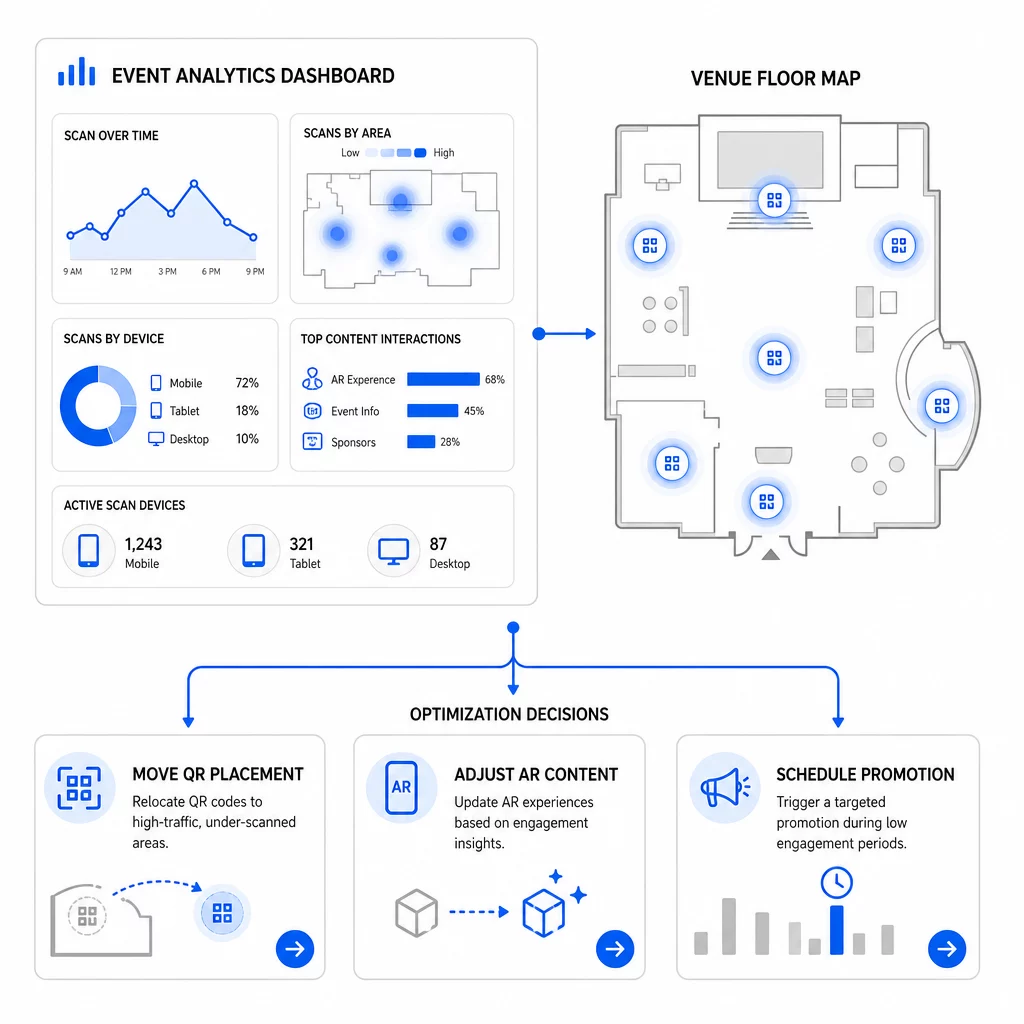
Wartość śledzenia wzrasta, gdy używasz go iteracyjnie. Przed kolejnym wydarzeniem porównaj wydajność w różnych miejscach, przedziałach czasowych i typach treści AR, aby zidentyfikować, co wywołało najbardziej znaczące zaangażowanie – nie tylko najwięcej skanów.
Konkretne optymalizacje do rozważenia:
- Przenieś kody QR z obszarów o niskiej liczbie skanów do miejsc w pobliżu wyjść z sesji o dużym natężeniu ruchu lub obszarów rejestracji
- Dostosuj treści AR na podstawie tego, które elementy interaktywne wykazały najdłuższy czas przebywania
- Dopracuj umiejscowienie CTA na stronie docelowej na podstawie tego, gdzie użytkownicy rezygnują
- Zaplanuj wspierające promocje i aktywacje personelu wokół szczytowych okien skanowania
- Skoncentruj przyszłe inwestycje w wydarzenia na regionach geograficznych, gdzie wskaźniki skanowania do konwersji były najsilniejsze
Porównywanie kluczowych wskaźników przed i po każdej zmianie jest jedynym wiarygodnym sposobem na sprawdzenie, czy optymalizacja faktycznie poprawiła wyniki. Przewodnik po panelach analitycznych kodów QR pokazuje, jak strukturyzować te porównania w panelu śledzenia.
Szerszy obraz na temat jak kody QR AR zmieniają wydarzenia jest wart przejrzenia, jeśli nadal jesteś na etapie planowania – szczególnie w zakresie definiowania celów przed wyborem metryk do priorytetyzacji.
Śledzenie sukcesu wydarzenia za pomocą kodów QR AR to nie tylko liczenie skanów. Chodzi o zbudowanie jasnego obrazu zachowań uczestników na całej ścieżce: kto się zaangażował, gdzie to zrobił, jak głęboko interakcjonował i co zrobił dalej. Skonfiguruj dynamiczne kody z odpowiednim tagowaniem UTM przed wydarzeniem, monitoruj metryki przestrzenne i czasu przebywania w czasie rzeczywistym oraz wykorzystaj dane konwersji po wydarzeniu, aby udoskonalić kolejną kampanię.
Rozpocznij śledzenie swoich kampanii eventowych Twórz dynamiczne, śledzalne kody QR AR za pomocą Pageloot pełny pakiet funkcji QR i monitoruj każde skanowanie z jednego pulpitu nawigacyjnego. Darmowy 14-dniowy okres próbny, karta kredytowa nie jest wymagana.
Najczęściej zadawane pytania
Najważniejsze metryki to całkowita liczba skanów, unikalne skany, częstotliwość skanowania, czas i data skanowania, dane urządzenia i systemu operacyjnego, geolokalizacja oraz czas przebywania w doświadczeniu AR. Zachowanie po skanowaniu – współczynnik odrzuceń, czas spędzony na stronie, wysłane formularze i konwersje – uzupełnia obraz, pokazując, czy skany przełożyły się na znaczące rezultaty.
Te dwa narzędzia służą różnym celom. Pageloot przechwytuje metadane na poziomie skanowania w czasie rzeczywistym – typ urządzenia, lokalizację, czas przebywania – bez konieczności wprowadzania jakichkolwiek zmian w kodzie strony internetowej. Google Analytics 4 śledzi, co dzieje się po skanowaniu: zachowanie na stronie, zdarzenia konwersji i szerszą ścieżkę klienta. W przypadku zdarzeń, gdzie liczy się zarówno natychmiastowe zaangażowanie, jak i późniejsze konwersje, użycie obu narzędzi razem zapewnia najbardziej kompletny obraz.
Statyczne kody QR kodują stały adres URL i nie dostarczają danych śledzenia. Dynamiczne kody QR kierują skany przez przekierowanie, które automatycznie rejestruje czas, urządzenie i metadane lokalizacji. Pozwalają również aktualizować docelowy adres URL lub powiązaną treść bez ponownego drukowania materiałów – przydatne w przypadku wielodniowych wydarzeń, gdzie harmonogramy lub wezwania do działania ulegają zmianie. Więcej o tym, jak to działa, dowiesz się na stronie generatora dynamicznych kodów QR.