Menez-vous des campagnes de codes QR compatibles avec la RA lors d'événements, mais avez-vous du mal à savoir ce qui fonctionne réellement ? Sans les bonnes métriques en place, les données de scan restent inutilisées tandis que les opportunités d'engagement s'échappent. Ce guide vous explique quelles métriques sont importantes, comment les lire et comment transformer ces données en meilleurs résultats d'événement.
Ce qui rend le suivi des codes QR RA différent
Les codes QR traditionnels vous indiquent combien de personnes ont scanné un code et, en gros, où elles se trouvaient lorsqu'elles l'ont fait. Les codes QR compatibles avec la RA vont plus loin. Parce que l'expérience se déroule à l'intérieur du scan lui-même – via des modèles 3D, des superpositions vidéo, des éléments spatiaux – il y a plus de moments significatifs à mesurer.
La différence fondamentale est que les codes QR RA nécessitent le suivi à la fois de l'engagement initial (le scan) et l'interaction immersive (temps de rétention, interactions avec les objets 3D, mouvement spatial). Un simple décompte de scans vous indique seulement que quelqu'un a commencé l'expérience. Le temps de rétention, la profondeur d'interaction et le comportement post-scan vous disent si elle a résonné.
En moyenne, les campagnes WebAR enregistrent des temps de rétention entre 60 et 120 secondes – bien plus longtemps que les interactions brèves typiques des codes QR standards. Cette fenêtre d'engagement étendue crée une piste de données plus riche, mais seulement si vous savez quoi capturer.
Les métriques clés à suivre
Avant de mettre en place toute infrastructure de suivi, déterminez à quoi ressemble le succès pour votre événement spécifique. Une activation de notoriété de marque a des KPI différents de ceux d'un stand de génération de leads. Une fois vos objectifs clairs, chaque métrique a un rôle défini.
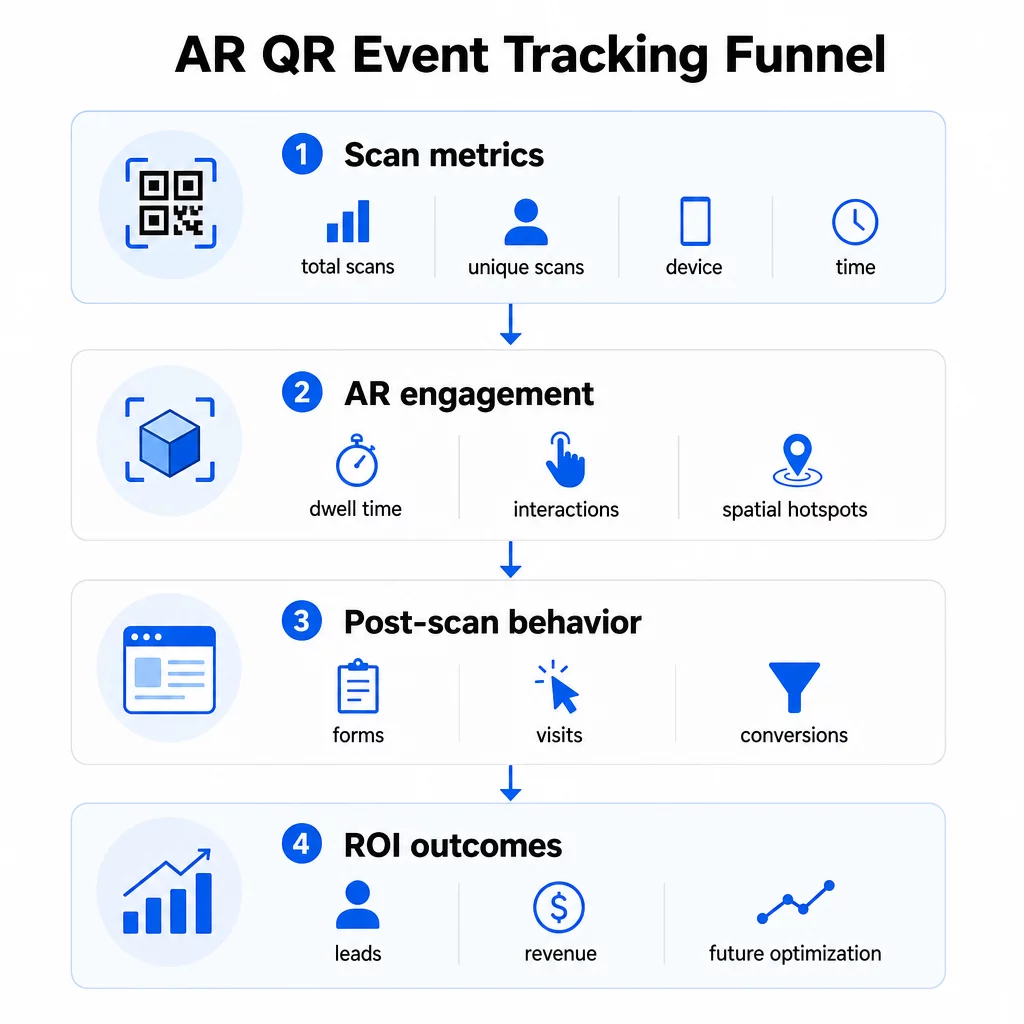
Les métriques au niveau du scan constituent la base :
- TOTAL DES SCANS – portée globale et volume d'engagement
- Scans uniques – nombre approximatif de participants individuels qui ont interagi
- Fréquence de scan (total ÷ unique) – si les gens reviennent à l'expérience, ce qui signale un intérêt véritable
- Heure et date du scan – les périodes de pointe d'engagement vous aident à identifier quelles sessions, stands ou créneaux horaires ont généré le plus d'activité
- Données sur l'appareil et le système d'exploitation – savoir si votre public est majoritairement sur iOS ou Android vous permet d'optimiser la page de destination et l'expérience de RA pour le type d'appareil dominant
- Données de géolocalisation – les données de scan au niveau de la ville ou de la région révèlent où l'engagement est le plus élevé, utile pour les événements multi-sites ou les décisions de placement d'événements futurs
Métriques spécifiques à la RA aller plus loin :
- Temps de rétention – combien de temps les utilisateurs restent à l'intérieur de l'expérience de RA, et pas seulement sur la page de destination
- Analyse spatiale – quelles zones physiques de votre lieu ou stand ont généré le plus d'activité de scan
- Événements d'interaction 3D – si les utilisateurs ont fait pivoter un modèle de produit, déclenché une vidéo ou complété un élément interactif
Comportement post-scan boucle la boucle :
- Soumissions de formulaires, inscriptions ou téléchargements qui ont suivi le scan
- Taux de rebond et temps passé sur la page de destination
- Conversions liées à des objectifs de campagne spécifiques (achats de billets, inscriptions à la newsletter, demandes de démo)
Pour les événements B2B en particulier, les métriques les plus précieuses sont les nouveaux leads qualifiés générés, les nouveaux comptes engagés et les revenus éventuels attribués à l'événement. Les données de scan alimentent le haut de cet entonnoir, mais les conversions post-scan déterminent le ROI.
Suivez chaque scan en temps réel Utilisez le Tableau de bord Pageloot Analytics pour surveiller le nombre total de scans, les scans uniques, les types d'appareils et les lieux de scan au fur et à mesure qu'ils se produisent pendant votre événement – aucune configuration technique requise.
Mise en place de votre infrastructure de suivi
Obtenir des données précises nécessite quelques décisions avant le lancement de votre événement.
Utiliser des codes QR dynamiques
Les codes QR statiques encodent une destination fixe et ne fournissent aucun suivi. Les codes QR dynamiques acheminent les scans via une redirection, c'est là que les métadonnées de scan – heure, appareil, emplacement – sont enregistrées. Le Générateur de QR code dynamique de Pageloot crée des codes qui suivent automatiquement les taux de scan, les données de localisation et d'autres métriques, et vous permet de mettre à jour l'URL de destination sans réimprimer les supports. Pour les événements de plusieurs jours où les horaires ou les appels à l'action peuvent changer, cette flexibilité est essentielle.
Ajouter des paramètres UTM pour le suivi post-scan
L'ajout de paramètres UTM à vos URL de destination de code QR permet à des outils comme Google Analytics 4 de distinguer le trafic généré par les QR codes des autres sources et de mesurer ce qui se passe après le scan. Une URL bien structurée ressemble à :
`https://yoursite.com/event-page?utm``source=event`stand&utmmoyen=qrcode&utmcampaign=conférence2025`
L'utilisation de `utm` descriptifssource` (par exemple, `mainscènestand`, `inscriptiondesk`) vous permet de comparer les performances entre différents emplacements lors du même événement. Gardez les conventions de nommage cohérentes – minuscules, tirets bas au lieu d'espaces – afin que vos rapports GA4 restent clairs et filtrables. Le guide sur des paramètres UTM pour les codes QR couvre cette configuration en détail.
Connectez vos données de présence
Si vous utilisez des codes QR pour les enregistrements d'événements, vos données de présence et vos données d'engagement peuvent être lues ensemble. Le code QR de présence système enregistre les arrivées en temps réel, ce qui vous permet de recouper les personnes qui se sont enregistrées avec celles qui ont scanné votre expérience de RA et effectué une action post-scan. Ceci est particulièrement utile pour calculer les vrais taux de conversion plutôt que de simples taux de scan vers page de destination.
Pour collecter des réponses structurées – commentaires, inscriptions, enquêtes post-événement – associez vos codes QR à Google Forms en utilisant le Générateur de QR code Google Forms. Les données de soumission de formulaire s'intègrent directement à Google Sheets pour une analyse immédiate.
Rationalisez les enregistrements d'événements Le Générateur de codes QR d'événements Pageloot vous permet de créer des billets traçables, des plannings interactifs et des points de contact d'engagement – tous gérables depuis un tableau de bord unique.
Comment interpréter vos données de scan
La collecte de métriques n'est utile que si vous savez ce qu'elles vous disent. Voici comment lire les schémas les plus courants.
Faible nombre total de scans ne signifie pas automatiquement que l'offre a échoué. Vérifiez d'abord le placement – le code est-il à hauteur des yeux, imprimé suffisamment grand, avec un appel à l'action clair à proximité ? Un mauvais contraste ou un code non marqué est la cause la plus fréquente des faibles taux de scan, et non le contenu derrière. Le guide sur l'engagement des codes QR avec les cartes thermiques explique comment diagnostiquer les problèmes de placement à l'aide des données de densité de scan.
Nombre total de scans élevé mais faible nombre de scans uniques suggère qu'un petit groupe scanne de manière répétée. Cela peut indiquer un véritable enthousiasme, ou cela peut signifier que votre code QR se trouve dans un endroit où les mêmes personnes passent plusieurs fois. Le contexte est important ici.
Nombre de scans uniques élevé mais taux de rebond élevé sur la page de destination indique une inadéquation entre l'attente créée par le code QR et ce que les utilisateurs trouvent après le scan. Revoyez le contenu de la page de destination et assurez-vous qu'il correspond au contexte où le code est affiché.
Temps de présence élevé avec faible conversion est courant dans les expériences de réalité augmentée où l'interaction est agréable mais l'appel à l'action n'est pas suffisamment mis en évidence. Examinez où le CTA apparaît dans l'expérience et si les utilisateurs l'atteignent avant de quitter.
Données de scan géographiques de votre l'analyse de géolocalisation peuvent révéler quelles zones d'un lieu à plusieurs salles ou d'un salon professionnel ont généré le plus d'activité, vous aidant à décider du placement des stands et des niveaux de personnel pour les futurs événements.
Modèles de scan basés sur le temps identifier les fenêtres d'engagement maximal. Si la plupart des scans se produisent dans les 20 minutes suivant la mention de votre activation par un conférencier principal, vous avez un signal clair de ce qui génère du trafic. Utilisez cette information pour planifier les publications sur les réseaux sociaux ou les rotations du personnel en conséquence.
Les équipes coordonnant des sessions autour de ces périodes de forte affluence peuvent utiliser la planification d'événements des outils pour organiser les horaires des événements, la disponibilité et la coordination des participants.
Choisir entre Pageloot et GA4
La plupart des événements bénéficient de l'utilisation combinée des deux outils, chacun gérant une couche de suivi distincte.
| FONCTIONNALITÉ | Pageloot | Google Analytics 4 |
|---|---|---|
| Analyse des scans en temps réel | Données instantanées au niveau du scan (géolocalisation, appareil, heure) | Disponible via le rapport en temps réel ; nécessite une configuration UTM |
| Métriques spécifiques à la RA | Temps de présence, analyses spatiales sur les niveaux pris en charge | Limité aux métriques web ; nécessite des événements personnalisés |
| Suivi des scans uniques | Déduplication d'appareils intégrée | Basé sur la session/l'utilisateur ; difficile à lier uniquement aux scans physiques |
| Effort d'intégration | Faible – plug-and-play avec des redirections dynamiques | Plus élevé – nécessite des paramètres UTM et des scripts de suivi |
| Prix | $10–$50+/mois | Gratuit (version standard) |
Utiliser Pageloot lorsque vous avez besoin d'informations immédiates pendant l'événement : qui scanne, d'où, sur quel appareil, et combien de temps ils s'engagent. Cela ne nécessite aucune modification de votre code de site web et est conçu autour de métriques spécifiques aux QR, y compris l'analyse spatiale et le temps de rétention.
Utiliser GA4 lorsque vous avez besoin de comprendre le parcours client en aval – ce que les utilisateurs ont fait après avoir atterri sur votre page, s'ils ont converti, et comment l'événement a contribué aux objectifs de campagne à plus long terme. La meilleurs outils de suivi d'événements par code QR page compare les options de plateforme plus en détail.
Pour les conférences de plusieurs jours ou les événements de réseautage, l'exécution des deux en parallèle vous donne un retour d'information immédiat sur l'engagement via Pageloot et l'attribution des conversions via GA4.
Considérations relatives à la confidentialité
Les campagnes de codes QR AR collectent automatiquement des données personnelles lors du scan – cela peut inclure les adresses IP, les identifiants d'appareil, les horodatages et les données de localisation précises. En vertu des lois sur la confidentialité des États américains telles que le CCPA et le VCPA, vous êtes tenu de divulguer quelles données sont collectées, comment elles sont utilisées et de proposer des mécanismes de désinscription.
Concrètement, cela signifie :
- Mettre à jour votre avis de confidentialité de l'événement pour décrire ce qui se passe lorsqu'un code QR est scanné
- Divulguer tout suivi de géolocalisation précis ou ciblage comportemental par votre plateforme QR
- Auditer les pratiques de données de votre fournisseur de codes QR, y compris les périodes de rétention et le partage avec des tiers
- Obtenir un consentement explicite avant de collecter des données de localisation basées sur le GPS
Le guide d'analyse de géolocalisation couvre les exigences de conformité en matière de confidentialité plus en détail, y compris la distinction entre le suivi basé sur l'IP et le suivi basé sur le GPS et quand chacun nécessite le consentement de l'utilisateur.
Utiliser les données pour optimiser les événements futurs
La valeur du suivi se multiplie lorsque vous l'utilisez de manière itérative. Avant votre prochain événement, comparez les performances des emplacements, des créneaux horaires et des types de contenu RA pour identifier ce qui a généré l'engagement le plus significatif – et pas seulement le plus grand nombre de scans.
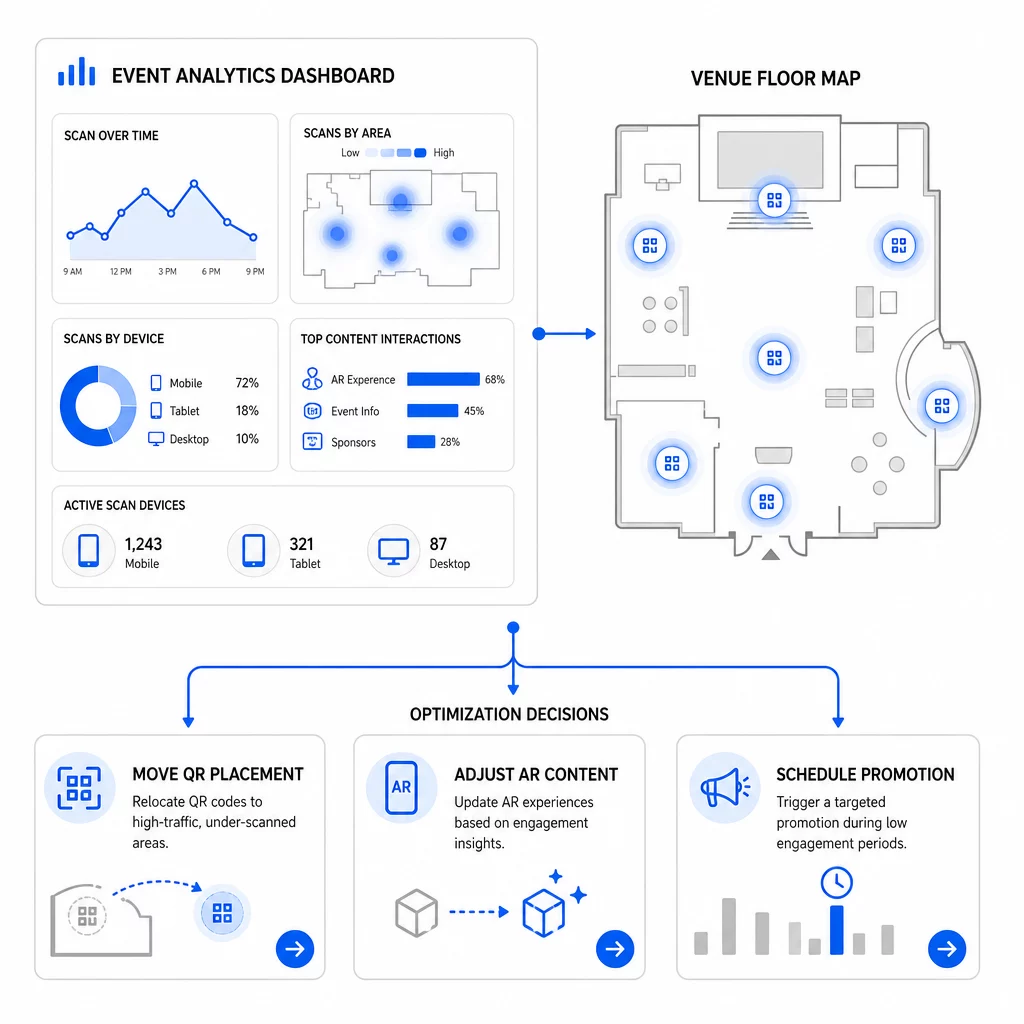
Optimisations spécifiques à considérer :
- Déplacer les codes QR des zones à faible scan vers des positions proches des sorties de session à fort trafic ou des zones d'inscription
- Ajuster le contenu RA en fonction des éléments interactifs qui ont montré le temps de rétention le plus élevé
- Affiner le placement de l'appel à l'action (CTA) de votre page de destination en fonction des points d'abandon des utilisateurs
- Planifier des promotions de soutien et des activations du personnel autour des périodes de pointe de scan
- Concentrer les investissements futurs pour les événements sur les régions géographiques où les taux de scan-à-conversion étaient les plus élevés
Comparer les métriques clés avant et après chaque changement est le seul moyen fiable de valider si une optimisation a réellement amélioré les résultats. Le guide des tableaux de bord d'analyse des codes QR explique comment structurer ces comparaisons au sein d'un tableau de bord de suivi.
La vue d'ensemble sur comment les codes QR RA transforment les événements mérite d'être examinée si vous êtes encore en phase de planification – en particulier concernant la définition des objectifs avant de choisir les métriques à prioriser.
Suivre le succès d'un événement avec les codes QR RA ne se limite pas à compter les scans. Il s'agit de construire une image claire du comportement des participants tout au long de leur parcours : qui s'est engagé, où ils l'ont fait, à quel point ils ont interagi, et ce qu'ils ont fait ensuite. Configurez des codes dynamiques avec un balisage UTM approprié avant l'événement, surveillez les métriques spatiales et de rétention en temps réel, et utilisez les données de conversion post-événement pour affiner la prochaine campagne.
Commencez à Suivre Vos Campagnes Événementielles Créez des codes QR AR dynamiques et traçables grâce à la suite complète de fonctionnalités QR de Pageloot et suivez chaque scan depuis un tableau de bord unique. Essai gratuit de 14 jours, aucune carte de crédit requise.
Questions fréquentes
Les métriques les plus importantes sont le nombre total de scans, les scans uniques, la fréquence des scans, l'heure et la date du scan, les données sur l'appareil et le système d'exploitation, la géolocalisation et le temps passé dans l'expérience de réalité augmentée. Le comportement post-scan – taux de rebond, temps passé sur la page, soumissions de formulaires et conversions – complète le tableau en montrant si les scans se sont traduits par des résultats significatifs.
Les deux outils servent à des fins différentes. Pageloot capture des métadonnées au niveau du scan en temps réel – type d'appareil, emplacement, temps de consultation – sans nécessiter de modifications du code du site web. Google Analytics 4 suit ce qui se passe après le scan : le comportement sur la page, les événements de conversion et le parcours client plus large. Pour les événements où l'engagement immédiat et les conversions ultérieures sont importants, l'utilisation des deux ensemble vous offre la vue la plus complète.
Les codes QR statiques encodent une URL fixe et ne fournissent aucune donnée de suivi. Les codes QR dynamiques acheminent les scans via une redirection qui enregistre automatiquement l'heure, l'appareil et les métadonnées de localisation. Ils vous permettent également de mettre à jour l'URL de destination ou le contenu lié sans réimprimer les supports – utile pour les événements de plusieurs jours où les horaires ou les appels à l'action changent. Vous pouvez en savoir plus sur le fonctionnement de cette fonctionnalité sur la page du générateur de codes QR dynamiques.