Rulați campanii cu coduri QR activate AR la evenimente, dar vă este greu să spuneți ce funcționează de fapt? Fără metricile potrivite, datele de scanare rămân neutilizate în timp ce oportunitățile de implicare se pierd. Acest ghid vă prezintă ce metrici contează, cum să le citiți și cum să transformați acele date în rezultate mai bune pentru evenimente.
Ce face diferită urmărirea codurilor QR AR
Codurile QR tradiționale vă spun câte persoane au scanat un cod și, în linii mari, unde se aflau când au făcut-o. Codurile QR activate AR merg mai departe. Deoarece experiența se desfășoară în interiorul scanării în sine – prin modele 3D, suprapuneri video, elemente spațiale – există mai multe momente semnificative de măsurat.
Diferența fundamentală este că codurile QR AR necesită urmărirea ambelor implicare inițială (scanarea) și interacțiune imersivă (timp de ședere, interacțiuni cu obiecte 3D, mișcare spațială). Un număr standard de scanări vă spune doar că cineva a început experiența. Timpul de ședere, profunzimea interacțiunii și comportamentul post-scanare vă spun dacă a rezonat.
În medie, campaniile WebAR înregistrează timpi de ședere între 60 și 120 de secunde – mult mai mult decât interacțiunile scurte tipice codurilor QR standard. Această fereastră extinsă de implicare creează o pistă de date mai bogată, dar numai dacă știți ce să capturați.
Metricile cheie de urmărit
Înainte de a configura orice infrastructură de urmărire, stabiliți cum arată succesul pentru evenimentul dumneavoastră specific. O activare de conștientizare a mărcii are KPI-uri diferite față de un stand de generare de lead-uri. Odată ce obiectivele dumneavoastră sunt clare, fiecare metrică are un rol definit.
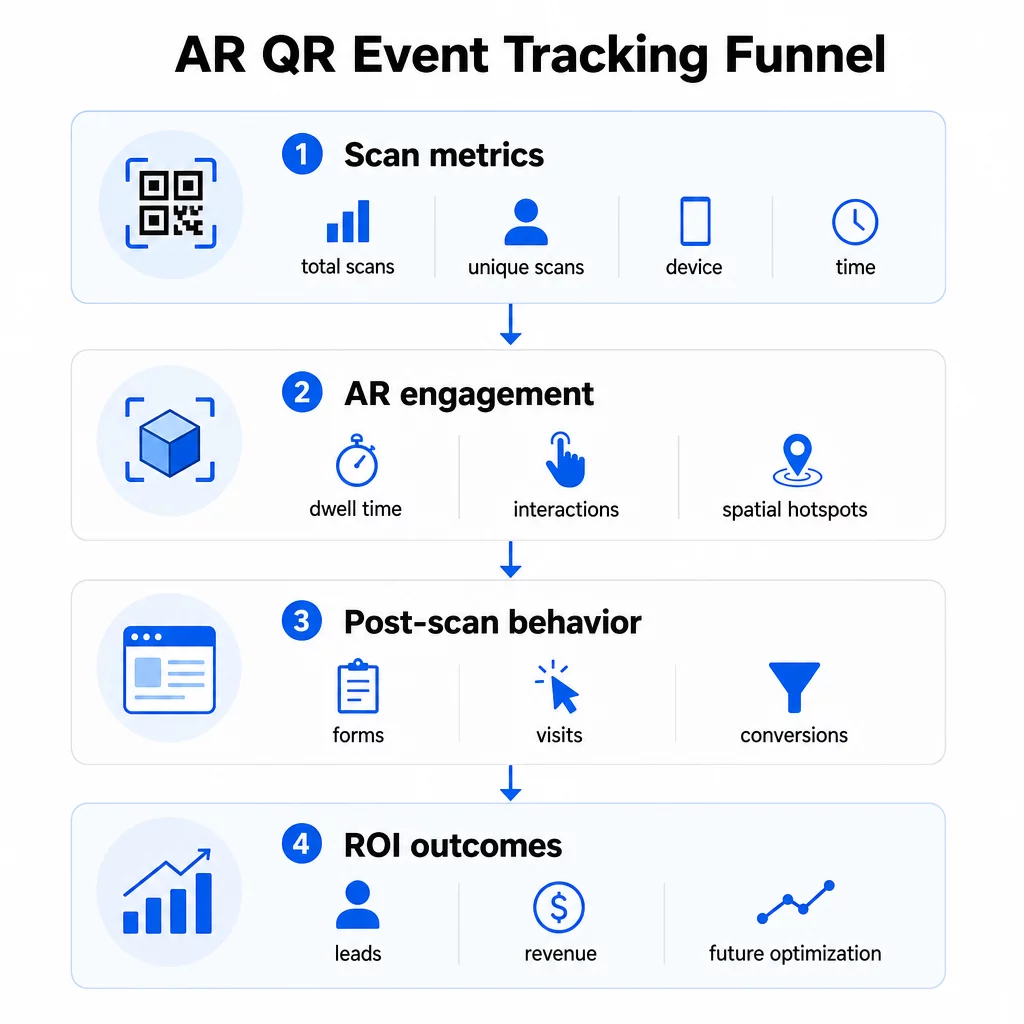
Metricile la nivel de scanare formează fundația:
- TOTAL SCANĂRI – acoperire generală și volum de implicare
- Scanări unice – numărul aproximativ de participanți individuali care au interacționat
- Frecvența scanărilor (total ÷ unic) – dacă oamenii revin la experiență, ceea ce semnalează un interes autentic
- Ora și data scanării – ferestrele de vârf de implicare vă ajută să identificați ce sesiuni, standuri sau intervale orare au generat cea mai mare activitate
- Date despre dispozitiv și sistemul de operare – știind dacă publicul dvs. este predominant pe iOS sau Android vă permite să optimizați pagina de destinație și experiența AR pentru tipul de dispozitiv dominant
- Date de geolocalizare – datele de scanare la nivel de oraș sau regiune relevă unde este cel mai mare nivel de implicare, util pentru evenimente cu locații multiple sau decizii privind plasarea evenimentelor viitoare
Metricile specifice AR aprofundați:
- Timpul de ședere – cât timp rămân utilizatorii în experiența AR, nu doar pe pagina de destinație
- Analize spațiale – ce zone fizice ale locației sau standului dvs. au generat cea mai mare activitate de scanare
- Evenimente de interacțiune 3D – dacă utilizatorii au rotit un model de produs, au declanșat un videoclip sau au finalizat un element interactiv
Comportament post-scanare închide ciclul:
- Trimiteri de formulare, înregistrări sau descărcări care au urmat scanării
- Rata de respingere și timpul petrecut pe pagină pentru destinația paginii de destinație
- Conversii legate de obiective specifice ale campaniei (achiziții de bilete, înscrieri la newsletter, cereri de demo)
În special pentru evenimentele B2B, cele mai valoroase metrici sunt lead-urile noi de calitate generate, conturile noi angajate și veniturile finale atribuite evenimentului. Datele de scanare alimentează partea superioară a pâlniei, dar conversiile post-scanare determină ROI-ul.
Urmăriți fiecare scanare în timp real Folosește Tabloul de bord Pageloot Analytics pentru a monitoriza scanările totale, scanările unice, tipurile de dispozitive și locațiile de scanare pe măsură ce se întâmplă în timpul evenimentului dvs. – nu este necesară nicio configurare tehnică.
Configurarea infrastructurii dvs. de urmărire
Obținerea datelor precise necesită câteva decizii înainte ca evenimentul dvs. să înceapă.
Utilizați coduri QR dinamice
Codurile QR statice codifică o destinație fixă și nu oferă urmărire. Codurile QR dinamice rutează scanările printr-o redirecționare, unde sunt înregistrate metadatele scanării – timp, dispozitiv, locație. Generator cod QR dinamic de la Pageloot creează coduri care urmăresc automat ratele de scanare, datele de locație și alte metrici și vă permite să actualizați URL-ul de destinație fără a retipări materialele. Pentru evenimentele de mai multe zile în care programele sau apelurile la acțiune se pot schimba, această flexibilitate este esențială.
Adăugați parametri UTM pentru urmărirea post-scanare
Atașarea parametrilor UTM la URL-urile de destinație ale codurilor dvs. QR permite instrumentelor precum Google Analytics 4 să distingă traficul generat de QR de alte surse și să măsoare ce se întâmplă după scanare. Un URL bine structurat arată astfel:
`https://yoursite.com/event-page?utmsource=eventstand&utmmediu=qrcod&utmcampaign=conferință2025`
Folosind valori descriptive `utmsource` valori (ex., `principalscenăstand`, `înregistrarebirou`) vă permite să comparați performanța în diferite locații de plasare la același eveniment. Păstrați convențiile de denumire consecvente – litere mici, subliniere în loc de spații – astfel încât rapoartele dvs. GA4 să rămână curate și filtrabile. Ghidul despre parametrilor UTM pentru codurile QR acoperă această configurare în detaliu.
Conectați-vă Datele de Prezență
Dacă utilizați coduri QR pentru înregistrările la evenimente, datele dvs. de prezență și datele dvs. de implicare pot fi citite împreună. Sistemul de cod QR de prezență înregistrează sosirile în timp real, ceea ce vă permite să comparați cine s-a înregistrat cu cine a scanat experiența dvs. AR și a finalizat o acțiune post-scanare. Acest lucru este util în special pentru calcularea ratelor reale de conversie, mai degrabă decât doar a ratelor de scanare-către-pagină-de-destinație.
Pentru colectarea răspunsurilor structurate – feedback, înregistrări, sondaje post-eveniment – asociați codurile dvs. QR cu Google Forms folosind Generator cod QR Google Forms. Datele de trimitere a formularului se integrează direct cu Google Sheets pentru analiză imediată.
Simplificați Înregistrările la Evenimente Cel Generator de coduri QR pentru evenimente Pageloot vă permite să creați bilete urmăribile, programe interactive și puncte de contact pentru implicare – toate gestionabile dintr-un singur tablou de bord.
Cum să interpretați datele dvs. de scanare
Colectarea datelor este utilă doar dacă știți ce vă spun. Iată cum să citiți cele mai comune tipare.
Număr scăzut de scanări totale nu înseamnă automat că oferta a eșuat. Verificați mai întâi plasarea – este codul la nivelul ochilor, imprimat suficient de mare, cu un apel la acțiune clar în apropiere? Contrastul slab sau un cod nemarcat este cea mai comună cauză a ratelor scăzute de scanare, nu conținutul din spatele acestuia. Ghidul ghid pentru implicarea cu coduri QR folosind hărți termice explică cum să diagnosticați problemele de plasare folosind datele de densitate a scanărilor.
Număr mare de scanări totale, dar număr scăzut de scanări unice sugerează că un grup mic scanează în mod repetat. Acest lucru poate indica entuziasm autentic, sau poate însemna că codul dvs. QR se află într-o locație unde aceleași persoane trec pe lângă el de mai multe ori. Contextul contează aici.
Număr mare de scanări unice, dar rată mare de respingere pe pagina de destinație indică o nepotrivire între așteptarea pe care o creează codul QR și ceea ce găsesc utilizatorii după scanare. Revizuiți conținutul paginii de destinație și asigurați-vă că se potrivește cu contextul în care este afișat codul.
Timp de ședere mare cu conversie scăzută este comun în experiențele AR unde interacțiunea este plăcută, dar apelul la acțiune nu este suficient de proeminent. Revizuiți unde apare CTA-ul în cadrul experienței și dacă utilizatorii îl ating înainte de a ieși.
Date geografice de scanare din analize de geolocație pot dezvălui care zone dintr-un spațiu cu mai multe încăperi sau dintr-un târg au generat cea mai mare activitate, ajutându-vă să decideți plasarea standurilor și nivelurile de personal pentru evenimente viitoare.
Modele de scanare bazate pe timp identificați ferestrele de vârf de implicare. Dacă majoritatea scanărilor au loc în cele 20 de minute după ce un vorbitor principal menționează activarea dvs., aveți un semnal clar despre ce generează trafic. Utilizați aceste informații pentru a programa postările pe rețelele sociale sau rotațiile personalului în consecință.
Echipele care coordonează sesiuni în jurul acestor perioade de maximă implicare pot folosi planificarea evenimentelor instrumente pentru a organiza orele evenimentelor, disponibilitatea și coordonarea participanților.
Alegerea între Pageloot și GA4
Majoritatea evenimentelor beneficiază de utilizarea ambelor instrumente în combinație, fiecare gestionând un strat distinct de urmărire.
| FUNCȚIE | Pageloot | Google Analytics 4 |
|---|---|---|
| Analize de scanare în timp real | Date instantanee la nivel de scanare (geo, dispozitiv, timp) | Disponibil prin raportul în timp real; necesită configurare UTM |
| Metricile specifice AR | Timp de ședere, analize spațiale pe nivelurile suportate | Limitat la metrici web; necesită evenimente personalizate |
| Urmărire unică a scanărilor | Deduplicare încorporată a dispozitivelor | Bazat pe sesiune/utilizator; dificil de legat exclusiv de scanările fizice |
| Efort de integrare | Scăzut – plug-and-play cu redirecționări dinamice | Mai mare – necesită parametri UTM și scripturi de urmărire |
| Prețuri | $10–$50+/lună | Gratuit (versiunea standard) |
Utilizați Pageloot atunci când aveți nevoie de informații imediate în timpul evenimentului: cine scanează, de unde, pe ce dispozitiv și cât timp interacționează. Nu necesită modificări ale codului site-ului dvs. web și este conceput în jurul unor metrici specifice QR, inclusiv analize spațiale și timpul de staționare.
Utilizați GA4 atunci când trebuie să înțelegeți parcursul ulterior al clientului – ce au făcut utilizatorii după ce au aterizat pe pagina dvs., dacă au convertit și cum a contribuit evenimentul la obiectivele campaniei pe termen lung. celor mai bune instrumente pentru urmărirea evenimentelor cu cod QR pagina compară opțiunile platformei în mai multe detalii.
Pentru conferințe de mai multe zile sau evenimente de networking, rularea ambelor în paralel vă oferă feedback imediat privind implicarea prin Pageloot și atribuirea conversiilor prin GA4.
Considerații privind confidențialitatea
Campaniile cu coduri QR AR colectează automat date personale la scanare – acestea pot include adrese IP, identificatori de dispozitiv, marcaje temporale și date precise de locație. Conform legilor statale americane privind confidențialitatea, cum ar fi CCPA și VCPA, sunteți obligat să divulgați ce date sunt colectate, cum sunt utilizate și să oferiți mecanisme de renunțare.
Practic, aceasta înseamnă:
- Actualizați notificarea de confidențialitate a evenimentului pentru a descrie ce se întâmplă atunci când un cod QR este scanat
- Divulgați orice urmărire precisă a geolocației sau țintire comportamentală de către platforma dvs. QR
- Auditați practicile de date ale furnizorului dvs. de coduri QR, inclusiv perioadele de păstrare și partajarea cu terți
- Obțineți consimțământul explicit înainte de a colecta date de locație bazate pe GPS
Cel ghidul de analiză a geolocației acoperă cerințele de conformitate cu confidențialitatea în mai multe detalii, inclusiv distincția dintre urmărirea bazată pe IP și cea bazată pe GPS și când fiecare necesită consimțământul utilizatorului.
Utilizarea datelor pentru a optimiza evenimentele viitoare
Valoarea urmăririi se amplifică atunci când o utilizați iterativ. Înainte de următorul eveniment, comparați performanța între plasamente, intervale orare și tipuri de conținut AR pentru a identifica ce a generat cel mai semnificativ angajament – nu doar cele mai multe scanări.
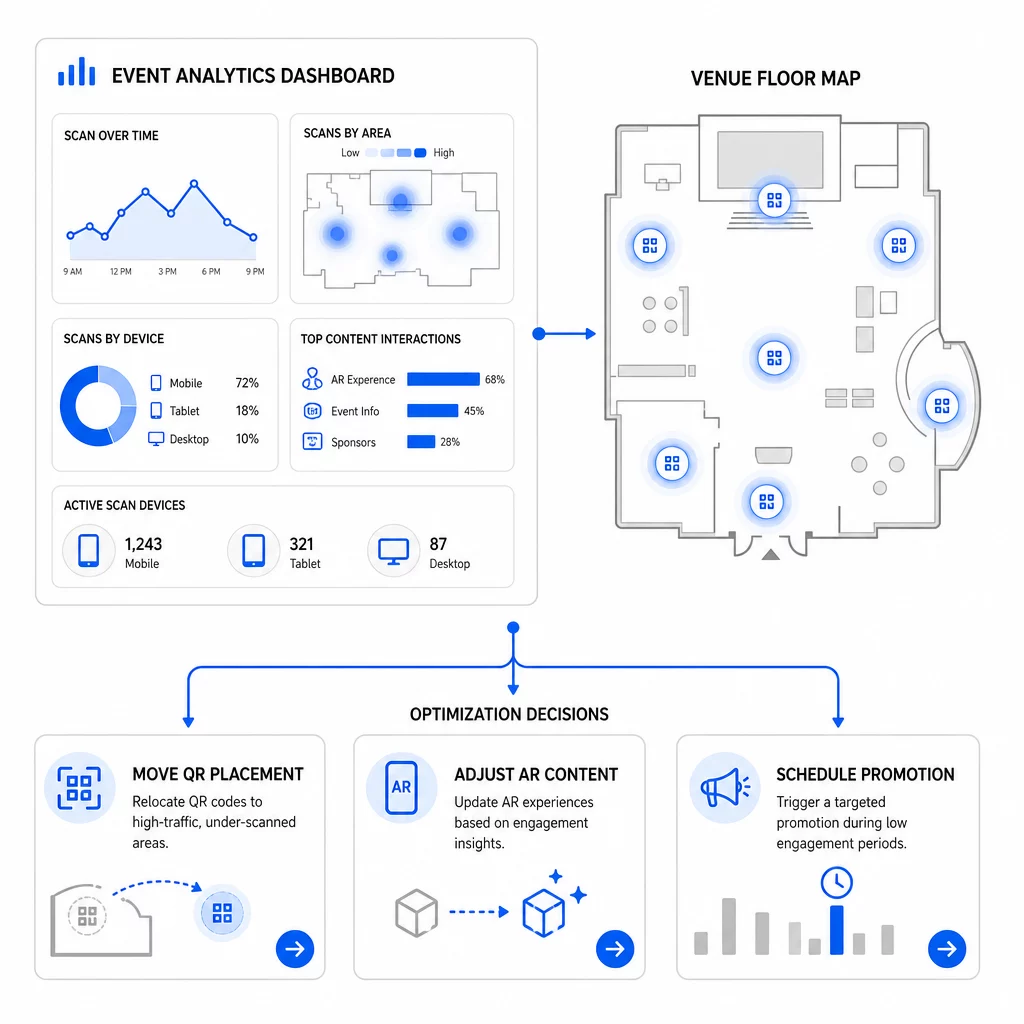
Optimizări specifice de luat în considerare:
- Mutați codurile QR din zonele cu scanări reduse în poziții lângă ieșirile sesiunilor cu trafic intens sau zonele de înregistrare
- Ajustați conținutul AR pe baza elementelor interactive care au înregistrat cel mai mare timp de interacțiune (dwell time)
- Rafinați plasarea CTA-ului paginii de destinație pe baza punctelor în care utilizatorii renunță
- Programați promoții de susținere și activări ale personalului în jurul intervalelor de vârf de scanare
- Concentrați investițiile viitoare în evenimente pe regiunile geografice unde ratele de scanare-conversie au fost cele mai puternice
Compararea indicatorilor cheie înainte și după fiecare modificare este singura modalitate fiabilă de a valida dacă o optimizare a îmbunătățit efectiv rezultatele. Ghidul tablourilor de bord de analiză a codurilor QR explică cum să structurați aceste comparații într-un tablou de bord de urmărire.
Imaginea de ansamblu privind modul în care codurile QR AR transformă evenimentele merită revizuită dacă sunteți încă în faza de planificare – în special în ceea ce privește definirea obiectivelor înainte de a alege ce metrici să prioritizați.
Urmărirea succesului evenimentelor cu coduri QR AR nu înseamnă doar numărarea scanărilor. Este vorba despre construirea unei imagini clare a comportamentului participanților pe parcursul întregii călătorii: cine s-a implicat, unde a făcut-o, cât de profund a interacționat și ce a făcut în continuare. Configurați coduri dinamice cu etichetare UTM corespunzătoare înainte de eveniment, monitorizați metricile spațiale și de interacțiune (dwell) în timp real și utilizați datele de conversie post-eveniment pentru a perfecționa următoarea campanie.
Începeți să urmăriți campaniile evenimentelor dumneavoastră Creați coduri QR AR dinamice, urmăribile cu Pageloot’s suita completă de funcționalități QR și monitorizați fiecare scanare dintr-un singur tablou de bord. Perioadă de probă gratuită de 14 zile, nu este necesar un card de credit.
Întrebări frecvente
Cele mai importante metrici sunt numărul total de scanări, scanări unice, frecvența scanărilor, ora și data scanării, date despre dispozitiv și sistemul de operare, geolocația și timpul petrecut în experiența AR. Comportamentul post-scanare – rata de respingere, timpul petrecut pe pagină, trimiterile de formulare și conversiile – completează imaginea arătând dacă scanările s-au tradus în rezultate semnificative.
Cele două instrumente servesc scopuri diferite. Pageloot captează metadate la nivel de scanare în timp real – tipul dispozitivului, locația, timpul de staționare – fără a necesita modificări ale codului site-ului web. Google Analytics 4 urmărește ce se întâmplă după scanare: comportamentul paginii, evenimentele de conversie și călătoria mai amplă a clientului. Pentru evenimentele în care contează atât implicarea imediată, cât și conversiile ulterioare, utilizarea ambelor împreună vă oferă cea mai completă imagine.
Codurile QR statice codifică o adresă URL fixă și nu oferă date de urmărire. Codurile QR dinamice rutează scanările printr-o redirecționare care înregistrează automat ora, dispozitivul și metadatele de locație. De asemenea, vă permit să actualizați adresa URL de destinație sau conținutul legat fără a retipări materialele – util pentru evenimente de mai multe zile unde programele sau apelurile la acțiune se modifică. Puteți afla mai multe despre cum funcționează acest lucru pe pagina generatorului de coduri QR dinamice.