Adakah anda menjalankan kempen kod QR berdaya AR di acara tetapi sukar untuk mengetahui apa yang sebenarnya berkesan? Tanpa metrik yang betul, data imbasan tidak digunakan manakala peluang penglibatan terlepas. Panduan ini membimbing anda tentang metrik yang penting, cara membacanya, dan cara menukar data tersebut menjadi hasil acara yang lebih baik.
Apa yang Membuat Penjejakan Kod QR AR Berbeza
Kod QR tradisional memberitahu anda berapa ramai orang mengimbas kod dan, secara amnya, di mana mereka berada apabila mereka melakukannya. Kod QR berdaya AR melangkah lebih jauh. Kerana pengalaman itu berlaku di dalam imbasan itu sendiri – melalui model 3D, tindanan video, elemen spatial – terdapat lebih banyak detik bermakna untuk diukur.
Perbezaan utama ialah kod QR AR memerlukan penjejakan kedua-duanya penglibatan awal (imbasan) dan interaksi mendalam (masa tinggal, interaksi objek 3D, pergerakan spatial). Kiraan imbasan standard hanya memberitahu anda seseorang memulakan pengalaman itu. Masa tinggal, kedalaman interaksi, dan tingkah laku selepas imbasan memberitahu anda sama ada ia berkesan.
Secara purata, kempen WebAR melihat masa tinggal antara 60 hingga 120 saat – jauh lebih lama daripada interaksi singkat yang biasa bagi kod QR standard. Jendela penglibatan yang dilanjutkan itu mencipta jejak data yang lebih kaya, tetapi hanya jika anda tahu apa yang perlu ditangkap.
Metrik Teras untuk Dijejaki
Sebelum menyediakan sebarang infrastruktur penjejakan, tetapkan apa yang dimaksudkan dengan kejayaan untuk acara khusus anda. Pengaktifan kesedaran jenama mempunyai KPI yang berbeza daripada gerai penjanaan petunjuk. Setelah objektif anda jelas, setiap metrik mempunyai peranan yang ditetapkan.
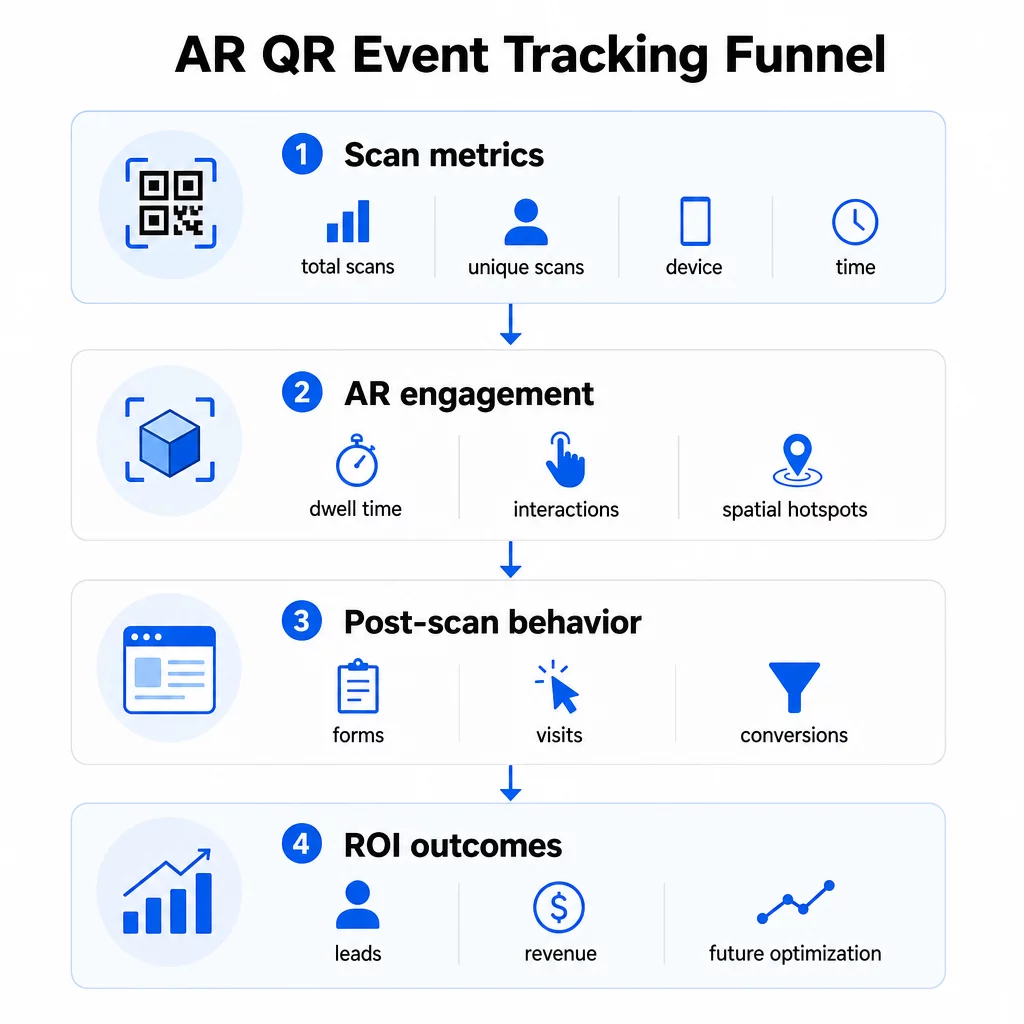
Metrik peringkat imbasan membentuk asas:
- JUMLAH IMBASAN – jangkauan keseluruhan dan volum penglibatan
- Imbasan unik – anggaran bilangan peserta individu yang berinteraksi
- Kekerapan imbasan (jumlah ÷ unik) – sama ada orang kembali kepada pengalaman itu, yang menandakan minat tulen
- Masa dan tarikh imbasan – tetingkap penglibatan puncak membantu anda mengenal pasti sesi, gerai atau slot masa yang mendorong aktiviti paling banyak
- Data Peranti dan OS – mengetahui sama ada khalayak anda kebanyakannya menggunakan iOS atau Android membolehkan anda mengoptimumkan halaman pendaratan dan pengalaman AR untuk jenis peranti dominan
- Data geolokasi – data imbasan peringkat bandar atau wilayah mendedahkan di mana penglibatan adalah tertinggi, berguna untuk acara berbilang tempat atau keputusan penempatan acara masa hadapan
Metrik khusus AR selami lebih dalam:
- Masa tinggal – berapa lama pengguna kekal dalam pengalaman AR, bukan hanya pada halaman pendaratan
- Analitik spatial – kawasan fizikal mana di tempat atau gerai anda yang menjana aktiviti imbasan paling banyak
- Acara interaksi 3D – sama ada pengguna memutar model produk, mencetuskan video, atau melengkapkan elemen interaktif
Tingkah laku selepas imbasan melengkapkan kitaran:
- Penyerahan borang, pendaftaran, atau muat turun yang menyusuli imbasan
- Kadar lantunan dan masa di halaman untuk destinasi halaman pendaratan
- Penukaran yang terikat dengan matlamat kempen tertentu (pembelian tiket, pendaftaran surat berita, permintaan demo)
Khususnya untuk acara B2B, metrik paling berharga ialah petunjuk berkualiti baharu yang dijana, akaun baharu yang terlibat, dan hasil akhir yang dikaitkan dengan acara tersebut. Data imbasan menyalurkan bahagian atas corong itu, tetapi penukaran selepas imbasan menentukan ROI.
Jejaki Setiap Imbasan dalam Masa Nyata Menggunakan Papan pemuka Analitik Pageloot untuk memantau jumlah imbasan, imbasan unik, jenis peranti, dan lokasi imbasan semasa ia berlaku sepanjang acara anda – tiada persediaan teknikal diperlukan.
Menyediakan Infrastruktur Penjejakan Anda
Mendapatkan data yang tepat memerlukan beberapa keputusan sebelum acara anda bermula.
Gunakan Kod QR Dinamik
Kod QR statik mengekod destinasi tetap dan tidak menyediakan penjejakan. Kod QR dinamik menghalakan imbasan melalui pengalihan, di mana metadata imbasan – masa, peranti, lokasi – dicatat. The Penjana dynamic QR code dari Pageloot mencipta kod yang menjejak kadar imbasan, data lokasi, dan metrik lain secara automatik, dan membolehkan anda mengemas kini URL destinasi tanpa mencetak semula bahan. Untuk acara berbilang hari di mana jadual atau seruan tindakan mungkin berubah, fleksibiliti ini adalah penting.
Tambah Parameter UTM untuk Penjejakan Selepas Imbasan
Melampirkan parameter UTM pada URL destinasi kod QR anda membolehkan alatan seperti Google Analytics 4 membezakan trafik yang didorong oleh QR daripada sumber lain dan mengukur apa yang berlaku selepas imbasan. URL yang tersusun baik kelihatan seperti:
`https://yoursite.com/event-page?utmsource=eventbooth&utmmedium=qrcode&utmcampaign=conference2025`
Menggunakan `utm` yang deskriptifsource` (cth., `mainstagebooth`, `registrationdesk`) membolehkan anda membandingkan prestasi merentasi lokasi penempatan yang berbeza pada acara yang sama. Kekalkan konvensyen penamaan yang konsisten – huruf kecil, garis bawah dan bukannya ruang – supaya laporan GA4 anda kekal bersih dan boleh ditapis. Panduan mengenai parameter UTM untuk kod QR merangkumi persediaan ini secara terperinci.
Sambungkan Data Kehadiran Anda
Jika anda menggunakan kod QR untuk daftar masuk acara, data kehadiran anda dan data penglibatan anda boleh dibaca bersama. Sistem kod QR kehadiran mencatat ketibaan dalam masa nyata, yang membolehkan anda menyemak silang siapa yang mendaftar masuk berbanding siapa yang mengimbas pengalaman AR anda dan menyelesaikan tindakan selepas imbasan. Ini amat berguna untuk mengira kadar penukaran sebenar dan bukannya hanya kadar imbasan-ke-halaman-pendaratan.
Untuk mengumpul respons berstruktur – maklum balas, pendaftaran, tinjauan selepas acara – pasangkan kod QR anda dengan Google Forms menggunakan Cara buat QR code untuk Google Form. Data penyerahan borang berintegrasi secara langsung dengan Google Sheets untuk analisis segera.
Perkemas Daftar Masuk Acara Yang Penjana Kod QR Acara Pageloot membolehkan anda mencipta tiket yang boleh dijejak, jadual interaktif, dan titik sentuh penglibatan – semuanya boleh diurus dari satu papan pemuka.
Cara Mentafsir Data Imbasan Anda
Mengumpul metrik hanya berguna jika anda tahu apa yang diberitahu olehnya. Berikut adalah cara untuk membaca corak yang paling biasa.
Jumlah imbasan rendah tidak semestinya bermakna tawaran itu gagal. Semak penempatan dahulu – adakah kod itu pada paras mata, dicetak cukup besar, dengan seruan tindakan yang jelas berdekatan? Kontras yang lemah atau kod yang tidak bertanda adalah punca paling biasa kadar imbasan rendah, bukan kandungan di belakangnya. Panduan penglibatan kod QR dengan peta haba menerangkan cara mendiagnosis masalah penempatan menggunakan data ketumpatan imbasan.
Jumlah imbasan tinggi tetapi imbasan unik rendah menunjukkan sekumpulan kecil mengimbas berulang kali. Ini boleh menunjukkan semangat tulen, atau ia boleh bermakna kod QR anda berada di lokasi di mana orang yang sama melaluinya beberapa kali. Konteks penting di sini.
Imbasan unik tinggi tetapi kadar lantunan tinggi pada halaman pendaratan menunjukkan ketidakpadanan antara jangkaan yang ditetapkan oleh kod QR dan apa yang pengguna temui selepas mengimbas. Semak semula kandungan halaman pendaratan dan pastikan ia sepadan dengan konteks di mana kod itu dipaparkan.
Masa tinggal yang kukuh dengan penukaran rendah adalah biasa dalam pengalaman AR di mana interaksi menyeronokkan tetapi seruan tindakan tidak cukup menonjol. Semak di mana CTA muncul dalam pengalaman dan sama ada pengguna mencapainya sebelum mereka keluar.
Data imbasan geografi dari anda analitik geolokasi boleh mendedahkan kawasan mana di tempat berbilang bilik atau lantai pameran perdagangan yang mendorong aktiviti paling banyak, membantu anda memutuskan penempatan gerai dan tahap kakitangan untuk acara akan datang.
Corak imbasan berdasarkan masa mengenal pasti tetingkap penglibatan puncak. Jika kebanyakan imbasan berlaku dalam tempoh 20 minit selepas penceramah utama menyebut pengaktifan anda, anda mempunyai isyarat jelas tentang apa yang mendorong trafik. Gunakan maklumat tersebut untuk mengatur masa siaran media sosial atau giliran kakitangan dengan sewajarnya.
Pasukan yang menyelaraskan sesi di sekitar tempoh penglibatan puncak ini boleh menggunakan penjadualan acara alat untuk menyusun masa acara, ketersediaan, dan penyelarasan peserta.
Memilih Antara Pageloot dan GA4
Kebanyakan acara mendapat manfaat daripada menggunakan kedua-dua alat secara gabungan, dengan setiap satu mengendalikan lapisan penjejakan yang berbeza.
| CIRI | Pageloot | Google Analitis 4 |
|---|---|---|
| Analitik imbasan masa nyata | Data peringkat imbasan segera (geo, peranti, masa) | Tersedia melalui laporan Masa Nyata; memerlukan persediaan UTM |
| Metrik khusus AR | Masa tinggal, analitik spatial pada peringkat yang disokong | Terhad kepada metrik web; memerlukan acara tersuai |
| Penjejakan imbasan unik | Penyahduaan peranti terbina dalam | Berdasarkan sesi/pengguna; sukar untuk dikaitkan semata-mata dengan imbasan fizikal |
| Usaha integrasi | Rendah – pasang dan main dengan pengalihan dinamik | Lebih tinggi – memerlukan parameter UTM dan skrip penjejakan |
| Harga | $10–$50+/bulan | Percuma (versi standard) |
Gunakan Pageloot apabila anda memerlukan pandangan segera semasa acara: siapa yang mengimbas, dari mana, pada peranti mana, dan berapa lama mereka terlibat. Ia tidak memerlukan perubahan pada kod laman web anda dan direka bentuk berdasarkan metrik khusus QR termasuk analitik spatial dan masa tinggal.
Gunakan GA4 apabila anda perlu memahami perjalanan pelanggan hiliran – apa yang pengguna lakukan selepas mereka mendarat di halaman anda, sama ada mereka menukar, dan bagaimana acara itu menyumbang kepada matlamat kempen jangka panjang. The alat terbaik untuk penjejakan acara kod QR halaman membandingkan pilihan platform dengan lebih terperinci.
Untuk persidangan berbilang hari atau acara rangkaian, menjalankan kedua-duanya secara selari memberikan anda maklum balas penglibatan segera melalui Pageloot dan atribusi penukaran melalui GA4.
Pertimbangan Privasi
Kempen kod QR AR mengumpul data peribadi secara automatik selepas pengimbasan – ini boleh termasuk alamat IP, pengecam peranti, cap masa, dan data lokasi tepat. Di bawah undang-undang privasi negeri A.S. seperti CCPA dan VCPA, anda dikehendaki mendedahkan data apa yang dikumpul, bagaimana ia digunakan, dan menawarkan mekanisme menarik diri.
Secara praktikal, ini bermakna:
- Kemas kini notis privasi acara anda untuk menerangkan apa yang berlaku apabila kod QR diimbas
- Dedahkan sebarang penjejakan geolokasi tepat atau penargetan tingkah laku oleh platform QR anda
- Audit amalan data penyedia kod QR anda, termasuk tempoh pengekalan dan perkongsian pihak ketiga
- Dapatkan persetujuan eksplisit sebelum mengumpul data lokasi berasaskan GPS
Yang panduan analitik geolokasi merangkumi keperluan pematuhan privasi dengan lebih terperinci, termasuk perbezaan antara penjejakan berasaskan IP dan berasaskan GPS serta bila setiap satu memerlukan persetujuan pengguna.
Menggunakan Data untuk Mengoptimumkan Acara Masa Depan
Nilai penjejakan bertambah apabila anda menggunakannya secara berulang. Sebelum acara anda yang seterusnya, bandingkan prestasi merentasi penempatan, slot masa, dan jenis kandungan AR untuk mengenal pasti apa yang mendorong penglibatan paling bermakna – bukan sekadar imbasan terbanyak.
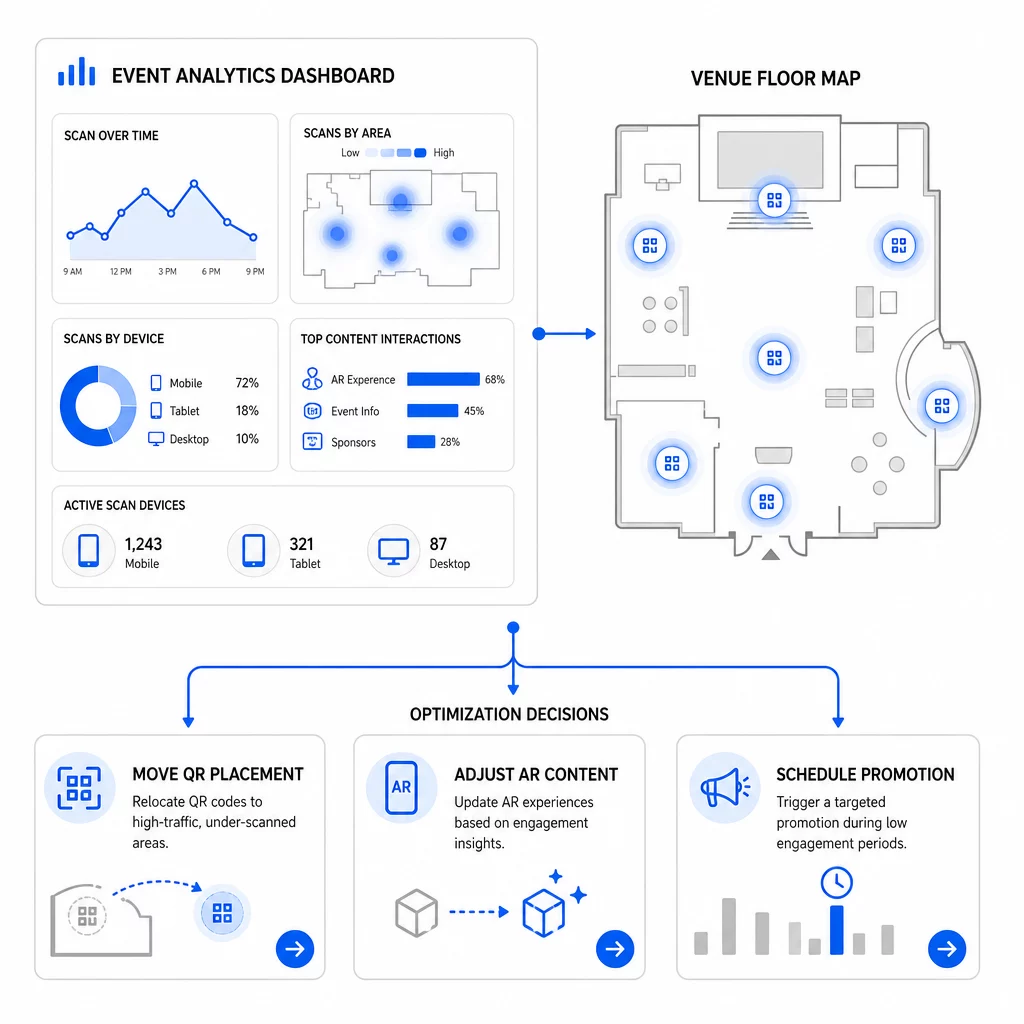
Pengoptimuman khusus untuk dipertimbangkan:
- Pindahkan kod QR dari kawasan imbasan rendah ke posisi berhampiran pintu keluar sesi trafik tinggi atau kawasan pendaftaran
- Laraskan kandungan AR berdasarkan elemen interaktif mana yang menunjukkan masa tinggal paling lama
- Perhalusi penempatan CTA halaman pendaratan anda berdasarkan di mana pengguna berhenti
- Jadualkan promosi sokongan dan pengaktifan kakitangan sekitar tempoh imbasan puncak
- Fokus pelaburan acara masa depan pada wilayah geografi di mana kadar imbasan-ke-penukaran adalah paling kukuh
Membandingkan metrik utama sebelum dan selepas setiap perubahan adalah satu-satunya cara yang boleh dipercayai untuk mengesahkan sama ada pengoptimuman benar-benar meningkatkan hasil. The panduan papan pemuka analitik kod QR menerangkan cara menyusun perbandingan ini dalam papan pemuka penjejakan.
Gambaran yang lebih luas mengenai bagaimana kod QR AR mengubah acara patut disemak jika anda masih dalam peringkat perancangan – terutamanya mengenai penetapan objektif sebelum memilih metrik mana yang perlu diutamakan.
Menjejaki kejayaan acara dengan kod QR AR bukan hanya tentang mengira imbasan. Ia adalah tentang membina gambaran jelas tingkah laku peserta sepanjang perjalanan penuh: siapa yang terlibat, di mana mereka melakukannya, sejauh mana mereka berinteraksi, dan apa yang mereka lakukan seterusnya. Sediakan kod dinamik dengan penandaan UTM yang betul sebelum acara, pantau metrik spatial dan dwell dalam masa nyata, dan gunakan data penukaran pasca-acara untuk menajamkan kempen seterusnya.
Mula Menjejaki Kempen Acara Anda Cipta kod QR AR dinamik, boleh dijejak dengan Pageloot’s rangkaian ciri QR penuh dan pantau setiap imbasan dari satu papan pemuka. Percubaan percuma 14 hari, tiada kad kredit diperlukan.
Soalan lazim
Metrik yang paling penting ialah jumlah imbasan, imbasan unik, kekerapan imbasan, masa dan tarikh imbasan, data peranti dan OS, geolokasi, dan masa tinggal dalam pengalaman AR. Tingkah laku selepas imbasan – kadar lantunan, masa di halaman, penyerahan borang, dan penukaran – melengkapkan gambaran dengan menunjukkan sama ada imbasan diterjemahkan kepada hasil yang bermakna.
Kedua-dua alat ini mempunyai tujuan yang berbeza. Pageloot menangkap metadata peringkat imbasan dalam masa nyata – jenis peranti, lokasi, masa tinggal – tanpa memerlukan sebarang perubahan kod laman web. Google Analytics 4 menjejaki apa yang berlaku selepas imbasan: tingkah laku halaman, peristiwa penukaran, dan perjalanan pelanggan yang lebih luas. Untuk peristiwa di mana kedua-dua penglibatan segera dan penukaran hiliran penting, menggunakan kedua-duanya bersama-sama memberikan anda pandangan yang paling lengkap.
Kod QR Statik mengekod URL tetap dan tidak menyediakan data penjejakan. Kod QR Dinamik menghalakan imbasan melalui pengalihan yang mencatat masa, peranti, dan metadata lokasi secara automatik. Ia juga membolehkan anda mengemas kini URL destinasi atau kandungan yang dipautkan tanpa mencetak semula bahan – berguna untuk acara berbilang hari di mana jadual atau seruan tindakan berubah. Anda boleh mengetahui lebih lanjut tentang cara ini berfungsi di halaman penjana kod QR dinamik.