Ali izvajate kampanje s kodami QR, ki podpirajo AR, na dogodkih, vendar se trudite ugotoviti, kaj dejansko deluje? Brez pravih metrik podatki o skeniranju ostanejo neizkoriščeni, medtem ko priložnosti za angažiranje izginejo. Ta vodnik vas popelje skozi to, katere metrike so pomembne, kako jih brati in kako te podatke pretvoriti v boljše rezultate dogodkov.
Kaj dela sledenje kodam QR z AR drugačno
Tradicionalne kode QR vam povedo, koliko ljudi je skeniralo kodo in, na splošno, kje so bili, ko so to storili. Kode QR, ki podpirajo AR, gredo dlje. Ker se izkušnja odvija znotraj samega skeniranja – prek 3D modelov, video prekrivanj, prostorskih elementov – je več pomembnih trenutkov za merjenje.
Ključna razlika je v tem, da kode QR z AR zahtevajo sledenje obojega začetnega angažiranja (skeniranja) in poglobljene interakcije (čas zadrževanja, interakcije z 3D objekti, prostorsko gibanje). Standardno štetje skeniranj vam pove le, da je nekdo začel izkušnjo. Čas zadrževanja, globina interakcije in vedenje po skeniranju vam povedo, ali je izkušnja odmevala.
V povprečju imajo kampanje WebAR čase zadrževanja med 60 in 120 sekundami – kar je veliko dlje od kratkih interakcij, značilnih za standardne kode QR. To podaljšano okno angažiranja ustvarja bogatejšo podatkovno sled, vendar le, če veste, kaj zajeti.
Ključne metrike za sledenje
Preden vzpostavite kakršno koli infrastrukturo za sledenje, določite, kaj pomeni uspeh za vaš specifičen dogodek. Aktivacija za ozaveščanje blagovne znamke ima drugačne KPI-je kot stojnica za pridobivanje potencialnih strank. Ko so vaši cilji jasni, ima vsaka metrika določeno vlogo.
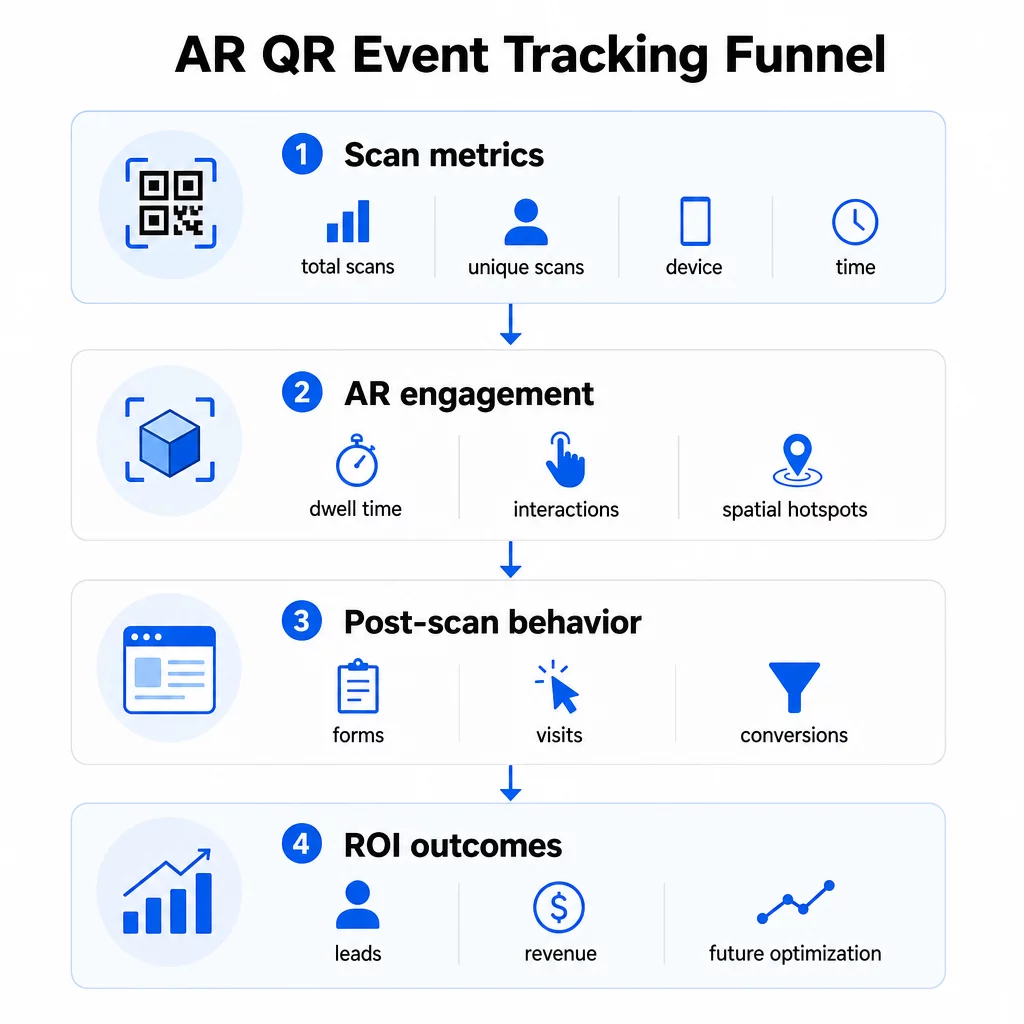
Metrike na ravni skeniranja tvorijo osnovo:
- SKUPNO SKENIRANJ – celoten doseg in obseg angažiranja
- Edinstvena skeniranja – približno število posameznih udeležencev, ki so sodelovali
- Pogostost skeniranja (skupno ÷ edinstveno) – ali se ljudje vračajo k izkušnji, kar kaže na resnično zanimanje
- Čas in datum skeniranja – okna največje angažiranosti vam pomagajo prepoznati, katere seje, stojnice ali časovne reže so povzročile največ aktivnosti
- Podatki o napravi in OS – vedeti, ali je vaše občinstvo pretežno na iOS-u ali Androidu, vam omogoča optimizacijo pristajalne strani in izkušnje AR za prevladujočo vrsto naprave
- Geolokacijski podatki – podatki o skeniranju na ravni mesta ali regije razkrivajo, kje je angažiranost najvišja, kar je uporabno za dogodke na več lokacijah ali odločitve o prihodnji postavitvi dogodkov
Metrike, specifične za AR pojdite globlje:
- Čas zadrževanja – kako dolgo uporabniki ostanejo znotraj izkušnje AR, ne le na pristajalni strani
- Prostorska analitika – katera fizična območja vašega prizorišča ali stojnice so ustvarila največ aktivnosti skeniranja
- Dogodki 3D interakcije – ali so uporabniki zavrteli model izdelka, sprožili video ali dokončali interaktivni element
Vedenje po skeniranju zaključuje krog:
- Oddaje obrazcev, registracije ali prenosi, ki so sledili skeniranju
- Stopnja obiskov ene strani in čas na strani za ciljno pristajalno stran
- Konverzije, vezane na specifične cilje kampanje (nakupi vstopnic, prijave na novice, zahteve za demo)
Zlasti za B2B dogodke so najdragocenejše metrike ustvarjeni novi kakovostni potencialni kupci, angažirani novi računi in končni prihodek, pripisan dogodku. Podatki o skeniranju napajajo vrh tega lijaka, vendar konverzije po skeniranju določajo ROI.
Sledite vsakemu skeniranju v realnem času Uporabi Nadzorna plošča Pageloot Analytics za spremljanje skupnega števila skeniranj, edinstvenih skeniranj, vrst naprav in lokacij skeniranja, ko se dogajajo med vašim dogodkom – tehnična nastavitev ni potrebna.
Nastavitev vaše sledilne infrastrukture
Pridobivanje natančnih podatkov zahteva nekaj odločitev, preden se vaš dogodek začne.
Uporabite dinamične kode QR
Statične QR kode kodirajo fiksno destinacijo in ne omogočajo sledenja. Dinamične QR kode preusmerjajo skeniranja prek preusmeritve, kjer se beležijo metapodatki skeniranja – čas, naprava, lokacija. The QR generator za dinamične QR kode iz Pageloota ustvarja kode, ki samodejno sledijo stopnjam skeniranja, podatkom o lokaciji in drugim metrikam, ter vam omogoča posodobitev ciljnega URL-ja brez ponovnega tiskanja materialov. Za večdnevne dogodke, kjer se urniki ali pozivi k akciji lahko spremenijo, je ta prilagodljivost bistvena.
Dodajte parametre UTM za sledenje po skeniranju
Pripisovanje parametrov UTM ciljnim URL-jem vaše QR kode omogoča orodjem, kot je Google Analytics 4, da razlikujejo promet, ki ga poganja QR, od drugih virov in merijo, kaj se zgodi po skeniranju. Dobro strukturiran URL izgleda takole:
`https://yoursite.com/event-page?utmsource=eventstojnica&utmmedij=qrkoda&utmcampaign=conference2025`
Uporaba opisnih `utmsource` vrednosti (npr. `mainstagebooth`, `registrationdesk`) vam omogoča primerjavo uspešnosti med različnimi lokacijami postavitve na istem dogodku. Ohranjajte dosledne konvencije poimenovanja – male črke, podčrtaji namesto presledkov – da bodo vaša poročila GA4 ostala čista in filtrabilna. Vodnik o parametrov UTM za QR kode podrobno pokriva to nastavitev.
Povežite svoje podatke o udeležbi
Če uporabljate QR kode za prijavo na dogodke, lahko vaše podatke o udeležbi in podatke o angažiranosti berete skupaj. Sistem QR kode za udeležbo beleži prihode v realnem času, kar vam omogoča navzkrižno preverjanje, kdo se je prijavil, proti temu, kdo je skeniral vašo AR izkušnjo in dokončal dejanje po skeniranju. To je še posebej uporabno za izračun resničnih stopenj konverzije namesto zgolj stopenj skeniranja do pristajalne strani.
Za zbiranje strukturiranih odgovorov – povratnih informacij, registracij, anket po dogodku – združite svoje QR kode z Google Obrazci z uporabo Generator QR kod za Google obrazec. Podatki o oddaji obrazcev se neposredno integrirajo z Google Preglednicami za takojšnjo analizo.
Poenostavite prijave na dogodke Vprašanje Pageloot Generator QR kod za dogodke vam omogoča ustvarjanje sledljivih vstopnic, interaktivnih urnikov in kontaktnih točk za angažiranje – vse to je mogoče upravljati z ene same nadzorne plošče.
Kako interpretirati podatke o skeniranju
Zbiranje metrik je uporabno le, če veste, kaj vam sporočajo. Tukaj je opisano, kako brati najpogostejše vzorce.
Nizko skupno število skeniranj ne pomeni samodejno, da je ponudba propadla. Najprej preverite postavitev – je koda v višini oči, natisnjena dovolj velika, z jasnim pozivom k dejanju v bližini? Slab kontrast ali neoznačena koda je najpogostejši vzrok za nizko stopnjo skeniranja, ne pa vsebina za njo. The vodnik za angažiranje s QR kodami z uporabo toplotnih kart pojasnjuje, kako diagnosticirati težave z umestitvijo z uporabo podatkov o gostoti skeniranja.
Visoko skupno število skeniranj, vendar nizko število edinstvenih skeniranj kaže, da majhna skupina večkrat skenira. To lahko kaže na resnično navdušenje ali pa pomeni, da je vaša QR koda na lokaciji, kjer isti ljudje večkrat gredo mimo nje. Tukaj je pomemben kontekst.
Visoko število edinstvenih skeniranj, vendar visoka stopnja odboja na ciljni strani kaže na neskladje med pričakovanjem, ki ga ustvari QR koda, in tem, kar uporabniki najdejo po skeniranju. Ponovno preglejte vsebino ciljne strani in se prepričajte, da se ujema s kontekstom, v katerem je koda prikazana.
Dolg čas zadrževanja z nizko konverzijo je pogost pri izkušnjah z razširjeno resničnostjo (AR), kjer je interakcija prijetna, vendar poziv k dejanju ni dovolj izrazit. Preglejte, kje se CTA pojavi znotraj izkušnje in ali ga uporabniki dosežejo, preden zapustijo.
Geografski podatki o skeniranju iz vašega geolokacijsko analitiko lahko razkrije, katera območja večprostornega prizorišča ali sejemskega prostora so ustvarila največ aktivnosti, kar vam pomaga pri odločanju o postavitvi stojnic in ravni osebja za prihodnje dogodke.
Vzorci skeniranja, ki temeljijo na času prepoznajte obdobja največje angažiranosti. Če se večina skeniranj zgodi v 20 minutah po tem, ko glavni govornik omeni vašo aktivacijo, imate jasen signal o tem, kaj poganja promet. Te informacije uporabite za ustrezno časovno uskladitev objav na družbenih medijih ali rotacije osebja.
Ekipe, ki usklajujejo seje okoli teh vrhunskih obdobij angažiranja, lahko uporabijo razporejanje dogodkov orodja za organizacijo časov dogodkov, razpoložljivosti in usklajevanja udeležencev.
Izbira med Pagelootom in GA4
Večina dogodkov ima koristi od uporabe obeh orodij v kombinaciji, pri čemer vsako obravnava ločeno raven sledenja.
| FUNKCIJA | Pageloot | Google Analytics 4 |
|---|---|---|
| Analitika skeniranja v realnem času | Takojšnji podatki na ravni skeniranja (geografija, naprava, čas) | Na voljo prek poročila v realnem času; zahteva nastavitev UTM |
| Metrike, specifične za AR | Čas zadrževanja, prostorska analitika na podprtih ravneh | Omejeno na spletne metrike; zahteva dogodke po meri |
| Sledenje edinstvenim skeniranjem | Vgrajena deduplikacija naprav | Na podlagi seje/uporabnika; težko je povezati izključno s fizičnimi skeniranji |
| Trud za integracijo | Nizko – plug-and-play z dinamičnimi preusmeritvami | Višje – potrebuje parametre UTM in sledilne skripte |
| Cenitev | $10–$50+/mesec | Brezplačno (standardna različica) |
Uporabite Pageloot ko potrebujete takojšen vpogled med dogodkom: kdo skenira, od kod, na kateri napravi in kako dolgo se angažira. Ne zahteva sprememb v kodi vaše spletne strani in je zasnovan okoli metrik, specifičnih za QR, vključno s prostorsko analitiko in časom zadrževanja.
Uporabite GA4 ko morate razumeti nadaljnjo pot stranke – kaj so uporabniki storili po pristanku na vaši strani, ali so se konvertirali in kako je dogodek prispeval k dolgoročnim ciljem kampanje. najboljših orodij za sledenje dogodkov z QR kodami stran podrobneje primerja možnosti platform.
Za večdnevne konference ali dogodke mreženja vam vzporedno delovanje obeh omogoča takojšnje povratne informacije o angažiranosti prek Pageloota in atribucijo konverzij prek GA4.
Premisleki o zasebnosti
Kampanje z AR QR kodami samodejno zbirajo osebne podatke ob skeniranju – to lahko vključuje IP naslove, identifikatorje naprav, časovne žige in natančne podatke o lokaciji. V skladu z državnimi zakoni ZDA o zasebnosti, kot sta CCPA in VCPA, ste dolžni razkriti, kateri podatki se zbirajo, kako se uporabljajo, in ponuditi mehanizme za odjavo.
V praksi to pomeni:
- Posodobite obvestilo o zasebnosti dogodka, da opišete, kaj se zgodi ob skeniranju QR kode
- Razkrijte morebitno natančno sledenje geolokaciji ali vedenjsko ciljanje s strani vaše QR platforme
- Preglejte prakse obdelave podatkov vašega ponudnika QR kod, vključno z obdobji hrambe in deljenjem s tretjimi osebami
- Pridobite izrecno soglasje pred zbiranjem podatkov o lokaciji na podlagi GPS-a
Vprašanje vodnik za geolokacijsko analitiko podrobneje zajema zahteve glede skladnosti z zasebnostjo, vključno z razlikovanjem med sledenjem na podlagi IP-ja in GPS-a ter kdaj vsako zahteva soglasje uporabnika.
Uporaba podatkov za optimizacijo prihodnjih dogodkov
Vrednost sledenja se poveča, ko ga uporabljate iterativno. Pred naslednjim dogodkom primerjajte uspešnost med umestitvami, časovnimi termini in vrstami vsebine AR, da ugotovite, kaj je povzročilo najpomembnejšo angažiranost – ne le največ skeniranj.
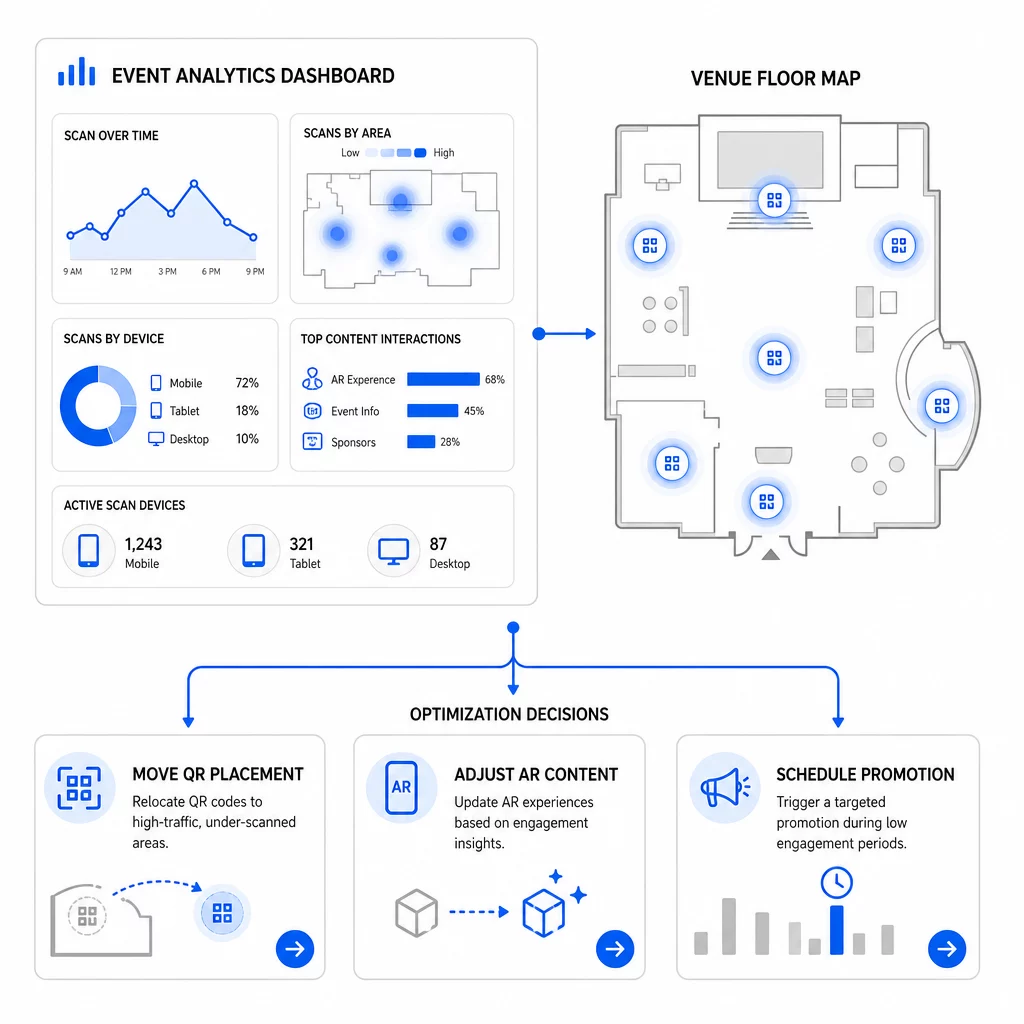
Specifične optimizacije, ki jih je treba upoštevati:
- Premestite QR kode z območij z malo skeniranji na mesta blizu izhodov iz sej z velikim prometom ali registracijskih območij
- Prilagodite vsebino AR glede na to, kateri interaktivni elementi so pokazali najdaljši čas zadrževanja
- Izboljšajte umestitev poziva k dejanju (CTA) na vaši pristajalni strani glede na to, kje uporabniki opustijo
- Načrtujte podporne promocije in aktivacije osebja okoli časovnih oken z največ skeniranji
- Osredotočite prihodnje naložbe v dogodke na geografske regije, kjer so bile stopnje pretvorbe iz skeniranja v konverzijo najmočnejše
Primerjava ključnih metrik pred in po vsaki spremembi je edini zanesljiv način za potrditev, ali je optimizacija dejansko izboljšala rezultate. Vodnik po nadzornih ploščah za analitiko QR kod podrobno opisuje, kako strukturirati te primerjave znotraj nadzorne plošče za sledenje.
Širša slika o tem, kako AR QR kode preoblikujejo dogodke je vredna pregleda, če ste še v fazi načrtovanja – zlasti glede določanja ciljev, preden izberete, katere metrike boste dali prednost.
Sledenje uspešnosti dogodkov z AR QR kodami ni le štetje skeniranj. Gre za ustvarjanje jasne slike vedenja udeležencev skozi celotno pot: kdo se je angažiral, kje so to storili, kako globoko so interagirali in kaj so storili naprej. Pred dogodkom nastavite dinamične kode z ustreznim označevanjem UTM, spremljajte prostorske in časovne metrike v realnem času ter uporabite podatke o konverzijah po dogodku za izboljšanje naslednje kampanje.
Začnite slediti svojim kampanjam dogodkov Ustvarite dinamične, sledljive AR QR kode s Pagelootovimi celovito zbirko funkcij QR in spremljajte vsako skeniranje z ene same nadzorne plošče. Brezplačna 14-dnevna preizkusna doba, kreditna kartica ni potrebna.
Pogosta vprašanja
Najpomembnejše metrike so skupno število skeniranj, edinstvena skeniranja, pogostost skeniranja, čas in datum skeniranja, podatki o napravi in OS, geolokacija in čas zadrževanja znotraj izkušnje AR. Vedenje po skeniranju – stopnja obiskov ene strani, čas na strani, oddaje obrazcev in konverzije – dopolnjujejo sliko, saj pokažejo, ali so se skeniranja pretvorila v smiselne rezultate.
Orodji služita različnim namenom.
Statične QR kode kodirajo fiksni URL in ne zagotavljajo podatkov za sledenje. Dinamične QR kode preusmerjajo skeniranja prek preusmeritve, ki samodejno beleži čas, napravo in metapodatke o lokaciji. Omogočajo tudi posodabljanje ciljnega URL-ja ali povezane vsebine brez ponovnega tiskanja materialov – uporabno za večdnevne dogodke, kjer se spreminjajo urniki ali pozivi k dejanju. Več o tem, kako to deluje, lahko izveste na strani generatorja dinamičnih QR kod.