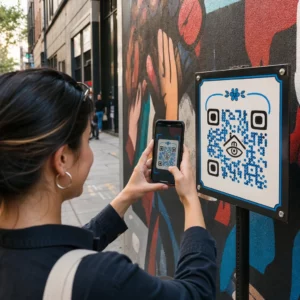
Kører du AR-aktiverede QR-kodekampagner ved events, men har svært ved at se, hvad der faktisk virker? Uden de rette målinger på plads ligger scanningsdata ubrugt hen, mens engagementmuligheder glider forbi. Denne guide fører dig igennem, hvilke målinger der betyder noget, hvordan du aflæser dem, og hvordan du omsætter disse data til bedre eventresultater.
Hvad gør AR QR-kodesporing anderledes
Traditionelle QR-koder fortæller dig, hvor mange mennesker der scannede en kode, og groft sagt, hvor de var, da de gjorde det. AR-aktiverede QR-koder går videre. Fordi oplevelsen udfolder sig inde i selve scanningen – gennem 3D-modeller, video-overlays, rumlige elementer – er der flere meningsfulde øjeblikke at måle.
Den grundlæggende forskel er, at AR QR-koder kræver sporing af både indledende engagement (scanningen) og fordybende interaktion (opholdstid, 3D-objektinteraktioner, rumlig bevægelse). En standard scanningsoptælling fortæller dig kun, at nogen startede oplevelsen. Opholdstid, interaktionsdybde og adfærd efter scanning fortæller dig, om det gav genklang.
I gennemsnit ser WebAR-kampagner opholdstider mellem 60 og 120 sekunder – langt længere end de korte interaktioner, der er typiske for standard QR-koder. Det udvidede engagementvindue skaber et rigere dataspor, men kun hvis du ved, hvad du skal indfange.
De vigtigste målinger at spore
Før du opsætter nogen sporingsinfrastruktur, skal du fastlægge, hvordan succes ser ud for dit specifikke event. En brand awareness-aktivering har andre KPI'er end en leadgenereringsstand. Når dine mål er klare, har hver måling en defineret rolle.
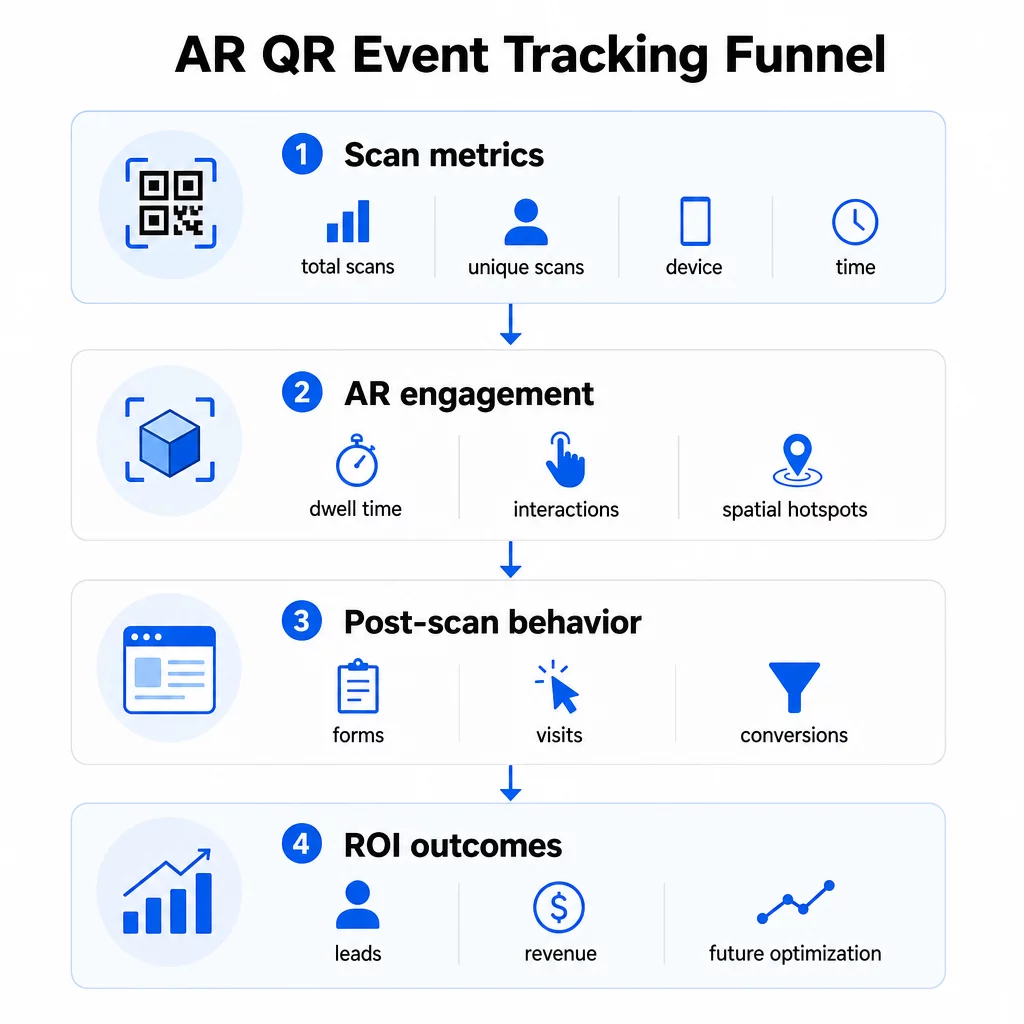
Målinger på scanningsniveau danner grundlaget:
- SCANNINGER I ALT – overordnet rækkevidde og engagementvolumen
- Unikke scanninger – omtrentligt antal individuelle deltagere, der interagerede
- Scanningsfrekvens (total ÷ unikke) – om folk vender tilbage til oplevelsen, hvilket signalerer ægte interesse
- Tid og dato for scanning – perioder med højeste engagement hjælper dig med at identificere, hvilke sessioner, stande eller tidsrum der skabte mest aktivitet
- Enheds- og OS-data – at vide, om dit publikum primært bruger iOS eller Android, giver dig mulighed for at optimere landingssiden og AR-oplevelsen til den dominerende enhedstype
- Geoplaceringsdata – scanningsdata på by- eller regionsniveau afslører, hvor engagementet er højest, nyttigt for arrangementer på flere steder eller beslutninger om fremtidig placering af arrangementer
AR-specifikke målinger gå dybere:
- Opholdstid – hvor længe brugere forbliver inde i AR-oplevelsen, ikke kun på landingssiden
- Rumlig analyse – hvilke fysiske områder af dit sted eller din stand der genererede mest scanningsaktivitet
- 3D-interaktionshændelser – om brugere roterede en produktmodel, udløste en video eller gennemførte et interaktivt element
Adfærd efter scanning lukker cirklen:
- Formularindsendelser, registreringer eller downloads, der fulgte efter scanningen
- Afvisningsprocent og tid på side for destinationssiden
- Konverteringer knyttet til specifikke kampagnemål (billetkøb, tilmelding til nyhedsbrev, demoanmodninger)
Især for B2B-events er de mest værdifulde metrics nye kvalitetsleads genereret, nye konti engageret og eventuel omsætning tilskrevet eventet. Scannedata føder toppen af den tragt, men konverteringer efter scanning bestemmer ROI.
Spor hver scanning i realtid Brug Pageloot Analytics-dashboard til at overvåge samlede scanninger, unikke scanninger, enhedstyper og scanningslokationer, som de sker under dit event – ingen teknisk opsætning påkrævet.
Opsætning af din sporingsinfrastruktur
At få nøjagtige data kræver et par beslutninger, før dit event går live.
Brug dynamiske QR-koder
Statiske QR-koder koder en fast destination og giver ingen sporing. Dynamiske QR-koder dirigerer scanninger gennem en omdirigering, hvor scanningsmetadata – tid, enhed, lokation – logges. Den Dynamisk QR-kode generator fra Pageloot opretter koder, der automatisk sporer scanningsrater, lokationsdata og andre metrics, og lader dig opdatere destinations-URL'en uden at genudskrive materialer. For flerdages events, hvor tidsplaner eller opfordringer til handling kan ændre sig, er denne fleksibilitet essentiel.
Tilføj UTM-parametre for sporing efter scanning
Ved at vedhæfte UTM-parametre til dine QR-kodes destinations-URL'er kan værktøjer som Google Analytics 4 skelne QR-drevet trafik fra andre kilder og måle, hvad der sker efter scanningen. En velstruktureret URL ser således ud:
`https://yoursite.com/event-page?utmsource=eventstand&utmmedium=qrkode&utmcampaign=konference2025`
Brug af beskrivende `utmsource`-værdier (f.eks. `hovedscenestand`, `registreringsskranke`) giver dig mulighed for at sammenligne ydeevne på tværs af forskellige placeringssteder ved den samme begivenhed. Hold navngivningskonventioner konsekvente – små bogstaver, understregninger i stedet for mellemrum – så dine GA4-rapporter forbliver rene og filtrerbare. Guiden om UTM-parametre for QR-koder dækker denne opsætning i detaljer.
Forbind dine deltagerdata
Hvis du bruger QR-koder til event-check-ins, kan dine deltagerdata og dine engagementsdata læses sammen. Det deltager-QR-kode system logger ankomster i realtid, hvilket giver dig mulighed for at krydsreferere, hvem der tjekkede ind, mod hvem der scannede din AR-oplevelse og gennemførte en handling efter scanning. Dette er især nyttigt til at beregne sande konverteringsrater snarere end blot scan-til-landingsside-rater.
For at indsamle strukturerede svar – feedback, registreringer, efter-event-undersøgelser – par dine QR-koder med Google Forms ved hjælp af Google Form QR-kode generator. Formularindsendelsesdata integreres direkte med Google Sheets for øjeblikkelig analyse.
Strømlin event-check-ins Det Pageloot Event QR-kodegenerator giver dig mulighed for at oprette sporbare billetter, interaktive tidsplaner og engagement-berøringspunkter – alt sammen håndterbart fra et enkelt dashboard.
Sådan fortolker du dine scanningsdata
Indsamling af målinger er kun nyttigt, hvis du ved, hvad de fortæller dig. Her er, hvordan du læser de mest almindelige mønstre.
Lavt samlet antal scanninger betyder ikke automatisk, at tilbuddet mislykkedes. Tjek placeringen først – er koden i øjenhøjde, trykt stort nok, med en tydelig opfordring til handling i nærheden? Dårlig kontrast eller en umarkeret kode er den mest almindelige årsag til lave scanningsrater, ikke indholdet bag den. Den guide til QR-kodeengagement med varmekort forklarer, hvordan man diagnosticerer placeringsproblemer ved hjælp af scanningsdensitetsdata.
Højt samlet antal scanninger, men lavt antal unikke scanninger antyder, at en lille gruppe scanner gentagne gange. Dette kan indikere ægte entusiasme, eller det kan betyde, at din QR-kode er placeret et sted, hvor de samme mennesker passerer den flere gange. Kontekst er vigtig her.
Højt antal unikke scanninger, men høj afvisningsprocent på landingssiden peger på et misforhold mellem den forventning, QR-koden skaber, og hvad brugerne finder efter scanning. Gennemgå landingssidens indhold og sørg for, at det matcher den kontekst, hvor koden vises.
Lang opholdstid med lav konvertering er almindeligt i AR-oplevelser, hvor interaktionen er fornøjelig, men opfordringen til handling ikke er fremtrædende nok. Gennemgå, hvor CTA'en vises i oplevelsen, og om brugerne når den, før de forlader den.
Geografiske scanningsdata fra din geolokaliseringsanalyse kan afsløre, hvilke områder af et lokale med flere rum eller en messegulv der skabte mest aktivitet, hvilket hjælper dig med at beslutte standplacering og personaleniveauer til fremtidige begivenheder.
Tidsbaserede scanningsmønstre identificer perioder med højeste engagement. Hvis de fleste scanninger sker inden for 20 minutter efter en hovedtaler nævner din aktivering, har du et klart signal om, hvad der driver trafik. Brug den information til at planlægge opslag på sociale medier eller personalerotationer derefter.
Teams, der koordinerer sessioner omkring disse spidsbelastede engagementstider, kan bruge begivenhedsplanlægning værktøjer til at organisere begivenhedstider, tilgængelighed og deltagerkoordinering.
Valg mellem Pageloot og GA4
De fleste begivenheder drager fordel af at bruge begge værktøjer i kombination, hvor hvert håndterer et særskilt lag af sporing.
| FUNKTION | Pageloot | Google Analytics 4 |
|---|---|---|
| Realtids scanningsanalyse | Øjeblikkelige scanningsdata (geo, enhed, tid) | Tilgængelig via Realtime-rapport; kræver UTM-opsætning |
| AR-specifikke målinger | Opholdstid, rumlig analyse på understøttede niveauer | Begrænset til webmålinger; kræver brugerdefinerede hændelser |
| Unik scanningssporing | Indbygget deduplikering af enheder | Sessions-/brugerbaseret; svært at knytte udelukkende til fysiske scanninger |
| Integrationsindsats | Lav – plug-and-play med dynamiske omdirigeringer | Højere – kræver UTM-parametre og sporingsscripts |
| Priser | $10–$50+/måned | Gratis (standardversion) |
Brug Pageloot når du har brug for øjeblikkelig indsigt under arrangementet: hvem scanner, hvorfra, på hvilken enhed, og hvor længe de engagerer sig. Det kræver ingen ændringer i din hjemmesidekode og er designet omkring QR-specifikke målinger, herunder rumlig analyse og opholdstid.
Brug GA4 når du har brug for at forstå kunderejsen nedstrøms – hvad brugere gjorde, efter de landede på din side, om de konverterede, og hvordan arrangementet bidrog til langsigtede kampagnemål. Den bedste værktøjer til QR-kode eventtracking side sammenligner platformmuligheder mere detaljeret.
For flerdages konferencer eller netværksarrangementer giver det at køre begge parallelt dig øjeblikkelig feedback på engagement via Pageloot og konverteringsattribution via GA4.
Overvejelser om privatliv
AR QR-kodekampagner indsamler automatisk personlige data ved scanning – dette kan omfatte IP-adresser, enhedsidentifikatorer, tidsstempler og præcise lokationsdata. I henhold til amerikanske delstatslove om privatliv som CCPA og VCPA er du forpligtet til at oplyse, hvilke data der indsamles, hvordan de bruges, og tilbyde fravalgsmekanismer.
Praktisk betyder dette:
- Opdater din begivenheds privatlivspolitik for at beskrive, hvad der sker, når en QR-kode scannes
- Oplys om enhver præcis geolokationssporing eller adfærdsmæssig målretning fra din QR-platform
- Gennemgå din QR-kodeudbyders datapraksis, herunder opbevaringsperioder og deling med tredjeparter
- Indhent udtrykkeligt samtykke, før du indsamler GPS-baserede lokationsdata
Det guide til geolokationsanalyse dækker krav til overholdelse af privatlivets fred mere detaljeret, herunder forskellen mellem IP-baseret og GPS-baseret sporing, og hvornår hver især kræver brugerens samtykke.
Brug af data til at optimere fremtidige begivenheder
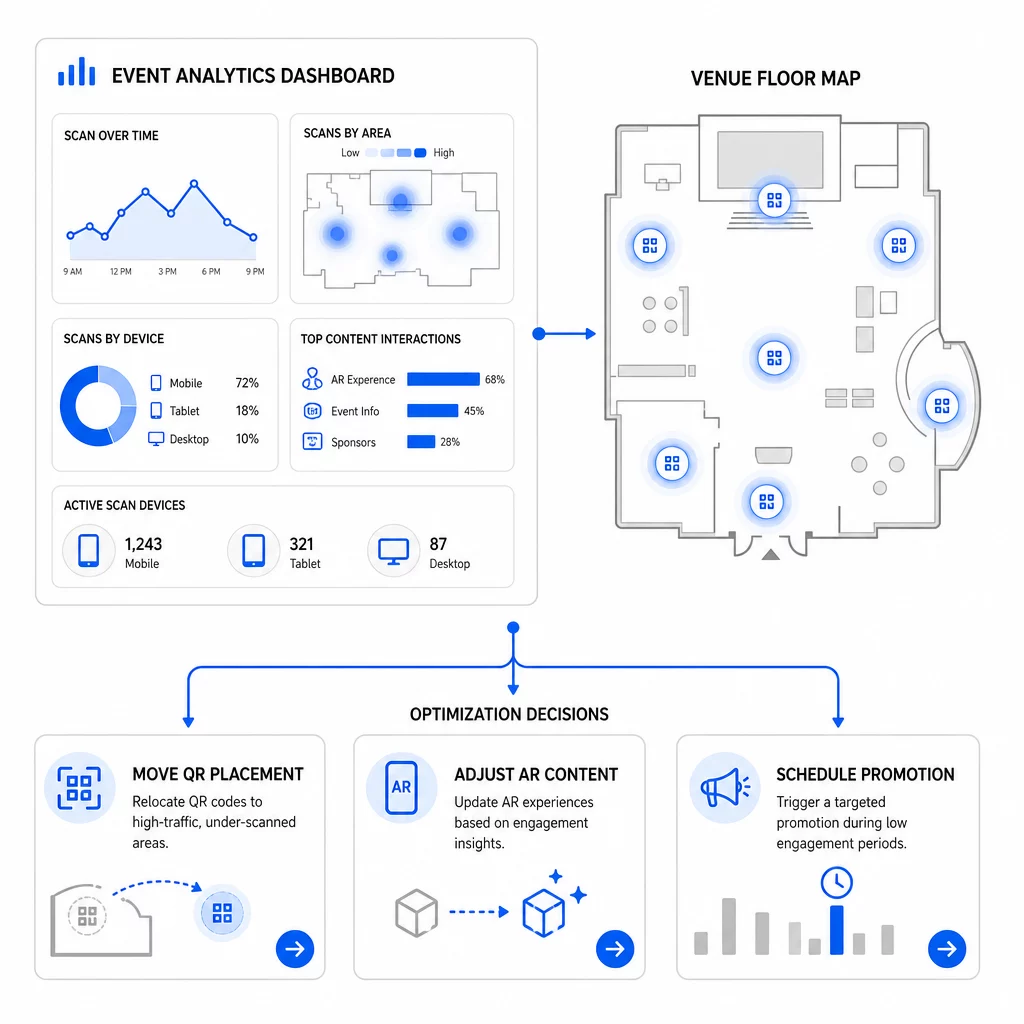
Værdien af sporing forstærkes, når du bruger den iterativt. Før din næste begivenhed skal du sammenligne ydeevne på tværs af placeringer, tidsrum og AR-indholdstyper for at identificere, hvad der skabte det mest meningsfulde engagement – ikke kun de fleste scanninger.
Specifikke optimeringer at overveje:
- Flyt QR-koder fra områder med få scanninger til positioner nær sessionudgange med høj trafik eller registreringsområder
- Juster AR-indhold baseret på hvilke interaktive elementer der viste den højeste opholdstid
- Forfin placeringen af din landingssides CTA baseret på, hvor brugere falder fra
- Planlæg understøttende kampagner og personalaktiveringer omkring perioder med flest scanninger
- Fokuser fremtidige begivenhedsinvesteringer på geografiske regioner, hvor scan-til-konverteringsraterne var stærkest
At sammenligne nøglemålinger før og efter hver ændring er den eneste pålidelige måde at validere, om en optimering faktisk forbedrede resultaterne. Den guide til QR-kode analyse-dashboards gennemgår, hvordan man strukturerer disse sammenligninger i et sporings-dashboard.
Det bredere billede af hvordan AR QR-koder transformerer begivenheder er værd at gennemgå, hvis du stadig er i planlægningsfasen – især omkring definition af mål, før du vælger, hvilke målinger der skal prioriteres.
At spore begivenhedssucces med AR QR-koder handler ikke kun om at tælle scanninger. Det handler om at opbygge et klart billede af deltageradfærd på tværs af hele rejsen: hvem der engagerede sig, hvor de gjorde det, hvor dybt de interagerede, og hvad de gjorde derefter. Opsæt dynamiske koder med korrekt UTM-tagging før begivenheden, overvåg rumlige og opholdsmålinger i realtid, og brug konverteringsdata efter begivenheden til at skærpe den næste kampagne.
Begynd at spore dine begivenhedskampagner Opret dynamiske, sporbare AR QR-koder med Pageloots fulde pakke af QR-funktioner og overvåg hver scanning fra et enkelt dashboard. Gratis 14-dages prøveperiode, intet kreditkort påkrævet.
Ofte stillede spørgsmål
De vigtigste målinger er samlede scanninger, unikke scanninger, scanningsfrekvens, tid og dato for scanning, enheds- og OS-data, geolokation og opholdstid inden for AR-oplevelsen. Efter-scanningsadfærd – afvisningsprocent, tid på side, formularindsendelser og konverteringer – fuldender billedet ved at vise, om scanninger førte til meningsfulde resultater.
De to værktøjer tjener forskellige formål. Pageloot indfanger metadata på scanningsniveau i realtid – enhedstype, placering, opholdstid – uden at kræve ændringer i hjemmesidens kode. Google Analytics 4 sporer, hvad der sker efter scanningen: sideadfærd, konverteringshændelser og den bredere kunderejse. For hændelser, hvor både øjeblikkelig engagement og efterfølgende konverteringer er vigtige, giver brugen af begge tilsammen dig det mest komplette overblik.
Statiske QR-koder koder en fast URL og giver ingen sporingsdata. Dynamiske QR-koder dirigerer scanninger gennem en omdirigering, der automatisk logger tid, enhed og placeringsmetadata. De lader dig også opdatere destinations-URL'en eller det linkede indhold uden at genoptrykke materialer – nyttigt til flerdagesarrangementer, hvor tidsplaner eller opfordringer til handling ændres. Du kan lære mere om, hvordan dette fungerer på siden for dynamisk QR-kodegenerator.