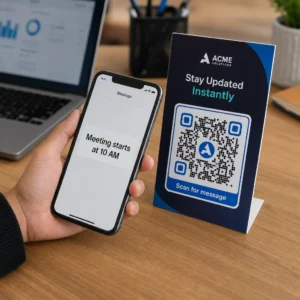
Bạn muốn làm cho thẻ quà tặng của mình dễ đổi hơn và khó bị bỏ qua hơn? Một quy trình đổi quà được thiết kế kém sẽ làm khách hàng thất vọng và dẫn đến số dư chưa được đổi nằm im. Hướng dẫn này giải thích cách thêm mã QR vào thẻ quà tặng vật lý và kỹ thuật số, những gì chúng mở khóa cho doanh nghiệp của bạn và cách thiết lập chúng một cách chính xác.
Tại sao mã QR nên có trên thẻ quà tặng
Thẻ quà tặng là một danh mục mua sắm quan trọng. Dữ liệu khảo sát gần đây cho thấy 76% người tiêu dùng Hoa Kỳ đã mua một thẻ quà tặng trong năm qua, trong đó 40% số giao dịch mua đó là kỹ thuật số. Tuy nhiên, hành vi đổi quà rất khác nhau – người tiêu dùng sử dụng thẻ quà tặng kỹ thuật số trung bình trong 16,8 ngày, so với 35,3 ngày đối với thẻ vật lý. Khoảng cách đó thể hiện doanh thu thực tế đang nằm trên kệ.
Một mã QR trên thẻ quà tặng loại bỏ sự cản trở khỏi quy trình đổi quà. Thay vì yêu cầu một khách hàng nhập một số thẻ dài hoặc điều hướng qua quy trình thanh toán nhiều bước, một lần quét duy nhất sẽ đưa họ trực tiếp đến một trang thanh toán, tra cứu số dư, hoặc cửa hàng trực tuyến. Việc giảm bớt nỗ lực đó trực tiếp dẫn đến việc đổi quà nhanh hơn và ít số dư bị bỏ quên hơn.
Ngoài sự tiện lợi, mã QR còn mang lại cho bạn điều mà thẻ quà tặng truyền thống không thể: dữ liệu. Bạn có thể theo dõi khi nào và ở đâu thẻ được quét, thiết kế thẻ nào hoạt động tốt hơn, và liệu khách hàng có hoàn tất việc đổi quà sau khi quét hay không.
Thẻ quà tặng vật lý: Thêm mã QR hoạt động hiệu quả
Một thẻ quà tặng vật lý có không gian hạn chế, vì vậy mọi quyết định thiết kế đều quan trọng. Việc thêm một mã QR rất đơn giản, nhưng một vài tiêu chuẩn kỹ thuật sẽ quyết định liệu nó có thực sự quét đáng tin cậy trong thế giới thực hay không.
Kích thước tối thiểu và vùng yên tĩnh
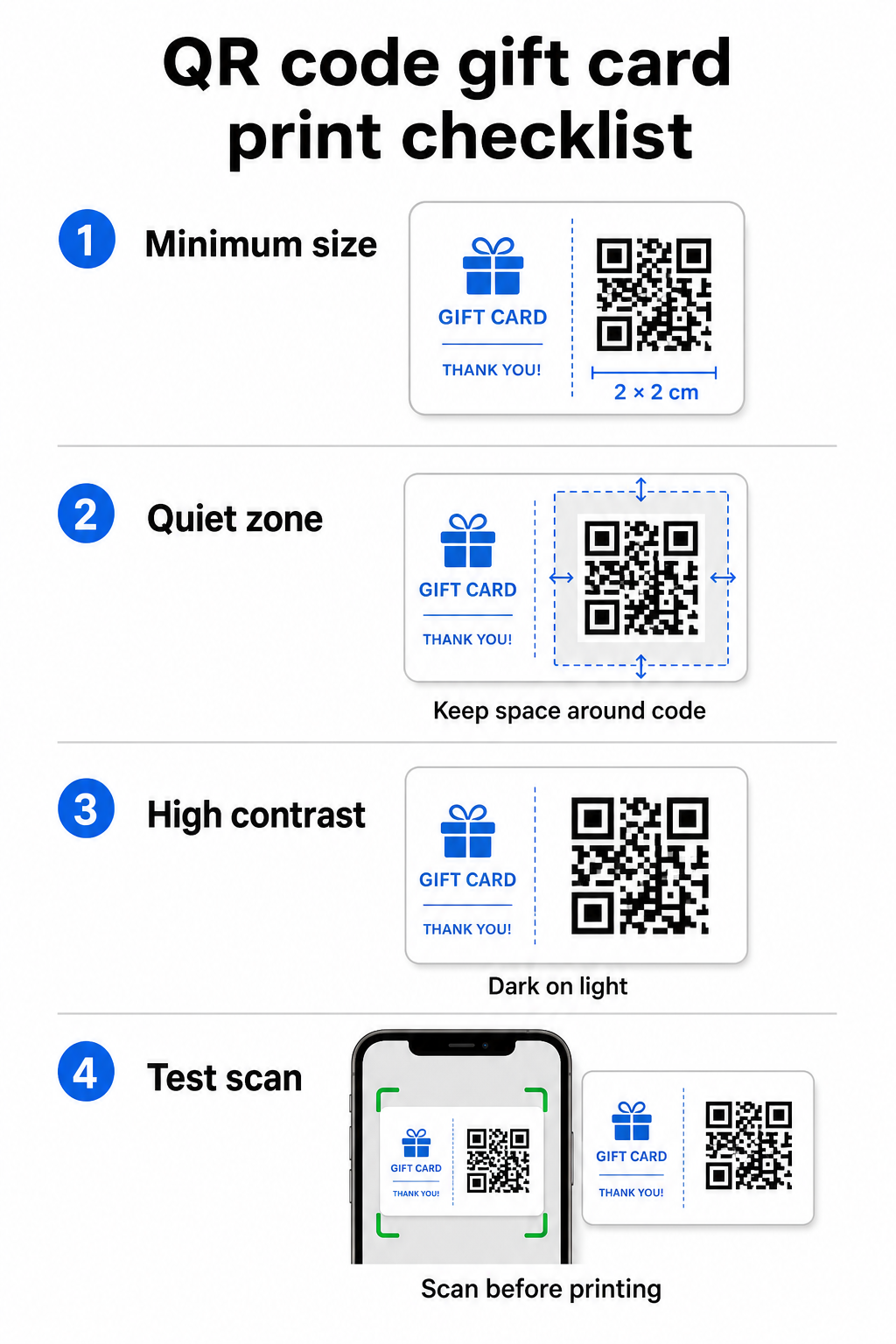
Để quét đáng tin cậy trên vật liệu in, mã QR của bạn phải có kích thước ít nhất 2 × 2 cm. Xung quanh mã, hãy để một lề trống – được gọi là vùng yên tĩnh – ít nhất bốn mô-đun ở tất cả các cạnh. Nếu mỗi mô-đun trong mã QR của bạn rộng 2 mm, điều đó có nghĩa là một lề 8 mm xung quanh. Việc làm cho mã bị chật chội với văn bản hoặc các yếu tố thiết kế trong vùng này là một trong những lý do phổ biến nhất khiến mã không quét được.
Yêu cầu về độ tương phản
Sử dụng màu nền trước tối trên nền sáng. Tỷ lệ tương phản tối thiểu được khuyến nghị là 4:1, mặc dù đen trên trắng (21:1) vẫn là sự kết hợp đáng tin cậy nhất. Tránh các sơ đồ màu đảo ngược (mẫu sáng trên nền tối), gradient và bóng – tất cả những điều này tạo ra độ tương phản không nhất quán làm nhiễu loạn máy quét camera. Để được hướng dẫn chi tiết, hãy xem các phương pháp hay nhất về độ tương phản màu của mã QR.
Vị trí trên thẻ
Đặt mã QR ở mặt sau của thẻ, tránh xa dải từ và khu vực mã PIN cào. Mặt trước của thẻ dùng để nhận diện thương hiệu; mặt sau là nơi các yếu tố chức năng như số thẻ và mã QR nên được đặt. Bao gồm một lời kêu gọi hành động ngắn gọn bên cạnh mã – chẳng hạn như “Quét để kiểm tra số dư” hoặc “Quét để đổi quà trực tuyến” – để khách hàng hiểu điều gì sẽ xảy ra khi họ quét.
Sử dụng Mã QR động để linh hoạt
Nếu bạn in thẻ vật lý số lượng lớn, một mã QR tĩnh sẽ khóa bạn vào một URL đích duy nhất. Một mã QR động cho phép bạn cập nhật đích đến bất cứ lúc nào mà không cần in lại thẻ. Điều này quan trọng khi bạn thiết kế lại cổng đổi quà, chạy chương trình khuyến mãi theo mùa, hoặc chuyển sang một hệ thống thanh toán mới. Bạn có thể tạo và quản lý mã QR động thông qua trình tạo mã QR của Pageloot, điều này cũng cung cấp cho bạn phân tích quét từ một bảng điều khiển tập trung.
Giữ cho các chiến dịch thẻ quà tặng của bạn linh hoạt Cần cập nhật nơi mã QR thẻ quà tặng của bạn trỏ đến mà không cần in lại hàng nghìn thẻ? Sử dụng Trình tạo mã QR liên kết để tạo mã động mà bạn có thể chuyển hướng bất cứ lúc nào, kèm theo tính năng theo dõi quét đầy đủ.
Thẻ quà tặng kỹ thuật số: Mã QR trong định dạng email và ví
Một thẻ quà tặng kỹ thuật số – được gửi qua email, SMS, hoặc lưu trữ trong một ví di động – có thể mang một mã QR hiệu quả như một thẻ vật lý. Trong bối cảnh này, mã QR đóng vai trò là cơ chế đổi quà.
Khi một khách hàng nhận được một thẻ quà tặng kỹ thuật số, mã QR được nhúng trong email hoặc tệp hình ảnh có thể liên kết trực tiếp đến một trang thanh toán đã được tải sẵn giá trị thẻ, một trang đích phiếu giảm giá với hướng dẫn đổi quà, hoặc một bộ xử lý thanh toán như PayPal hoặc Stripe. Khách hàng quét mã tại quầy thanh toán – tại cửa hàng hoặc trực tuyến – và giá trị được áp dụng tự động.
Cách tiếp cận này đặc biệt hiệu quả cho các doanh nghiệp hoạt động cả cửa hàng vật lý và trực tuyến. Một khách hàng nhận được một thẻ quà tặng kỹ thuật số qua email có thể bước vào cửa hàng của bạn, mở email, và để nhân viên thu ngân quét mã QR từ màn hình điện thoại của họ – không cần số thẻ.
Cụ thể đối với luồng thanh toán, Pageloot’s Mã QR PayPal cho phép bạn tạo một mã liên kết trực tiếp đến trang thanh toán, giúp việc xây dựng trải nghiệm đổi quà quét để thanh toán vào thiết kế thẻ quà tặng kỹ thuật số của bạn trở nên đơn giản.
Nên liên kết Mã QR thẻ quà tặng của bạn đến đâu
Điểm đến bạn chọn xác định trải nghiệm của khách hàng sau khi quét. Dưới đây là những lựa chọn phổ biến và hiệu quả nhất:
| Điểm đến | Trường hợp sử dụng tốt nhất |
|---|---|
| Cửa hàng trực tuyến hoặc trang thanh toán | Đổi quà thương mại điện tử đầy đủ; giá trị thẻ được áp dụng khi thanh toán |
| Trang tra cứu số dư | Cho phép người nhận kiểm tra giá trị còn lại trước khi chi tiêu |
| Trang đích phiếu giảm giá hoặc ưu đãi | Các chương trình khuyến mãi đi kèm cùng với giá trị thẻ quà tặng |
| Liên kết thanh toán (PayPal, Stripe) | Thanh toán trực tiếp tại điểm bán hàng vật lý |
| Trang chào mừng thương hiệu | Giới thiệu khách hàng mới; liên kết đến đăng ký chương trình khách hàng thân thiết |
Nếu bạn muốn chạy các chương trình khuyến mãi cùng với chương trình thẻ quà tặng của bạn – ví dụ, cung cấp các khoản giảm giá thưởng cho người nhận quét trong một khung thời gian nhất định – của Pageloot Tạo mã QR phiếu giảm giá cho phép bạn xây dựng một trang đích hiển thị nhiều ưu đãi, theo dõi những địa điểm nào thu thập được nhiều lượt đổi quà nhất và cập nhật những ưu đãi đó mà không cần tạo mã mới.
Để có cái nhìn tổng quan hơn về cách các chương trình khuyến mãi dựa trên QR so sánh với các phương pháp giảm giá truyền thống, xem Mã QR so với phiếu giảm giá truyền thống: cái nào hiệu quả hơn.
Theo dõi lượt đổi quà và Hiệu suất chiến dịch
Một trong những lợi thế rõ ràng nhất của việc sử dụng mã QR trên thẻ quà tặng – so với chỉ số thẻ truyền thống – là lớp phân tích mà chúng bổ sung. Với một nền tảng như Pageloot, mỗi lượt quét được ghi lại với dấu thời gian, loại thiết bị và dữ liệu vị trí. Điều này cho bạn biết:
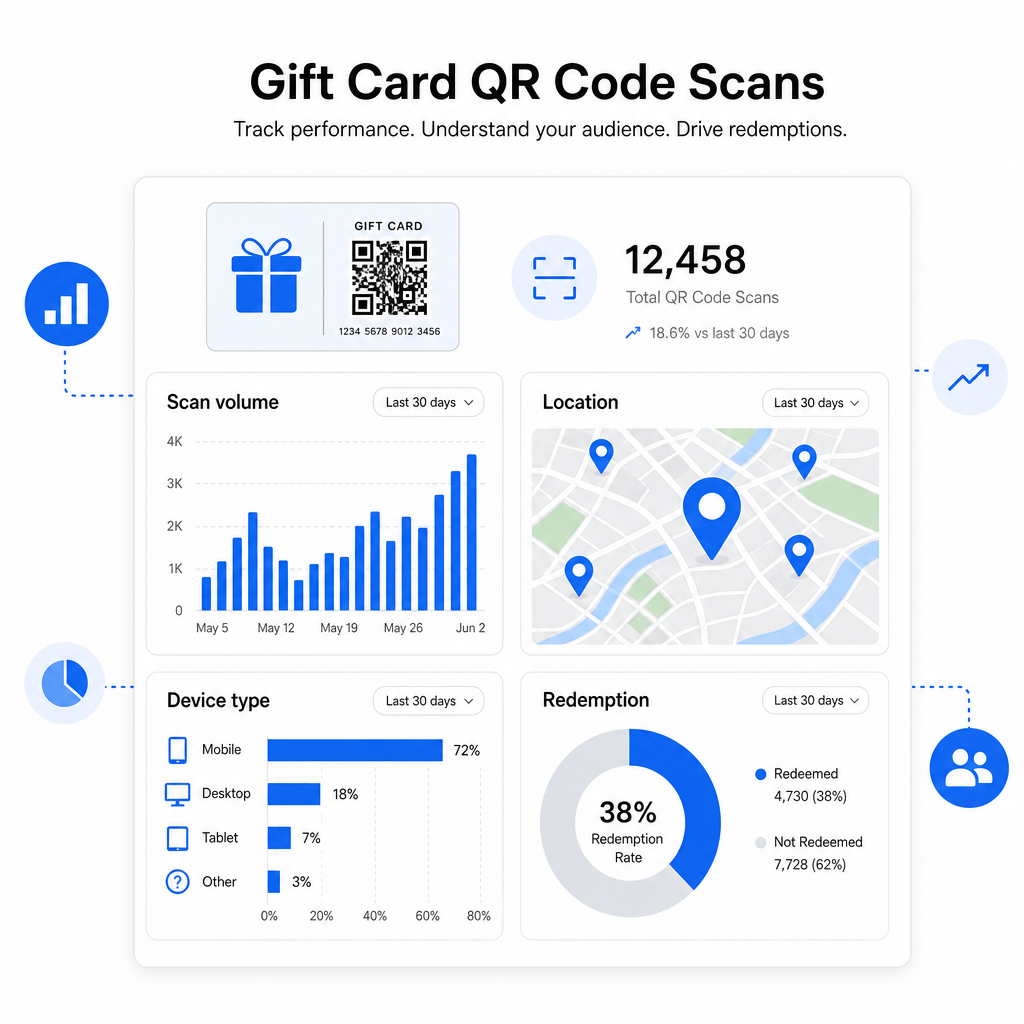
- Những thiết kế thẻ hoặc các lô khuyến mãi nào đang được quét nhiều nhất
- Liệu khách hàng có quét nhưng không hoàn tất việc đổi quà, cho thấy một vấn đề về trang đích
- Phân bố địa lý của các lượt đổi quà, hữu ích cho các nhà bán lẻ đa địa điểm
- Thời gian đổi quà cao điểm, có thể thông báo thời gian khuyến mãi trong tương lai
Dữ liệu này đặc biệt có giá trị cho các doanh nghiệp bán lẻ đang chạy các chiến dịch thẻ quà tặng xung quanh các ngày lễ hoặc sự kiện theo mùa. Để biết thêm về cách mã QR hỗ trợ thanh toán bán lẻ và các chiến lược tương tác, xem Mã QR cho bán lẻ và cách mã QR đơn giản hóa thanh toán bán lẻ.
Xem những chiến dịch thẻ quà tặng nào đang thúc đẩy lượt đổi quà Theo dõi số lượng quét, loại thiết bị và vị trí cho mỗi mã QR trên thẻ quà tặng của bạn. Bắt đầu với Trình tạo mã QR Pageloot và truy cập bảng điều khiển phân tích của bạn ngay từ ngày đầu tiên.
Các cân nhắc pháp lý đối với thẻ quà tặng tại Hoa Kỳ.
Nếu bạn phát hành thẻ quà tặng tại Hoa Kỳ, luật liên bang quy định cách chúng hoạt động. Theo Đạo luật CARD và Quy định E (12 C.F.R. § 1005.20), các thẻ quà tặng được bảo hiểm – bao gồm thẻ quà tặng cửa hàng và thẻ trả trước sử dụng chung – không thể hết hạn trong vòng chưa đầy năm năm kể từ ngày phát hành, và phí không hoạt động chỉ có thể được tính sau 12 tháng liên tiếp không có hoạt động, với không quá một khoản phí như vậy mỗi tháng. Tất cả các khoản phí và điều khoản hết hạn phải được tiết lộ rõ ràng cho khách hàng.
Việc thêm mã QR vào thẻ quà tặng của bạn không làm thay đổi các nghĩa vụ này, nhưng nó cung cấp cho bạn một công cụ thực tế để truyền đạt chúng rõ ràng hơn. Trang đích mã QR của bạn có thể hiển thị số dư còn lại, ngày hết hạn, các khoản phí áp dụng và các điều khoản đầy đủ ở định dạng dễ đọc hơn nhiều so với chữ in nhỏ trên thẻ vật lý.
Lưu ý rằng một số sản phẩm trả trước được miễn các quy tắc liên bang này – bao gồm thẻ có thể nạp lại không được tiếp thị là thẻ quà tặng và thẻ thưởng khuyến mãi – nhưng luật tiểu bang có thể áp đặt các yêu cầu bổ sung. Luôn xem xét cả quy tắc liên bang và quy tắc tiểu bang áp dụng trước khi ra mắt chương trình thẻ quà tặng.
Danh sách kiểm tra thiết kế trước khi bạn in hoặc gửi
Trước khi hoàn thiện mã QR thẻ quà tặng của bạn, hãy thực hiện các kiểm tra sau:
- Kích thước: Ít nhất 2 × 2 cm cho thẻ vật lý; có thể mở rộng cho hiển thị email hoặc ví
- Vùng yên tĩnh: Tối thiểu bốn mô-đun không gian trống ở cả bốn cạnh
- Độ tương phản: Nền tối trên nền sáng, tỷ lệ ít nhất 4:1
- Điểm đến: Kiểm tra liên kết trên nhiều thiết bị và xác nhận nó tải đúng trên thiết bị di động
- Kêu gọi hành động: Bao gồm một hướng dẫn ngắn bên cạnh mã giải thích việc quét làm gì
- Động so với tĩnh: Sử dụng mã động nếu điểm đến có thể thay đổi hoặc nếu bạn muốn phân tích lượt quét
- Sửa lỗi: Sử dụng cấp độ Q hoặc H nếu thêm logo vào mã QR, để duy trì khả năng quét
Để có hướng dẫn đầy đủ về các tiêu chuẩn thiết kế mã QR, xem các phương pháp hay nhất để đọc mã QR.
Mã QR biến một thẻ quà tặng thụ động thành một điểm chạm khách hàng tích cực. Khi được thiết kế đúng cách và liên kết với trải nghiệm đổi quà được xây dựng tốt, chúng giảm ma sát, tăng tỷ lệ đổi quà và cung cấp cho bạn dữ liệu có thể đo lường về cách chương trình thẻ quà tặng của bạn thực sự hoạt động. Bắt đầu với một mã động để bạn giữ quyền kiểm soát điểm đến, và sử dụng phân tích lượt quét của bạn để tiếp tục cải thiện trải nghiệm theo thời gian.
Tạo Mã QR thẻ quà tặng của bạn ngay hôm nay Xây dựng mã QR có thương hiệu, có thể theo dõi cho chương trình thẻ quà tặng của bạn trong vài phút. Hãy thử Trình tạo mã QR Pageloot miễn phí trong 14 ngày – không yêu cầu thẻ tín dụng.
Câu hỏi thường gặp
Nếu bạn sử dụng một mã QR động, bạn có thể cập nhật liên kết đích bất cứ lúc nào mà không cần thay đổi chính mã đó. Điều này có nghĩa là bạn có thể in mã QR một lần và chuyển hướng nó đến một trang thanh toán mới, ưu đãi theo mùa hoặc cổng thông tin đã cập nhật sau này. Tuy nhiên, nếu bạn cần thay đổi thiết kế vật lý của thẻ, bạn sẽ cần in lại.
Điểm đến hiệu quả nhất là một trang được tối ưu hóa cho thiết bị di động nơi khách hàng có thể hoàn tất việc đổi quà, kiểm tra số dư hoặc thực hiện thanh toán. Các tùy chọn bao gồm trang thanh toán được tải sẵn giá trị của thẻ, liên kết thanh toán PayPal hoặc Stripe, hoặc trang đích phiếu giảm giá với các ưu đãi hiện tại. Điều quan trọng là trang tải nhanh trên thiết bị di động và làm cho bước tiếp theo trở nên rõ ràng.
Sử dụng một nền tảng mã QR có tích hợp phân tích, chẳng hạn như Pageloot. Mỗi lần quét được ghi lại với thời gian, loại thiết bị và vị trí, để bạn có thể thấy có bao nhiêu thẻ đang được quét, khi hoạt động đổi thưởng đạt đỉnh, và liệu khách hàng có bỏ cuộc trước khi hoàn tất việc đổi thưởng hay không. Dữ liệu này giúp bạn xác định và khắc phục các điểm yếu trong quy trình đổi thưởng của mình.