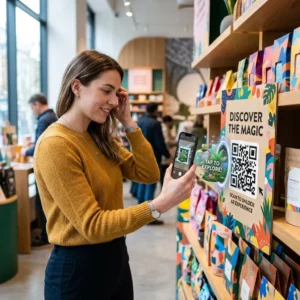
Θέλετε να κάνετε τις δωροκάρτες σας πιο εύκολες στην εξαργύρωση και πιο δύσκολες να αγνοηθούν; Μια κακοσχεδιασμένη διαδικασία εξαργύρωσης απογοητεύει τους πελάτες και οδηγεί σε μη εξαργυρωμένα υπόλοιπα που παραμένουν αδρανή. Αυτός ο οδηγός εξηγεί πώς να προσθέσετε κωδικούς QR σε φυσικές και ψηφιακές δωροκάρτες, τι ξεκλειδώνουν για την επιχείρησή σας και πώς να τους ρυθμίσετε σωστά.
Γιατί οι κωδικοί QR ανήκουν στις δωροκάρτες
Οι δωροκάρτες αποτελούν μια σημαντική κατηγορία αγορών. Πρόσφατα δεδομένα έρευνας δείχνουν ότι το 76% των καταναλωτών των ΗΠΑ αγόρασαν μια δωροκάρτα τον τελευταίο χρόνο, με το 40% αυτών των αγορών να είναι ψηφιακές. Ωστόσο, η συμπεριφορά εξαργύρωσης ποικίλλει ευρέως – οι καταναλωτές ξοδεύουν τις ψηφιακές δωροκάρτες κατά μέσο όρο σε 16,8 ημέρες, σε σύγκριση με 35,3 ημέρες για τις φυσικές κάρτες. Αυτό το κενό αντιπροσωπεύει πραγματικά έσοδα που παραμένουν αδιάθετα.
Ένας κωδικός QR σε μια δωροκάρτα αφαιρεί την τριβή από τη διαδικασία εξαργύρωσης. Αντί να ζητάτε από έναν πελάτη να πληκτρολογήσει έναν μακρύ αριθμό κάρτας ή να περιηγηθεί σε μια διαδικασία πληρωμής πολλαπλών βημάτων, μια απλή σάρωση τον οδηγεί απευθείας σε μια σελίδα πληρωμής, αναζήτηση υπολοίπου ή ηλεκτρονικό κατάστημα. Αυτή η μείωση της προσπάθειας μεταφράζεται απευθείας σε ταχύτερες εξαργυρώσεις και λιγότερα εγκαταλελειμμένα υπόλοιπα.
Πέρα από την ευκολία, οι κωδικοί QR σας δίνουν κάτι που οι παραδοσιακές δωροκάρτες δεν μπορούν: δεδομένα. Μπορείτε να παρακολουθείτε πότε και πού σαρώνονται οι κάρτες, ποια σχέδια καρτών αποδίδουν καλύτερα και αν οι πελάτες ολοκληρώνουν την εξαργύρωση μετά τη σάρωση.
Φυσικές δωροκάρτες: Προσθήκη κωδικού QR που λειτουργεί
Μια φυσική δωροκάρτα έχει περιορισμένο χώρο, οπότε κάθε απόφαση σχεδιασμού έχει σημασία. Η προσθήκη ενός κωδικού QR είναι απλή, αλλά ορισμένα τεχνικά πρότυπα καθορίζουν αν όντως σαρώνεται αξιόπιστα στον πραγματικό κόσμο.
Ελάχιστο μέγεθος και ήσυχη ζώνη
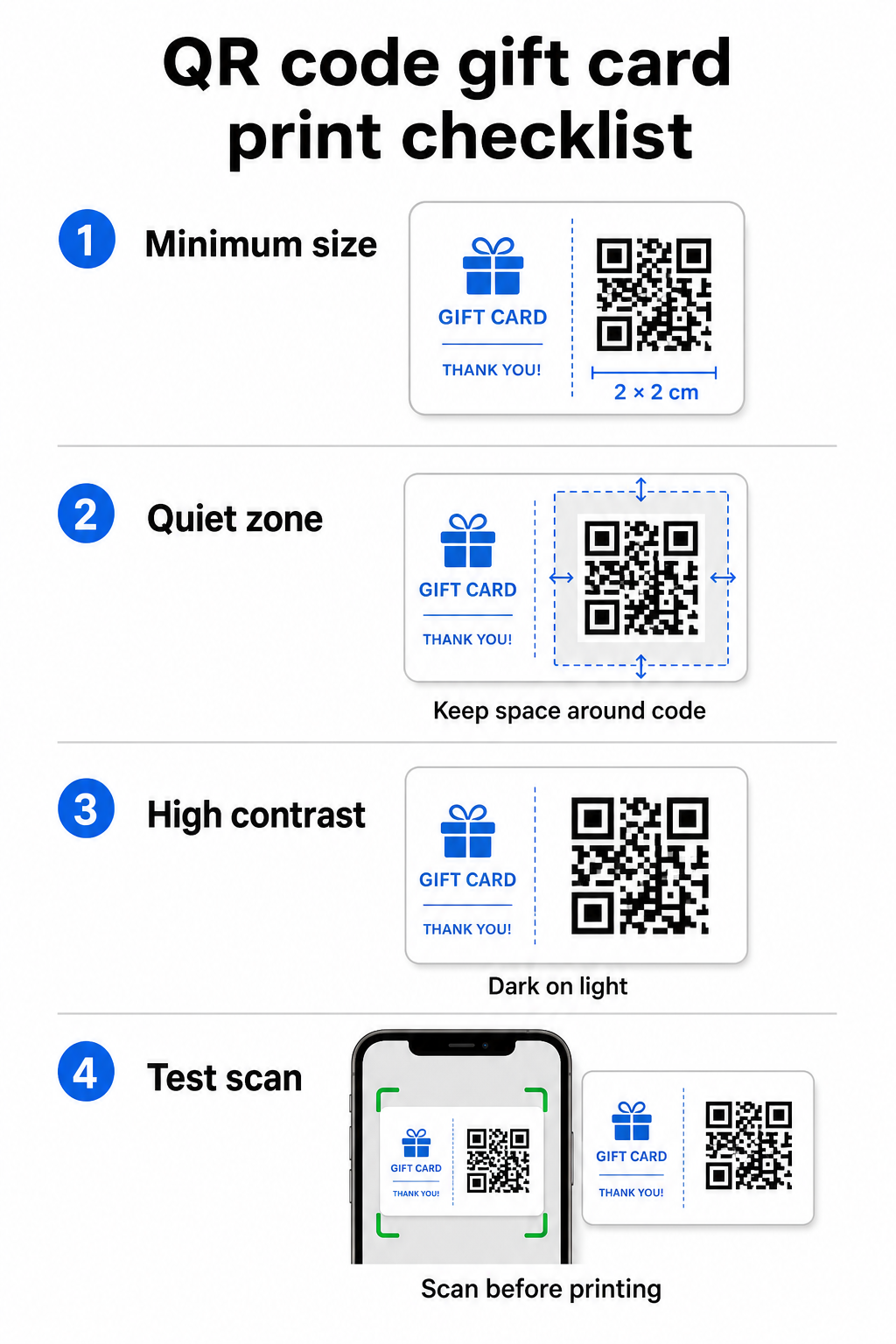
Για αξιόπιστη σάρωση σε έντυπα υλικά, ο κωδικός QR σας πρέπει να είναι τουλάχιστον 2 × 2 cm. Γύρω από τον ίδιο τον κωδικό, αφήστε ένα κενό περιθώριο – που ονομάζεται ήσυχη ζώνη – τουλάχιστον τεσσάρων μονάδων σε όλες τις πλευρές. Εάν κάθε μονάδα στον κωδικό QR σας έχει πλάτος 2 mm, αυτό σημαίνει ένα περιθώριο 8 mm γύρω-γύρω. Η συσσώρευση κειμένου ή στοιχείων σχεδιασμού σε αυτή τη ζώνη είναι ένας από τους πιο συνηθισμένους λόγους που οι κωδικοί αποτυγχάνουν να σαρωθούν.
Απαιτήσεις αντίθεσης
Χρησιμοποιήστε ένα σκούρο χρώμα προσκηνίου σε ανοιχτόχρωμο φόντο. Η ελάχιστη συνιστώμενη αναλογία αντίθεσης είναι 4:1, αν και το μαύρο σε λευκό (21:1) παραμένει ο πιο αξιόπιστος συνδυασμός. Αποφύγετε τα ανεστραμμένα χρωματικά σχήματα (ανοιχτόχρωμο μοτίβο σε σκούρο φόντο), τις διαβαθμίσεις και τις σκιές – όλα αυτά δημιουργούν ασυνεπή αντίθεση που μπερδεύει τους σαρωτές κάμερας. Για λεπτομερή καθοδήγηση, δείτε βέλτιστες πρακτικές αντίθεσης χρωμάτων κωδικών QR.
Τοποθέτηση στην κάρτα
Τοποθετήστε τον κωδικό QR στο πίσω μέρος της κάρτας, μακριά από τη μαγνητική ταινία και την περιοχή του PIN με ξυστό. Το μπροστινό μέρος της κάρτας είναι για την αναγνώριση της επωνυμίας. το πίσω μέρος είναι εκεί όπου ανήκουν λειτουργικά στοιχεία όπως αριθμοί καρτών και κωδικοί QR. Συμπεριλάβετε μια σύντομη παρότρυνση για δράση δίπλα στον κωδικό – όπως “Σαρώστε για να ελέγξετε το υπόλοιπό σας” ή “Σαρώστε για να εξαργυρώσετε online” – ώστε οι πελάτες να κατανοούν τι συμβαίνει όταν σαρώνουν.
Χρησιμοποιήστε Δυναμικούς Κωδικούς QR για Ευελιξία
Εάν εκτυπώνετε φυσικές κάρτες χύμα, ένας στατικός κωδικός QR σας δεσμεύει σε μια ενιαία διεύθυνση URL προορισμού. Ένας δυναμικός κωδικός QR σας επιτρέπει να ενημερώνετε τον προορισμό ανά πάσα στιγμή χωρίς να επανεκτυπώνετε την κάρτα. Αυτό έχει σημασία όταν επανασχεδιάζετε την πύλη εξαργύρωσης, εκτελείτε μια εποχική προσφορά ή μεταβαίνετε σε ένα νέο σύστημα πληρωμών. Μπορείτε να δημιουργήσετε και να διαχειριστείτε δυναμικούς κωδικούς QR μέσω τη γεννήτρια κωδικών QR της Pageloot, το οποίο σας παρέχει επίσης αναλύσεις σάρωσης από έναν κεντρικό πίνακα ελέγχου.
Διατηρήστε τις καμπάνιες δωροκαρτών σας ευέλικτες Χρειάζεται να ενημερώσετε πού οδηγούν οι κωδικοί QR των δωροκαρτών σας χωρίς να επανεκτυπώσετε χιλιάδες κάρτες; Χρησιμοποιήστε το Γεννήτρια Κωδικών QR Συνδέσμων για να δημιουργήσετε δυναμικούς κωδικούς που μπορείτε να ανακατευθύνετε ανά πάσα στιγμή, με πλήρη παρακολούθηση σάρωσης.
Ψηφιακές δωροκάρτες: Κωδικοί QR σε μορφές email και πορτοφολιού
Μια ψηφιακή δωροκάρτα – που παραδίδεται μέσω email, SMS ή αποθηκεύεται σε ένα κινητό πορτοφόλι – μπορεί να φέρει έναν κωδικό QR εξίσου αποτελεσματικά με μια φυσική. Σε αυτό το πλαίσιο, ο κωδικός QR λειτουργεί ως ο ίδιος ο μηχανισμός εξαργύρωσης.
Όταν ένας πελάτης λαμβάνει μια ψηφιακή δωροκάρτα, ο κωδικός QR που είναι ενσωματωμένος στο email ή στο αρχείο εικόνας μπορεί να συνδεθεί απευθείας με μια σελίδα πληρωμής προφορτωμένη με την αξία της κάρτας, μια σελίδα προορισμού κουπονιού με οδηγίες εξαργύρωσης ή έναν επεξεργαστή πληρωμών όπως το PayPal ή το Stripe. Ο πελάτης σαρώνει τον κωδικό κατά την πληρωμή – στο κατάστημα ή online – και η αξία εφαρμόζεται αυτόματα.
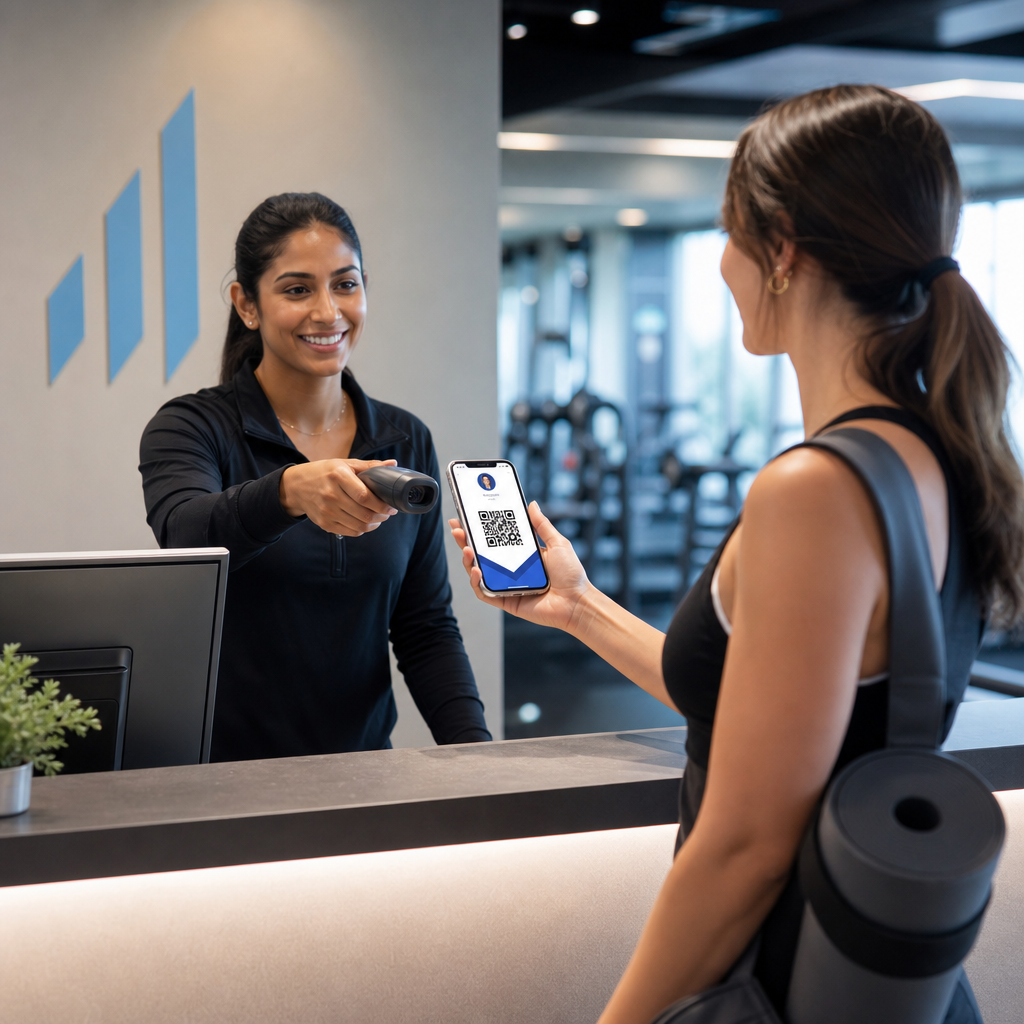
Αυτή η προσέγγιση λειτουργεί ιδιαίτερα καλά για επιχειρήσεις που λειτουργούν τόσο φυσικά όσο και ηλεκτρονικά καταστήματα. Ένας πελάτης που λαμβάνει μια ψηφιακή δωροκάρτα μέσω email μπορεί να μπει στο κατάστημά σας, να ανοίξει το email και να αφήσει τον ταμία να σαρώσει τον κωδικό QR από την οθόνη του τηλεφώνου του – χωρίς να απαιτείται αριθμός κάρτας.
Ειδικά για τη ροή πληρωμών, το Pageloot's Δημιουργία QR code για PayPal σας επιτρέπει να δημιουργήσετε έναν κωδικό που συνδέεται απευθείας με μια σελίδα πληρωμής, καθιστώντας εύκολη την ενσωμάτωση μιας εμπειρίας εξαργύρωσης με σάρωση για πληρωμή στον σχεδιασμό της ψηφιακής σας δωροκάρτας.
Τι να συνδέσετε τον κωδικό QR της δωροκάρτας σας
Ο προορισμός που επιλέγετε καθορίζει την εμπειρία του πελάτη μετά τη σάρωση. Ακολουθούν οι πιο κοινές και αποτελεσματικές επιλογές:
| Προορισμός | Καλύτερη περίπτωση χρήσης |
|---|---|
| Ηλεκτρονικό κατάστημα ή σελίδα ολοκλήρωσης αγοράς | Πλήρης εξαργύρωση ηλεκτρονικού εμπορίου· αξία κάρτας που εφαρμόζεται στην ολοκλήρωση αγοράς |
| Σελίδα αναζήτησης υπολοίπου | Επιτρέπει στους παραλήπτες να ελέγχουν το υπόλοιπο ποσό πριν από την αγορά |
| Σελίδα προορισμού κουπονιού ή προσφοράς | Συνδυασμένες προσφορές παράλληλα με την αξία της δωροκάρτας |
| Σύνδεσμος πληρωμής (PayPal, Stripe) | Άμεση πληρωμή σε φυσικό σημείο πώλησης |
| Σελίδα καλωσορίσματος επωνυμίας | Ενσωμάτωση νέων πελατών· συνδέεται με την εγγραφή σε πρόγραμμα επιβράβευσης |
Εάν θέλετε να εκτελέσετε προσφορές παράλληλα με το πρόγραμμα δωροκαρτών σας – προσφέροντας επιπλέον εκπτώσεις στους παραλήπτες που σαρώνουν εντός καθορισμένου χρονικού πλαισίου, για παράδειγμα – της Pageloot Δημιουργία QR code για κουπόνια σας επιτρέπει να δημιουργήσετε μια σελίδα προορισμού που εμφανίζει πολλαπλές προσφορές, παρακολουθεί ποιες τοποθεσίες συλλέγουν τις περισσότερες εξαργυρώσεις και ενημερώνει αυτές τις προσφορές χωρίς να δημιουργεί νέο κωδικό.
Για μια ευρύτερη ματιά στο πώς οι προσφορές που βασίζονται σε QR συγκρίνονται με τις παραδοσιακές μεθόδους έκπτωσης, δείτε Κωδικοί QR έναντι παραδοσιακών κουπονιών: ποιο λειτουργεί καλύτερα.
Παρακολούθηση Εξαργυρώσεων και Απόδοσης Καμπάνιας
Ένα από τα σαφέστερα πλεονεκτήματα της χρήσης κωδικών QR σε δωροκάρτες – έναντι μόνο των παραδοσιακών αριθμών καρτών – είναι το επίπεδο αναλυτικών στοιχείων που προσθέτουν. Με μια πλατφόρμα όπως η Pageloot, κάθε σάρωση καταγράφεται με χρονική σήμανση, τύπο συσκευής και δεδομένα τοποθεσίας. Αυτό σας λέει:
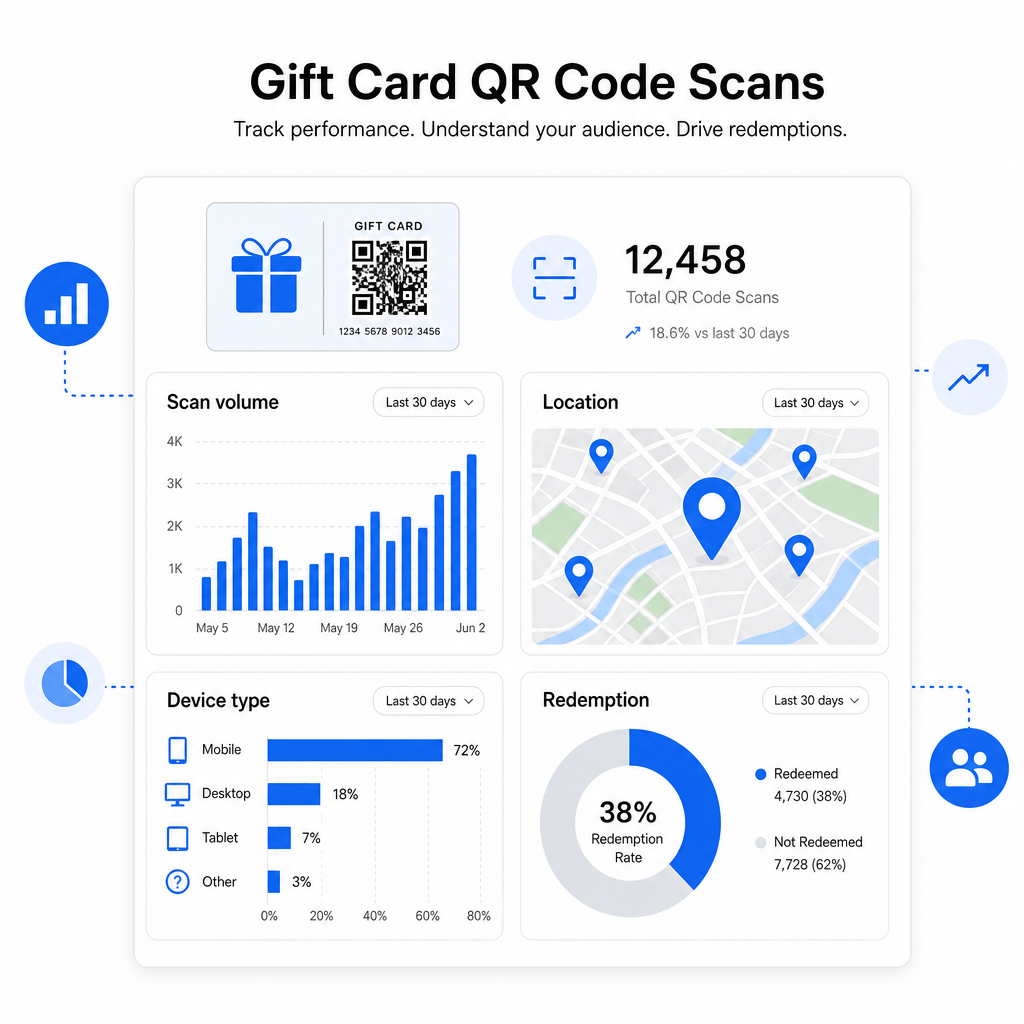
- Ποιοι σχεδιασμοί καρτών ή παρτίδες προσφορών σαρώνoνται περισσότερο
- Εάν οι πελάτες σαρώνουν αλλά δεν ολοκληρώνουν την εξαργύρωση, υποδεικνύοντας πρόβλημα στη σελίδα προορισμού
- Γεωγραφική κατανομή των εξαργυρώσεων, χρήσιμη για λιανοπωλητές με πολλές τοποθεσίες
- Ώρες αιχμής εξαργύρωσης, οι οποίες μπορούν να ενημερώσουν τον μελλοντικό χρονισμό των προσφορών
Αυτά τα δεδομένα είναι ιδιαίτερα πολύτιμα για επιχειρήσεις λιανικής που εκτελούν καμπάνιες δωροκαρτών γύρω από διακοπές ή εποχιακές εκδηλώσεις. Για περισσότερα σχετικά με το πώς οι κωδικοί QR υποστηρίζουν τις στρατηγικές πληρωμών και δέσμευσης λιανικής, δείτε Κωδικοί QR για λιανική πώληση και πώς οι κωδικοί QR απλοποιούν τις πληρωμές στο λιανικό εμπόριο.
Δείτε Ποιες Καμπάνιες Δωροκαρτών Οδηγούν σε Εξαργυρώσεις Παρακολουθήστε τον όγκο σάρωσης, τους τύπους συσκευών και τις τοποθεσίες για κάθε κωδικό QR στις δωροκάρτες σας. Ξεκινήστε με το Δημιουργία κώδικα Pageloot QR και αποκτήστε πρόσβαση στον πίνακα ελέγχου αναλυτικών στοιχείων σας από την πρώτη μέρα.
Νομικές Θεωρήσεις για Δωροκάρτες στις Η.Π.Α.
Εάν εκδίδετε δωροκάρτες στις Ηνωμένες Πολιτείες, η ομοσπονδιακή νομοθεσία διέπει τον τρόπο λειτουργίας τους. Σύμφωνα με τον Νόμο CARD και τον Κανονισμό Ε (12 C.F.R. § 1005.20), οι καλυπτόμενες δωροκάρτες – συμπεριλαμβανομένων των δωροκαρτών καταστημάτων και των προπληρωμένων καρτών γενικής χρήσης – δεν μπορούν να λήξουν σε λιγότερο από πέντε χρόνια από την ημερομηνία έκδοσης, και τα τέλη αδράνειας μπορούν να χρεωθούν μόνο μετά από 12 συνεχόμενους μήνες χωρίς δραστηριότητα, με όχι περισσότερο από ένα τέτοιο τέλος ανά μήνα. Όλα τα τέλη και οι όροι λήξης πρέπει να γνωστοποιούνται σαφώς στον πελάτη.
Η προσθήκη ενός κωδικού QR στη δωροκάρτα σας δεν αλλάζει αυτές τις υποχρεώσεις, αλλά σας δίνει ένα πρακτικό εργαλείο για να τις επικοινωνήσετε πιο σαφώς. Η σελίδα προορισμού του κωδικού QR σας μπορεί να εμφανίζει το υπόλοιπο, την ημερομηνία λήξης, τα ισχύοντα τέλη και τους πλήρεις όρους σε μια μορφή που είναι πολύ πιο ευανάγνωστη από τα ψιλά γράμματα σε μια φυσική κάρτα.
Σημειώστε ότι ορισμένα προπληρωμένα προϊόντα εξαιρούνται από αυτούς τους ομοσπονδιακούς κανόνες – συμπεριλαμβανομένων των επαναφορτιζόμενων καρτών που δεν διατίθενται στην αγορά ως δωροκάρτες και των καρτών επιβράβευσης προσφορών – αλλά οι κρατικοί νόμοι ενδέχεται να επιβάλλουν πρόσθετες απαιτήσεις. Πάντα να ελέγχετε τόσο τους ομοσπονδιακούς όσο και τους ισχύοντες κρατικούς κανόνες πριν ξεκινήσετε ένα πρόγραμμα δωροκαρτών.
Λίστα Ελέγχου Σχεδιασμού Πριν Εκτυπώσετε ή Στείλετε
Πριν οριστικοποιήσετε τους κωδικούς QR της δωροκάρτας σας, ελέγξτε τα εξής:
- Μέγεθος: Τουλάχιστον 2 × 2 cm για φυσικές κάρτες· επεκτάσιμο για εμφάνιση σε email ή πορτοφόλι
- Ήσυχη ζώνη: Ελάχιστο τέσσερα modules κενού χώρου και στις τέσσερις πλευρές
- Αντίθεση: Σκούρο προσκήνιο σε ανοιχτό φόντο, αναλογία τουλάχιστον 4:1
- Προορισμός: Δοκιμάστε τον σύνδεσμο σε πολλές συσκευές και επιβεβαιώστε ότι φορτώνει σωστά σε κινητό
- Παρότρυνση για δράση: Συμπεριλάβετε μια σύντομη οδηγία δίπλα στον κωδικό εξηγώντας τι κάνει η σάρωση
- Δυναμικός έναντι στατικού: Χρησιμοποιήστε έναν δυναμικό κωδικό εάν ο προορισμός μπορεί να αλλάξει ή εάν θέλετε αναλυτικά στοιχεία σάρωσης
- Διόρθωση σφαλμάτων: Χρησιμοποιήστε επίπεδο Q ή H εάν προσθέτετε ένα λογότυπο στον κωδικό QR, για να διατηρήσετε τη δυνατότητα σάρωσης
Για μια πλήρη περιγραφή των προτύπων σχεδιασμού κωδικών QR, δείτε βέλτιστες πρακτικές για την αναγνωσιμότητα των κωδικών QR.
Οι κωδικοί QR μετατρέπουν μια παθητική δωροκάρτα σε ένα ενεργό σημείο επαφής με τον πελάτη. Όταν σχεδιάζονται σωστά και συνδέονται με μια καλά δομημένη εμπειρία εξαργύρωσης, μειώνουν την τριβή, αυξάνουν τα ποσοστά εξαργύρωσης και σας δίνουν μετρήσιμα δεδομένα για το πώς αποδίδει πραγματικά το πρόγραμμα δωροκαρτών σας. Ξεκινήστε με έναν δυναμικό κωδικό ώστε να διατηρείτε τον έλεγχο του προορισμού, και χρησιμοποιήστε τα αναλυτικά στοιχεία σάρωσης για να συνεχίσετε να βελτιώνετε την εμπειρία με την πάροδο του χρόνου.
Δημιουργήστε τον Κωδικό QR της Δωροκάρτας σας Σήμερα Δημιουργήστε έναν επώνυμο, ανιχνεύσιμο κωδικό QR για το πρόγραμμα δωροκαρτών σας σε λίγα λεπτά. Δοκιμάστε το Δημιουργία κώδικα Pageloot QR δωρεάν για 14 ημέρες – δεν απαιτείται πιστωτική κάρτα.
Συχνές ερωτήσεις
Εάν χρησιμοποιείτε έναν δυναμικό κωδικό QR, μπορείτε να ενημερώσετε τον σύνδεσμο προορισμού ανά πάσα στιγμή χωρίς να αλλάξετε τον ίδιο τον κωδικό. Αυτό σημαίνει ότι μπορείτε να εκτυπώσετε τον κωδικό QR μία φορά και να τον ανακατευθύνετε σε μια νέα σελίδα πληρωμής, εποχική προσφορά ή ενημερωμένη πύλη αργότερα. Ωστόσο, εάν χρειαστεί να αλλάξετε τη φυσική σχεδίαση της κάρτας, θα χρειαστεί να επανεκτυπώσετε.
Ο πιο αποτελεσματικός προορισμός είναι μια σελίδα βελτιστοποιημένη για κινητά, όπου ο πελάτης μπορεί να ολοκληρώσει μια εξαργύρωση, να ελέγξει το υπόλοιπό του ή να πραγματοποιήσει μια πληρωμή. Οι επιλογές περιλαμβάνουν μια σελίδα ολοκλήρωσης αγοράς προφορτωμένη με την αξία της κάρτας, έναν σύνδεσμο πληρωμής PayPal ή Stripe, ή μια σελίδα προορισμού κουπονιών με τρέχουσες προσφορές. Το κλειδί είναι ότι η σελίδα φορτώνει γρήγορα σε κινητά και καθιστά το επόμενο βήμα προφανές.
Χρησιμοποιήστε μια πλατφόρμα κωδικών QR που περιλαμβάνει ενσωματωμένα αναλυτικά στοιχεία, όπως το Pageloot. Κάθε σάρωση καταγράφεται με την ώρα, τον τύπο συσκευής και την τοποθεσία, ώστε να μπορείτε να δείτε πόσες κάρτες σαρώνονται, πότε κορυφώνεται η δραστηριότητα εξαργύρωσης, και αν οι πελάτες εγκαταλείπουν πριν ολοκληρώσουν την εξαργύρωση. Αυτά τα δεδομένα σάς βοηθούν να εντοπίσετε και να διορθώσετε αδύναμα σημεία στη ροή εξαργύρωσής σας.