Szeretné, ha ajándékkártyái könnyebben beválthatók és nehezebben figyelmen kívül hagyhatók lennének? Egy rosszul megtervezett beváltási folyamat frusztrálja az ügyfeleket, és beváltatlan egyenlegek tétlenkedéséhez vezet. Ez az útmutató elmagyarázza, hogyan adhat hozzá QR-kódokat fizikai és digitális ajándékkártyákhoz, mit nyitnak meg vállalkozása számára, és hogyan állíthatja be őket helyesen.
Miért van helye a QR-kódoknak az ajándékkártyákon
Az ajándékkártyák jelentős vásárlási kategóriát képviselnek. A legfrissebb felmérések adatai szerint az amerikai fogyasztók 76%-a vásárolt ajándékkártyát az elmúlt évben, és ezen vásárlások 40%-a digitális volt. A beváltási viselkedés azonban nagymértékben eltér – a fogyasztók átlagosan 16,8 nap alatt költik el a digitális ajándékkártyákat, szemben a fizikai kártyák 35,3 napjával. Ez a különbség valós bevételt jelent, amely a polcon ül.
Egy ajándékkártyán lévő QR-kód megszünteti a súrlódást a beváltási folyamatból. Ahelyett, hogy egy ügyfelet arra kérnénk, hogy írjon be egy hosszú kártyaszámot, vagy navigáljon egy többlépcsős fizetési folyamaton, egyetlen szkennelés közvetlenül egy fizetési oldalra, egyenleglekérdezésre vagy online áruházba viszi őket. Az erőfeszítés csökkenése közvetlenül gyorsabb beváltásokhoz és kevesebb elhagyott egyenleghez vezet.
A kényelem mellett a QR-kódok olyat adnak, amit a hagyományos ajándékkártyák nem tudnak: adatokat. Nyomon követheti, hogy mikor és hol szkennelik be a kártyákat, mely kártyatervek teljesítenek jobban, és hogy az ügyfelek befejezik-e a beváltást a szkennelés után.
Fizikai ajándékkártyák: Működő QR-kód hozzáadása
Egy fizikai ajándékkártya korlátozott hellyel rendelkezik, így minden tervezési döntés számít. A QR-kód hozzáadása egyszerű, de néhány technikai szabvány határozza meg, hogy az valójában megbízhatóan szkennelhető-e a valós világban.
Minimális méret és csendes zóna
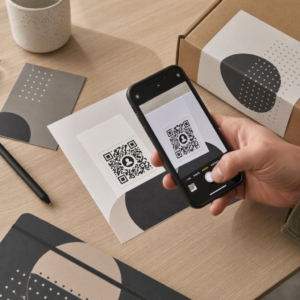
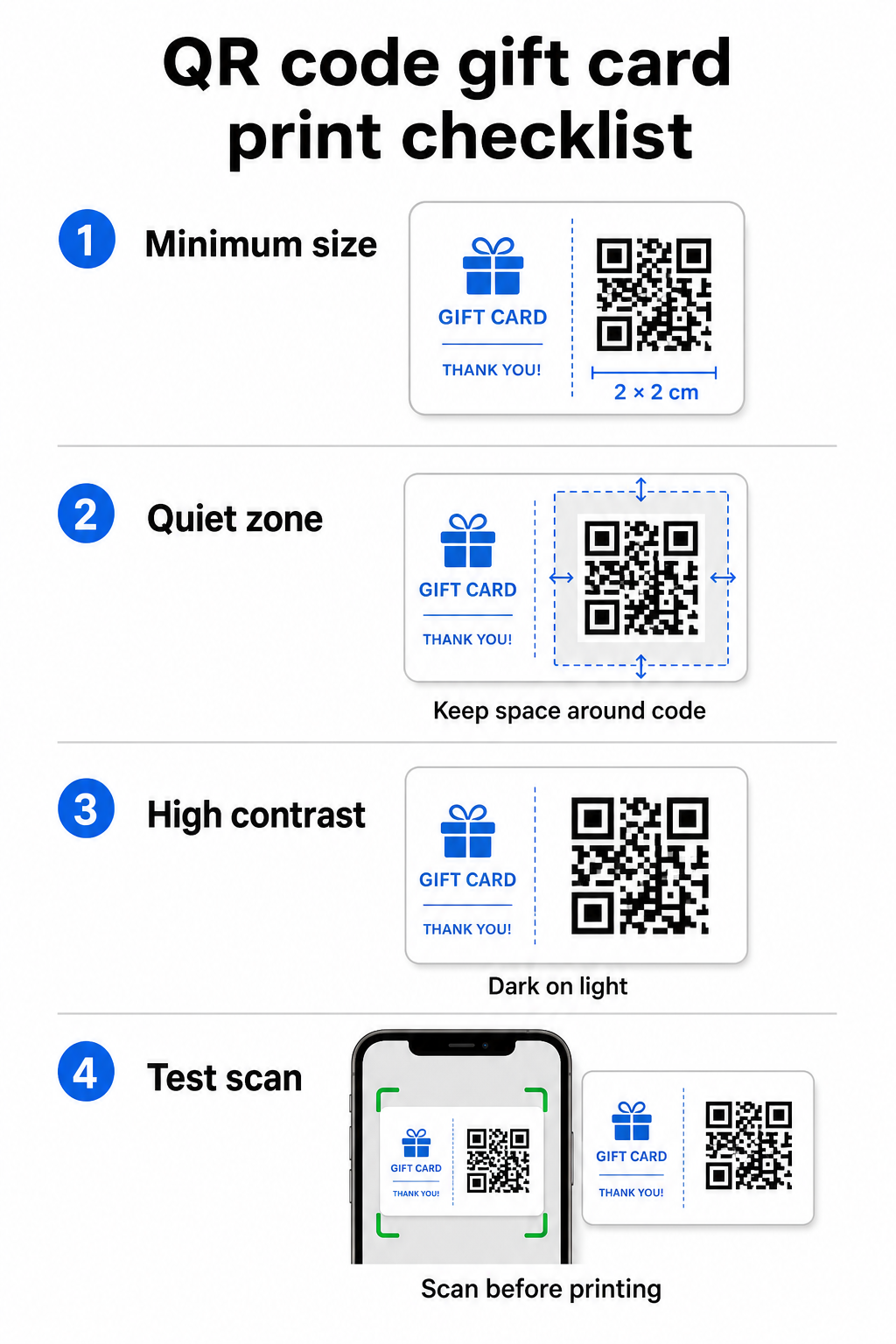
A nyomtatott anyagokon történő megbízható szkenneléshez a QR-kódnak legalább 2 × 2 cm-esnek kell lennie. Maga a kód körül hagyjon egy üres margót – az úgynevezett csendes zónára – legalább négy modulnyi szélességben minden oldalon. Ha a QR-kód minden modulja 2 mm széles, az 8 mm-es margót jelent minden oldalon. A kód zsúfolása szöveggel vagy design elemekkel ebben a zónában az egyik leggyakoribb oka annak, hogy a kódok nem szkennelhetők.
Kontrasztkövetelmények
Használjon sötét előtérszínt világos háttéren. A minimális ajánlott kontrasztarány 4:1, bár a fekete fehéren (21:1) marad a legmegbízhatóbb kombináció. Kerülje a fordított színvilágokat (világos minta sötét háttéren), a színátmeneteket és az árnyékokat – mindezek inkonzisztens kontrasztot hoznak létre, ami összezavarja a kamerás szkennereket. Részletes útmutatásért lásd QR-kód színkontrasztra vonatkozó legjobb gyakorlatokat.
Elhelyezés a kártyán
Helyezze a QR-kódot a kártya hátuljára, távol a mágnescsíktól és a lekaparható PIN-területtől. A kártya eleje a márkafelismerésre szolgál; a hátulja az, ahová a funkcionális elemek, például a kártyaszámok és a QR-kódok tartoznak. Helyezzen el egy rövid cselekvésre ösztönző felhívást a kód mellé – például “Szkennelje be az egyenleg ellenőrzéséhez” vagy “Szkennelje be az online beváltáshoz” – hogy az ügyfelek megértsék, mi történik, amikor szkennelnek.
Használjon dinamikus QR-kódokat a rugalmasság érdekében
Ha tömegesen nyomtat fizikai kártyákat, egy statikus QR-kód egyetlen cél URL-hez köti Önt. Egy dinamikus QR-kód lehetővé teszi a cél frissítését bármikor a kártya újranyomtatása nélkül. Ez akkor fontos, ha újratervezi a beváltási portálját, szezonális promóciót futtat, vagy új fizetési rendszerre tér át. Dinamikus QR-kódokat hozhat létre és kezelhet a Pageloot QR-kód generátorával, amely központosított irányítópultról szkennelési analitikát is biztosít.
Tartsa rugalmasan ajándékkártya-kampányait Frissítenie kell, hová mutatnak az ajándékkártya QR-kódjai anélkül, hogy több ezer kártyát újranyomtatna? Használja a Link QR-kód generátor dinamikus kódok létrehozásához, amelyeket bármikor átirányíthat, teljes szkennelési nyomon követéssel együtt.
Digitális ajándékkártyák: QR-kódok e-mail és pénztárca formátumokban
Egy digitális ajándékkártya – amelyet e-mailben, SMS-ben kézbesítenek, vagy mobil pénztárcában tárolnak – ugyanolyan hatékonyan hordozhat QR-kódot, mint egy fizikai. Ebben a kontextusban a QR-kód maga a beváltási mechanizmus.
Amikor egy ügyfél digitális ajándékkártyát kap, az e-mailbe vagy képfájlba ágyazott QR-kód közvetlenül egy olyan fizetési oldalra mutathat, amely előre be van töltve a kártya értékével, egy kuponos céloldalra beváltási utasításokkal, vagy egy fizetési szolgáltatóra, mint a PayPal vagy a Stripe. Az ügyfél beolvassa a kódot a fizetéskor – üzletben vagy online – és az érték automatikusan alkalmazásra kerül.
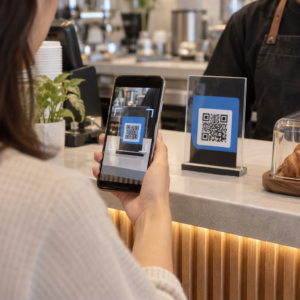
Ez a megközelítés különösen jól működik azoknál a vállalkozásoknál, amelyek fizikai és online üzleteket is üzemeltetnek. Egy ügyfél, aki e-mailben kap digitális ajándékkártyát, bemehet az üzletébe, megnyithatja az e-mailt, és hagyhatja, hogy a pénztáros beolvassa a QR-kódot a telefonja képernyőjéről – kártyaszám megadása nélkül.
Kifejezetten a fizetési folyamathoz a Pageloot PayPal pénzfogadás QR kóddal lehetővé teszi, hogy létrehozz egy kódot, amely közvetlenül egy fizetési oldalra mutat, így egyszerűvé válik egy beolvasás-fizetés beváltási élmény beépítése a digitális ajándékkártya-tervezésbe.
Mire mutasson az ajándékkártya QR-kódja?
A választott cél határozza meg az ügyfélélményt a beolvasás után. Íme a leggyakoribb és leghatékonyabb lehetőségek:
| Célállomás | Legjobb használati eset |
|---|---|
| Online áruház vagy fizetési oldal | Teljes e-kereskedelmi beváltás; kártyaérték alkalmazva a fizetéskor |
| Egyenleg lekérdező oldal | Lehetővé teszi a címzetteknek, hogy ellenőrizzék a fennmaradó értéket költés előtt |
| Kupon vagy ajánlat céloldal | Párosított promóciók az ajándékkártya értékével együtt |
| Fizetési link (PayPal, Stripe) | Közvetlen fizetés fizikai értékesítési ponton |
| Márka üdvözlő oldal | Új ügyfél bevezetése; linkek hűségprogram regisztrációhoz |
Ha promóciókat szeretnél futtatni az ajándékkártya programod mellett – például bónusz kedvezményeket kínálva azoknak a címzetteknek, akik egy meghatározott időkereten belül beolvassák – a Pageloot Kuponkód generátor QR kóddal lehetővé teszi, hogy olyan céloldalt építs, amely több ajánlatot is megjelenít, nyomon követi, mely helyszínek gyűjtik a legtöbb beváltást, és frissíti ezeket az ajánlatokat anélkül, hogy új kódot generálna.
A QR-alapú promóciók és a hagyományos kedvezményes módszerek összehasonlításának szélesebb körű áttekintéséhez lásd: QR-kódok vs. hagyományos kuponok: melyik működik jobban.
Beváltások és kampányteljesítmény nyomon követése
Az ajándékkártyákon lévő QR-kódok használatának egyik legvilágosabb előnye – a hagyományos kártyaszámokkal szemben – az általuk hozzáadott analitikai réteg. Egy Pageloot-hoz hasonló platformmal minden beolvasás naplózásra kerül időbélyeggel, eszköz típussal és helyadatokkal. Ez megmondja neked:
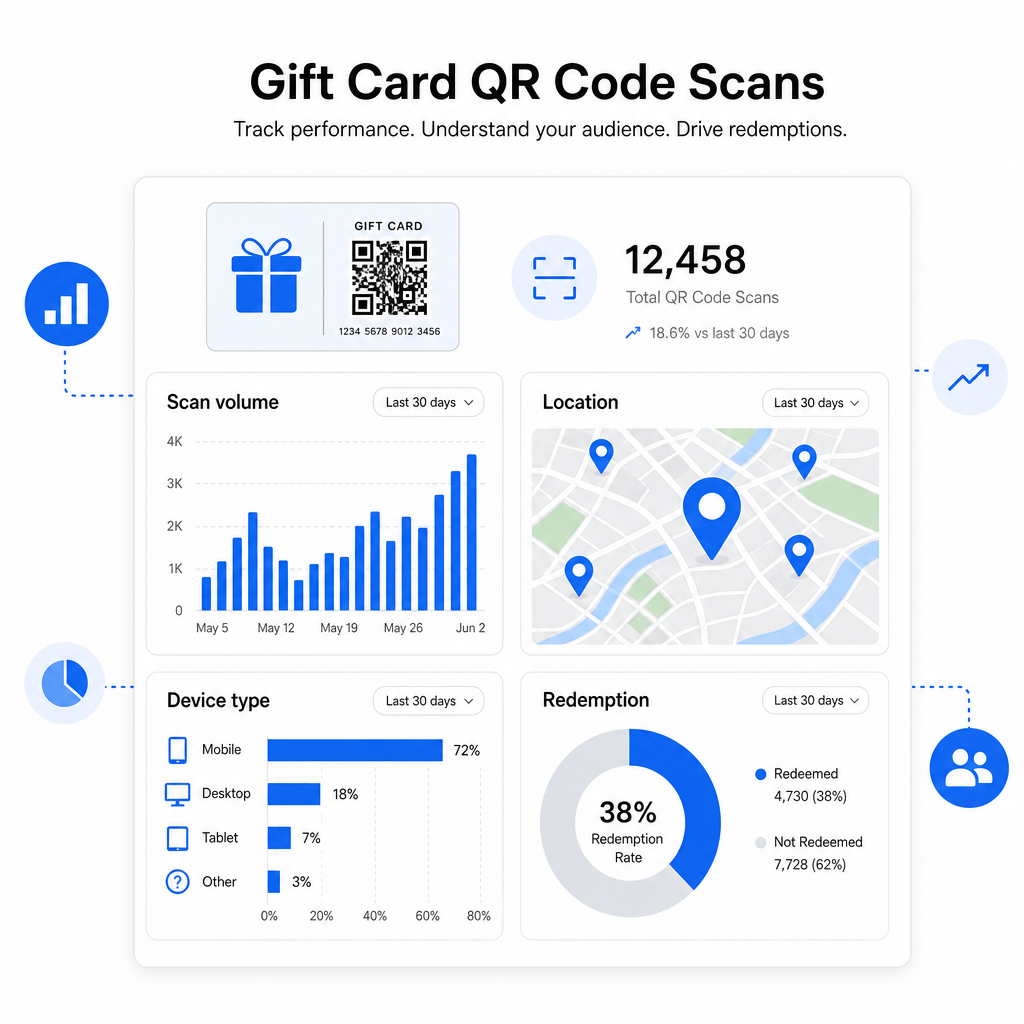
- Mely kártyatervek vagy promóciós tételek kerülnek a leggyakrabban beolvasásra
- Hogy az ügyfelek beolvassák-e, de nem fejezik be a beváltást, ami egy céloldal problémára utal
- A beváltások földrajzi eloszlása, hasznos több telephelyű kiskereskedők számára
- Csúcs beváltási idők, amelyek tájékoztathatják a jövőbeli promóciós időzítést
Ez az adat különösen értékes azoknak a kiskereskedelmi vállalkozásoknak, amelyek ajándékkártya-kampányokat futtatnak ünnepek vagy szezonális események környékén. További információkért arról, hogy a QR-kódok hogyan támogatják a kiskereskedelmi fizetési és elkötelezettségi stratégiákat, lásd: QR-kódok kiskereskedelemhez és hogyan egyszerűsítik a QR-kódok a kiskereskedelmi fizetéseket.
Lásd, mely ajándékkártya-kampányok ösztönzik a beváltásokat Kövesd nyomon a beolvasási mennyiséget, az eszköz típusokat és a helyszíneket minden QR-kódhoz az ajándékkártyáidon. Kezd el a Pageloot QR Kód Generátor és hozzáférhetsz az analitikai irányítópultodhoz az első naptól.
Jogi megfontolások az ajándékkártyákra vonatkozóan az Egyesült Államokban.
Ha ajándékkártyákat bocsátasz ki az Egyesült Államokban, a szövetségi törvény szabályozza működésüket. A CARD törvény és az E rendelet (12 C.F.R. § 1005.20) értelmében a fedezett ajándékkártyák – beleértve az üzleti ajándékkártyákat és az általános célú előre fizetett kártyákat – nem járhatnak le kevesebb mint öt év alatt a kibocsátás dátumától számítva, és az inaktivitási díjak csak 12 egymást követő hónap inaktivitás után számíthatók fel, havonta legfeljebb egy ilyen díjjal. Minden díjat és lejárati feltételt egyértelműen közölni kell az ügyféllel.
Egy QR-kód hozzáadása az ajándékkártyádhoz nem változtatja meg ezeket a kötelezettségeket, de ad egy praktikus eszközt, hogy világosabban kommunikáld őket. A QR-kód céloldalad megjelenítheti a fennmaradó egyenleget, a lejárati dátumot, az alkalmazandó díjakat és a teljes feltételeket egy olyan formátumban, amely sokkal könnyebben olvasható, mint a fizikai kártyán lévő apró betűs rész.
Megjegyzendő, hogy egyes előre fizetett termékek mentesülnek e szövetségi szabályok alól – beleértve az újratölthető kártyákat, amelyeket nem ajándékkártyaként forgalmaznak, és a promóciós jutalomkártyákat – de az állami törvények további követelményeket írhatnak elő. Mindig tekintsd át mind a szövetségi, mind az alkalmazandó állami szabályokat, mielőtt ajándékkártya-programot indítasz.
Tervezési ellenőrzőlista nyomtatás vagy küldés előtt
Mielőtt véglegesítenéd az ajándékkártya QR-kódjaidat, futtasd le ezeket az ellenőrzéseket:
- Méret: Legalább 2 × 2 cm fizikai kártyákhoz; skálázható e-mail vagy pénztárca megjelenítéshez
- Csendes zóna: Minimum négy modulnyi üres hely mind a négy oldalon
- Kontraszt: Sötét előtér világos háttéren, legalább 4:1 arány
- Cél: Teszteld a linket több eszközön, és erősítsd meg, hogy helyesen töltődik be mobilon
- Cselekvésre ösztönzés: Mellékelj egy rövid utasítást a kód mellé, amely elmagyarázza, mit tesz a beolvasás
- Dinamikus vs. statikus: Használj dinamikus kódot, ha a cél változhat, vagy ha beolvasási analitikát szeretnél
- Hibajavítás: Használj Q vagy H szintet, ha logót adsz a QR-kódhoz, a beolvashatóság fenntartásához
A QR-kód tervezési szabványok teljes áttekintéséhez lásd: a QR-kód olvashatóságára vonatkozó legjobb gyakorlatokat.
A QR-kódok a passzív ajándékkártyát aktív ügyfélkapcsolati ponttá alakítják. Ha helyesen tervezték meg és egy jól felépített beváltási élményhez kapcsolódnak, csökkentik a súrlódást, növelik a beváltási arányokat, és mérhető adatokat szolgáltatnak arról, hogy az ajándékkártya-programod valójában hogyan teljesít. Kezdj egy dinamikus kóddal, hogy megőrizd az irányítást a cél felett, és használd a beolvasási analitikádat az élmény folyamatos javításához.
Készítsd el ajándékkártya QR-kódodat még ma Építsen egy márkás, nyomon követhető QR-kódot ajándékkártya-programjához percek alatt. Próbálja ki a Pageloot QR Kód Generátor ingyenesen 14 napig – hitelkártya nem szükséges.
Gyakori kérdések
Ha Ön dinamikus QR kódot használ, bármikor frissítheti a célhivatkozást anélkül, hogy magát a kódot megváltoztatná. Ez azt jelenti, hogy a QR kódot egyszer kinyomtathatja és később átirányíthatja egy új fizetési oldalra, szezonális ajánlatra vagy frissített portálra. Azonban, ha módosítania kell a kártya fizikai kialakítását, újra kell nyomtatnia.
A leghatékonyabb célállomás egy mobilra optimalizált oldal, ahol az ügyfél befejezheti a visszaváltást, ellenőrizheti egyenlegét, vagy fizethet. Lehetőségek közé tartozik egy előre feltöltött fizetési oldal a kártya értékével, egy PayPal vagy Stripe fizetési link, vagy egy kuponos céloldal aktuális ajánlatokkal. A kulcs az, hogy az oldal gyorsan betöltődik mobilon, és egyértelművé teszi a következő lépést.
Használjon egy QR-kód platformot, amely beépített analitikát tartalmaz, például a Pageloot-ot. Minden szkennelés rögzítésre kerül az idővel, eszköz típusával és helyével, így láthatja, hány kártyát szkennelnek be, mikor tetőzik a beváltási tevékenység, és hogy az ügyfelek lemorzsolódnak-e a beváltás befejezése előtt. Ez az adat segít Önnek azonosítani és kijavítani a gyenge pontokat a beváltási folyamatában.