Želite li da se vaše poklon kartice lakše iskoriste i teže ignoriraju? Loše osmišljen proces iskorištavanja frustrira kupce i dovodi do neiskorištenih stanja koja stoje neaktivna. Ovaj vodič objašnjava kako dodati QR kodove fizičkim i digitalnim poklon karticama, što oni otključavaju za vaše poslovanje i kako ih ispravno postaviti.
Zašto QR kodovi pripadaju na poklon kartice
Poklon kartice su značajna kategorija kupnje. Nedavni podaci istraživanja pokazuju da je 76% američkih potrošača kupilo poklon karticu u protekloj godini, pri čemu je 40% tih kupnji bilo digitalno. Ipak, ponašanje pri iskorištavanju uvelike varira – potrošači troše digitalne poklon kartice u prosjeku za 16,8 dana, u usporedbi s 35,3 dana za fizičke kartice. Taj jaz predstavlja stvarni prihod koji stoji na polici.
QR kod na poklon kartici uklanja trenje iz procesa iskorištavanja. Umjesto da tražite od kupca da upiše dugačak broj kartice ili se kreće kroz višestupančanu naplatu, jedno skeniranje ih vodi izravno na stranicu za plaćanje, provjeru stanja ili internetsku trgovinu. To smanjenje napora izravno se pretvara u brže iskorištavanje i manje napuštenih stanja.
Osim praktičnosti, QR kodovi vam daju nešto što tradicionalne poklon kartice ne mogu: podatke. Možete pratiti kada i gdje su kartice skenirane, koji dizajni kartica bolje funkcioniraju i jesu li kupci dovršili iskorištavanje nakon skeniranja.
Fizičke poklon kartice: Dodavanje QR koda koji funkcionira
Fizička poklon kartica ima ograničen prostor, tako da je svaka odluka o dizajnu važna. Dodavanje QR koda je jednostavno, ali nekoliko tehničkih standarda određuje hoće li se on stvarno pouzdano skenirati u stvarnom svijetu.
Minimalna veličina i tiha zona
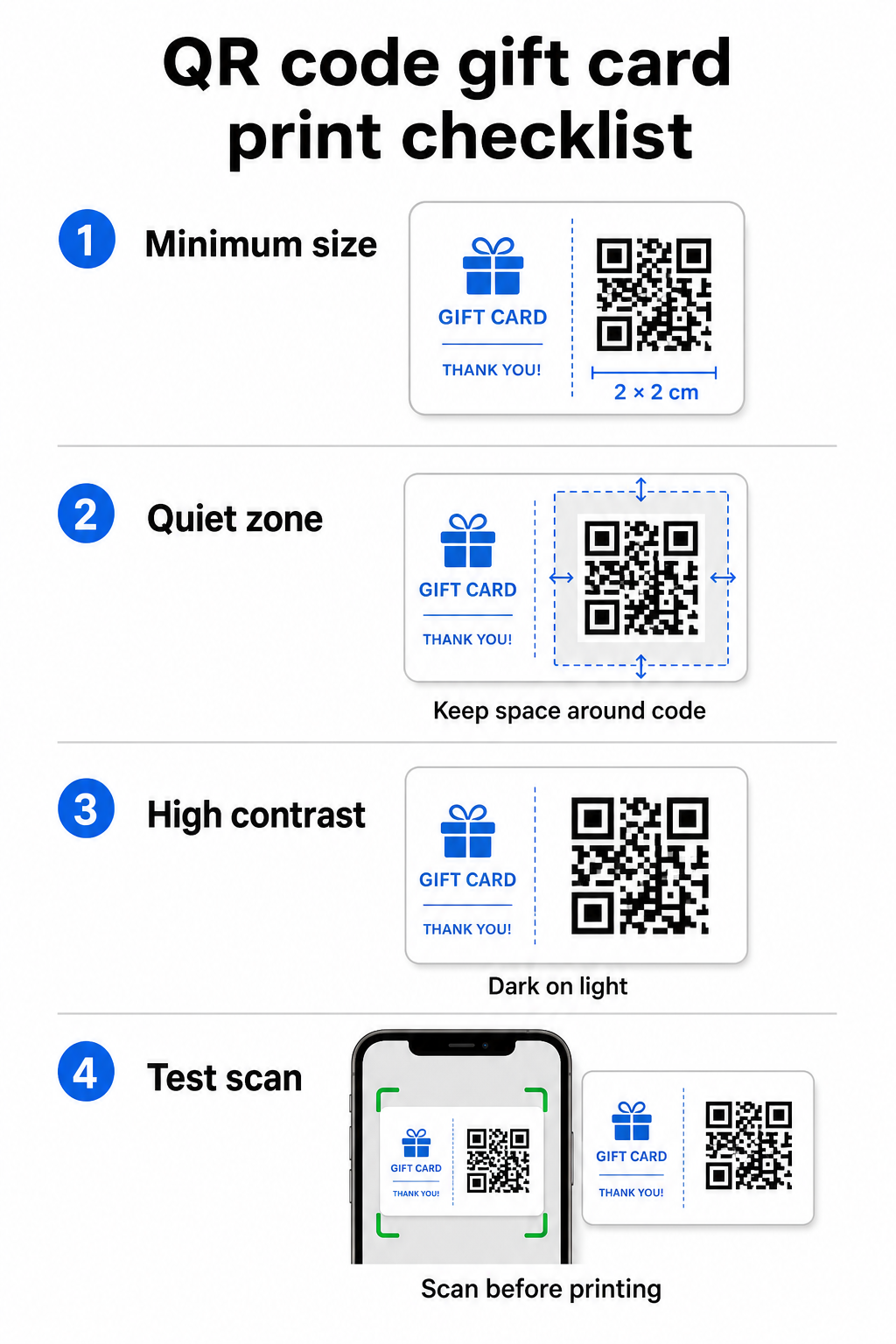
Za pouzdano skeniranje na tiskanim materijalima, vaš QR kod trebao bi biti najmanje 2 × 2 cm. Oko samog koda ostavite prazan rub – nazvan tihu zonu – od najmanje četiri modula sa svih strana. Ako je svaki modul u vašem QR kodu širok 2 mm, to znači rub od 8 mm sa svih strana. Nagomilavanje teksta ili dizajnerskih elemenata u ovoj zoni jedan je od najčešćih razloga zašto se kodovi ne skeniraju.
Zahtjevi za kontrast
Koristite tamnu boju prednjeg plana na svijetloj pozadini. Minimalni preporučeni omjer kontrasta je 4:1, iako crna na bijeloj (21:1) ostaje najpouzdanija kombinacija. Izbjegavajte obrnute sheme boja (svijetli uzorak na tamnoj pozadini), gradijente i sjene – sve to stvara nedosljedan kontrast koji zbunjuje skenere kamera. Za detaljne smjernice pogledajte najbolje prakse za kontrast boja QR koda.
Položaj na kartici
Postavite QR kod na poleđinu kartice, dalje od magnetske trake i područja za PIN koje se grebe. Prednja strana kartice služi za prepoznavanje marke; poleđina je mjesto gdje pripadaju funkcionalni elementi poput brojeva kartica i QR kodova. Uključite kratak poziv na akciju pored koda – kao što je “Skenirajte za provjeru stanja” ili “Skenirajte za online iskorištavanje” – kako bi kupci razumjeli što se događa kada skeniraju.
Koristite dinamičke QR kodove za fleksibilnost
Ako tiskate fizičke kartice u velikim količinama, statični QR kod vas veže za jednu odredišnu URL adresu. A dinamički QR kod omogućuje vam ažuriranje odredišta u bilo kojem trenutku bez ponovnog tiskanja kartice. To je važno kada redizajnirate svoj portal za iskorištavanje, pokrećete sezonsku promociju ili prelazite na novi sustav plaćanja. Dinamičke QR kodove možete kreirati i upravljati njima putem Pagelootov generator QR kodova, što vam također pruža analitiku skeniranja s centralizirane nadzorne ploče.
Održavajte svoje kampanje poklon kartica fleksibilnima Trebate ažurirati gdje pokazuju QR kodovi vaših poklon kartica bez ponovnog tiskanja tisuća kartica? Koristite Generator QR kodova za linkove za stvaranje dinamičkih kodova koje možete preusmjeriti bilo kada, s uključenim potpunim praćenjem skeniranja.
Digitalne poklon kartice: QR kodovi u formatima e-pošte i novčanika
Digitalna poklon kartica – isporučena e-poštom, SMS-om ili pohranjena u mobilnom novčaniku – može nositi QR kod jednako učinkovito kao i fizička. U ovom kontekstu, QR kod služi kao sam mehanizam za iskorištavanje.
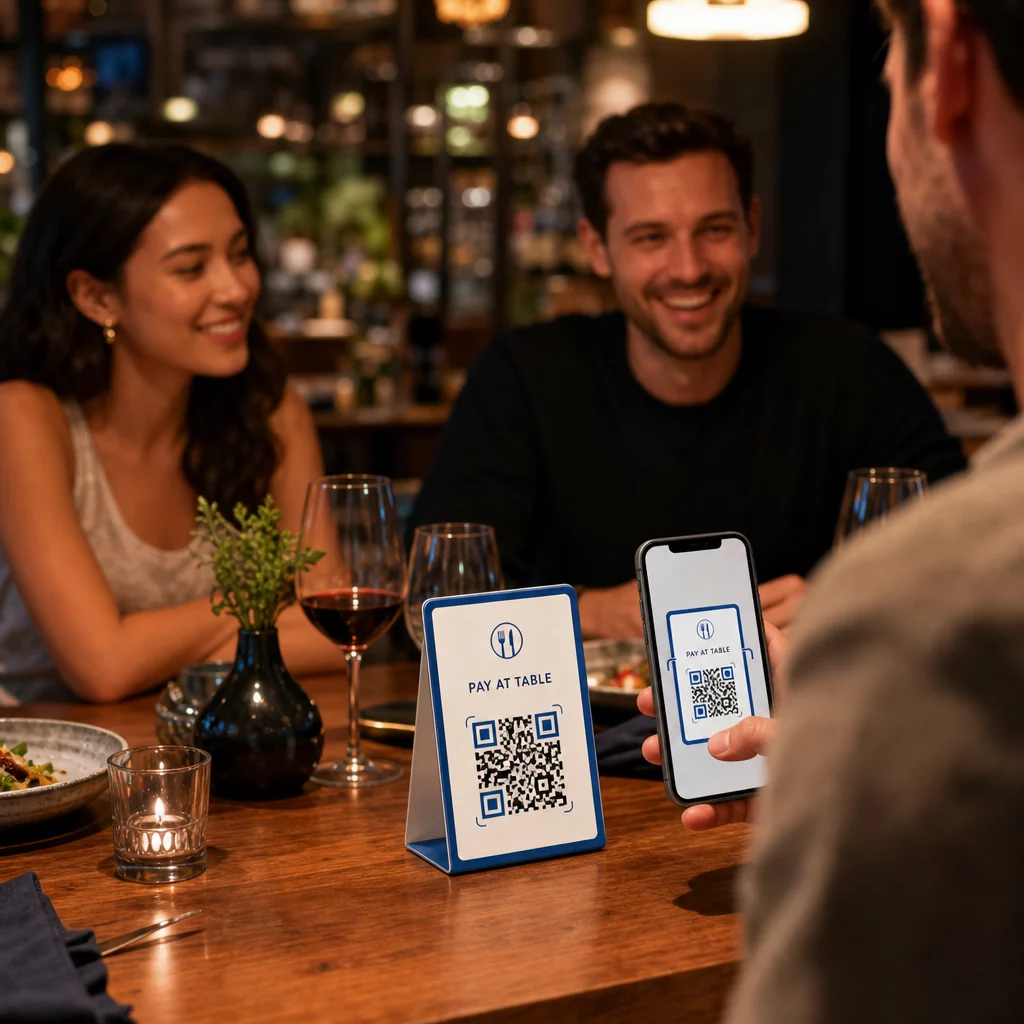
Kada kupac primi digitalnu poklon karticu, QR kod ugrađen u e-poštu ili slikovnu datoteku može izravno voditi na stranicu za naplatu unaprijed učitanu s vrijednošću kartice, odredišnu stranicu kupona s uputama za iskorištavanje ili procesor plaćanja poput PayPala ili Stripea. Kupac skenira kod prilikom naplate – u trgovini ili online – i vrijednost se automatski primjenjuje.
Ovaj pristup posebno dobro funkcionira za tvrtke koje posluju i s fizičkim i s online trgovinama. Kupac koji primi digitalnu poklon karticu e-poštom može ući u vašu trgovinu, otvoriti e-poštu i dopustiti blagajniku da skenira QR kod s ekrana telefona – broj kartice nije potreban.
Konkretno za tijek plaćanja, Pagelootov Kako napraviti QR kod za plaćanje s PayPalom omogućuje vam stvaranje koda koji izravno vodi na stranicu za plaćanje, čime se olakšava ugradnja iskustva iskorištavanja 'skeniraj za plaćanje' u dizajn vaše digitalne poklon kartice.
Na što povezati QR kod vaše poklon kartice
Odredište koje odaberete određuje korisničko iskustvo nakon skeniranja. Evo najčešćih i najučinkovitijih opcija:
| Odredište | Najbolji slučaj upotrebe |
|---|---|
| Online trgovina ili stranica za naplatu | Potpuno e-trgovinsko iskorištavanje; vrijednost kartice primijenjena pri naplati |
| Stranica za provjeru stanja | Omogućuje primateljima provjeru preostale vrijednosti prije trošenja |
| Odredišna stranica kupona ili ponude | Uparivanje promocija uz vrijednost poklon kartice |
| Link za plaćanje (PayPal, Stripe) | Izravno plaćanje na fizičkom prodajnom mjestu |
| Stranica dobrodošlice brenda | Uvođenje novih kupaca; povezuje se s prijavom za program vjernosti |
Ako želite provoditi promocije uz svoj program poklon kartica – na primjer, nudeći bonus popuste primateljima koji skeniraju unutar određenog vremenskog okvira – Pagelootov QR kod za kupon generator omogućuje vam izradu odredišne stranice koja prikazuje više ponuda, prati koje lokacije prikupljaju najviše iskorištavanja i ažurira te ponude bez generiranja novog koda.
Za širi pregled kako se promocije temeljene na QR kodovima uspoređuju s tradicionalnim metodama popusta, pogledajte QR kodovi naspram tradicionalnih kupona: što bolje funkcionira.
Praćenje iskorištavanja i učinka kampanje
Jedna od najjasnijih prednosti korištenja QR kodova na poklon karticama – u odnosu na samo tradicionalne brojeve kartica – je sloj analitike koji dodaju. S platformom kao što je Pageloot, svako skeniranje se bilježi s vremenskom oznakom, vrstom uređaja i podacima o lokaciji. To vam govori:
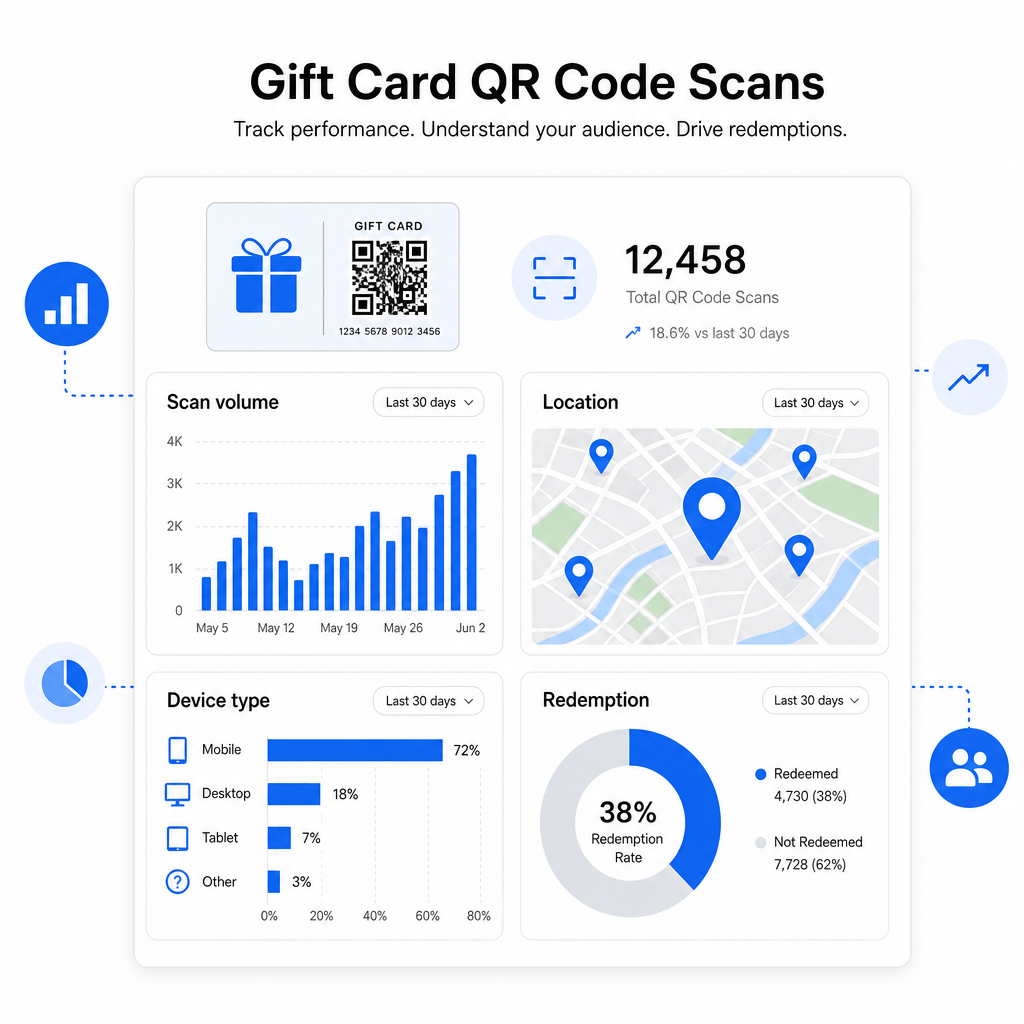
- Koji se dizajni kartica ili promotivne serije najviše skeniraju
- Skeniraju li kupci, ali ne dovršavaju iskorištavanje, što ukazuje na problem s odredišnom stranicom
- Geografska distribucija iskorištavanja, korisna za trgovce s više lokacija
- Vrhunci vremena iskorištavanja, što može informirati o budućem vremenu promocija
Ovi podaci su posebno vrijedni za maloprodajna poduzeća koja provode kampanje poklon kartica oko praznika ili sezonskih događaja. Za više o tome kako QR kodovi podržavaju strategije maloprodajnog plaćanja i angažmana, pogledajte QR kodovi za maloprodaju i kako QR kodovi pojednostavljuju maloprodajna plaćanja.
Pogledajte Koje Kampanje Poklon Kartica Potiču Iskorištavanje Pratite volumen skeniranja, vrste uređaja i lokacije za svaki QR kod na vašim poklon karticama. Započnite s Pageloot Generator QR kodova i pristupite svojoj analitičkoj nadzornoj ploči od prvog dana.
Pravna razmatranja za poklon kartice u SAD-u.
Ako izdajete poklon kartice u Sjedinjenim Državama, savezni zakon regulira njihovo funkcioniranje. Prema Zakonu o KARTICAMA (CARD Act) i Uredbi E (12 C.F.R. § 1005.20), obuhvaćene poklon kartice – uključujući poklon kartice trgovina i prepaid kartice opće namjene – ne mogu isteći za manje od pet godina od datuma izdavanja, a naknade za neaktivnost mogu se naplaćivati tek nakon 12 uzastopnih mjeseci bez aktivnosti, s najviše jednom takvom naknadom mjesečno. Sve naknade i uvjeti isteka moraju biti jasno objavljeni kupcu.
Dodavanje QR koda na vašu poklon karticu ne mijenja ove obveze, ali vam daje praktičan alat za jasniju komunikaciju. Vaša odredišna stranica QR koda može prikazati preostali iznos, datum isteka, primjenjive naknade i potpune uvjete u formatu koji je mnogo lakši za čitanje od sitnog tiska na fizičkoj kartici.
Imajte na umu da su neki prepaid proizvodi izuzeti od ovih saveznih pravila – uključujući kartice koje se mogu ponovno puniti, a koje se ne prodaju kao poklon kartice, i promotivne nagradne kartice – ali državni zakoni mogu nametnuti dodatne zahtjeve. Uvijek pregledajte i savezna i primjenjiva državna pravila prije pokretanja programa poklon kartica.
Kontrolna lista za dizajn prije ispisa ili slanja
Prije finaliziranja QR kodova za vaše poklon kartice, prođite kroz ove provjere:
- Veličina: Najmanje 2 × 2 cm za fizičke kartice; prilagodljivo za prikaz u e-pošti ili novčaniku
- Tiha zona: Minimalno četiri modula praznog prostora sa sve četiri strane
- Kontrast: Tamna prednja strana na svijetloj pozadini, omjer najmanje 4:1
- Odredište: Testirajte poveznicu na više uređaja i potvrdite da se ispravno učitava na mobilnom uređaju
- Poziv na akciju: Uključite kratku uputu pored koda koja objašnjava što skeniranje radi
- Dinamički naspram statičkog: Koristite dinamički kod ako se odredište može promijeniti ili ako želite analitiku skeniranja
- Ispravljanje pogrešaka: Koristite razinu Q ili H ako dodajete logotip QR kodu, kako biste održali mogućnost skeniranja
Za potpuni pregled standarda dizajna QR kodova, pogledajte najbolje prakse za čitljivost QR koda.
QR kodovi pretvaraju pasivnu poklon karticu u aktivnu dodirnu točku s kupcima. Kada su ispravno dizajnirani i povezani s dobro izgrađenim iskustvom iskorištavanja, smanjuju trenje, povećavaju stope iskorištavanja i daju vam mjerljive podatke o tome kako vaš program poklon kartica zapravo funkcionira. Započnite s dinamičkim kodom kako biste zadržali kontrolu nad odredištem i koristite svoju analitiku skeniranja za kontinuirano poboljšanje iskustva tijekom vremena.
Izradite svoj QR kod za poklon karticu danas Izradite brendirani QR kod koji se može pratiti za vaš program poklon kartica u nekoliko minuta. Isprobajte Pageloot Generator QR kodova besplatno 14 dana – kreditna kartica nije potrebna.
Često postavljana pitanja
Ako koristite dinamički QR kod, možete ažurirati odredišnu vezu u bilo kojem trenutku bez mijenjanja samog koda. To znači da možete ispisati QR kod jednom i preusmjeriti ga na novu stranicu za plaćanje, sezonsku ponudu ili ažurirani portal kasnije. Međutim, ako trebate promijeniti fizički dizajn kartice, morat ćete ponovno ispisati.
Najučinkovitije odredište je stranica optimizirana za mobilne uređaje gdje kupac može dovršiti iskorištavanje, provjeriti stanje ili izvršiti plaćanje. Opcije uključuju stranicu za naplatu unaprijed učitanu s vrijednošću kartice, PayPal ili Stripe vezu za plaćanje, ili odredišnu stranicu kupona s trenutnim ponudama. Ključno je da se stranica brzo učitava na mobilnom uređaju i čini sljedeći korak očitim.
Koristite platformu za QR kodove koja uključuje ugrađenu analitiku, kao što je Pageloot. Svako skeniranje se bilježi s vremenom, vrstom uređaja i lokacijom, tako da možete vidjeti koliko se kartica skenira, kada aktivnost iskorištavanja doseže vrhunac i odustaju li kupci prije dovršetka iskorištavanja. Ovi podaci pomažu vam identificirati i otkloniti slabe točke u vašem toku iskorištavanja.