Vrei să faci cardurile tale cadou mai ușor de valorificat și mai greu de ignorat? Un proces de valorificare prost conceput frustrează clienții și duce la solduri nevalorificate care stau inactive. Acest ghid explică cum să adaugi coduri QR pe cardurile cadou fizice și digitale, ce deblochează acestea pentru afacerea ta și cum să le configurezi corect.
De ce codurile QR își au locul pe cardurile cadou
Cardurile cadou reprezintă o categorie semnificativă de achiziții. Datele recente ale unui sondaj arată că 76% dintre consumatorii americani au achiziționat un card cadou în ultimul an, 40% dintre aceste achiziții fiind digitale. Cu toate acestea, comportamentul de valorificare variază considerabil – consumatorii cheltuiesc cardurile cadou digitale într-o medie de 16,8 zile, comparativ cu 35,3 zile pentru cardurile fizice. Acest decalaj reprezintă venituri reale care stau pe raft.
Un cod QR pe un card cadou elimină fricțiunea din procesul de valorificare. În loc să-i ceri unui client să introducă un număr lung de card sau să navigheze printr-un proces de plată în mai mulți pași, o singură scanare îl duce direct la o pagină de plată, la verificarea soldului sau la un magazin online. Această reducere a efortului se traduce direct în valorificări mai rapide și mai puține solduri abandonate.
Dincolo de comoditate, codurile QR îți oferă ceva ce cardurile cadou tradiționale nu pot: date. Poți urmări când și unde sunt scanate cardurile, ce designuri de carduri funcționează mai bine și dacă clienții finalizează valorificarea după scanare.
Carduri cadou fizice: Adăugarea unui cod QR care funcționează
Un card cadou fizic are spațiu limitat, așa că fiecare decizie de design contează. Adăugarea unui cod QR este simplă, dar câteva standarde tehnice determină dacă acesta se scanează de fapt în mod fiabil în lumea reală.
Dimensiune minimă și zonă de liniște
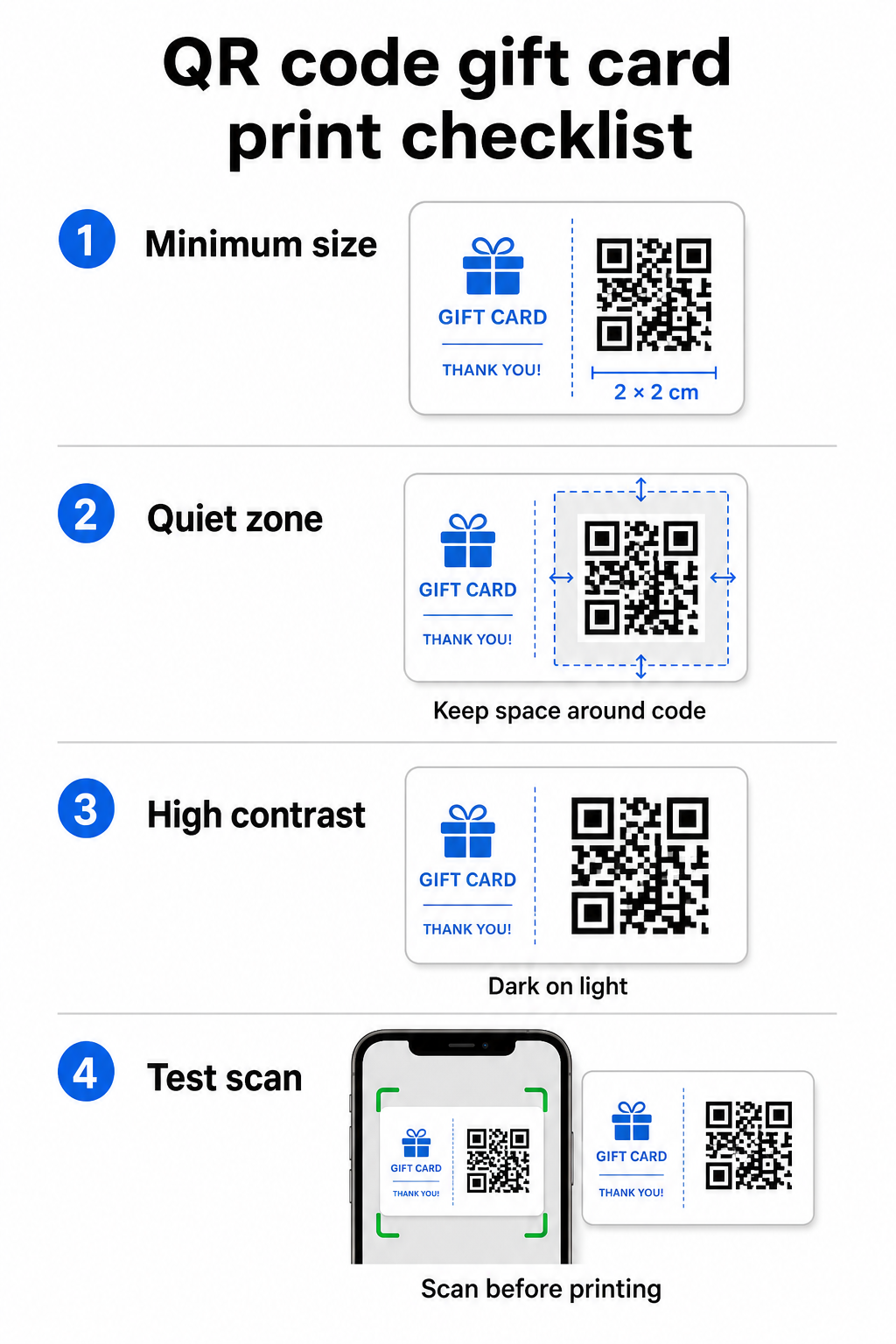
Pentru o scanare fiabilă pe materiale tipărite, codul tău QR ar trebui să aibă cel puțin 2 × 2 cm. În jurul codului în sine, lasă o margine albă – numită zonă de liniște – de cel puțin patru module pe toate laturile. Dacă fiecare modul din codul tău QR are o lățime de 2 mm, asta înseamnă o margine de 8 mm pe toate laturile. Îngrămădirea codului cu text sau elemente de design în această zonă este unul dintre cele mai comune motive pentru care codurile nu reușesc să fie scanate.
Cerințe de contrast
Folosește o culoare închisă pentru prim-plan pe un fundal deschis. Raportul minim de contrast recomandat este de 4:1, deși negru pe alb (21:1) rămâne cea mai fiabilă combinație. Evită schemele de culori inversate (model deschis pe fundal închis), gradienții și umbrele – toate acestea creează un contrast inconsistent care derutează scanerele camerelor. Pentru îndrumări detaliate, vezi cele mai bune practici de contrast de culoare pentru codurile QR.
Amplasarea pe card
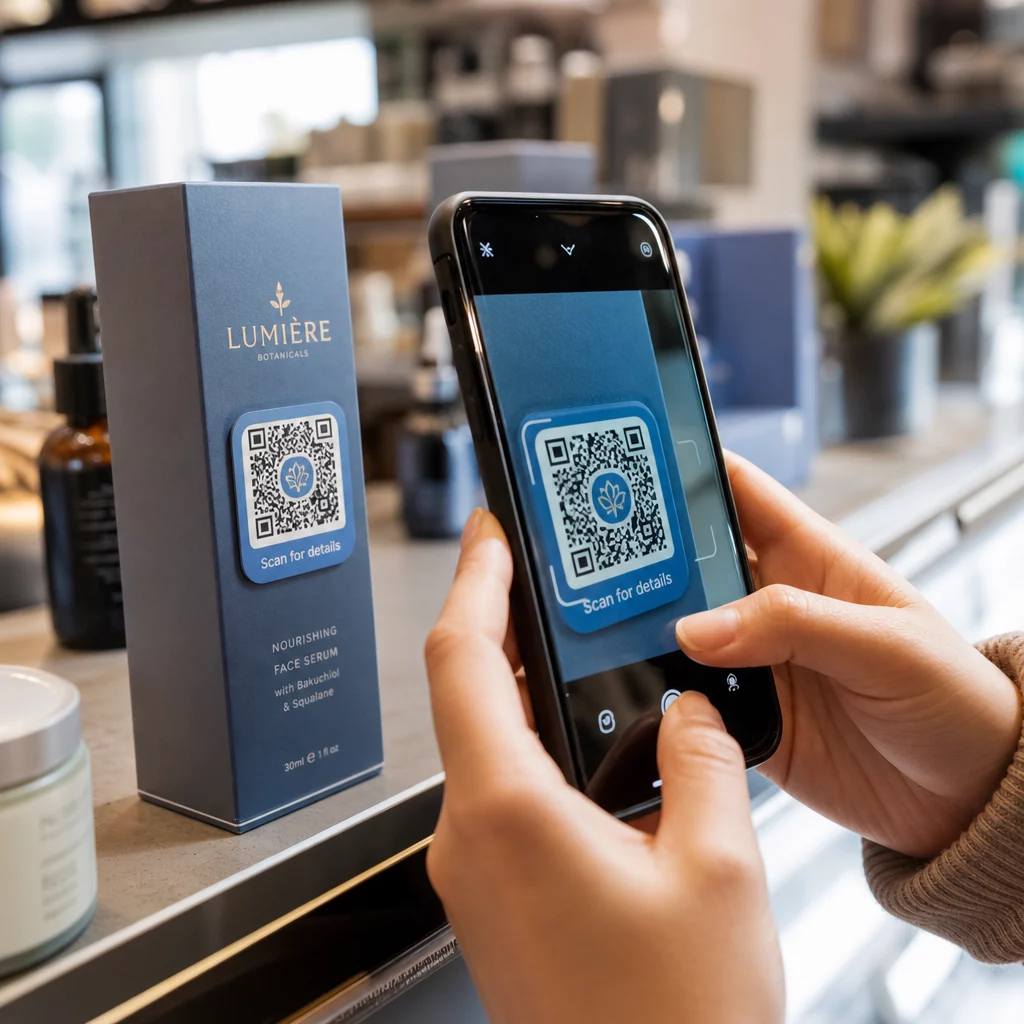
Plasează codul QR pe spatele cardului, departe de banda magnetică și de zona PIN-ului răzuibil. Fața cardului este pentru recunoașterea mărcii; spatele este locul unde aparțin elementele funcționale precum numerele de card și codurile QR. Include un scurt apel la acțiune lângă cod – cum ar fi “Scanează pentru a verifica soldul” sau “Scanează pentru a valorifica online” – astfel încât clienții să înțeleagă ce se întâmplă atunci când scanează.
Utilizați coduri QR dinamice pentru flexibilitate
Dacă imprimi carduri fizice în vrac, un cod QR static te blochează la o singură adresă URL de destinație. Un cod QR dinamic îți permite să actualizezi destinația în orice moment fără a re-imprima cardul. Acest lucru contează atunci când îți reproiectezi portalul de valorificare, derulezi o promoție sezonieră sau migrezi la un nou sistem de plată. Poți crea și gestiona coduri QR dinamice prin generatorul de coduri QR de la Pageloot, care îți oferă, de asemenea, analize de scanare dintr-un tablou de bord centralizat.
Menține-ți campaniile de carduri cadou flexibile Trebuie să actualizezi unde indică codurile QR ale cardurilor tale cadou fără a re-imprima mii de carduri? Folosește Generator de coduri QR pentru linkuri pentru a crea coduri dinamice pe care le poți redirecționa oricând, cu urmărire completă a scanărilor inclusă.
Carduri cadou digitale: Coduri QR în formate de e-mail și portofel
Un card cadou digital – livrat prin e-mail, SMS sau stocat într-un portofel mobil – poate purta un cod QR la fel de eficient ca unul fizic. În acest context, codul QR servește drept mecanism de valorificare în sine.
Atunci când un client primește un card cadou digital, codul QR încorporat în e-mail sau în fișierul imagine poate face legătura directă către o pagină de plată preîncărcată cu valoarea cardului, o pagină de destinație a cuponului cu instrucțiuni de valorificare sau un procesator de plăți precum PayPal sau Stripe. Clientul scanează codul la finalizarea comenzii – în magazin sau online – iar valoarea este aplicată automat.
Această abordare funcționează deosebit de bine pentru afacerile care operează atât magazine fizice, cât și online. Un client care primește un card cadou digital prin e-mail poate intra în magazinul tău, deschide e-mailul și lăsa casierul să scaneze codul QR de pe ecranul telefonului său – nu este necesar niciun număr de card.
Pentru fluxul de plată în mod specific, Pageloot’s Generator cod QR PayPal vă permite să creați un cod care se leagă direct la o pagină de plată, făcând simplă integrarea unei experiențe de răscumpărare prin scanare și plată în designul cardului dvs. cadou digital.
La ce să legați codul QR al cardului dvs. cadou
Destinația pe care o alegeți determină experiența clientului după scanare. Iată cele mai comune și eficiente opțiuni:
| Destinație | Cel mai bun caz de utilizare |
|---|---|
| Magazin online sau pagină de finalizare a comenzii | Răscumpărare completă e-commerce; valoarea cardului aplicată la finalizarea comenzii |
| Pagină de verificare a soldului | Permite destinatarilor să verifice valoarea rămasă înainte de a cheltui |
| Pagină de destinație pentru cupoane sau oferte | Promoții asociate alături de valoarea cardului cadou |
| Link de plată (PayPal, Stripe) | Plată directă la punctul de vânzare fizic |
| Pagină de bun venit a brandului | Integrarea noilor clienți; linkuri către înregistrarea în programul de loialitate |
Dacă doriți să derulați promoții alături de programul dvs. de carduri cadou – oferind reduceri bonus destinatarilor care scanează într-un interval de timp stabilit, de exemplu – Pageloot Generator cod cupon QR vă permite să construiți o pagină de destinație care afișează mai multe oferte, urmărește ce locații colectează cele mai multe răscumpărări și actualizează acele oferte fără a genera un cod nou.
Pentru o privire mai amplă asupra modului în care promoțiile bazate pe coduri QR se compară cu metodele tradiționale de reducere, vedeți Coduri QR vs. cupoane tradiționale: care funcționează mai bine.
Urmărirea Răscumpărărilor și Performanței Campaniei
Unul dintre cele mai clare avantaje ale utilizării codurilor QR pe cardurile cadou – față de numerele tradiționale de carduri singure – este stratul de analiză pe care îl adaugă. Cu o platformă precum Pageloot, fiecare scanare este înregistrată cu un marcaj de timp, tip de dispozitiv și date de locație. Acest lucru vă spune:
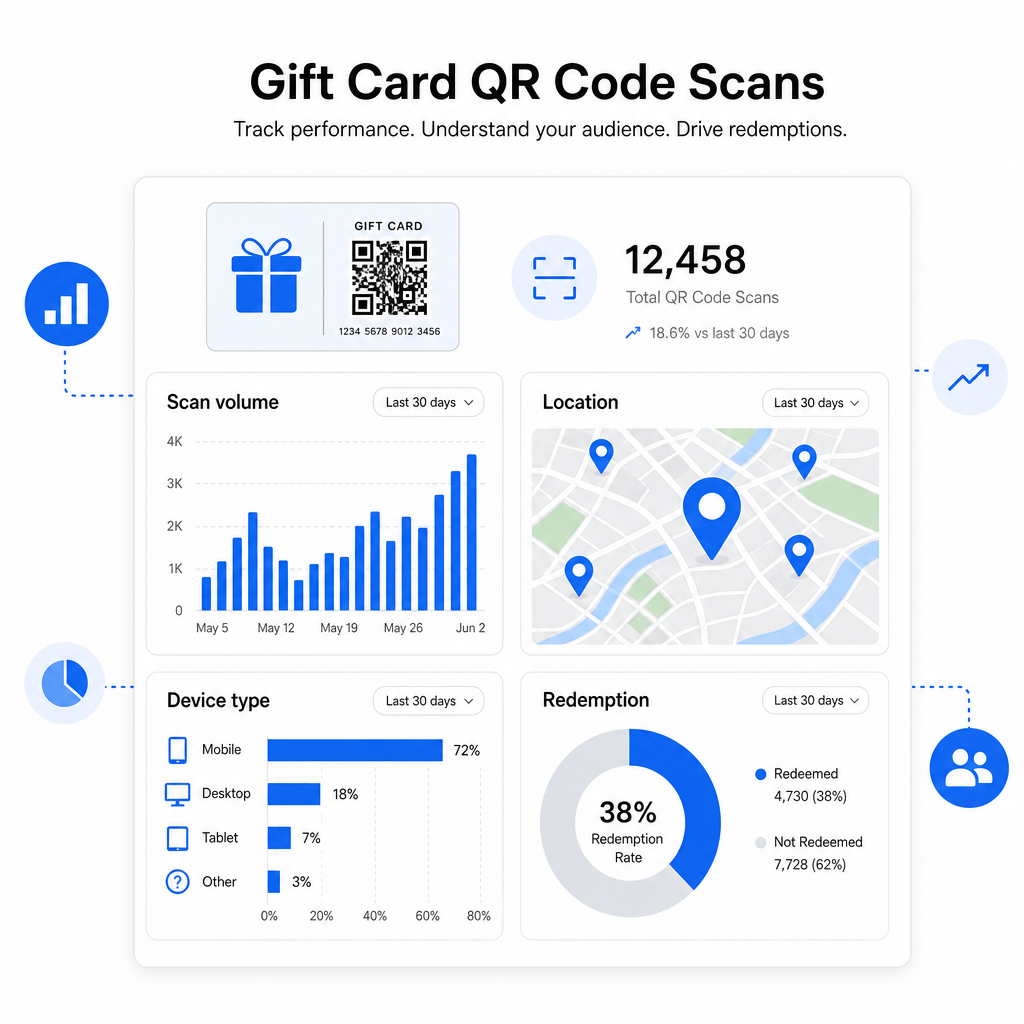
- Ce designuri de carduri sau loturi promoționale sunt scanate cel mai mult
- Dacă clienții scanează, dar nu finalizează răscumpărarea, indicând o problemă cu pagina de destinație
- Distribuția geografică a răscumpărărilor, utilă pentru comercianții cu amănuntul cu mai multe locații
- Orele de vârf ale răscumpărărilor, care pot informa viitoarele planificări promoționale
Aceste date sunt deosebit de valoroase pentru afacerile de retail care derulează campanii de carduri cadou în jurul sărbătorilor sau evenimentelor sezoniere. Pentru mai multe despre modul în care codurile QR susțin strategiile de plată și de implicare în retail, vedeți Coduri QR pentru comerțul cu amănuntul și cum codurile QR simplifică plățile în comerțul cu amănuntul.
Vedeți ce campanii de carduri cadou generează răscumpărări Urmăriți volumul de scanări, tipurile de dispozitive și locațiile pentru fiecare cod QR de pe cardurile dvs. cadou. Începeți cu Generator de coduri QR Pageloot și accesați tabloul de bord de analiză din prima zi.
Considerații legale pentru cardurile cadou în S.U.A.
Dacă emiteți carduri cadou în Statele Unite, legislația federală reglementează modul în care funcționează acestea. Conform Legii CARD și Regulamentului E (12 C.F.R. § 1005.20), cardurile cadou vizate – inclusiv cardurile cadou de magazin și cardurile preplătite de uz general – nu pot expira în mai puțin de cinci ani de la data emiterii, iar taxele de inactivitate pot fi percepute doar după 12 luni consecutive de inactivitate, cu nu mai mult de o astfel de taxă pe lună. Toate taxele și termenii de expirare trebuie să fie divulgați clar clientului.
Adăugarea unui cod QR pe cardul dvs. cadou nu modifică aceste obligații, dar vă oferă un instrument practic pentru a le comunica mai clar. Pagina de destinație a codului dvs. QR poate afișa soldul rămas, data de expirare, taxele aplicabile și termenii completi într-un format mult mai ușor de citit decât textul scris mărunt de pe un card fizic.
Rețineți că unele produse preplătite sunt scutite de aceste reguli federale – inclusiv cardurile reîncărcabile care nu sunt comercializate ca și carduri cadou și cardurile de recompensă promoționale – dar legile statale pot impune cerințe suplimentare. Examinați întotdeauna atât regulile federale, cât și pe cele statale aplicabile înainte de a lansa un program de carduri cadou.
Listă de verificare pentru design înainte de a imprima sau trimite
Înainte de a finaliza codurile QR ale cardurilor dvs. cadou, parcurgeți aceste verificări:
- Mărimea: Cel puțin 2 × 2 cm pentru cardurile fizice; scalabil pentru afișare în e-mail sau portofel
- Zonă de liniște: Minim patru module de spațiu gol pe toate cele patru laturi
- Contrast: Prim-plan întunecat pe fundal deschis, raport de cel puțin 4:1
- Destinație: Testați linkul pe mai multe dispozitive și confirmați că se încarcă corect pe mobil
- Apel la acțiune: Includeți o scurtă instrucțiune lângă cod care explică ce face scanarea
- Dinamic vs. static: Utilizați un cod dinamic dacă destinația se poate schimba sau dacă doriți analize de scanare
- Corecția erorilor: Utilizați nivelul Q sau H dacă adăugați un logo la codul QR, pentru a menține scanabilitatea
Pentru o prezentare completă a standardelor de design pentru codurile QR, vezi cele mai bune practici pentru lizibilitatea codurilor QR.
Codurile QR transformă un card cadou pasiv într-un punct de contact activ cu clientul. Atunci când sunt concepute corect și legate de o experiență de răscumpărare bine construită, acestea reduc fricțiunea, cresc ratele de răscumpărare și vă oferă date măsurabile despre modul în care programul dvs. de carduri cadou funcționează de fapt. Începeți cu un cod dinamic pentru a păstra controlul asupra destinației și utilizați analizele de scanare pentru a îmbunătăți continuu experiența în timp.
Creați-vă Codul QR pentru Cardul Cadou Astăzi Construiește un cod QR personalizat, urmăribil pentru programul tău de carduri cadou în câteva minute. Încearcă Generator de coduri QR Pageloot gratuit timp de 14 zile – nu este necesar un card de credit.
Întrebări frecvente
Dacă utilizați un cod QR dinamic, puteți actualiza linkul de destinație oricând fără a schimba codul însuși. Aceasta înseamnă că puteți imprima codul QR o singură dată și să îl redirecționați către o nouă pagină de plată, o ofertă sezonieră sau un portal actualizat mai târziu. Cu toate acestea, dacă aveți nevoie să schimbați designul fizic al cardului, va trebui să reimprimați.
Cea mai eficientă destinație este o pagină optimizată pentru mobil unde clientul poate finaliza o răscumpărare, verifica soldul sau efectua o plată. Opțiunile includ o pagină de finalizare a comenzii preîncărcată cu valoarea cardului, un link de plată PayPal sau Stripe, sau o pagină de destinație cu cupoane cu oferte curente. Cheia este ca pagina să se încarce rapid pe mobil și să facă următorul pas evident.
Folosiți o platformă de coduri QR care include analize încorporate, cum ar fi Pageloot. Fiecare scanare este înregistrată cu ora, tipul dispozitivului și locația, astfel încât să puteți vedea câte carduri sunt scanate, când activitatea de răscumpărare atinge vârful și dacă clienții renunță înainte de a finaliza răscumpărarea. Aceste date vă ajută să identificați și să remediați punctele slabe din fluxul dumneavoastră de răscumpărare.