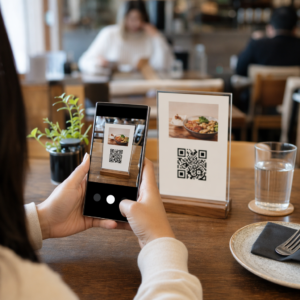
רוצים להפוך את כרטיסי המתנה שלכם לקלים יותר למימוש וקשים יותר להתעלמות? תהליך מימוש מעוצב בצורה גרועה מתסכל לקוחות ומוביל ליתרות שלא מומשו שיושבות בטלות. מדריך זה מסביר כיצד להוסיף קודי QR לכרטיסי מתנה פיזיים ודיגיטליים, מה הם פותחים עבור העסק שלכם, וכיצד להגדיר אותם נכון.
למה קודי QR שייכים על כרטיסי מתנה
כרטיסי מתנה הם קטגוריית רכישה משמעותית. נתוני סקר עדכניים מראים ש-76% מהצרכנים בארה"ב רכשו כרטיס מתנה בשנה האחרונה, כאשר 40% מהרכישות הללו היו דיגיטליות. עם זאת, התנהגות המימוש משתנה מאוד – צרכנים מוציאים כרטיסי מתנה דיגיטליים בממוצע של 16.8 ימים, לעומת 35.3 ימים עבור כרטיסים פיזיים. פער זה מייצג הכנסה אמיתית שיושבת על המדף.
קוד QR על כרטיס מתנה מסיר חיכוך מתהליך המימוש. במקום לבקש מלקוח להקליד מספר כרטיס ארוך או לנווט בקופה מרובת שלבים, סריקה אחת לוקחת אותם ישירות לדף תשלום, בדיקת יתרה, או חנות מקוונת. הפחתה זו במאמץ מתורגמת ישירות למימושים מהירים יותר ופחות יתרות נטושות.
מעבר לנוחות, קודי QR נותנים לכם משהו שכרטיסי מתנה מסורתיים לא יכולים: נתונים. אתם יכולים לעקוב מתי והיכן כרטיסים נסרקים, אילו עיצובי כרטיסים מניבים ביצועים טובים יותר, והאם לקוחות משלימים את המימוש לאחר הסריקה.
כרטיסי מתנה פיזיים: הוספת קוד QR שעובד
לכרטיס מתנה פיזי יש שטח מוגבל, ולכן כל החלטת עיצוב חשובה. הוספת קוד QR היא פשוטה, אך כמה תקנים טכניים קובעים אם הוא אכן נסרק באופן אמין בעולם האמיתי.
גודל מינימלי ואזור שקט
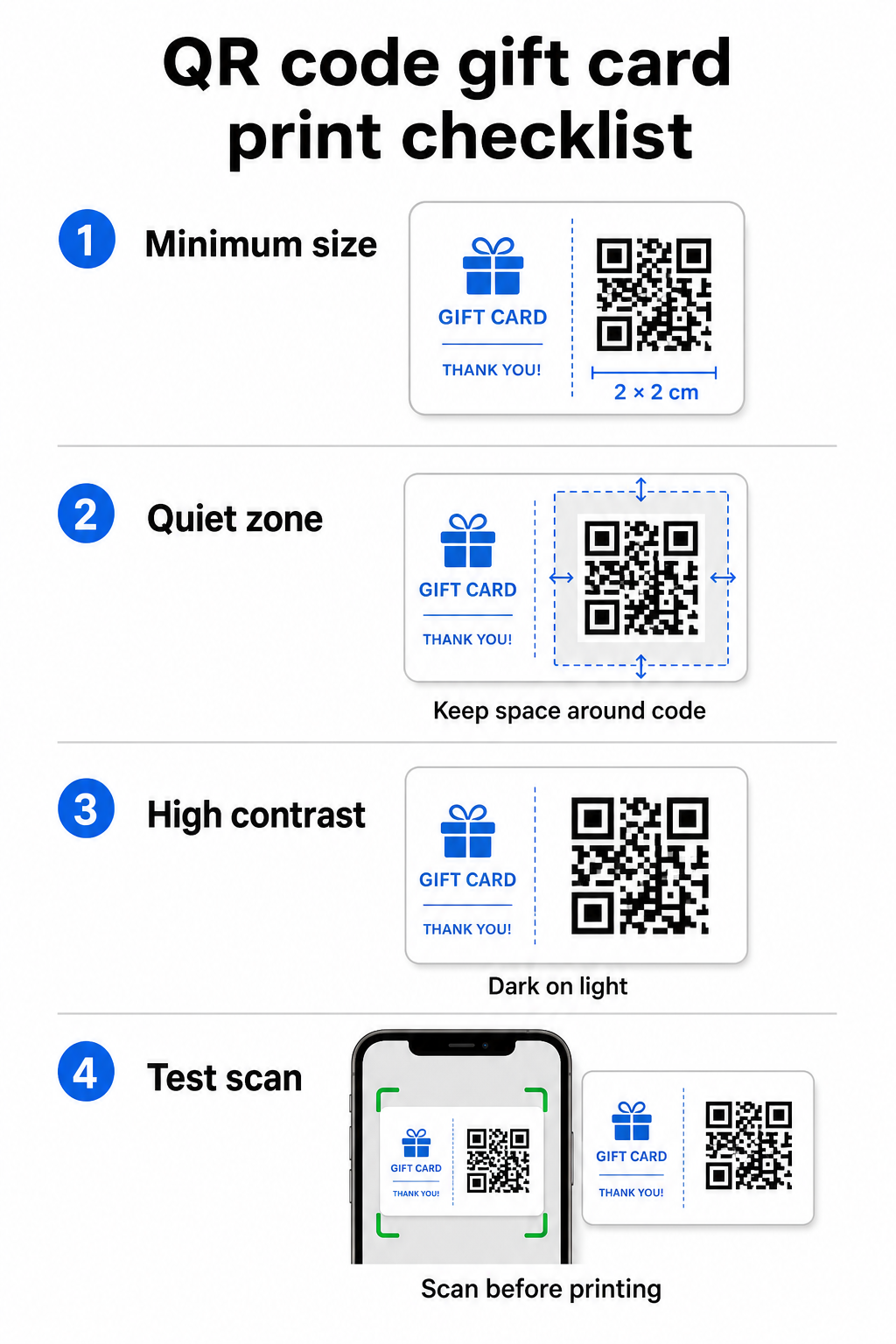
לסריקה אמינה על חומרים מודפסים, קוד ה-QR שלכם צריך להיות לפחות 2 × 2 ס"מ. סביב הקוד עצמו, השאירו שוליים ריקים – הנקראים ה- אזור שקט – של לפחות ארבעה מודולים מכל הצדדים. אם כל מודול בקוד ה-QR שלכם הוא ברוחב 2 מ"מ, זה אומר שוליים של 8 מ"מ מסביב. צפיפות הקוד עם טקסט או אלמנטים עיצוביים באזור זה היא אחת הסיבות הנפוצות ביותר לכך שקודים לא נסרקים.
דרישות ניגודיות
השתמשו בצבע חזית כהה על רקע בהיר. יחס הניגודיות המינימלי המומלץ הוא 4:1, אם כי שחור על לבן (21:1) נשאר השילוב האמין ביותר. הימנעו מסכימות צבע הפוכות (תבנית בהירה על רקע כהה), מעברי צבע וצללים – כל אלה יוצרים ניגודיות לא עקבית שמבלבלת סורקי מצלמה. להנחיות מפורטות, ראו שיטות עבודה מומלצות לניגודיות צבעי קוד QR.
מיקום על הכרטיס
מקמו את קוד ה-QR בגב הכרטיס, הרחק מהפס המגנטי ואזור ה-PIN הניתן לגירוד. חזית הכרטיס מיועדת לזיהוי מותג; הגב הוא המקום שבו שייכים אלמנטים פונקציונליים כמו מספרי כרטיס וקודי QR. כללו קריאה קצרה לפעולה ליד הקוד – כגון “סרוק לבדיקת יתרה” או “סרוק למימוש מקוון” – כדי שהלקוחות יבינו מה קורה כשהם סורקים.
השתמש בקודי QR דינמיים לגמישות
אם אתם מדפיסים כרטיסים פיזיים בכמויות גדולות, קוד QR סטטי נועל אתכם לכתובת URL יעד יחידה. א קוד QR דינמי מאפשר לכם לעדכן את היעד בכל עת מבלי להדפיס מחדש את הכרטיס. זה חשוב כשאתם מעצבים מחדש את פורטל המימוש שלכם, מפעילים מבצע עונתי, או עוברים למערכת תשלומים חדשה. אתם יכולים ליצור ולנהל קודי QR דינמיים באמצעות מחולל קודי ה-QR של Pageloot, אשר גם נותן לכם ניתוח סריקות מלוח מחוונים מרכזי.
שמרו על גמישות בקמפייני כרטיסי המתנה שלכם צריכים לעדכן לאן מצביעים קודי ה-QR של כרטיסי המתנה שלכם מבלי להדפיס מחדש אלפי כרטיסים? השתמשו ב- מחולל קודי QR לקישורים כדי ליצור קודים דינמיים שתוכלו להפנות מחדש בכל עת, עם מעקב סריקות מלא כלול.
כרטיסי מתנה דיגיטליים: קודי QR בפורמטים של דוא"ל וארנק
כרטיס מתנה דיגיטלי – הנמסר באמצעות דוא"ל, SMS, או מאוחסן בארנק נייד – יכול לשאת קוד QR באותה יעילות כמו כרטיס פיזי. בהקשר זה, קוד ה-QR משמש כמנגנון המימוש עצמו.
כאשר לקוח מקבל כרטיס מתנה דיגיטלי, קוד ה-QR המוטמע בדוא"ל או בקובץ התמונה יכול לקשר ישירות לדף קופה טעון מראש עם ערך הכרטיס, דף נחיתה של קופון עם הוראות מימוש, או מעבד תשלומים כמו PayPal או Stripe. הלקוח סורק את הקוד בקופה – בחנות או באינטרנט – והערך מיושם אוטומטית.
גישה זו עובדת היטב במיוחד עבור עסקים המפעילים חנויות פיזיות ומקוונות כאחד. לקוח שמקבל כרטיס מתנה דיגיטלי בדוא"ל יכול להיכנס לחנות שלכם, לפתוח את הדוא"ל, ולתת לקופאי לסרוק את קוד ה-QR ממסך הטלפון שלו – ללא צורך במספר כרטיס.
עבור זרימת התשלום באופן ספציפי, של Pageloot מחולל קוד QR ל-PayPal מאפשר לך ליצור קוד שמקשר ישירות לדף תשלום, מה שהופך את הבנייה לפשוטה של חווית מימוש של סריקה-לתשלום בעיצוב כרטיס המתנה הדיגיטלי שלך.
לאן לקשר את קוד ה-QR של כרטיס המתנה שלך
היעד שתבחר קובע את חווית הלקוח לאחר הסריקה. הנה האפשרויות הנפוצות והיעילות ביותר:
| יעד | מקרה השימוש הטוב ביותר |
|---|---|
| חנות מקוונת או דף תשלום | מימוש מסחר אלקטרוני מלא; ערך הכרטיס מיושם בקופה |
| דף בדיקת יתרה | מאפשר לנמענים לבדוק יתרה שנותרה לפני הוצאה |
| דף נחיתה של קופון או הצעה | מבצעים משולבים לצד ערך כרטיס המתנה |
| קישור תשלום (פייפאל, סטרייפ) | תשלום ישיר בנקודת מכירה פיזית |
| דף קבלת פנים של המותג | קליטת לקוחות חדשים; קישורים להרשמה לתוכנית נאמנות |
אם ברצונך להריץ מבצעים לצד תוכנית כרטיסי המתנה שלך – למשל, להציע הנחות בונוס לנמענים הסורקים בתוך מסגרת זמן מוגדרת – של Pageloot קוד הטבה עם QR לקופונים מאפשר לך לבנות דף נחיתה המציג מספר הצעות, עוקב אחר אילו מיקומים אוספים את מירב המימושים, ומעדכן הצעות אלו מבלי ליצור קוד חדש.
למבט רחב יותר על האופן שבו מבצעים מבוססי QR משתווים לשיטות הנחה מסורתיות, ראה קודי QR לעומת קופונים מסורתיים: מה עובד טוב יותר.
מעקב אחר מימושים וביצועי קמפיין
אחד היתרונות הברורים ביותר בשימוש בקודי QR על כרטיסי מתנה – לעומת מספרי כרטיסים מסורתיים בלבד – הוא שכבת הניתוח שהם מוסיפים. עם פלטפורמה כמו Pageloot, כל סריקה נרשמת עם חותמת זמן, סוג מכשיר ונתוני מיקום. זה אומר לך:
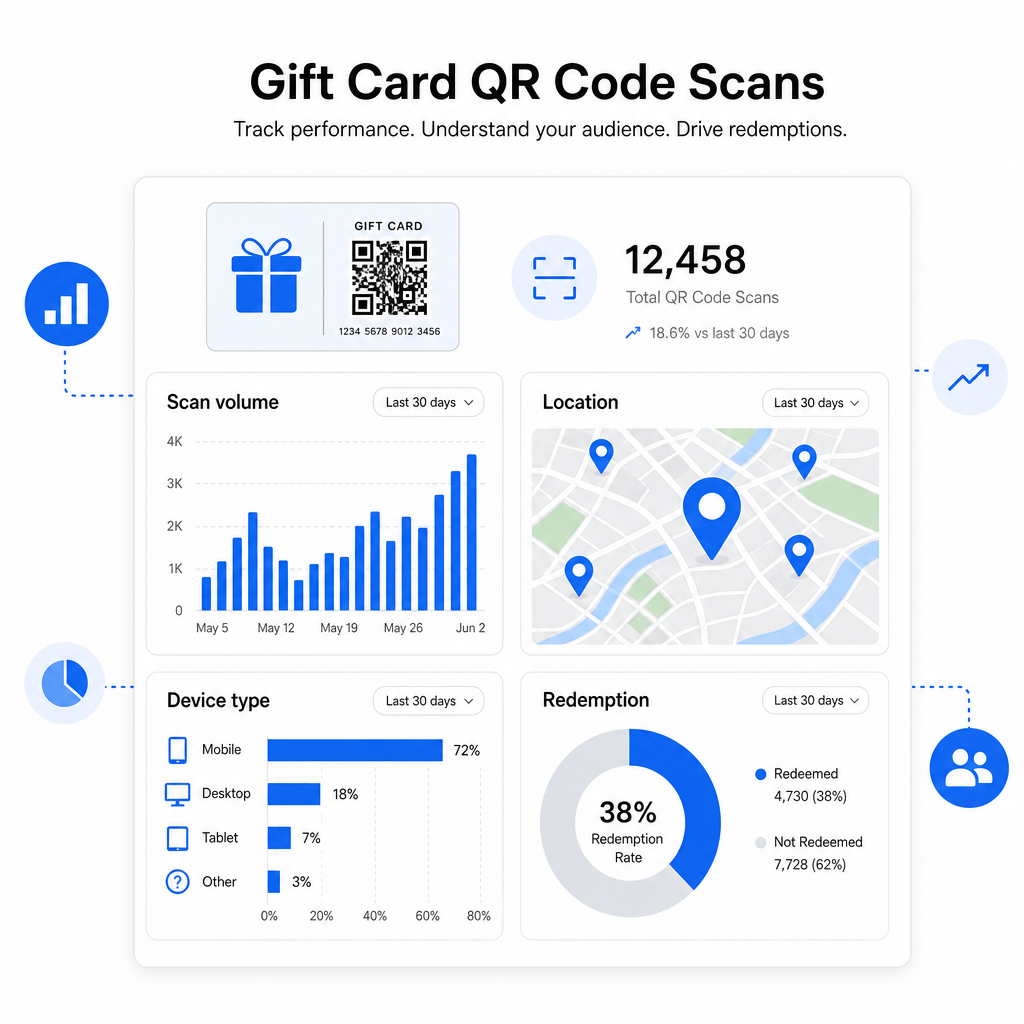
- אילו עיצובי כרטיסים או קבוצות קידום מכירות נסרקים הכי הרבה
- האם לקוחות סורקים אך אינם משלימים את המימוש, מה שמעיד על בעיה בדף הנחיתה
- התפלגות גיאוגרפית של מימושים, שימושי עבור קמעונאים מרובי מיקומים
- זמני מימוש שיא, שיכולים להשפיע על תזמון מבצעים עתידיים
נתונים אלה יקרי ערך במיוחד עבור עסקים קמעונאיים המנהלים קמפיינים של כרטיסי מתנה סביב חגים או אירועים עונתיים. למידע נוסף על האופן שבו קודי QR תומכים באסטרטגיות תשלום ומעורבות קמעונאיות, ראה קודי QR לקמעונאות ו כיצד קודי QR מפשטים תשלומים קמעונאיים.
ראה אילו קמפיינים של כרטיסי מתנה מניעים מימושים עקוב אחר נפח סריקות, סוגי מכשירים ומיקומים עבור כל קוד QR בכרטיסי המתנה שלך. התחל עם ה- מחולל קוד QR של Pageloot וקבל גישה ללוח המחוונים של הניתוחים שלך מהיום הראשון.
שיקולים משפטיים עבור כרטיסי מתנה בארה"ב.
אם אתה מנפיק כרטיסי מתנה בארצות הברית, החוק הפדרלי קובע כיצד הם פועלים. על פי חוק CARD ותקנה E (12 C.F.R. § 1005.20), כרטיסי מתנה מכוסים – כולל כרטיסי מתנה לחנויות וכרטיסים נטענים לשימוש כללי – אינם יכולים לפוג בתוך פחות מחמש שנים מתאריך ההנפקה, ודמי חוסר פעילות יכולים להיגבות רק לאחר 12 חודשים רצופים של חוסר פעילות, עם לא יותר מדמי עמלה אחת כזו לחודש. כל העמלות ותנאי התפוגה חייבים להיחשף בבירור ללקוח.
הוספת קוד QR לכרטיס המתנה שלך אינה משנה התחייבויות אלה, אך היא כן נותנת לך כלי פרקטי לתקשר אותן בצורה ברורה יותר. דף הנחיתה של קוד ה-QR שלך יכול להציג יתרה שנותרה, תאריך תפוגה, עמלות רלוונטיות ותנאים מלאים בפורמט שקל הרבה יותר לקרוא מאשר האותיות הקטנות על כרטיס פיזי.
שים לב שחלק ממוצרי פריפייד פטורים מכללים פדרליים אלה – כולל כרטיסים נטענים שאינם משווקים ככרטיסי מתנה וכרטיסי תגמול לקידום מכירות – אך חוקי המדינה עשויים להטיל דרישות נוספות. סקור תמיד הן את הכללים הפדרליים והן את כללי המדינה הרלוונטיים לפני השקת תוכנית כרטיסי מתנה.
רשימת בדיקה לעיצוב לפני שאתה מדפיס או שולח
לפני סיום קודי ה-QR של כרטיס המתנה שלך, עבור על בדיקות אלה:
- גודל: לפחות 2 × 2 ס"מ לכרטיסים פיזיים; ניתנים להרחבה לתצוגת דוא"ל או ארנק
- אזור שקט: מינימום ארבעה מודולים של שטח ריק מכל ארבעת הצדדים
- ניגודיות: חזית כהה על רקע בהיר, יחס של לפחות 4:1
- יעד: בדוק את הקישור במספר מכשירים ואשר שהוא נטען כהלכה בנייד
- קריאה לפעולה: כלול הוראה קצרה ליד הקוד המסבירה מה הסריקה עושה
- דינמי לעומת סטטי: השתמש בקוד דינמי אם היעד עשוי להשתנות או אם אתה רוצה ניתוח סריקות
- תיקון שגיאות: השתמש ברמה Q או H אם מוסיפים לוגו לקוד ה-QR, כדי לשמור על יכולת סריקה
למדריך מלא על תקני עיצוב קודי QR, ראה שיטות עבודה מומלצות לקריאות קודי QR.
קודי QR הופכים כרטיס מתנה פסיבי לנקודת מגע פעילה עם הלקוח. כאשר הם מעוצבים נכון ומקושרים לחווית מימוש בנויה היטב, הם מפחיתים חיכוך, מגבירים את שיעורי המימוש, ומספקים לך נתונים מדידים על האופן שבו תוכנית כרטיסי המתנה שלך באמת מתפקדת. התחל עם קוד דינמי כדי לשמור על שליטה ביעד, והשתמש בניתוח הסריקות שלך כדי להמשיך ולשפר את החוויה לאורך זמן.
צור את קוד ה-QR של כרטיס המתנה שלך היום בנה קוד QR ממותג וניתן למעקב עבור תוכנית כרטיסי המתנה שלך תוך דקות. נסה את ה מחולל קוד QR של Pageloot בחינם למשך 14 יום – ללא צורך בכרטיס אשראי.
שאלות נפוצות
אם אתה משתמש בקוד QR דינמי, אתה יכול לעדכן את קישור היעד בכל עת מבלי לשנות את הקוד עצמו. זה אומר שאתה יכול להדפיס את קוד ה-QR פעם אחת ולהפנות אותו לדף תשלום חדש, הצעה עונתית, או פורטל מעודכן מאוחר יותר. עם זאת, אם אתה צריך לשנות את העיצוב הפיזי של הכרטיס, תצטרך להדפיס מחדש.
היעד היעיל ביותר הוא דף מותאם לנייד שבו הלקוח יכול להשלים מימוש, לבדוק את יתרתו, או לבצע תשלום. אפשרויות כוללות דף קופה טעון מראש עם ערך הכרטיס, קישור תשלום של PayPal או Stripe, או דף נחיתה של קופונים עם הצעות עדכניות. המפתח הוא שהדף נטען במהירות בנייד והופך את השלב הבא לברור.
השתמש בפלטפורמת קוד QR הכוללת ניתוח נתונים מובנה, כגון Pageloot. כל סריקה מתועדת עם השעה, סוג המכשיר, והמיקום, כך שתוכל לראות כמה כרטיסים נסרקים, מתי פעילות המימוש מגיעה לשיא, והאם לקוחות נוטשים לפני השלמת המימוש. נתונים אלה עוזרים לך לזהות ולתקן נקודות חולשה בתהליך המימוש שלך.