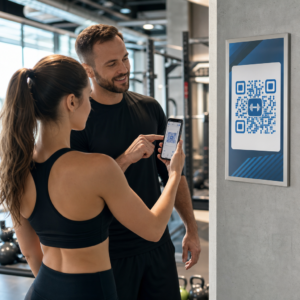
Wilt u uw cadeaubonnen gemakkelijker inwisselbaar en moeilijker te negeren maken? Een slecht ontworpen inwisselproces frustreert klanten en leidt tot ongebruikte saldi die onbenut blijven. Deze gids legt uit hoe u QR-codes kunt toevoegen aan fysieke en digitale cadeaubonnen, wat ze voor uw bedrijf ontsluiten, en hoe u ze correct instelt.
Waarom QR-codes thuishoren op cadeaubonnen
Cadeaubonnen zijn een belangrijke aankoopcategorie. Recente enquêtegegevens tonen aan dat 76% van de Amerikaanse consumenten het afgelopen jaar een cadeaubon heeft gekocht, waarvan 40% van die aankopen digitaal was. Toch varieert het inwisselgedrag sterk – consumenten besteden digitale cadeaubonnen in gemiddeld 16,8 dagen, vergeleken met 35,3 dagen voor fysieke kaarten. Die kloof vertegenwoordigt echte inkomsten die onbenut blijven.
Een QR-code op een cadeaubon vermindert de frictie in het inwisselproces. In plaats van een klant te vragen een lang kaartnummer in te typen of door een meervoudige afrekenprocedure te navigeren, brengt één enkele scan hen direct naar een betaalpagina, saldochecker of online winkel. Die vermindering van inspanning vertaalt zich direct in snellere inwisselingen en minder ongebruikte saldi.
Naast gemak bieden QR-codes u iets wat traditionele cadeaubonnen niet kunnen: gegevens. U kunt bijhouden wanneer en waar kaarten worden gescand, welke kaartontwerpen beter presteren, en of klanten de inwisseling voltooien na het scannen.
Fysieke cadeaubonnen: Een werkende QR-code toevoegen
Een fysieke cadeaubon heeft beperkte ruimte, dus elke ontwerpbeslissing is van belang. Het toevoegen van een QR-code is eenvoudig, maar enkele technische standaarden bepalen of deze daadwerkelijk betrouwbaar scant in de echte wereld.
Minimale grootte en stille zone
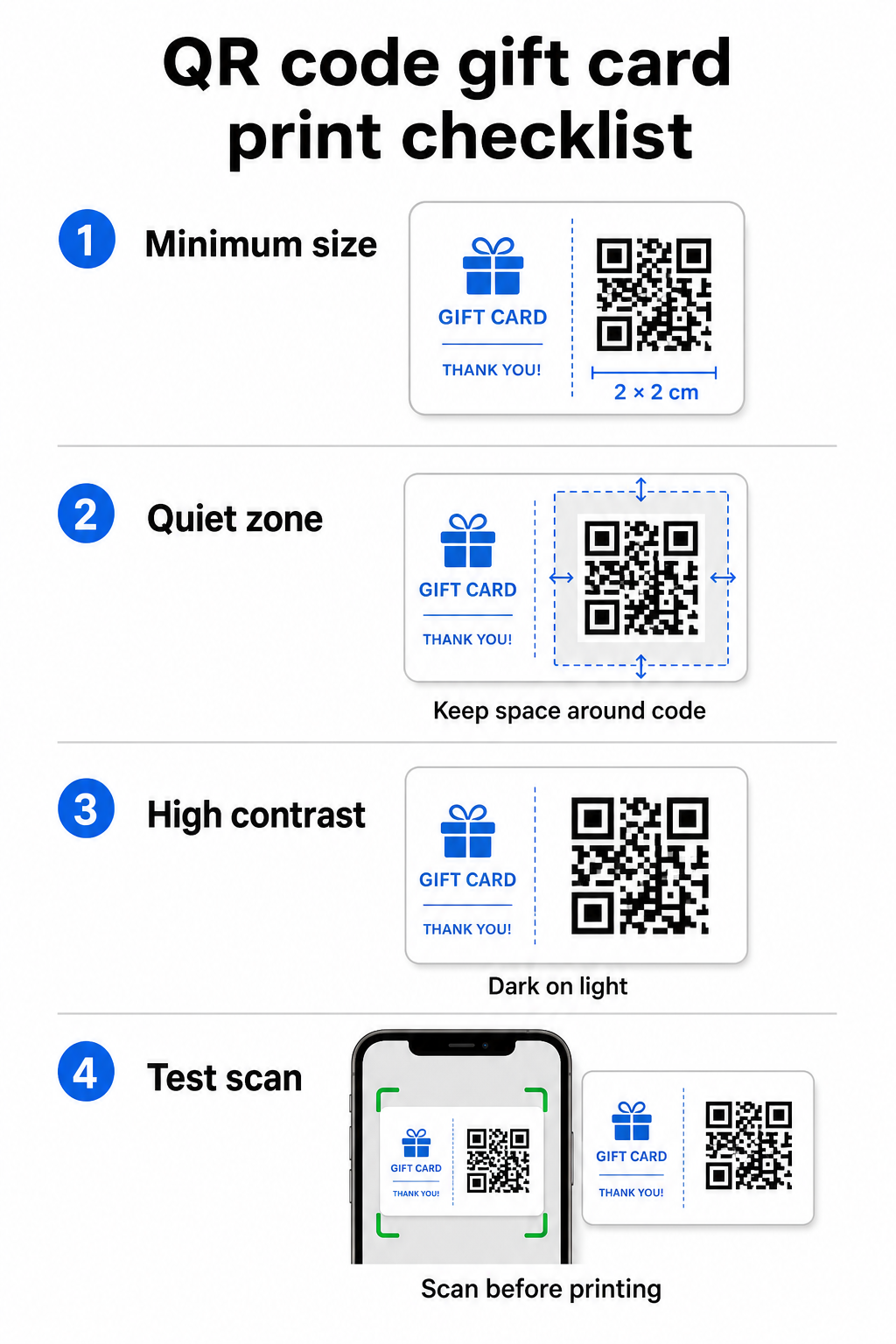
Voor betrouwbaar scannen op gedrukt materiaal moet uw QR-code minimaal 2 × 2 cm zijn. Rond de code zelf laat u een blanco marge – genaamd de stille zone – van minimaal vier modules aan alle zijden. Als elke module in uw QR-code 2 mm breed is, betekent dat een marge van 8 mm rondom. Het overladen van de code met tekst of ontwerpelementen in deze zone is een van de meest voorkomende redenen waarom codes niet scannen.
Contrastvereisten
Gebruik een donkere voorgrondkleur op een lichte achtergrond. De minimaal aanbevolen contrastverhouding is 4:1, hoewel zwart op wit (21:1) de meest betrouwbare combinatie blijft. Vermijd omgekeerde kleurenschema's (licht patroon op donkere achtergrond), verlopen en schaduwen – al deze creëren inconsistent contrast dat camerascanners in verwarring brengt. Voor gedetailleerde richtlijnen, zie best practices voor kleurcontrast van QR-codes.
Plaatsing op de kaart
Plaats de QR-code op de achterkant van de kaart, weg van de magneetstrip en het kras-PIN-gebied. De voorkant van de kaart is voor merkherkenning; de achterkant is waar functionele elementen zoals kaartnummers en QR-codes thuishoren. Voeg een korte call-to-action toe naast de code – zoals “Scan om uw saldo te controleren” of “Scan om online in te wisselen” – zodat klanten begrijpen wat er gebeurt wanneer ze scannen.
Gebruik dynamische QR-codes voor flexibiliteit
Als u fysieke kaarten in bulk afdrukt, bindt een statische QR-code u aan één enkele bestemmings-URL. Een dynamische QR-code stelt u in staat de bestemming op elk moment bij te werken zonder de kaart opnieuw af te drukken. Dit is van belang wanneer u uw inwisselportaal opnieuw ontwerpt, een seizoenspromotie uitvoert of migreert naar een nieuw betalingssysteem. U kunt dynamische QR-codes maken en beheren via Pageloot's QR-codegenerator, wat u ook scananalyses biedt vanuit een gecentraliseerd dashboard.
Houd uw cadeauboncampagnes flexibel Moet u bijwerken waar uw cadeaubon QR-codes naartoe verwijzen zonder duizenden kaarten opnieuw af te drukken? Gebruik de Link QR-codegenerator om dynamische codes te maken die u op elk moment kunt omleiden, inclusief volledige scanningsregistratie.
Digitale cadeaubonnen: QR-codes in e-mail- en wallet-formaten
Een digitale cadeaubon – geleverd via e-mail, sms of opgeslagen in een mobiele wallet – kan een QR-code net zo effectief dragen als een fysieke. In deze context dient de QR-code zelf als het inwisselmechanisme.
Wanneer een klant een digitale cadeaubon ontvangt, kan de QR-code die is ingebed in de e-mail of het afbeeldingsbestand direct linken naar een afrekenpagina die vooraf is geladen met de waarde van de kaart, een coupon landingspagina met inwisselinstructies, of een betalingsverwerker zoals PayPal of Stripe. De klant scant de code bij het afrekenen – in de winkel of online – en de waarde wordt automatisch toegepast.
Deze aanpak werkt bijzonder goed voor bedrijven die zowel fysieke als online winkels exploiteren. Een klant die een digitale cadeaubon per e-mail ontvangt, kan uw winkel binnenlopen, de e-mail openen en de caissière de QR-code vanaf hun telefoonscherm laten scannen – geen kaartnummer vereist.
Specifiek voor de betaalstroom, Pageloot's PayPal QR code maken laat u een code maken die direct naar een betaalpagina linkt, waardoor het eenvoudig is om een scan-en-betaal inwisselervaring te bouwen in uw digitale cadeaukaartontwerp.
Waar u uw Cadeaukaart QR-code aan kunt koppelen
De bestemming die u kiest, bepaalt de klantervaring na de scan. Hier zijn de meest voorkomende en effectieve opties:
| Bestemming | Beste gebruikscasus |
|---|---|
| Online winkel of afrekenpagina | Volledige e-commerce inwisseling; kaartwaarde toegepast bij het afrekenen |
| Saldo opzoekpagina | Laat ontvangers resterende waarde controleren voordat ze uitgeven |
| Coupon- of aanbiedingslandingspagina | Gekoppelde promoties naast de cadeaukaartwaarde |
| Betaallink (PayPal, Stripe) | Directe betaling op het fysieke verkooppunt |
| Merk welkomstpagina | Onboarding van nieuwe klanten; links naar aanmelding voor loyaliteitsprogramma |
Als u promoties wilt uitvoeren naast uw cadeaukaartprogramma – bijvoorbeeld door bonuskortingen aan te bieden aan ontvangers die binnen een bepaalde termijn scannen – Pageloot's QR code maken voor coupons laat u een landingspagina bouwen die meerdere aanbiedingen toont, bijhoudt welke locaties de meeste inwisselingen verzamelen, en die aanbiedingen bijwerkt zonder een nieuwe code te genereren.
Voor een bredere kijk op hoe QR-gebaseerde promoties zich verhouden tot traditionele kortingsmethoden, zie QR-codes versus traditionele coupons: welke werkt beter.
Inwisselingen en Campagneprestaties bijhouden
Een van de duidelijkste voordelen van het gebruik van QR-codes op cadeaukaarten – boven traditionele kaartnummers alleen – is de analysemogelijkheid die ze toevoegen. Met een platform zoals Pageloot, wordt elke scan gelogd met een tijdstempel, apparaattype en locatiegegevens. Dit vertelt u:
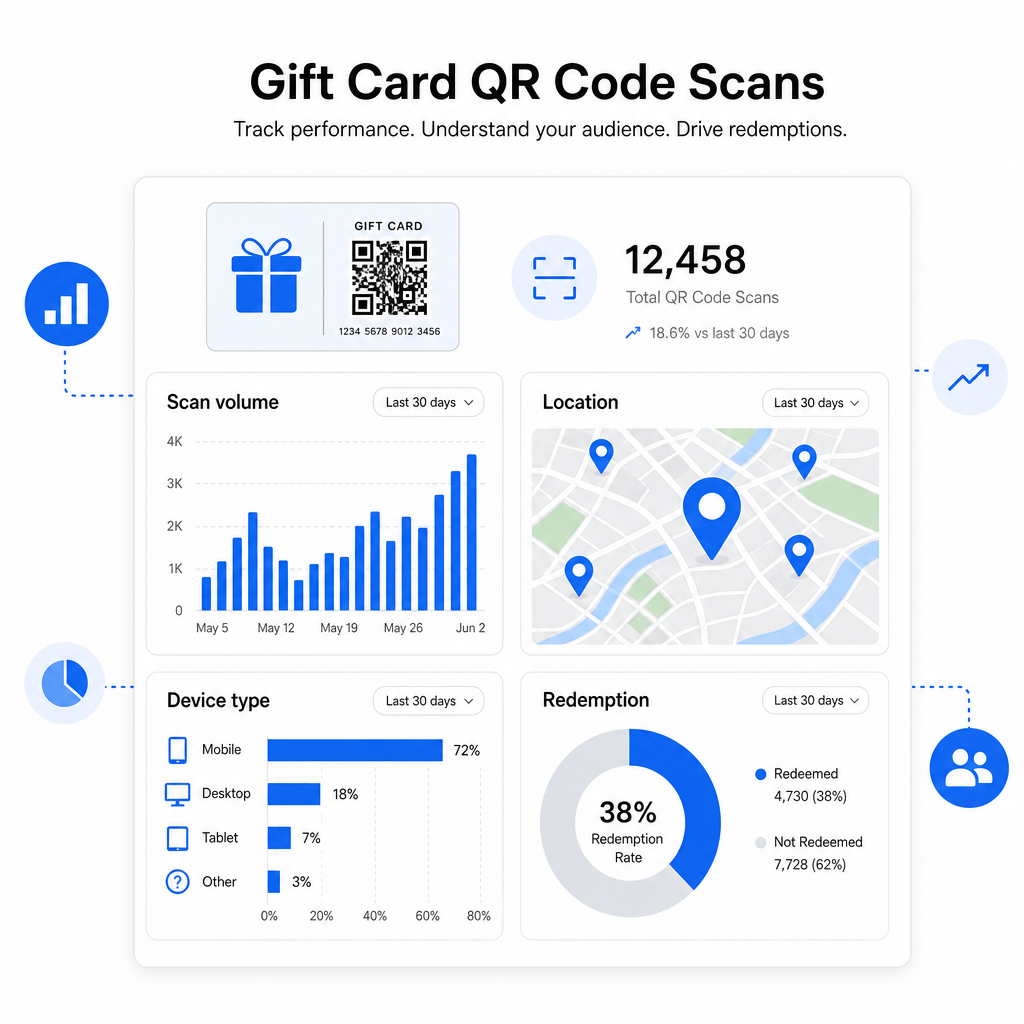
- Welke kaartontwerpen of promotionele batches het meest worden gescand
- Of klanten scannen maar de inwisseling niet voltooien, wat duidt op een probleem met de landingspagina
- Geografische spreiding van inwisselingen, nuttig voor retailers met meerdere locaties
- Piek inwisseltijden, die toekomstige promotietiming kunnen informeren
Deze gegevens zijn bijzonder waardevol voor retailbedrijven die cadeaukaartcampagnes uitvoeren rond feestdagen of seizoensevenementen. Voor meer informatie over hoe QR-codes retailbetalings- en engagementstrategieën ondersteunen, zie QR codes voor retail en hoe QR-codes retailbetalingen vereenvoudigen.
Bekijk welke cadeaukaartcampagnes inwisselingen stimuleren Volg scanvolume, apparaattypen en locaties voor elke QR-code op uw cadeaukaarten. Begin met de Pageloot QR-codegenerator en krijg toegang tot uw analysedashboard vanaf dag één.
Juridische overwegingen voor cadeaukaarten in de VS.
Als u cadeaukaarten uitgeeft in de Verenigde Staten, regelt de federale wetgeving hoe ze werken. Volgens de CARD Act en Verordening E (12 C.F.R. § 1005.20), mogen gedekte cadeaukaarten – inclusief winkelcadeaukaarten en algemeen bruikbare prepaidkaarten – niet verlopen in minder dan vijf jaar vanaf de uitgiftedatum, en inactiviteitskosten mogen alleen worden berekend na 12 opeenvolgende maanden van inactiviteit, met niet meer dan één dergelijke vergoeding per maand. Alle kosten en vervaltermijnen moeten duidelijk aan de klant worden bekendgemaakt.
Het toevoegen van een QR-code aan uw cadeaukaart verandert deze verplichtingen niet, maar het geeft u wel een praktisch hulpmiddel om ze duidelijker te communiceren. Uw QR-code landingspagina kan het resterende saldo, de vervaldatum, toepasselijke kosten en volledige voorwaarden weergeven in een formaat dat veel gemakkelijker te lezen is dan de kleine lettertjes op een fysieke kaart.
Merk op dat sommige prepaidproducten zijn vrijgesteld van deze federale regels – inclusief herlaadbare kaarten die niet als cadeaukaarten worden verkocht en promotionele beloningskaarten – maar staatswetten kunnen aanvullende eisen stellen. Controleer altijd zowel de federale als de toepasselijke staatswetten voordat u een cadeaukaartprogramma lanceert.
Ontwerpchecklist Voordat u afdrukt of verzendt
Voordat u uw cadeaukaart QR-codes afrondt, doorloop deze controles:
- Maat: Minimaal 2 × 2 cm voor fysieke kaarten; schaalbaar voor e-mail of portemonnee weergave
- Stille zone: Minimaal vier modules blanco ruimte aan alle vier de zijden
- Contrast: Donkere voorgrond op lichte achtergrond, minimaal 4:1 verhouding
- Bestemming: Test de link op meerdere apparaten en bevestig dat deze correct laadt op mobiel
- Oproep tot actie: Voeg een korte instructie toe naast de code die uitlegt wat de scan doet
- Dynamisch versus statisch: Gebruik een dynamische code als de bestemming kan veranderen of als u scananalyses wilt
- Foutcorrectie: Gebruik niveau Q of H als u een logo toevoegt aan de QR-code, om de scanbaarheid te behouden
Voor een volledige handleiding van QR-code ontwerpstandaarden, zie best practices voor de leesbaarheid van QR-codes.
QR-codes veranderen een passieve cadeaukaart in een actief klantcontactpunt. Wanneer correct ontworpen en gekoppeld aan een goed opgebouwde inwisselervaring, verminderen ze wrijving, verhogen ze de inwisselpercentages, en geven ze u meetbare gegevens over hoe uw cadeaukaartprogramma daadwerkelijk presteert. Begin met een dynamische code zodat u controle behoudt over de bestemming, en gebruik uw scananalyses om de ervaring in de loop van de tijd te blijven verbeteren.
Maak vandaag nog uw cadeaukaart QR-code Bouw in enkele minuten een branded, traceerbare QR-code voor uw cadeaubonprogramma. Probeer de Pageloot QR-codegenerator gratis gedurende 14 dagen – geen creditcard vereist.
Veelgestelde vragen
Als u een dynamische QR-code gebruikt, kunt u de bestemmingslink op elk moment bijwerken zonder de code zelf te wijzigen. Dit betekent dat u de QR-code één keer kunt afdrukken en deze later kunt omleiden naar een nieuwe betaalpagina, seizoensaanbieding of bijgewerkt portaal. Als u echter het fysieke ontwerp van de kaart moet wijzigen, moet u opnieuw afdrukken.
De meest effectieve bestemming is een voor mobiel geoptimaliseerde pagina waar de klant een inwisseling kan voltooien, zijn saldo kan controleren, of een betaling kan doen. Opties zijn onder meer een afrekenpagina die vooraf is geladen met de waarde van de kaart, een PayPal- of Stripe-betaallink, of een couponlandingspagina met actuele aanbiedingen. De sleutel is dat de pagina snel laadt op mobiel en de volgende stap duidelijk maakt.
Gebruik een QR-codeplatform dat ingebouwde analyses omvat, zoals Pageloot. Elke scan wordt geregistreerd met de tijd, het apparaattype en de locatie, zodat je kunt zien hoeveel kaarten er worden gescand, wanneer de inwisselactiviteit piekt, en of klanten afhaken voordat ze de inwisseling voltooien. Deze gegevens helpen je bij het identificeren en oplossen van zwakke punten in je inwisselstroom.