首页 > 使用案例 > How to Use QR Codes on Gift Cards
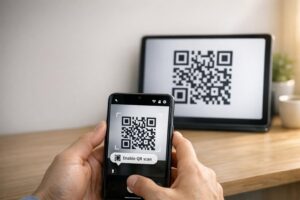
Scanning gift card

How to Use QR Codes on Gift Cards

Learn how QR codes on physical and digital gift cards speed up redemptions. This guide covers design standards, scan analytics, and legal considerations.
Updated on 7 月 2, 2026
目录

Want to make your gift cards easier to redeem and harder to ignore? A poorly designed redemption process frustrates customers and leads to unredeemed balances sitting idle. This guide explains how to add QR codes to physical and digital gift cards, what they unlock for your business, and how to set them up correctly.

Why QR Codes Belong on Gift Cards

Gift cards are a significant purchase category. Recent survey data shows that 76% of U.S. consumers purchased a gift card in the past year, with 40% of those purchases being digital. Yet redemption behavior varies widely – consumers spend digital gift cards in an average of 16.8 days, compared to 35.3 days for physical cards. That gap represents real revenue sitting on the shelf.

A QR code on a gift card removes friction from the redemption process. Instead of asking a customer to type in a long card number or navigate a multi-step checkout, a single scan takes them directly to a payment page, balance lookup, or online store. That reduction in effort translates directly into faster redemptions and fewer abandoned balances.

Beyond convenience, QR codes give you something traditional gift cards cannot: data. You can track when and where cards are scanned, which card designs perform better, and whether customers complete the redemption after scanning.

Physical Gift Cards: Adding a QR Code That Works

A physical gift card has limited real estate, so every design decision matters. Adding a QR code is straightforward, but a few technical standards determine whether it actually scans reliably in the real world.

Minimum Size and Quiet Zone

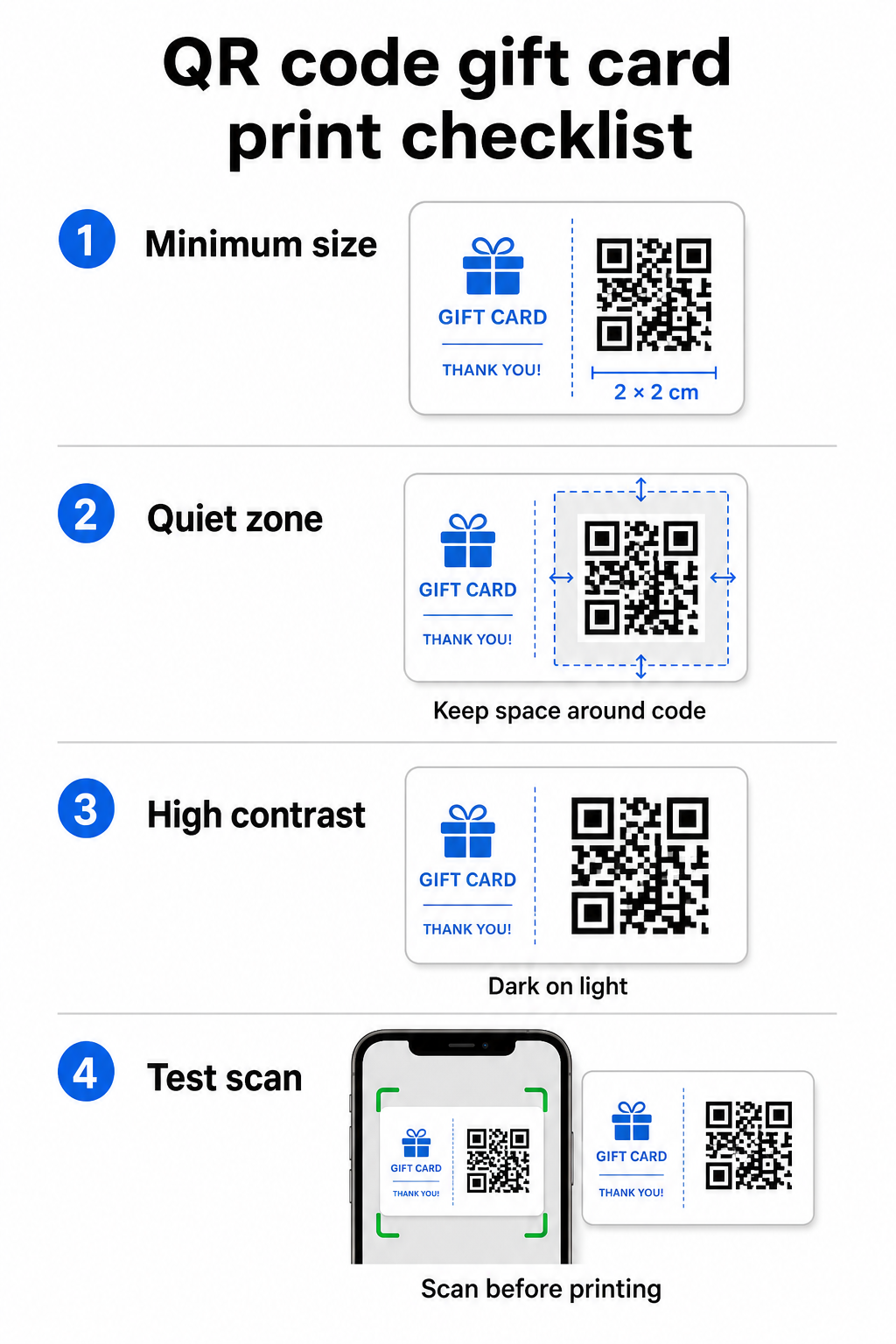
For reliable scanning on printed materials, your QR code should be at least 2 × 2 cm. Around the code itself, leave a blank margin – called the 静区 – of at least four modules on all sides. If each module in your QR code is 2 mm wide, that means an 8 mm margin all around. Crowding the code with text or design elements in this zone is one of the most common reasons codes fail to scan.

QR design checklist

Contrast Requirements

Use a dark foreground color on a light background. The minimum recommended contrast ratio is 4:1, though black on white (21:1) remains the most reliable combination. Avoid reversed color schemes (light pattern on dark background), gradients, and shadows – all of these create inconsistent contrast that confuses camera scanners. For detailed guidance, see 二维码颜色对比度最佳实践.

Placement on the Card

Place the QR code on the back of the card, away from the magnetic stripe and scratch-off PIN area. The front of the card is for brand recognition; the back is where functional elements like card numbers and QR codes belong. Include a short call-to-action next to the code – such as “Scan to check your balance” or “Scan to redeem online” – so customers understand what happens when they scan.

Use Dynamic QR Codes for Flexibility

If you print physical cards in bulk, a static QR code locks you into a single destination URL. A 动态二维码 lets you update the destination at any time without reprinting the card. This matters when you redesign your redemption portal, run a seasonal promotion, or migrate to a new payment system. You can create and manage dynamic QR codes through Pageloot’s QR code generator, which also gives you scan analytics from a centralized dashboard.

Keep Your Gift Card Campaigns Flexible Need to update where your gift card QR codes point without reprinting thousands of cards? Use the 链接二维码生成器 to create dynamic codes that you can redirect anytime, with full scan tracking included.

Digital Gift Cards: QR Codes in Email and Wallet Formats

A digital gift card – delivered by email, SMS, or stored in a mobile wallet – can carry a QR code just as effectively as a physical one. In this context, the QR code serves as the redemption mechanism itself.

When a customer receives a digital gift card, the QR code embedded in the email or image file can link directly to a checkout page pre-loaded with the card’s value, a coupon landing page with redemption instructions, or a payment processor like PayPal or Stripe. The customer scans the code at checkout – in-store or online – and the value is applied automatically.

This approach works particularly well for businesses that operate both physical and online stores. A customer who receives a digital gift card by email can walk into your store, open the email, and let the cashier scan the QR code from their phone screen – no card number required.

For the payment flow specifically, Pageloot’s PayPal 二维码生成器 lets you create a code that links directly to a payment page, making it straightforward to build a scan-to-pay redemption experience into your digital gift card design.

What to Link Your Gift Card QR Code To

The destination you choose determines the customer experience after the scan. Here are the most common and effective options:

目的地 最佳使用案例
Online store or checkout page Full e-commerce redemption; card value applied at checkout
Balance lookup page Lets recipients check remaining value before spending
Coupon or offer landing page Paired promotions alongside the gift card value
Payment link (PayPal, Stripe) Direct payment at physical point of sale
Brand welcome page New customer onboarding; links to loyalty program signup

If you want to run promotions alongside your gift card program – offering bonus discounts to recipients who scan within a set timeframe, for example – Pageloot’s 优惠券二维码生成器 lets you build a landing page that displays multiple offers, tracks which locations collect the most redemptions, and updates those offers without generating a new code.

For a broader look at how QR-based promotions compare to traditional discount methods, see QR codes vs. traditional coupons: which works better.

Tracking Redemptions and Campaign Performance

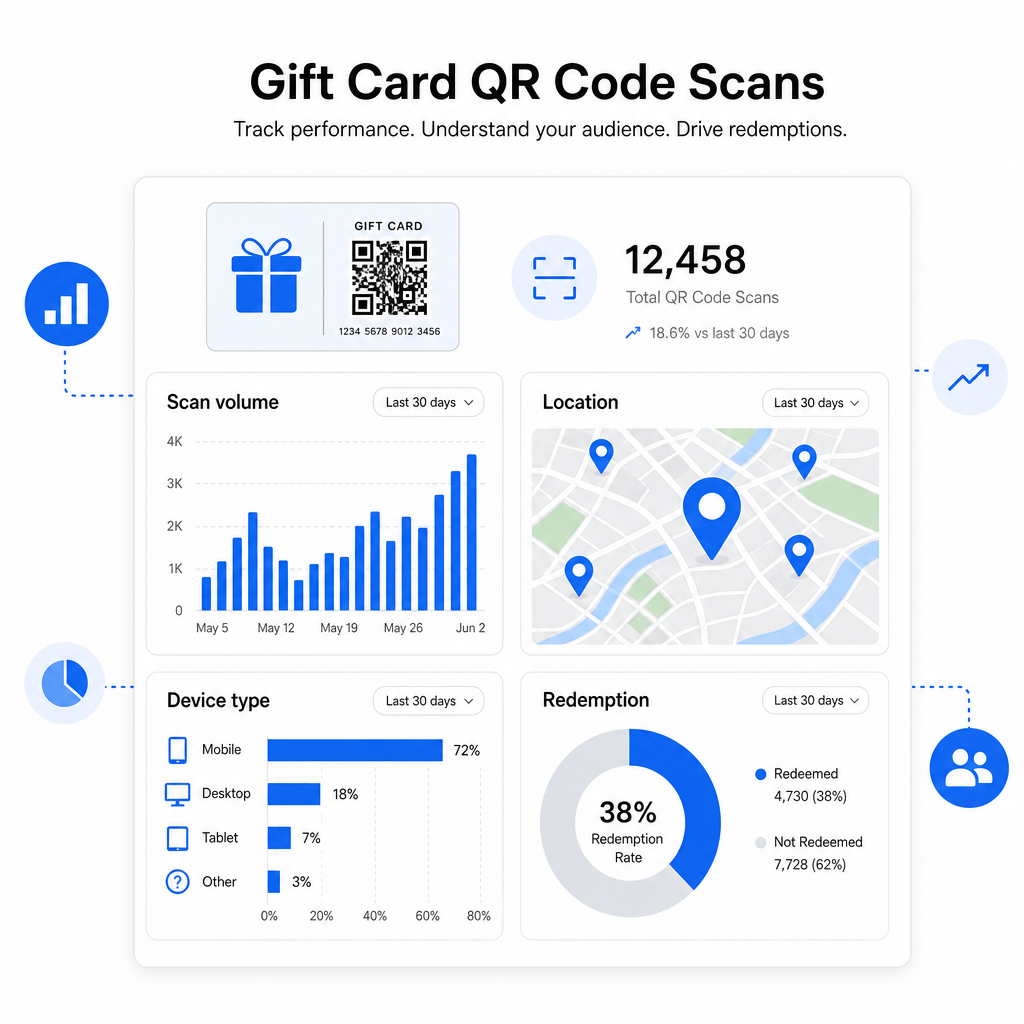
One of the clearest advantages of using QR codes on gift cards – over traditional card numbers alone – is the layer of analytics they add. With a platform like Pageloot, each scan is logged with a timestamp, device type, and location data. This tells you:

Gift card analytics
  • Which card designs or promotional batches are being scanned most
  • Whether customers scan but don’t complete the redemption, indicating a landing page problem
  • Geographic distribution of redemptions, useful for multi-location retailers
  • Peak redemption times, which can inform future promotional timing

This data is especially valuable for retail businesses running gift card campaigns around holidays or seasonal events. For more on how QR codes support retail payment and engagement strategies, see 零售业二维码how QR codes simplify retail payments.

See Which Gift Card Campaigns Are Driving Redemptions Track scan volume, device types, and locations for every QR code on your gift cards. Get started with the Pageloot QR码生成器 and access your analytics dashboard from day one.

Legal Considerations for Gift Cards in the U.S.

If you issue gift cards in the United States, federal law governs how they work. Under the CARD Act and Regulation E (12 C.F.R. § 1005.20), covered gift cards – including store gift cards and general-use prepaid cards – cannot expire in less than five years from the date of issuance, and inactivity fees can only be charged after 12 consecutive months of no activity, with no more than one such fee per month. All fees and expiration terms must be disclosed clearly to the customer.

Adding a QR code to your gift card does not change these obligations, but it does give you a practical tool to communicate them more clearly. Your QR code landing page can display remaining balance, expiration date, applicable fees, and full terms in a format that is far easier to read than the fine print on a physical card.

Note that some prepaid products are exempt from these federal rules – including reloadable cards not marketed as gift cards and promotional reward cards – but state laws may impose additional requirements. Always review both federal and applicable state rules before launching a gift card program.

Design Checklist Before You Print or Send

Before finalizing your gift card QR codes, run through these checks:

  • 尺寸: At least 2 × 2 cm for physical cards; scalable for email or wallet display
  • 静区: Minimum four modules of blank space on all four sides
  • 对比度: Dark foreground on light background, at least 4:1 ratio
  • Destination: Test the link on multiple devices and confirm it loads correctly on mobile
  • Call-to-action: Include a short instruction next to the code explaining what the scan does
  • Dynamic vs. static: Use a dynamic code if the destination may change or if you want scan analytics
  • Error correction: Use level Q or H if adding a logo to the QR code, to maintain scannability

For a full walkthrough of QR code design standards, see 二维码可读性的最佳实践.

QR codes turn a passive gift card into an active customer touchpoint. When designed correctly and linked to a well-built redemption experience, they reduce friction, increase redemption rates, and give you measurable data on how your gift card program is actually performing. Start with a dynamic code so you retain control over the destination, and use your scan analytics to keep improving the experience over time.

Create Your Gift Card QR Code Today Build a branded, trackable QR code for your gift card program in minutes. Try the Pageloot QR码生成器 free for 14 days – no credit card required.

常见问题

Can I add a QR code to an existing gift card design without reprinting everything?

If you use a dynamic QR code, you can update the destination link at any time without changing the code itself. This means you can print the QR code once and redirect it to a new payment page, seasonal offer, or updated portal later. However, if you need to change the physical design of the card, you will need to reprint.

What should the QR code on a gift card link to?

The most effective destination is a mobile-optimized page where the customer can complete a redemption, check their balance, or make a payment. Options include a checkout page pre-loaded with the card’s value, a PayPal or Stripe payment link, or a coupon landing page with current offers. The key is that the page loads quickly on mobile and makes the next step obvious.

How do I track whether customers are actually scanning and redeeming their gift cards?

Use a QR code platform that includes built-in analytics, such as Pageloot. Each scan is recorded with the time, device type, and location, so you can see how many cards are being scanned, when redemption activity peaks, and whether customers are dropping off before completing the redemption. This data helps you identify and fix weak points in your redemption flow.

关于作者

Siim Kostabi 是 Pageloot 的内容主管,负责撰写关于我们创新型二维码生成器服务的文章。凭借五年多来在二维码领域积累的深厚专业知识,Siim 是该领域的专家。他致力于利用二维码技术简化和增强数字交互,并取得了显著的成果。.

类别
了解更多关于
顾客扫描图书馆二维码
二维码 图书馆
扫描视频二维码
制作二维码 视频文件
QR QR码的#1解决方案

如果您需要在线创建QR码,则可以 制作二维码 就在这里免费!
Pageloot是 #1转到解决方案 创建和扫描QR码。

BL-0294

博客生成器

受到超过 20,000 个品牌的信赖,可获得更多销售、评论和关注者。

客户徽标
受到顶级品牌的信赖
评分为 4.8(共 5)

4.86 / 5 星评级

雨果·劳伦特
雨果·劳伦特
餐馆老板
有史以来最容易和最可靠的QR码生成器。PDF文件可以立即上传。我们的餐厅菜单现在是数字化的。
卢卡斯-詹森
卢卡斯-詹森
房地产开发商
这是一个很好的工具,二维码带你到你想要的地方。我们只使用位置二维码,但有许多有用的功能。
艾玛-莫雷蒂
艾玛-莫雷蒂
零售产品
易于使用和快速。它工作得很好,创造了一个完美的图像,所以员工可以下载我的vCard。
雨果·劳伦特
雨果·劳伦特
餐馆老板
有史以来最容易和最可靠的QR码生成器。PDF文件可以立即上传。我们的餐厅菜单现在是数字化的。
卢卡斯-詹森
卢卡斯-詹森
房地产开发商
这是一个很好的工具,二维码带你到你想要的地方。我们只使用位置二维码,但有许多有用的功能。
艾玛-莫雷蒂
艾玛-莫雷蒂
零售产品
易于使用和快速。它工作得很好,创造了一个完美的图像,所以员工可以下载我的vCard。
查看更多QR码
如何产生QR码
它是如何工作的 QR码和条形码
将一切转化为数字体验 不到3分钟。

免费试用 14 天。

无需信用卡。

首次购买可享受 30% 折扣

使用代码:

分享您的 MP3 文件

注册以创建 PDF QR 码

上传和显示你需要的一切。

  • 音频文件
  • 播客
  • 音乐

注册即可享 14 天免费试用。.
试用期结束后,二维码将失效。.

注册以创建音频 mp3 二维码

使用边框获得更多扫描

注册以向您的二维码添加更多框架

呼叫行动框架帮助您的客户与QR码轻松互动。试试吧!

注册即可享 14 天免费试用。.
试用期结束后,二维码将失效。.

注册以向您的二维码添加更多框架

使用形状添加更多样式

注册以创建更多形状

二维码不一定是方形的。试着改变它以适应你的品牌形象。

注册即可享 14 天免费试用。.
试用期结束后,二维码将失效。.

注册以创建更多形状

为您的二维码添加徽标

注册以将您的徽标添加到二维码中

通过在二维码上添加你的标志和品牌,使你的二维码脱颖而出。

注册即可享 14 天免费试用。.
试用期结束后,二维码将失效。.

注册以将您的徽标添加到二维码中

智能应用商店重定向

注册以创建应用商店二维码

将您的应用程序链接添加到我们的智能应用程序商店QR码。用户会根据他们的设备被重新定向。

注册即可享 14 天免费试用。.
试用期结束后,二维码将失效。.

注册以创建应用商店二维码

将图片上传到二维码

注册以创建图像二维码

轻松分享你的图像。在几秒钟内动态地改变任何图像。

注册即可享 14 天免费试用。.
试用期结束后,二维码将失效。.

注册以创建图像二维码

分享您的 PDF 文件

注册以创建 PDF QR 码

上传和显示你需要的一切。

  • 菜单和价格表
  • 使用说明
  • 任何文件

注册即可享 14 天免费试用。.
试用期结束后,二维码将失效。.

注册以创建 PDF QR 码

稍后编辑,无需打印

注册即可编辑您的二维码,无需再次打印

动态QR码让你改变你的QR码的内容,而不需要打印新的QR码。

注册即可享 14 天免费试用。.
试用期结束后,二维码将失效。.

注册即可编辑您的二维码,无需再次打印

何时?何地?追踪您的二维码扫描

注册以追踪您的二维码

发现你的哪些二维码收到了最多的扫描,以及什么最能让你的客户兴奋。

注册即可享 14 天免费试用。.
试用期结束后,二维码将失效。.

注册以追踪您的二维码

提供可打印文件

注册以创建 PDF 和 SVG 等矢量二维码

.EPS, .PDF, .SVG

想下载高清分辨率的QR码吗?获得矢量或像素格式,可随时打印。

注册即可享 14 天免费试用。.
试用期结束后,二维码将失效。.

注册以创建 PDF 和 SVG 等矢量二维码

请等待。您的二维码是 正在加载... 正在加载...

打造专属

注册以保存您的二维码以供日后使用

通过创建具有不同颜色、标识和行动呼吁框架的出色的QR码,获得更多的扫描。

注册即可享 14 天免费试用。.
试用期结束后,二维码将失效。.

注册以保存您的二维码以供日后使用