Haluatko tehdä lahjakorteistasi helpommin lunastettavia ja vaikeammin sivuutettavia? Huonosti suunniteltu lunastusprosessi turhauttaa asiakkaita ja johtaa lunastamattomiin saldoihin, jotka jäävät käyttämättä. Tämä opas selittää, miten QR-koodeja lisätään fyysisiin ja digitaalisiin lahjakortteihin, mitä ne avaavat yrityksellesi ja miten ne asetetaan oikein.
Miksi QR-koodit kuuluvat lahjakortteihin
Lahjakortit ovat merkittävä ostoskategoria. Tuoreen kyselydatan mukaan 76% yhdysvaltalaisista kuluttajista osti lahjakortin viime vuonna, ja 40% näistä ostoista oli digitaalisia. Lunastuskäyttäytyminen kuitenkin vaihtelee suuresti – kuluttajat käyttävät digitaalisia lahjakortteja keskimäärin 16,8 päivässä, kun taas fyysisten korttien osalta aika on 35,3 päivää. Tämä ero edustaa todellisia tuloja, jotka odottavat hyllyllä.
QR-koodi lahjakortissa poistaa kitkaa lunastusprosessista. Sen sijaan, että asiakasta pyydettäisiin syöttämään pitkä korttinumero tai navigoimaan monivaiheisessa kassalla, yksi skannaus vie hänet suoraan maksusivulle, saldokyselyyn tai verkkokauppaan. Tämä vaivannäön väheneminen tarkoittaa suoraan nopeampia lunastuksia ja vähemmän hylättyjä saldoja.
Mukavuuden lisäksi QR-koodit antavat sinulle jotain, mitä perinteiset lahjakortit eivät voi: dataa. Voit seurata, milloin ja missä kortteja skannataan, mitkä korttimallit toimivat paremmin ja suorittavatko asiakkaat lunastuksen skannauksen jälkeen.
Fyysiset lahjakortit: Toimivan QR-koodin lisääminen
Fyysisessä lahjakortissa on rajallisesti tilaa, joten jokaisella suunnittelupäätöksellä on merkitystä. QR-koodin lisääminen on suoraviivaista, mutta muutamat tekniset standardit määräävät, skannaako se todella luotettavasti todellisessa maailmassa.
Vähimmäiskoko ja hiljainen vyöhyke
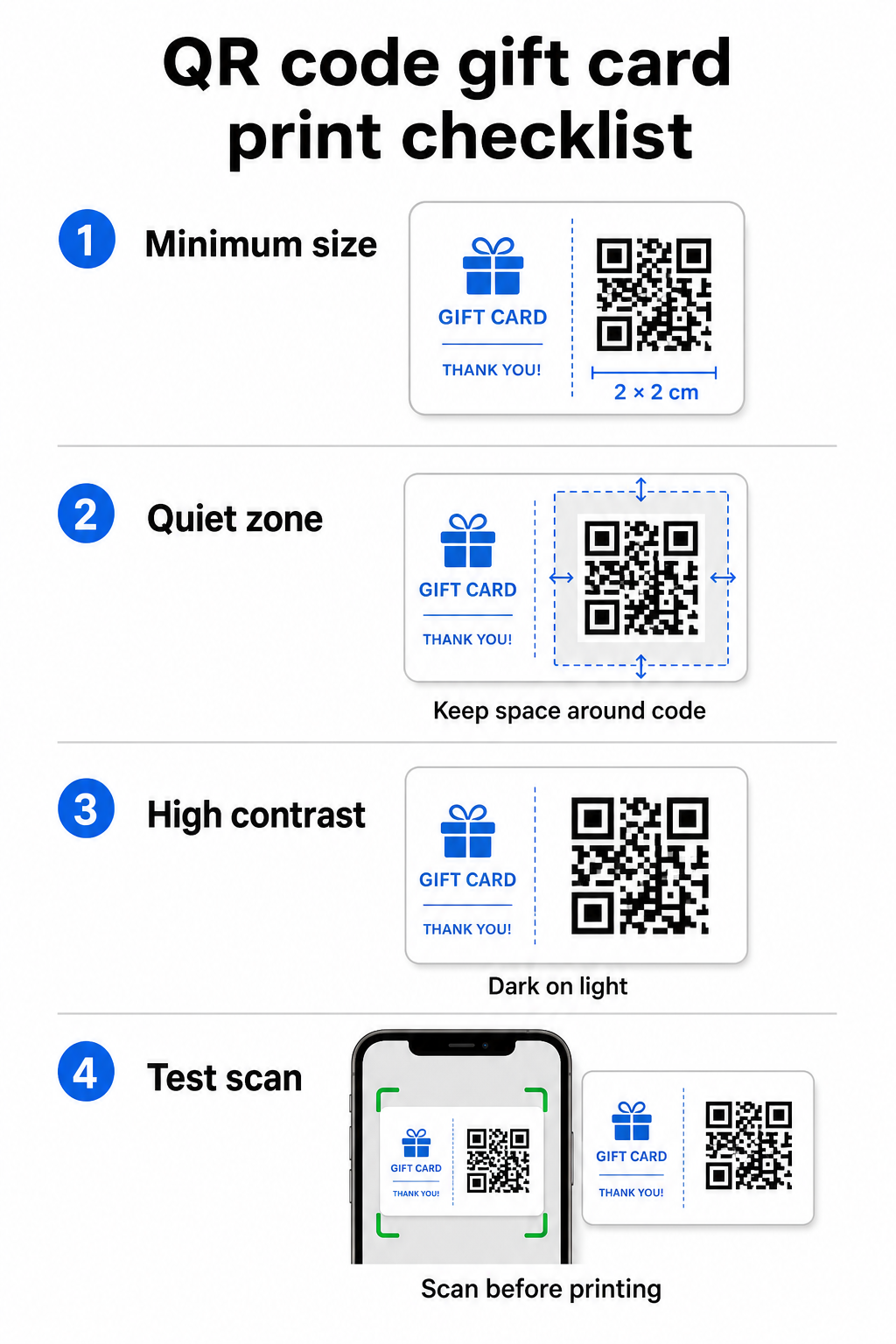
Luotettavaa skannausta varten painetuissa materiaaleissa QR-koodisi tulisi olla vähintään 2 × 2 cm. Itse koodin ympärille jätä tyhjä marginaali – jota kutsutaan hiljaisen alueen – vähintään neljän moduulin verran kaikilta sivuilta. Jos jokainen QR-koodisi moduuli on 2 mm leveä, se tarkoittaa 8 mm marginaalia joka puolella. Koodin ahtaminen tekstillä tai suunnitteluelementeillä tällä alueella on yksi yleisimmistä syistä, miksi koodit eivät skannaa.
Kontrastivaatimukset
Käytä tummaa etualan väriä vaalealla taustalla. Suositeltu vähimmäiskontrastisuhde on 4:1, vaikka musta valkoisella (21:1) pysyy luotettavimpana yhdistelmänä. Vältä käänteisiä värimaailmoja (vaalea kuvio tummalla taustalla), gradientteja ja varjoja – kaikki nämä luovat epäjohdonmukaista kontrastia, joka hämmentää kameraskannereita. Yksityiskohtaiset ohjeet löydät osoitteesta QR-koodin värikontrastin parhaita käytäntöjä.
Sijoitus kortille
Aseta QR-koodi kortin taakse, pois magneettiraidan ja raaputettavan PIN-alueen läheltä. Kortin etupuoli on brändin tunnistusta varten; takapuolelle kuuluvat toiminnalliset elementit, kuten korttinumerot ja QR-koodit. Sisällytä koodin viereen lyhyt toimintakehotus – kuten “Skannaa tarkistaaksesi saldosi” tai “Skannaa lunastaaksesi verkossa” – jotta asiakkaat ymmärtävät, mitä tapahtuu, kun he skannaavat.
Käytä dynaamisia QR-koodeja joustavuuden vuoksi
Jos tulostat fyysisiä kortteja massana, staattinen QR-koodi sitoo sinut yhteen kohde-URL-osoitteeseen. A dynaaminen QR-koodi antaa sinun päivittää kohdetta milloin tahansa tulostamatta korttia uudelleen. Tällä on merkitystä, kun suunnittelet lunastusportaaliasi uudelleen, järjestät kausiluonteisen kampanjan tai siirryt uuteen maksujärjestelmään. Voit luoda ja hallita dynaamisia QR-koodeja Pagelootin QR-koodigeneraattorilla, joka antaa sinulle myös skannausanalytiikkaa keskitetystä hallintapaneelista.
Pidä lahjakorttikampanjasi joustavina Tarvitseeko sinun päivittää, mihin lahjakorttisi QR-koodit osoittavat tulostamatta tuhansia kortteja uudelleen? Käytä Linkki QR-koodigeneraattori luodaksesi dynaamisia koodeja, jotka voit ohjata uudelleen milloin tahansa, täydellä skannausten seurannalla.
Digitaaliset lahjakortit: QR-koodit sähköposti- ja lompakkomuodoissa
Digitaalinen lahjakortti – toimitettuna sähköpostitse, tekstiviestillä tai tallennettuna mobiililompakkoon – voi sisältää QR-koodin yhtä tehokkaasti kuin fyysinenkin. Tässä yhteydessä QR-koodi toimii itse lunastusmekanismina.
Kun asiakas saa digitaalisen lahjakortin, sähköpostiin tai kuvatiedostoon upotettu QR-koodi voi linkittää suoraan kassasivulle, johon kortin arvo on esiladattu, kuponkien laskeutumissivulle lunastusohjeineen tai maksunkäsittelijään, kuten PayPaliin tai Stripeen. Asiakas skannaa koodin kassalla – myymälässä tai verkossa – ja arvo sovelletaan automaattisesti.
Tämä lähestymistapa toimii erityisen hyvin yrityksille, jotka toimivat sekä fyysisissä että verkkokaupoissa. Asiakas, joka saa digitaalisen lahjakortin sähköpostitse, voi kävellä myymälääsi, avata sähköpostin ja antaa kassanhoitajan skannata QR-koodin puhelimensa näytöltä – korttinumeroa ei tarvita.
Erityisesti maksuvirtaa varten Pagelootin PayPal QR-koodi generaattori antaa sinun luoda koodin, joka linkittää suoraan maksusivulle, tehden siitä suoraviivaista rakentaa skannaa-maksa-lunastuskokemuksen digitaalisen lahjakorttisi suunnitteluun.
Mihin lahjakorttisi QR-koodi linkitetään
Valitsemasi kohde määrittää asiakaskokemuksen skannauksen jälkeen. Tässä ovat yleisimmät ja tehokkaimmat vaihtoehdot:
| Kohde | Paras käyttökotelo |
|---|---|
| Verkkokauppa tai kassasivu | Täysi verkkokaupan lunastus; kortin arvo käytetty kassalla |
| Saldon tarkistussivu | Antaa vastaanottajien tarkistaa jäljellä olevan arvon ennen käyttöä |
| Kuponki- tai tarjoussivu | Yhdistetyt kampanjat lahjakortin arvon rinnalla |
| Maksulinkki (PayPal, Stripe) | Suora maksu fyysisessä myyntipisteessä |
| Brändin tervetuliaissivu | Uusien asiakkaiden perehdytys; linkit kanta-asiakasohjelman rekisteröitymiseen |
Jos haluat järjestää kampanjoita lahjakorttiohjelmasi rinnalla – tarjoten bonusalennuksia vastaanottajille, jotka skannaavat tietyn ajan kuluessa, esimerkiksi – Pagelootin Kuponki QR-koodi generaattori antaa sinun rakentaa laskeutumissivun, joka näyttää useita tarjouksia, seuraa, mitkä sijainnit keräävät eniten lunastuksia, ja päivittää näitä tarjouksia luomatta uutta koodia.
Laajemman katsauksen saamiseksi siihen, miten QR-pohjaiset kampanjat vertautuvat perinteisiin alennusmenetelmiin, katso QR-koodit vs. perinteiset kupongit: kumpi toimii paremmin.
Lunastusten ja kampanjan suorituskyvyn seuranta
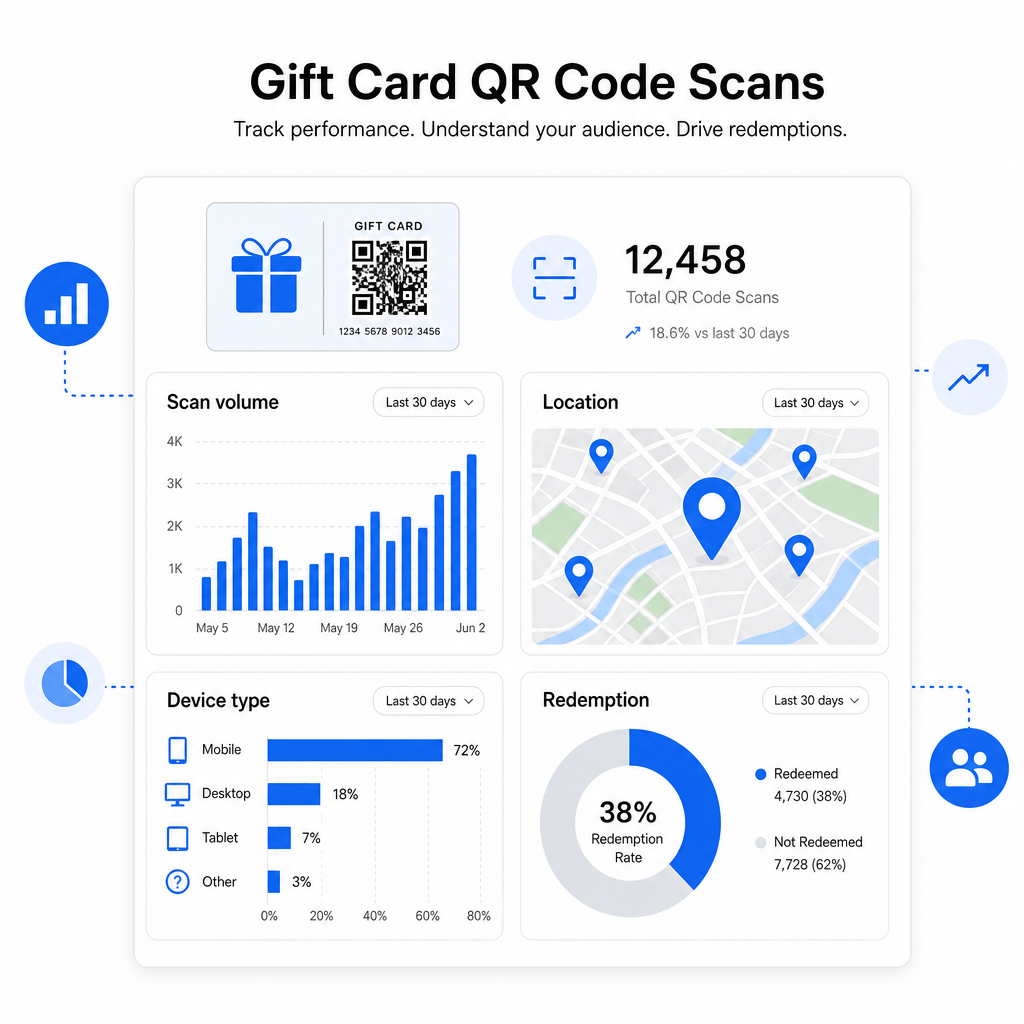
Yksi selkeimmistä eduista QR-koodien käytössä lahjakorteissa – pelkkien perinteisten korttinumeroiden sijaan – on niiden lisäämä analytiikkakerros. Pagelootin kaltaisella alustalla jokainen skannaus kirjataan aikaleiman, laitetyypin ja sijaintitietojen kanssa. Tämä kertoo sinulle:
- Mitkä korttimallit tai kampanjaerät skannataan eniten
- Skannaavatko asiakkaat, mutta eivät suorita lunastusta loppuun, mikä viittaa laskeutumissivun ongelmaan
- Lunastusten maantieteellinen jakautuminen, hyödyllinen monipaikkaisille jälleenmyyjille
- Lunastusten huippuajat, jotka voivat ohjata tulevaa kampanja-ajoitusta
Nämä tiedot ovat erityisen arvokkaita vähittäiskaupoille, jotka järjestävät lahjakorttikampanjoita juhlapäivien tai kausittaisten tapahtumien aikaan. Lisätietoja siitä, miten QR-koodit tukevat vähittäiskaupan maksu- ja sitouttamisstrategioita, katso QR-koodit vähittäiskauppaan ja miten QR-koodit yksinkertaistavat vähittäiskaupan maksuja.
Katso, mitkä lahjakorttikampanjat ajavat lunastuksia Seuraa skannausten määrää, laitetyyppejä ja sijainteja jokaiselle lahjakorteissasi olevalle QR-koodille. Aloita Pageloot QR-koodigeneraattori ja pääset analytiikan hallintapaneeliisi ensimmäisestä päivästä lähtien.
Lainsäädännölliset näkökohdat lahjakorteille Yhdysvalloissa.
Jos myönnät lahjakortteja Yhdysvalloissa, liittovaltion laki säätelee niiden toimintaa. CARD-lain ja E-asetuksen (12 C.F.R. § 1005.20) mukaan katetut lahjakortit – mukaan lukien kauppojen lahjakortit ja yleiskäyttöiset prepaid-kortit – eivät voi vanhentua alle viidessä vuodessa myöntämispäivästä, ja käyttämättömyysmaksut voidaan periä vasta 12 peräkkäisen kuukauden käyttämättömyyden jälkeen, enintään yhdellä tällaisella maksulla kuukaudessa. Kaikki maksut ja vanhentumisehdot on ilmoitettava selkeästi asiakkaalle.
QR-koodin lisääminen lahjakorttiisi ei muuta näitä velvoitteita, mutta se antaa sinulle käytännöllisen työkalun viestiä niistä selkeämmin. QR-koodisi laskeutumissivu voi näyttää jäljellä olevan saldon, vanhentumispäivän, sovellettavat maksut ja täydelliset ehdot muodossa, joka on paljon helpompi lukea kuin fyysisen kortin pieni präntti.
Huomaa, että jotkut prepaid-tuotteet on vapautettu näistä liittovaltion säännöistä – mukaan lukien uudelleenladattavat kortit, joita ei markkinoida lahjakortteina, ja kampanjapalkintokortit – mutta osavaltioiden lait voivat asettaa lisävaatimuksia. Tarkista aina sekä liittovaltion että sovellettavat osavaltion säännöt ennen lahjakorttiohjelman käynnistämistä.
Suunnittelun tarkistuslista ennen tulostamista tai lähettämistä
Ennen lahjakorttisi QR-koodien viimeistelyä käy läpi nämä tarkistukset:
- Koko: Vähintään 2 × 2 cm fyysisille korteille; skaalautuva sähköposti- tai lompakkonäyttöön
- Hiljainen vyöhyke: Vähintään neljä moduulia tyhjää tilaa kaikilla neljällä sivulla
- Kontrasti: Tumma etuala vaalealla taustalla, vähintään 4:1 suhde
- Kohde: Testaa linkkiä useilla laitteilla ja varmista, että se latautuu oikein mobiililaitteella
- Toimintakehote: Sisällytä lyhyt ohje koodin viereen selittäen, mitä skannaus tekee
- Dynaaminen vs. staattinen: Käytä dynaamista koodia, jos kohde voi muuttua tai jos haluat skannausanalytiikkaa
- Virheenkorjaus: Käytä tasoa Q tai H, jos lisäät logon QR-koodiin, skannattavuuden säilyttämiseksi
Täydellisen QR-koodin suunnittelustandardien läpikäynnin löydät täältä: parhaita käytäntöjä QR-koodin luettavuudelle.
QR-koodit muuttavat passiivisen lahjakortin aktiiviseksi asiakkaan kosketuspisteeksi. Kun ne on suunniteltu oikein ja linkitetty hyvin rakennettuun lunastuskokemukseen, ne vähentävät kitkaa, lisäävät lunastusasteita ja antavat sinulle mitattavissa olevaa tietoa siitä, miten lahjakorttiohjelmasi todella toimii. Aloita dynaamisella koodilla, jotta säilytät hallinnan kohteesta, ja käytä skannausanalytiikkaasi parantaaksesi kokemusta ajan myötä.
Luo lahjakorttisi QR-koodi tänään Rakenna brändätty, seurattava QR-koodi lahjakorttiohjelmaasi minuuteissa. Kokeile Pageloot QR-koodigeneraattori ilmaiseksi 14 päivän ajan – luottokorttia ei tarvita.
Usein kysytyt kysymykset
Jos käytät dynaamista QR-koodia, voit päivittää kohdelinkin milloin tahansa muuttamatta itse koodia. Tämä tarkoittaa, että voit tulostaa QR-koodin kerran ja ohjata sen uudelle maksusivulle, kausitarjoukseen tai päivitettyyn portaaliin myöhemmin. Kuitenkin, jos sinun tarvitsee muuttaa kortin fyysistä ulkoasua, sinun täytyy tulostaa uudelleen.
Tehokkain kohde on mobiilioptimoidu sivu, jossa asiakas voi suorittaa lunastuksen, tarkistaa saldonsa tai tehdä maksun. Vaihtoehtoja ovat kassasivu, johon kortin arvo on esiladattu, PayPal- tai Stripe-maksulinkki tai kuponkien laskeutumissivu nykyisine tarjouksineen. Tärkeintä on, että sivu latautuu nopeasti mobiililaitteella ja tekee seuraavasta vaiheesta ilmeisen.
Käytä QR-koodialustaa, joka sisältää sisäänrakennetun analytiikan, kuten Pageloot. Jokainen skannaus tallennetaan ajan, laitteen tyypin ja sijainnin kanssa, jotta voit nähdä, kuinka monta korttia skannataan, milloin lunastustoiminta on vilkkaimmillaan, ja jättävätkö asiakkaat lunastuksen kesken ennen sen valmistumista. Nämä tiedot auttavat sinua tunnistamaan ja korjaamaan heikkoja kohtia lunastusprosessissasi.