Hediye kartlarınızı kullanmayı kolaylaştırmak ve göz ardı edilmesini zorlaştırmak mı istiyorsunuz? Kötü tasarlanmış bir kullanım süreci müşterileri hayal kırıklığına uğratır ve kullanılmayan bakiyelerin atıl kalmasına neden olur. Bu kılavuz, fiziksel ve dijital hediye kartlarına QR kodları nasıl ekleyeceğinizi, işletmeniz için neleri açığa çıkaracaklarını ve bunları doğru şekilde nasıl kuracağınızı açıklar.
QR Kodları Neden Hediye Kartlarında Olmalı
Hediye kartları önemli bir satın alma kategorisidir. Son anket verileri, ABD'li tüketicilerin 'sının geçen yıl bir hediye kartı satın aldığını ve bu satın almaların 'ının dijital olduğunu gösteriyor. Ancak kullanım davranışı büyük ölçüde değişiyor – tüketiciler dijital hediye kartlarını ortalama 16,8 günde harcarken, fiziksel kartlar için bu süre 35,3 gün. Bu fark, rafta duran gerçek geliri temsil ediyor.
Bir hediye kartındaki QR kodu, kullanım sürecindeki sürtünmeyi ortadan kaldırır. Bir müşteriden uzun bir kart numarası yazmasını veya çok adımlı bir ödeme sürecinde gezinmesini istemek yerine, tek bir tarama onları doğrudan bir ödeme sayfasına, bakiye sorgulamaya veya çevrimiçi mağazaya götürür. Bu çaba azalması, doğrudan daha hızlı kullanımlara ve daha az terk edilmiş bakiyeye dönüşür.
Kolaylığın ötesinde, QR kodları size geleneksel hediye kartlarının yapamadığı bir şey sunar: veri. Kartların ne zaman ve nerede tarandığını, hangi kart tasarımlarının daha iyi performans gösterdiğini ve müşterilerin taramadan sonra kullanımı tamamlayıp tamamlamadığını takip edebilirsiniz.
Fiziksel Hediye Kartları: Çalışan Bir QR Kodu Ekleme
Fiziksel bir hediye kartının sınırlı alanı vardır, bu nedenle her tasarım kararı önemlidir. Bir QR kodu eklemek basittir, ancak birkaç teknik standart, gerçek dünyada güvenilir bir şekilde tarayıp taramadığını belirler.
Minimum Boyut ve Sessiz Bölge
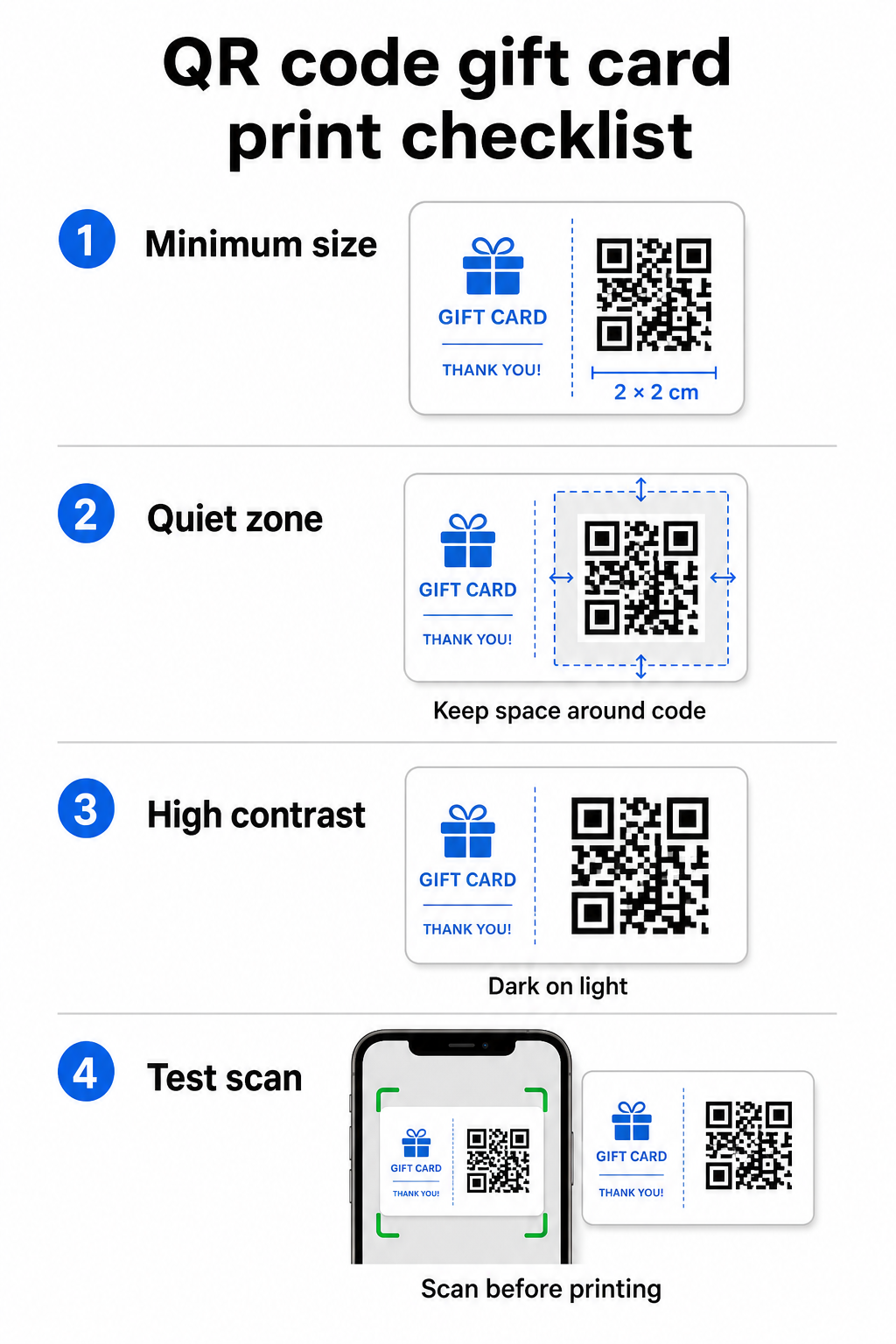
Basılı materyallerde güvenilir tarama için QR kodunuz en az 2 × 2 cm olmalıdır. Kodun etrafında, boş bir kenar boşluğu bırakın – buna denir sessiz alan – her tarafta en az dört modül. QR kodunuzdaki her modül 2 mm genişliğindeyse, bu her tarafta 8 mm'lik bir kenar boşluğu anlamına gelir. Kodu bu bölgede metin veya tasarım öğeleriyle doldurmak, kodların taranamamasının en yaygın nedenlerinden biridir.
Kontrast Gereksinimleri
Açık bir arka plan üzerinde koyu bir ön plan rengi kullanın. Minimum önerilen kontrast oranı 4:1'dir, ancak beyaz üzerine siyah (21:1) en güvenilir kombinasyon olmaya devam etmektedir. Ters renk şemalarından (koyu arka plan üzerinde açık desen), gradyanlardan ve gölgelerden kaçının – bunların hepsi kamera tarayıcılarını şaşırtan tutarsız kontrast oluşturur. Ayrıntılı rehberlik için bkz. QR kodu renk kontrastı en iyi uygulamaları.
Kart Üzerindeki Yerleşim
QR kodunu kartın arkasına, manyetik şeritten ve kazı-kazan PIN alanından uzağa yerleştirin. Kartın ön yüzü marka tanınırlığı içindir; arka yüzü ise kart numaraları ve QR kodları gibi işlevsel öğelerin ait olduğu yerdir. Kodun yanına kısa bir eylem çağrısı ekleyin – örneğin “Bakiyenizi kontrol etmek için tarayın” veya “Çevrimiçi kullanmak için tarayın” – böylece müşteriler taradıklarında ne olacağını anlarlar.
Esneklik İçin Dinamik QR Kodları Kullanın
Fiziksel kartları toplu olarak basarsanız, statik bir QR kodu sizi tek bir hedef URL'ye kilitler. Bir dinamik QR kodu kartı yeniden basmadan hedefi istediğiniz zaman güncellemenizi sağlar. Bu, kullanım portalınızı yeniden tasarladığınızda, mevsimlik bir promosyon yürüttüğünüzde veya yeni bir ödeme sistemine geçtiğinizde önemlidir. Dinamik QR kodlarını şunlar aracılığıyla oluşturabilir ve yönetebilirsiniz: Pageloot'un QR kod oluşturucusu, aynı zamanda merkezi bir panodan tarama analizi de sunar.
Hediye Kartı Kampanyalarınızı Esnek Tutun Hediye kartı QR kodlarınızın işaret ettiği yeri binlerce kartı yeniden basmadan güncellemeniz mi gerekiyor? Şunu kullanın: Bağlantı QR Kod Oluşturucu istediğiniz zaman yönlendirebileceğiniz dinamik kodlar oluşturmak için, tam tarama takibi dahil.
Dijital Hediye Kartları: E-posta ve Cüzdan Formatlarında QR Kodları
E-posta, SMS yoluyla teslim edilen veya mobil cüzdanda saklanan dijital bir hediye kartı, fiziksel bir kart kadar etkili bir şekilde QR kodu taşıyabilir. Bu bağlamda, QR kodu kullanım mekanizmasının kendisi olarak hizmet eder.
Bir müşteri dijital bir hediye kartı aldığında, e-postaya veya resim dosyasına gömülü QR kodu, kartın değeriyle önceden yüklenmiş bir ödeme sayfasına, kullanım talimatları içeren bir kupon açılış sayfasına veya PayPal veya Stripe gibi bir ödeme işlemcisine doğrudan bağlanabilir. Müşteri ödeme sırasında – mağazada veya çevrimiçi – kodu tarar ve değer otomatik olarak uygulanır.
Bu yaklaşım, hem fiziksel hem de çevrimiçi mağazaları işleten işletmeler için özellikle iyi çalışır. E-posta ile dijital bir hediye kartı alan bir müşteri mağazanıza girebilir, e-postayı açabilir ve kasiyerin QR kodunu telefon ekranından taramasına izin verebilir – kart numarası gerekmez.
Özellikle ödeme akışı için Pageloot'un PayPal QR Kod Oluşturucu doğrudan bir ödeme sayfasına bağlanan bir kod oluşturmanızı sağlayarak, dijital hediye kartı tasarımınıza tarayarak ödeme kullanım deneyimi oluşturmayı kolaylaştırır.
Hediye Kartı QR Kodunuzu Nereye Bağlamalısınız
Seçtiğiniz hedef, tarama sonrası müşteri deneyimini belirler. İşte en yaygın ve etkili seçenekler:
| Hedef | En İyi Kullanım Örneği |
|---|---|
| Çevrimiçi mağaza veya ödeme sayfası | Tam e-ticaret kullanımı; kart değeri ödeme sırasında uygulanır |
| Bakiye sorgulama sayfası | Alıcıların harcamadan önce kalan değeri kontrol etmesini sağlar |
| Kupon veya teklif açılış sayfası | Hediye kartı değerinin yanı sıra eşleştirilmiş promosyonlar |
| Ödeme bağlantısı (PayPal, Stripe) | Fiziksel satış noktasında doğrudan ödeme |
| Marka karşılama sayfası | Yeni müşteri katılımı; sadakat programı kaydına bağlantılar |
Hediye kartı programınızın yanı sıra promosyonlar yürütmek istiyorsanız – örneğin, belirli bir zaman diliminde tarayan alıcılara bonus indirimler sunarak – Pageloot'un Kupon QR Kod Oluşturucu birden fazla teklifi gösteren, hangi konumların en çok kullanımı topladığını izleyen ve yeni bir kod oluşturmadan bu teklifleri güncelleyen bir açılış sayfası oluşturmanızı sağlar.
QR tabanlı promosyonların geleneksel indirim yöntemleriyle nasıl karşılaştırıldığına daha geniş bir bakış için, bakınız QR kodları ve geleneksel kuponlar: hangisi daha iyi çalışır.
Kullanımları ve Kampanya Performansını İzleme
Hediye kartlarında QR kodları kullanmanın – yalnızca geleneksel kart numaralarına göre – en belirgin avantajlarından biri, ekledikleri analiz katmanıdır. Pageloot gibi bir platformla, her tarama zaman damgası, cihaz türü ve konum verileriyle kaydedilir. Bu size şunları söyler:
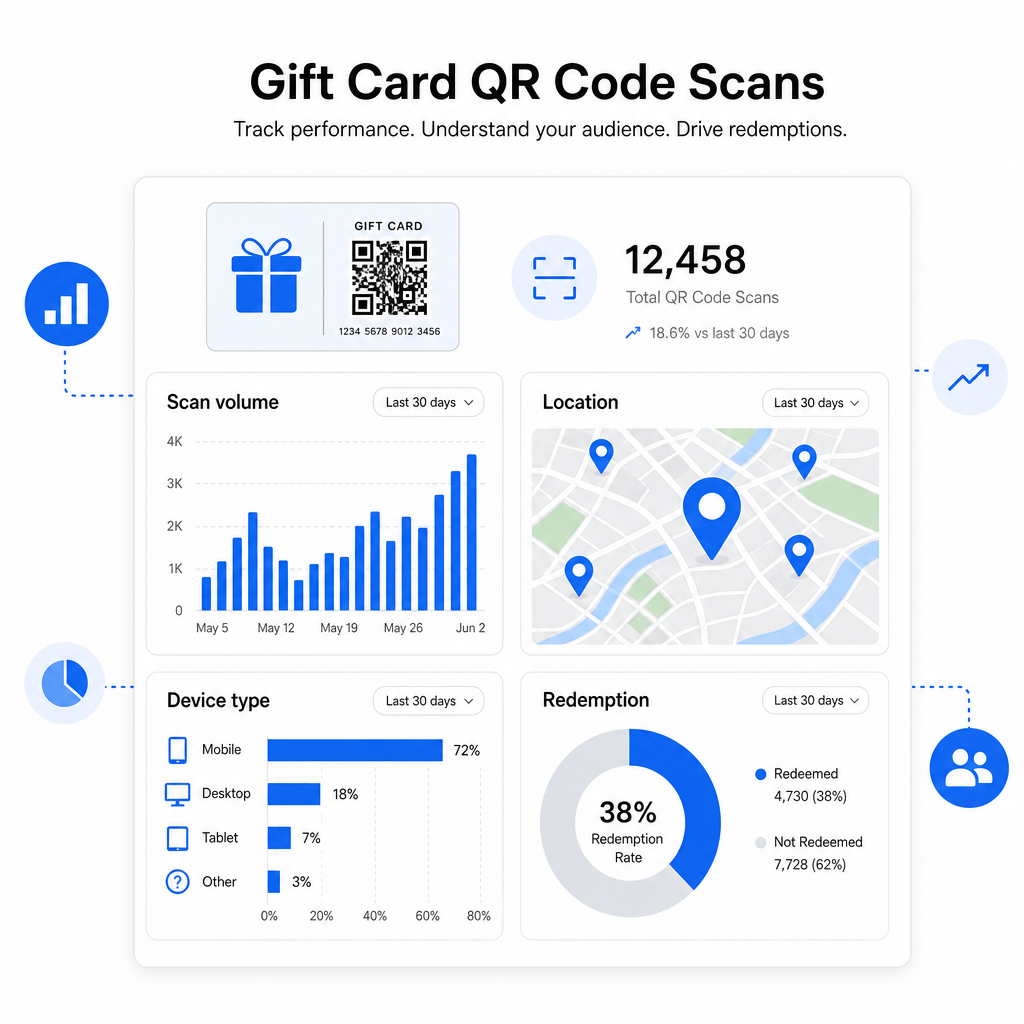
- Hangi kart tasarımları veya promosyon partileri en çok taranıyor
- Müşterilerin tarayıp taramadığı ancak kullanımı tamamlamadığı, bu da bir açılış sayfası sorununu gösterir
- Kullanımların coğrafi dağılımı, çok konumlu perakendeciler için faydalıdır
- En yoğun kullanım zamanları, gelecekteki promosyon zamanlamasını bilgilendirebilir
Bu veriler, tatiller veya mevsimlik etkinlikler etrafında hediye kartı kampanyaları yürüten perakende işletmeleri için özellikle değerlidir. QR kodlarının perakende ödeme ve etkileşim stratejilerini nasıl desteklediği hakkında daha fazla bilgi için, bakınız Perakende için QR kodlar ve QR kodları perakende ödemelerini nasıl basitleştirir.
Hangi Hediye Kartı Kampanyalarının Kullanımları Artırdığını Görün Hediye kartlarınızdaki her QR kodu için tarama hacmini, cihaz türlerini ve konumları izleyin. ile başlayın Pageloot QR Kodu Oluşturucu ve ilk günden itibaren analiz panonuza erişin.
ABD'deki Hediye Kartları için Yasal Hususlar.
Amerika Birleşik Devletleri'nde hediye kartları çıkarıyorsanız, federal yasa bunların nasıl çalıştığını düzenler. CARD Yasası ve E Yönetmeliği (12 C.F.R. § 1005.20) uyarınca, kapsanan hediye kartları – mağaza hediye kartları ve genel kullanımlı ön ödemeli kartlar dahil – düzenleme tarihinden itibaren beş yıldan daha kısa sürede sona eremez ve hareketsizlik ücretleri yalnızca 12 ardışık ay boyunca hiçbir etkinlik olmaması durumunda, ayda birden fazla bu tür ücret olmaksızın tahsil edilebilir. Tüm ücretler ve son kullanma koşulları müşteriye açıkça bildirilmelidir.
Hediye kartınıza bir QR kodu eklemek bu yükümlülükleri değiştirmez, ancak bunları daha net iletmek için pratik bir araç sunar. QR kodunuzun açılış sayfası, kalan bakiye, son kullanma tarihi, geçerli ücretler ve tam koşulları, fiziksel bir karttaki küçük yazıdan çok daha kolay okunabilen bir biçimde gösterebilir.
Bazı ön ödemeli ürünlerin bu federal kurallardan muaf olduğunu unutmayın – hediye kartı olarak pazarlanmayan yeniden yüklenebilir kartlar ve promosyon ödül kartları dahil – ancak eyalet yasaları ek gereksinimler getirebilir. Bir hediye kartı programı başlatmadan önce her zaman hem federal hem de geçerli eyalet kurallarını gözden geçirin.
Yazdırmadan veya Göndermeden Önce Tasarım Kontrol Listesi
Hediye kartı QR kodlarınızı kesinleştirmeden önce, bu kontrolleri yapın:
- Boyut: Fiziksel kartlar için en az 2 × 2 cm; e-posta veya cüzdan gösterimi için ölçeklenebilir
- Sessiz bölge: Dört tarafında da minimum dört modül boş alan
- Kontrast: Açık arka plan üzerinde koyu ön plan, en az 4:1 oranında
- Hedef: Bağlantıyı birden fazla cihazda test edin ve mobil cihazlarda doğru yüklendiğini onaylayın
- Harekete geçirici mesaj: Kodun yanına, taramanın ne yaptığını açıklayan kısa bir talimat ekleyin
- Dinamik ve statik: Hedef değişebilirse veya tarama analizi istiyorsanız dinamik bir kod kullanın
- Hata düzeltme: QR koduna logo ekliyorsanız, taranabilirliği korumak için Q veya H seviyesini kullanın
QR kodu tasarım standartları hakkında tam bir rehber için, bakınız QR kodu okunabilirliği için en iyi uygulamaları.
QR kodları pasif bir hediye kartını aktif bir müşteri temas noktasına dönüştürür. Doğru tasarlandığında ve iyi oluşturulmuş bir kullanım deneyimine bağlandığında, sürtünmeyi azaltır, kullanım oranlarını artırır ve hediye kartı programınızın gerçekte nasıl performans gösterdiği hakkında size ölçülebilir veriler sunar. Hedef üzerinde kontrolü elinizde tutmak için dinamik bir kodla başlayın ve deneyimi zamanla geliştirmeye devam etmek için tarama analizlerinizi kullanın.
Hediye Kartı QR Kodunuzu Bugün Oluşturun Hediye kartı programınız için dakikalar içinde markalı, izlenebilir bir QR kodu oluşturun. Deneyin bu Pageloot QR Kodu Oluşturucu 14 gün boyunca ücretsiz – kredi kartı gerekmez.
Sıkça sorulan sorular
Dinamik bir QR kod kullanırsanız, kodun kendisini değiştirmeden hedef bağlantıyı istediğiniz zaman güncelleyebilirsiniz. Bu, QR kodu bir kez yazdırıp daha sonra yeni bir ödeme sayfasına, mevsimlik bir teklife veya güncellenmiş bir portala yönlendirebileceğiniz anlamına gelir. Ancak, kartın fiziksel tasarımını değiştirmeniz gerekirse, yeniden yazdırmanız gerekecektir.
En etkili hedef, müşterinin bir ödeme işlemini tamamlayabileceği, bakiyesini kontrol edebileceği veya ödeme yapabileceği mobil optimize edilmiş bir sayfadır. Seçenekler arasında kartın değeriyle önceden yüklenmiş bir ödeme sayfası, bir PayPal veya Stripe ödeme bağlantısı veya güncel teklifleri içeren bir kupon açılış sayfası bulunur. Önemli olan, sayfanın mobilde hızlı yüklenmesi ve bir sonraki adımı açık hale getirmesidir.
Pageloot gibi, yerleşik analizler içeren bir QR kodu platformu kullanın. Her tarama, zaman, cihaz türü ve konum ile kaydedilir, böylece kaç kartın tarandığını, kurtarma etkinliğinin ne zaman zirveye ulaştığını ve müşterilerin kurtarmayı tamamlamadan önce ayrılıp ayrılmadığını görebilirsiniz. Bu veriler, kurtarma akışınızdaki zayıf noktaları belirlemenize ve düzeltmenize yardımcı olur.