> 사용 사례 > How to Use QR Codes on Gift Cards
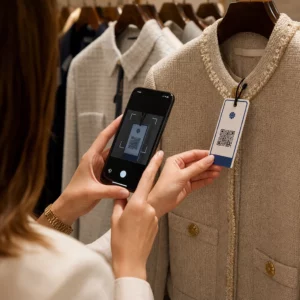
Scanning gift card

How to Use QR Codes on Gift Cards

Learn how QR codes on physical and digital gift cards speed up redemptions. This guide covers design standards, scan analytics, and legal considerations.
Updated on 7월 2, 2026
목차

Want to make your gift cards easier to redeem and harder to ignore? A poorly designed redemption process frustrates customers and leads to unredeemed balances sitting idle. This guide explains how to add QR codes to physical and digital gift cards, what they unlock for your business, and how to set them up correctly.

Why QR Codes Belong on Gift Cards

Gift cards are a significant purchase category. Recent survey data shows that 76% of U.S. consumers purchased a gift card in the past year, with 40% of those purchases being digital. Yet redemption behavior varies widely – consumers spend digital gift cards in an average of 16.8 days, compared to 35.3 days for physical cards. That gap represents real revenue sitting on the shelf.

A QR code on a gift card removes friction from the redemption process. Instead of asking a customer to type in a long card number or navigate a multi-step checkout, a single scan takes them directly to a payment page, balance lookup, or online store. That reduction in effort translates directly into faster redemptions and fewer abandoned balances.

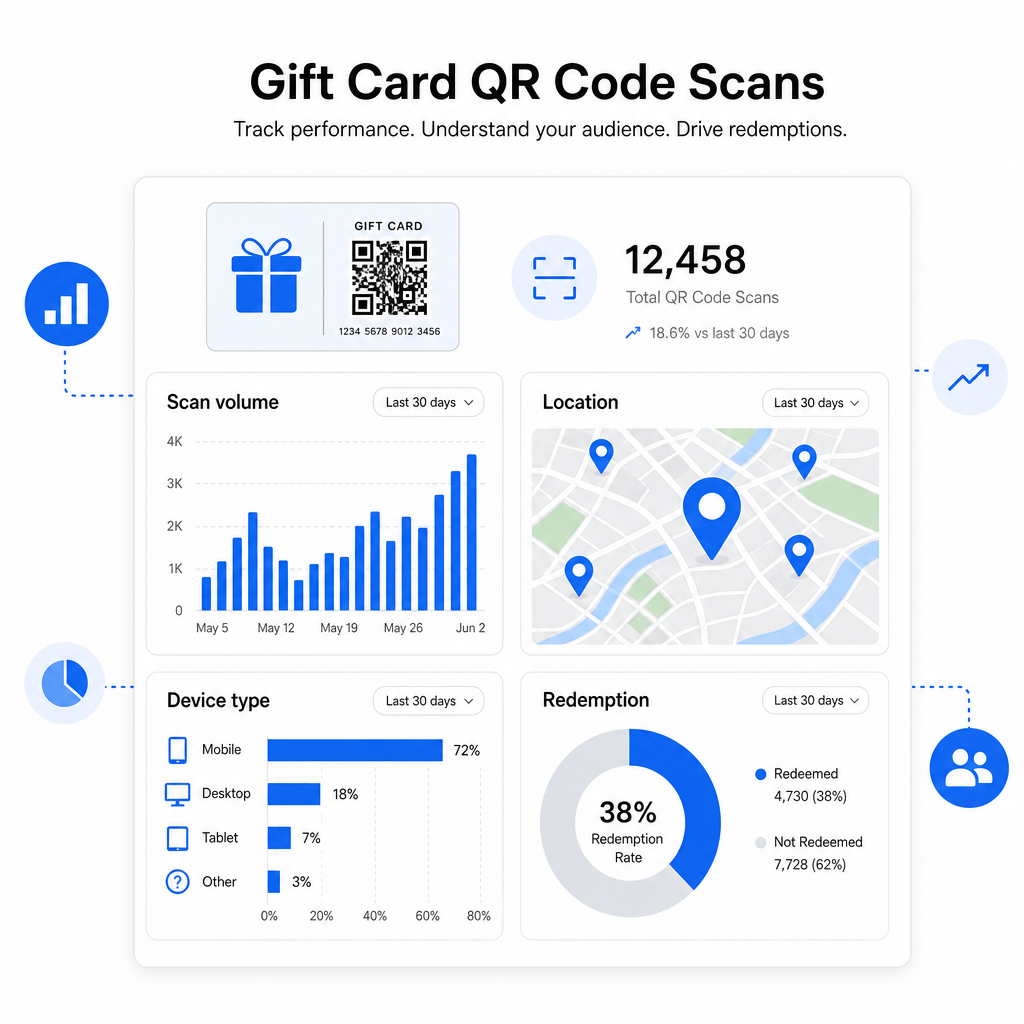
Beyond convenience, QR codes give you something traditional gift cards cannot: data. You can track when and where cards are scanned, which card designs perform better, and whether customers complete the redemption after scanning.

Physical Gift Cards: Adding a QR Code That Works

A physical gift card has limited real estate, so every design decision matters. Adding a QR code is straightforward, but a few technical standards determine whether it actually scans reliably in the real world.

Minimum Size and Quiet Zone

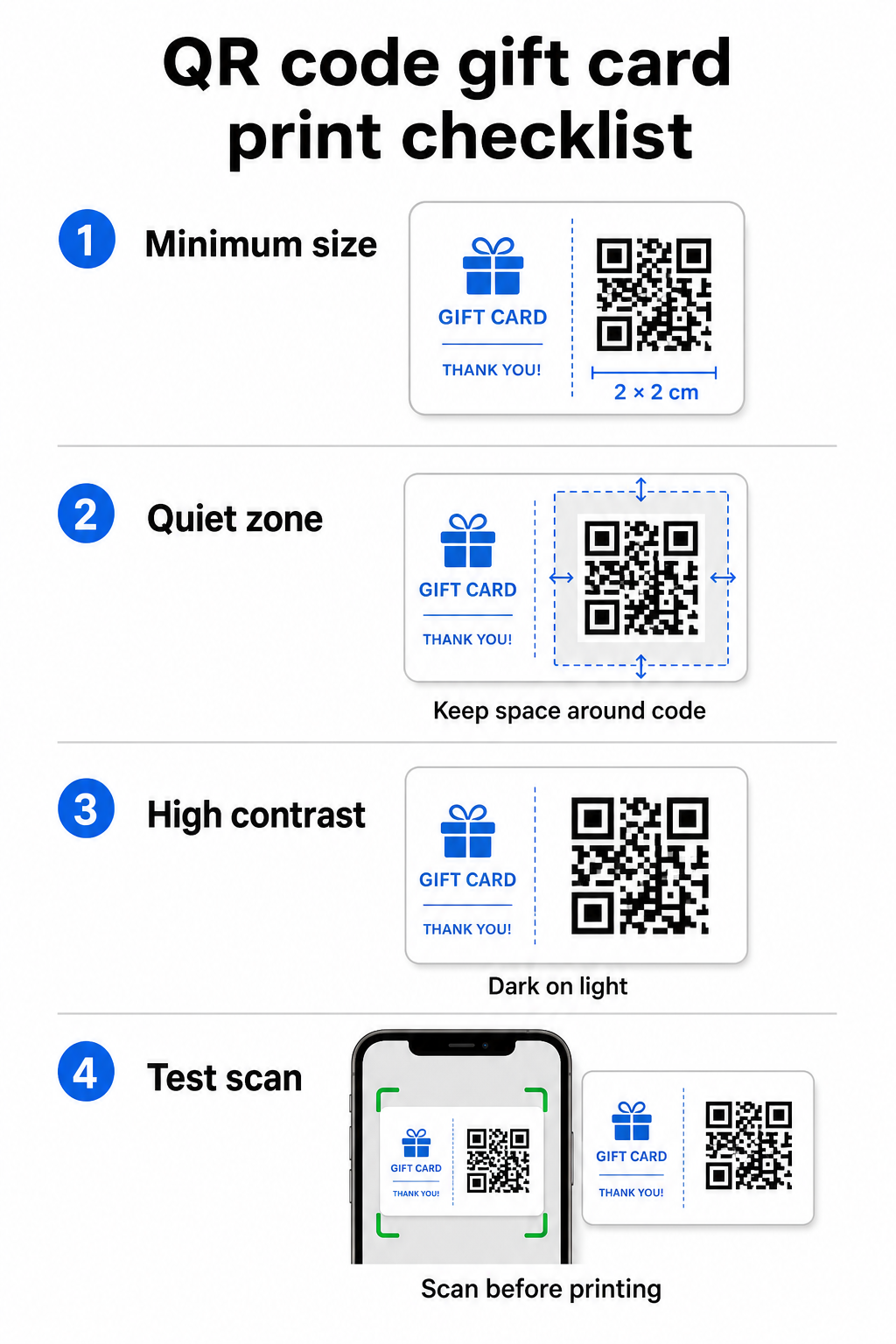
For reliable scanning on printed materials, your QR code should be at least 2 × 2 cm. Around the code itself, leave a blank margin – called the 콰이어트 존 – of at least four modules on all sides. If each module in your QR code is 2 mm wide, that means an 8 mm margin all around. Crowding the code with text or design elements in this zone is one of the most common reasons codes fail to scan.

QR design checklist

Contrast Requirements

Use a dark foreground color on a light background. The minimum recommended contrast ratio is 4:1, though black on white (21:1) remains the most reliable combination. Avoid reversed color schemes (light pattern on dark background), gradients, and shadows – all of these create inconsistent contrast that confuses camera scanners. For detailed guidance, see QR 코드 색상 대비 모범 사례.

Placement on the Card

Place the QR code on the back of the card, away from the magnetic stripe and scratch-off PIN area. The front of the card is for brand recognition; the back is where functional elements like card numbers and QR codes belong. Include a short call-to-action next to the code – such as “Scan to check your balance” or “Scan to redeem online” – so customers understand what happens when they scan.

Use Dynamic QR Codes for Flexibility

If you print physical cards in bulk, a static QR code locks you into a single destination URL. A 동적 QR 코드 lets you update the destination at any time without reprinting the card. This matters when you redesign your redemption portal, run a seasonal promotion, or migrate to a new payment system. You can create and manage dynamic QR codes through Pageloot’s QR code generator, which also gives you scan analytics from a centralized dashboard.

Keep Your Gift Card Campaigns Flexible Need to update where your gift card QR codes point without reprinting thousands of cards? Use the 링크 QR 코드 생성기 to create dynamic codes that you can redirect anytime, with full scan tracking included.

Digital Gift Cards: QR Codes in Email and Wallet Formats

A digital gift card – delivered by email, SMS, or stored in a mobile wallet – can carry a QR code just as effectively as a physical one. In this context, the QR code serves as the redemption mechanism itself.

When a customer receives a digital gift card, the QR code embedded in the email or image file can link directly to a checkout page pre-loaded with the card’s value, a coupon landing page with redemption instructions, or a payment processor like PayPal or Stripe. The customer scans the code at checkout – in-store or online – and the value is applied automatically.

This approach works particularly well for businesses that operate both physical and online stores. A customer who receives a digital gift card by email can walk into your store, open the email, and let the cashier scan the QR code from their phone screen – no card number required.

For the payment flow specifically, Pageloot’s PayPal QR 코드 생성기 lets you create a code that links directly to a payment page, making it straightforward to build a scan-to-pay redemption experience into your digital gift card design.

What to Link Your Gift Card QR Code To

The destination you choose determines the customer experience after the scan. Here are the most common and effective options:

목적지 가장 좋은 사용 사례
Online store or checkout page Full e-commerce redemption; card value applied at checkout
Balance lookup page Lets recipients check remaining value before spending
Coupon or offer landing page Paired promotions alongside the gift card value
Payment link (PayPal, Stripe) Direct payment at physical point of sale
Brand welcome page New customer onboarding; links to loyalty program signup

If you want to run promotions alongside your gift card program – offering bonus discounts to recipients who scan within a set timeframe, for example – Pageloot’s `쿠폰 QR 코드 생성기` lets you build a landing page that displays multiple offers, tracks which locations collect the most redemptions, and updates those offers without generating a new code.

For a broader look at how QR-based promotions compare to traditional discount methods, see QR codes vs. traditional coupons: which works better.

Tracking Redemptions and Campaign Performance

One of the clearest advantages of using QR codes on gift cards – over traditional card numbers alone – is the layer of analytics they add. With a platform like Pageloot, each scan is logged with a timestamp, device type, and location data. This tells you:

Gift card analytics
  • Which card designs or promotional batches are being scanned most
  • Whether customers scan but don’t complete the redemption, indicating a landing page problem
  • Geographic distribution of redemptions, useful for multi-location retailers
  • Peak redemption times, which can inform future promotional timing

This data is especially valuable for retail businesses running gift card campaigns around holidays or seasonal events. For more on how QR codes support retail payment and engagement strategies, see 소매용 QR 코드how QR codes simplify retail payments.

See Which Gift Card Campaigns Are Driving Redemptions Track scan volume, device types, and locations for every QR code on your gift cards. Get started with the Pageloot QR 코드 생성기 and access your analytics dashboard from day one.

Legal Considerations for Gift Cards in the U.S.

If you issue gift cards in the United States, federal law governs how they work. Under the CARD Act and Regulation E (12 C.F.R. § 1005.20), covered gift cards – including store gift cards and general-use prepaid cards – cannot expire in less than five years from the date of issuance, and inactivity fees can only be charged after 12 consecutive months of no activity, with no more than one such fee per month. All fees and expiration terms must be disclosed clearly to the customer.

Adding a QR code to your gift card does not change these obligations, but it does give you a practical tool to communicate them more clearly. Your QR code landing page can display remaining balance, expiration date, applicable fees, and full terms in a format that is far easier to read than the fine print on a physical card.

Note that some prepaid products are exempt from these federal rules – including reloadable cards not marketed as gift cards and promotional reward cards – but state laws may impose additional requirements. Always review both federal and applicable state rules before launching a gift card program.

Design Checklist Before You Print or Send

Before finalizing your gift card QR codes, run through these checks:

  • 크기: At least 2 × 2 cm for physical cards; scalable for email or wallet display
  • 콰이어트 존: Minimum four modules of blank space on all four sides
  • 대비: Dark foreground on light background, at least 4:1 ratio
  • Destination: Test the link on multiple devices and confirm it loads correctly on mobile
  • Call-to-action: Include a short instruction next to the code explaining what the scan does
  • Dynamic vs. static: Use a dynamic code if the destination may change or if you want scan analytics
  • Error correction: Use level Q or H if adding a logo to the QR code, to maintain scannability

For a full walkthrough of QR code design standards, see QR 코드 가독성을 위한 모범 사례.

QR codes turn a passive gift card into an active customer touchpoint. When designed correctly and linked to a well-built redemption experience, they reduce friction, increase redemption rates, and give you measurable data on how your gift card program is actually performing. Start with a dynamic code so you retain control over the destination, and use your scan analytics to keep improving the experience over time.

Create Your Gift Card QR Code Today Build a branded, trackable QR code for your gift card program in minutes. Try the Pageloot QR 코드 생성기 free for 14 days – no credit card required.

자주 묻는 질문

Can I add a QR code to an existing gift card design without reprinting everything?

If you use a dynamic QR code, you can update the destination link at any time without changing the code itself. This means you can print the QR code once and redirect it to a new payment page, seasonal offer, or updated portal later. However, if you need to change the physical design of the card, you will need to reprint.

What should the QR code on a gift card link to?

The most effective destination is a mobile-optimized page where the customer can complete a redemption, check their balance, or make a payment. Options include a checkout page pre-loaded with the card’s value, a PayPal or Stripe payment link, or a coupon landing page with current offers. The key is that the page loads quickly on mobile and makes the next step obvious.

How do I track whether customers are actually scanning and redeeming their gift cards?

Use a QR code platform that includes built-in analytics, such as Pageloot. Each scan is recorded with the time, device type, and location, so you can see how many cards are being scanned, when redemption activity peaks, and whether customers are dropping off before completing the redemption. This data helps you identify and fix weak points in your redemption flow.

작성자 정보

시임 코스타비는 페이지루트의 콘텐츠 책임자입니다. 그는 페이지루트의 혁신적인 QR 코드 생성 서비스에 대한 글을 쓰고 있습니다. 5년 이상 QR 코드 분야에서 쌓아온 깊이 있는 전문 지식을 바탕으로, 시임은 이 분야의 전문가로 인정받고 있습니다. 그는 QR 기술을 활용하여 디지털 상호작용을 간소화하고 향상시키는 데 크게 기여하고 있습니다.

범주
에 대해 자세히 알아보기

온라인으로 QR 코드를 생성해야하는 경우 QR 코드 만들기 무료로 여기!
Pageloot는 #1 Go-To 솔루션 QR 코드를 만들고 스캔합니다.

BL-0294

블로그 세대

20,000개 이상의 브랜드로부터 신뢰를 받아 더 많은 매출, 리뷰, 팔로워를 확보했습니다.

클라이언트 로고
최고 브랜드의 신뢰
5 중 4.8 평가

4.86 / 5 별점

휴고 로랑
휴고 로랑
레스토랑 주인
가장 쉽고 안정적인 QR 코드 생성기. PDF 파일을 즉시 업로드할 수 있습니다. 이제 레스토랑 메뉴가 디지털화되었습니다.
루카스 얀센
루카스 얀센
부동산 개발사
이것은 훌륭한 도구이며 QR 코드를 사용하면 원하는 곳으로 이동할 수 있습니다. 우리는 위치 QR 코드만 사용하지만 유용한 기능이 너무 많습니다.
엠마 모레티
엠마 모레티
소매 제품
사용하기 쉽고 빠릅니다. 그것은 훌륭하게 작동하고 완벽한 이미지를 생성하므로 직원들이 내 vCard를 다운로드할 수 있습니다.
휴고 로랑
휴고 로랑
레스토랑 주인
가장 쉽고 안정적인 QR 코드 생성기. PDF 파일을 즉시 업로드할 수 있습니다. 이제 레스토랑 메뉴가 디지털화되었습니다.
루카스 얀센
루카스 얀센
부동산 개발사
이것은 훌륭한 도구이며 QR 코드를 사용하면 원하는 곳으로 이동할 수 있습니다. 우리는 위치 QR 코드만 사용하지만 유용한 기능이 너무 많습니다.
엠마 모레티
엠마 모레티
소매 제품
사용하기 쉽고 빠릅니다. 그것은 훌륭하게 작동하고 완벽한 이미지를 생성하므로 직원들이 내 vCard를 다운로드할 수 있습니다.
더 많은 QR 코드보기
Worker scanning QR code
QR 코드 건설
무엇이든 디지털 경험으로 전환하세요 3분 이내에.

14일 무료 체험.

신용카드는 필요 없습니다.

첫 구매 시 30% 할인

코드를 사용하세요:

MP3 파일 공유

PDF QR 코드를 생성하려면 가입하세요

필요한 모든 것을 업로드하고 표시합니다.

  • 오디오 파일
  • 팟캐스트
  • 음악

가입 시 14일 무료 체험.
체험 기간 후 QR 코드 만료.

오디오 mp3 QR 코드를 생성하려면 가입하세요

프레임으로 더 많은 스캔 확보

QR 코드에 더 많은 프레임을 추가하려면 가입하세요

클릭 유도 문안 프레임은 고객이 QR 코드와 쉽게 상호 작용할 수 있도록 도와줍니다. 사용해 보세요!

가입 시 14일 무료 체험.
체험 기간 후 QR 코드 만료.

QR 코드에 더 많은 프레임을 추가하려면 가입하세요

도형으로 더 많은 스타일 추가

더 많은 도형을 만들려면 가입하세요

QR 코드는 정사각형일 필요가 없습니다. 브랜드 이미지에 맞게 전환해 보세요.

가입 시 14일 무료 체험.
체험 기간 후 QR 코드 만료.

더 많은 도형을 만들려면 가입하세요

QR 코드에 로고 추가

QR 코드에 로고를 추가하려면 가입하세요

로고와 브랜드를 추가하여 QR 코드를 돋보이게 만드세요.

가입 시 14일 무료 체험.
체험 기간 후 QR 코드 만료.

QR 코드에 로고를 추가하려면 가입하세요

스마트 앱 스토어 리디렉션

앱 스토어 QR 코드를 생성하려면 가입하세요

스마트 앱 스토어 QR 코드에 앱 링크를 추가하세요. 사용자는 장치에 따라 리디렉션됩니다.

가입 시 14일 무료 체험.
체험 기간 후 QR 코드 만료.

앱 스토어 QR 코드를 생성하려면 가입하세요

QR 코드에 이미지 업로드

이미지 QR 코드를 생성하려면 가입하세요

이미지를 쉽게 공유하세요. 몇 초 안에 동적으로 이미지를 변경하십시오.

가입 시 14일 무료 체험.
체험 기간 후 QR 코드 만료.

이미지 QR 코드를 생성하려면 가입하세요

PDF 파일 공유

PDF QR 코드를 생성하려면 가입하세요

필요한 모든 것을 업로드하고 표시합니다.

  • 메뉴 및 가격표
  • 명령
  • 모든 문서

가입 시 14일 무료 체험.
체험 기간 후 QR 코드 만료.

PDF QR 코드를 생성하려면 가입하세요

인쇄 없이 나중에 편집

다시 인쇄하지 않고 QR 코드를 편집하려면 가입하세요

동적 QR 코드를 사용하면 새 QR 코드를 인쇄하지 않고도 QR 코드의 내용을 변경할 수 있습니다.

가입 시 14일 무료 체험.
체험 기간 후 QR 코드 만료.

다시 인쇄하지 않고 QR 코드를 편집하려면 가입하세요

언제? 어디서? QR 코드 스캔 추적

QR 코드를 추적하려면 가입하세요

어떤 QR 코드가 가장 많이 스캔되고 무엇이 고객을 가장 흥분시키는지 알아보십시오.

가입 시 14일 무료 체험.
체험 기간 후 QR 코드 만료.

QR 코드를 추적하려면 가입하세요

인쇄 준비 파일 제공

PDF 및 SVG와 같은 벡터 QR 코드를 생성하려면 가입하세요.

.EPS, .PDF, .SVG

HD 해상도로 QR 코드를 다운로드하고 싶으신가요? 인쇄할 준비가 된 벡터 또는 픽셀 형식을 가져옵니다.

가입 시 14일 무료 체험.
체험 기간 후 QR 코드 만료.

PDF 및 SVG와 같은 벡터 QR 코드를 생성하려면 가입하세요.

기다리세요. 귀하의 QR 코드는 로드 중... 로드 중...

나만의 것으로 만들기

나중을 위해 QR 코드를 저장하려면 가입하세요.

다양한 색상, 로고 및 클릭 유도문안 프레임으로 멋진 QR 코드를 만들어 더 많은 스캔을 받으세요.

가입 시 14일 무료 체험.
체험 기간 후 QR 코드 만료.

나중을 위해 QR 코드를 저장하려면 가입하세요.