Adakah versi tiruan produk anda sampai kepada pelanggan? Selain kehilangan hasil, barangan palsu merosakkan kepercayaan jenama dan boleh membahayakan pembeli. Halaman ini menerangkan bagaimana kod QR, yang dilaksanakan dengan identiti unik bersiri dan infrastruktur yang betul, mencipta sistem pengesahan produk yang praktikal dan berskala.
Mengapa Pemalsuan Adalah Masalah Yang Berbaloi Untuk Diselesaikan Secara Sistematik
Skala perdagangan barangan tiruan adalah signifikan. OECD dan EUIPO menganggarkan bahawa barangan tiruan menyumbang kira-kira $467 bilion dalam perdagangan global pada tahun 2021, mewakili 2.3% daripada jumlah import global. Laporan Pejabat Paten dan Tanda Dagangan A.S. mendapati bahawa pemalsuan dan cetak rompak menelan belanja perniagaan A.S. lebih daripada $200 bilion setahun dan menyumbang kepada kehilangan lebih daripada 750,000 pekerjaan.
Bagi pemilik jenama, kerugian kewangan langsung diburukkan lagi oleh kerosakan yang lebih sukar untuk diukur: seorang pelanggan yang membeli versi tiruan produk anda dan mempunyai pengalaman buruk akan menyalahkan jenama anda, bukan pemalsu.
Sistem pengesahan berasaskan QR menangani masalah ini pada peringkat item. Daripada hanya mengesahkan bahawa jenis produk adalah tulen, ia mengesahkan bahawa unit tertentu, individu adalah tulen – dan memberikan anda data untuk mengesan apabila sesuatu tidak kena.
Mengapa Kod QR Standard Sahaja Tidak Mencukupi
Sebelum meneroka cara pengesahan QR berfungsi, adalah penting untuk memahami batasan utama yang sering diabaikan oleh banyak jenama.
Kod QR generik mudah diduplikasi. Seorang pemalsu boleh mengambil gambar kod anda pada resolusi tinggi, mencetaknya semula pada ribuan produk palsu, dan kod-kod klon tersebut akan mengimbas dan berfungsi sama seperti yang asal. Jika kod QR anda hanya menunjuk ke halaman produk atau URL pengesahan statik, ia tidak memberikan perlindungan sebenar.
Kod QR statik tradisional yang digunakan untuk kebolehjejakan atau maklumat produk tidak memberikan pengesahan intrinsik. Jika produk itu sendiri palsu, halaman yang dipautkan masih kelihatan tulen dan tidak dapat mengesahkan ketulenan dengan sendirinya.
Pengesahan QR yang berkesan memerlukan tiga perkara yang berfungsi bersama:
- Penjujukan: setiap item individu mendapat kod unik, bukan hanya setiap SKU atau kelompok
- Pengesahan sebelah pelayan: setiap imbasan diperiksa terhadap rekod yang dipercayai, bukan hanya URL destinasi
- Logik pemantauan: anomali seperti imbasan berulang dari lokasi yang berbeza, atau kiraan imbasan yang melebihi kuantiti yang dijangka, mencetuskan amaran
Kod QR adalah antara muka yang berhadapan dengan pelanggan. Keselamatan terletak pada infrastruktur di belakangnya.
Bagaimana Pengesahan QR Bersiri Berfungsi
Kod QR bersiri menetapkan kod unik kepada setiap unit produk individu. Apabila pelanggan mengimbas kod tersebut, sistem bukan sahaja memuatkan halaman – ia melakukan carian terhadap rekod produk untuk mengesahkan bahawa item khusus ini, dengan pengecam khusus ini, diketahui dan sah.
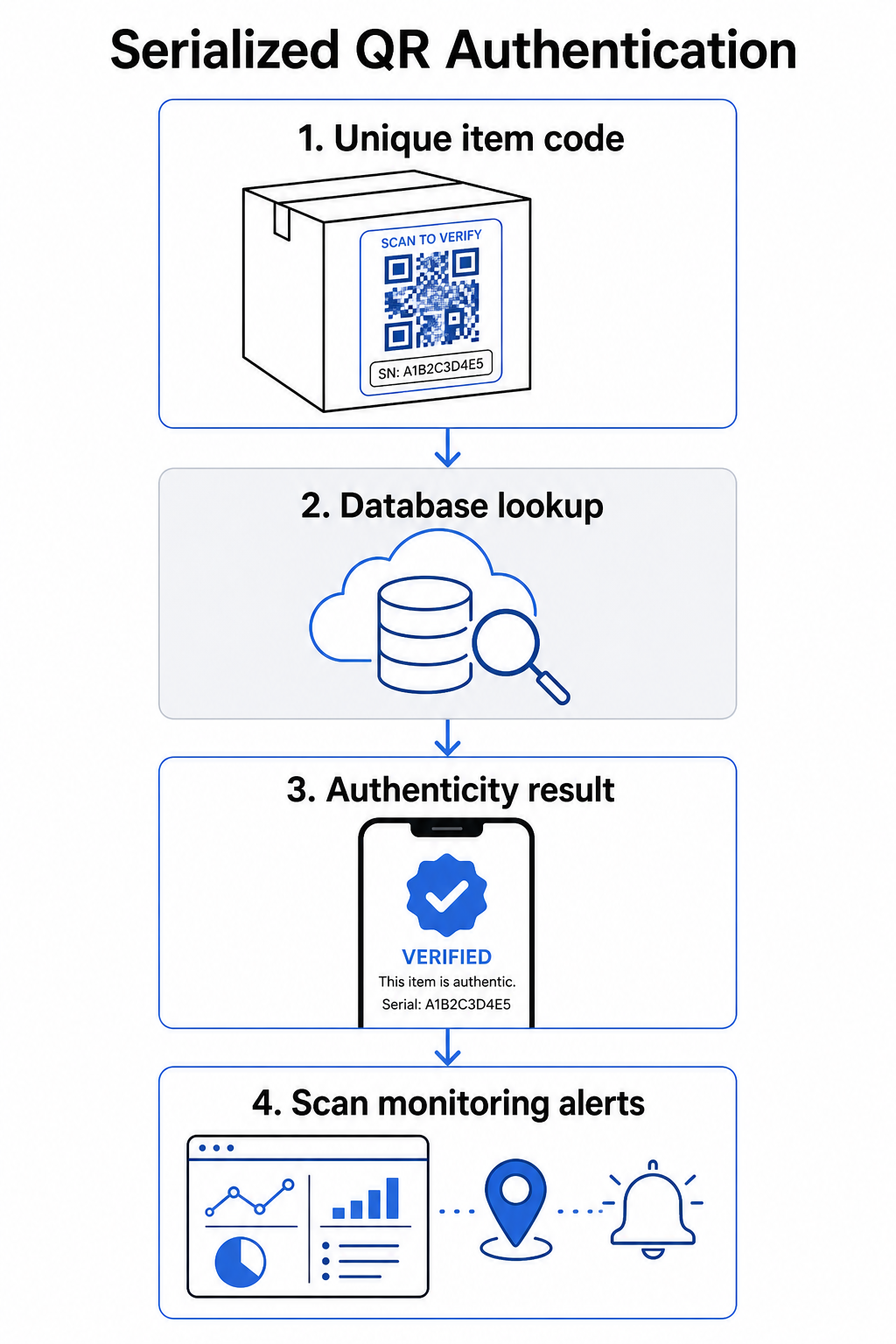
Aliran kerja pengesahan yang lengkap biasanya merangkumi langkah-langkah ini:
- Cipta pengecam unik untuk setiap item – ini boleh menjadi nombor siri, rujukan kelompok, cap masa pengeluaran, atau gabungan yang dikodkan sebagai URI Pautan Digital GS1, yang merangkumi Pengecam Aplikasi GS1 untuk GTIN, nombor kelompok/lot, dan nombor siri
- Pautkan pengecam tersebut ke rekod produk digital – disimpan dalam pangkalan data selamat yang dikawal oleh sistem anda
- Jana dan tetapkan kod QR unik yang menunjuk ke titik akhir pengesahan yang membawa pengecam atau token legap, dan bukannya data mentah itu sendiri
- Letakkan kod QR pada produk fizikal – untuk item bernilai tinggi, meletakkannya di bawah panel calar atau merentasi meterai kalis gangguan menghalang pemindahan dan penggunaan semula label
- Log setiap imbasan sebagai peristiwa – menangkap cap masa, lokasi, dan maklumat peranti untuk menyokong pemantauan berterusan
- Hidangkan halaman pengesahan yang memaparkan butiran produk dan hasil ketulenan yang jelas supaya pelanggan segera tahu apa yang mereka lihat
Halaman pengesahan itu sendiri penting. Halaman yang direka dengan baik menunjukkan nama produk, butiran kelompok atau waranti, dan pengesahan ketulenan yang mudah. Sesetengah sistem juga memaparkan berapa kali kod tertentu telah diimbas – kod yang mengumpul lebih banyak imbasan daripada yang dijangka menjadi pencetus syak wasangka untuk barangan tiruan yang menggunakan kod yang diduplikasi.
Urus dan Jejak Setiap Kod Produk Pageloot Penjana dynamic QR code membolehkan anda mencipta kod QR yang boleh dijejak, boleh diedit dan mengakses papan pemuka analitik penuh yang menunjukkan bila dan di mana setiap imbasan berlaku – memberikan anda lapisan pemantauan yang diperlukan oleh sistem pengesahan anda.
Peranan Kod QR Dinamik dalam Pengesahan
Kod QR dinamik adalah asas praktikal untuk pengesahan produk kerana ia memisahkan kod yang dicetak daripada destinasi yang ditujunya. Kod fizikal pada produk tidak pernah berubah, tetapi destinasi dan logik di sebaliknya boleh dikemas kini pada bila-bila masa tanpa mencetak semula.
Ini penting untuk pengesahan dalam beberapa cara tertentu:
- Anda boleh mengemas kini halaman pengesahan jika infrastruktur belakang anda berubah, tanpa memanggil semula atau mencetak semula produk berlabel
- Anda boleh melumpuhkan sebuah kod jika sebuah kelompok dipanggil semula atau jika aktiviti penipuan dikesan di sekitar pengecam tertentu
- Anda boleh mengubah hala imbasan kepada pengalaman yang berbeza berdasarkan kiraan imbasan, geografi, atau masa – contohnya, menghalakan imbasan pertama ke halaman pengesahan penuh dan imbasan seterusnya kepada notis amaran
Platform Pageloot menyokong pengeditan destinasi kod QR selepas mencetak dan menyediakan analitik imbasan termasuk lokasi, jenis peranti, dan masa imbasan – kesemuanya disalurkan terus ke dalam aliran kerja pemantauan.
Untuk jenama yang menguruskan jumlah produk yang besar, Pageloot menyokong penjanaan kod QR pukal melalui muat naik CSV, berskala sehingga 100,000 kod, yang menjadikan penjanaan kod bersiri praktikal walaupun pada skala pembuatan. Pembekal dan penjual semula boleh meneroka alat khusus melalui Penyelesaian pembekal dan penjual semula Pageloot.
Menggabungkan Kod QR dengan Elemen Keselamatan Fizikal
Penyelidik keselamatan dan pakar perlindungan jenama secara konsisten menyatakan bahawa sebuah kod QR sahaja tidak dapat mencegah pemalsuan. Perlindungan yang berkesan menggabungkan lapisan QR dengan elemen fizikal atau struktur yang lebih sukar untuk ditiru.
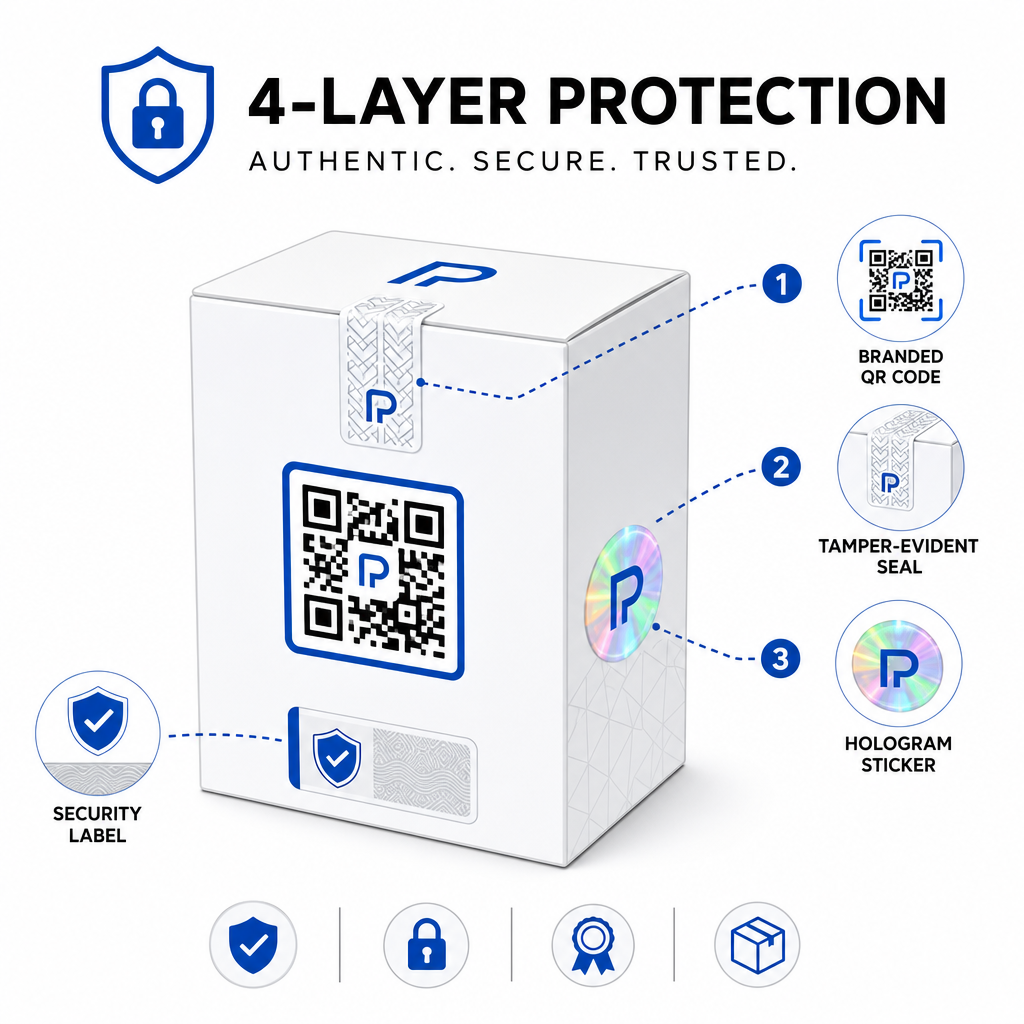
Pendekatan biasa termasuk:
- Meterai bukti gangguan: meletakkan kod QR merentasi sebuah meterai yang menunjukkan kerosakan yang kelihatan jika ditanggalkan
- Panel gores-dan-dedah: menyembunyikan kod QR di bawah sebuah lapisan yang ditanggalkan oleh pembeli pada penggunaan pertama, menjadikan kod itu lebih sukar untuk pemalsu mengambil gambar sebelum pembelian
- Lapisan holografik atau dakwat keselamatan: menambah sebuah lapisan fizikal yang merosot secara kelihatan apabila disalin
- Corak kalis salinan yang selamat: beberapa sistem membenamkan tekstur anti-salinan mikroskopik dalam reka bentuk kod QR itu sendiri, menyebabkan corak itu merosot atau hilang apabila diambil gambar dan dicetak semula
Strategi gabungan ini penting kerana ia mengalihkan pengesahan daripada satu titik kegagalan. Seorang pemalsu yang boleh menduplikasi kod QR tidak dapat dengan mudah juga meniru meterai gangguan, hologram, atau substrat sensitif salinan pada masa yang sama.
Untuk pandangan yang lebih luas tentang bagaimana kod QR berinteraksi dengan pembungkusan produk fizikal, panduan mengenai kod QR pada pembungkusan produk meliputi penempatan dan reka bentuk secara terperinci.
Pengesahan Sisi Pelayan dan Pemantauan Imbasan
Lapisan keselamatan yang paling penting dalam sebuah sistem pengesahan QR adalah satu yang tidak pernah dilihat pelanggan: pengesahan sisi pelayan.
Apabila seorang pelanggan mengimbas sebuah kod QR yang disahkan, sistem itu harus:
- Sahkan pengecam terhadap pangkalan data produk anda sebelum menyajikan sebarang hasil
- Log peristiwa imbasan dengan cap masa, koordinat GPS atau lokasi berasaskan IP, dan cap jari peranti
- Semak anomali seperti kod yang sama diimbas dari dua lokasi yang berjauhan secara geografi dalam beberapa minit, atau sebuah kod bersiri tunggal mengumpul imbasan melebihi sebarang penggunaan sah yang munasabah
- Gunakan token legap daripada pengecam mentah dalam kandungan QR, supaya walaupun seseorang membaca data QR secara langsung mereka tidak dapat membina sebuah palsu yang sah tanpa akses kepada logik pelayan anda
Pendekatan ini – di mana kod QR hanya membawa sebuah rujukan legap dan semua pengesahan yang bermakna berlaku di sisi pelayan – adalah standard yang disyorkan oleh pengamal keselamatan untuk kes penggunaan pengesahan.
Untuk penyelaman teknikal yang mendalam tentang bagaimana penyulitan dapat melindungi lebih lanjut sistem pengesahan berasaskan QR, siaran mengenai kod QR yang disulitkan untuk platform pengesahan meliputi kaedah penyulitan dan pertimbangan pematuhan secara terperinci.
Reka Bentuk dan Penempatan untuk Kod QR Pengesahan
Sebuah kod QR pengesahan yang tidak dapat diimbas oleh pelanggan mengalahkan tujuannya sendiri. Amalan terbaik standard untuk kualiti cetakan dan penempatan berlaku sama di sini:
- Saiz minimum: ikuti peraturan umum 1 cm per 10 cm jarak imbasan untuk memastikan pengimbasan yang boleh dipercayai merentasi peranti
- Kontras tinggi: gunakan modul gelap pada latar belakang terang, dan elakkan kemasan berkilat atau memantul yang menyebabkan silau
- Zon senyap: tinggalkan sebuah sempadan yang jelas sekurang-kurangnya empat modul di sekeliling kod, bebas daripada teks atau elemen reka bentuk
- Resolusi cetakan: gunakan format vektor atau PNG pada minimum 300 DPI untuk aplikasi cetakan
- Penempatan rata: elakkan permukaan melengkung, jahitan, atau lipatan yang memesongkan geometri kod
- Kosongkan seruan tindak: sertakan sebuah arahan ringkas berhampiran kod, seperti “Imbas untuk mengesahkan ketulenan,” supaya pelanggan memahami untuk apa kod itu
Untuk panduan yang lebih terperinci mengenai penempatan khusus pembungkusan, panduan tersebut panduan muktamad untuk kod QR bagi label produk merangkumi saiz, kontras, dan kedudukan secara mendalam.
Kod QR berjenama dengan logo anda tertanam juga menandakan kesahihan kepada pelanggan sepintas lalu. Ciri ini QR code with logo membolehkan anda menggabungkan identiti jenama secara langsung ke dalam reka bentuk kod tanpa menjejaskan kebolehimbasan.
Untuk Siapa Pendekatan Ini Dibina
Pengesahan produk berasaskan QR relevan merentasi pelbagai kategori produk dan industri:
| Jenis Produk | Keperluan Pengesahan |
|---|---|
| Elektronik pengguna dan aksesori | Kadar pemalsuan tinggi; pengesahan waranti |
| Farmaseutikal dan produk kesihatan | Keselamatan pengguna; pematuhan peraturan |
| Barangan mewah dan pakaian | Perlindungan jenama; pencegahan pasaran kelabu |
| Komponen dan alat ganti industri | Pensijilan keselamatan; integriti rantaian bekalan |
| Makanan dan minuman | Kebolehjejakan kelompok; pengesahan import |
Jenama yang menjual melalui peruncit pihak ketiga atau platform e-dagang amat terdedah kerana mereka mempunyai kawalan langsung yang kurang terhadap apa yang sampai kepada pelanggan akhir. Pengesahan bersiri memberi mereka saluran langsung untuk mengesahkan mana-mana unit, tanpa mengira di mana ia dibeli.
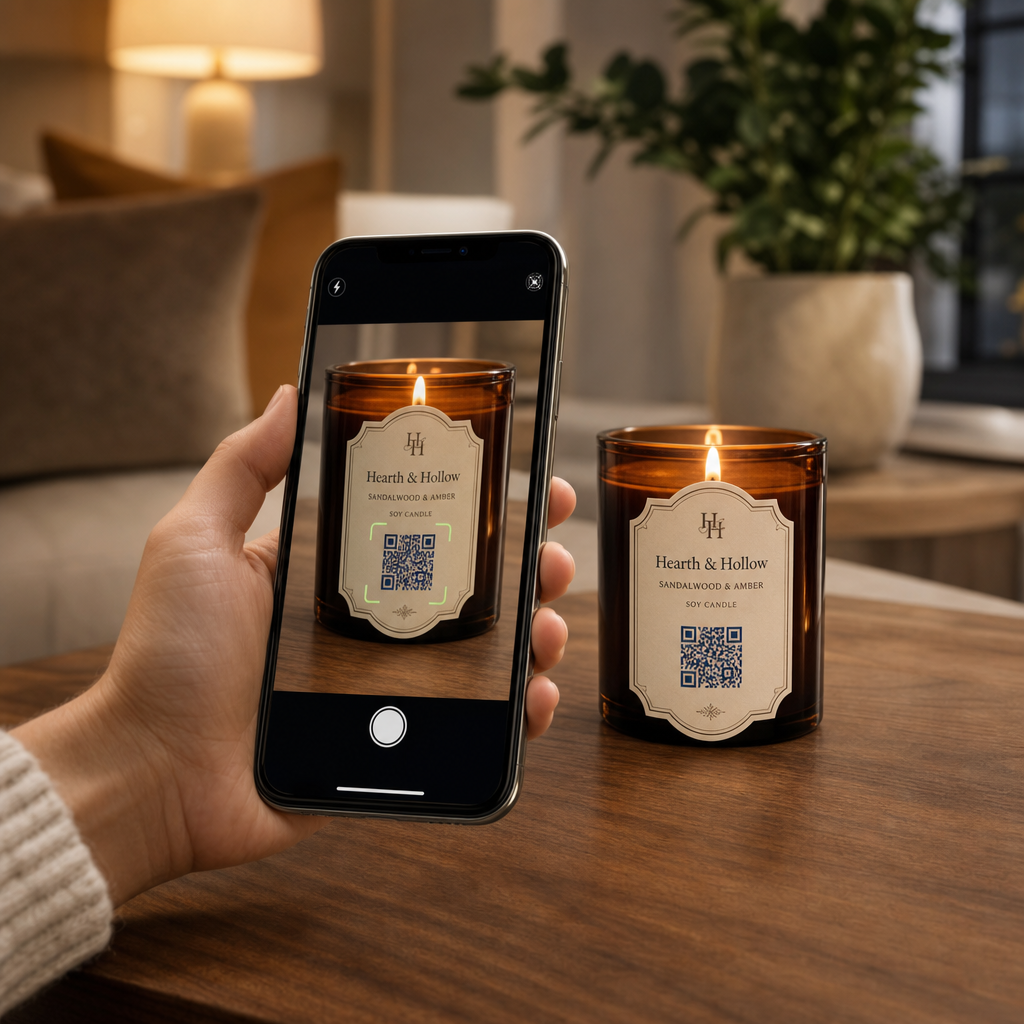
Pageloot penyelesaian industri produk direka untuk jenama yang menggunakan kod QR pada pembungkusan dan label untuk menghubungkan produk fizikal dengan pengalaman digital, termasuk aliran kerja pengesahan.
Cipta Kod Bersiri pada Skala Perlu menjana kod QR unik untuk setiap unit dalam pengeluaran anda? Pageloot’s Penjana Kod QR menyokong penciptaan pukal dengan papan pemuka berpusat untuk menjejak, mengemas kini, dan mengurus kod merentasi keseluruhan katalog anda.
Pengujian Sebelum Anda Melaksanakan
Sebelum menggunakan kod QR pengesahan pada pengeluaran, ujian menyeluruh mencegah kegagalan yang menjejaskan kepercayaan pelanggan pada saat yang paling penting. Langkah-langkah utama termasuk:
- Imbas kod yang dicetak dengan pelbagai peranti dan aplikasi kamera asli merentasi keadaan pencahayaan yang berbeza
- Sahkan bahawa pengecam dalam imbasan memetakan dengan betul ke rekod produk yang betul dalam pangkalan data anda
- Sahkan halaman pengesahan dimuatkan dengan betul pada mudah alih dan memaparkan hasil ketulenan dengan jelas
- Uji logik pengesanan anomali dengan mengimbas kod yang sama berulang kali dan mengesahkan sistem pemantauan anda menandakannya dengan sewajarnya
- Semak bahawa interaksi dengan elemen keselamatan fizikal – seperti menanggalkan panel calar atau memecahkan meterai – menghasilkan hasil yang dijangka dalam sistem anda
Untuk pendekatan berstruktur kepada proses ini, panduan mengenai menguji amalan terbaik pengesahan kod QR merangkumi aliran kerja ujian penuh secara terperinci.
***
Membina Sistem Pengesahan yang Berskala
Pengesahan produk berasaskan QR bukanlah persediaan sekali sahaja. Ia memerlukan pengurusan berterusan: memantau data imbasan, menyiasat anomali, mengemas kini destinasi pengesahan apabila produk ditarik balik, dan mengembangkan sistem apabila barisan produk anda berkembang.
Platform pengurusan QR berpusat menjadikan ini realistik dari segi operasi. Papan pemuka Pageloot membolehkan pasukan menyusun kod mengikut kempen atau kategori produk menggunakan folder, melihat prestasi imbasan agregat merentasi set kod yang besar, dan mengemas kini destinasi tanpa mencetak semula – keupayaan yang penting apabila anda menguruskan kod bersiri merentasi puluhan ribu unit.
Kod QR pada produk anda adalah apa yang dilihat oleh pelanggan. Sistem di belakangnya adalah apa yang sebenarnya melindungi mereka – dan jenama anda. Bina kedua-duanya dengan penjagaan yang sama, dan pengesahan QR bersiri menjadi salah satu alat yang paling praktikal dan berskala yang tersedia untuk pencegahan pemalsuan. Terokai bagaimana perniagaan merentasi vertikal yang berbeza mendekati pelaksanaan kod QR di hab penyelesaian industri Pageloot.
Mula Melindungi Produk Anda Cipta kod QR yang boleh dijejak, boleh diedit dan pantau setiap imbasan dari satu papan pemuka. Cuba Penjana dynamic QR code percuma selama 14 hari – tiada kad kredit diperlukan.
Soalan lazim
Tidak. Kod QR biasa boleh difoto dan dicetak semula pada produk palsu, dan kod yang diklon akan mengimbas sama dengan yang asal. Pengesahan yang berkesan memerlukan kod unik bersiri yang digabungkan dengan pengesahan sisi pelayan yang mengesahkan setiap imbasan terhadap rekod produk yang dipercayai, serta pemantauan untuk anomali seperti kiraan imbasan yang tidak dijangka atau ketidakpadanan geografi.
Kod QR bersiri adalah unik untuk satu item fizikal, bukan hanya jenis produk atau SKU. Apabila diimbas, ia mengenal pasti unit khusus itu dan menyemaknya terhadap rekod pangkalan data. Kod QR produk biasa biasanya memautkan semua unit produk yang sama ke URL yang sama, yang bermaksud pemalsu yang mengklon kod itu boleh menggunakannya pada produk palsu dan menjadikannya berfungsi sama seperti yang asal.
Pageloot menyokong penjanaan kod QR pukal melalui muat naik CSV, menskalakan sehingga 100,000 kod, menjadikan pengesahan bersiri praktikal walaupun pada volum pengeluaran yang tinggi. Kod boleh diatur mengikut barisan produk atau kelompok menggunakan folder, dan semua data imbasan dijejak secara berpusat dalam papan pemuka.