Når forfalskede versjoner av produktet ditt når kundene? Utover tapt inntekt, skader falske varer merkevaretillit og kan sette kjøpere i fare. Denne siden forklarer hvordan QR-koder, implementert med serialiserte unike identiteter og riktig infrastruktur, skaper et praktisk og skalerbart produktautentiseringssystem.
Hvorfor forfalskning er et problem verdt å løse systematisk
Omfanget av forfalsket handel er betydelig. OECD og EUIPO anslår at forfalskede varer utgjorde omtrent $467 milliarder i global handel i 2021, noe som representerer 2.3% av den totale globale importen. En rapport fra U.S. Patent and Trademark Office fant at forfalskning og piratkopiering koster amerikanske bedrifter mer enn $200 milliarder per år og bidrar til tap av mer enn 750 000 arbeidsplasser.
For merkevareeiere forsterkes de direkte økonomiske tapene av skade som er vanskeligere å kvantifisere: en kunde som kjøper en forfalsket versjon av produktet ditt og har en dårlig opplevelse, klandrer merkevaren din, ikke forfalskeren.
Et QR-basert autentiseringssystem adresserer dette på varenivå. I stedet for bare å verifisere at en produkttype er ekte, verifiserer det at en spesifikk, individuell enhet er ekte – og gir deg dataene for å oppdage når noe går galt.
Hvorfor en standard QR-kode alene ikke er nok
Før vi utforsker hvordan QR-autentisering fungerer, er det viktig å forstå en grunnleggende begrensning som mange merker overser.
En generisk QR-kode dupliseres enkelt. En forfalsker kan fotografere koden din i høy oppløsning, trykke den på tusenvis av falske produkter, og disse klonede kodene vil skanne og oppføre seg identisk med originalen. Hvis QR-koden din bare peker til en produktside eller en statisk verifiserings-URL, gir den ingen reell beskyttelse.
Tradisjonelle statiske QR-koder brukt for sporbarhet eller produktinformasjon gir ingen iboende autentisering. Hvis selve produktet er falskt, vil den lenkede siden fortsatt virke ekte og kan ikke bekrefte autentisitet på egen hånd.
Effektiv QR-autentisering krever tre ting som fungerer sammen:
- Serialisering: hvert enkelt element får en unik kode, ikke bare hver SKU eller batch
- Server-side verifisering: hver skanning sjekkes mot en pålitelig post, ikke bare en destinasjons-URL
- Overvåkingslogikk: anomalier som gjentatte skanninger fra forskjellige steder, eller antall skanninger som overskrider forventede mengder, utløser varsler
QR-koden er det kundeorienterte grensesnittet. Sikkerheten ligger i infrastrukturen bak den.
Hvordan serialisert QR-autentisering fungerer
Serialiserte QR-koder tildeler en unik kode til hver enkelt produktenhet. Når en kunde skanner den koden, laster systemet ikke bare en side – det utfører et oppslag mot en produktpost for å bekrefte at dette spesifikke elementet, med denne spesifikke identifikatoren, er kjent og gyldig.
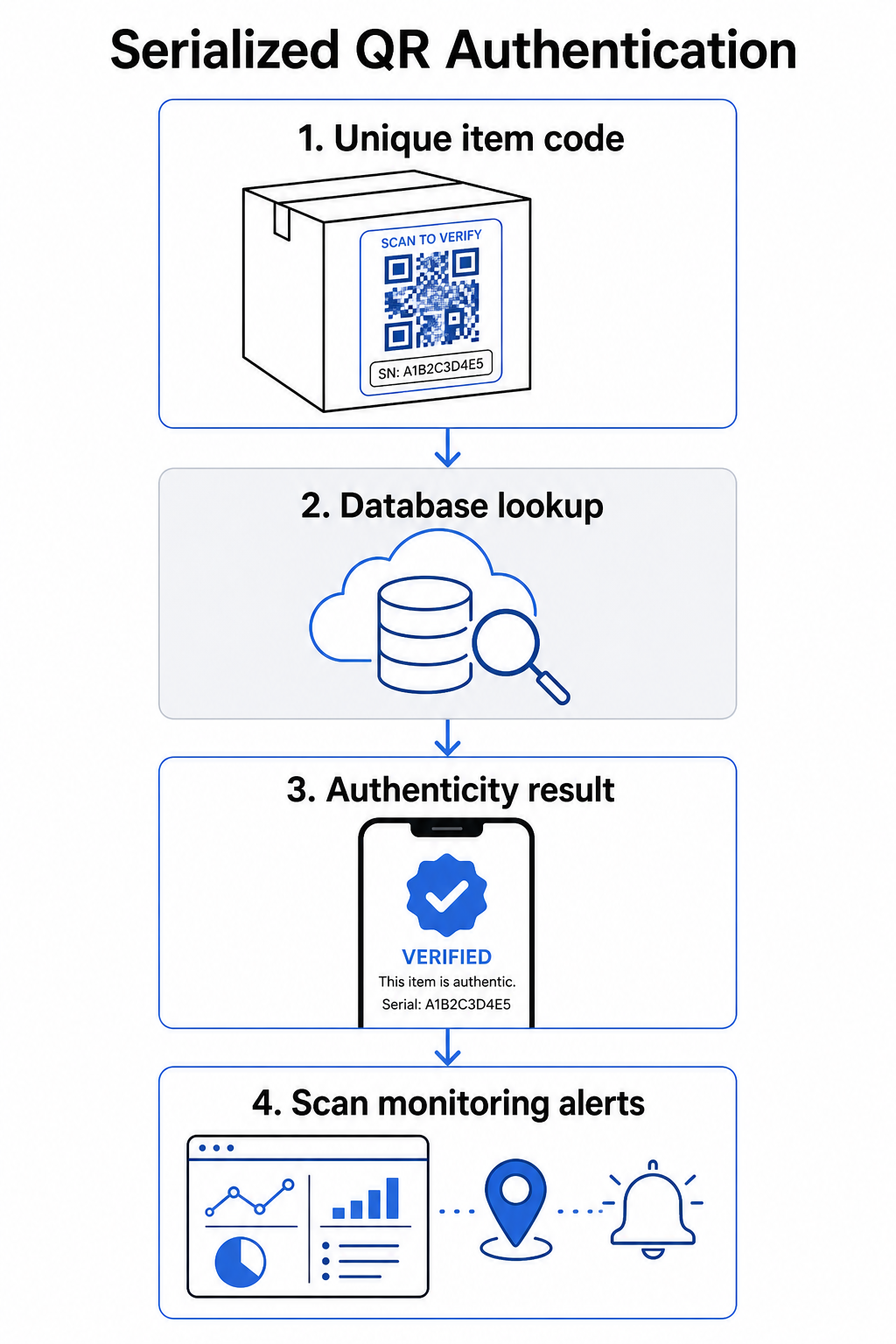
En komplett autentiseringsarbeidsflyt inkluderer vanligvis disse trinnene:
- Opprett en unik identifikator for hvert element – dette kan være et serienummer, batchreferanse, produksjonsdato, eller en kombinasjon kodet som en GS1 Digital Link URI, som inkluderer GS1 applikasjonsidentifikatorer for GTIN, batch-/lotnummer og serienummer
- Koble den identifikatoren til en digital produktpost – lagret i en sikker database som systemet ditt kontrollerer
- Generer og tildel en unik QR-kode som peker til et verifiseringsendepunkt som bærer en ugjennomsiktig identifikator eller token, snarere enn selve rådataene
- Påfør QR-koden på det fysiske produktet – for varer av høyere verdi, fraråder plassering under et skrapepanel eller over en manipulasjonssikker forsegling etikettoverføring og gjenbruk
- Logg hver skanning som en hendelse – fanger opp tidsstempel, sted og enhetsinformasjon for å støtte kontinuerlig overvåking
- Vis en verifiseringsside som viser produktdetaljer og et klart autentisitetsresultat slik at kundene umiddelbart vet hva de ser på
Selve verifiseringssiden er viktig. En godt designet side viser produktnavn, batch- eller garantidetaljer, og en enkel autentisitetsbekreftelse. Noen systemer viser også hvor mange ganger en spesifikk kode er skannet – en kode som samler langt flere skanninger enn forventet, blir en mistanketrigger for forfalskninger som bruker dupliserte koder.
Administrer og spor hver produktkode Pageloots Dynamisk QR-kode generator lar deg opprette sporingsbare, redigerbare QR-koder og få tilgang til et komplett analysedashbord som viser når og hvor hver skanning skjer – noe som gir deg overvåkingslaget autentiseringssystemet ditt trenger.
Rollen til dynamiske QR-koder i autentisering
Dynamiske QR-koder er et praktisk grunnlag for produktautentisering fordi de skiller den trykte koden fra destinasjonen den peker til. Den fysiske koden på et produkt endres aldri, men destinasjonen og logikken bak den kan oppdateres når som helst uten å trykke på nytt.
Dette er viktig for autentisering på flere spesifikke måter:
- Du kan oppdatere verifiseringssider hvis din backend-infrastruktur endres, uten å tilbakekalle eller trykke på nytt merkede produkter
- Du kan deaktivere en kode hvis et parti tilbakekalles eller hvis svindelaktivitet oppdages rundt en bestemt identifikator
- Du kan omdirigere skanninger til forskjellige opplevelser basert på antall skanninger, geografi eller tid – for eksempel, rute den første skanningen til en fullstendig verifiseringsside og påfølgende skanninger til en advarsel
Pageloots plattform støtter redigering av QR-kodedestinasjoner etter utskrift og gir skanneanalyser inkludert plassering, enhetstype og skannetidspunkt – alt dette mates direkte inn i en overvåkingsarbeidsflyt.
For merker som administrerer store produktvolumer, støtter Pageloot massegenerering av QR-koder via CSV-opplastinger, skalerer opp til 100 000 koder, noe som gjør serialisert kodegenerering praktisk selv i produksjonsskala. Leverandører og forhandlere kan utforske dedikerte verktøy gjennom Pageloots leverandør- og forhandlerløsninger.
Kombinere QR-koder med fysiske sikkerhetselementer
Sikkerhetsforskere og merkevarebeskyttelsesspesialister bemerker konsekvent at en QR-kode alene ikke kan forhindre forfalskning. Effektiv beskyttelse kombinerer QR-laget med fysiske eller strukturelle elementer som er vanskeligere å replikere.
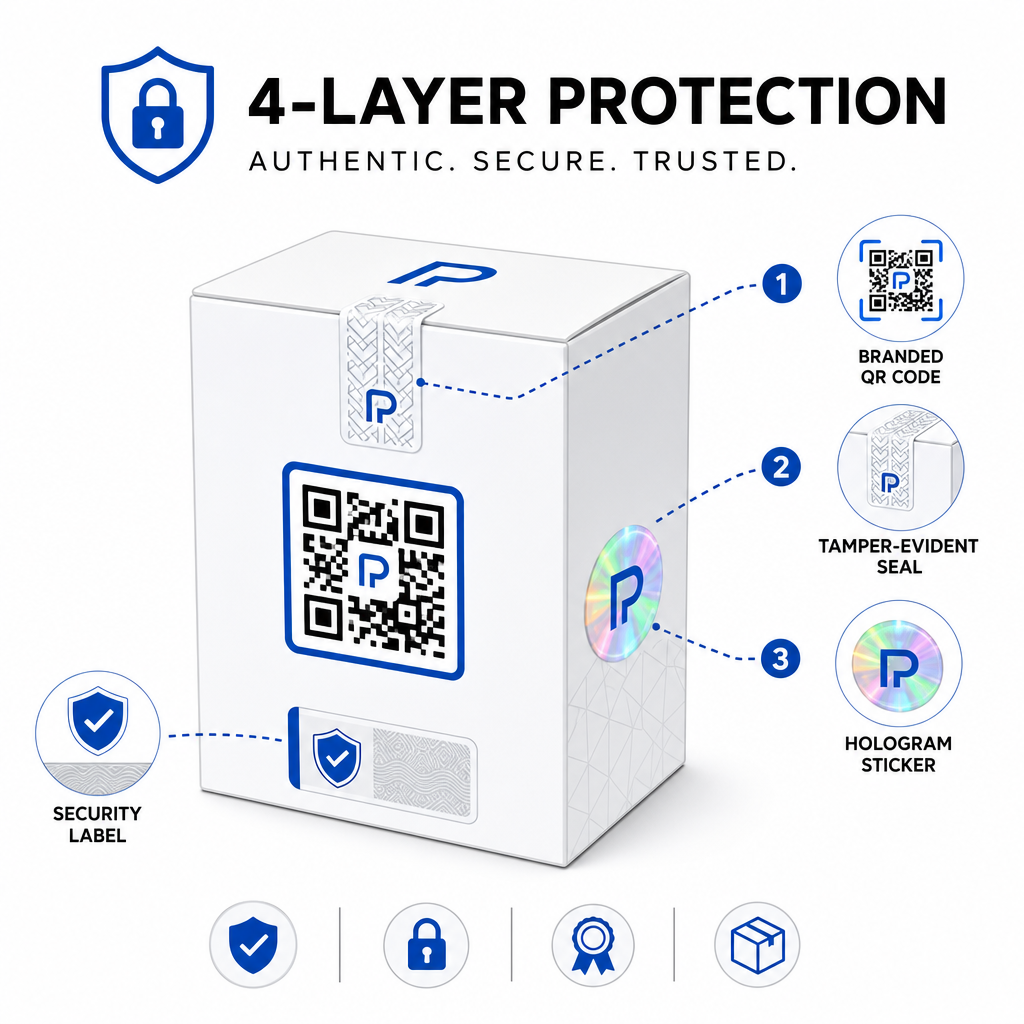
Vanlige tilnærminger inkluderer:
- Manipulasjonssikre forseglinger: plassere QR-koden over en forsegling som viser synlig skade hvis den fjernes
- Skrapeloddpaneler: skjule QR-koden under et belegg som en kjøper fjerner ved første gangs bruk, noe som gjør koden vanskeligere for forfalskere å fotografere før kjøp
- Holografiske overflater eller sikkerhetsblekk: legge til et fysisk lag som forringes synlig når det kopieres
- Sikre kopisikre mønstre: noen systemer innebygger mikroskopiske anti-kopiteksturer i selve QR-kodedesignet, noe som får mønsteret til å forringes eller forsvinne når det fotograferes og trykkes på nytt
Kombinasjonsstrategien er viktig fordi den flytter autentisering bort fra et enkelt feilpunkt. En forfalsker som kan duplisere QR-koden kan ikke enkelt også replikere manipulasjonsforseglingen, hologrammet eller det kopisensitive substratet samtidig.
For en bredere titt på hvordan QR-koder samhandler med fysisk produktemballasje, dekker guiden om QR-koder på produktemballasje plassering og design i detalj.
Serverside-verifisering og skanneovervåking
Det viktigste sikkerhetslaget i et QR-autentiseringssystem er et kundene aldri ser: serverside-validering.
Når en kunde skanner en autentisert QR-kode, bør systemet:
- Validere identifikatoren mot din produktdatabase før det leveres noe resultat
- Logge skannehendelsen med tidsstempel, GPS-koordinater eller IP-basert plassering, og enhetsfingeravtrykk
- Sjekke for anomalier som for eksempel at samme kode skannes fra to geografisk fjerntliggende steder innen minutter, eller en enkelt serialisert kode som akkumulerer skanninger utover enhver plausibel legitim bruk
- Bruke ugjennomsiktige tokens i stedet for rå identifikatorer i QR-innholdet, slik at selv om noen leser QR-dataene direkte kan de ikke konstruere en gyldig forfalskning uten tilgang til serverlogikken din
Denne tilnærmingen – der QR-koden kun bærer en ugjennomsiktig referanse og all meningsfull verifisering skjer serverside – er standarden anbefalt av sikkerhetsutøvere for autentiseringsbrukstilfeller.
For en teknisk dypdykk i hvordan kryptering ytterligere kan beskytte QR-baserte autentiseringssystemer, dekker innlegget om krypterte QR-koder for autentiseringsplattformer krypteringsmetoder og samsvarshensyn i detalj.
Design og plassering for autentiserings-QR-koder
En autentiserings-QR-kode som kunder ikke kan skanne, motvirker sitt eget formål. Standard beste praksis for utskriftskvalitet og plassering gjelder like mye her:
- Minimumsstørrelse: følg tommelfingerregelen på 1 cm per 10 cm skanneavstand for å sikre pålitelig skanning på tvers av enheter
- Høy kontrast: bruk mørke moduler på en lys bakgrunn, og unngå blanke eller reflekterende overflater som forårsaker gjenskinn
- Stille sone: la det være en klar kant på minst fire moduler rundt koden, fri for tekst eller designelementer
- Utskriftsoppløsning: bruk vektorformater eller PNG med minimum 300 DPI for utskriftsapplikasjoner
- Flat plassering: unngå buede overflater, sømmer eller folder som forvrenger kodens geometri
- Tydelig handlingsfremmende oppfordring: inkluder en kort instruksjon nær koden, som for eksempel “Skann for å verifisere ektheten”, slik at kundene forstår hva koden er til for
For mer detaljert veiledning om emballasjespesifikk plassering, den ultimate guide til QR-koder for produktetiketter dekker størrelse, kontrast og plassering i dybden.
Merkede QR-koder med logoen din innebygd signaliserer også legitimitet til kunder ved første øyekast. Den QR-kode generator med logo lar deg innlemme merkevareidentitet direkte i kodedesignet uten å kompromittere skannbarheten.
Hvem denne tilnærmingen er bygget for
QR-basert produktautentisering er relevant på tvers av et bredt spekter av produktkategorier og bransjer:
| Produkttype | Autentiseringsbehov |
|---|---|
| Forbrukerelektronikk og tilbehør | Høy forfalskningsrate; garantivalidering |
| Legemidler og helseprodukter | Forbrukersikkerhet; forskriftsoverholdelse |
| Luksusvarer og klær | Merkebeskyttelse; forebygging av gråmarked |
| Industrielle komponenter og deler | Sikkerhetssertifisering; forsyningskjedens integritet |
| Mat og drikke | Batch-sporbarhet; importverifisering |
Merker som selger gjennom tredjepartsforhandlere eller e-handelsplattformer er spesielt sårbare fordi de har mindre direkte kontroll over hva som når sluttkunden. Serialisert autentisering gir dem en direkte kanal for å verifisere enhver enhet, uavhengig av hvor den ble kjøpt.
Pageloots produktbransjeløsninger er designet for merker som bruker QR-koder på emballasje og etiketter for å koble fysiske produkter med digitale opplevelser, inkludert verifiseringsarbeidsflyter.
Opprett serialiserte koder i stor skala Trenger du å generere unike QR-koder for hver enhet i produksjonskjøringen din? Pageloot’s QR-kodegenerator støtter bulkopprettelse med et sentralisert dashbord for å spore, oppdatere og administrere koder på tvers av hele katalogen din.
Testing før utrulling
Før du bruker autentiserings-QR-koder på en produksjonskjøring, forhindrer grundig testing feil som undergraver kundens tillit i det øyeblikket det betyr mest. Viktige trinn inkluderer:
- Skann den trykte koden med flere enheter og native kamera-apper under forskjellige lysforhold
- Verifiser at identifikatoren i skanningen kartlegger riktig til riktig produktpost i databasen din
- Bekreft at verifiseringssiden lastes riktig på mobil og viser autentisitetsresultatet tydelig
- Test anomalideteksjonslogikken ved å skanne den samme koden gjentatte ganger og bekrefte at overvåkingssystemet ditt flagger den på riktig måte
- Sjekk at interaksjon med det fysiske sikkerhetselementet – som å fjerne et skrapepanel eller bryte en forsegling – gir det forventede resultatet i systemet ditt
For en strukturert tilnærming til denne prosessen, guiden om testing av beste praksis for QR-kodeautentisering dekker hele testarbeidsflyten i detalj.
***
Bygge et autentiseringssystem som skalerer
QR-basert produktautentisering er ikke et engangsoppsett. Det krever løpende administrasjon: overvåking av skannedata, undersøkelse av anomalier, oppdatering av verifiseringsdestinasjoner når produkter tilbakekalles, og utvidelse av systemet etter hvert som produktlinjen din vokser.
En sentralisert QR-administrasjonsplattform gjør dette operasjonelt realistisk. Pageloot’s dashbord lar team organisere koder etter kampanje eller produktkategori ved hjelp av mapper, se samlet skanneytelse på tvers av store kodesett, og oppdatere destinasjoner uten å skrive ut på nytt – funksjoner som betyr noe når du administrerer serialiserte koder på tvers av titusenvis av enheter.
QR-koden på produktet ditt er det en kunde ser. Systemet bak det er det som faktisk beskytter dem – og merkevaren din. Bygg begge med like stor omhu, og serialisert QR-autentisering blir et av de mest praktiske og skalerbare verktøyene som er tilgjengelige for forfalskningsforebygging. Utforsk hvordan bedrifter på tvers av forskjellige vertikaler tilnærmer seg QR-kodeimplementering på Pageloot’s bransjeløsningshub.
Begynn å beskytte produktene dine Opprett sporbare, redigerbare QR-koder og overvåk hver skanning fra et enkelt dashbord. Prøv den Dynamisk QR-kode generator gratis i 14 dager – ingen kredittkort kreves.
Ofte stilte spørsmål
Nei. En vanlig QR-kode kan fotograferes og trykkes på nytt på falske produkter, og den klonede koden vil skanne identisk med originalen. Effektiv autentisering krever serialiserte unike koder kombinert med server-side verifisering som validerer hvert skann mot en pålitelig produktpost, pluss overvåking for avvik som uventede skannetall eller geografiske uoverensstemmelser.
En serialisert QR-kode er unik for en enkelt fysisk vare, ikke bare en produkttype eller SKU. Når den skannes, identifiserer den den spesifikke enheten og sjekker den mot en databaseoppføring. En vanlig produkt-QR-kode lenker vanligvis alle enheter av det samme produktet til den samme URL-en, noe som betyr at en forfalsker som kloner koden kan bruke den på et falskt produkt og få det til å oppføre seg nøyaktig som originalen.
Pageloot støtter massegenerering av QR-koder via CSV-opplasting, skalerer opp til 100 000 koder, noe som gjør serialisert autentisering praktisk selv ved høye produksjonsvolumer. Koder kan organiseres etter produktlinje eller batch ved hjelp av mapper, og all skannedata spores sentralt i dashbordet.