Des versions contrefaites de votre produit atteignent-elles les clients ? Au-delà des pertes de revenus, les produits contrefaits nuisent à la confiance dans la marque et peuvent mettre les acheteurs en danger. Cette page explique comment les codes QR, mis en œuvre avec des identités uniques sérialisées et l'infrastructure adéquate, créent un système d'authentification de produit pratique et évolutif.
Pourquoi la contrefaçon est un problème qui mérite d'être résolu systématiquement
L'ampleur du commerce de contrefaçon est considérable. L'OCDE et l'EUIPO estiment que les produits contrefaits représentaient environ $467 milliards dans le commerce mondial en 2021, soit 2,3% du total des importations mondiales. Un rapport de l'Office américain des brevets et des marques a révélé que la contrefaçon et le piratage coûtent aux entreprises américaines plus de $200 milliards par an et contribuent à la perte de plus de 750 000 emplois.
Pour les propriétaires de marques, les pertes financières directes sont aggravées par des dommages plus difficiles à quantifier : un client qui achète une version contrefaite de votre produit et a une mauvaise expérience blâme votre marque, et non le contrefacteur.
Un système d'authentification basé sur les codes QR résout ce problème au niveau de l'article. Au lieu de simplement vérifier qu'un type de produit est authentique, il vérifie qu'une unité spécifique et individuelle est authentique – et vous fournit les données pour détecter quand quelque chose ne va pas.
Pourquoi un code QR standard seul ne suffit pas
Avant d'explorer le fonctionnement de l'authentification QR, il est important de comprendre une limitation fondamentale que de nombreuses marques négligent.
Un code QR générique est facilement duplicable. Un contrefacteur peut photographier votre code en haute résolution, le réimprimer sur des milliers de faux produits, et ces codes clonés scanneront et se comporteront de manière identique à l'original. Si votre code QR pointe simplement vers une page produit ou une URL de vérification statique, il n'offre aucune protection réelle.
Les codes QR statiques traditionnels utilisés pour la traçabilité ou les informations produit n'offrent aucune authentification intrinsèque. Si le produit lui-même est faux, la page liée apparaît toujours comme authentique et ne peut pas confirmer l'authenticité par elle-même.
Une authentification QR efficace nécessite trois éléments fonctionnant ensemble :
- Sérialisation: chaque article individuel reçoit un code unique, pas seulement chaque SKU ou lot
- Vérification côté serveur: chaque scan est vérifié par rapport à un enregistrement fiable, et non pas seulement une URL de destination
- Logique de surveillance: les anomalies telles que des scans répétés depuis différents emplacements, ou des nombres de scans qui dépassent les quantités attendues, déclenchent des alertes
Le code QR est l'interface client. La sécurité réside dans l'infrastructure qui le sous-tend.
Comment fonctionne l'authentification QR sérialisée
Les codes QR sérialisés attribuent un code unique à chaque unité de produit individuelle. Lorsqu'un client scanne ce code, le système ne se contente pas de charger une page – il effectue une recherche dans un enregistrement de produit pour confirmer que cet article spécifique, avec cet identifiant spécifique, est connu et valide.
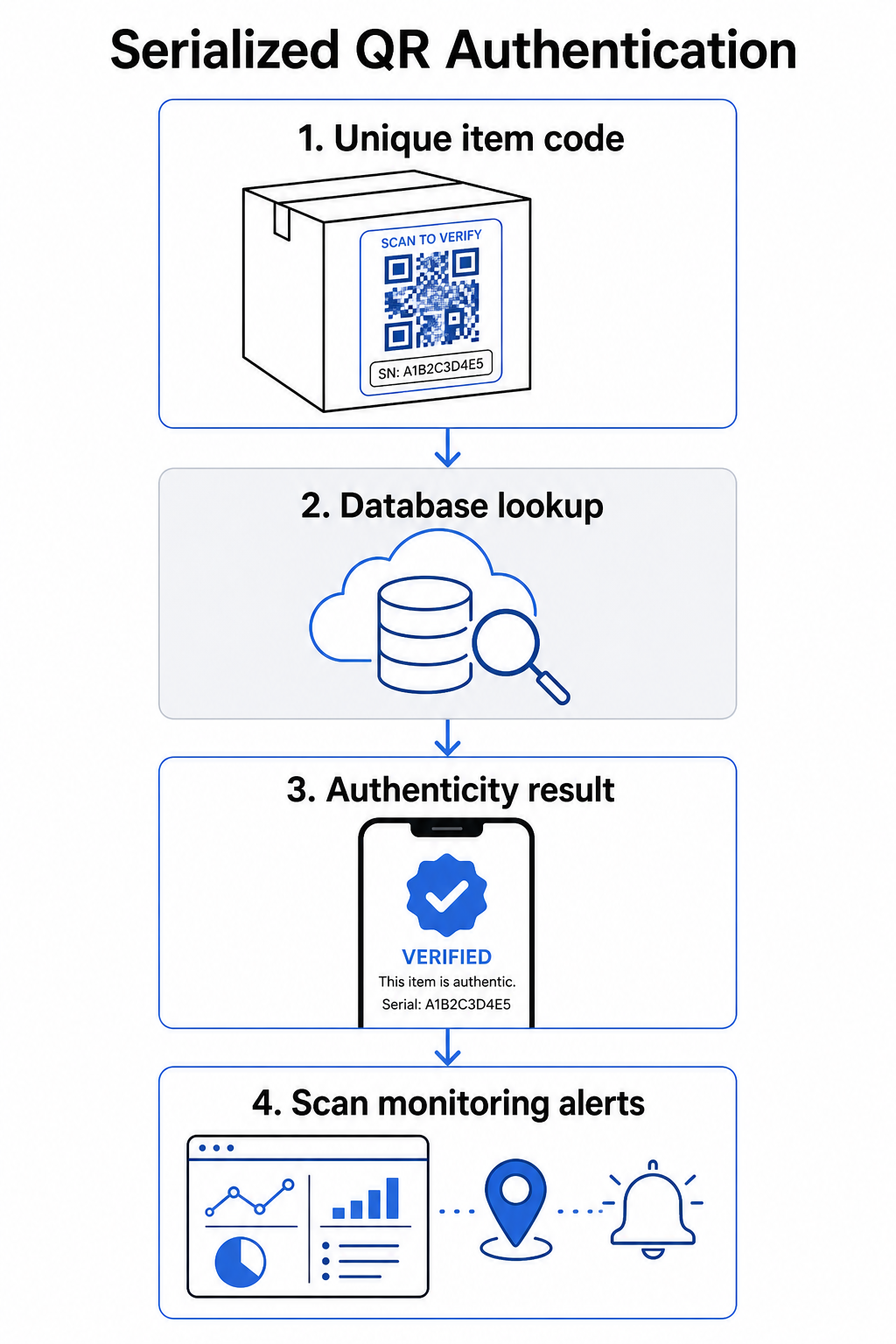
Un flux de travail d'authentification complet comprend généralement ces étapes :
- Créer un identifiant unique pour chaque article – il peut s'agir d'un numéro de série, d'une référence de lot, d'un horodatage de production, ou d'une combinaison encodée sous forme d'URI GS1 Digital Link, qui inclut les identifiants d'application GS1 pour le GTIN, le numéro de lot et le numéro de série
- Lier cet identifiant à un enregistrement de produit numérique – stocké dans une base de données sécurisée que votre système contrôle
- Générer et attribuer un code QR unique qui pointe vers un point de terminaison de vérification portant un identifiant ou un jeton opaque, plutôt que les données brutes elles-mêmes
- Appliquer le code QR au produit physique – pour les articles de plus grande valeur, le placer sous un panneau à gratter ou sur un sceau inviolable décourage le transfert et la réutilisation de l'étiquette
- Enregistrer chaque scan comme un événement – capturant l'horodatage, l'emplacement et les informations de l'appareil pour soutenir la surveillance continue
- Servir une page de vérification qui affiche les détails du produit et un résultat d'authenticité clair afin que les clients sachent immédiatement ce qu'ils regardent
La page de vérification elle-même est importante. Une page bien conçue affiche le nom du produit, les détails du lot ou de la garantie, et une confirmation d'authenticité simple. Certains systèmes affichent également le nombre de fois qu'un code spécifique a été scanné – un code accumulant beaucoup plus de scans que prévu devient un déclencheur de suspicion pour les contrefaçons utilisant des codes dupliqués.
Gérer et suivre chaque code produit Celui de Pageloot Générateur de QR code dynamique vous permet de créer des codes QR traçables et modifiables et d'accéder à un tableau de bord analytique complet montrant quand et où chaque scan se produit – vous offrant la couche de surveillance dont votre système d'authentification a besoin.
Le rôle des codes QR dynamiques dans l'authentification
Codes QR dynamiques sont une base pratique pour l'authentification des produits car ils séparent le code imprimé de la destination vers laquelle il pointe. Le code physique sur un produit ne change jamais, mais la destination et la logique qui le sous-tend peuvent être mises à jour à tout moment sans réimpression.
Cela est important pour l'authentification de plusieurs manières spécifiques :
- Vous pouvez mettre à jour les pages de vérification si votre infrastructure backend change, sans rappeler ou réimprimer les produits étiquetés
- Vous pouvez désactiver un code si un lot est rappelé ou si une activité frauduleuse est détectée autour d'un identifiant particulier
- Vous pouvez rediriger les scans vers différentes expériences basées sur le nombre de scans, la géographie ou le temps – par exemple, en acheminant le premier scan vers une page de vérification complète et les scans suivants vers un avis d'avertissement
La plateforme de Pageloot prend en charge la modification des destinations des codes QR après impression et fournit des analyses de scan incluant la localisation, le type d'appareil et le moment du scan – tout cela alimentant directement un flux de travail de surveillance.
Pour les marques gérant de grands volumes de produits, Pageloot prend en charge la génération de codes QR en masse via des téléchargements CSV, pouvant atteindre 100 000 codes, ce qui rend la génération de codes sérialisés pratique même à l'échelle de la fabrication. Les fournisseurs et revendeurs peuvent explorer des outils dédiés via Les solutions de Pageloot pour fournisseurs et revendeurs.
Combiner les codes QR avec des éléments de sécurité physiques
Les chercheurs en sécurité et les spécialistes de la protection des marques notent constamment qu'un code QR seul ne peut empêcher la contrefaçon. Une protection efficace combine la couche QR avec des éléments physiques ou structurels plus difficiles à reproduire.
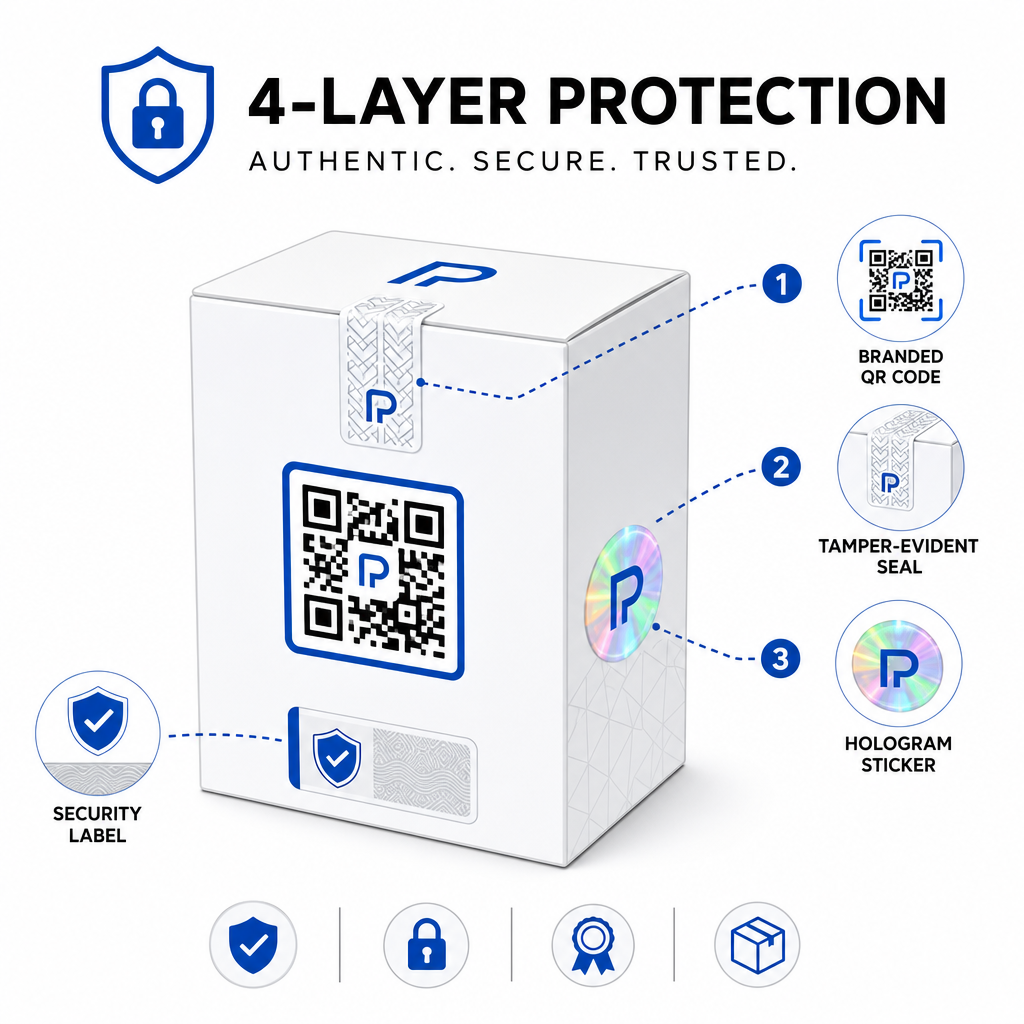
Les approches courantes incluent :
- Scellés inviolables: placer le code QR sur un scellé qui montre des dommages visibles s'il est retiré
- Panneaux à gratter: dissimuler le code QR sous un revêtement qu'un acheteur retire lors de la première utilisation, rendant le code plus difficile à photographier pour les contrefacteurs avant l'achat
- Sur-laminés holographiques ou encres de sécurité: ajouter une couche physique qui se dégrade visiblement lorsqu'elle est copiée
- Motifs sécurisés anti-copie: certains systèmes intègrent des textures microscopiques anti-copie dans la conception même du code QR, ce qui entraîne la dégradation ou la disparition du motif lorsqu'il est photographié et réimprimé
La stratégie de combinaison est importante car elle éloigne l'authentification d'un point de défaillance unique. Un contrefacteur qui peut dupliquer le code QR ne peut pas facilement répliquer en même temps le scellé inviolable, l'hologramme ou le substrat sensible à la copie.
Pour un aperçu plus large de la manière dont les codes QR interagissent avec l'emballage physique des produits, le guide sur des codes QR sur les emballages de produits couvre le placement et la conception en détail.
Vérification côté serveur et surveillance des scans
La couche de sécurité la plus importante dans un système d'authentification QR est celle que les clients ne voient jamais : la validation côté serveur.
Lorsqu'un client scanne un code QR authentifié, le système doit :
- Valider l'identifiant par rapport à votre base de données produits avant de fournir tout résultat
- Enregistrer l'événement de scan avec horodatage, coordonnées GPS ou localisation basée sur l'IP, et empreinte numérique de l'appareil
- Vérifier les anomalies telles que le même code scanné depuis deux emplacements géographiquement éloignés en quelques minutes, ou un seul code sérialisé accumulant des scans au-delà de toute utilisation légitime plausible
- Utiliser des jetons opaques plutôt que des identifiants bruts dans le contenu QR, de sorte que même si quelqu'un lit directement les données QR, il ne peut pas construire un faux valide sans accès à votre logique serveur
Cette approche – où le code QR ne contient qu'une référence opaque et où toute vérification significative se fait côté serveur – est la norme recommandée par les professionnels de la sécurité pour les cas d'utilisation d'authentification.
Pour une exploration technique approfondie de la manière dont le chiffrement peut protéger davantage les systèmes d'authentification basés sur les codes QR, l'article sur codes QR chiffrés pour les plateformes d'authentification couvre les méthodes de chiffrement et les considérations de conformité en détail.
Conception et placement des codes QR d'authentification
Un code QR d'authentification que les clients ne peuvent pas scanner va à l'encontre de son propre objectif. Les meilleures pratiques standard en matière de qualité d'impression et de placement s'appliquent également ici :
- Taille minimale: suivre la règle empirique de 1 cm par 10 cm de distance de scan pour assurer un scan fiable sur tous les appareils
- Contraste élevé: utiliser des modules sombres sur un fond clair, et éviter les finitions brillantes ou réfléchissantes qui provoquent des reflets
- Zone de silence: laisser une bordure claire d'au moins quatre modules autour du code, exempte de texte ou d'éléments de design
- Résolution d'impression: utiliser des formats vectoriels ou PNG à 300 DPI minimum pour les applications d'impression
- Placement à plat: éviter les surfaces courbes, les coutures ou les plis qui déforment la géométrie du code
- Appel à l'action clair: inclure une courte instruction près du code, telle que “ Scanner pour vérifier l'authenticité ”, afin que les clients comprennent à quoi sert le code
Pour des conseils plus détaillés sur le placement spécifique à l'emballage, le guide ultime des codes QR pour les étiquettes de produits couvre le dimensionnement, le contraste et le positionnement en profondeur.
Les codes QR de marque avec votre logo intégré signalent également la légitimité aux clients en un coup d'œil. Le Générateur de QR code avec logo vous permet d'incorporer l'identité de marque directement dans la conception du code sans compromettre la lisibilité.
À qui s'adresse cette approche
L'authentification de produit basée sur les codes QR est pertinente pour un large éventail de catégories de produits et d'industries :
| Type de produit | Besoin d'authentification |
|---|---|
| Électronique grand public et accessoires | Taux de contrefaçon élevé ; validation de garantie |
| Produits pharmaceutiques et de santé | Sécurité des consommateurs ; conformité réglementaire |
| Articles de luxe et vêtements | Protection de la marque ; prévention du marché gris |
| Composants et pièces industriels | Certification de sécurité ; intégrité de la chaîne d'approvisionnement |
| Aliments et boissons | Traçabilité des lots ; vérification des importations |
Les marques vendant par l'intermédiaire de détaillants tiers ou de plateformes de commerce électronique sont particulièrement vulnérables car elles ont moins de contrôle direct sur ce qui parvient au client final. L'authentification sérialisée leur offre un canal direct pour vérifier toute unité, quel que soit son lieu d'achat.
Celui de Pageloot solutions industrielles pour les produits sont conçues pour les marques utilisant des codes QR sur les emballages et les étiquettes afin de connecter les produits physiques à des expériences numériques, y compris les flux de travail de vérification.
Créer des codes sérialisés à grande échelle Besoin de générer des codes QR uniques pour chaque unité de votre série de production ? Le Générateur de codes QR prend en charge la création en masse avec un tableau de bord centralisé pour suivre, mettre à jour et gérer les codes sur l'ensemble de votre catalogue.
Tester avant de déployer
Avant d'appliquer des codes QR d'authentification à une série de production, des tests approfondis préviennent les défaillances qui sapent la confiance des clients au moment le plus crucial. Les étapes clés comprennent :
- Scannez le code imprimé avec plusieurs appareils et applications d'appareil photo natives dans différentes conditions d'éclairage
- Vérifiez que l'identifiant dans le scan correspond correctement au bon enregistrement de produit dans votre base de données
- Confirmez que la page de vérification se charge correctement sur mobile et affiche clairement le résultat d'authenticité
- Testez la logique de détection d'anomalies en scannant le même code à plusieurs reprises et en confirmant que votre système de surveillance le signale de manière appropriée
- Vérifiez que l'interaction avec l'élément de sécurité physique – tel que le retrait d'un panneau à gratter ou la rupture d'un sceau – produit le résultat attendu dans votre système
Pour une approche structurée de ce processus, le guide sur les meilleures pratiques de test d'authentification par code QR couvre le flux de travail de test complet en détail.
***
Construire un système d'authentification qui évolue
L'authentification de produit basée sur les codes QR n'est pas une configuration unique. Elle nécessite une gestion continue : surveillance des données de scan, investigation des anomalies, mise à jour des destinations de vérification lorsque les produits sont rappelés, et expansion du système à mesure que votre gamme de produits s'agrandit.
Une plateforme centralisée de gestion des codes QR rend cela opérationnellement réaliste. Le tableau de bord de Pageloot permet aux équipes d'organiser les codes par campagne ou catégorie de produit à l'aide de dossiers, de visualiser les performances de scan agrégées sur de grands ensembles de codes, et de mettre à jour les destinations sans réimpression – des capacités qui comptent lorsque vous gérez des codes sérialisés sur des dizaines de milliers d'unités.
Le code QR sur votre produit est ce qu'un client voit. Le système qui le sous-tend est ce qui les protège réellement – et votre marque. Construisez les deux avec le même soin, et l'authentification QR sérialisée devient l'un des outils les plus pratiques et évolutifs disponibles pour la prévention de la contrefaçon. Explorez comment les entreprises de différents secteurs verticaux abordent l'implémentation des codes QR à le centre de solutions industrielles de Pageloot.
Commencez à protéger vos produits Créez des codes QR traçables et modifiables et surveillez chaque scan depuis un tableau de bord unique. Essayez le Générateur de QR code dynamique gratuitement pendant 14 jours – aucune carte de crédit requise.
Questions fréquentes
Non. Un simple code QR peut être photographié et réimprimé sur des produits contrefaits, et le code cloné scannera de manière identique à l'original. Une authentification efficace nécessite des codes uniques sérialisés combinés à une vérification côté serveur qui valide chaque scan par rapport à un enregistrement de produit fiable, plus une surveillance des anomalies comme des nombres de scans inattendus ou des incohérences géographiques.
Un code QR sérialisé est unique à un seul article physique, pas seulement à un type de produit ou une UGS. Lorsqu'il est scanné, il identifie cette unité spécifique et la vérifie par rapport à un enregistrement de base de données. Un code QR de produit régulier lie généralement toutes les unités du même produit à la même URL, ce qui signifie qu'un contrefacteur qui clone le code peut l'appliquer à un faux produit et le faire se comporter exactement comme l'original.
Pageloot prend en charge la génération en masse de codes QR via le téléchargement CSV, pouvant atteindre 100 000 codes, rendant l'authentification sérialisée pratique même à des volumes de production élevés. Les codes peuvent être organisés par ligne de produits ou par lot à l'aide de dossiers, et toutes les données de scan sont suivies de manière centralisée dans le tableau de bord.