> 산업 > QR Codes for Product Authentication: How to Verify Items and Fight Counterfeits
Scanning authentic product

QR Codes for Product Authentication: How to Verify Items and Fight Counterfeits

Protect your brand from counterfeits using serialized QR codes. Learn how unique identifiers and server-side verification provide secure product authentication.
Updated on 7월 2, 2026
목차

Are counterfeit versions of your product reaching customers? Beyond lost revenue, fake goods damage brand trust and can put buyers at risk. This page explains how QR codes, implemented with serialized unique identities and the right infrastructure, create a practical and scalable product authentication system.

Why Counterfeiting Is a Problem Worth Solving Systematically

The scale of counterfeit trade is significant. The OECD and EUIPO estimate that counterfeit goods accounted for approximately $467 billion in global trade in 2021, representing 2.3% of total global imports. A U.S. Patent and Trademark Office report found that counterfeiting and piracy cost U.S. businesses more than $200 billion per year and contribute to the loss of more than 750,000 jobs.

For brand owners, the direct financial losses are compounded by damage that is harder to quantify: a customer who buys a counterfeit version of your product and has a bad experience blames your brand, not the counterfeiter.

A QR-based authentication system addresses this at the item level. Instead of simply verifying that a product type is genuine, it verifies that a specific, individual unit is genuine – and gives you the data to detect when something goes wrong.

Why a Standard QR Code Alone Is Not Enough

Before exploring how QR authentication works, it is important to understand a core limitation that many brands overlook.

A generic QR code is easily duplicated. A counterfeiter can photograph your code at high resolution, reprint it on thousands of fake products, and those cloned codes will scan and behave identically to the original. If your QR code simply points to a product page or a static verification URL, it provides no real protection.

Traditional static QR codes used for traceability or product information provide no intrinsic authentication. If the product itself is fake, the linked page still appears genuine and cannot confirm authenticity on its own.

Effective QR authentication requires three things working together:

  • Serialization: every individual item gets a unique code, not just every SKU or batch
  • Server-side verification: each scan is checked against a trusted record, not just a destination URL
  • Monitoring logic: anomalies such as repeated scans from different locations, or scan counts that exceed expected quantities, trigger alerts

The QR code is the customer-facing interface. The security lives in the infrastructure behind it.

How Serialized QR Authentication Works

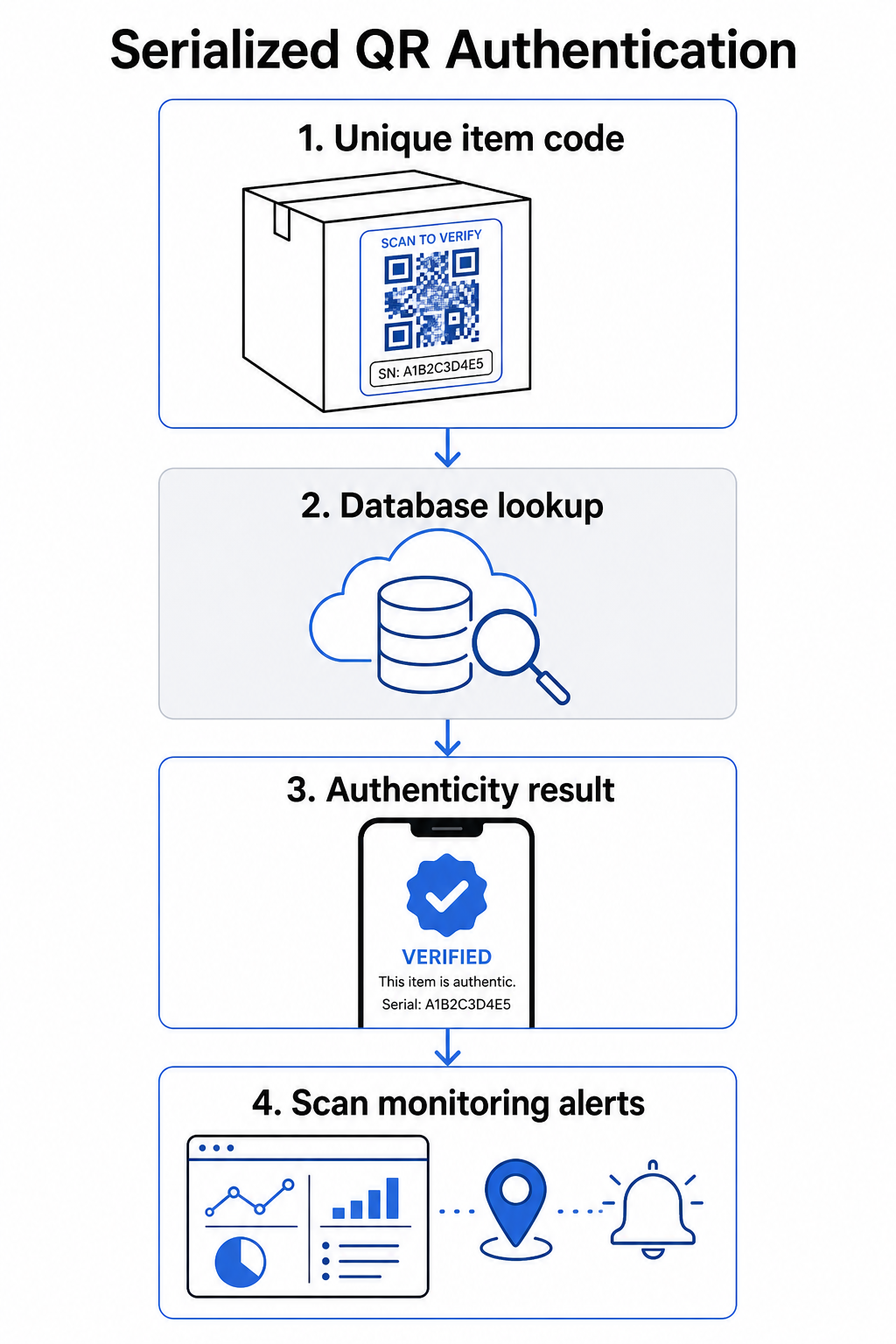
Serialized QR codes assign a unique code to each individual product unit. When a customer scans that code, the system does not just load a page – it performs a lookup against a product record to confirm that this specific item, with this specific identifier, is known and valid.

QR authentication workflow

A complete authentication workflow typically includes these steps:

  • Create a unique identifier for each item – this can be a serial number, batch reference, production timestamp, or a combination encoded as a GS1 Digital Link URI, which includes GS1 Application Identifiers for GTIN, batch/lot number, and serial number
  • Link that identifier to a digital product record – stored in a secure database that your system controls
  • Generate and assign a unique QR code that points to a verification endpoint carrying an opaque identifier or token, rather than the raw data itself
  • Apply the QR code to the physical product – for higher-value items, placing it under a scratch-off panel or across a tamper-evident seal discourages label transfer and reuse
  • Log every scan as an event – capturing timestamp, location, and device information to support ongoing monitoring
  • Serve a verification page that displays product details and a clear authenticity result so customers know immediately what they are looking at

The verification page itself matters. A well-designed page shows the product name, batch or warranty details, and a straightforward authenticity confirmation. Some systems also display how many times a specific code has been scanned – a code accumulating far more scans than expected becomes a suspicion trigger for counterfeits using duplicated codes.

Manage and Track Every Product Code 페이지루트의 동적 QR 코드 생성기 lets you create trackable, editable QR codes and access a full analytics dashboard showing when and where each scan occurs – giving you the monitoring layer your authentication system needs.

The Role of Dynamic QR Codes in Authentication

동적 QR 코드 are a practical foundation for product authentication because they separate the printed code from the destination it points to. The physical code on a product never changes, but the destination and the logic behind it can be updated at any time without reprinting.

This matters for authentication in several specific ways:

  • You can update verification pages if your backend infrastructure changes, without recalling or reprinting labeled products
  • You can disable a code if a batch is recalled or if fraudulent activity is detected around a particular identifier
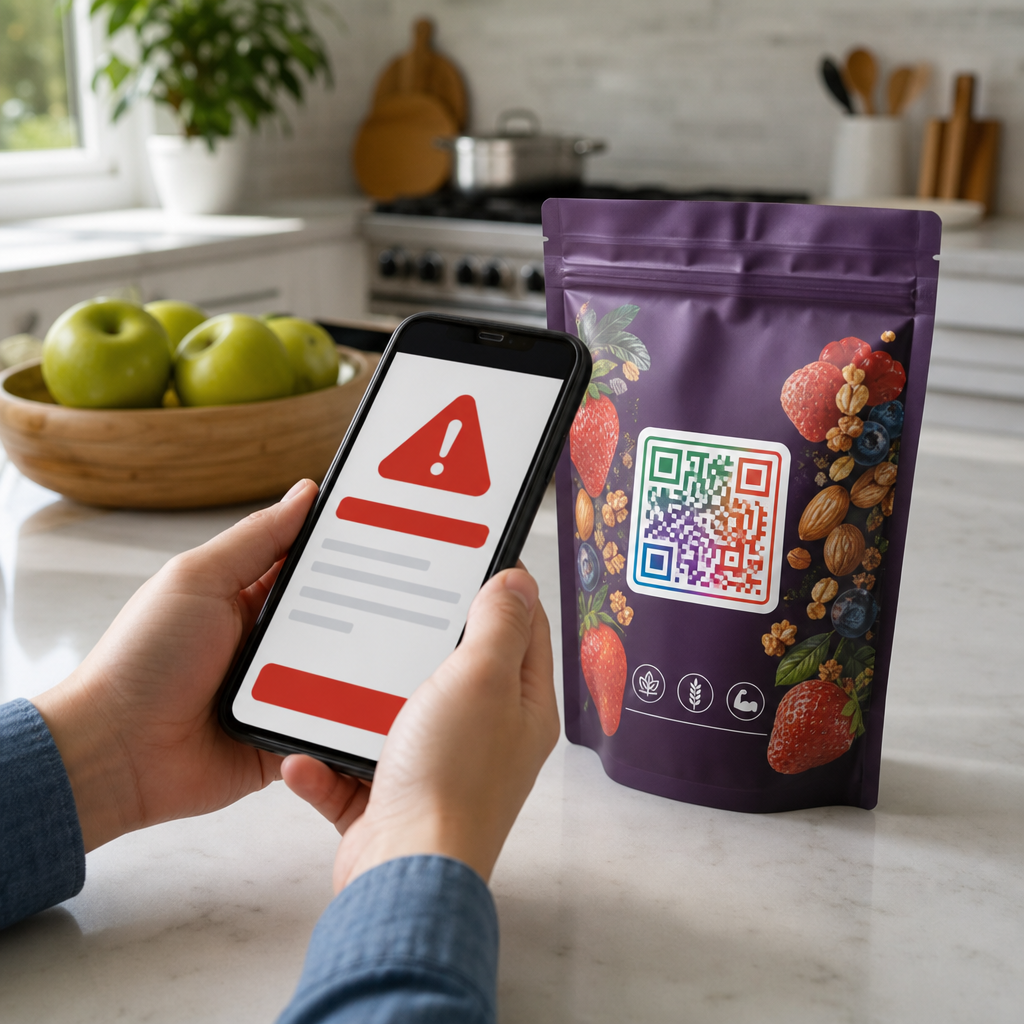
  • You can redirect scans to different experiences based on scan count, geography, or time – for example, routing the first scan to a full verification page and subsequent scans to a warning notice

Pageloot’s platform supports editing QR code destinations after printing and provides scan analytics including location, device type, and scan timing – all of which feed directly into a monitoring workflow.

For brands managing large product volumes, Pageloot supports bulk QR code generation via CSV uploads, scaling up to 100,000 codes, which makes serialized code generation practical even at manufacturing scale. Suppliers and resellers can explore dedicated tools through Pageloot’s supplier and reseller solutions.

Combining QR Codes with Physical Security Elements

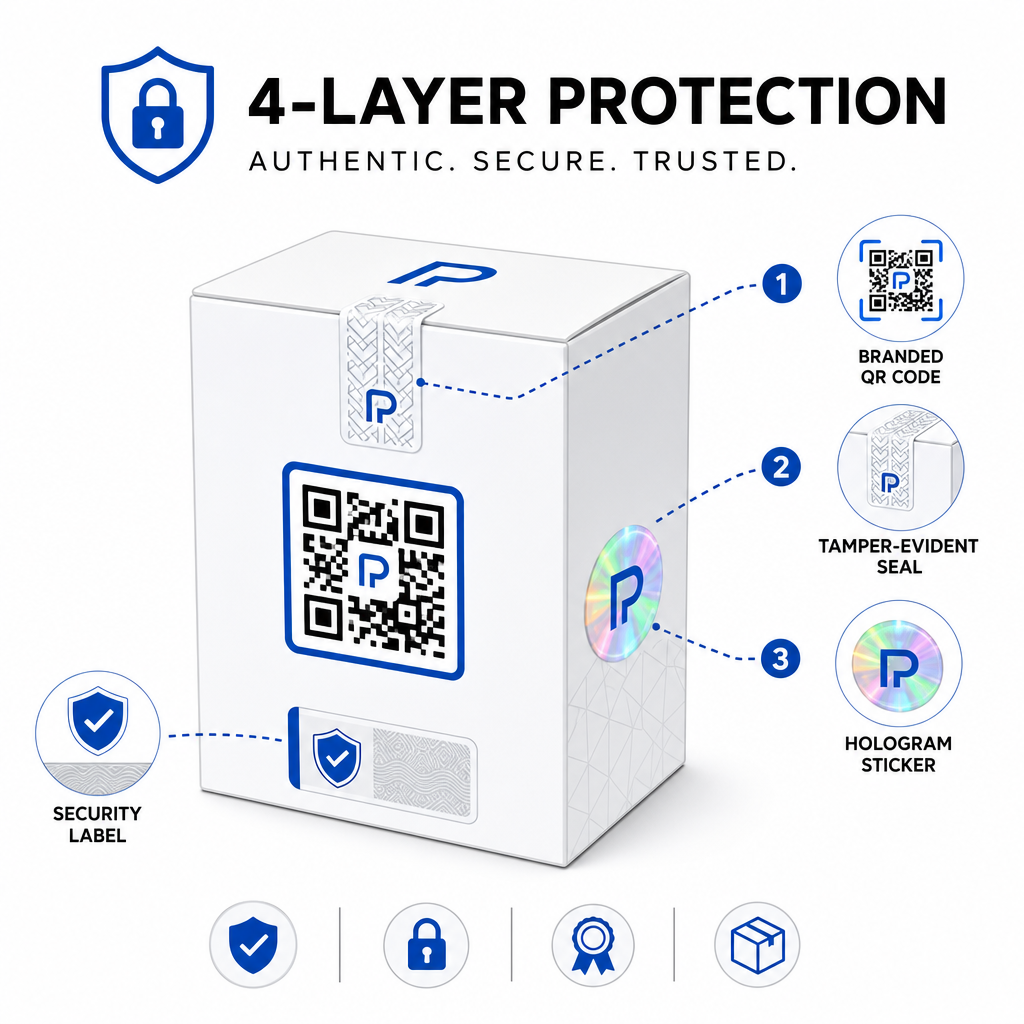
Security researchers and brand protection specialists consistently note that a QR code alone cannot prevent counterfeiting. Effective protection combines the QR layer with physical or structural elements that are harder to replicate.

Layered product security

Common approaches include:

  • Tamper-evident seals: placing the QR code across a seal that shows visible damage if removed
  • Scratch-off panels: concealing the QR code under a coating that a buyer removes at first use, making the code harder for counterfeiters to photograph before purchase
  • Holographic overlaminates or security inks: adding a physical layer that degrades visibly when copied
  • Secure copy-proof patterns: some systems embed microscopic anti-copy textures within the QR code design itself, causing the pattern to degrade or disappear when photographed and reprinted

The combination strategy matters because it shifts authentication away from a single point of failure. A counterfeiter who can duplicate the QR code cannot easily also replicate the tamper seal, hologram, or copy-sensitive substrate at the same time.

For a broader look at how QR codes interact with physical product packaging, the guide on 제품 포장의 QR 코드를 스캔하여 covers placement and design in detail.

Server-Side Verification and Scan Monitoring

The most important security layer in a QR authentication system is one customers never see: server-side validation.

When a customer scans an authenticated QR code, the system should:

  • Validate the identifier against your product database before serving any result
  • Log the scan event with timestamp, GPS coordinates or IP-based location, and device fingerprint
  • Check for anomalies such as the same code being scanned from two geographically distant locations within minutes, or a single serialized code accumulating scans beyond any plausible legitimate use
  • Use opaque tokens rather than raw identifiers in the QR content, so that even if someone reads the QR data directly they cannot construct a valid fake without access to your server logic

This approach – where the QR code carries only an opaque reference and all meaningful verification happens server-side – is the standard recommended by security practitioners for authentication use cases.

For a technical deep dive into how encryption can further protect QR-based authentication systems, the post on 인증 플랫폼용 암호화된 QR 코드 covers encryption methods and compliance considerations in detail.

Design and Placement for Authentication QR Codes

An authentication QR code that customers cannot scan defeats its own purpose. Standard best practices for print quality and placement apply equally here:

  • Minimum size: follow the 1 cm per 10 cm of scanning distance rule of thumb to ensure reliable scanning across devices
  • High contrast: use dark modules on a light background, and avoid shiny or reflective finishes that cause glare
  • Quiet zone: leave a clear border of at least four modules around the code, free of text or design elements
  • Print resolution: use vector formats or PNG at 300 DPI minimum for print applications
  • Flat placement: avoid curved surfaces, seams, or folds that distort the code geometry
  • 명확한 클릭 유도 문안: include a short instruction near the code, such as “Scan to verify authenticity,” so customers understand what the code is for

For more detailed guidance on packaging-specific placement, the 제품 라벨용 QR 코드 궁극 가이드 covers sizing, contrast, and positioning in depth.

Branded QR codes with your logo embedded also signal legitimacy to customers at a glance. The 로고가 있는 QR 코드 생성기 lets you incorporate brand identity directly into the code design without compromising scannability.

Who This Approach Is Built For

QR-based product authentication is relevant across a wide range of product categories and industries:

Product Type Authentication Need
Consumer electronics and accessories High counterfeit rate; warranty validation
Pharmaceuticals and health products Consumer safety; regulatory compliance
Luxury goods and apparel Brand protection; gray market prevention
Industrial components and parts Safety certification; supply chain integrity
Food and beverage Batch traceability; import verification

Brands selling through third-party retailers or e-commerce platforms are particularly vulnerable because they have less direct control over what reaches the end customer. Serialized authentication gives them a direct channel to verify any unit, regardless of where it was purchased.

페이지루트의 product industry solutions are designed for brands using QR codes on packaging and labels to connect physical products with digital experiences, including verification workflows.

Create Serialized Codes at Scale Need to generate unique QR codes for every unit in your production run? Pageloot’s QR 코드 생성기 supports bulk creation with a centralized dashboard to track, update, and manage codes across your entire catalog.

Testing Before You Deploy

Before applying authentication QR codes to a production run, thorough testing prevents failures that undermine customer trust at the moment it matters most. Key steps include:

  • Scan the printed code with multiple devices and native camera apps across different lighting conditions
  • Verify that the identifier in the scan maps correctly to the right product record in your database
  • Confirm the verification page loads correctly on mobile and displays the authenticity result clearly
  • Test the anomaly detection logic by scanning the same code repeatedly and confirming your monitoring system flags it appropriately
  • Check that interacting with the physical security element – such as removing a scratch panel or breaking a seal – produces the expected result in your system

For a structured approach to this process, the guide on testing QR code authentication best practices covers the full testing workflow in detail.

***

Building an Authentication System That Scales

QR-based product authentication is not a one-time setup. It requires ongoing management: monitoring scan data, investigating anomalies, updating verification destinations when products are recalled, and expanding the system as your product line grows.

A centralized QR management platform makes this operationally realistic. Pageloot’s dashboard lets teams organize codes by campaign or product category using folders, view aggregated scan performance across large code sets, and update destinations without reprinting – capabilities that matter when you are managing serialized codes across tens of thousands of units.

The QR code on your product is what a customer sees. The system behind it is what actually protects them – and your brand. Build both with equal care, and serialized QR authentication becomes one of the most practical and scalable tools available for counterfeit prevention. Explore how businesses across different verticals approach QR code implementation at Pageloot’s industry solutions hub.

Start Protecting Your Products Create trackable, editable QR codes and monitor every scan from a single dashboard. Try the 동적 QR 코드 생성기 free for 14 days – no credit card required.

자주 묻는 질문

Can a standard QR code prevent counterfeiting on its own?

No. A plain QR code can be photographed and reprinted on fake products, and the cloned code will scan identically to the original. Effective authentication requires serialized unique codes combined with server-side verification that validates each scan against a trusted product record, plus monitoring for anomalies like unexpected scan counts or geographic mismatches.

What is a serialized QR code and how is it different from a regular product QR code?

A serialized QR code is unique to a single physical item, not just a product type or SKU. When scanned, it identifies that specific unit and checks it against a database record. A regular product QR code typically links all units of the same product to the same URL, which means a counterfeiter who clones the code can apply it to a fake product and have it behave exactly like the original.

How many unique QR codes can I generate for product authentication?

Pageloot supports bulk QR code generation via CSV upload, scaling up to 100,000 codes, making serialized authentication practical even at high production volumes. Codes can be organized by product line or batch using folders, and all scan data is tracked centrally in the dashboard.

작성자 정보

시임 코스타비는 페이지루트의 콘텐츠 책임자입니다. 그는 페이지루트의 혁신적인 QR 코드 생성 서비스에 대한 글을 쓰고 있습니다. 5년 이상 QR 코드 분야에서 쌓아온 깊이 있는 전문 지식을 바탕으로, 시임은 이 분야의 전문가로 인정받고 있습니다. 그는 QR 기술을 활용하여 디지털 상호작용을 간소화하고 향상시키는 데 크게 기여하고 있습니다.

범주
에 대해 자세히 알아보기
밴에 있는 QR 코드
QR 코드 사용 차량

온라인으로 QR 코드를 생성해야하는 경우 QR 코드 만들기 무료로 여기!
Pageloot는 #1 Go-To 솔루션 QR 코드를 만들고 스캔합니다.

BL-0280

블로그 세대

20,000개 이상의 브랜드로부터 신뢰를 받아 더 많은 매출, 리뷰, 팔로워를 확보했습니다.

클라이언트 로고
최고 브랜드의 신뢰
5 중 4.8 평가

4.86 / 5 별점

휴고 로랑
휴고 로랑
레스토랑 주인
가장 쉽고 안정적인 QR 코드 생성기. PDF 파일을 즉시 업로드할 수 있습니다. 이제 레스토랑 메뉴가 디지털화되었습니다.
루카스 얀센
루카스 얀센
부동산 개발사
이것은 훌륭한 도구이며 QR 코드를 사용하면 원하는 곳으로 이동할 수 있습니다. 우리는 위치 QR 코드만 사용하지만 유용한 기능이 너무 많습니다.
엠마 모레티
엠마 모레티
소매 제품
사용하기 쉽고 빠릅니다. 그것은 훌륭하게 작동하고 완벽한 이미지를 생성하므로 직원들이 내 vCard를 다운로드할 수 있습니다.
휴고 로랑
휴고 로랑
레스토랑 주인
가장 쉽고 안정적인 QR 코드 생성기. PDF 파일을 즉시 업로드할 수 있습니다. 이제 레스토랑 메뉴가 디지털화되었습니다.
루카스 얀센
루카스 얀센
부동산 개발사
이것은 훌륭한 도구이며 QR 코드를 사용하면 원하는 곳으로 이동할 수 있습니다. 우리는 위치 QR 코드만 사용하지만 유용한 기능이 너무 많습니다.
엠마 모레티
엠마 모레티
소매 제품
사용하기 쉽고 빠릅니다. 그것은 훌륭하게 작동하고 완벽한 이미지를 생성하므로 직원들이 내 vCard를 다운로드할 수 있습니다.
더 많은 QR 코드보기
무엇이든 디지털 경험으로 전환하세요 3분 이내에.

14일 무료 체험.

신용카드는 필요 없습니다.

첫 구매 시 30% 할인

코드를 사용하세요:

MP3 파일 공유

PDF QR 코드를 생성하려면 가입하세요

필요한 모든 것을 업로드하고 표시합니다.

  • 오디오 파일
  • 팟캐스트
  • 음악

가입 시 14일 무료 체험.
체험 기간 후 QR 코드 만료.

오디오 mp3 QR 코드를 생성하려면 가입하세요

프레임으로 더 많은 스캔 확보

QR 코드에 더 많은 프레임을 추가하려면 가입하세요

클릭 유도 문안 프레임은 고객이 QR 코드와 쉽게 상호 작용할 수 있도록 도와줍니다. 사용해 보세요!

가입 시 14일 무료 체험.
체험 기간 후 QR 코드 만료.

QR 코드에 더 많은 프레임을 추가하려면 가입하세요

도형으로 더 많은 스타일 추가

더 많은 도형을 만들려면 가입하세요

QR 코드는 정사각형일 필요가 없습니다. 브랜드 이미지에 맞게 전환해 보세요.

가입 시 14일 무료 체험.
체험 기간 후 QR 코드 만료.

더 많은 도형을 만들려면 가입하세요

QR 코드에 로고 추가

QR 코드에 로고를 추가하려면 가입하세요

로고와 브랜드를 추가하여 QR 코드를 돋보이게 만드세요.

가입 시 14일 무료 체험.
체험 기간 후 QR 코드 만료.

QR 코드에 로고를 추가하려면 가입하세요

스마트 앱 스토어 리디렉션

앱 스토어 QR 코드를 생성하려면 가입하세요

스마트 앱 스토어 QR 코드에 앱 링크를 추가하세요. 사용자는 장치에 따라 리디렉션됩니다.

가입 시 14일 무료 체험.
체험 기간 후 QR 코드 만료.

앱 스토어 QR 코드를 생성하려면 가입하세요

QR 코드에 이미지 업로드

이미지 QR 코드를 생성하려면 가입하세요

이미지를 쉽게 공유하세요. 몇 초 안에 동적으로 이미지를 변경하십시오.

가입 시 14일 무료 체험.
체험 기간 후 QR 코드 만료.

이미지 QR 코드를 생성하려면 가입하세요

PDF 파일 공유

PDF QR 코드를 생성하려면 가입하세요

필요한 모든 것을 업로드하고 표시합니다.

  • 메뉴 및 가격표
  • 명령
  • 모든 문서

가입 시 14일 무료 체험.
체험 기간 후 QR 코드 만료.

PDF QR 코드를 생성하려면 가입하세요

인쇄 없이 나중에 편집

다시 인쇄하지 않고 QR 코드를 편집하려면 가입하세요

동적 QR 코드를 사용하면 새 QR 코드를 인쇄하지 않고도 QR 코드의 내용을 변경할 수 있습니다.

가입 시 14일 무료 체험.
체험 기간 후 QR 코드 만료.

다시 인쇄하지 않고 QR 코드를 편집하려면 가입하세요

언제? 어디서? QR 코드 스캔 추적

QR 코드를 추적하려면 가입하세요

어떤 QR 코드가 가장 많이 스캔되고 무엇이 고객을 가장 흥분시키는지 알아보십시오.

가입 시 14일 무료 체험.
체험 기간 후 QR 코드 만료.

QR 코드를 추적하려면 가입하세요

인쇄 준비 파일 제공

PDF 및 SVG와 같은 벡터 QR 코드를 생성하려면 가입하세요.

.EPS, .PDF, .SVG

HD 해상도로 QR 코드를 다운로드하고 싶으신가요? 인쇄할 준비가 된 벡터 또는 픽셀 형식을 가져옵니다.

가입 시 14일 무료 체험.
체험 기간 후 QR 코드 만료.

PDF 및 SVG와 같은 벡터 QR 코드를 생성하려면 가입하세요.

기다리세요. 귀하의 QR 코드는 로드 중... 로드 중...

나만의 것으로 만들기

나중을 위해 QR 코드를 저장하려면 가입하세요.

다양한 색상, 로고 및 클릭 유도문안 프레임으로 멋진 QR 코드를 만들어 더 많은 스캔을 받으세요.

가입 시 14일 무료 체험.
체험 기간 후 QR 코드 만료.

나중을 위해 QR 코드를 저장하려면 가입하세요.