¿Están llegando versiones falsificadas de su producto a los clientes? Más allá de la pérdida de ingresos, los productos falsificados dañan la confianza en la marca y pueden poner en riesgo a los compradores. Esta página explica cómo los códigos QR, implementados con identidades únicas serializadas y la infraestructura adecuada, crean un sistema de autenticación de productos práctico y escalable.
¿Por qué la falsificación es un problema que vale la pena resolver sistemáticamente?
La escala del comercio de productos falsificados es significativa. La OCDE y la EUIPO estiman que los productos falsificados representaron aproximadamente $467 mil millones en el comercio global en 2021, lo que representa el 2.3% del total de las importaciones globales. Un informe de la Oficina de Patentes y Marcas de EE. UU. encontró que la falsificación y la piratería cuestan a las empresas estadounidenses más de $200 mil millones por año y contribuyen a la pérdida de más de 750,000 empleos.
Para los propietarios de marcas, las pérdidas financieras directas se ven agravadas por daños más difíciles de cuantificar: un cliente que compra una versión falsificada de su producto y tiene una mala experiencia culpa a su marca, no al falsificador.
Un sistema de autenticación basado en QR aborda esto a nivel de artículo. En lugar de simplemente verificar que un tipo de producto es genuino, verifica que una unidad específica e individual es genuina, y le proporciona los datos para detectar cuándo algo sale mal.
¿Por qué un código QR estándar por sí solo no es suficiente?
Antes de explorar cómo funciona la autenticación QR, es importante comprender una limitación fundamental que muchas marcas pasan por alto.
Un código QR genérico se duplica fácilmente. Un falsificador puede fotografiar su código en alta resolución, reimprimirlo en miles de productos falsos, y esos códigos clonados se escanearán y se comportarán de manera idéntica al original. Si su código QR simplemente apunta a una página de producto o a una URL de verificación estática, no proporciona protección real.
Los códigos QR estáticos tradicionales utilizados para la trazabilidad o la información del producto no proporcionan autenticación intrínseca. Si el producto en sí es falso, la página vinculada aún parece genuina y no puede confirmar la autenticidad por sí misma.
La autenticación QR efectiva requiere tres cosas que trabajen juntas:
- Serialización: cada artículo individual obtiene un código único, no solo cada SKU o lote
- Verificación del lado del servidor: cada escaneo se verifica contra un registro confiable, no solo una URL de destino
- Lógica de monitoreo: anomalías como escaneos repetidos desde diferentes ubicaciones, o recuentos de escaneos que exceden las cantidades esperadas, activan alertas
El código QR es la interfaz de cara al cliente. La seguridad reside en la infraestructura que lo respalda.
Cómo funciona la autenticación QR serializada
Los códigos QR serializados asignan un código único a cada unidad de producto individual. Cuando un cliente escanea ese código, el sistema no solo carga una página, sino que realiza una búsqueda en un registro de producto para confirmar que este artículo específico, con este identificador específico, es conocido y válido.
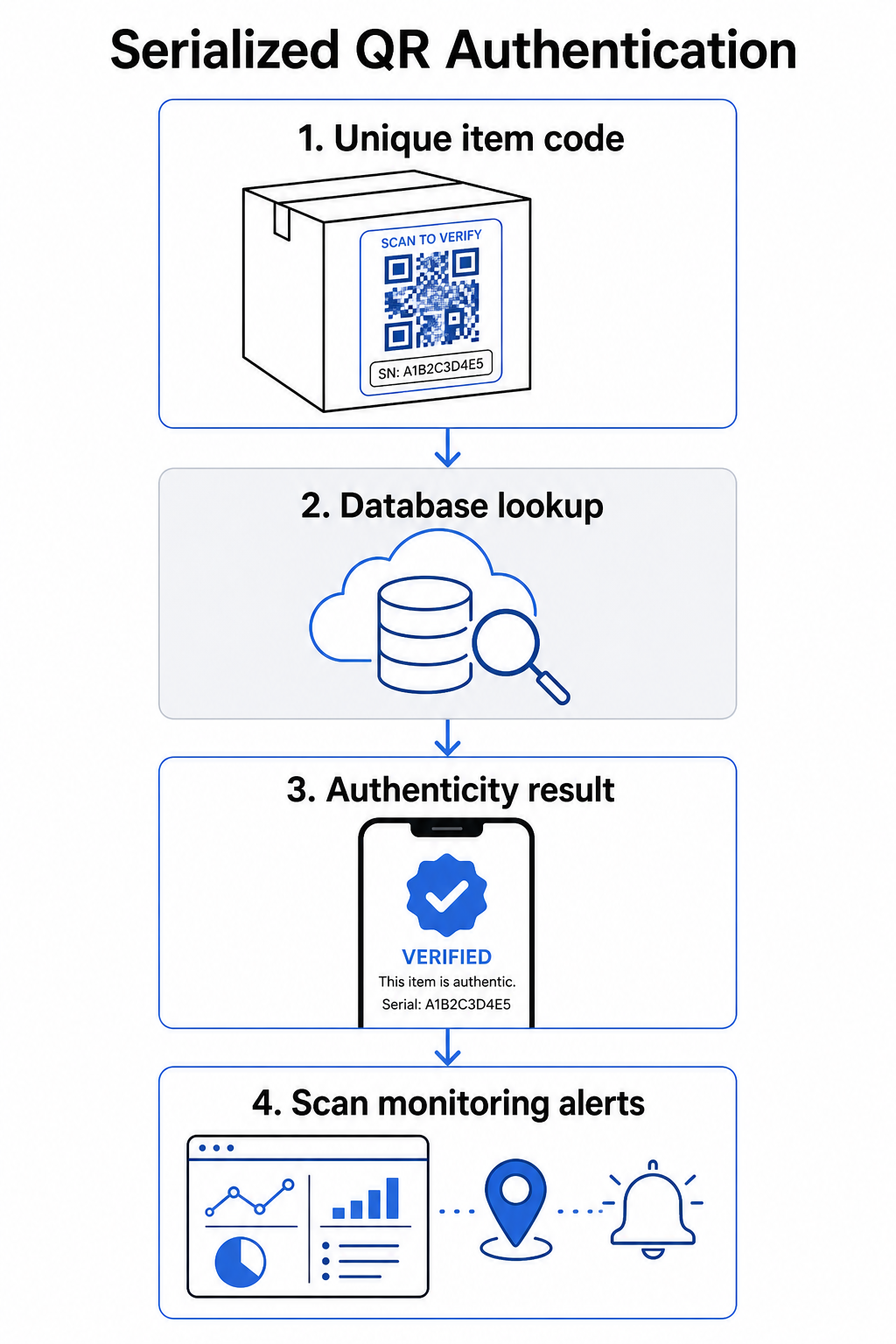
Un flujo de trabajo de autenticación completo generalmente incluye estos pasos:
- Crear un identificador único para cada artículo – esto puede ser un número de serie, referencia de lote, marca de tiempo de producción, o una combinación codificada como una URI de GS1 Digital Link, que incluye identificadores de aplicación GS1 para GTIN, número de lote y número de serie
- Vincular ese identificador a un registro de producto digital – almacenado en una base de datos segura que su sistema controla
- Generar y asignar un código QR único que apunta a un punto final de verificación que lleva un identificador opaco o token, en lugar de los datos brutos en sí
- Aplicar el código QR al producto físico – para artículos de mayor valor, colocarlo debajo de un panel raspable o sobre un sello a prueba de manipulaciones desalienta la transferencia y reutilización de etiquetas
- Registrar cada escaneo como un evento – capturando la marca de tiempo, la ubicación y la información del dispositivo para respaldar el monitoreo continuo
- Servir una página de verificación que muestra los detalles del producto y un resultado claro de autenticidad para que los clientes sepan inmediatamente lo que están viendo
La página de verificación en sí misma importa. Una página bien diseñada muestra el nombre del producto, los detalles del lote o la garantía, y una confirmación de autenticidad sencilla. Algunos sistemas también muestran cuántas veces se ha escaneado un código específico; un código que acumula muchos más escaneos de lo esperado se convierte en un disparador de sospecha para falsificaciones que utilizan códigos duplicados.
Gestionar y rastrear cada código de producto De Pageloot Generador de códigos QR dinámicos le permite crear códigos QR rastreables y editables y acceder a un panel de análisis completo que muestra cuándo y dónde ocurre cada escaneo, lo que le brinda la capa de monitoreo que su sistema de autenticación necesita.
El papel de los códigos QR dinámicos en la autenticación
Códigos QR dinámicos son una base práctica para la autenticación de productos porque separan el código impreso del destino al que apunta. El código físico en un producto nunca cambia, pero el destino y la lógica detrás de él pueden actualizarse en cualquier momento sin reimprimir.
Esto es importante para la autenticación de varias maneras específicas:
- Puede actualizar las páginas de verificación si su infraestructura de backend cambia, sin retirar o reimprimir productos etiquetados
- Puede deshabilitar un código si se retira un lote o si se detecta actividad fraudulenta alrededor de un identificador particular
- Puede redirigir los escaneos a diferentes experiencias basadas en el número de escaneos, la geografía o el tiempo – por ejemplo, dirigiendo el primer escaneo a una página de verificación completa y los escaneos posteriores a un aviso de advertencia
La plataforma de Pageloot permite editar los destinos de los códigos QR después de la impresión y proporciona análisis de escaneo que incluyen ubicación, tipo de dispositivo y tiempo de escaneo – todo lo cual se integra directamente en un flujo de trabajo de monitoreo.
Para marcas que gestionan grandes volúmenes de productos, Pageloot admite la generación masiva de códigos QR mediante cargas CSV, escalando hasta 100.000 códigos, lo que hace que la generación de códigos serializados sea práctica incluso a escala de fabricación. Los proveedores y revendedores pueden explorar herramientas dedicadas a través de las soluciones para proveedores y revendedores de Pageloot.
Combinación de códigos QR con elementos de seguridad física
Investigadores de seguridad y especialistas en protección de marcas señalan constantemente que un código QR por sí solo no puede prevenir la falsificación. La protección efectiva combina la capa QR con elementos físicos o estructurales que son más difíciles de replicar.
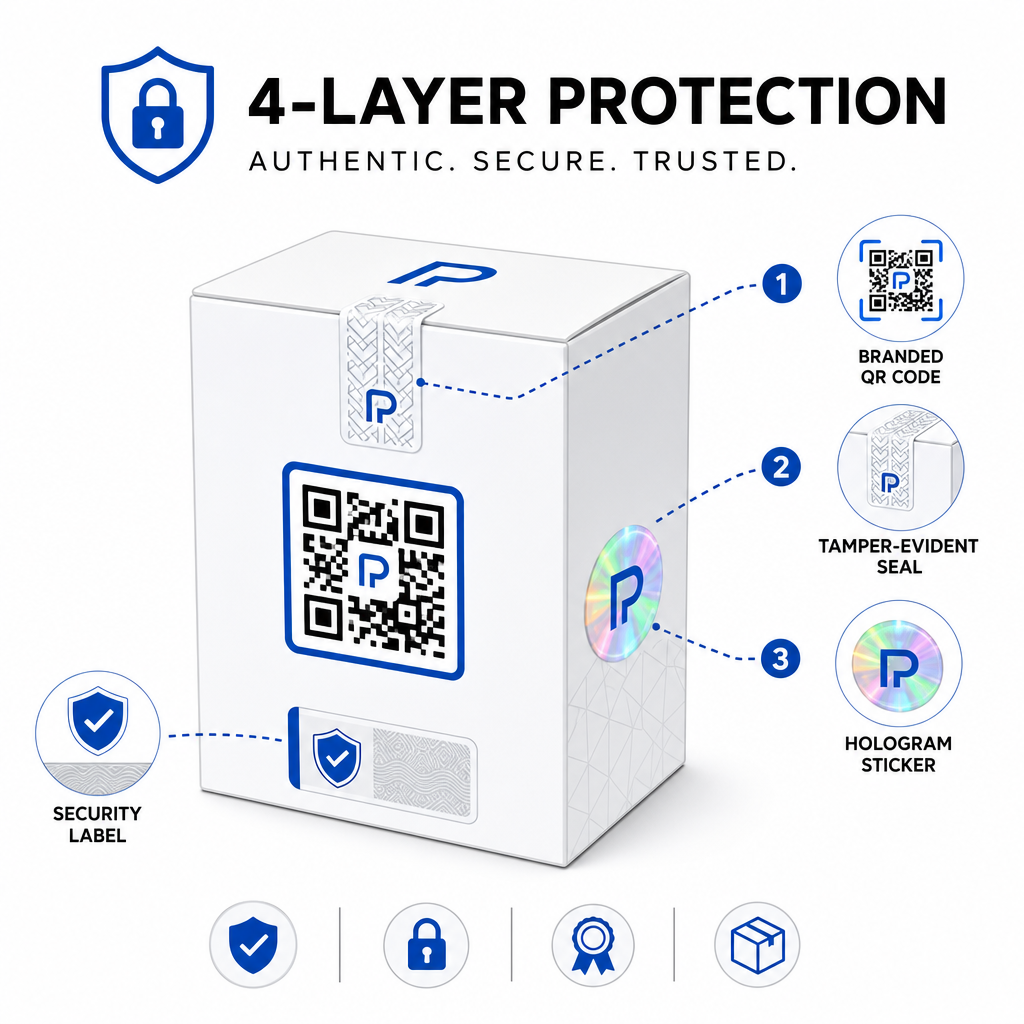
Los enfoques comunes incluyen:
- Sellos a prueba de manipulaciones: colocar el código QR sobre un sello que muestra daños visibles si se retira
- Paneles rasca y gana: ocultar el código QR bajo un recubrimiento que un comprador retira en el primer uso, haciendo que el código sea más difícil de fotografiar para los falsificadores antes de la compra
- Sobrelaminados holográficos o tintas de seguridad: añadir una capa física que se degrada visiblemente al ser copiada
- Patrones seguros a prueba de copia: algunos sistemas incrustan texturas microscópicas anticopia dentro del propio diseño del código QR, haciendo que el patrón se degrade o desaparezca al ser fotografiado y reimpreso
La estrategia de combinación es importante porque aleja la autenticación de un único punto de fallo. Un falsificador que puede duplicar el código QR no puede replicar fácilmente también el sello a prueba de manipulaciones, el holograma o el sustrato sensible a la copia al mismo tiempo.
Para una visión más amplia de cómo los códigos QR interactúan con el embalaje físico del producto, la guía sobre códigos QR en el embalaje del producto cubre la colocación y el diseño en detalle.
Verificación del lado del servidor y monitoreo de escaneos
La capa de seguridad más importante en un sistema de autenticación QR es una que los clientes nunca ven: la validación del lado del servidor.
Cuando un cliente escanea un código QR autenticado, el sistema debería:
- Validar el identificador contra su base de datos de productos antes de mostrar cualquier resultado
- Registrar el evento de escaneo con marca de tiempo, coordenadas GPS o ubicación basada en IP, y huella digital del dispositivo
- Buscar anomalías como el mismo código siendo escaneado desde dos ubicaciones geográficamente distantes en cuestión de minutos, o un único código serializado acumulando escaneos más allá de cualquier uso legítimo plausible
- Usar tokens opacos en lugar de identificadores brutos en el contenido QR, para que incluso si alguien lee los datos QR directamente no puedan construir una falsificación válida sin acceso a la lógica de su servidor
Este enfoque – donde el código QR lleva solo una referencia opaca y toda la verificación significativa ocurre en el lado del servidor – es el estándar recomendado por los profesionales de la seguridad para casos de uso de autenticación.
Para una inmersión técnica profunda en cómo el cifrado puede proteger aún más los sistemas de autenticación basados en QR, la publicación sobre códigos QR cifrados para plataformas de autenticación cubre los métodos de cifrado y las consideraciones de cumplimiento en detalle.
Diseño y colocación para códigos QR de autenticación
Un código QR de autenticación que los clientes no pueden escanear frustra su propio propósito. Las mejores prácticas estándar para la calidad de impresión y la colocación se aplican igualmente aquí:
- Tamaño mínimo: siga la regla general de 1 cm por cada 10 cm de distancia de escaneo para asegurar un escaneo fiable en todos los dispositivos
- Alto contraste: use módulos oscuros sobre un fondo claro, y evite acabados brillantes o reflectantes que causen deslumbramiento
- Zona tranquila: deje un borde claro de al menos cuatro módulos alrededor del código, libre de texto o elementos de diseño
- Resolución de impresión: use formatos vectoriales o PNG a 300 DPI mínimo para aplicaciones de impresión
- Colocación plana: evite superficies curvas, costuras o pliegues que distorsionan la geometría del código
- Llamada a la acción clara: incluya una instrucción corta cerca del código, como “Escanear para verificar la autenticidad”, para que los clientes entiendan para qué sirve el código
Para obtener una guía más detallada sobre la colocación específica en el empaque, el guía definitiva de códigos QR para etiquetas de productos cubre el tamaño, el contraste y el posicionamiento en profundidad.
Los códigos QR de marca con su logotipo incrustado también señalan legitimidad a los clientes a primera vista. El Generador de código QR con logo le permite incorporar la identidad de marca directamente en el diseño del código sin comprometer la escaneabilidad.
Para quién está diseñado este enfoque
La autenticación de productos basada en QR es relevante en una amplia gama de categorías de productos e industrias:
| Tipo de producto | Necesidad de autenticación |
|---|---|
| Electrónica de consumo y accesorios | Alta tasa de falsificación; validación de garantía |
| Productos farmacéuticos y de salud | Seguridad del consumidor; cumplimiento normativo |
| Artículos de lujo y vestimenta | Protección de marca; prevención del mercado gris |
| Componentes y piezas industriales | Certificación de seguridad; integridad de la cadena de suministro |
| Alimentos y bebidas | Trazabilidad de lotes; verificación de importación |
Las marcas que venden a través de minoristas de terceros o plataformas de comercio electrónico son particularmente vulnerables porque tienen menos control directo sobre lo que llega al cliente final. La autenticación serializada les brinda un canal directo para verificar cualquier unidad, independientemente de dónde se haya comprado.
De Pageloot soluciones de la industria de productos están diseñadas para marcas que utilizan códigos QR en empaques y etiquetas para conectar productos físicos con experiencias digitales, incluidos los flujos de trabajo de verificación.
Crear códigos serializados a escala ¿Necesita generar códigos QR únicos para cada unidad en su ciclo de producción? El Generador de códigos QR de Pageloot admite la creación masiva con un panel centralizado para rastrear, actualizar y administrar códigos en todo su catálogo.
Pruebas antes de la implementación
Antes de aplicar códigos QR de autenticación a un ciclo de producción, las pruebas exhaustivas evitan fallas que socavan la confianza del cliente en el momento más importante. Los pasos clave incluyen:
- Escanee el código impreso con múltiples dispositivos y aplicaciones de cámara nativas en diferentes condiciones de iluminación
- Verifique que el identificador en el escaneo se asigne correctamente al registro de producto correcto en su base de datos
- Confirme que la página de verificación se carga correctamente en el móvil y muestra claramente el resultado de autenticidad
- Pruebe la lógica de detección de anomalías escaneando el mismo código repetidamente y confirmando que su sistema de monitoreo lo marca apropiadamente
- Verifique que la interacción con el elemento de seguridad físico, como quitar un panel de raspado o romper un sello, produzca el resultado esperado en su sistema
Para un enfoque estructurado de este proceso, la guía sobre mejores prácticas de prueba de autenticación de códigos QR cubre el flujo de trabajo completo de pruebas en detalle.
***
Construyendo un sistema de autenticación que escala
La autenticación de productos basada en QR no es una configuración única. Requiere una gestión continua: monitorear los datos de escaneo, investigar anomalías, actualizar los destinos de verificación cuando se retiran productos y expandir el sistema a medida que crece su línea de productos.
Una plataforma centralizada de gestión de QR hace que esto sea operacionalmente realista. El panel de control de Pageloot permite a los equipos organizar códigos por campaña o categoría de producto usando carpetas, ver el rendimiento de escaneo agregado en grandes conjuntos de códigos y actualizar destinos sin reimprimir, capacidades que importan cuando se gestionan códigos serializados en decenas de miles de unidades.
El código QR en su producto es lo que ve un cliente. El sistema detrás de él es lo que realmente los protege, y a su marca. Construya ambos con el mismo cuidado, y la autenticación QR serializada se convierte en una de las herramientas más prácticas y escalables disponibles para la prevención de falsificaciones. Explore cómo las empresas de diferentes verticales abordan la implementación de códigos QR en el centro de soluciones industriales de Pageloot.
Empiece a proteger sus productos Cree códigos QR rastreables y editables y monitoree cada escaneo desde un único panel de control. Pruebe el Generador de códigos QR dinámicos gratis durante 14 días, no se requiere tarjeta de crédito.
Preguntas frecuentes
No. Un código QR simple puede ser fotografiado y reimpreso en productos falsificados, y el código clonado se escaneará idénticamente al original. La autenticación efectiva requiere códigos únicos serializados combinados con verificación del lado del servidor que valida cada escaneo contra un registro de producto confiable, además de monitoreo de anomalías como recuentos de escaneo inesperados o desajustes geográficos.
Un código QR serializado es único para un solo artículo físico, no solo un tipo de producto o SKU. Cuando se escanea, lo identifica a esa unidad específica y lo verifica contra un registro de base de datos. Un código QR de producto regular típicamente enlaza todas las unidades del mismo producto a la misma URL, lo que significa que un falsificador que clona el código puede aplicarlo a un producto falso y hacer que se comporte exactamente como el original.
Pageloot admite la generación masiva de códigos QR mediante carga CSV, escalando hasta 100.000 códigos, haciendo que la autenticación serializada sea práctica incluso a altos volúmenes de producción. Los códigos pueden organizarse por línea de producto o lote usando carpetas, y todos los datos de escaneo se rastrean centralmente en el panel de control.