Чи досягають підроблені версії вашого продукту споживачів? Окрім втраченого доходу, підроблені товари шкодять довірі до бренду та можуть наражати покупців на ризик. Ця сторінка пояснює, як QR-коди, реалізовані з серіалізованими унікальними ідентифікаторами та правильною інфраструктурою, створюють практичну та масштабовану систему автентифікації продукції.
Чому підробка є проблемою, яку варто вирішувати систематично
Масштаби торгівлі контрафактною продукцією значні. ОЕСР та EUIPO оцінюють, що у 2021 році контрафактні товари становили приблизно $467 мільярдів у світовій торгівлі, що становить 2.3% від загального обсягу світового імпорту. Звіт Управління з патентів і торгових марок США виявив, що підробка та піратство коштують американським компаніям понад $200 мільярдів на рік і призводять до втрати понад 750 000 робочих місць.
Для власників брендів прямі фінансові втрати посилюються збитками, які важче кількісно оцінити: клієнт, який купує підроблену версію вашого продукту та має поганий досвід, звинувачує ваш бренд, а не фальсифікатора.
Система автентифікації на основі QR-кодів вирішує цю проблему на рівні одиниці товару. Замість простої перевірки справжності типу продукту, вона перевіряє справжність конкретної, індивідуальної одиниці – і надає вам дані для виявлення, коли щось йде не так.
Чому одного стандартного QR-коду недостатньо
Перш ніж досліджувати, як працює QR-автентифікація, важливо зрозуміти ключове обмеження, яке багато брендів ігнорують.
Загальний QR-код легко дублюється. Фальсифікатор може сфотографувати ваш код у високій роздільній здатності, передрукувати його на тисячах підроблених продуктів, і ці клоновані коди скануватимуться та поводитимуться ідентично оригіналу. Якщо ваш QR-код просто вказує на сторінку продукту або статичну URL-адресу для перевірки, він не забезпечує реального захисту.
Традиційні статичні QR-коди, що використовуються для відстеження або інформації про продукт, не забезпечують внутрішньої автентифікації. Якщо сам продукт підроблений, пов'язана сторінка все одно виглядає справжньою і не може самостійно підтвердити автентичність.
Ефективна QR-автентифікація вимагає трьох речей, що працюють разом:
- Серіалізація: кожен окремий товар отримує унікальний код, а не лише кожен SKU або партія
- Перевірка на стороні сервера: кожне сканування перевіряється за надійним записом, а не просто за URL-адресою призначення
- Логіка моніторингу: аномалії, такі як повторні сканування з різних місць або кількість сканувань, що перевищує очікувані обсяги, викликають сповіщення
QR-код – це інтерфейс, орієнтований на клієнта. Безпека знаходиться в інфраструктурі за ним.
Як працює серіалізована QR-автентифікація
Серіалізовані QR-коди присвоюють унікальний код кожній окремій одиниці продукту. Коли клієнт сканує цей код, система не просто завантажує сторінку – вона виконує пошук за записом продукту, щоб підтвердити, що цей конкретний товар, з цим конкретним ідентифікатором, відомий і дійсний.
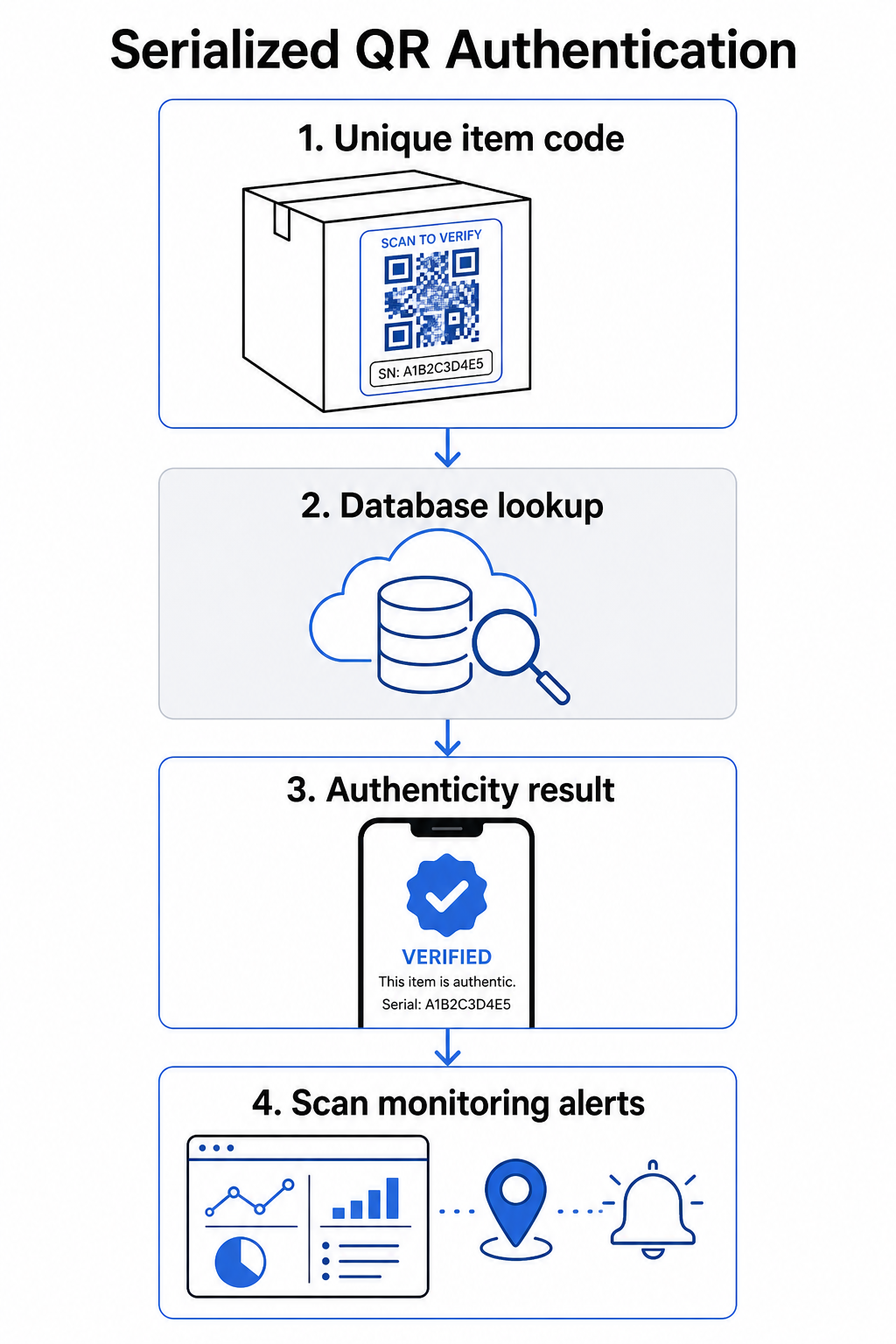
Повний робочий процес автентифікації зазвичай включає такі кроки:
- Створіть унікальний ідентифікатор для кожного товару – це може бути серійний номер, посилання на партію, позначка часу виробництва або комбінація, закодована як URI GS1 Digital Link, що включає ідентифікатори застосунків GS1 для GTIN, номеру партії/лоту та серійного номеру
- Пов'яжіть цей ідентифікатор з цифровим записом продукту – що зберігається в захищеній базі даних, яку контролює ваша система
- Згенеруйте та призначте унікальний QR-код який вказує на кінцеву точку перевірки, що містить непрозорий ідентифікатор або токен, а не самі необроблені дані
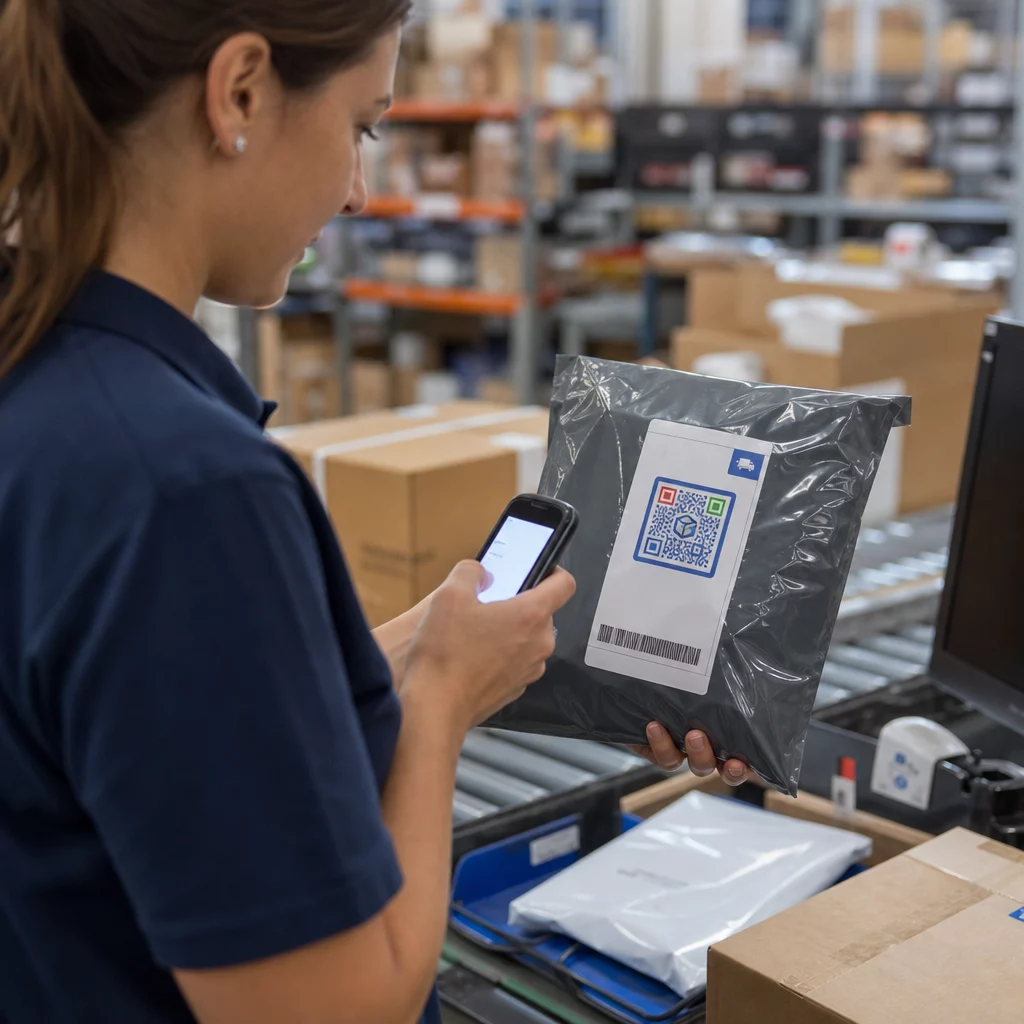
- Нанесіть QR-код на фізичний продукт – для товарів вищої вартості, розміщення його під скретч-панеллю або через пломбу, що свідчить про втручання, перешкоджає перенесенню та повторному використанню етикетки
- Записуйте кожне сканування як подію – фіксуючи позначку часу, місцезнаходження та інформацію про пристрій для підтримки постійного моніторингу
- Надайте сторінку перевірки яка відображає деталі продукту та чіткий результат автентичності, щоб клієнти одразу знали, на що вони дивляться
Сама сторінка перевірки має значення. Добре розроблена сторінка показує назву продукту, деталі партії або гарантії та просте підтвердження автентичності. Деякі системи також відображають, скільки разів було відскановано певний код – код, що накопичує значно більше сканувань, ніж очікувалося, стає тригером підозри на підробки, що використовують дубльовані коди.
Керуйте та відстежуйте кожен код продукту Pageloot’s Динамічний QR код: генератор дозволяє створювати відстежувані, редаговані QR-коди та отримувати доступ до повної аналітичної панелі, що показує, коли і де відбувається кожне сканування – надаючи вам шар моніторингу, необхідний вашій системі автентифікації.
Роль динамічних QR-кодів в автентифікації
Динамічні QR-коди є практичною основою для автентифікації продукції, тому що вони відокремлюють надрукований код від місця призначення, на яке він вказує. Фізичний код на продукті ніколи не змінюється, але місце призначення та логіка, що стоїть за ним, можуть бути оновлені в будь-який час без повторного друку.
Це важливо для автентифікації кількома конкретними способами:
- Ви можете оновлювати сторінки верифікації якщо ваша бекенд-інфраструктура змінюється, без відкликання або повторного друку маркованих продуктів
- Ви можете деактивувати код якщо партія відкликана або якщо виявлено шахрайську діяльність навколо певного ідентифікатора
- Ви можете перенаправляти сканування на різні результати залежно від кількості сканувань, географії або часу – наприклад, направляючи перше сканування на повну сторінку верифікації, а наступні сканування – на попередження
Платформа Pageloot підтримує редагування місць призначення QR-кодів після друку та надає аналітику сканувань, включаючи місцезнаходження, тип пристрою та час сканування – все це безпосередньо надходить у робочий процес моніторингу.
Для брендів, що керують великими обсягами продукції, Pageloot підтримує масове генерування QR-кодів через завантаження CSV, масштабуючись до 100 000 кодів, що робить генерування серійних кодів практичним навіть у масштабах виробництва. Постачальники та реселери можуть ознайомитися зі спеціалізованими інструментами через Рішення Pageloot для постачальників та реселерів.
Поєднання QR-кодів з фізичними елементами безпеки
Дослідники безпеки та фахівці із захисту брендів постійно зазначають, що сам по собі QR-код не може запобігти підробці. Ефективний захист поєднує QR-шар з фізичними або структурними елементами, які важче відтворити.
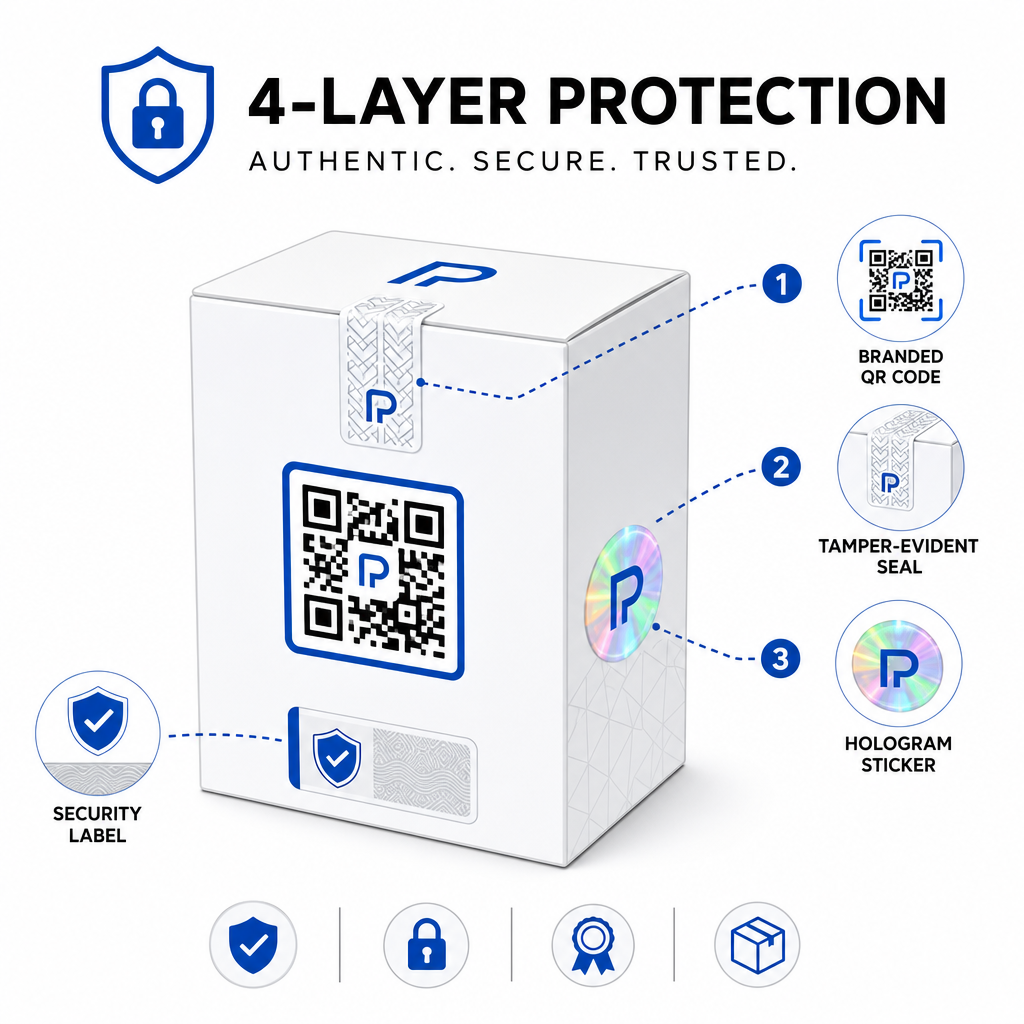
Поширені підходи включають:
- Контрольні пломби: розміщення QR-коду на пломбі, яка показує видимі пошкодження при видаленні
- Скретч-панелі: приховування QR-коду під покриттям, яке покупець видаляє при першому використанні, що ускладнює фотографування коду для фальсифікаторів до покупки
- Голографічні накладки або захисні чорнила: додавання фізичного шару, який помітно погіршується при копіюванні
- Захищені від копіювання візерунки: деякі системи вбудовують мікроскопічні антикопіювальні текстури в сам дизайн QR-коду, що призводить до погіршення або зникнення візерунка при фотографуванні та передруку
Стратегія комбінації має значення, оскільки вона переносить автентифікацію від єдиної точки відмови. Фальсифікатор, який може дублювати QR-код, не може легко одночасно відтворити захисну пломбу, голограму або чутливий до копіювання субстрат.
Для ширшого огляду того, як QR-коди взаємодіють з фізичною упаковкою продукту, посібник щодо QR-коди на упаковці продукту детально розглядає розміщення та дизайн.
Перевірка на стороні сервера та моніторинг сканувань
Найважливіший рівень безпеки в системі автентифікації QR-кодів – це той, який клієнти ніколи не бачать: перевірка на стороні сервера.
Коли клієнт сканує автентифікований QR-код, система повинна:
- Перевірити ідентифікатор у вашій базі даних продуктів, перш ніж видавати будь-який результат
- Записати подію сканування з міткою часу, GPS-координатами або місцезнаходженням на основі IP, а також відбитком пристрою
- Перевірити на наявність аномалій таких як сканування одного й того ж коду з двох географічно віддалених місць протягом декількох хвилин, або накопичення сканувань одним серійним кодом понад будь-яке правдоподібне законне використання
- Використовувати непрозорі токени замість необроблених ідентифікаторів у вмісті QR-коду, щоб навіть якщо хтось прочитає дані QR-коду безпосередньо, він не зміг створити дійсну підробку без доступу до вашої серверної логіки
Цей підхід – коли QR-код містить лише непрозоре посилання, а вся значуща перевірка відбувається на стороні сервера – є стандартом, рекомендованим фахівцями з безпеки для випадків використання автентифікації.
Для глибокого технічного занурення в те, як шифрування може додатково захистити системи автентифікації на основі QR-кодів, допис щодо зашифрованих QR-кодів для платформ автентифікації детально розглядає методи шифрування та питання відповідності.
Дизайн та розміщення QR-кодів для автентифікації
QR-код для автентифікації, який клієнти не можуть відсканувати, втрачає своє призначення. Стандартні найкращі практики щодо якості друку та розміщення однаково застосовуються і тут:
- Мінімальний розмір: дотримуйтесь емпіричного правила 1 см на кожні 10 см відстані сканування, щоб забезпечити надійне сканування на різних пристроях
- Високий контраст: використовуйте темні модулі на світлому фоні та уникайте блискучих або відбиваючих поверхонь, які викликають відблиски
- Тиха зона: залиште чітку межу щонайменше чотири модулі навколо коду, вільну від тексту або елементів дизайну
- Роздільна здатність друку: використовуйте векторні формати або PNG з мінімальною роздільною здатністю 300 DPI для друкованих застосувань
- Плоске розміщення: уникайте вигнутих поверхонь, швів або згинів, які спотворюють геометрію коду
- Чіткий заклик до дії: додайте коротку інструкцію біля коду, наприклад, “Скануйте, щоб перевірити справжність”, щоб клієнти розуміли, для чого призначений код
Для більш детальних вказівок щодо розміщення на упаковці, повного посібника з QR-кодів для етикеток продуктів охоплює розмір, контраст і позиціонування в деталях.
Брендовані QR-коди з вбудованим логотипом також сигналізують клієнтам про легітимність з першого погляду. Генератор QR-кодів з логотипом дозволяє інтегрувати ідентичність бренду безпосередньо в дизайн коду, не компрометуючи його сканованість.
Для кого розроблено цей підхід
Автентифікація продукції на основі QR-кодів актуальна для широкого спектру категорій товарів та галузей:
| Тип продукту | Потреба в автентифікації |
|---|---|
| Споживча електроніка та аксесуари | Високий рівень підробок; перевірка гарантії |
| Фармацевтичні та медичні товари | Безпека споживачів; відповідність нормативним вимогам |
| Предмети розкоші та одяг | Захист бренду; запобігання сірому ринку |
| Промислові компоненти та запчастини | Сертифікація безпеки; цілісність ланцюга поставок |
| Продукти харчування та напої | Відстеження партій; перевірка імпорту |
Бренди, що продають через сторонніх роздрібних продавців або платформи електронної комерції, особливо вразливі, оскільки вони мають менший прямий контроль над тим, що досягає кінцевого споживача. Серійна автентифікація надає їм прямий канал для перевірки будь-якої одиниці, незалежно від місця її придбання.
Pageloot’s галузеві рішення для продуктів розроблені для брендів, які використовують QR-коди на упаковці та етикетках для зв'язку фізичних продуктів з цифровим досвідом, включаючи робочі процеси перевірки.
Створення серійних кодів у масштабі Потрібно генерувати унікальні QR-коди для кожної одиниці у вашому виробничому циклі? Pageloot Генератор QR-кодів підтримує масове створення з централізованою панеллю керування для відстеження, оновлення та управління кодами по всьому вашому каталогу.
Тестування перед розгортанням
Перед застосуванням QR-кодів автентифікації до виробничого циклу ретельне тестування запобігає збоям, які підривають довіру клієнтів у найважливіший момент. Основні кроки включають:
- Скануйте надрукований код кількома пристроями та нативними програмами камери за різних умов освітлення
- Переконайтеся, що ідентифікатор у скані правильно відображається на відповідний запис продукту у вашій базі даних
- Підтвердьте, що сторінка перевірки правильно завантажується на мобільному пристрої та чітко відображає результат автентичності
- Протестуйте логіку виявлення аномалій, скануючи той самий код кілька разів і підтверджуючи, що ваша система моніторингу позначає його належним чином
- Перевірте, що взаємодія з фізичним елементом безпеки – таким як видалення скретч-панелі або порушення пломби – дає очікуваний результат у вашій системі
Для структурованого підходу до цього процесу, посібник з тестування найкращих практик автентифікації QR-кодів охоплює повний робочий процес тестування в деталях.
***
Створення масштабованої системи автентифікації
Автентифікація продукції на основі QR-кодів не є одноразовим налаштуванням. Вона вимагає постійного управління: моніторингу даних сканування, розслідування аномалій, оновлення місць призначення перевірки при відкликанні продуктів та розширення системи в міру зростання вашої продуктової лінійки.
Централізована платформа управління QR-кодами робить це операційно реалістичним. Панель керування Pageloot дозволяє командам організовувати коди за кампаніями або категоріями продуктів за допомогою папок, переглядати агреговану ефективність сканування для великих наборів кодів та оновлювати місця призначення без повторного друку – можливості, які мають значення, коли ви керуєте серійними кодами для десятків тисяч одиниць.
QR-код на вашому продукті – це те, що бачить клієнт. Система, що стоїть за ним, – це те, що насправді захищає їх – і ваш бренд. Будуйте обидва з однаковою ретельністю, і серійна QR-автентифікація стане одним з найпрактичніших і масштабованих інструментів, доступних для запобігання підробкам. Дізнайтеся, як компанії в різних галузях підходять до впровадження QR-кодів на центрі галузевих рішень Pageloot.
Почніть захищати свої продукти Створюйте відстежувані, редаговані QR-коди та відстежуйте кожне сканування з єдиної панелі керування. Спробуйте Динамічний QR код: генератор безкоштовно протягом 14 днів – кредитна картка не потрібна.
Поширені запитання
Ні. Простий QR-код можна сфотографувати та передрукувати на підроблених продуктах, і клонований код скануватиметься ідентично оригіналу. Ефективна автентифікація вимагає серіалізованих унікальних кодів у поєднанні з перевіркою на стороні сервера, яка перевіряє кожне сканування за надійним записом продукту, а також моніторинг аномалій, таких як неочікувана кількість сканувань або географічні невідповідності.
Серійний QR-код є унікальним для одного фізичного предмета, а не просто для типу продукту чи SKU. При скануванні він ідентифікує цю конкретну одиницю і перевіряє її за записом у базі даних. Звичайний QR-код продукту зазвичай пов'язує всі одиниці того самого продукту з тією самою URL-адресою, що означає, що фальсифікатор, який клонує код, може застосувати його до підробленого продукту, і він поводитиметься точно як оригінал.
Pageloot підтримує масове генерування QR-кодів за допомогою завантаження CSV, масштабуючи до 100 000 кодів, роблячи серійну автентифікацію практичною навіть при великих обсягах виробництва. Коди можуть бути організовані за продуктовою лінійкою або партією, використовуючи папки, і всі дані сканування відстежуються централізовано на інформаційній панелі.