ホーム > 産業 > QR Codes for Product Authentication: How to Verify Items and Fight Counterfeits
Scanning authentic product

QR Codes for Product Authentication: How to Verify Items and Fight Counterfeits

Protect your brand from counterfeits using serialized QR codes. Learn how unique identifiers and server-side verification provide secure product authentication.
Updated on 7月 2, 2026
目次

Are counterfeit versions of your product reaching customers? Beyond lost revenue, fake goods damage brand trust and can put buyers at risk. This page explains how QR codes, implemented with serialized unique identities and the right infrastructure, create a practical and scalable product authentication system.

Why Counterfeiting Is a Problem Worth Solving Systematically

The scale of counterfeit trade is significant. The OECD and EUIPO estimate that counterfeit goods accounted for approximately $467 billion in global trade in 2021, representing 2.3% of total global imports. A U.S. Patent and Trademark Office report found that counterfeiting and piracy cost U.S. businesses more than $200 billion per year and contribute to the loss of more than 750,000 jobs.

For brand owners, the direct financial losses are compounded by damage that is harder to quantify: a customer who buys a counterfeit version of your product and has a bad experience blames your brand, not the counterfeiter.

A QR-based authentication system addresses this at the item level. Instead of simply verifying that a product type is genuine, it verifies that a specific, individual unit is genuine – and gives you the data to detect when something goes wrong.

Why a Standard QR Code Alone Is Not Enough

Before exploring how QR authentication works, it is important to understand a core limitation that many brands overlook.

A generic QR code is easily duplicated. A counterfeiter can photograph your code at high resolution, reprint it on thousands of fake products, and those cloned codes will scan and behave identically to the original. If your QR code simply points to a product page or a static verification URL, it provides no real protection.

Traditional static QR codes used for traceability or product information provide no intrinsic authentication. If the product itself is fake, the linked page still appears genuine and cannot confirm authenticity on its own.

Effective QR authentication requires three things working together:

  • Serialization: every individual item gets a unique code, not just every SKU or batch
  • Server-side verification: each scan is checked against a trusted record, not just a destination URL
  • Monitoring logic: anomalies such as repeated scans from different locations, or scan counts that exceed expected quantities, trigger alerts

The QR code is the customer-facing interface. The security lives in the infrastructure behind it.

How Serialized QR Authentication Works

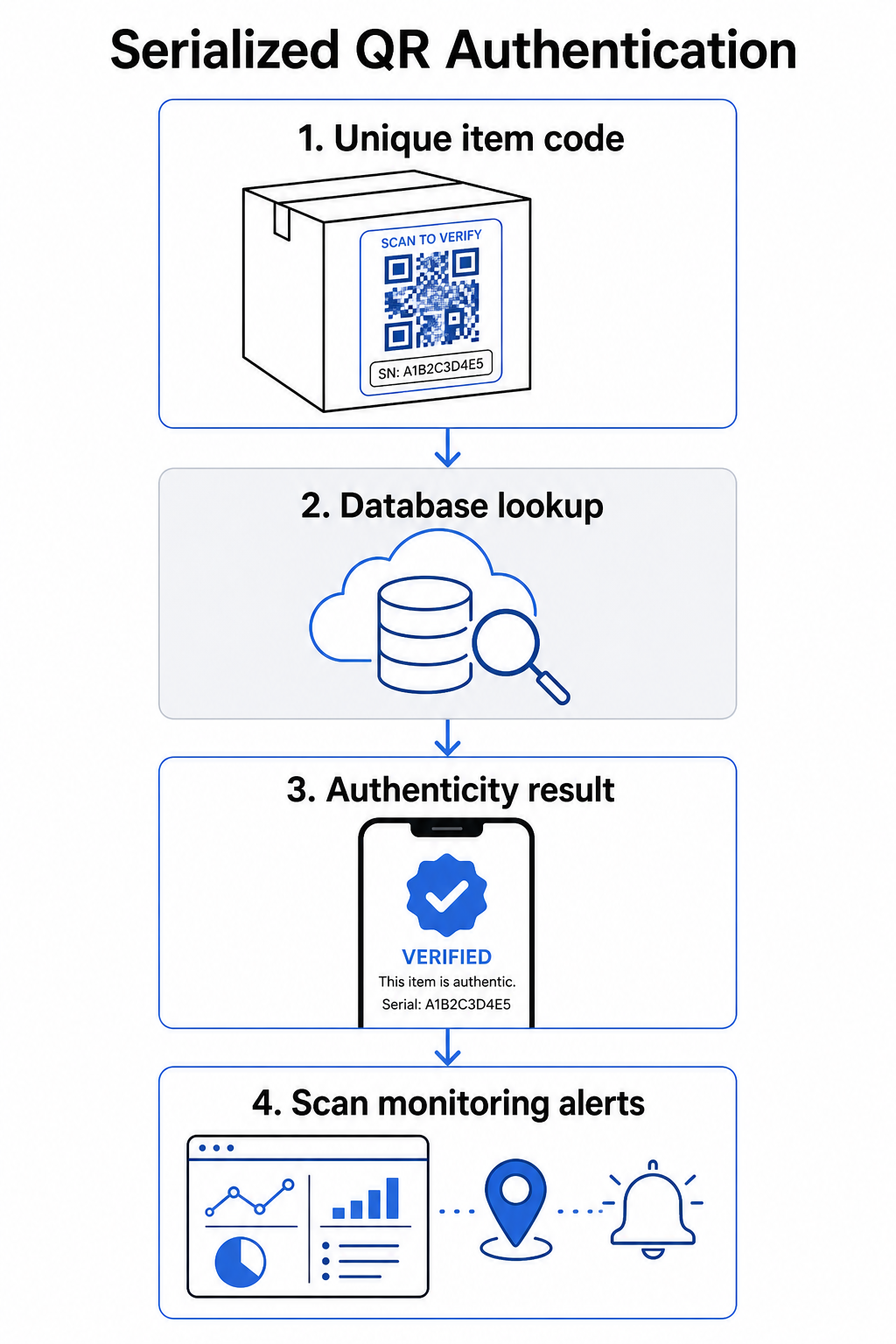
Serialized QR codes assign a unique code to each individual product unit. When a customer scans that code, the system does not just load a page – it performs a lookup against a product record to confirm that this specific item, with this specific identifier, is known and valid.

QR authentication workflow

A complete authentication workflow typically includes these steps:

  • Create a unique identifier for each item – this can be a serial number, batch reference, production timestamp, or a combination encoded as a GS1 Digital Link URI, which includes GS1 Application Identifiers for GTIN, batch/lot number, and serial number
  • Link that identifier to a digital product record – stored in a secure database that your system controls
  • Generate and assign a unique QR code that points to a verification endpoint carrying an opaque identifier or token, rather than the raw data itself
  • Apply the QR code to the physical product – for higher-value items, placing it under a scratch-off panel or across a tamper-evident seal discourages label transfer and reuse
  • Log every scan as an event – capturing timestamp, location, and device information to support ongoing monitoring
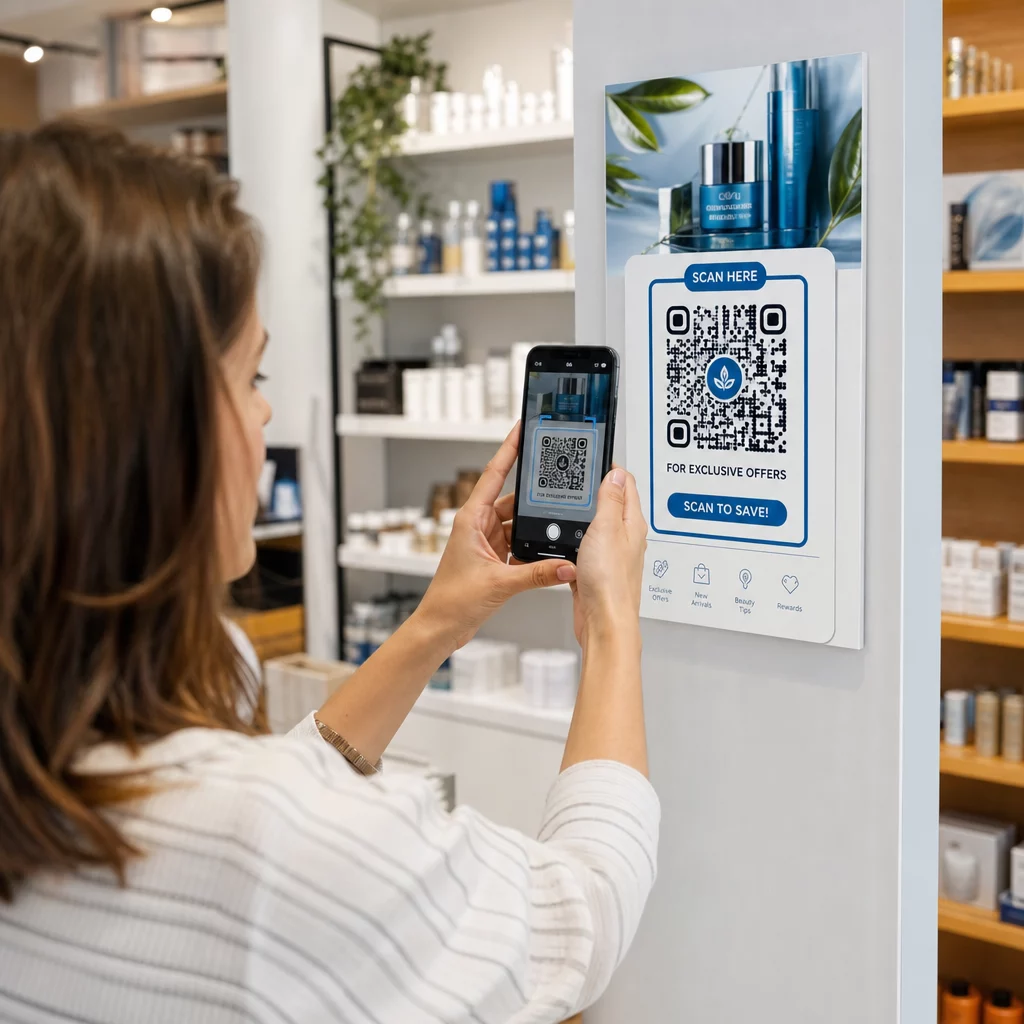
  • Serve a verification page that displays product details and a clear authenticity result so customers know immediately what they are looking at

The verification page itself matters. A well-designed page shows the product name, batch or warranty details, and a straightforward authenticity confirmation. Some systems also display how many times a specific code has been scanned – a code accumulating far more scans than expected becomes a suspicion trigger for counterfeits using duplicated codes.

Manage and Track Every Product Code Pagelootの ダイナミックQRコードジェネレーター lets you create trackable, editable QR codes and access a full analytics dashboard showing when and where each scan occurs – giving you the monitoring layer your authentication system needs.

The Role of Dynamic QR Codes in Authentication

ダイナミックQRコード are a practical foundation for product authentication because they separate the printed code from the destination it points to. The physical code on a product never changes, but the destination and the logic behind it can be updated at any time without reprinting.

This matters for authentication in several specific ways:

  • You can update verification pages if your backend infrastructure changes, without recalling or reprinting labeled products
  • You can disable a code if a batch is recalled or if fraudulent activity is detected around a particular identifier
  • You can redirect scans to different experiences based on scan count, geography, or time – for example, routing the first scan to a full verification page and subsequent scans to a warning notice

Pageloot’s platform supports editing QR code destinations after printing and provides scan analytics including location, device type, and scan timing – all of which feed directly into a monitoring workflow.

For brands managing large product volumes, Pageloot supports bulk QR code generation via CSV uploads, scaling up to 100,000 codes, which makes serialized code generation practical even at manufacturing scale. Suppliers and resellers can explore dedicated tools through Pageloot’s supplier and reseller solutions.

Combining QR Codes with Physical Security Elements

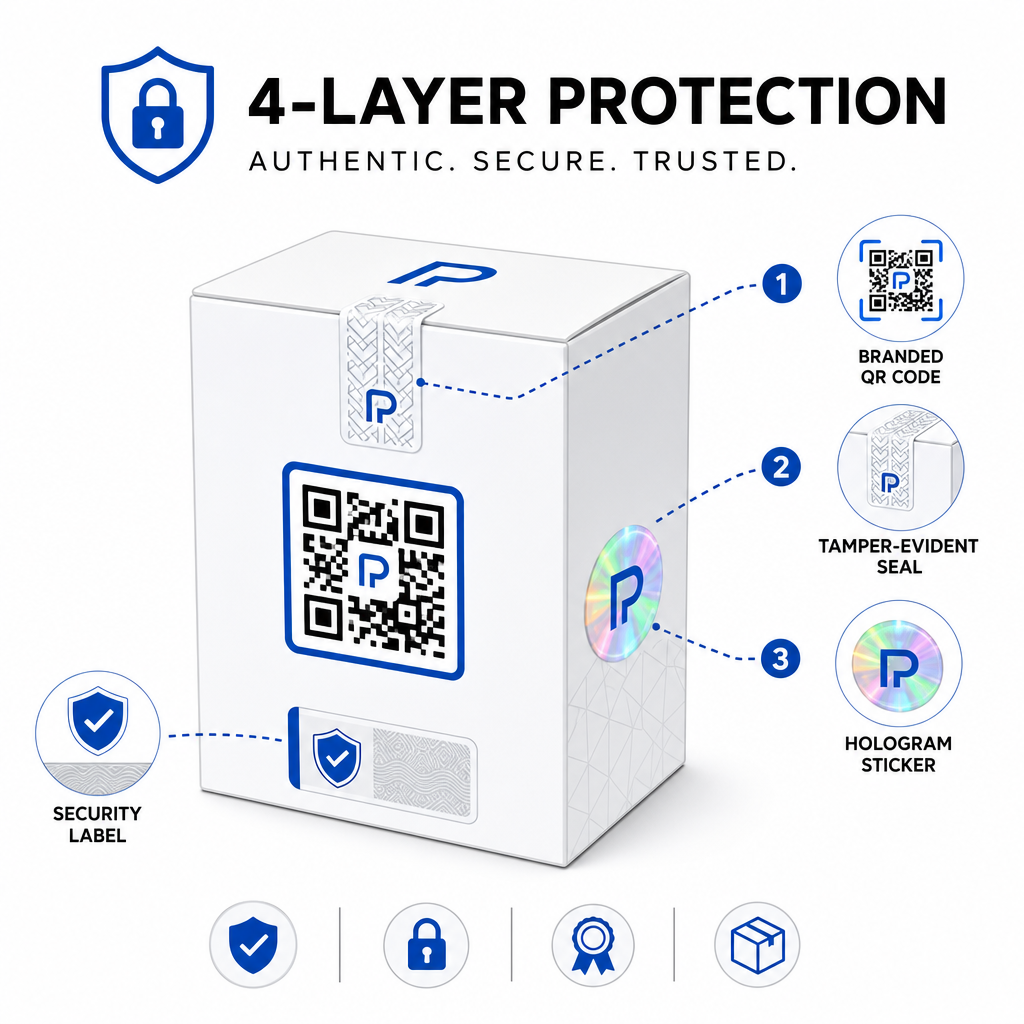
Security researchers and brand protection specialists consistently note that a QR code alone cannot prevent counterfeiting. Effective protection combines the QR layer with physical or structural elements that are harder to replicate.

Layered product security

Common approaches include:

  • Tamper-evident seals: placing the QR code across a seal that shows visible damage if removed
  • Scratch-off panels: concealing the QR code under a coating that a buyer removes at first use, making the code harder for counterfeiters to photograph before purchase
  • Holographic overlaminates or security inks: adding a physical layer that degrades visibly when copied
  • Secure copy-proof patterns: some systems embed microscopic anti-copy textures within the QR code design itself, causing the pattern to degrade or disappear when photographed and reprinted

The combination strategy matters because it shifts authentication away from a single point of failure. A counterfeiter who can duplicate the QR code cannot easily also replicate the tamper seal, hologram, or copy-sensitive substrate at the same time.

For a broader look at how QR codes interact with physical product packaging, the guide on 製品パッケージのQRコード covers placement and design in detail.

Server-Side Verification and Scan Monitoring

The most important security layer in a QR authentication system is one customers never see: server-side validation.

When a customer scans an authenticated QR code, the system should:

  • Validate the identifier against your product database before serving any result
  • Log the scan event with timestamp, GPS coordinates or IP-based location, and device fingerprint
  • Check for anomalies such as the same code being scanned from two geographically distant locations within minutes, or a single serialized code accumulating scans beyond any plausible legitimate use
  • Use opaque tokens rather than raw identifiers in the QR content, so that even if someone reads the QR data directly they cannot construct a valid fake without access to your server logic

This approach – where the QR code carries only an opaque reference and all meaningful verification happens server-side – is the standard recommended by security practitioners for authentication use cases.

For a technical deep dive into how encryption can further protect QR-based authentication systems, the post on 認証プラットフォーム向けの暗号化されたQRコード covers encryption methods and compliance considerations in detail.

Design and Placement for Authentication QR Codes

An authentication QR code that customers cannot scan defeats its own purpose. Standard best practices for print quality and placement apply equally here:

  • Minimum size: follow the 1 cm per 10 cm of scanning distance rule of thumb to ensure reliable scanning across devices
  • High contrast: use dark modules on a light background, and avoid shiny or reflective finishes that cause glare
  • Quiet zone: leave a clear border of at least four modules around the code, free of text or design elements
  • Print resolution: use vector formats or PNG at 300 DPI minimum for print applications
  • Flat placement: avoid curved surfaces, seams, or folds that distort the code geometry
  • 明確なコール・トゥ・アクション: include a short instruction near the code, such as “Scan to verify authenticity,” so customers understand what the code is for

For more detailed guidance on packaging-specific placement, the 製品ラベル用QRコードの究極ガイド covers sizing, contrast, and positioning in depth.

Branded QR codes with your logo embedded also signal legitimacy to customers at a glance. The ロゴ付きQRコードジェネレーター lets you incorporate brand identity directly into the code design without compromising scannability.

Who This Approach Is Built For

QR-based product authentication is relevant across a wide range of product categories and industries:

Product Type Authentication Need
Consumer electronics and accessories High counterfeit rate; warranty validation
Pharmaceuticals and health products Consumer safety; regulatory compliance
Luxury goods and apparel Brand protection; gray market prevention
Industrial components and parts Safety certification; supply chain integrity
Food and beverage Batch traceability; import verification

Brands selling through third-party retailers or e-commerce platforms are particularly vulnerable because they have less direct control over what reaches the end customer. Serialized authentication gives them a direct channel to verify any unit, regardless of where it was purchased.

Pagelootの product industry solutions are designed for brands using QR codes on packaging and labels to connect physical products with digital experiences, including verification workflows.

Create Serialized Codes at Scale Need to generate unique QR codes for every unit in your production run? Pageloot’s QRコードジェネレーター supports bulk creation with a centralized dashboard to track, update, and manage codes across your entire catalog.

Testing Before You Deploy

Before applying authentication QR codes to a production run, thorough testing prevents failures that undermine customer trust at the moment it matters most. Key steps include:

  • Scan the printed code with multiple devices and native camera apps across different lighting conditions
  • Verify that the identifier in the scan maps correctly to the right product record in your database
  • Confirm the verification page loads correctly on mobile and displays the authenticity result clearly
  • Test the anomaly detection logic by scanning the same code repeatedly and confirming your monitoring system flags it appropriately
  • Check that interacting with the physical security element – such as removing a scratch panel or breaking a seal – produces the expected result in your system

For a structured approach to this process, the guide on testing QR code authentication best practices covers the full testing workflow in detail.

***

Building an Authentication System That Scales

QR-based product authentication is not a one-time setup. It requires ongoing management: monitoring scan data, investigating anomalies, updating verification destinations when products are recalled, and expanding the system as your product line grows.

A centralized QR management platform makes this operationally realistic. Pageloot’s dashboard lets teams organize codes by campaign or product category using folders, view aggregated scan performance across large code sets, and update destinations without reprinting – capabilities that matter when you are managing serialized codes across tens of thousands of units.

The QR code on your product is what a customer sees. The system behind it is what actually protects them – and your brand. Build both with equal care, and serialized QR authentication becomes one of the most practical and scalable tools available for counterfeit prevention. Explore how businesses across different verticals approach QR code implementation at Pageloot’s industry solutions hub.

Start Protecting Your Products Create trackable, editable QR codes and monitor every scan from a single dashboard. Try the ダイナミックQRコードジェネレーター free for 14 days – no credit card required.

よくある質問

Can a standard QR code prevent counterfeiting on its own?

No. A plain QR code can be photographed and reprinted on fake products, and the cloned code will scan identically to the original. Effective authentication requires serialized unique codes combined with server-side verification that validates each scan against a trusted product record, plus monitoring for anomalies like unexpected scan counts or geographic mismatches.

What is a serialized QR code and how is it different from a regular product QR code?

A serialized QR code is unique to a single physical item, not just a product type or SKU. When scanned, it identifies that specific unit and checks it against a database record. A regular product QR code typically links all units of the same product to the same URL, which means a counterfeiter who clones the code can apply it to a fake product and have it behave exactly like the original.

How many unique QR codes can I generate for product authentication?

Pageloot supports bulk QR code generation via CSV upload, scaling up to 100,000 codes, making serialized authentication practical even at high production volumes. Codes can be organized by product line or batch using folders, and all scan data is tracked centrally in the dashboard.

著者について

Siim KostabiはPagelootのコンテンツリードです。Pagelootの革新的なQRコード生成サービスについて執筆しています。5年以上にわたるQRコードに関する深い専門知識を持つSiimは、この分野の専門家です。QRテクノロジーを活用してデジタルインタラクションを簡素化・拡張する上で、大きな進歩を遂げています。.

カテゴリー
について詳しくはこちら
画像QRコードのスキャン
QRコードを作成する 画像
✅ QRコードの#1ソリューション

オンラインでQRコードを作成する必要がある場合は QRコードを作る ここで無料で
ページルートは #1のGo-Toソリューション でQRコードを作成してスキャンすることができます。

BL-0280

ブログジェネ

売上、レビュー、フォロワーを増やすために 20,000 を超えるブランドから信頼されています。

クライアントのロゴ
トップブランドから信頼される
5 のうち 4.8 と評価しました

4.86 / 5つ星評価

ユーゴ・ローラン
ユーゴ・ローラン
レストランオーナー
最も簡単で信頼性の高いQRコードジェネレータです。PDFファイルを即座にアップロードできます。レストランのメニューがデジタル化されました。
ルーカス・ジャンセン
ルーカス・ジャンセン
不動産開発業者
これは優れたツールで、QRコードでちょうど欲しいところに連れて行ってくれます。私たちは位置情報のQRコードしか使っていませんが、とても便利な機能がたくさんあります。
エマ・モレッティ
エマ・モレッティ
小売製品
使いやすいし、早い。素晴らしい機能で、完璧な画像を作成してくれるので、社員は私のvCardをダウンロードすることができます。
ユーゴ・ローラン
ユーゴ・ローラン
レストランオーナー
最も簡単で信頼性の高いQRコードジェネレータです。PDFファイルを即座にアップロードできます。レストランのメニューがデジタル化されました。
ルーカス・ジャンセン
ルーカス・ジャンセン
不動産開発業者
これは優れたツールで、QRコードでちょうど欲しいところに連れて行ってくれます。私たちは位置情報のQRコードしか使っていませんが、とても便利な機能がたくさんあります。
エマ・モレッティ
エマ・モレッティ
小売製品
使いやすいし、早い。素晴らしい機能で、完璧な画像を作成してくれるので、社員は私のvCardをダウンロードすることができます。
QRコードをもっと見る
ブランドQRコードデザイン
でQRコードを作る カスタムデザイン
あらゆるものをデジタル体験に変えよう 3分以内に。

14日間の無料トライアル。

クレジットカードは必要ありません。

初回購入で30%オフ

次のコードを使用してください:

MP3ファイルを共有

PDF QRコードを作成するにはサインアップしてください

必要なものをすべてアップロードして表示する。

  • オーディオファイル
  • ポッドキャスト
  • 音楽

サインアップで14日間無料トライアル。.
トライアル終了後、QRコードは期限切れになります。.

オーディオmp3 QRコードを作成するにはサインアップしてください

フレームでより多くのスキャンを獲得

QRコードにフレームを追加するにはサインアップしてください

コールトゥアクションフレームは、お客様が簡単にQRコードと対話できるようにします。ぜひお試しください。

サインアップで14日間無料トライアル。.
トライアル終了後、QRコードは期限切れになります。.

QRコードにフレームを追加するにはサインアップしてください

シェイプでスタイルを追加

より多くの図形を作成するにはサインアップしてください

QRコードは四角いものである必要はありません。あなたのブランドのイメージに合わせて変えてみてください。

サインアップで14日間無料トライアル。.
トライアル終了後、QRコードは期限切れになります。.

より多くの図形を作成するにはサインアップしてください

QRコードにロゴを追加

QRコードにロゴを追加するにはサインアップしてください

QRコードにロゴやブランドを入れることで、目立たせることができます。

サインアップで14日間無料トライアル。.
トライアル終了後、QRコードは期限切れになります。.

QRコードにロゴを追加するにはサインアップしてください

スマートなApp Storeリダイレクト

アプリストアのQRコードを作成するにはサインアップしてください

スマートなApp StoreのQRコードに、あなたのアプリのリンクを追加します。ユーザーは、デバイスに応じてリダイレクトされます。

サインアップで14日間無料トライアル。.
トライアル終了後、QRコードは期限切れになります。.

アプリストアのQRコードを作成するにはサインアップしてください

QRコードに画像をアップロード

画像QRコードを作成するにはサインアップしてください

画像を簡単に共有できます。どんな画像も、数秒でダイナミックに変化します。

サインアップで14日間無料トライアル。.
トライアル終了後、QRコードは期限切れになります。.

画像QRコードを作成するにはサインアップしてください

PDFファイルを共有

PDF QRコードを作成するにはサインアップしてください

必要なものをすべてアップロードして表示する。

  • メニュー&プライスリスト
  • 指示
  • 任意の書類

サインアップで14日間無料トライアル。.
トライアル終了後、QRコードは期限切れになります。.

PDF QRコードを作成するにはサインアップしてください

印刷せずに後で編集

再度印刷せずにQRコードを編集するにはサインアップしてください

ダイナミックQRコードは、新たにQRコードを印刷することなく、QRコードの内容を変更することができます。

サインアップで14日間無料トライアル。.
トライアル終了後、QRコードは期限切れになります。.

再度印刷せずにQRコードを編集するにはサインアップしてください

いつ?どこで?QRコードのスキャンを追跡

QRコードを追跡するにはサインアップしてください

どのQRコードが最も多くスキャンされ、何が最も顧客を喜ばせているのかを知ることができます。

サインアップで14日間無料トライアル。.
トライアル終了後、QRコードは期限切れになります。.

QRコードを追跡するにはサインアップしてください

印刷可能なファイルが利用可能

PDFやSVGのようなベクターQRコードを作成するにはサインアップしてください

.eps、.pdf、.svg

QRコードをHD解像度でダウンロードしたいですか?すぐに印刷できるベクターまたはピクセル形式を入手しましょう。

サインアップで14日間無料トライアル。.
トライアル終了後、QRコードは期限切れになります。.

PDFやSVGのようなベクターQRコードを作成するにはサインアップしてください

しばらくお待ちください。あなたのQRコードは ロード... ロード...

あなただけのものに

サインアップしてQRコードを後で保存してください

異なる色、ロゴ、コールトゥアクションフレームで素晴らしいQRコードを作成することで、より多くのスキャンを得ることができます。

サインアップで14日間無料トライアル。.
トライアル終了後、QRコードは期限切れになります。.

サインアップしてQRコードを後で保存してください