Erreichen gefälschte Versionen Ihres Produkts die Kunden? Über Umsatzeinbußen hinaus schaden gefälschte Waren dem Markenvertrauen und können Käufer gefährden. Diese Seite erklärt, wie QR-Codes, implementiert mit serialisierten eindeutigen Identitäten und der richtigen Infrastruktur, ein praktisches und skalierbares Produktauthentifizierungssystem schaffen.
Warum Produktfälschungen ein Problem sind, das es systematisch zu lösen gilt
Das Ausmaß des Handels mit Fälschungen ist erheblich. Die OECD und das EUIPO schätzen, dass gefälschte Waren im Jahr 2021 weltweit etwa $467 Milliarden im globalen Handel ausmachten, was 2.3% der gesamten globalen Importe entspricht. Ein Bericht des U.S. Patent and Trademark Office ergab, dass Fälschungen und Piraterie US-Unternehmen jährlich mehr als $200 Milliarden kosten und zum Verlust von über 750.000 Arbeitsplätzen beitragen.
Für Markeninhaber werden die direkten finanziellen Verluste durch schwerer zu quantifizierende Schäden noch verstärkt: Ein Kunde, der eine gefälschte Version Ihres Produkts kauft und eine schlechte Erfahrung macht, macht Ihre Marke dafür verantwortlich, nicht den Fälscher.
Ein QR-basiertes Authentifizierungssystem löst dies auf Artikelebene. Anstatt lediglich zu überprüfen, ob ein Produkttyp echt ist, verifiziert es, dass eine spezifische, einzelne Einheit echt ist – und liefert Ihnen die Daten, um zu erkennen, wenn etwas schiefgeht.
Warum ein Standard-QR-Code allein nicht ausreicht
Bevor wir untersuchen, wie die QR-Authentifizierung funktioniert, ist es wichtig, eine grundlegende Einschränkung zu verstehen, die viele Marken übersehen.
Ein generischer QR-Code lässt sich leicht duplizieren. Ein Fälscher kann Ihren Code in hoher Auflösung fotografieren, ihn auf Tausenden von gefälschten Produkten nachdrucken, und diese geklonten Codes werden identisch mit dem Original scannen und sich verhalten. Wenn Ihr QR-Code lediglich auf eine Produktseite oder eine statische Verifizierungs-URL verweist, bietet er keinen echten Schutz.
Herkömmliche statische QR-Codes, die für Rückverfolgbarkeit oder Produktinformationen verwendet werden, bieten keine intrinsische Authentifizierung. Wenn das Produkt selbst gefälscht ist, erscheint die verlinkte Seite immer noch echt und kann die Authentizität nicht eigenständig bestätigen.
Eine effektive QR-Authentifizierung erfordert drei Dinge, die zusammenwirken:
- Serialisierung: jeder einzelne Artikel erhält einen einzigartigen Code, nicht nur jede SKU oder Charge
- Serverseitige Verifizierung: jeder Scan wird mit einem vertrauenswürdigen Datensatz abgeglichen, nicht nur mit einer Ziel-URL
- Überwachungslogik: Anomalien wie wiederholte Scans von verschiedenen Standorten oder Scan-Zahlen, die die erwarteten Mengen überschreiten, lösen Warnungen aus
Der QR-Code ist die kundenorientierte Schnittstelle. Die Sicherheit liegt in der dahinterliegenden Infrastruktur.
Wie die serialisierte QR-Authentifizierung funktioniert
Serialisierte QR-Codes weisen jeder einzelnen Produkteinheit einen einzigartigen Code zu. Wenn ein Kunde diesen Code scannt, lädt das System nicht nur eine Seite – es führt einen Abgleich mit einem Produktdatensatz durch, um zu bestätigen, dass dieser spezifische Artikel mit diesem spezifischen Identifikator bekannt und gültig ist.
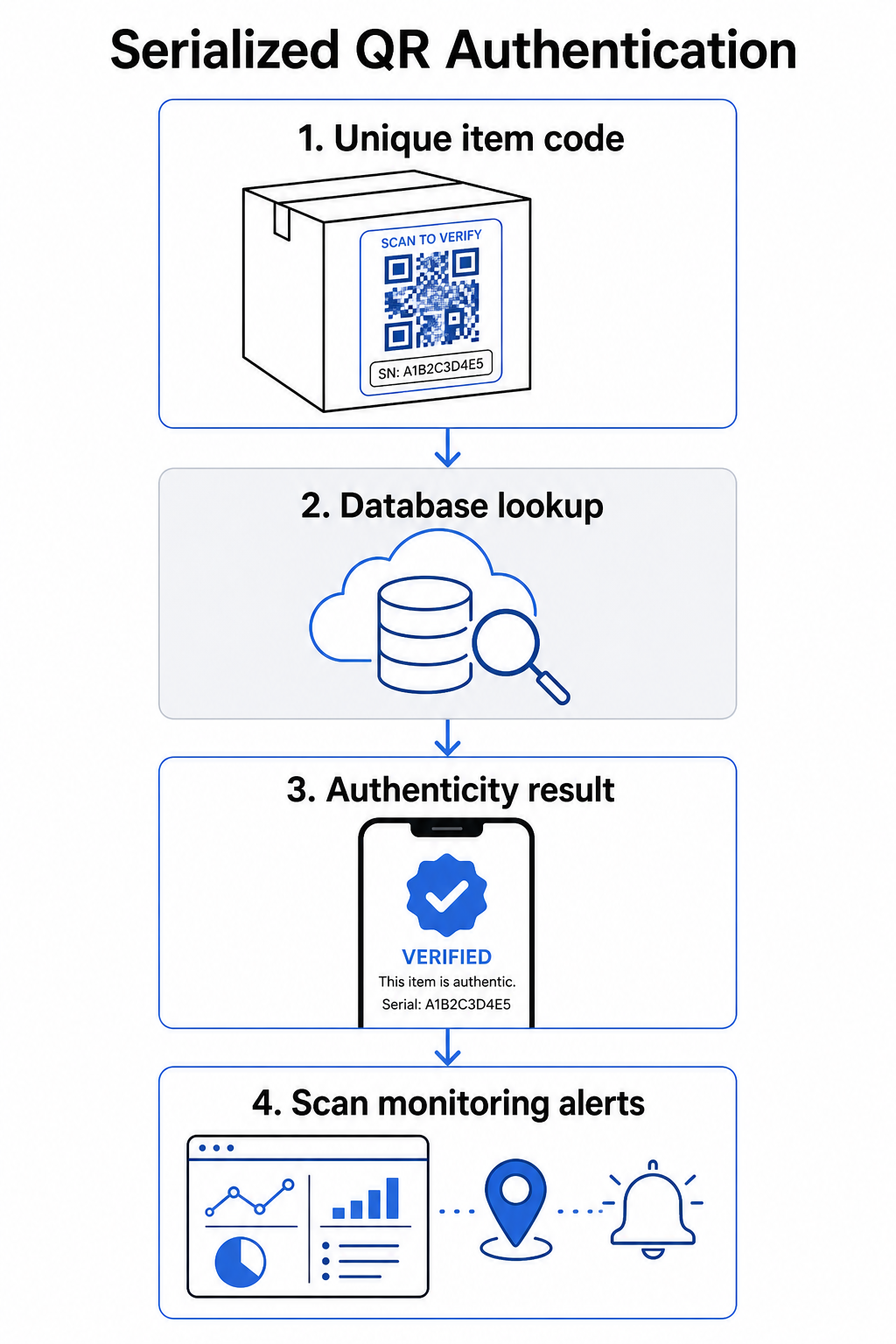
Ein vollständiger Authentifizierungs-Workflow umfasst typischerweise diese Schritte:
- Erstellen Sie einen eindeutigen Identifikator für jeden Artikel – dies kann eine Seriennummer, Chargenreferenz, Produktionszeitstempel oder eine Kombination sein, die als GS1 Digital Link URI kodiert ist, welche GS1 Anwendungsidentifikatoren für GTIN, Chargen-/Losnummer und Seriennummer enthält
- Verknüpfen Sie diesen Identifikator mit einem digitalen Produktdatensatz – gespeichert in einer sicheren Datenbank, die Ihr System kontrolliert
- Generieren und zuweisen eines einzigartigen QR-Codes der auf einen Verifizierungsendpunkt verweist, der einen undurchsichtigen Identifikator oder Token trägt, anstatt die Rohdaten selbst
- Anbringen des QR-Codes am physischen Produkt – bei höherwertigen Artikeln schreckt das Anbringen unter einem Rubbelfeld oder über einem manipulationssicheren Siegel die Etikettenübertragung und Wiederverwendung ab
- Protokollieren Sie jeden Scan als Ereignis – Erfassung von Zeitstempel, Standort und Geräteinformationen zur Unterstützung der laufenden Überwachung
- Bereitstellen einer Verifizierungsseite die Produktdetails und ein klares Authentizitätsergebnis anzeigt, damit Kunden sofort wissen, was sie sehen
Die Verifizierungsseite selbst ist wichtig. Eine gut gestaltete Seite zeigt den Produktnamen, Chargen- oder Garantiedetails und eine unkomplizierte Authentizitätsbestätigung. Einige Systeme zeigen auch an, wie oft ein bestimmter Code gescannt wurde – ein Code, der weitaus mehr Scans als erwartet ansammelt, wird zu einem Verdachtsauslöser für Fälschungen, die duplizierte Codes verwenden.
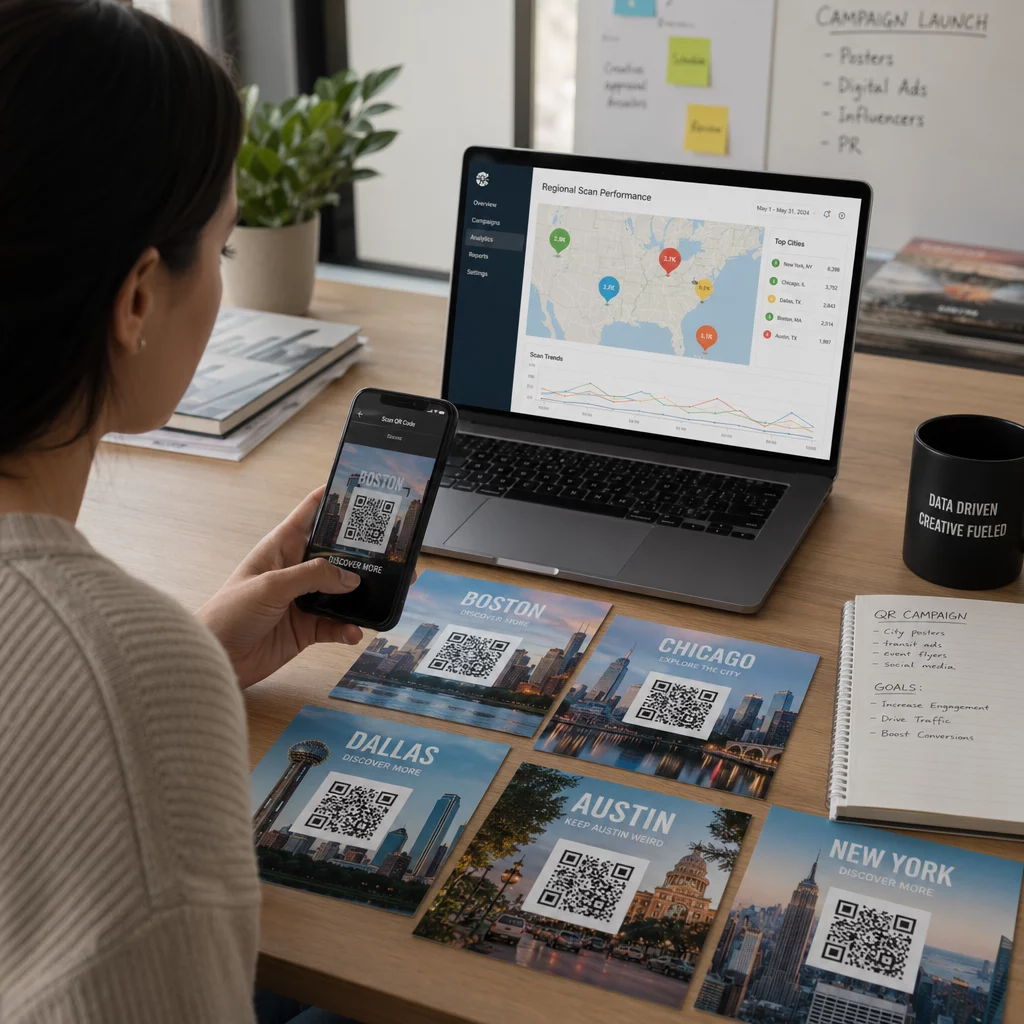
Jeden Produktcode verwalten und verfolgen Pageloots Dynamischer QR-Code Generator ermöglicht Ihnen die Erstellung verfolgbarer, bearbeitbarer QR-Codes und den Zugriff auf ein vollständiges Analyse-Dashboard, das anzeigt, wann und wo jeder Scan erfolgt – und Ihnen die Überwachungsebene bietet, die Ihr Authentifizierungssystem benötigt.
Die Rolle dynamischer QR-Codes bei der Authentifizierung
Dynamische QR-Codes sind eine praktische Grundlage für die Produktauthentifizierung, da sie den gedruckten Code von dem Ziel trennen, auf das er verweist. Der physische Code auf einem Produkt ändert sich nie, aber das Ziel und die dahinterstehende Logik können jederzeit ohne Neudruck aktualisiert werden.
Dies ist wichtig für die Authentifizierung auf verschiedene spezifische Weisen:
- Sie können Verifizierungsseiten aktualisieren wenn sich Ihre Backend-Infrastruktur ändert, ohne gekennzeichnete Produkte zurückzurufen oder neu zu drucken
- Sie können einen Code deaktivieren wenn eine Charge zurückgerufen wird oder wenn betrügerische Aktivitäten um einen bestimmten Identifikator herum erkannt werden
- Sie können Scans umleiten zu verschiedenen Erlebnissen basierend auf der Scan-Anzahl, Geografie oder Zeit – zum Beispiel, den ersten Scan zu einer vollständigen Verifizierungsseite und nachfolgende Scans zu einer Warnmeldung leiten
Die Plattform von Pageloot unterstützt das Bearbeiten von QR-Code-Zielen nach dem Druck und bietet Scan-Analysen einschließlich Standort, Gerätetyp und Scan-Zeitpunkt – die alle direkt in einen Überwachungs-Workflow einfließen.
Für Marken, die große Produktmengen verwalten, unterstützt Pageloot die Massen-QR-Code-Generierung über CSV-Uploads, skalierbar auf bis zu 100.000 Codes, was die serialisierte Codegenerierung selbst im Fertigungsmaßstab praktikabel macht. Lieferanten und Wiederverkäufer können spezielle Tools über Pageloots Lieferanten- und Wiederverkäuferlösungen.
QR-Codes mit physischen Sicherheitselementen kombinieren
Sicherheitsforscher und Markenschutzspezialisten stellen immer wieder fest, dass ein QR-Code allein Fälschungen nicht verhindern kann. Effektiver Schutz kombiniert die QR-Schicht mit physischen oder strukturellen Elementen, die schwerer zu replizieren sind.
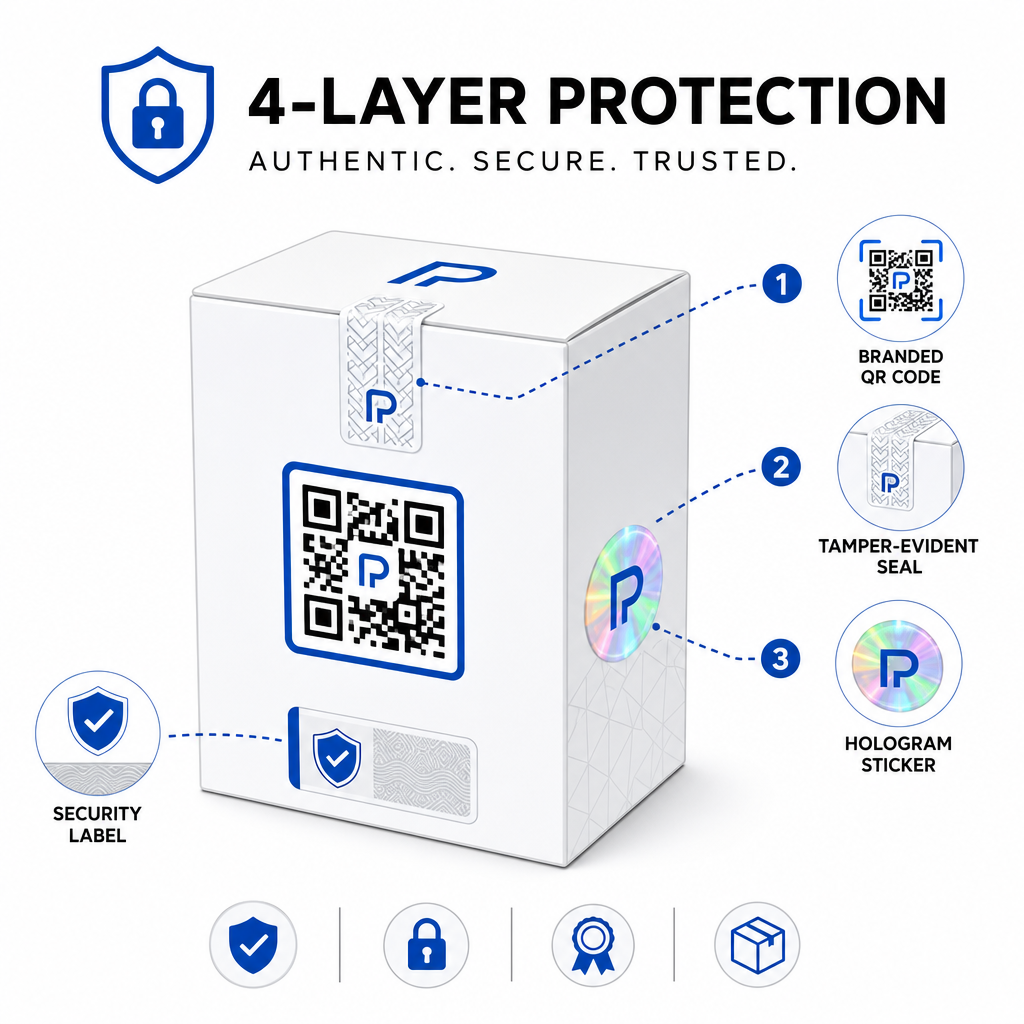
Gängige Ansätze sind:
- Manipulationssichere Siegel: Platzierung des QR-Codes über einem Siegel, das sichtbare Schäden aufweist, wenn es entfernt wird
- Rubbelfelder: Verbergen des QR-Codes unter einer Beschichtung, die ein Käufer bei der ersten Verwendung entfernt, wodurch es für Fälscher schwieriger wird, den Code vor dem Kauf zu fotografieren
- Holografische Überlaminate oder Sicherheitsfarben: Hinzufügen einer physischen Schicht, die beim Kopieren sichtbar degradiert
- Sichere kopiersichere Muster: einige Systeme betten mikroskopische Anti-Kopier-Texturen innerhalb des QR-Code-Designs selbst ein, wodurch das Muster beim Fotografieren und Neudrucken degradiert oder verschwindet
Die Kombinationsstrategie ist wichtig, weil sie die Authentifizierung von einem einzigen Fehlerpunkt wegbewegt. Ein Fälscher, der den QR-Code duplizieren kann, kann nicht gleichzeitig auch das Manipulationssiegel, Hologramm oder kopiersensible Substrat leicht replizieren.
Für einen umfassenderen Blick darauf, wie QR-Codes mit physischen Produktverpackungen interagieren, behandelt der Leitfaden zu QR-Codes auf Produktverpackungen Platzierung und Design im Detail.
Serverseitige Verifizierung und Scan-Überwachung
Die wichtigste Sicherheitsebene in einem QR-Authentifizierungssystem ist eine, die Kunden nie sehen: serverseitige Validierung.
Wenn ein Kunde einen authentifizierten QR-Code scannt, sollte das System:
- Den Identifikator validieren gegen Ihre Produktdatenbank, bevor ein Ergebnis bereitgestellt wird
- Das Scan-Ereignis protokollieren mit Zeitstempel, GPS-Koordinaten oder IP-basiertem Standort und Geräte-Fingerabdruck
- Auf Anomalien prüfen wie zum Beispiel, dass derselbe Code von zwei geografisch weit entfernten Standorten innerhalb von Minuten gescannt wird, oder ein einzelner serialisierter Code Scans über jede plausible legitime Nutzung hinaus ansammelt
- Opake Token verwenden anstatt roher Identifikatoren im QR-Inhalt, so dass selbst wenn jemand die QR-Daten direkt liest, er keine gültige Fälschung erstellen kann, ohne Zugriff auf Ihre Serverlogik zu haben
Dieser Ansatz – bei dem der QR-Code nur eine opake Referenz trägt und alle bedeutsame Verifizierung serverseitig erfolgt – ist der von Sicherheitsexperten empfohlene Standard für Authentifizierungsanwendungsfälle.
Für einen technischen Einblick, wie Verschlüsselung QR-basierte Authentifizierungssysteme weiter schützen kann, behandelt der Beitrag zu verschlüsselten QR-Codes für Authentifizierungsplattformen Verschlüsselungsmethoden und Compliance-Überlegungen im Detail.
Design und Platzierung für Authentifizierungs-QR-Codes
Ein Authentifizierungs-QR-Code, den Kunden nicht scannen können, verfehlt seinen Zweck. Standard-Best Practices für Druckqualität und Platzierung gelten hier gleichermaßen:
- Mindestgröße: befolgen Sie die Faustregel von 1 cm pro 10 cm Scan-Abstand, um zuverlässiges Scannen über verschiedene Geräte hinweg zu gewährleisten
- Hoher Kontrast: verwenden Sie dunkle Module auf hellem Hintergrund und vermeiden Sie glänzende oder reflektierende Oberflächen, die Blendung verursachen
- Ruhezone: lassen Sie einen klaren Rand von mindestens vier Modulen um den Code, frei von Text- oder Designelementen
- Druckauflösung: verwenden Sie Vektorformate oder PNG mit mindestens 300 DPI für Druckanwendungen
- Flache Platzierung: vermeiden Sie gekrümmte Oberflächen, Nähte oder Falten, die die Code-Geometrie verzerren
- Klare Aufforderung zum Handeln: fügen Sie eine kurze Anweisung in der Nähe des Codes ein, wie “Scannen zur Echtheitsprüfung,” damit Kunden verstehen, wofür der Code ist
Für detailliertere Anleitungen zur verpackungsspezifischen Platzierung, der ultimativen Leitfadens für QR-Codes auf Produktetiketten behandelt Größe, Kontrast und Positionierung ausführlich.
Gebrandete QR-Codes mit Ihrem eingebetteten Logo signalisieren Kunden auf den ersten Blick Legitimität. Der QR-Code Generator mit Logo ermöglicht es Ihnen, die Markenidentität direkt in das Code-Design zu integrieren, ohne die Scannbarkeit zu beeinträchtigen.
Für wen dieser Ansatz entwickelt wurde
QR-basierte Produktauthentifizierung ist relevant für eine Vielzahl von Produktkategorien und Branchen:
| Produkttyp | Authentifizierungsbedarf |
|---|---|
| Unterhaltungselektronik und Zubehör | Hohe Fälschungsrate; Garantievalidierung |
| Pharmazeutika und Gesundheitsprodukte | Verbrauchersicherheit; Einhaltung gesetzlicher Vorschriften |
| Luxusgüter und Bekleidung | Markenschutz; Graumarktprävention |
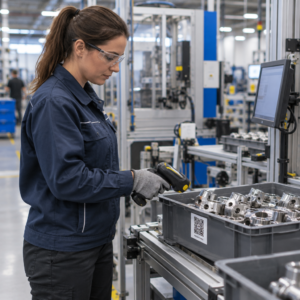
| Industrielle Komponenten und Teile | Sicherheitszertifizierung; Integrität der Lieferkette |
| Lebensmittel und Getränke | Chargenrückverfolgbarkeit; Importüberprüfung |
Marken, die über Drittanbieter oder E-Commerce-Plattformen verkaufen, sind besonders anfällig, da.
Pageloots Produkt- und Branchenlösungen wurden für Marken entwickelt, die QR-Codes auf Verpackungen und Etiketten verwenden, um physische Produkte mit digitalen Erlebnissen zu verbinden, einschließlich Verifizierungs-Workflows.
Serialisierte Codes in großem Maßstab erstellen Müssen Sie für jede Einheit in Ihrer Produktion einzigartige QR-Codes generieren? Pageloot QR-Code-Generator unterstützt die Massenerstellung mit einem zentralen Dashboard, um Codes in Ihrem gesamten Katalog zu verfolgen, zu aktualisieren und zu verwalten.
Testen vor der Bereitstellung
Bevor Authentifizierungs-QR-Codes auf eine Produktionsserie angewendet werden, verhindert eine gründliche Prüfung Fehler, die das Kundenvertrauen im entscheidenden Moment untergraben. Wichtige Schritte sind:
- Scannen Sie den gedruckten Code mit mehreren Geräten und nativen Kamera-Apps unter verschiedenen Lichtbedingungen
- Überprüfen Sie, ob der Bezeichner im Scan korrekt dem richtigen Produktdatensatz in Ihrer Datenbank zugeordnet ist
- Bestätigen Sie, dass die Verifizierungsseite auf dem Mobiltelefon korrekt geladen wird und das Authentizitätsergebnis klar anzeigt
- Testen Sie die Anomalieerkennungslogik, indem Sie denselben Code wiederholt scannen und bestätigen, dass Ihr Überwachungssystem ihn entsprechend kennzeichnet
- Überprüfen Sie, ob die Interaktion mit dem physischen Sicherheitselement – wie das Entfernen eines Rubbelfeldes oder das Brechen eines Siegels – das erwartete Ergebnis in Ihrem System erzeugt
Für einen strukturierten Ansatz zu diesem Prozess deckt der Leitfaden zu Best Practices für das Testen der QR-Code-Authentifizierung den gesamten Test-Workflow detailliert ab.
***
Aufbau eines skalierbaren Authentifizierungssystems
Die QR-basierte Produktauthentifizierung ist keine einmalige Einrichtung. Sie erfordert eine fortlaufende Verwaltung: Überwachung der Scandaten, Untersuchung von Anomalien, Aktualisierung der Verifizierungsziele bei Produktrückrufen und Erweiterung des Systems, wenn Ihre Produktlinie wächst.
Eine zentralisierte QR-Verwaltungsplattform macht diesen Betrieb realistisch. Das Dashboard von Pageloot ermöglicht es Teams, Codes nach Kampagne oder Produktkategorie mithilfe von Ordnern zu organisieren, die aggregierte Scan-Leistung über große Code-Sets hinweg anzuzeigen und Ziele ohne Neudruck zu aktualisieren – Funktionen, die wichtig sind, wenn Sie serialisierte Codes über Zehntausende von Einheiten verwalten.
Der QR-Code auf Ihrem Produkt ist das, was ein Kunde sieht. Das System dahinter ist das, was ihn – und Ihre Marke – tatsächlich schützt. Bauen Sie beides mit gleicher Sorgfalt auf, und die serialisierte QR-Authentifizierung wird zu einem der praktischsten und skalierbarsten Tools zur Fälschungsprävention. Erfahren Sie, wie Unternehmen verschiedener Branchen die QR-Code-Implementierung angehen unter Pageloots Branchenlösungen-Hub.
Beginnen Sie, Ihre Produkte zu schützen Erstellen Sie verfolgbare, bearbeitbare QR-Codes und überwachen Sie jeden Scan von einem einzigen Dashboard aus. Probieren Sie den Dynamischer QR-Code Generator 14 Tage lang kostenlos – keine Kreditkarte erforderlich.
Häufig gestellte Fragen
Nein. Ein einfacher QR-Code kann fotografiert und auf gefälschten Produkten nachgedruckt werden, und der geklonte Code wird identisch mit dem Original scannen. Eine effektive Authentifizierung erfordert serialisierte eindeutige Codes in Kombination mit einer serverseitigen Verifizierung, die jeden Scan mit einem vertrauenswürdigen Produktdatensatz abgleicht, sowie die Überwachung auf Anomalien wie unerwartete Scan-Anzahlen oder geografische Diskrepanzen.
Ein serialisierter QR-Code ist einzigartig für einen einzelnen physischen Artikel, nicht nur für einen Produkttyp oder eine SKU. Beim Scannen identifiziert er diese spezifische Einheit und gleicht sie mit einem Datenbankeintrag ab. Ein regulärer Produkt-QR-Code verknüpft typischerweise alle Einheiten desselben Produkts mit derselben URL, was bedeutet, dass ein Fälscher, der den Code klont, ihn auf ein gefälschtes Produkt anwenden kann und es sich genau wie das Original verhält.
Pageloot unterstützt die Massen-QR-Code-Generierung per CSV-Upload und skaliert auf bis zu 100.000 Codes, wodurch die serialisierte Authentifizierung selbst bei hohen Produktionsmengen praktikabel wird. Codes können nach Produktlinie oder Charge mithilfe von Ordnern organisiert werden, und alle Scandaten werden zentral im Dashboard verfolgt.