Når förfalskade versioner av din produkt kunderna? Utöver förlorade intäkter skadar förfalskade varor varumärkets förtroende och kan utsätta köpare för risk. Denna sida förklarar hur QR-koder, implementerade med serialiserade unika identiteter och rätt infrastruktur, skapar ett praktiskt och skalbart system för produktautentisering.
Varför förfalskning är ett problem värt att lösa systematiskt
Omfattningen av den förfalskade handeln är betydande. OECD och EUIPO uppskattar att förfalskade varor stod för cirka $467 miljarder i global handel 2021, vilket representerar 2.3% av de totala globala importen. En rapport från U.S. Patent and Trademark Office fann att förfalskning och piratkopiering kostar amerikanska företag mer än $200 miljarder per år och bidrar till förlusten av mer än 750 000 jobb.
För varumärkesägare förvärras de direkta ekonomiska förlusterna av skador som är svårare att kvantifiera: en kund som köper en förfalskad version av din produkt och får en dålig upplevelse skyller på ditt varumärke, inte på förfalskaren.
Ett QR-baserat autentiseringssystem hanterar detta på objektnivå. Istället för att bara verifiera att en produkttyp är äkta, verifierar det att en specifik, individuell enhet är äkta – och ger dig data för att upptäcka när något går fel.
Varför en standard-QR-kod ensam inte räcker
Innan vi utforskar hur QR-autentisering fungerar är det viktigt att förstå en grundläggande begränsning som många varumärken förbiser.
En generisk QR-kod kan enkelt dupliceras. En förfalskare kan fotografera din kod i hög upplösning, trycka om den på tusentals falska produkter, och dessa klonade koder kommer att skanna och bete sig identiskt med originalet. Om din QR-kod bara pekar på en produktsida eller en statisk verifierings-URL, ger den inget verkligt skydd.
Traditionella statiska QR-koder som används för spårbarhet eller produktinformation ger ingen inneboende autentisering. Om produkten i sig är falsk, verkar den länkade sidan fortfarande äkta och kan inte bekräfta äktheten på egen hand.
Effektiv QR-autentisering kräver tre saker som samverkar:
- Serialisering: varje enskild artikel får en unik kod, inte bara varje SKU eller batch
- Serverbaserad verifiering: varje skanning kontrolleras mot en betrodd post, inte bara en destinations-URL
- Övervakningslogik: avvikelser som upprepade skanningar från olika platser, eller skanningsantal som överstiger förväntade kvantiteter, utlöser varningar
QR-koden är det kundvända gränssnittet. Säkerheten ligger i infrastrukturen bakom den.
Så fungerar serialiserad QR-autentisering
Serialiserade QR-koder tilldelar en unik kod till varje enskild produktenhet. När en kund skannar den koden laddar systemet inte bara en sida – det utför en sökning mot en produktpost för att bekräfta att denna specifika artikel, med denna specifika identifierare, är känd och giltig.
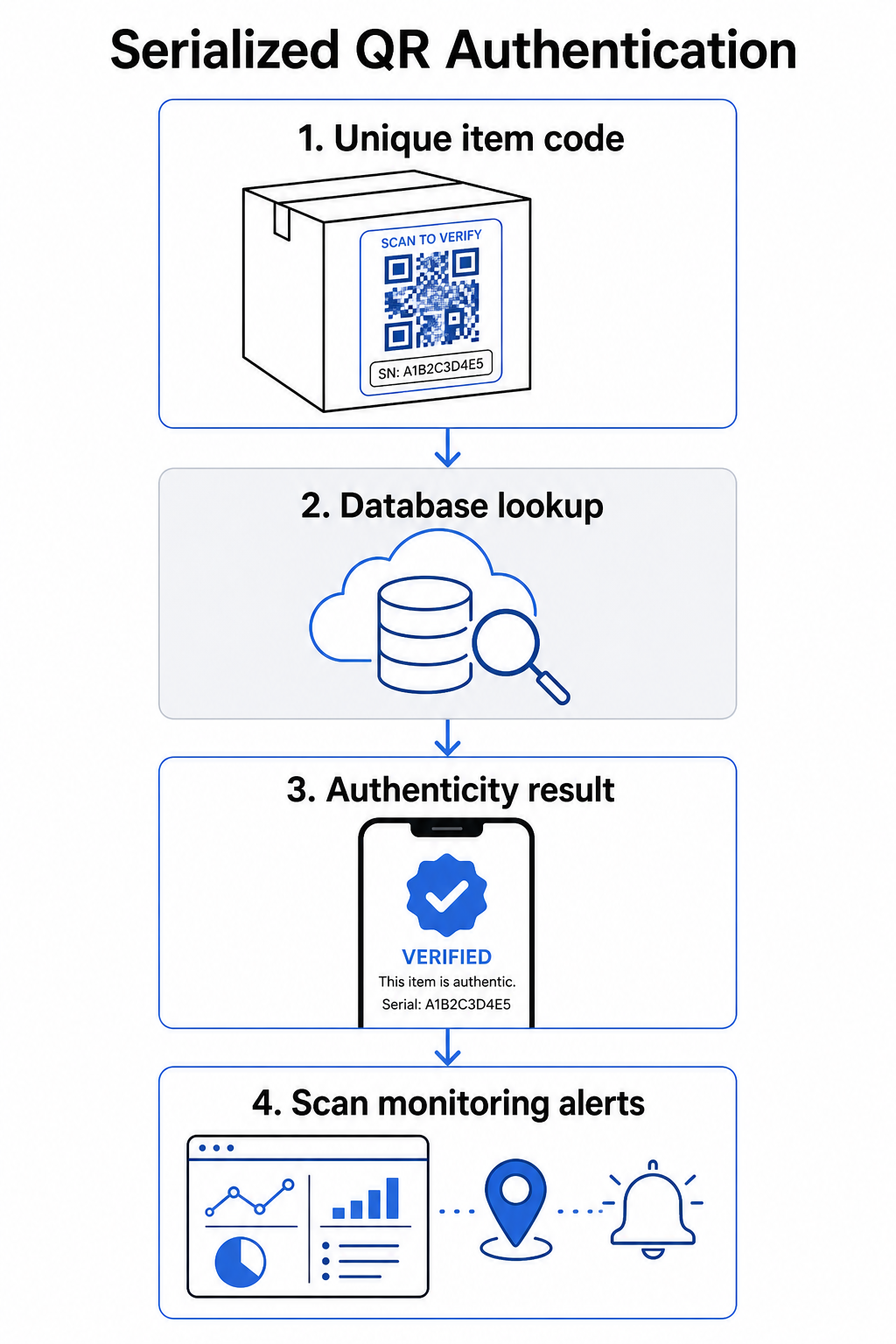
Ett komplett autentiseringsflöde inkluderar vanligtvis dessa steg:
- Skapa en unik identifierare för varje artikel – detta kan vara ett serienummer, batchreferens, produktionstidsstämpel eller en kombination kodad som en GS1 Digital Link URI, som inkluderar GS1 Application Identifiers för GTIN, batch-/partinummer och serienummer
- Länka den identifieraren till en digital produktpost – lagrad i en säker databas som ditt system kontrollerar
- Generera och tilldela en unik QR-kod som pekar på en verifieringsslutpunkt som bär en ogenomskinlig identifierare eller token, snarare än själva rådatan
- Applicera QR-koden på den fysiska produkten – för högvärdesartiklar, att placera den under en skrap-panel eller över en manipuleringssäker försegling avskräcker etikettöverföring och återanvändning
- Logga varje skanning som en händelse – fånga tidsstämpel, plats och enhetsinformation för att stödja kontinuerlig övervakning
- Visa en verifieringssida som visar produktinformation och ett tydligt äkthetsresultat så att kunderna omedelbart vet vad de tittar på
Verifieringssidan i sig är viktig. En välutformad sida visar produktnamn, batch- eller garantidetaljer och en enkel äkthetsbekräftelse. Vissa system visar också hur många gånger en specifik kod har skannats – en kod som ackumulerar betydligt fler skanningar än förväntat blir en misstankesutlösare för förfalskningar som använder duplicerade koder.
Hantera och spåra varje produktkod Pageloots Dynamisk QR-kodgenerator låter dig skapa spårbara, redigerbara QR-koder och få tillgång till en komplett analyspanel som visar när och var varje skanning sker – vilket ger dig det övervakningslager ditt autentiseringssystem behöver.
Rollen för dynamiska QR-koder i autentisering
Dynamiska QR-koder är en praktisk grund för produktautentisering eftersom de separerar den tryckta koden från destinationen den pekar på. Den fysiska koden på en produkt ändras aldrig, men destinationen och logiken bakom den kan uppdateras när som helst utan omtryckning.
Detta är viktigt för autentisering på flera specifika sätt:
- Du kan uppdatera verifieringssidor om din backend-infrastruktur ändras, utan att återkalla eller trycka om märkta produkter
- Du kan inaktivera en kod om ett parti återkallas eller om bedräglig aktivitet upptäcks kring en viss identifierare
- Du kan omdirigera skanningar till olika upplevelser baserat på antal skanningar, geografi eller tid – till exempel, dirigera den första skanningen till en fullständig verifieringssida och efterföljande skanningar till ett varningsmeddelande
Pageloots plattform stöder redigering av QR-koddestinationer efter utskrift och tillhandahåller skanningsanalys inklusive plats, enhetstyp och skanningstid – allt detta matas direkt in i ett övervakningsarbetsflöde.
För varumärken som hanterar stora produktvolymer stöder Pageloot massgenerering av QR-koder via CSV-uppladdningar, skalbart upp till 100 000 koder, vilket gör serialiserad kodgenerering praktisk även i tillverkningsskala. Leverantörer och återförsäljare kan utforska dedikerade verktyg via Pageloots leverantörs- och återförsäljarlösningar.
Kombinera QR-koder med fysiska säkerhetselement
Säkerhetsforskare och varumärkesskyddsspecialister noterar konsekvent att en QR-kod ensam inte kan förhindra förfalskning. Effektivt skydd kombinerar QR-lagret med fysiska eller strukturella element som är svårare att replikera.
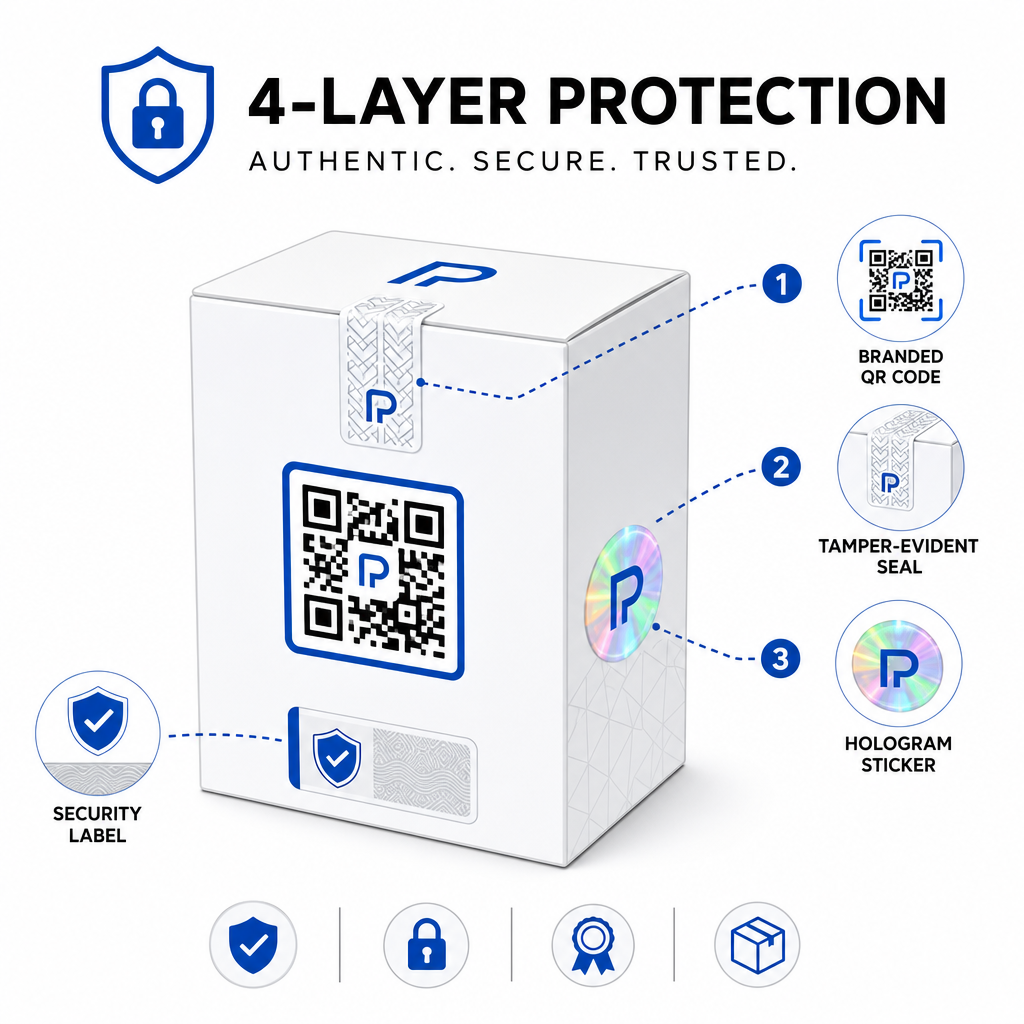
Vanliga metoder inkluderar:
- Manipulationssäkra förseglingar: placera QR-koden över en försegling som visar synlig skada om den tas bort
- Skrapfält: dölja QR-koden under en beläggning som en köpare tar bort vid första användningen, vilket gör koden svårare för förfalskare att fotografera före köp
- Holografiska överlaminat eller säkerhetsfärger: lägga till ett fysiskt lager som synligt försämras när det kopieras
- Säkra kopieringssäkra mönster: vissa system bäddar in mikroskopiska anti-kopieringstexturer i själva QR-koddesignen, vilket får mönstret att försämras eller försvinna när det fotograferas och trycks om
Kombinationsstrategin är viktig eftersom den flyttar autentiseringen bort från en enda felpunkt. En förfalskare som kan duplicera QR-koden kan inte lätt replikera manipulationsförseglingen, hologrammet eller det kopieringskänsliga substratet samtidigt.
För en bredare titt på hur QR-koder interagerar med fysiska produktförpackningar, täcker guiden om QR-koder på produktförpackningar placering och design i detalj.
Server-sidig verifiering och skanningsövervakning
Det viktigaste säkerhetslagret i ett QR-autentiseringssystem är ett som kunder aldrig ser: server-sidig validering.
När en kund skannar en autentiserad QR-kod bör systemet:
- Validera identifieraren mot din produktdatabas innan något resultat visas
- Logga skanningshändelsen med tidsstämpel, GPS-koordinater eller IP-baserad plats och enhetsfingeravtryck
- Kontrollera efter avvikelser såsom samma kod som skannas från två geografiskt avlägsna platser inom några minuter, eller en enda serialiserad kod som ackumulerar skanningar utöver all rimlig legitim användning
- Använd ogenomskinliga tokens snarare än råa identifierare i QR-innehållet, så att även om någon läser QR-data direkt kan de inte konstruera en giltig förfalskning utan tillgång till din serverlogik
Detta tillvägagångssätt – där QR-koden endast bär en ogenomskinlig referens och all meningsfull verifiering sker server-sidigt – är standarden som rekommenderas av säkerhetsexperter för autentiseringsanvändningsfall.
För en teknisk djupdykning i hur kryptering ytterligare kan skydda QR-baserade autentiseringssystem, täcker inlägget om krypterade QR-koder för autentiseringsplattformar krypteringsmetoder och efterlevnadsöverväganden i detalj.
Design och placering för autentiserings-QR-koder
En autentiserings-QR-kod som kunder inte kan skanna motverkar sitt eget syfte. Standardiserade bästa praxis för utskriftskvalitet och placering gäller lika här:
- Minsta storlek: följ tumregeln 1 cm per 10 cm skanningsavstånd för att säkerställa tillförlitlig skanning över olika enheter
- Hög kontrast: använd mörka moduler på en ljus bakgrund, och undvik glänsande eller reflekterande ytor som orsakar bländning
- Tyst zon: lämna en tydlig kant på minst fyra moduler runt koden, fri från text eller designelement
- Utskriftsupplösning: använd vektorformat eller PNG med minst 300 DPI för utskriftsapplikationer
- Platt placering: undvik böjda ytor, sömmar eller veck som förvränger kodgeometrin
- Tydlig uppmaning till handling: inkludera en kort instruktion nära koden, såsom “Skanna för att verifiera äkthet,” så att kunderna förstår vad koden är till för
För mer detaljerad vägledning om förpackningsspecifik placering, guiden ultimat guide till QR-koder för produktetiketter täcker storlek, kontrast och positionering i detalj.
Märkta QR-koder med din logotyp inbäddad signalerar också legitimitet till kunder vid en första anblick. Funktionen QR-kodgenerator med logotyp låter dig införliva varumärkesidentitet direkt i koddesignen utan att kompromissa med skanningsbarheten.
Vem denna metod är byggd för
QR-baserad produktautentisering är relevant inom ett brett spektrum av produktkategorier och branscher:
| Produkttyp | Autentiseringsbehov |
|---|---|
| Konsumentelektronik och tillbehör | Hög förfalskningsgrad; garanti-validering |
| Läkemedel och hälsoprodukter | Konsumentsäkerhet; regelefterlevnad |
| Lyxvaror och kläder | Varumärkesskydd; förebyggande av grå marknad |
| Industriella komponenter och delar | Säkerhetscertifiering; integritet i leveranskedjan |
| Mat och dryck | Spårbarhet för batcher; importverifiering |
Varumärken som säljer via tredjepartshandlare eller e-handelsplattformar är särskilt sårbara eftersom de har mindre direkt kontroll över vad som når slutkunden. Serialiserad autentisering ger dem en direkt kanal för att verifiera vilken enhet som helst, oavsett var den köptes.
Pageloots branschlösningar för produkter är utformade för varumärken som använder QR-koder på förpackningar och etiketter för att koppla fysiska produkter till digitala upplevelser, inklusive verifieringsflöden.
Skapa serialiserade koder i stor skala Behöver du generera unika QR-koder för varje enhet i din produktionsserie? Pageloots QR-kodgenerator stöder masskapande med en centraliserad instrumentpanel för att spåra, uppdatera och hantera koder i hela din katalog.
Testning innan du distribuerar
Innan autentiserings-QR-koder appliceras på en produktionsserie, förhindrar noggrann testning fel som undergräver kundens förtroende i det viktigaste ögonblicket. Viktiga steg inkluderar:
- Skanna den tryckta koden med flera enheter och inbyggda kameraappar under olika ljusförhållanden
- Verifiera att identifieraren i skanningen korrekt matchar rätt produktpost i din databas
- Bekräfta att verifieringssidan laddas korrekt på mobilen och visar autenticitetsresultatet tydligt
- Testa logiken för avvikelsedetektering genom att skanna samma kod upprepade gånger och bekräfta att ditt övervakningssystem flaggar den på lämpligt sätt
- Kontrollera att interaktion med det fysiska säkerhetselementet – som att ta bort en skrapfält eller bryta en försegling – ger det förväntade resultatet i ditt system
För en strukturerad metod för denna process, guiden om testning av bästa praxis för QR-kodautentisering täcker hela testflödet i detalj.
***
Bygga ett autentiseringssystem som skalar
QR-baserad produktautentisering är inte en engångsinställning. Det kräver löpande hantering: övervakning av skanningsdata, utredning av avvikelser, uppdatering av verifieringsdestinationer när produkter återkallas och utökning av systemet när din produktlinje växer.
En centraliserad plattform för QR-hantering gör detta operationellt realistiskt. Pageloots instrumentpanel låter team organisera koder efter kampanj eller produktkategori med hjälp av mappar, visa aggregerad skanningsprestanda över stora koduppsättningar och uppdatera destinationer utan att trycka om – funktioner som är viktiga när du hanterar serialiserade koder över tiotusentals enheter.
QR-koden på din produkt är vad en kund ser. Systemet bakom den är det som faktiskt skyddar dem – och ditt varumärke. Bygg båda med lika stor omsorg, och serialiserad QR-autentisering blir ett av de mest praktiska och skalbara verktygen som finns tillgängliga för att förhindra förfalskningar. Utforska hur företag inom olika vertikaler närmar sig implementering av QR-koder på Pageloots hubb för branschlösningar.
Börja skydda dina produkter Skapa spårbara, redigerbara QR-koder och övervaka varje skanning från en enda instrumentpanel. Prova lösningen Dynamisk QR-kodgenerator gratis i 14 dagar – inget kreditkort krävs.
Vanliga frågor
Nej. En vanlig QR-kod kan fotograferas och tryckas om på förfalskade produkter, och den klonade koden kommer att skanna identiskt med originalet. Effektiv autentisering kräver serialiserade unika koder kombinerat med serverbaserad verifiering som validerar varje skanning mot en betrodd produktpost, plus övervakning av avvikelser som oväntade antal skanningar eller geografiska avvikelser.
En serialiserad QR-kod är unik för en enskild fysisk artikel, inte bara en produkttyp eller SKU. När den skannas, identifierar den den specifika enheten och kontrollerar den mot en databaspost. En vanlig produkt-QR-kod länkar vanligtvis alla enheter av samma produkt till samma URL, vilket innebär att en förfalskare som klonar koden kan applicera den på en falsk produkt och få den att bete sig exakt som originalet.
Pageloot stöder massgenerering av QR-koder via CSV-uppladdning, skalning upp till 100 000 koder, vilket gör serialiserad autentisering praktisk även vid höga produktionsvolymer. Koder kan organiseras efter produktlinje eller batch med hjälp av mappar, och all skanningsdata spåras centralt i instrumentpanelen.