Ar klastotos jūsų produkto versijos pasiekia klientus? Be prarastų pajamų, padirbtos prekės kenkia prekės ženklo pasitikėjimui ir gali sukelti riziką pirkėjams. Šiame puslapyje paaiškinama, kaip QR kodai, įdiegti su serijinėmis unikaliomis tapatybėmis ir tinkama infrastruktūra, sukuria praktišką ir keičiamo dydžio produkto autentiškumo patvirtinimo sistemą.
Kodėl klastojimas yra problema, kurią verta spręsti sistemingai
Klastotų prekių prekybos mastas yra didelis. EBPO ir EUIPO skaičiavimais, klastotos prekės 2021 m. sudarė maždaug $467 mlrd. pasaulinės prekybos, o tai sudaro 2,3% visų pasaulinių importų. JAV patentų ir prekių ženklų biuro ataskaitoje nustatyta, kad klastojimas ir piratavimas JAV įmonėms kasmet kainuoja daugiau nei $200 mlrd. ir prisideda prie daugiau nei 750 000 darbo vietų praradimo.
Prekės ženklų savininkams tiesioginius finansinius nuostolius dar labiau padidina sunkiau įvertinama žala: klientas, kuris perka klastotą jūsų produkto versiją ir patiria blogą patirtį, kaltina jūsų prekės ženklą, o ne klastotoją.
QR pagrindu veikianti autentiškumo patvirtinimo sistema sprendžia šią problemą prekės lygmeniu. Užuot tiesiog patvirtinus, kad produkto tipas yra autentiškas, ji patvirtina, kad konkretus, individualus vienetas yra autentiškas – ir suteikia jums duomenis, leidžiančius aptikti, kai kažkas nutinka ne taip.
Kodėl vien standartinio QR kodo nepakanka
Prieš nagrinėjant, kaip veikia QR autentiškumo patvirtinimas, svarbu suprasti pagrindinį apribojimą, kurį daugelis prekės ženklų ignoruoja.
Bendras QR kodas lengvai dubliuojamas. Klastotojas gali nufotografuoti jūsų kodą didelės raiškos, perspausdinti jį ant tūkstančių padirbtų produktų, ir tie klonuoti kodai nuskaitys ir elgsis identiškai originalui. Jei jūsų QR kodas tiesiog nukreipia į produkto puslapį arba statinį patvirtinimo URL, jis nesuteikia jokios realios apsaugos.
Tradiciniai statiniai QR kodai, naudojami atsekamumui ar produkto informacijai, nesuteikia jokio vidinio autentiškumo patvirtinimo. Jei pats produktas yra padirbtas, susietas puslapis vis tiek atrodo autentiškas ir pats negali patvirtinti autentiškumo.
Efektyviam QR autentiškumo patvirtinimui reikia trijų dalykų, veikiančių kartu:
- Serijavimas: kiekvienas individualus elementas gauna unikalų kodą, o ne tik kiekvienas SKU ar partija
- Patvirtinimas serveryje: kiekvienas nuskaitymas patikrinamas pagal patikimą įrašą, o ne tik paskirties URL
- Stebėjimo logika: anomalijos, tokios kaip pakartotiniai nuskaitymai iš skirtingų vietų arba nuskaitymų skaičius, viršijantis numatomus kiekius, sukelia įspėjimus
QR kodas yra sąsaja, skirta klientui. Saugumas slypi už jo esančioje infrastruktūroje.
Kaip veikia serijinis QR autentiškumo patvirtinimas
Serijiniai QR kodai priskiria unikalų kodą kiekvienam individualiam produkto vienetui. Kai klientas nuskaito tą kodą, sistema ne tik įkelia puslapį – ji atlieka paiešką produkto įraše, kad patvirtintų, jog šis konkretus elementas, su šiuo konkrečiu identifikatoriumi, yra žinomas ir galiojantis.
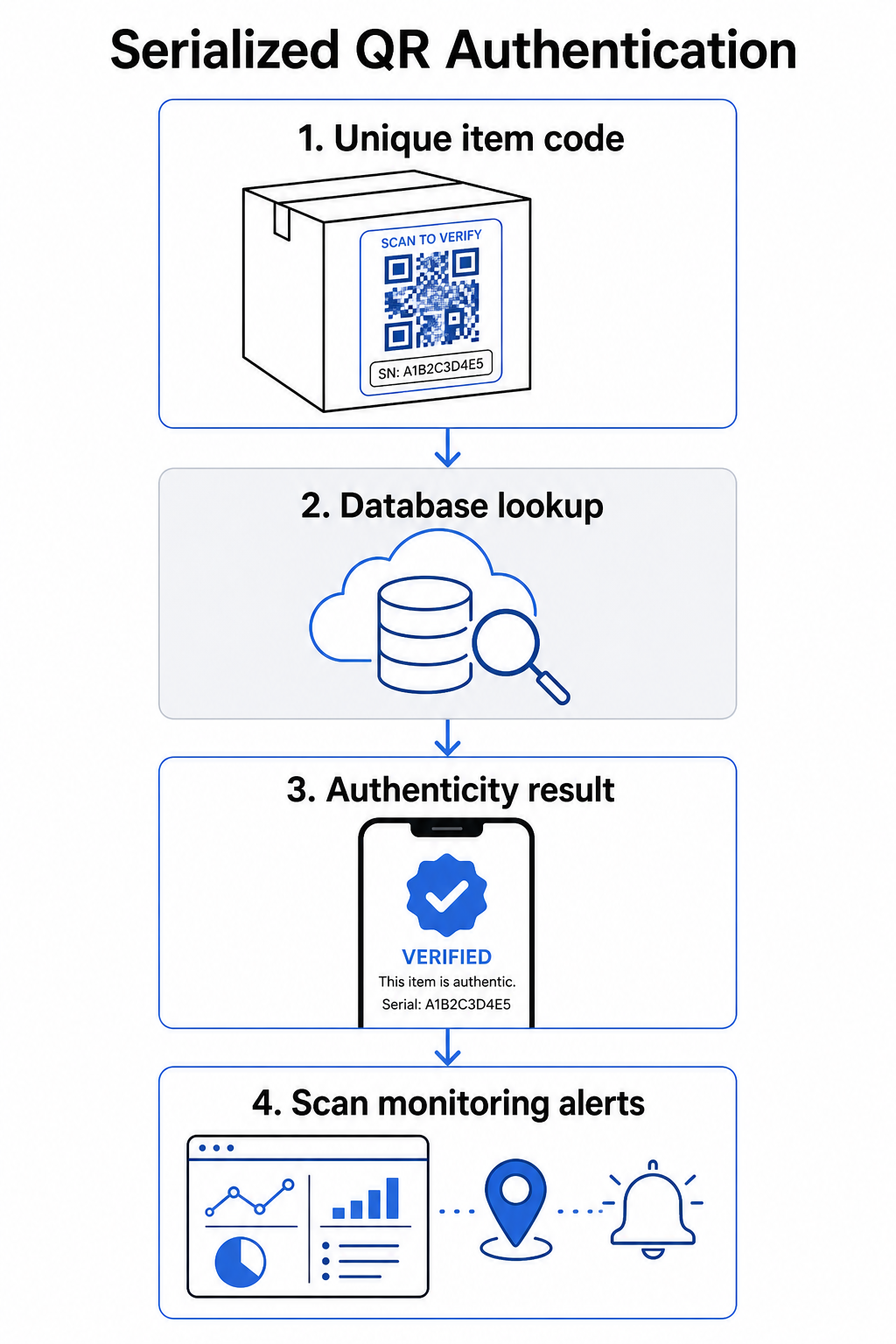
Išsamus autentiškumo patvirtinimo darbo procesas paprastai apima šiuos veiksmus:
- Sukurkite unikalų identifikatorių kiekvienam elementui – tai gali būti serijos numeris, partijos nuoroda, gamybos laiko žyma arba derinys, užkoduotas kaip GS1 skaitmeninės nuorodos URI, kuris apima GS1 taikymo identifikatorius GTIN, partijos/partijos numeriui ir serijos numeriui
- Susiekite tą identifikatorių su skaitmeniniu produkto įrašu – saugomoje duomenų bazėje, kurią valdo jūsų sistema
- Sugeneruokite ir priskirkite unikalų QR kodą kuris nukreipia į patvirtinimo galinį tašką, turintį nepermatomą identifikatorių arba žetoną, o ne pačius neapdorotus duomenis
- Pritaikykite QR kodą fiziniam produktui – didesnės vertės prekėms, padėjus jį po nutrinamuoju skydeliu arba ant pažeidimo požymius rodančio antspaudo, atgrasoma nuo etiketės perkėlimo ir pakartotinio naudojimo
- Užregistruokite kiekvieną nuskaitymą kaip įvykį – fiksuojant laiko žymą, vietą ir įrenginio informaciją, kad būtų palaikomas nuolatinis stebėjimas
- Pateikite patvirtinimo puslapį kuriame rodoma produkto informacija ir aiškus autentiškumo rezultatas, kad klientai iš karto žinotų, ką jie mato
Pats patvirtinimo puslapis yra svarbus. Gerai suprojektuotas puslapis rodo produkto pavadinimą, partijos ar garantijos detales ir tiesioginį autentiškumo patvirtinimą. Kai kurios sistemos taip pat rodo, kiek kartų buvo nuskaitytas konkretus kodas – kodas, sukaupęs daug daugiau nuskaitymų nei tikėtasi, tampa įtarimo sukėlėju klastotėms, naudojant dubliuotus kodus.
Valdykite ir stebėkite kiekvieną produkto kodą Pagelooto Dinaminis QR kodo generatorius leidžia jums kurti atsekamus, redaguojamus QR kodus ir pasiekti visą analizės prietaisų skydelį, rodantį, kada ir kur įvyksta kiekvienas nuskaitymas – suteikiant jums stebėjimo sluoksnį, kurio reikia jūsų autentiškumo patvirtinimo sistemai.
Dinaminių QR kodų vaidmuo autentiškumo patvirtinime
Dinaminiai QR kodai yra praktinis pagrindas produkto autentifikavimui, nes jie atskiria atspausdintą kodą nuo paskirties vietos, į kurią jis nukreipia. Fizinis kodas ant produkto niekada nesikeičia, tačiau paskirties vieta ir logika už jo gali būti atnaujinta bet kuriuo metu be pakartotinio spausdinimo.
Tai svarbu autentifikavimui keliais konkrečiais būdais:
- Galite atnaujinti patvirtinimo puslapius jei jūsų užpakalinė infrastruktūra pasikeičia, neatšaukiant ar neperspausdinant paženklintų produktų
- Galite išjungti kodą jei partija atšaukiama arba jei aptinkama apgaulinga veikla aplink konkretų identifikatorių
- Galite nukreipti nuskaitymus į skirtingas patirtis, atsižvelgiant į nuskaitymų skaičių, geografiją ar laiką – pavyzdžiui, nukreipiant pirmąjį nuskaitymą į visą patvirtinimo puslapį ir vėlesnius nuskaitymus į įspėjimą
Pageloot platforma palaiko QR kodo paskirties vietų redagavimą po spausdinimo ir teikia nuskaitymo analizę, įskaitant vietą, įrenginio tipą ir nuskaitymo laiką – visa tai tiesiogiai patenka į stebėjimo darbo eigą.
Prekės ženklams, valdantiems didelius produktų kiekius, Pageloot palaiko masinį QR kodų generavimą per CSV įkėlimus, didinant iki 100 000 kodų, o tai daro serijinį kodų generavimą praktišku net gamybos mastu. Tiekėjai ir perpardavėjai gali tyrinėti specializuotus įrankius per Pageloot tiekėjų ir perpardavėjų sprendimai.
QR kodų derinimas su fiziniais saugumo elementais
Saugumo tyrėjai ir prekės ženklo apsaugos specialistai nuolat pažymi, kad vienas QR kodas negali užkirsti kelio klastojimui. Efektyvi apsauga derina QR sluoksnį su fiziniais ar struktūriniais elementais, kuriuos sunkiau atkartoti.
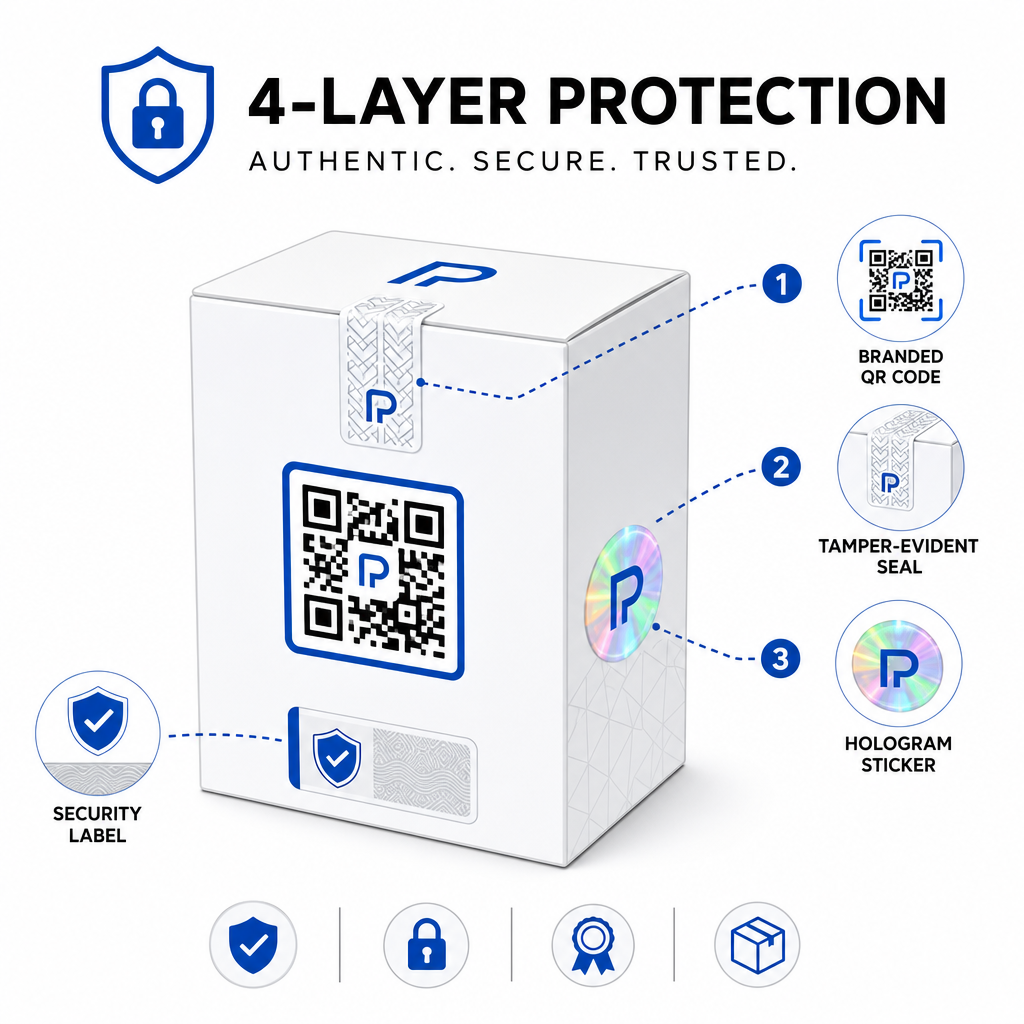
Dažni metodai apima:
- Apsaugos nuo klastojimo plombos: QR kodo uždėjimas ant plombos, kuri rodo matomą pažeidimą, jei pašalinama
- Nutrinami skydeliai: QR kodo paslėpimas po danga, kurią pirkėjas pašalina pirmojo naudojimo metu, todėl klastotojams sunkiau nufotografuoti kodą prieš pirkimą
- Holografiniai viršutiniai laminatai arba apsauginiai rašalai: fizinio sluoksnio pridėjimas, kuris matomai degraduoja kopijuojant
- Saugūs kopijavimui atsparūs raštai: kai kurios sistemos įterpia mikroskopines apsaugos nuo kopijavimo tekstūras pačiame QR kodo dizaine, dėl ko raštas degraduoja arba išnyksta nufotografavus ir perspausdinus
Kombinuota strategija yra svarbi, nes ji perkelia autentifikavimą nuo vieno gedimo taško. Klastotojas, galintis dubliuoti QR kodą, negali lengvai atkartoti apsaugos nuo klastojimo plombos, hologramos ar kopijavimui jautraus pagrindo tuo pačiu metu.
Norėdami plačiau pažvelgti į tai, kaip QR kodai sąveikauja su fizine produkto pakuote, vadovas apie QR kodus ant produktų pakuočių apima išdėstymą ir dizainą išsamiai.
Serverio pusės patvirtinimas ir nuskaitymo stebėjimas
Svarbiausias saugumo sluoksnis QR autentifikavimo sistemoje yra tas, kurio klientai niekada nemato: serverio pusės patvirtinimas.
Kai klientas nuskaito autentifikuotą QR kodą, sistema turėtų:
- Patvirtinti identifikatorių su jūsų produktų duomenų baze prieš pateikiant bet kokį rezultatą
- Užregistruoti nuskaitymo įvykį su laiko žyma, GPS koordinatėmis arba IP pagrindu nustatyta vieta ir įrenginio piršto atspaudu
- Patikrinti anomalijas pvz., tas pats kodas nuskaitomas iš dviejų geografiškai nutolusių vietų per kelias minutes, arba vienas serijinis kodas kaupia nuskaitymus, viršijančius bet kokį tikėtiną teisėtą naudojimą
- Naudoti nepermatomus žetonus o ne neapdorotus identifikatorius QR turinyje, kad net jei kas nors tiesiogiai perskaitys QR duomenis, jie negalės sukurti galiojančios klastotės neturėdami prieigos prie jūsų serverio logikos
Šis metodas – kai QR kodas turi tik nepermatomą nuorodą ir visas prasmingas patvirtinimas vyksta serverio pusėje – yra standartas, rekomenduojamas saugumo specialistų autentifikavimo naudojimo atvejams.
Norėdami giliau pasinerti techniškai į tai, kaip šifravimas gali toliau apsaugoti QR pagrindu veikiančias autentifikavimo sistemas, įrašas apie šifruotus QR kodus autentifikavimo platformoms apima šifravimo metodus ir atitikties aspektus išsamiai.
Autentifikavimo QR kodų dizainas ir išdėstymas
Autentifikavimo QR kodas, kurio klientai negali nuskaityti, paneigia savo paskirtį. Standartinė geriausia spausdinimo kokybės ir išdėstymo praktika vienodai taikoma čia:
- Mažiausias dydis: laikykitės 1 cm 10 cm nuskaitymo atstumo taisyklės, kad būtų užtikrintas patikimas nuskaitymas visuose įrenginiuose
- Didelis kontrastas: naudokite tamsius modulius šviesiame fone ir venkite blizgių ar atspindinčių paviršių, kurie sukelia akinimą
- Tylioji zona: palikite aiškų bent keturių modulių kraštą aplink kodą, be teksto ar dizaino elementų
- Spausdinimo raiška: naudokite vektorinius formatus arba PNG mažiausiai 300 DPI spausdinimo programoms
- Plokščias išdėstymas: venkite išlenktų paviršių, siūlių ar raukšlių, kurie iškraipo kodo geometriją
- Aiškus raginimas imtis veiksmų: įtraukite trumpą instrukciją prie kodo, pvz., “Nuskaitykite, kad patvirtintumėte autentiškumą,” kad klientai suprastų, kam skirtas kodas
Išsamesnių nurodymų dėl konkretaus pakuotės išdėstymo, išsamų QR kodų vadovą produkto etiketėms apima dydžio, kontrasto ir padėties nustatymą išsamiai.
Firminiai QR kodai su įterptu logotipu taip pat iš pirmo žvilgsnio signalizuoja klientams apie teisėtumą. QR kodo generatorius su logotipu leidžia įtraukti prekės ženklo tapatybę tiesiai į kodo dizainą, nepakenkiant nuskaitymo galimybėms.
Kam skirtas šis metodas
QR kodais pagrįstas produktų autentiškumo patvirtinimas yra aktualus įvairiose produktų kategorijose ir pramonės šakose:
| Produkto tipas | Autentiškumo patvirtinimo poreikis |
|---|---|
| Buitinė elektronika ir priedai | Didelis padirbinių skaičius; garantijos patvirtinimas |
| Farmacijos ir sveikatos produktai | Vartotojų sauga; reguliavimo atitiktis |
| Prabangos prekės ir drabužiai | Prekės ženklo apsauga; pilkosios rinkos |
| Pramoniniai komponentai ir dalys | Saugos sertifikavimas; tiekimo grandinės vientisumas |
| Maistas ir gėrimai | Partijos atsekamumas; importo patikrinimas |
Prekės ženklai, parduodantys per trečiųjų šalių mažmenininkus ar el. prekybos platformas, yra ypač pažeidžiami, nes jie turi mažiau tiesioginės kontrolės, kas pasiekia galutinį klientą. Serijinė autentifikacija suteikia jiems tiesioginį kanalą patikrinti bet kurį vienetą, nepriklausomai nuo to, kur jis buvo įsigytas.
Pagelooto produktų pramonės sprendimai yra skirti prekės ženklams, naudojantiems QR kodus ant pakuočių ir etikečių, siekiant sujungti fizinius produktus su skaitmenine patirtimi, įskaitant patvirtinimo darbo eigas.
Kurkite serijinius kodus dideliu mastu Reikia sugeneruoti unikalius QR kodus kiekvienam gamybos partijos vienetui? Pageloot QR kodo generatorius palaiko masinį kūrimą su centralizuota prietaisų skydeliu, leidžiančiu sekti, atnaujinti ir valdyti kodus visame jūsų kataloge.
Testavimas prieš diegiant
Prieš taikant autentifikavimo QR kodus gamybos partijai, kruopštus testavimas apsaugo nuo gedimų, kurie pakenktų klientų pasitikėjimui svarbiausiu momentu. Pagrindiniai žingsniai apima:
- Nuskaitykite atspausdintą kodą keliais įrenginiais ir vietinėmis kameros programėlėmis skirtingomis apšvietimo sąlygomis
- Patikrinkite, ar nuskaitymo metu gautas identifikatorius teisingai susieja su tinkamu produkto įrašu jūsų duomenų bazėje
- Patvirtinkite, kad patvirtinimo puslapis teisingai įkeliamas mobiliajame telefone ir aiškiai rodo autentiškumo rezultatą
- Išbandykite anomalijų aptikimo logiką, pakartotinai nuskaitydami tą patį kodą ir patvirtindami, kad jūsų stebėjimo sistema jį tinkamai pažymi
- Patikrinkite, ar sąveika su fiziniu saugumo elementu – pvz., nutrinant nulaužiamąjį skydelį ar sulaužant plombą – duoda laukiamą rezultatą jūsų sistemoje
Norėdami struktūrizuoto požiūrio į šį procesą, vadovas apie QR kodo autentifikavimo geriausios praktikos testavimą išsamiai aprašo visą testavimo darbo eigą.
***
Autentifikavimo sistemos, kuri plečiasi, kūrimas
QR kodu pagrįstas produkto autentifikavimas nėra vienkartinis nustatymas. Jam reikalingas nuolatinis valdymas: nuskaitymo duomenų stebėjimas, anomalijų tyrimas, patvirtinimo paskirties vietų atnaujinimas, kai produktai atšaukiami, ir sistemos plėtimas augant jūsų produktų linijai.
Centralizuota QR valdymo platforma daro tai operatyviai realistiška. Pageloot prietaisų skydelis leidžia komandoms organizuoti kodus pagal kampaniją ar produktų kategoriją naudojant aplankus, peržiūrėti apibendrintą nuskaitymo našumą dideliuose kodų rinkiniuose ir atnaujinti paskirties vietas be pakartotinio spausdinimo – tai yra galimybės, kurios yra svarbios, kai valdote serijinius kodus dešimtyse tūkstančių vienetų.
QR kodas ant jūsų produkto yra tai, ką mato klientas. Sistema už jo yra tai, kas iš tikrųjų juos – ir jūsų prekės ženklą – apsaugo. Kurkite abu vienodai kruopščiai, ir serijinė QR autentifikacija taps viena praktiškiausių ir labiausiai plečiamų priemonių, skirtų kovai su klastotėmis. Išsiaiškinkite, kaip įmonės įvairiose srityse taiko QR kodų diegimą adresu Pageloot pramonės sprendimų centras.
Pradėkite saugoti savo produktus Kurkite sekamus, redaguojamus QR kodus ir stebėkite kiekvieną nuskaitymą iš vieno prietaisų skydelio. Išbandykite Dinaminis QR kodo generatorius nemokamai 14 dienų – nereikia kredito kortelės.
Dažniausiai užduodami klausimai
Ne. Paprastas QR kodas gali būti nufotografuotas ir perspausdintas ant padirbtų produktų, o klonuotas kodas nuskaitys identiškai originalui. Efektyviam autentifikavimui reikalingi serijiniai unikalūs kodai kartu su serverio pusės patvirtinimu, kuris patvirtina kiekvieną nuskaitymą pagal patikimą produkto įrašą, plius anomalijų, tokių kaip netikėti nuskaitymų skaičiai ar geografiniai neatitikimai, stebėjimas.
Serializuotas QR kodas yra unikalus vienam fiziniam daiktui, ne tik produkto tipui ar SKU. Nuskenavus, jis identifikuoja tą konkretų vienetą ir patikrina jį pagal duomenų bazės įrašą. Įprastas produkto QR kodas paprastai susieja visus to paties produkto vienetus su tuo pačiu URL, o tai reiškia, kad klastotojas, kuris klonuoja kodą, gali jį pritaikyti padirbtam produktui ir priversti jį elgtis lygiai taip pat kaip originalas.
Pageloot palaiko masinį QR kodų generavimą per CSV įkėlimą, mastelį didinant iki 100 000 kodų, padarant serijinę autentifikaciją praktišką net prie didelių gamybos apimčių. Kodai gali būti organizuojami pagal produktų liniją arba partiją naudojant aplankus, ir visi nuskaitymo duomenys yra centralizuotai sekami prietaisų skydelyje.