Eljutnak-e hamisított verziói termékének a vásárlókhoz? Az elveszett bevételen túl, a hamis áruk károsítják a márka bizalmát és veszélyeztethetik a vásárlókat. Ez az oldal elmagyarázza, hogyan hoznak létre a QR-kódok, sorozatszámozott egyedi azonosítókkal és a megfelelő infrastruktúrával megvalósítva, egy praktikus és skálázható termékazonosító rendszert.
Miért érdemes a hamisítást problémaként szisztematikusan megoldani
A hamisított áruk kereskedelmének mértéke jelentős. Az OECD és az EUIPO becslése szerint a hamisított áruk 2021-ben körülbelül 467 milliárd dollárt tettek ki a globális kereskedelemben, ami a teljes globális import 2,3%-át jelenti. Az Egyesült Államok Szabadalmi és Védjegyhivatala jelentése szerint a hamisítás és a kalózkodás évente több mint 200 milliárd dollárba kerül az amerikai vállalkozásoknak, és több mint 750 000 munkahely elvesztéséhez járul hozzá.
A márkatulajdonosok számára a közvetlen pénzügyi veszteségeket súlyosbítja az a kár, amelyet nehezebb számszerűsíteni: egy vásárló, aki megveszi termékének hamisított változatát és rossz tapasztalata van, az Ön márkáját hibáztatja, nem a hamisítót.
Egy QR-alapú hitelesítési rendszer ezt az elem szintjén kezeli. Ahelyett, hogy egyszerűen ellenőrizné, hogy egy terméktípus eredeti-e, azt ellenőrzi, hogy egy adott, egyedi egység eredeti-e – és adatokat szolgáltat Önnek, hogy észlelje, ha valami rosszul megy.
Miért nem elég egy szabványos QR-kód önmagában
Mielőtt megvizsgálnánk, hogyan működik a QR-hitelesítés, fontos megérteni egy alapvető korlátot, amelyet sok márka figyelmen kívül hagy.
Egy általános QR-kód könnyen másolható. Egy hamisító nagy felbontásban lefényképezheti a kódját, újra kinyomtathatja több ezer hamis termékre, és ezek a klónozott kódok az eredetivel azonos módon fognak beolvasódni és viselkedni. Ha a QR-kódja egyszerűen egy termékoldalra vagy egy statikus ellenőrző URL-re mutat, az nem nyújt valódi védelmet.
A nyomon követhetőségre vagy termékinformációra használt hagyományos statikus QR-kódok nem nyújtanak belső hitelesítést. Ha maga a termék hamis, a hivatkozott oldal továbbra is eredetinek tűnik, és önmagában nem tudja megerősíteni az eredetiséget.
A hatékony QR-hitelesítéshez három dolog együttes működése szükséges:
- Sorozatszámozás: minden egyes tétel egyedi kódot kap, nem csak minden SKU vagy tétel
- Szerveroldali ellenőrzés: minden beolvasás egy megbízható rekord ellenőrzése alapján történik, nem csak egy cél URL alapján
- Felügyeleti logika: az olyan anomáliák, mint a különböző helyekről származó ismételt beolvasások, vagy a várható mennyiséget meghaladó beolvasási számok, riasztásokat váltanak ki
A QR-kód az ügyféloldali felület. A biztonság a mögötte lévő infrastruktúrában rejlik.
Hogyan működik a sorozatszámozott QR-hitelesítés
A sorozatszámozott QR-kódok egyedi kódot rendelnek minden egyes termékegységhez. Amikor egy vásárló beolvassa ezt a kódot, a rendszer nem csak egy oldalt tölt be – hanem egy termékrekord ellenőrzését végzi el, hogy megerősítse, ez a specifikus tétel, ezzel a specifikus azonosítóval, ismert és érvényes.
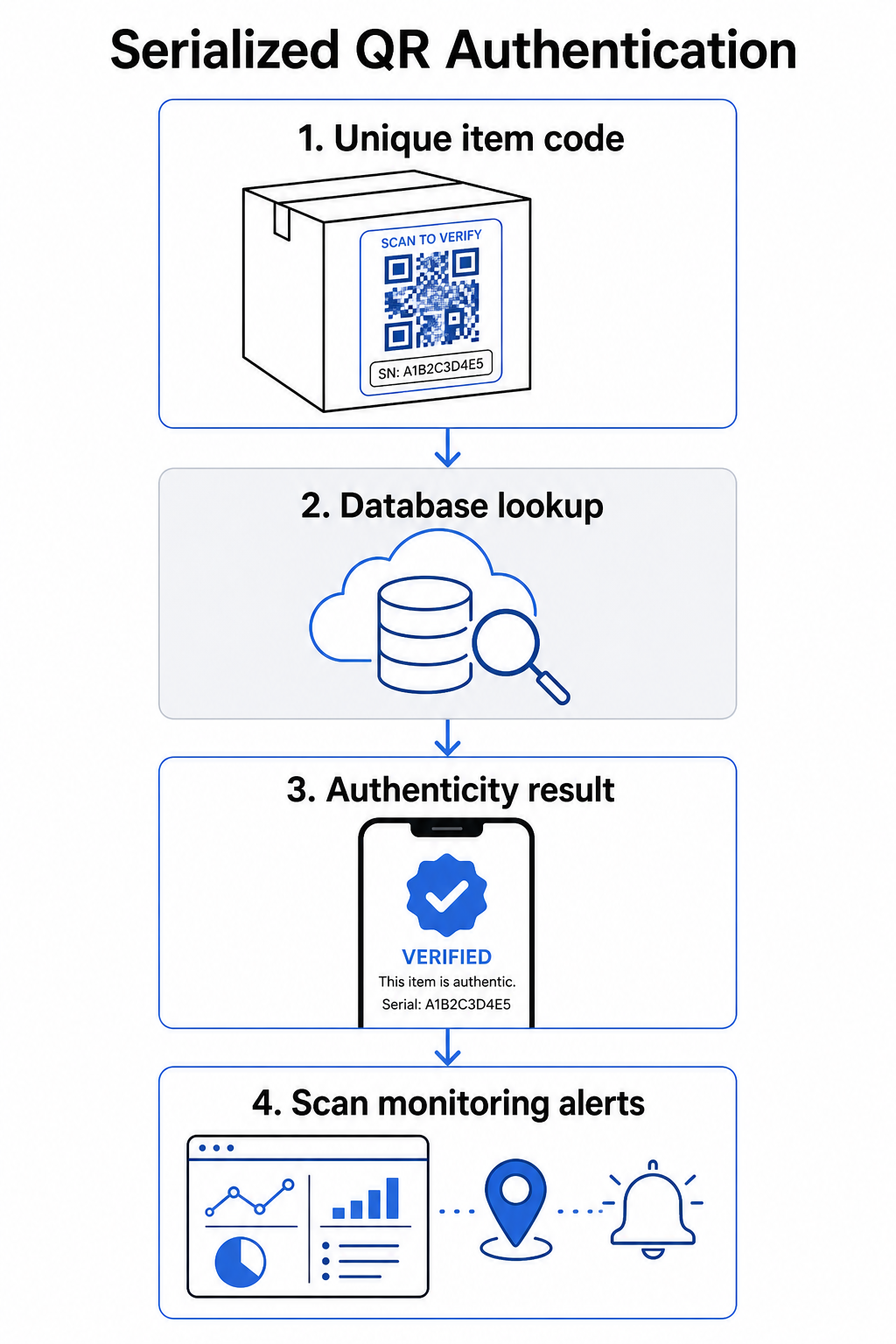
Egy teljes hitelesítési munkafolyamat jellemzően a következő lépéseket tartalmazza:
- Hozzon létre egyedi azonosítót minden tételhez – ez lehet sorozatszám, tételszám, gyártási időbélyeg, vagy egy kombináció, amely GS1 Digital Link URI-ként van kódolva, és tartalmazza a GS1 alkalmazásazonosítókat a GTIN-hez, a tétel/lot számhoz és a sorozatszámhoz
- Kapcsolja össze ezt az azonosítót egy digitális termékrekorddal – egy biztonságos adatbázisban tárolva, amelyet az Ön rendszere vezérel
- Generáljon és rendeljen hozzá egy egyedi QR-kódot amely egy ellenőrzési végpontra mutat, átláthatatlan azonosítót vagy tokent hordozva, a nyers adatok helyett
- Alkalmazza a QR-kódot a fizikai terméken – magasabb értékű tételeknél, karcolható panel alá helyezve vagy egy manipulációbiztos pecsétre, megakadályozza a címke átvitelét és újrafelhasználását
- Naplózzon minden beolvasást eseményként – rögzítve az időbélyeget, helyet és eszközinformációkat a folyamatos felügyelet támogatására
- Szolgáltasson egy ellenőrző oldalt amely megjeleníti a termék részleteit és egyértelmű eredetiség-eredményt, hogy a vásárlók azonnal tudják, mit látnak
Maga az ellenőrző oldal is számít. Egy jól megtervezett oldal megjeleníti a termék nevét, a tétel- vagy garanciális részleteket, és egy egyszerű eredetiség-megerősítést. Néhány rendszer azt is megjeleníti, hányszor olvastak be egy adott kódot – egy kód, amely sokkal több beolvasást gyűjt, mint a várt, gyanút kelt a duplikált kódokat használó hamisítványok esetében.
Kezelje és kövesse nyomon minden termékkódot A Pageloot Dinamikus QR-kód generátor lehetővé teszi nyomon követhető, szerkeszthető QR-kódok létrehozását és hozzáférést biztosít egy teljes analitikai irányítópulthoz, amely megmutatja, mikor és hol történik minden beolvasás – biztosítva a hitelesítési rendszeréhez szükséges felügyeleti réteget.
A dinamikus QR-kódok szerepe a hitelesítésben
Dinamikus QR-kódok gyakorlati alapot jelentenek a termék hitelesítéséhez, mert elválasztják a nyomtatott kódot attól a céltól, amire mutat. A terméken lévő fizikai kód soha nem változik, de a cél és a mögötte lévő logika bármikor frissíthető újranyomtatás nélkül.
Ez több konkrét módon is fontos a hitelesítés szempontjából:
- Frissítheti az ellenőrző oldalakat ha a háttérinfrastruktúrája megváltozik, anélkül, hogy visszahívná vagy újranyomtatná a címkézett termékeket
- Letilthat egy kódot ha egy tételt visszahívnak, vagy ha csalárd tevékenységet észlelnek egy adott azonosító körül
- Átirányíthatja a szkenneléseket különböző élményekre a szkennelések számától, földrajzi helyétől vagy idejétől függően – például az első szkennelést egy teljes ellenőrző oldalra irányítva, a későbbi szkenneléseket pedig egy figyelmeztető értesítésre
A Pageloot platformja támogatja a QR-kód céljainak szerkesztését nyomtatás után, és szkennelési analitikát biztosít, beleértve a helyet, az eszköz típusát és a szkennelés időzítését – melyek mindegyike közvetlenül egy felügyeleti munkafolyamatba táplálkozik.
Nagy termékmennyiségeket kezelő márkák számára a Pageloot támogatja a tömeges QR-kód generálást CSV feltöltésekkel, akár 100 000 kódra skálázva, ami a szerializált kódgenerálást praktikussá teszi még gyártási méretekben is. A beszállítók és viszonteladók dedikált eszközöket fedezhetnek fel a Pageloot beszállítói és viszonteladói megoldásai.
QR-kódok kombinálása fizikai biztonsági elemekkel
Biztonsági kutatók és márkavédelmi szakemberek folyamatosan megjegyzik, hogy egy QR-kód önmagában nem akadályozhatja meg a hamisítást. A hatékony védelem kombinálja a QR-réteget fizikai vagy szerkezeti elemekkel, amelyeket nehezebb lemásolni.
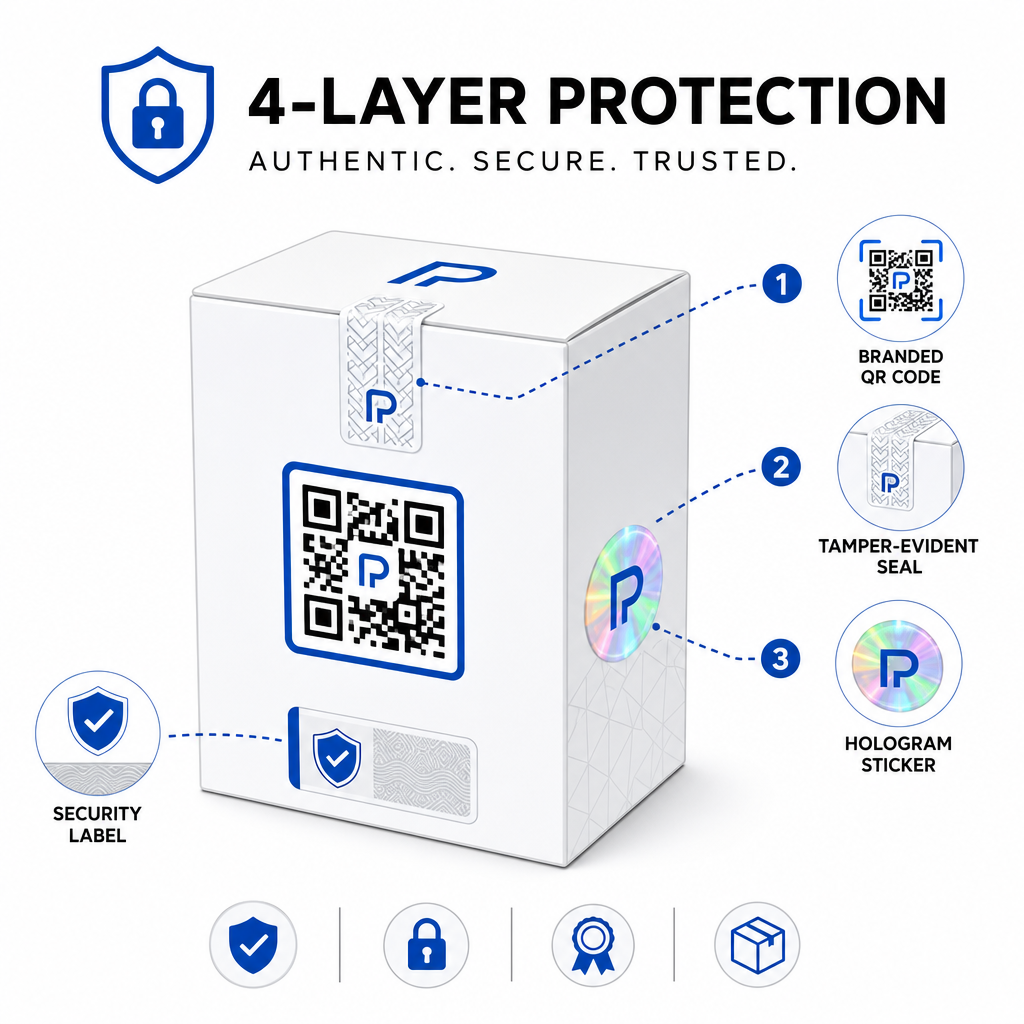
Gyakori megközelítések közé tartozik:
- Szabotázsjelző pecsétek: a QR-kód elhelyezése egy pecséten keresztül, amely látható sérülést mutat, ha eltávolítják
- Kaparással eltávolítható panelek: a QR-kód elrejtése egy bevonat alatt, amit a vevő az első használatkor eltávolít, ezáltal megnehezítve a kód lefényképezését a hamisítók számára vásárlás előtt
- Holografikus felülrétegek vagy biztonsági tinták: egy fizikai réteg hozzáadása, amely láthatóan romlik másoláskor
- Biztonságos másolásálló minták: egyes rendszerek mikroszkopikus másolásgátló textúrákat ágyaznak magába a QR-kód tervezésébe, ami a minta romlását vagy eltűnését okozza fényképezés és újranyomtatás esetén
A kombinációs stratégia fontos, mert elmozdítja a hitelesítést egyetlen hibaponttól. Egy hamisító, aki képes lemásolni a QR-kódot, nem tudja könnyen lemásolni a szabotázsjelző pecsétet, hologramot vagy másolásérzékeny hordozót egyidejűleg.
A szélesebb körű áttekintéshez arról, hogy hogyan lépnek kölcsönhatásba a QR-kódok a fizikai termékcsomagolással, az útmutató a QR-kódokat a termékcsomagoláson részletesen tárgyalja az elhelyezést és a tervezést.
Szerveroldali ellenőrzés és szkennelésfigyelés
A legfontosabb biztonsági réteg egy QR-hitelesítési rendszerben az, amit az ügyfelek soha nem látnak: szerveroldali érvényesítés.
Amikor egy ügyfél beolvas egy hitelesített QR-kódot, a rendszernek a következőket kell tennie:
- Érvényesítse az azonosítót a termékadatbázisa ellen, mielőtt bármilyen eredményt szolgáltatna
- Naplózza a szkennelési eseményt időbélyeggel, GPS koordinátákkal vagy IP-alapú helyzettel, és eszköz ujjlenyomattal
- Ellenőrizze az anomáliákat például ugyanaz a kód beolvasása két földrajzilag távoli helyről percek alatt, vagy egyetlen szerializált kód túl sok szkennelést gyűjt minden ésszerű, jogszerű felhasználáson túl
- Használjon átlátszatlan tokeneket a nyers azonosítók helyett a QR-tartalomban, hogy még ha valaki közvetlenül olvassa is a QR-adatokat, ne tudjon érvényes hamisítványt létrehozni a szerverlogikájához való hozzáférés nélkül
Ez a megközelítés – ahol a QR-kód csak egy átlátszatlan hivatkozást tartalmaz, és minden értelmes ellenőrzés szerveroldalon történik – az a szabvány, amelyet a biztonsági szakemberek ajánlanak hitelesítési felhasználási esetekre.
A technikai mélyebb betekintéshez arról, hogy hogyan védheti tovább a titkosítás a QR-alapú hitelesítési rendszereket, a bejegyzés a titkosított QR-kódok hitelesítési platformokhoz részletesen tárgyalja a titkosítási módszereket és a megfelelőségi szempontokat.
Tervezés és elhelyezés hitelesítési QR-kódokhoz
Egy hitelesítési QR-kód, amit az ügyfelek nem tudnak beolvasni, megfosztja magát a céljától. A nyomtatási minőségre és elhelyezésre vonatkozó szabványos legjobb gyakorlatok itt is egyaránt érvényesek:
- Minimális méret: kövesse az 1 cm / 10 cm szkennelési távolság ökölszabályát az eszközök közötti megbízható szkennelés biztosításához
- Magas kontraszt: használjon sötét modulokat világos háttéren, és kerülje a fényes vagy tükröződő felületeket, amelyek tükröződést okoznak
- Csendes zóna: hagyjon tiszta szegélyt legalább négy modul szélességben a kód körül, szöveg- vagy designelemektől mentesen
- Nyomtatási felbontás: használjon vektoros formátumokat vagy PNG-t minimum 300 DPI-vel nyomtatási alkalmazásokhoz
- Sík elhelyezés: kerülje az ívelt felületeket, varratokat vagy redőket, amelyek torzítják a kód geometriáját
- Egyértelmű felhívás a cselekvésre: mellékeljen egy rövid utasítást a kód közelében, például “Szkennelje be az eredetiség ellenőrzéséhez”, hogy az ügyfelek megértsék, mire való a kód
A csomagolás-specifikus elhelyezésre vonatkozó részletesebb útmutatásért a végső útmutató a termékcímkék QR-kódjaihoz méretezést, kontrasztot és pozicionálást tárgyalja mélységében.
A beágyazott logóval ellátott márkás QR-kódok egy pillantásra is jeleznek a vásárlóknak a legitimitásról. A QR kód generálás logóval lehetővé teszi, hogy a márkaidentitást közvetlenül beépítse a kódtervezésbe anélkül, hogy a szkennelhetőséget veszélyeztetné.
Kinek készült ez a megközelítés
A QR-alapú termékazonosítás számos termékkategóriában és iparágban releváns:
| Terméktípus | Hitelesítési igény |
|---|---|
| Fogyasztói elektronika és kiegészítők | Magas hamisítási arány; garancia érvényesítése |
| Gyógyszerek és egészségügyi termékek | Fogyasztói biztonság; szabályozási megfelelőség |
| Luxuscikkek és ruházat | Márkavédelem; szürke piac megelőzése |
| Ipari alkatrészek és részegységek | Biztonsági tanúsítás; ellátási lánc integritása |
| Élelmiszer és ital | Tétel nyomon követhetősége; import ellenőrzés |
A harmadik féltől származó kiskereskedőkön vagy e-kereskedelmi platformokon keresztül értékesítő márkák különösen sebezhetőek, mivel kevesebb közvetlen ellenőrzésük van afölött, hogy mi jut el a végfelhasználóhoz. A sorozatszámozott hitelesítés közvetlen csatornát biztosít számukra bármely egység ellenőrzésére, függetlenül attól, hogy hol vásárolták.
A Pageloot termék iparági megoldások olyan márkák számára készültek, amelyek QR-kódokat használnak a csomagoláson és címkéken a fizikai termékek digitális élményekkel való összekapcsolására, beleértve az ellenőrzési munkafolyamatokat is.
Sorozatszámozott kódok létrehozása nagy mennyiségben Egyedi QR-kódokat kell generálnia a gyártási sorozat minden egyes egységéhez? A Pageloot QR Kód Generátor támogatja a tömeges létrehozást egy központosított irányítópulttal a kódok nyomon követésére, frissítésére és kezelésére a teljes katalógusában.
Tesztelés telepítés előtt
Mielőtt hitelesítési QR-kódokat alkalmazna egy gyártási sorozaton, alapos tesztelésre van szükség, hogy megelőzze azokat a hibákat, amelyek aláássák az ügyfél bizalmát a legfontosabb pillanatban. A kulcsfontosságú lépések a következők:
- Szkennelje be a nyomtatott kódot több eszközzel és natív kameraalkalmazással, különböző fényviszonyok között
- Ellenőrizze, hogy a szkennelésben szereplő azonosító helyesen illeszkedik-e az adatbázisában lévő megfelelő termékrekordhoz
- Győződjön meg arról, hogy az ellenőrző oldal helyesen töltődik be mobilon, és egyértelműen megjeleníti a hitelességi eredményt
- Tesztelje az anomáliaészlelési logikát ugyanazon kód ismételt beolvasásával, és győződjön meg arról, hogy a felügyeleti rendszere megfelelően jelzi azt
- Ellenőrizze, hogy a fizikai biztonsági elemmel való interakció – például egy kaparós panel eltávolítása vagy egy pecsét feltörése – a várt eredményt produkálja-e a rendszerében
A folyamat strukturált megközelítéséhez az útmutató a QR-kód hitelesítési legjobb gyakorlatok tesztelése részletesen tárgyalja a teljes tesztelési munkafolyamatot.
***
Skálázható hitelesítési rendszer építése
A QR-alapú termékazonosítás nem egyszeri beállítás. Folyamatos kezelést igényel: szkennelési adatok figyelése, anomáliák kivizsgálása, ellenőrzési célhelyek frissítése termékvisszahívások esetén, és a rendszer bővítése a termékpaletta növekedésével.
Egy központosított QR-kezelő platform teszi ezt működésileg reálissá. A Pageloot irányítópultja lehetővé teszi a csapatok számára, hogy mappák segítségével kampány vagy termékkategória szerint rendezzék a kódokat, megtekintsék az összesített szkennelési teljesítményt nagy kódkészleteken keresztül, és frissítsék a célhelyeket újranyomtatás nélkül – olyan képességek, amelyek számítanak, ha több tízezer egységre kiterjedő sorozatszámozott kódokat kezel.
A termékén lévő QR-kód az, amit a vásárló lát. A mögötte lévő rendszer az, ami valójában védi őket – és az Ön márkáját. Építse mindkettőt egyenlő gondossággal, és a sorozatszámozott QR-hitelesítés az egyik legpraktikusabb és legskálázhatóbb eszköz lesz a hamisítás megelőzésére. Fedezze fel, hogyan közelítik meg a különböző vertikális piacokon működő vállalkozások a QR-kód implementációt a Pageloot iparági megoldások központjában.
Kezdje el termékei védelmét Hozzon létre nyomon követhető, szerkeszthető QR-kódokat, és figyelje minden szkennelést egyetlen irányítópultról. Próbálja ki a Dinamikus QR-kód generátor ingyenesen 14 napig – hitelkártya nem szükséges.
Gyakori kérdések
Nem. Egy egyszerű QR-kód lefényképezhető és újranyomtatható hamis termékeken, és a klónozott kód az eredetivel azonos módon fog szkennelődni. A hatékony hitelesítés szerializált egyedi kódokat igényel, szerveroldali ellenőrzéssel kombinálva, amely minden szkennelést érvényesít egy megbízható termékrekorddal szemben, plusz az anomáliák felügyeletét, mint például a váratlan szkennelési számok vagy a földrajzi eltérések.
Egy szerializált QR kód egyedi egyetlen fizikai tételhez, nem csupán egy terméktípushoz vagy SKU-hoz. Beolvasáskor az azonosítja azt a konkrét egységet, és összeveti azt egy adatbázis-rekorddal. Egy hagyományos termék QR kód jellemzően összekapcsolja ugyanazon termék összes egységét ugyanahhoz az URL-hez, ami azt jelenti, hogy egy hamisító, aki klónozza a kódot, alkalmazhatja azt egy hamis termékre, és az pontosan úgy viselkedik, mint az eredeti.
A Pageloot támogatja a tömeges QR kód generálást CSV feltöltésen keresztül, akár 100 000 kódra skálázva, így a sorozatos hitelesítés praktikussá válik még nagy gyártási volumenek esetén is. A kódok termékvonal vagy tétel szerint rendezhetők mappák segítségével, és minden szkennelési adat központilag nyomon követhető a műszerfalon.