Når forfalskede versioner af dit produkt ud til kunderne? Ud over tabt omsætning skader falske varer brandtillid og kan udsætte købere for risiko. Denne side forklarer, hvordan QR-koder, implementeret med serialiserede unikke identiteter og den rette infrastruktur, skaber et praktisk og skalerbart produktautentificeringssystem.
Hvorfor forfalskning er et problem, der er værd at løse systematisk
Omfanget af handel med forfalskede varer er betydeligt. OECD og EUIPO anslår, at forfalskede varer udgjorde cirka $467 milliarder i global handel i 2021, hvilket repræsenterer 2,3% af den samlede globale import. En rapport fra U.S. Patent and Trademark Office viste, at forfalskning og piratkopiering koster amerikanske virksomheder mere end $200 milliarder om året og bidrager til tabet af mere end 750.000 arbejdspladser.
For brandejere forstærkes de direkte økonomiske tab af skader, der er sværere at kvantificere: en kunde, der køber en forfalsket version af dit produkt og får en dårlig oplevelse, bebrejder dit brand, ikke forfalskeren.
Et QR-baseret autentificeringssystem adresserer dette på vareniveau. I stedet for blot at verificere, at en produkttype er ægte, verificerer det, at en specifik, individuel enhed er ægte – og giver dig data til at opdage, når noget går galt.
Hvorfor en standard QR-kode alene ikke er nok
Før vi udforsker, hvordan QR-autentificering fungerer, er det vigtigt at forstå en grundlæggende begrænsning, som mange brands overser.
En generisk QR-kode kan let duplikeres. En forfalsker kan fotografere din kode i høj opløsning, genudskrive den på tusindvis af falske produkter, og disse klonede koder vil scanne og opføre sig identisk med originalen. Hvis din QR-kode blot peger på en produktside eller en statisk verifikations-URL, giver den ingen reel beskyttelse.
Traditionelle statiske QR-koder, der bruges til sporbarhed eller produktinformation, giver ingen iboende autentificering. Hvis selve produktet er falsk, vil den linkede side stadig fremstå ægte og kan ikke bekræfte ægthed alene.
Effektiv QR-autentificering kræver tre ting, der arbejder sammen:
- Serialisering: hver enkelt vare får en unik kode, ikke kun hver SKU eller batch
- Server-side verifikation: hver scanning kontrolleres mod en betroet post, ikke kun en destinations-URL
- Overvågningslogik: anomalier som gentagne scanninger fra forskellige steder, eller scanningsantal der overstiger forventede mængder, udløser alarmer
QR-koden er den kundevendte grænseflade. Sikkerheden ligger i infrastrukturen bag den.
Sådan fungerer serialiseret QR-autentificering
Serialiserede QR-koder tildeler en unik kode til hver enkelt produktionsenhed. Når en kunde scanner den kode, indlæser systemet ikke blot en side – det udfører et opslag mod en produktpost for at bekræfte, at denne specifikke vare, med denne specifikke identifikator, er kendt og gyldig.
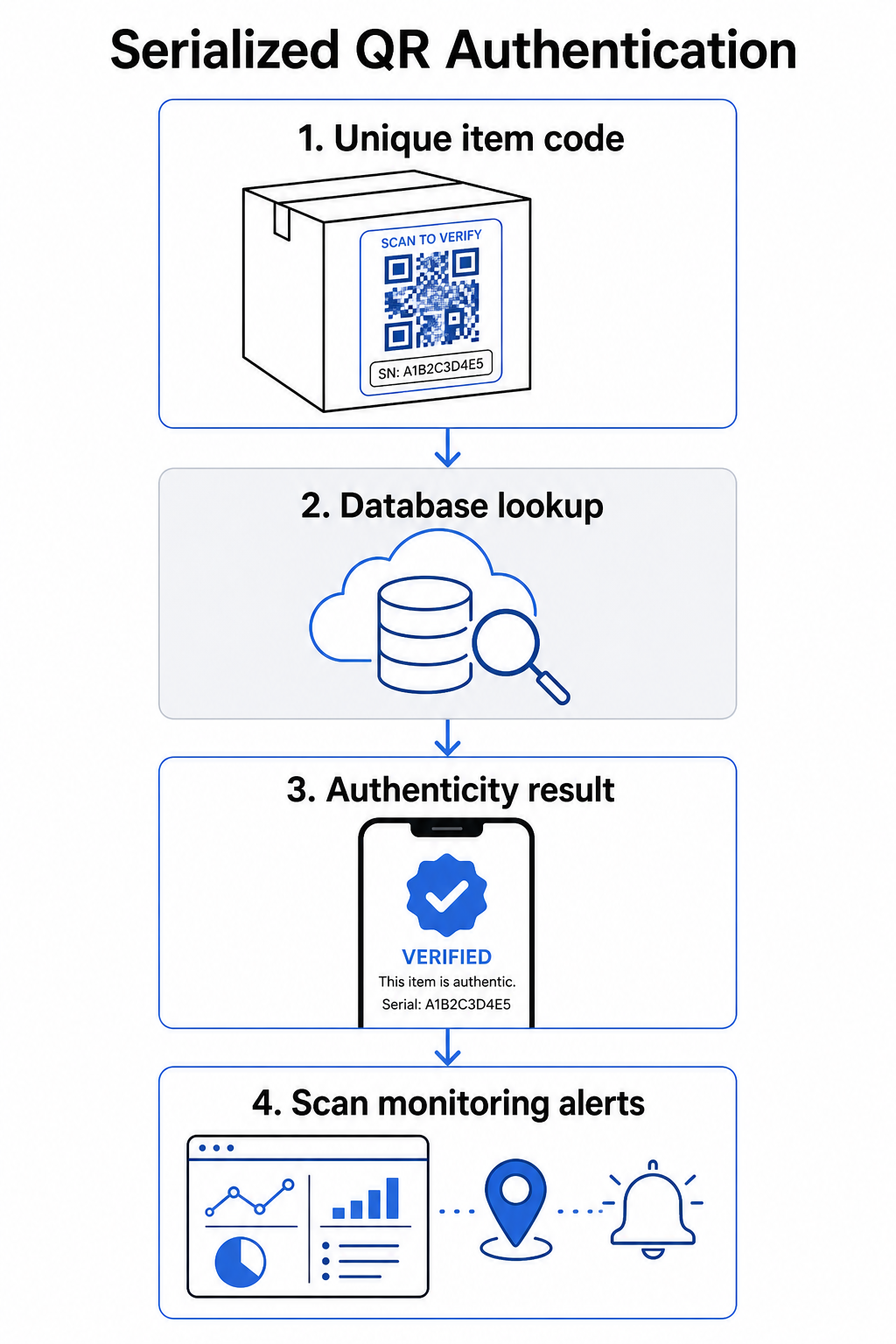
En komplet autentificeringsarbejdsgang omfatter typisk disse trin:
- Opret en unik identifikator for hver vare – dette kan være et serienummer, batchreference, produktionstidsstempel eller en kombination kodet som en GS1 Digital Link URI, som inkluderer GS1 applikationsidentifikatorer for GTIN, batch-/lotnummer og serienummer
- Link denne identifikator til en digital produktpost – gemt i en sikker database, som dit system kontrollerer
- Generer og tildel en unik QR-kode der peger på et verifikations-endpoint, der bærer en uigennemsigtig identifikator eller token, snarere end de rå data selv
- Anvend QR-koden på det fysiske produkt – for varer af højere værdi, afskrækker placering under et skrabelag eller over en manipulationssikker forsegling etiketoverførsel og genbrug
- Log hver scanning som en begivenhed – indsamling af tidsstempel, placering og enhedsinformation for at understøtte løbende overvågning
- Vis en verifikationsside der viser produktdetaljer og et klart autenticitetsresultat, så kunderne straks ved, hvad de ser på
Selve verifikationssiden er vigtig. En veldesignet side viser produktnavn, batch- eller garantidetaljer og en ligetil autenticitetsbekræftelse. Nogle systemer viser også, hvor mange gange en specifik kode er blevet scannet – en kode, der akkumulerer langt flere scanninger end forventet, bliver en mistanketrigger for forfalskninger, der bruger duplikerede koder.
Administrer og spor hver produktkode Pageloots Dynamisk QR-kode generator lader dig oprette sporbare, redigerbare QR-koder og få adgang til et komplet analyse-dashboard, der viser, hvornår og hvor hver scanning finder sted – hvilket giver dig det overvågningslag, dit autentificeringssystem har brug for.
Rollen af dynamiske QR-koder i autentificering
Dynamiske QR-koder er et praktisk grundlag for produktautentificering, fordi de adskiller den trykte kode fra den destination, den peger på. Den fysiske kode på et produkt ændres aldrig, men destinationen og logikken bag den kan opdateres når som helst uden genoptrykning.
Dette er vigtigt for autentificering på flere specifikke måder:
- Du kan opdatere verificeringssider hvis din backend-infrastruktur ændres, uden at tilbagekalde eller genoptrykke mærkede produkter
- Du kan deaktivere en kode hvis et parti tilbagekaldes, eller hvis svigagtig aktivitet opdages omkring en bestemt identifikator
- Du kan omdirigere scanninger til forskellige oplevelser baseret på antal scanninger, geografi eller tid – for eksempel ved at dirigere den første scanning til en fuld verificeringsside og efterfølgende scanninger til en advarsel
Pageloots platform understøtter redigering af QR-kodedestinationer efter udskrivning og leverer scanningsanalyser, herunder placering, enhedstype og scanningstidspunkt – som alle føres direkte ind i en overvågningsarbejdsgang.
For brands, der administrerer store produktmængder, understøtter Pageloot bulk-generering af QR-koder via CSV-uploads, skalering op til 100.000 koder, hvilket gør seriel kodegenerering praktisk selv i produktionsskala. Leverandører og forhandlere kan udforske dedikerede værktøjer gennem Pageloots leverandør- og forhandlerløsninger.
Kombinering af QR-koder med fysiske sikkerhedselementer
Sikkerhedsforskere og specialister i brandbeskyttelse bemærker konsekvent, at en QR-kode alene ikke kan forhindre forfalskning. Effektiv beskyttelse kombinerer QR-laget med fysiske eller strukturelle elementer, der er sværere at kopiere.
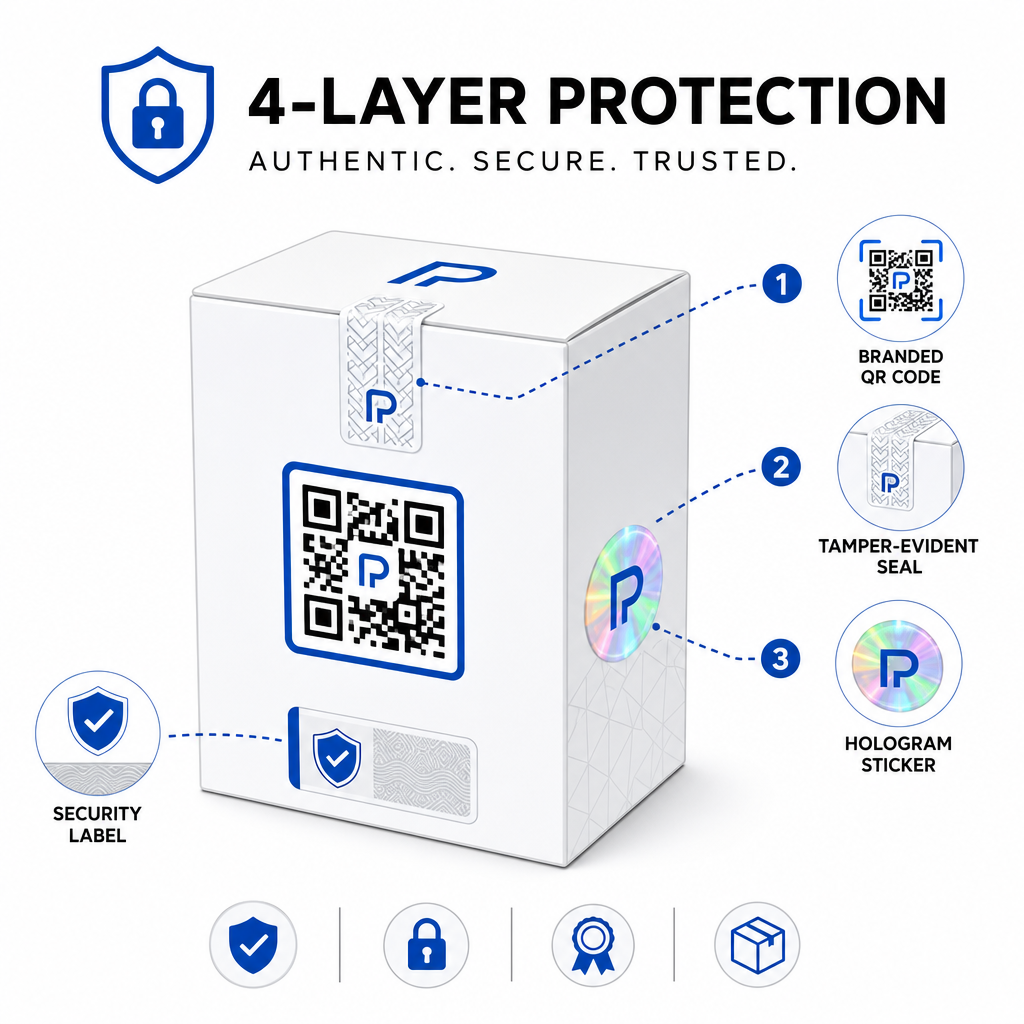
Almindelige tilgange omfatter:
- Forseglinger, der afslører manipulation: placering af QR-koden hen over en forsegling, der viser synlig skade, hvis den fjernes
- Skrabefelter: skjuler QR-koden under en belægning, som en køber fjerner ved første brug, hvilket gør koden sværere for forfalskere at fotografere før køb
- Holografiske overlaminater eller sikkerhedsfarver: tilføjelse af et fysisk lag, der nedbrydes synligt, når det kopieres
- Sikre kopisikre mønstre: nogle systemer indlejrer mikroskopiske anti-kopieringsteksturer i selve QR-kodens design, hvilket får mønsteret til at nedbrydes eller forsvinde, når det fotograferes og genoptrykkes
Kombinationsstrategien er vigtig, fordi den flytter autentificering væk fra et enkelt fejlpunkt. En forfalsker, der kan duplikere QR-koden, kan ikke let også kopiere forseglingen, hologrammet eller det kopifølsomme substrat på samme tid.
For et bredere kig på, hvordan QR-koder interagerer med fysisk produktemballage, guiden om QR-koder på produktemballage dækker placering og design i detaljer.
Server-side verificering og scanningsmonitorering
Det vigtigste sikkerhedslag i et QR-autentificeringssystem er et, kunderne aldrig ser: server-side validering.
Når en kunde scanner en autentificeret QR-kode, skal systemet:
- Validere identifikatoren mod din produktdatabase, før der leveres et resultat
- Logge scanningshændelsen med tidsstempel, GPS-koordinater eller IP-baseret placering og enhedsfingeraftryk
- Tjekke for anomalier såsom den samme kode, der scannes fra to geografisk fjerne steder inden for få minutter, eller en enkelt seriel kode, der akkumulerer scanninger ud over enhver plausibel legitim brug
- Bruge uigennemsigtige tokens snarere end rå identifikatorer i QR-indholdet, så selvom nogen læser QR-dataene direkte, kan de ikke konstruere en gyldig falsk uden adgang til din serverlogik
Denne tilgang – hvor QR-koden kun indeholder en uigennemsigtig reference, og al meningsfuld verificering sker server-side – er den standard, der anbefales af sikkerhedseksperter til autentificeringsbrugsscenarier.
For en teknisk dybdegående gennemgang af, hvordan kryptering yderligere kan beskytte QR-baserede autentificeringssystemer, indlægget om krypterede QR-koder til godkendelsesplatforme dækker krypteringsmetoder og overvejelser om overholdelse i detaljer.
Design og placering for autentificerings-QR-koder
En autentificerings-QR-kode, som kunder ikke kan scanne, modarbejder sit eget formål. Standard bedste praksis for printkvalitet og placering gælder også her:
- Mindstestørrelse: følg tommelfingerreglen om 1 cm pr. 10 cm scanningsafstand for at sikre pålidelig scanning på tværs af enheder
- Høj kontrast: brug mørke moduler på en lys baggrund, og undgå skinnende eller reflekterende overflader, der forårsager genskin
- Stillezone: efterlad en klar kant på mindst fire moduler omkring koden, fri for tekst eller designelementer
- Printopløsning: brug vektorformater eller PNG med mindst 300 DPI til printapplikationer
- Flad placering: undgå buede overflader, sømme eller folder, der forvrænger kodens geometri
- Klar opfordring til handling: inkluder en kort instruktion nær koden, såsom “Scan for at verificere ægthed,” så kunderne forstår, hvad koden er til
For mere detaljeret vejledning om emballagespecifik placering, den ultimativ guide til QR-koder til produktetiketter dækker størrelse, kontrast og placering i dybden.
Brandede QR-koder med dit logo indlejret signalerer også legitimitet til kunderne ved første øjekast. Den QR-kode generator med logo lader dig indarbejde brandidentitet direkte i kodedesignet uden at kompromittere scannbarheden.
Hvem denne tilgang er bygget til
QR-baseret produktautentificering er relevant på tværs af en bred vifte af produktkategorier og brancher:
| Produkttype | Autentificeringsbehov |
|---|---|
| Forbrugerelektronik og tilbehør | Høj forfalskningsrate; garantivalidering |
| Lægemidler og sundhedsprodukter | Forbrugersikkerhed; lovgivningsmæssig overholdelse |
| Luksusvarer og beklædning | Brandbeskyttelse; forebyggelse af gråmarked |
| Industrielle komponenter og dele | Sikkerhedscertificering; forsyningskædens integritet |
| Mad og drikkevarer | Batchsporing; importverifikation |
Brands, der sælger gennem tredjepartsforhandlere eller e-handelsplatforme, er særligt sårbare, fordi de har mindre direkte kontrol over, hvad der når slutkunden. Serialiseret autentificering giver dem en direkte kanal til at verificere enhver enhed, uanset hvor den blev købt.
Pageloots produktindustriløsninger er designet til brands, der bruger QR-koder på emballage og etiketter for at forbinde fysiske produkter med digitale oplevelser, herunder verifikationsarbejdsgange.
Opret serialiserede koder i stor skala Har du brug for at generere unikke QR-koder for hver enhed i din produktionsserie? Pageloots QR-kodegenerator understøtter masseoprettelse med et centraliseret dashboard til at spore, opdatere og administrere koder på tværs af hele dit katalog.
Test før du implementerer
Før autentificerings-QR-koder anvendes på en produktionsserie, forhindrer grundig test fejl, der underminerer kundens tillid i det øjeblik, det betyder mest. Nøgletrin inkluderer:
- Scan den printede kode med flere enheder og native kamera-apps under forskellige lysforhold
- Verificer, at identifikatoren i scanningen korrekt matcher den rigtige produktpost i din database
- Bekræft, at verifikationssiden indlæses korrekt på mobil og viser autenticitetsresultatet tydeligt
- Test logikken for anomalidetektion ved at scanne den samme kode gentagne gange og bekræfte, at dit overvågningssystem markerer den passende
- Kontroller, at interaktion med det fysiske sikkerhedselement – såsom at fjerne et skrabelag eller bryde en forsegling – producerer det forventede resultat i dit system
For en struktureret tilgang til denne proces, guiden om test af bedste praksis for QR-kodeautentificering dækker hele testarbejdsgangen i detaljer.
***
Opbygning af et autentificeringssystem, der skalerer
QR-baseret produktautentificering er ikke en engangsopsætning. Det kræver løbende styring: overvågning af scanningsdata, undersøgelse af anomalier, opdatering af verifikationsdestinationer, når produkter tilbagekaldes, og udvidelse af systemet, efterhånden som din produktlinje vokser.
En centraliseret QR-styringsplatform gør dette operationelt realistisk. Pageloots dashboard lader teams organisere koder efter kampagne eller produktkategori ved hjælp af mapper, se aggregeret scanningsydelse på tværs af store kodesæt og opdatere destinationer uden genprint – funktioner, der betyder noget, når du administrerer serialiserede koder på tværs af titusinder af enheder.
QR-koden på dit produkt er, hvad en kunde ser. Systemet bag det er det, der faktisk beskytter dem – og dit brand. Byg begge med lige stor omhu, og serialiseret QR-autentificering bliver et af de mest praktiske og skalerbare værktøjer til rådighed for forfalskningsforebyggelse. Udforsk, hvordan virksomheder på tværs af forskellige vertikaler tilgår QR-kodeimplementering på Pageloots hub for industriløsninger.
Begynd at beskytte dine produkter Opret sporbare, redigerbare QR-koder og overvåg hver scanning fra et enkelt dashboard. Prøv den Dynamisk QR-kode generator gratis i 14 dage – intet kreditkort påkrævet.
Ofte stillede spørgsmål
Nej. En almindelig QR-kode kan fotograferes og genoptrykkes på falske produkter, og den klonede kode vil scanne identisk med originalen. Effektiv autentificering kræver serialiserede unikke koder kombineret med serverbaseret verifikation, der validerer hver scanning mod en betroet produktregistrering, plus overvågning for anomalier såsom uventede scanningsantal eller geografiske uoverensstemmelser.
En serialiseret QR-kode er unik for en enkelt fysisk genstand, ikke kun en produkttype eller SKU. Når den scannes, identificerer den den specifikke enhed og kontrollerer den mod en databasepost. En almindelig produkt-QR-kode linker typisk alle enheder af det samme produkt til den samme URL, hvilket betyder, at en forfalsker, der kloner koden, kan anvende den på et falsk produkt og få den til at opføre sig præcis som originalen.
Pageloot understøtter massegenerering af QR-koder via CSV-upload, skalerende op til 100.000 koder, hvilket gør serialiseret autentificering praktisk selv ved høje produktionsvolumener. Koder kan organiseres efter produktlinje eller batch ved hjælp af mapper, og alle scanningsdata spores centralt i dashboardet.