Bereiken namaakversies van uw product klanten? Naast gederfde inkomsten schaden namaakgoederen het merktrouwen en kunnen ze kopers in gevaar brengen. Deze pagina legt uit hoe QR-codes, geïmplementeerd met geserialiseerde unieke identiteiten en de juiste infrastructuur, een praktisch en schaalbaar productauthenticatiesysteem creëren.
Waarom namaak een probleem is dat systematisch moet worden opgelost
De omvang van de namaakhandel is aanzienlijk. De OESO en het EUIPO schatten dat namaakgoederen in 2021 goed waren voor ongeveer $467 miljard in de wereldhandel, wat neerkomt op 2,3% van de totale wereldwijde import. Een rapport van het U.S. Patent and Trademark Office wees uit dat namaak en piraterij Amerikaanse bedrijven meer dan $200 miljard per jaar kosten en bijdragen aan het verlies van meer dan 750.000 banen.
Voor merkeigenaren worden de directe financiële verliezen verergerd door schade die moeilijker te kwantificeren is: een klant die een namaakversie van uw product koopt en een slechte ervaring heeft, geeft uw merk de schuld, niet de namaakproducent.
Een QR-gebaseerd authenticatiesysteem pakt dit aan op itemniveau. In plaats van simpelweg te verifiëren dat een producttype echt is, verifieert het dat een specifieke, individuele eenheid echt is – en geeft het u de gegevens om te detecteren wanneer er iets misgaat.
Waarom een standaard QR-code alleen niet genoeg is
Voordat we onderzoeken hoe QR-authenticatie werkt, is het belangrijk om een kernbeperking te begrijpen die veel merken over het hoofd zien.
Een generieke QR-code is gemakkelijk te dupliceren. Een namaakproducent kan uw code met hoge resolutie fotograferen, deze op duizenden nepproducten herdrukken, en die gekloonde codes zullen identiek scannen en zich gedragen als het origineel. Als uw QR-code simpelweg naar een productpagina of een statische verificatie-URL verwijst, biedt deze geen echte bescherming.
Traditionele statische QR-codes die worden gebruikt voor traceerbaarheid of productinformatie bieden geen intrinsieke authenticatie. Als het product zelf nep is, lijkt de gekoppelde pagina nog steeds echt en kan deze op zichzelf de authenticiteit niet bevestigen.
Effectieve QR-authenticatie vereist drie dingen die samenwerken:
- Serialisatie: elk individueel item krijgt een unieke code, niet alleen elke SKU of batch
- Server-side verificatie: elke scan wordt gecontroleerd tegen een betrouwbaar record, niet alleen een bestemmings-URL
- Monitoringlogica: afwijkingen zoals herhaalde scans vanaf verschillende locaties, of scan tellingen die de verwachte hoeveelheden overschrijden, activeren waarschuwingen
De QR-code is de klantgerichte interface. De beveiliging zit in de infrastructuur erachter.
Hoe geserialiseerde QR-authenticatie werkt
Geserialiseerde QR-codes wijzen een unieke code toe aan elke individuele producteenheid. Wanneer een klant die code scant, laadt het systeem niet zomaar een pagina – het voert een zoekopdracht uit tegen een productrecord om te bevestigen dat dit specifieke item, met deze specifieke identificatie, bekend en geldig is.
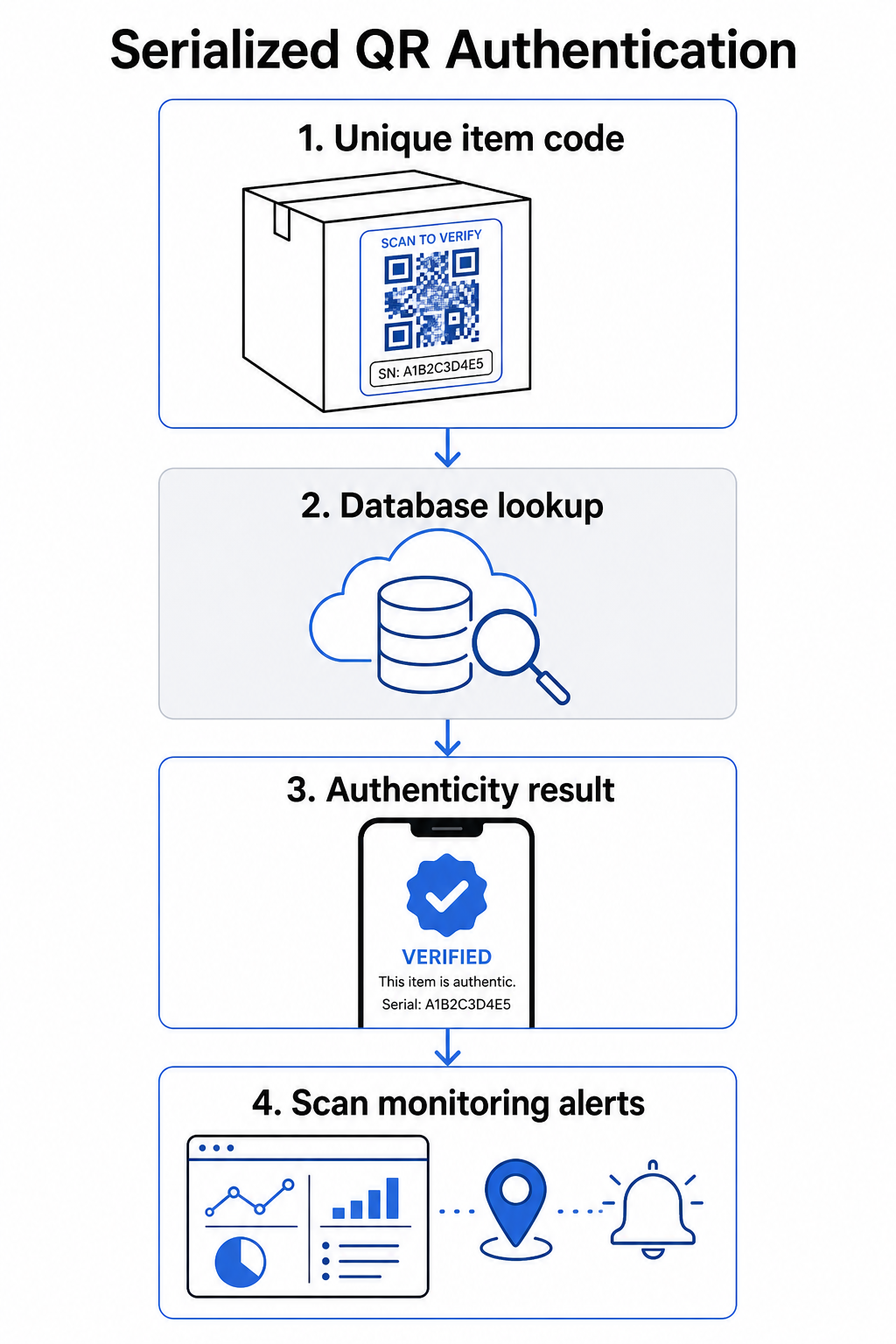
Een complete authenticatieworkflow omvat doorgaans deze stappen:
- Creëer een unieke identificatie voor elk item – dit kan een serienummer, batchreferentie, productietijdstempel of een combinatie zijn, gecodeerd als een GS1 Digital Link URI, die GS1 Application Identifiers voor GTIN, batch-/lotnummer en serienummer omvat
- Koppel die identificatie aan een digitaal productrecord – opgeslagen in een veilige database die uw systeem beheert
- Genereer en wijs een unieke QR-code toe die verwijst naar een verificatie-eindpunt met een ondoorzichtige identificatie of token, in plaats van de ruwe gegevens zelf
- Breng de QR-code aan op het fysieke product – voor items met een hogere waarde, ontmoedigt het plaatsen ervan onder een kraspaneel of over een fraudebestendige verzegeling het overbrengen en hergebruiken van labels
- Log elke scan als een gebeurtenis – vastleggen van tijdstempel, locatie en apparaatinformatie ter ondersteuning van continue monitoring
- Toon een verificatiepagina die productdetails en een duidelijk authenticiteitsresultaat weergeeft, zodat klanten onmiddellijk weten waar ze naar kijken
De verificatiepagina zelf is belangrijk. Een goed ontworpen pagina toont de productnaam, batch- of garantiedetails en een duidelijke authenticiteitsbevestiging. Sommige systemen tonen ook hoe vaak een specifieke code is gescand – een code die veel meer scans verzamelt dan verwacht, wordt een verdacht trigger voor namaakproducten die gedupliceerde codes gebruiken.
Beheer en volg elke productcode Pageloot's Dynamische QR code generator laat u traceerbare, bewerkbare QR-codes maken en toegang krijgen tot een volledig analyse-dashboard dat toont wanneer en waar elke scan plaatsvindt – waardoor u de monitoringlaag krijgt die uw authenticatiesysteem nodig heeft.
De rol van dynamische QR-codes bij authenticatie
Dynamische QR codes vormen een praktische basis voor productauthenticatie omdat ze de geprinte code scheiden van de bestemming waarnaar deze verwijst. De fysieke code op een product verandert nooit, maar de bestemming en de logica erachter kunnen op elk moment worden bijgewerkt zonder opnieuw te printen.
Dit is van belang voor authenticatie op verschillende specifieke manieren:
- U kunt verificatiepagina's bijwerken als uw backend-infrastructuur verandert, zonder gelabelde producten terug te roepen of opnieuw te printen
- U kunt een code uitschakelen als een batch wordt teruggeroepen of als frauduleuze activiteit wordt gedetecteerd rond een specifieke identificatiecode
- U kunt scans omleiden naar verschillende ervaringen op basis van scanaantal, geografie of tijd – bijvoorbeeld, de eerste scan routeren naar een volledige verificatiepagina en volgende scans naar een waarschuwingsbericht
Het platform van Pageloot ondersteunt het bewerken van QR-codebestemmingen na het printen en biedt scananalyses inclusief locatie, apparaattype en scantijd – die allemaal direct in een monitoringworkflow terechtkomen.
Voor merken die grote productvolumes beheren, ondersteunt Pageloot bulk-QR-codegeneratie via CSV-uploads, opschalend tot 100.000 codes, wat geserialiseerde codegeneratie praktisch maakt zelfs op productieschaal. Leveranciers en wederverkopers kunnen speciale tools verkennen via de leveranciers- en wederverkopersoplossingen van Pageloot.
QR-codes combineren met fysieke beveiligingselementen
Beveiligingsonderzoekers en specialisten in merkbescherming merken consequent op dat een QR-code alleen namaak niet kan voorkomen. Effectieve bescherming combineert de QR-laag met fysieke of structurele elementen die moeilijker te repliceren zijn.
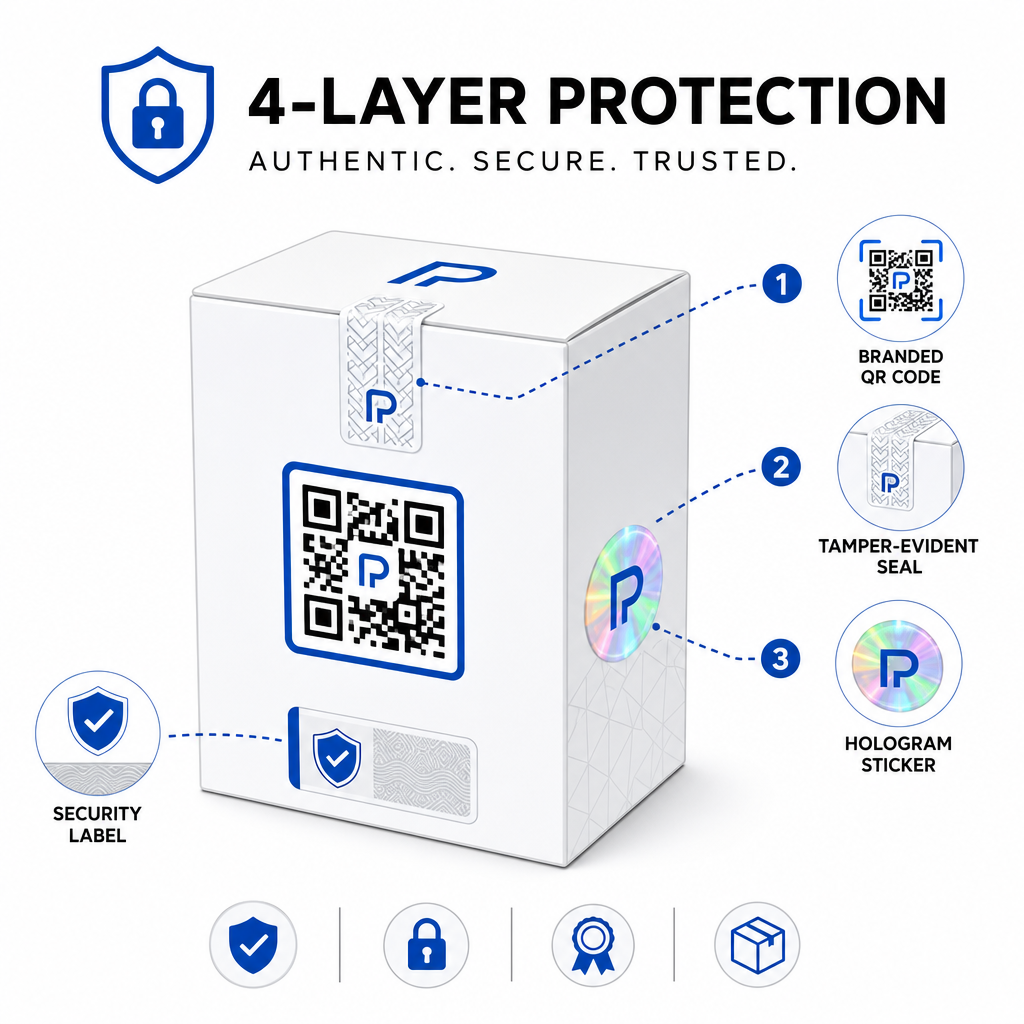
Veelvoorkomende benaderingen zijn:
- Verzegelingen die manipulatie aantonen: de QR-code over een zegel plaatsen dat zichtbare schade vertoont indien verwijderd
- Kraspanelen: de QR-code verbergen onder een coating die een koper bij het eerste gebruik verwijdert, waardoor de code moeilijker te fotograferen is voor namaakproducenten vóór aankoop
- Holografische overlaminaten of veiligheidsinkten: een fysieke laag toevoegen die zichtbaar degradeert wanneer gekopieerd
- Veilige kopieerbeveiligde patronen: sommige systemen embedden microscopische anti-kopieertexturen binnen het QR-codeontwerp zelf, waardoor het patroon degradeert of verdwijnt wanneer gefotografeerd en opnieuw geprint
De combinatiestrategie is van belang omdat het authenticatie weghaalt van een enkel faalpunt. Een namaakproducent die de QR-code kan dupliceren, kan niet gemakkelijk ook de verzegeling, het hologram, of het kopieergevoelige substraat tegelijkertijd repliceren.
Voor een bredere kijk op hoe QR-codes interageren met fysieke productverpakkingen, de gids over QR-codes op productverpakkingen behandelt plaatsing en ontwerp in detail.
Server-side verificatie en scanmonitoring
De belangrijkste beveiligingslaag in een QR-authenticatiesysteem is er een die klanten nooit zien: server-side validatie.
Wanneer een klant een geauthenticeerde QR-code scant, moet het systeem:
- De identificatiecode valideren tegen uw productdatabase voordat enig resultaat wordt weergegeven
- De scangebeurtenis loggen met tijdstempel, GPS-coördinaten of IP-gebaseerde locatie, en apparaatvingerafdruk
- Controleren op afwijkingen zoals dezelfde code die wordt gescand vanaf twee geografisch verschillende locaties binnen enkele minuten, of een enkele geserialiseerde code die scans verzamelt boven elk aannemelijk legitiem gebruik
- Ondoorzichtige tokens gebruiken in plaats van ruwe identificatiecodes in de QR-inhoud, zodat zelfs als iemand de QR-gegevens direct leest zij geen geldige namaak kunnen construeren zonder toegang tot uw serverlogica
Deze benadering – waarbij de QR-code alleen een ondoorzichtige referentie bevat en alle zinvolle verificatie server-side plaatsvindt – is de standaard die wordt aanbevolen door beveiligingsspecialisten voor authenticatiegebruiksscenario's.
Voor een technische diepgaande blik op hoe encryptie QR-gebaseerde authenticatiesystemen verder kan beschermen, de post over versleutelde QR-codes voor authenticatieplatforms behandelt encryptiemethoden en compliance-overwegingen in detail.
Ontwerp en plaatsing voor authenticatie-QR-codes
Een authenticatie-QR-code die klanten niet kunnen scannen doet zijn eigen doel teniet. Standaard best practices voor printkwaliteit en plaatsing gelden hier evenzeer:
- Minimale grootte: volg de vuistregel van 1 cm per 10 cm scanafstand om betrouwbaar scannen op verschillende apparaten te garanderen
- Hoog contrast: gebruik donkere modules op een lichte achtergrond, en vermijd glanzende of reflecterende afwerkingen die schittering veroorzaken
- Stille zone: laat een duidelijke rand van minimaal vier modules rond de code, vrij van tekst of ontwerpelementen
- Printresolutie: gebruik vectorformaten of PNG met minimaal 300 DPI voor printtoepassingen
- Vlakke plaatsing: vermijd gebogen oppervlakken, naden of vouwen die de codegeometrie vervormen
- Duidelijke oproep tot actie: voeg een korte instructie toe bij de code, zoals “Scan om authenticiteit te verifiëren,” zodat klanten begrijpen waar de code voor dient
Voor meer gedetailleerde richtlijnen over verpakkingsspecifieke plaatsing, de ultieme gids voor QR-codes voor productetiketten behandelt formaat, contrast en positionering in de diepte.
QR-codes met uw logo erin verwerkt, signaleren ook legitimiteit aan klanten in één oogopslag. De QR code met logo maken laat u merkidentiteit direct in het code-ontwerp opnemen zonder de scanbaarheid in gevaar te brengen.
Voor wie deze aanpak is gebouwd
QR-gebaseerde productauthenticatie is relevant voor een breed scala aan productcategorieën en industrieën:
| Producttype | Authenticatiebehoefte |
|---|---|
| Consumentenelektronica en accessoires | Hoge namaaksnelheid; garantievalidatie |
| Farmaceutische en gezondheidsproducten | Consumentenveiligheid; naleving van regelgeving |
| Luxe goederen en kleding | Merkbescherming; preventie van grijze markt |
| Industriële componenten en onderdelen | Veiligheidscertificering; integriteit van de toeleveringsketen |
| Voedsel en drank | Batch traceerbaarheid; importverificatie |
Merken die verkopen via externe retailers of e-commerceplatforms zijn bijzonder kwetsbaar omdat ze minder directe controle hebben over wat de eindklant bereikt. Gerealiseerde authenticatie geeft hen een direct kanaal om elke eenheid te verifiëren, ongeacht waar deze is gekocht.
Pageloot's productoplossingen voor de industrie zijn ontworpen voor merken die QR-codes gebruiken op verpakkingen en labels om fysieke producten te verbinden met digitale ervaringen, inclusief verificatieworkflows.
Gerealiseerde codes op schaal creëren Moet u unieke QR-codes genereren voor elke eenheid in uw productierun? Pageloot's QR-codegenerator ondersteunt bulkcreatie met een gecentraliseerd dashboard om codes in uw hele catalogus te volgen, bij te werken en te beheren.
Testen voordat u implementeert
Voordat authenticatie-QR-codes worden toegepast op een productierun, voorkomt grondige testen storingen die het klantvertrouwen ondermijnen op het moment dat het er het meest toe doet. Belangrijke stappen zijn:
- Scan de geprinte code met meerdere apparaten en native camera-apps onder verschillende lichtomstandigheden
- Verifieer dat de identificatie in de scan correct overeenkomt met de juiste productrecord in uw database
- Bevestig dat de verificatiepagina correct laadt op mobiel en het authenticiteitsresultaat duidelijk weergeeft
- Test de anomaliedetectielogica door dezelfde code herhaaldelijk te scannen en te bevestigen dat uw monitoringsysteem deze correct markeert
- Controleer of interactie met het fysieke beveiligingselement – zoals het verwijderen van een kraspaneel of het verbreken van een zegel – het verwachte resultaat in uw systeem oplevert
Voor een gestructureerde aanpak van dit proces, de gids over beste praktijken voor het testen van QR-code authenticatie behandelt de volledige testworkflow in detail.
***
Een authenticatiesysteem bouwen dat schaalbaar is
QR-gebaseerde productauthenticatie is geen eenmalige installatie. Het vereist doorlopend beheer: het monitoren van scangegevens, het onderzoeken van afwijkingen, het bijwerken van verificatiebestemmingen wanneer producten worden teruggeroepen, en het uitbreiden van het systeem naarmate uw productlijn groeit.
Een gecentraliseerd QR-beheerplatform maakt dit operationeel realistisch. Het dashboard van Pageloot stelt teams in staat om codes te organiseren per campagne of productcategorie met behulp van mappen, geaggregeerde scanprestaties te bekijken over grote codesets, en bestemmingen bij te werken zonder opnieuw te printen – mogelijkheden die van belang zijn wanneer u gerealiseerde codes beheert over tienduizenden eenheden.
De QR-code op uw product is wat een klant ziet. Het systeem erachter is wat hen – en uw merk – daadwerkelijk beschermt. Bouw beide met gelijke zorg, en gerealiseerde QR-authenticatie wordt een van de meest praktische en schaalbare hulpmiddelen die beschikbaar zijn voor namaakpreventie. Ontdek hoe bedrijven in verschillende sectoren de implementatie van QR-codes aanpakken op Pageloot's hub voor industriële oplossingen.
Begin met het beschermen van uw producten Creëer traceerbare, bewerkbare QR-codes en monitor elke scan vanuit één dashboard. Probeer de Dynamische QR code generator gratis gedurende 14 dagen – geen creditcard vereist.
Veelgestelde vragen
Nee. Een eenvoudige QR-code kan worden gefotografeerd en opnieuw afgedrukt op namaakproducten, en de gekloonde code zal identiek scannen aan het origineel. Effectieve authenticatie vereist geserialiseerde unieke codes gecombineerd met server-side verificatie die elke scan valideert tegen een betrouwbaar productrecord, plus monitoring op afwijkingen zoals onverwachte scanaantallen of geografische mismatches.
Een geserialiseerde QR-code is uniek voor een enkel fysiek item, niet alleen voor een producttype of SKU. Wanneer gescand, identificeert het die specifieke eenheid en controleert het deze tegen een databaserecord. Een reguliere product QR-code koppelt doorgaans alle eenheden van hetzelfde product aan dezelfde URL, wat betekent dat een vervalser die de code kloont, deze kan toepassen op een nep product en het zich precies zo kan laten gedragen als het origineel.
Pageloot ondersteunt bulk QR-codegeneratie via CSV-upload, opschalend tot 100.000 codes, waardoor geserialiseerde authenticatie praktisch wordt, zelfs bij hoge productievolumes. Codes kunnen worden georganiseerd per productlijn of batch met behulp van mappen, en alle scangegevens worden centraal bijgehouden in het dashboard.