Các phiên bản hàng giả của sản phẩm của bạn có đang đến tay khách hàng không? Ngoài doanh thu bị mất, hàng giả làm tổn hại lòng tin thương hiệu và có thể đặt người mua vào rủi ro. Trang này giải thích cách mã QR, được triển khai với các định danh duy nhất được tuần tự hóa và cơ sở hạ tầng phù hợp, tạo ra một hệ thống xác thực sản phẩm thực tế và có thể mở rộng.
Tại sao hàng giả là một vấn đề đáng giải quyết một cách có hệ thống
Quy mô thương mại hàng giả là đáng kể. OECD và EUIPO ước tính rằng hàng giả chiếm khoảng $467 tỷ USD trong thương mại toàn cầu vào năm 2021, chiếm 2.3% tổng kim ngạch nhập khẩu toàn cầu. Một báo cáo của Văn phòng Sáng chế và Nhãn hiệu Hoa Kỳ cho thấy hàng giả và vi phạm bản quyền gây thiệt hại cho các doanh nghiệp Hoa Kỳ hơn $200 tỷ USD mỗi năm và góp phần làm mất hơn 750.000 việc làm.
Đối với chủ sở hữu thương hiệu, những tổn thất tài chính trực tiếp còn trầm trọng hơn bởi những thiệt hại khó định lượng hơn: một khách hàng mua phiên bản hàng giả của sản phẩm của bạn và có trải nghiệm tồi tệ sẽ đổ lỗi cho thương hiệu của bạn, chứ không phải kẻ làm giả.
Một hệ thống xác thực dựa trên QR giải quyết vấn đề này ở cấp độ từng mặt hàng. Thay vì chỉ đơn thuần xác minh rằng một loại sản phẩm là chính hãng, nó xác minh rằng một đơn vị cụ thể, riêng lẻ là chính hãng – và cung cấp cho bạn dữ liệu để phát hiện khi có điều gì đó không ổn.
Tại sao một mã QR tiêu chuẩn đơn thuần là không đủ
Trước khi tìm hiểu cách xác thực QR hoạt động, điều quan trọng là phải hiểu một hạn chế cốt lõi mà nhiều thương hiệu bỏ qua.
Một mã QR chung chung rất dễ bị sao chép. Kẻ làm giả có thể chụp ảnh mã của bạn ở độ phân giải cao, in lại nó trên hàng nghìn sản phẩm giả, và những mã được nhân bản đó sẽ quét và hoạt động giống hệt bản gốc. Nếu mã QR của bạn chỉ đơn thuần trỏ đến một trang sản phẩm hoặc một URL xác minh tĩnh, nó không cung cấp sự bảo vệ thực sự nào.
Các mã QR tĩnh truyền thống được sử dụng để truy xuất nguồn gốc hoặc thông tin sản phẩm không cung cấp xác thực nội tại. Nếu bản thân sản phẩm là giả, trang được liên kết vẫn xuất hiện là chính hãng và không thể tự xác nhận tính xác thực.
Xác thực QR hiệu quả yêu cầu ba yếu tố hoạt động cùng nhau:
- Tuần tự hóa: mỗi mặt hàng riêng lẻ nhận được một mã duy nhất, không chỉ mỗi SKU hoặc lô hàng
- Xác minh phía máy chủ: mỗi lần quét được kiểm tra dựa trên một bản ghi đáng tin cậy, không chỉ là một URL đích
- Logic giám sát: các bất thường như quét lặp lại từ các vị trí khác nhau, hoặc số lượt quét vượt quá số lượng dự kiến, sẽ kích hoạt cảnh báo
Mã QR là giao diện hướng tới khách hàng. Bảo mật nằm trong cơ sở hạ tầng đằng sau nó.
Cách xác thực QR được tuần tự hóa hoạt động
Mã QR được tuần tự hóa gán một mã duy nhất cho mỗi đơn vị sản phẩm riêng lẻ. Khi khách hàng quét mã đó, hệ thống không chỉ tải một trang – nó thực hiện tra cứu dựa trên bản ghi sản phẩm để xác nhận rằng mặt hàng cụ thể này, với định danh cụ thể này, là đã biết và hợp lệ.
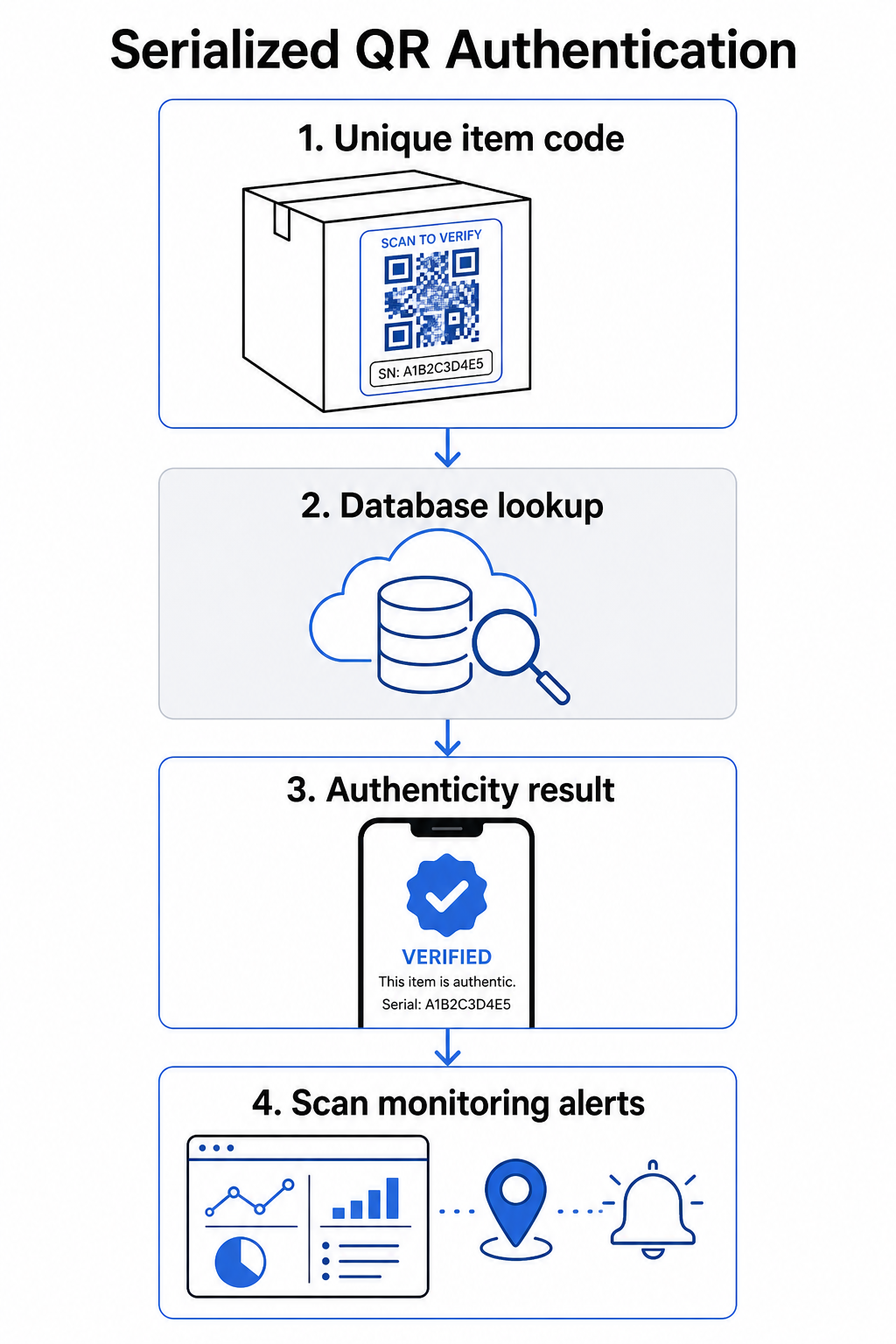
Một quy trình xác thực hoàn chỉnh thường bao gồm các bước sau:
- Tạo một định danh duy nhất cho mỗi mặt hàng – đây có thể là số sê-ri, tham chiếu lô hàng, dấu thời gian sản xuất, hoặc một sự kết hợp được mã hóa dưới dạng URI GS1 Digital Link, bao gồm các Định danh ứng dụng GS1 cho GTIN, số lô/lô hàng và số sê-ri
- Liên kết định danh đó với một bản ghi sản phẩm kỹ thuật số – được lưu trữ trong một cơ sở dữ liệu an toàn mà hệ thống của bạn kiểm soát
- Tạo và gán một mã QR duy nhất trỏ đến một điểm cuối xác minh mang một định danh hoặc mã thông báo không rõ ràng, thay vì dữ liệu thô
- Áp dụng mã QR lên sản phẩm vật lý – đối với các mặt hàng có giá trị cao hơn, việc đặt nó dưới một lớp phủ cào hoặc trên một niêm phong chống giả mạo sẽ ngăn chặn việc chuyển và tái sử dụng nhãn
- Ghi lại mỗi lần quét như một sự kiện – thu thập dấu thời gian, vị trí và thông tin thiết bị để hỗ trợ giám sát liên tục
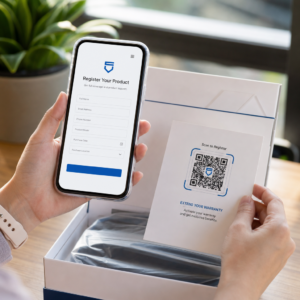
- Cung cấp một trang xác minh hiển thị chi tiết sản phẩm và kết quả xác thực rõ ràng để khách hàng biết ngay họ đang xem gì
Trang xác minh tự nó rất quan trọng. Một trang được thiết kế tốt hiển thị tên sản phẩm, chi tiết lô hàng hoặc bảo hành, và một xác nhận tính xác thực rõ ràng. Một số hệ thống cũng hiển thị số lần một mã cụ thể đã được quét – một mã tích lũy số lượt quét nhiều hơn đáng kể so với dự kiến sẽ trở thành yếu tố kích hoạt nghi ngờ đối với hàng giả sử dụng mã trùng lặp.
Quản lý và Theo dõi Mọi Mã Sản phẩm Của Pageloot Tạo mã QR động cho phép bạn tạo mã QR có thể theo dõi, chỉnh sửa và truy cập bảng điều khiển phân tích đầy đủ hiển thị thời gian và địa điểm mỗi lần quét xảy ra – cung cấp cho bạn lớp giám sát mà hệ thống xác thực của bạn cần.
Vai trò của Mã QR động trong xác thực
Mã QR động là một nền tảng thực tế cho việc xác thực sản phẩm vì chúng tách mã in ra khỏi đích đến mà nó trỏ tới. Mã vật lý trên sản phẩm không bao giờ thay đổi, nhưng đích đến và logic đằng sau nó có thể được cập nhật bất cứ lúc nào mà không cần in lại.
Điều này quan trọng đối với việc xác thực theo một số cách cụ thể:
- Bạn có thể cập nhật các trang xác minh nếu cơ sở hạ tầng phụ trợ của bạn thay đổi, mà không cần thu hồi hoặc in lại các sản phẩm đã dán nhãn
- Bạn có thể vô hiệu hóa một mã nếu một lô hàng bị thu hồi hoặc nếu hoạt động gian lận được phát hiện xung quanh một mã định danh cụ thể
- Bạn có thể chuyển hướng các lần quét đến các trải nghiệm khác nhau dựa trên số lần quét, vị trí địa lý hoặc thời gian – ví dụ, định tuyến lần quét đầu tiên đến một trang xác minh đầy đủ và các lần quét tiếp theo đến một thông báo cảnh báo
Nền tảng của Pageloot hỗ trợ chỉnh sửa đích đến của mã QR sau khi in và cung cấp phân tích quét bao gồm vị trí, loại thiết bị và thời gian quét – tất cả đều được đưa trực tiếp vào quy trình làm việc giám sát.
Đối với các thương hiệu quản lý số lượng sản phẩm lớn, Pageloot hỗ trợ tạo mã QR hàng loạt thông qua tải lên CSV, mở rộng lên đến 100.000 mã, điều này làm cho việc tạo mã nối tiếp trở nên khả thi ngay cả ở quy mô sản xuất. Các nhà cung cấp và đại lý có thể khám phá các công cụ chuyên dụng thông qua các giải pháp dành cho nhà cung cấp và đại lý của Pageloot.
Kết hợp mã QR với các yếu tố bảo mật vật lý
Các nhà nghiên cứu bảo mật và chuyên gia bảo vệ thương hiệu luôn lưu ý rằng một mã QR đơn thuần không thể ngăn chặn hàng giả. Bảo vệ hiệu quả kết hợp lớp QR với các yếu tố vật lý hoặc cấu trúc khó sao chép hơn.
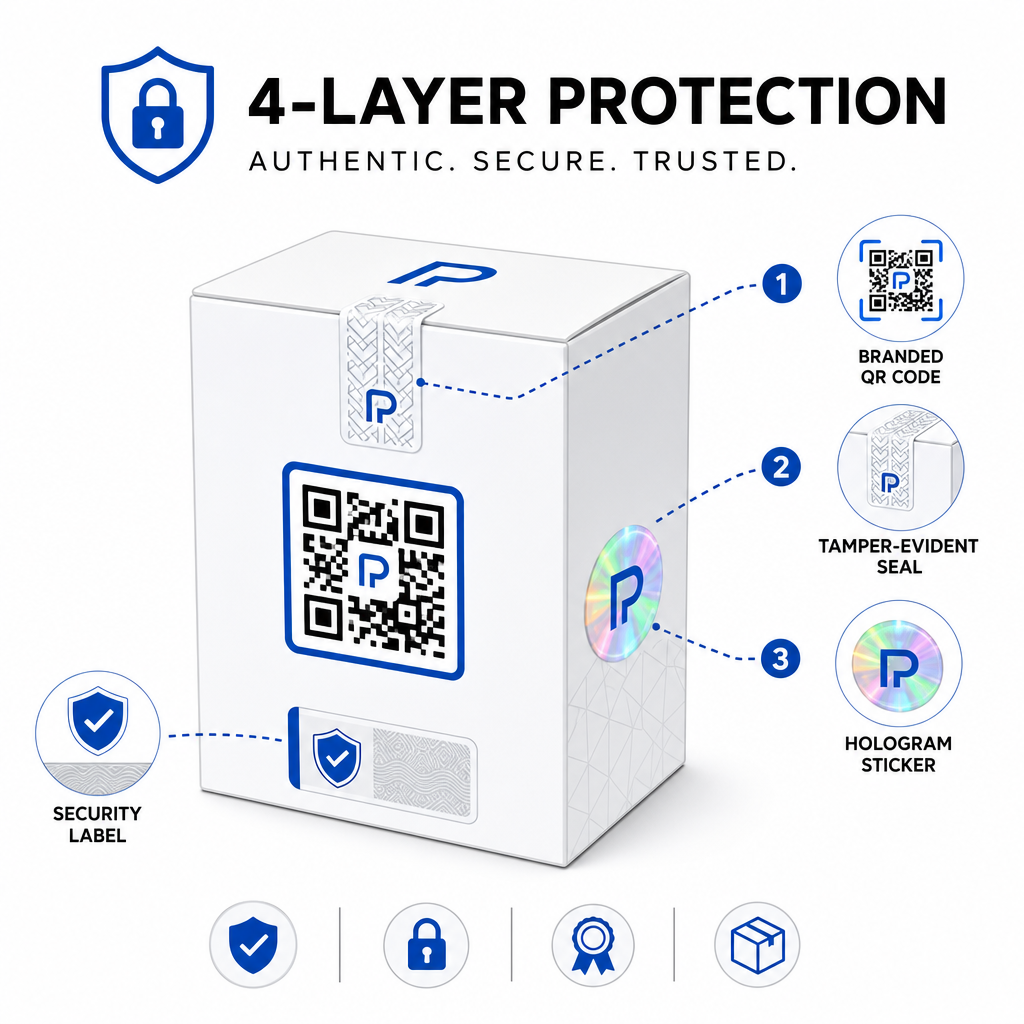
Các phương pháp tiếp cận phổ biến bao gồm:
- Tem chống giả: đặt mã QR trên một con tem mà hiển thị hư hại rõ ràng nếu bị gỡ bỏ
- Lớp phủ cào: che giấu mã QR dưới một lớp phủ mà người mua gỡ bỏ khi sử dụng lần đầu, làm cho mã khó bị kẻ làm giả chụp ảnh trước khi mua
- Lớp phủ hologram hoặc mực bảo mật: thêm một lớp vật lý mà bị suy giảm rõ rệt khi sao chép
- Các mẫu chống sao chép an toàn: một số hệ thống nhúng các họa tiết chống sao chép siêu nhỏ vào chính thiết kế mã QR, khiến mẫu bị suy giảm hoặc biến mất khi chụp ảnh và in lại
Chiến lược kết hợp này quan trọng vì nó chuyển việc xác thực ra khỏi một điểm lỗi duy nhất. Kẻ làm giả có thể sao chép mã QR nhưng không thể dễ dàng sao chép đồng thời tem chống giả, hologram hoặc chất nền nhạy cảm với sao chép.
Để có cái nhìn rộng hơn về cách mã QR tương tác với bao bì sản phẩm vật lý, hướng dẫn về mã QR trên bao bì sản phẩm đề cập chi tiết về vị trí và thiết kế.
Xác minh phía máy chủ và Giám sát quét
Lớp bảo mật quan trọng nhất trong hệ thống xác thực QR là lớp mà khách hàng không bao giờ thấy: xác thực phía máy chủ.
Khi khách hàng quét một mã QR đã được xác thực, hệ thống nên:
- Xác thực mã định danh với cơ sở dữ liệu sản phẩm của bạn trước khi trả về bất kỳ kết quả nào
- Ghi lại sự kiện quét với dấu thời gian, tọa độ GPS hoặc vị trí dựa trên IP, và dấu vân tay thiết bị
- Kiểm tra các bất thường chẳng hạn như cùng một mã được quét từ hai vị trí địa lý cách xa nhau trong vòng vài phút, hoặc một mã nối tiếp duy nhất tích lũy số lần quét vượt quá bất kỳ mục đích sử dụng hợp pháp nào có thể chấp nhận được
- Sử dụng mã thông báo mờ thay vì các mã định danh thô trong nội dung QR, để ngay cả khi ai đó đọc dữ liệu QR trực tiếp họ không thể tạo ra một bản giả mạo hợp lệ nếu không có quyền truy cập vào logic máy chủ của bạn
Cách tiếp cận này – trong đó mã QR chỉ mang một tham chiếu mờ và tất cả xác minh có ý nghĩa đều diễn ra ở phía máy chủ – là tiêu chuẩn được các chuyên gia bảo mật khuyến nghị cho các trường hợp sử dụng xác thực.
Để tìm hiểu sâu về mặt kỹ thuật về cách mã hóa có thể bảo vệ thêm các hệ thống xác thực dựa trên QR, bài đăng trên mã QR được mã hóa cho các nền tảng xác thực đề cập chi tiết về các phương pháp mã hóa và các cân nhắc tuân thủ.
Thiết kế và Vị trí đặt mã QR xác thực
Một mã QR xác thực mà khách hàng không thể quét sẽ làm mất đi mục đích của nó. Các thực hành tốt nhất tiêu chuẩn về chất lượng in và vị trí cũng áp dụng ở đây:
- Kích thước tối thiểu: tuân thủ quy tắc ngón tay cái 1 cm trên 10 cm khoảng cách quét để đảm bảo quét đáng tin cậy trên các thiết bị
- Độ tương phản cao: sử dụng các mô-đun tối trên nền sáng, và tránh các bề mặt bóng hoặc phản chiếu gây chói
- Vùng yên tĩnh: để lại một đường viền rõ ràng ít nhất bốn mô-đun xung quanh mã, không có văn bản hoặc yếu tố thiết kế
- Độ phân giải in: sử dụng định dạng vector hoặc PNG ở độ phân giải tối thiểu 300 DPI cho các ứng dụng in
- Vị trí phẳng: tránh các bề mặt cong, đường nối hoặc nếp gấp làm biến dạng hình học của mã
- Xóa lời kêu gọi hành động: bao gồm một hướng dẫn ngắn gần mã, chẳng hạn như “Quét để xác minh tính xác thực,” để khách hàng hiểu mã dùng để làm gì
Để có hướng dẫn chi tiết hơn về vị trí cụ thể trên bao bì, tài liệu hướng dẫn toàn diện về mã QR cho nhãn sản phẩm đề cập chuyên sâu về kích thước, độ tương phản và vị trí.
Mã QR có thương hiệu với logo của bạn được nhúng cũng báo hiệu tính hợp pháp cho khách hàng ngay từ cái nhìn đầu tiên. Công nghệ Tạo mã QR có logo ở giữa cho phép bạn tích hợp nhận diện thương hiệu trực tiếp vào thiết kế mã mà không ảnh hưởng đến khả năng quét.
Đối Tượng Tiếp Cận Này Được Xây Dựng Cho Ai
Xác thực sản phẩm dựa trên QR có liên quan đến nhiều loại danh mục sản phẩm và ngành công nghiệp:
| Loại Sản Phẩm | Nhu Cầu Xác Thực |
|---|---|
| Điện tử tiêu dùng và phụ kiện | Tỷ lệ hàng giả cao; xác thực bảo hành |
| Dược phẩm và sản phẩm y tế | An toàn người tiêu dùng; tuân thủ quy định |
| Hàng xa xỉ và may mặc | Bảo vệ thương hiệu; ngăn chặn thị trường xám |
| Linh kiện và phụ tùng công nghiệp | Chứng nhận an toàn; tính toàn vẹn chuỗi cung ứng |
| Thực phẩm và đồ uống | Truy xuất nguồn gốc lô hàng; xác minh nhập khẩu |
Các thương hiệu bán hàng thông qua các nhà bán lẻ bên thứ ba hoặc nền tảng thương mại điện tử đặc biệt dễ bị tổn thương vì họ ít kiểm soát trực tiếp hơn đối với những gì đến tay khách hàng cuối cùng. Xác thực theo số seri cung cấp cho họ một kênh trực tiếp để xác minh bất kỳ đơn vị nào, bất kể nó được mua ở đâu.
Của Pageloot giải pháp ngành sản phẩm được thiết kế cho các thương hiệu sử dụng mã QR trên bao bì và nhãn mác để kết nối sản phẩm vật lý với trải nghiệm kỹ thuật số, bao gồm quy trình xác minh.
Tạo Mã Seri Hóa Với Quy Mô Lớn Cần tạo mã QR duy nhất cho mỗi đơn vị trong quá trình sản xuất của bạn? Nền tảng của Pageloot Trình tạo mã QR hỗ trợ tạo hàng loạt với bảng điều khiển tập trung để theo dõi, cập nhật và quản lý mã trên toàn bộ danh mục của bạn.
Kiểm tra trước khi triển khai
Trước khi áp dụng mã QR xác thực vào quá trình sản xuất, việc kiểm tra kỹ lưỡng sẽ ngăn ngừa các lỗi làm suy yếu lòng tin của khách hàng vào thời điểm quan trọng nhất. Các bước chính bao gồm:
- Quét mã đã in bằng nhiều thiết bị và ứng dụng camera gốc trong các điều kiện ánh sáng khác nhau
- Xác minh rằng mã định danh trong bản quét khớp chính xác với bản ghi sản phẩm phù hợp trong cơ sở dữ liệu của bạn
- Xác nhận trang xác minh tải đúng trên thiết bị di động và hiển thị rõ ràng kết quả xác thực
- Kiểm tra logic phát hiện bất thường bằng cách quét cùng một mã nhiều lần và xác nhận hệ thống giám sát của bạn gắn cờ nó một cách thích hợp
- Kiểm tra xem việc tương tác với yếu tố bảo mật vật lý – chẳng hạn như loại bỏ bảng cào hoặc phá vỡ niêm phong – có tạo ra kết quả mong đợi trong hệ thống của bạn hay không
Để có một cách tiếp cận có cấu trúc cho quy trình này, hướng dẫn về kiểm tra các phương pháp hay nhất về xác thực mã QR đề cập chi tiết toàn bộ quy trình kiểm tra.
***
Xây Dựng Hệ Thống Xác Thực Có Khả Năng Mở Rộng
Xác thực sản phẩm dựa trên QR không phải là thiết lập một lần. Nó đòi hỏi quản lý liên tục: giám sát dữ liệu quét, điều tra các bất thường, cập nhật đích xác minh khi sản phẩm bị thu hồi và mở rộng hệ thống khi dòng sản phẩm của bạn phát triển.
Một nền tảng quản lý QR tập trung giúp điều này trở nên khả thi về mặt vận hành. Bảng điều khiển của Pageloot cho phép các nhóm tổ chức mã theo chiến dịch hoặc danh mục sản phẩm bằng cách sử dụng thư mục, xem hiệu suất quét tổng hợp trên các bộ mã lớn và cập nhật đích mà không cần in lại – những khả năng quan trọng khi bạn quản lý mã seri hóa trên hàng chục nghìn đơn vị.
Mã QR trên sản phẩm của bạn là thứ khách hàng nhìn thấy. Hệ thống đằng sau nó là thứ thực sự bảo vệ họ – và thương hiệu của bạn. Xây dựng cả hai với sự cẩn trọng như nhau, và xác thực QR theo số seri trở thành một trong những công cụ thực tế và có khả năng mở rộng nhất hiện có để ngăn chặn hàng giả. Khám phá cách các doanh nghiệp thuộc các ngành dọc khác nhau tiếp cận việc triển khai mã QR tại trung tâm giải pháp ngành của Pageloot.
Bắt Đầu Bảo Vệ Sản Phẩm Của Bạn Tạo mã QR có thể theo dõi, chỉnh sửa và giám sát mọi lượt quét từ một bảng điều khiển duy nhất. Hãy thử Tạo mã QR động miễn phí trong 14 ngày – không yêu cầu thẻ tín dụng.
Câu hỏi thường gặp
Không. Một mã QR thông thường có thể được chụp ảnh và in lại trên các sản phẩm giả mạo, và mã được sao chép sẽ quét giống hệt bản gốc. Xác thực hiệu quả yêu cầu các mã duy nhất được tuần tự hóa kết hợp với xác minh phía máy chủ xác thực mỗi lần quét so với một bản ghi sản phẩm đáng tin cậy, cộng với việc giám sát các bất thường như số lần quét không mong muốn hoặc sự không khớp về địa lý.
Mã QR được tuần tự hóa là duy nhất cho một mặt hàng vật lý duy nhất, không chỉ là một loại sản phẩm hoặc SKU. Khi được quét, nó xác định đơn vị cụ thể đó và kiểm tra nó với một bản ghi cơ sở dữ liệu. Một mã QR sản phẩm thông thường thường liên kết tất cả các đơn vị của cùng một sản phẩm đến cùng một URL, điều đó có nghĩa là một kẻ làm hàng giả sao chép mã có thể áp dụng nó cho một sản phẩm giả và làm cho nó hoạt động chính xác như bản gốc.
Pageloot hỗ trợ tạo mã QR hàng loạt thông qua tải lên CSV, mở rộng lên tới 100.000 mã, giúp xác thực nối tiếp trở nên khả thi ngay cả ở khối lượng sản xuất lớn. Các mã có thể được sắp xếp theo dòng sản phẩm hoặc lô bằng cách sử dụng thư mục, và tất cả dữ liệu quét được theo dõi tập trung trong bảng điều khiển.