En iyi QR kodu renkleri, açık bir arka plan üzerindeki koyu modüller (kareler)dir ve evet, QR kodları renklendirilebilir. Kural basittir: modüller arka plandan belirgin şekilde daha koyu olmalıdır. Siyah üzerine beyaz 21:1 kontrast oranı verir ve en güvenli seçenektir. Markalı bir kod için en az 4:1 hedefleyin ve güneş ışığı ile mesafenin etkili kontrastı düşürdüğü dış mekan tabelaları için 7:1 veya daha fazlasını kullanın. Bu kılavuz sayıları, bir renk tablosunu ve bir test rutinini sunar.
Hangi QR Kodu Renkleri Çalışır ve QR Kodları Renklendirilebilir mi?
Bir QR kodu neredeyse her renkte olabilir ve modüller ile arka plan için farklı renkler kullanabilir. Bir telefon kamerası renk tonunu görmez. Görüntüyü gri tonlamaya dönüştürür ve kare kare neyin koyu neyin açık olduğuna karar verir. Dolayısıyla soru, hangi rengi seçtiğiniz değil, iki gri tonlama değerinin ne kadar farklı olduğudur.
- Çalışır: beyaz, krem veya başka çok açık bir arka plan üzerinde lacivert, koyu yeşil, kömür grisi, koyu mor, koyu kahverengi veya siyah modüller.
- Test ile çalışır: beyaz üzerine koyu kırmızı, koyu camgöbeği ve koyu turuncu. Önce oranı kontrol edin ve basılı bir kanıtı tarayın.
- Çalışmaz: sarı, açık gri, pastel veya neon modüller ve orta yeşil üzerine orta kırmızı gibi aynı parlaklığa sahip herhangi bir renk çifti.
- Riskli: koyu arka plan üzerinde açık modüller (ters çevrilmiş kodlar). Birçok tarayıcı uygulaması bunları okur, ancak bazıları okumaz, bu nedenle önemli olan hiçbir şeyde bunlardan kaçının.
Kontrast Neden QR Kodu Taranabilirliğini Kontrol Eder?
Optik sensörler, koyu ve açık modüller arasındaki yansıtma farkını ölçerek QR kodlarını okur. QR kodu standardı, ISO/IEC 18004, açık bir arka plan üzerinde koyu modüller olduğunu varsayar. Koyu modüller ışığı emer ve açık arka plan onu yansıtır. Fark çok küçükse, kod çözücü veri desenini arka plandan ayıramaz.
Barkod testinde (ISO/IEC 15415), sembol kontrastı, koddaki en parlak ve en koyu yansıma arasındaki farktır. veya daha fazla sembol kontrastı en yüksek notu alırken, 'nin altı başarısız sayılır. Derecelendirenler ayrıca, ışık ve karanlık modüllerin tüm sembol üzerinde ne kadar eşit yansıdığını gösteren modülasyonu da kontrol eder. Düzensiz renkler veya zayıf ayrım, tarayıcının modül kenarlarını kaçırmasına neden olur.
Açık bir arka plan üzerinde koyu modüllere sahip normal polarite, her cihazda çalışır. Bazı yerleşik telefon kamera uygulamaları, koyu arka planlar üzerindeki açık renkli kodları okuyamaz ve destek, telefon modeline ve yazılım sürümüne göre değişir. Hedef kitlenizin kullandığı cihazlarda tersine çevrilmiş sürümü test etmediyseniz, normal polarite kullanın.
Renk Kontrast Oranları ve Eşiklerini Değerlendirme
Kontrast oranı, 1:1'den (fark yok) 21:1'e (beyaz üzerine siyah) kadar bir sayıdır. Bu oran, metinler için yazılmış ancak QR renklerini kontrol etmek için pratik bir yol olan Web İçeriği Erişilebilirlik Yönergeleri (WCAG) erişilebilirlik kurallarından gelir. Bir kontrast denetleyicisi ("WCAG kontrast denetleyicisi" diye arayın) iki onaltılık kod kabul eder ve oranı döndürür. Kapsayıcı tasarım hakkında daha fazla bilgi için rehberimizi okuyun: QR Kodlar ADA Uyumlu Nasıl Yapılır.
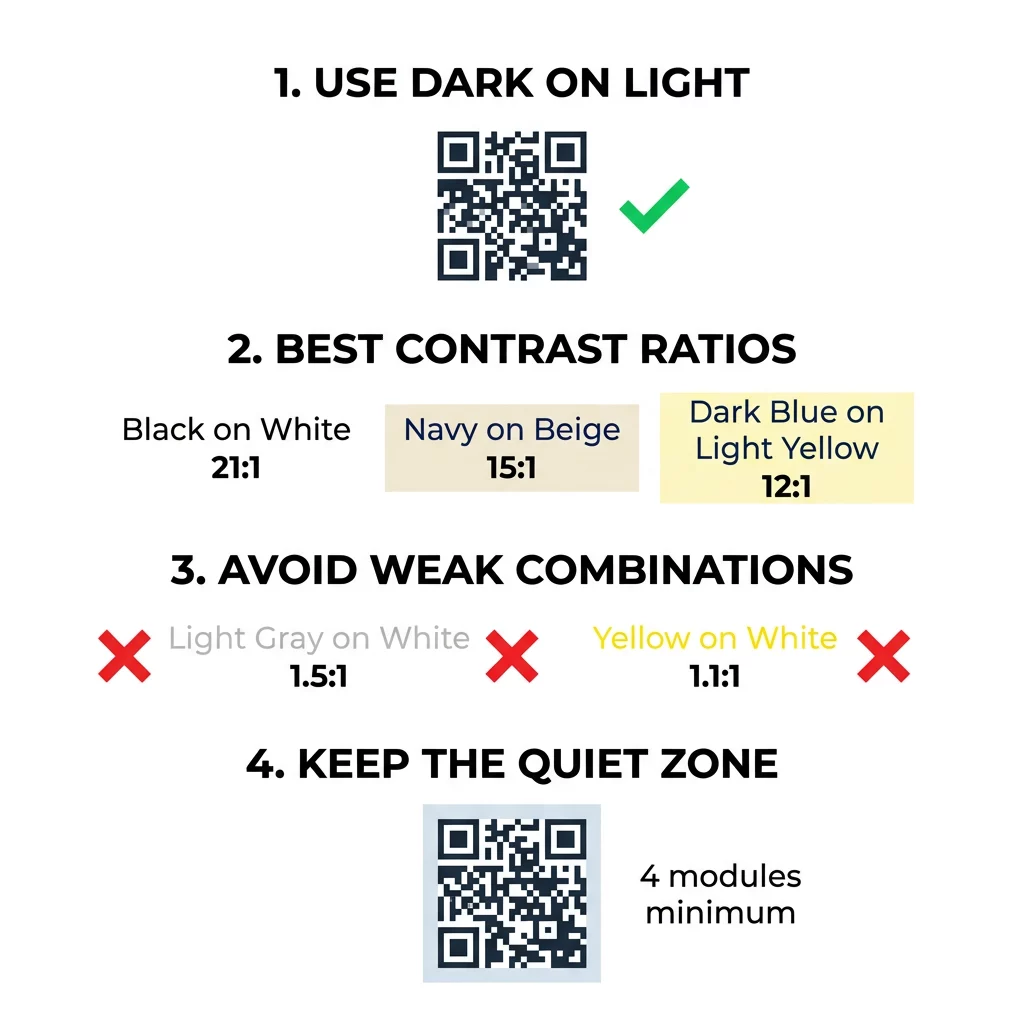
Bu hedefleri kullanın. İç mekan baskı ve ekranlar için minimum 4:1'dir. Ambalaj, el ilanları ve çeşitli ışıkta fotoğraf çekilen her şey için 7:1 veya daha fazlası daha güvenlidir. Dış mekan tabelaları için 10:1 veya daha fazlası hedeftir. Aşağıdaki oranlar yaklaşık değerlerdir ve tam tonlamaya bağlıdır.
| Renk Kombinasyonu | Yaklaşık Kontrast Oranı | Taranabilirlik Değerlendirmesi |
|---|---|---|
| Beyaz Üzerine Siyah | 21:1 | Optimal (endüstri standardı) |
| Bej Üzerine Lacivert | ~15:1 | Mükemmel |
| Açık Sarı Üzerine Koyu Mavi | ~12:1 | Çok İyi |
| Kırık Beyaz Üzerine Koyu Kahverengi | ~8:1 | İyi |
| Beyaz Üzerine Saf Kırmızı (#FF0000) | ~4:1 | Sınırda, yazdırmadan önce test edin |
| Beyaz Üzerine Koyu Kırmızı (#8B0000) | ~11:1 | Çok İyi |
| Beyaz Üzerine Açık Gri | ~1.5:1 | Kötü (sık sık tarama hataları) |
| Beyaz Üzerine Sarı | ~1.1:1 | Taranamıyor |
Taranabilirliği Feda Etmeden Kodları Özelleştirin Renkleri test edin ve tasarımınızı gerçek zamanlı olarak bizim Logolu QR Kod Oluşturucu ile marka estetiğini güvenilir tarama ile dengelemek için.
Dış Mekan Tabelaları İçin En İyi QR Kod Kontrast Oranı
Hiçbir standart, dış mekan QR kodları için gerekli bir oran belirlemez, ancak dış mekan koşulları kontrastı üç şekilde azaltır: doğrudan güneş ışığı açık alanları ağartır, parlama kodun bazı kısımlarını gizler ve mesafe küçük modülleri bulanıklaştırır. İç mekanda olduğundan daha büyük bir güvenlik payı planlayın.
- Beyaz üzerine siyah veya çok koyu bir renk kullanın. 10:1 veya daha yüksek bir oran hedefleyin.
- Mat malzemeye basın veya mat bir laminat ekleyin. Parlak vinil ve cam güneşi yansıtır ve deseni bozar.
- Kodu tarama mesafesine göre boyutlandırın. Yaygın bir kural, her 10 birim mesafe için 1 birim kod genişliğidir, bu nedenle 2 metreden (yaklaşık 6.5 fit) taranan bir kod yaklaşık 20 cm (8 inç) genişliğinde olmalıdır.
- Sessiz bölgenin tamamını koruyun ve kodu bir fotoğraf yerine düz, açık renkli bir panele yerleştirin.
- Kodu alçak güneşe maruz kalacağı veya cam arkasında kalacağı yerlere koymaktan kaçının ve toplu üretim siparişi vermeden önce basılı tabelayı gerçek konumda tarayın.
Barkod Kontrastı: QR Kodları ve Doğrusal Barkodlar
Aynı kontrast kuralları, Code 128 veya EAN gibi diğer yüksek kontrastlı barkodlar için de geçerlidir. Perakende tarayıcılar genellikle kırmızı lazer kullanır ve kırmızı ışık, kırmızı çubukları veya kırmızı mürekkebi koyu olarak görmez. Doğrusal barkodlar için çubukları beyaz üzerine siyah, koyu mavi veya koyu yeşil renkte yazdırın ve asla kırmızı veya turuncu kullanmayın. Bir telefon kamerasıyla okunan QR kodları renge karşı daha az hassastır, ancak aynı tavsiye her ikisi için de en güvenilir sonucu verir.
Sessiz Bölgeyi ve Kod Boyutlarını Koruma
Yüksek kontrast, kodun kenarına kadar uzanmalıdır. Desen etrafındaki boş kenar sessiz bölgedir. Kameraya kodun nerede başladığını ve diğer grafiklerin nerede bittiğini söyler.
- Dört tarafın her birinde en az dört modül genişliğinde bir sessiz bölge bırakın.
- Bu kenar boşluğunu metinlerden, çizimlerden ve kenarlıklardan arındırın.
- Sınırın net olması için sessiz bölgeyi açık arka plan renginize uyacak şekilde ayarlayın.
- Yakın, elde tarama için kodları en az 2 x 2 cm (0.8 x 0.8 inç) boyutunda yazdırın. Daha uzun bağlantılar için daha büyük yapın, çünkü daha fazla veri daha küçük modüller anlamına gelir.
- Kısa bir bağlantıyı tercih edin. Kısa bir URL, düşük ışıkta daha iyi taranabilen, daha büyük modüllere sahip daha basit bir desen oluşturur.
Sessiz bölge içindeki metin veya resim, markalı materyallerde sık karşılaşılan tarama hatalarının nedenidir. Rehberimiz QR kodu okunabilirliği için en iyi uygulamaları düzeninizi yerleştirirken kenar boşluklarını nasıl koruyacağınızı gösterir.
Sık Yapılan Renk ve Stil Hatalarından Kaçınmak
Bir kodu özelleştirmek okunabilirliği olumsuz etkileyebilir. Kameralar görüntüyü gri tonlamalıya dönüştürür, bu nedenle iki farklı ton aynı parlaklığa sahip olabilir ve tek bir griye dönüşebilir.
- Bebek mavisi, nane yeşili veya soluk sarı gibi pastel modüllerden kaçının.
- Parlak kırmızı veya turuncu modüllerden kaçının. Lazer tarayıcılar kırmızıyı ışık olarak okur ve kontrast oranı genellikle 5:1'in altındadır. Bordo gibi koyu bir kırmızı çok daha güvenlidir.
- Modül renginin en açık kısmının arka plana yakın olduğu gradyanlardan kaçının.
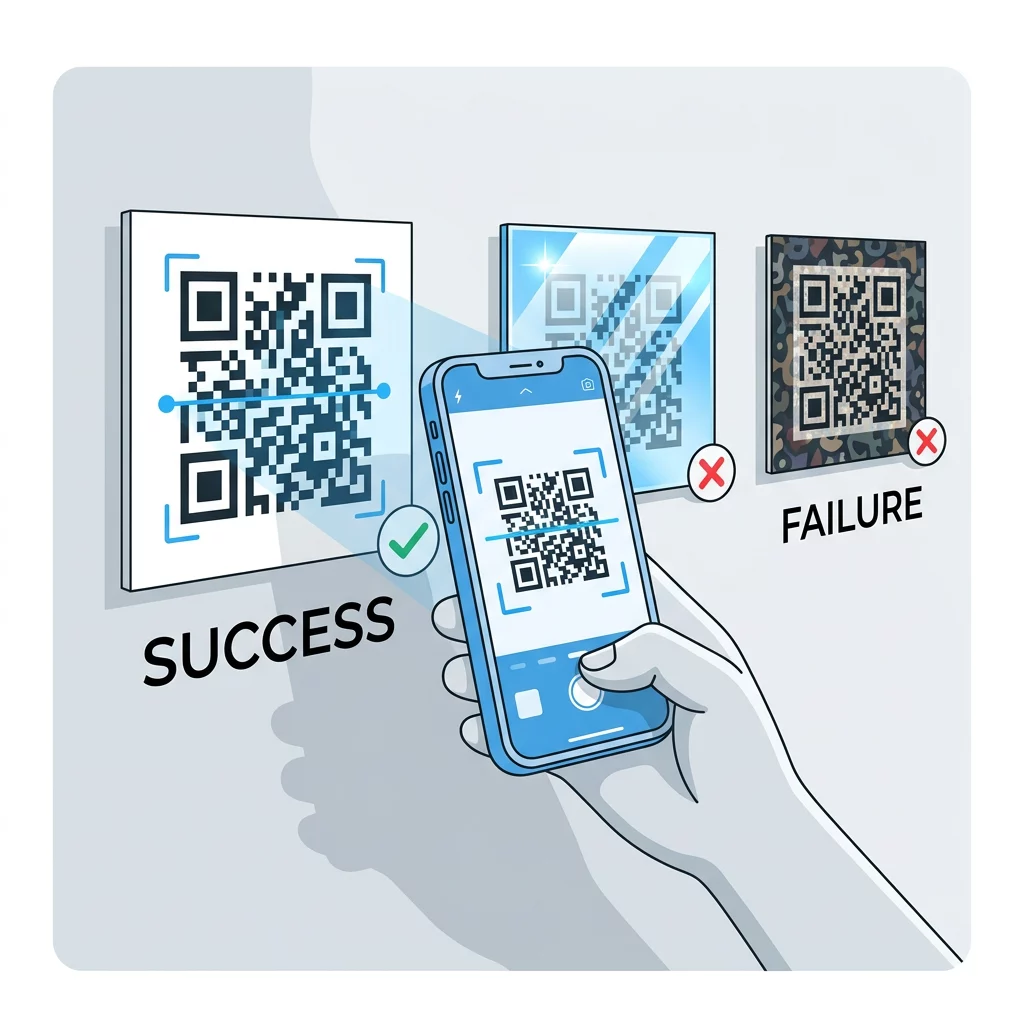
- Fotoğraflar, dokulu kağıtlar veya desenli ambalajlar üzerinde şeffaf arka planlardan kaçının. Kodu düz, açık renkli bir panele yerleştirin.
- Koyu bir arka plan üzerinde açık renkli modüller içeren tersine çevrilmiş tasarımlardan, hedef kitlenizin kullandığı telefonlarda test etmediğiniz sürece kaçının.
- Büyük logolardan kaçının. Çok fazla modülü kaplayan bir logo, kodun hata düzeltme kapasitesini aşabilir.
Bu sınırları bilmek size şunu öğrenmenizi sağlar özel bir QR kodu nasıl oluşturulur markanızı kod çözmeyi bozmadan gösteren.
Gerçek Dünya Ortamlarında Test Etme ve Doğrulama
Parlak bir monitörden taranabilen bir kod, kağıtta başarısız olabilir. Oda ışığı, görüş açısı ve malzeme dokusu, lense ulaşan kontrastı değiştirir. Doğrudan güneş ışığı küçük renk farklarını giderir, loş odalar sensörün modülleri ayırma yeteneğini azaltır ve parlak yüzeyler parlamaya neden olur.
Her baskı işinden önce bu kontrolü yapın:
- Kontrast denetleyicisinde renk çiftini kontrol edin. Oran en az 4:1, ambalaj ve dış mekan kullanımı için ise 7:1 veya daha fazla olmalıdır.
- Gerçek malzemeye, gerçek boyutta, gerçek bitişle bir prova baskısı yapın.
- En az bir iPhone ve bir Android telefondaki yerleşik kamera ile, mümkünse bir eski telefonla ve tarayıcı tabanlı bir sistemle tarayın. QR Kod Okuyucu.
- Kodu karşılaşacağı en kötü ışıkta tarayın: loş oda, doğrudan güneş ve açılı olarak.
- Tereddüt ederse, kontrastı artırın, kodu büyütün, bağlantıyı kısaltın veya sessiz bölgeyi geri yükleyin.
Kılavuzumuz: Baskıdan önce QR kod nasıl test edilir bunu daha ayrıntılı olarak ele alır ve QR kodu okunabilirliği nasıl artırılır başarısız olan kodlar için düzeltmeleri kapsar.
QR Kod Güvenilirliğini ve Etkileşimini En Üst Düzeye Çıkarma
Kontrastı bir son dokunuş olarak değil, teknik bir gereklilik olarak ele alın. Açık bir arka plan üzerinde koyu bir renk seçin, sessiz bölgeyi koruyun ve basılı bir prova örneğini karşılaşacağı ışık altında test edin. Bu, baskı bütçenizi taranmayan kodlardan korur.
Yüksek kontrastlı kodunuzu şununla oluşturun: QR kod oluşturucu. Modül ve arka plan renklerini ayarlayın ve bir PNG, SVG veya PDF indirin. Bir kod yazdırır ve daha sonra bağlantıyı değiştirmeniz gerekirse, dinamik bir kod kullanın: hedefi yazdırdıktan sonra düzenleyebilir ve tarama istatistiklerini görebilirsiniz. Dinamik kodlar 14 günlük ücretsiz deneme ile gelir ve planlar şurada listelenmiştir: https://pageloot.com/pricing/.
Sıkça sorulan sorular
Modüller ve arka plan arasında en az 4:1 oranını hedefleyin. Ambalaj ve el ilanları için 7:1 veya daha fazlasını, açık hava tabelaları için ise 10:1 veya daha fazlasını kullanın. Beyaz zemin üzerine siyah 21:1'dir.
Evet. Modüller arka plandan net bir şekilde daha koyuysa her renk işe yarar. Koyu lacivert, orman yeşili, antrasit ve bordo renkler beyaz veya krem üzerinde iyi sonuç verir. Sarı, açık gri ve pastel renkler uygun değildir.
Modüller ve arka plan farklı renklerde olabilir ve herhangi bir ton kullanabilirsiniz, ancak yalnızca parlaklık farkı önemlidir. Bir telefon kodu gri tonlamalı okur, bu nedenle eşit parlaklıktaki iki renk başarısız olacaktır. Oranı kontrol edin ve basılı bir kanıtı tarayın.
Resmi bir standart yoktur. Siyahın beyaz üzerine olması gibi, 10:1 veya daha yüksek bir oran güvenli bir hedeftir. Parlamayı kesmek için mat bir yüzey kullanın, kodu tarama mesafesinin yaklaşık 1/10'u boyutunda yapın ve sahada test edin.
Evet, markanızın rengi koyu lacivert, orman yeşili veya antrasit gibi yeterince koyuysa ve tekdüze açık bir arka plan üzerinde duruyorsa. Markanızın rengi açıksa, modüller için koyu bir tonunu kullanın.
QR standardı, açık bir arka plan üzerinde koyu modüller tanımlar. Birçok kamera uygulaması önce bu deseni arar ve bazıları koyu bir arka plan üzerindeki açık modülleri okuyamaz. Destek telefona göre değişir, bu nedenle yazdırmadan önce test edin.
Evet. Code 128 veya EAN gibi doğrusal barkodlar da açık bir arka plan üzerinde koyu çubuklara ihtiyaç duyar. Perakende lazer tarayıcıları kırmızı ışık kullandığından, çubukları asla kırmızı veya turuncu renkte basmayın.