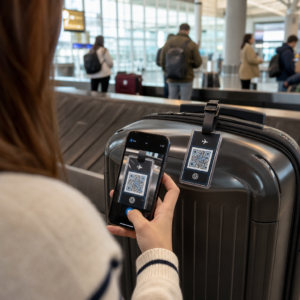
Rör sig dina evenemangsinträdesköer för långsamt, eller tappar du koll på vem som har tillgång till vad? Ett tryckt armband med en QR-kod löser båda problemen genom att koppla en fysisk behörighet direkt till dina digitala system. Denna guide förklarar hur man designar, genererar och hanterar QR-kodarmband som fungerar tillförlitligt från installation till efterevenemangsanalys.
Vad QR-kodarmband faktiskt gör
Ett QR-kodarmband är ett fysiskt band – tyg, vinyl, silikon eller papper – tryckt med en unik QR-kod som länkar till en digital post eller destination. När en personalmedlem skannar det, validerar koden antingen en deltagares inträde, bekräftar deras åtkomstnivå, eller utlöser en digital åtgärd som att öppna en profil eller logga närvaro.
Den viktigaste skillnaden att förstå är skillnaden mellan statiska och Dynamisk QR-koder. En statisk kod kodar sin destination permanent – om något ändras måste du trycka om. En dynamisk QR-kod pekar på en kort omdirigerings-URL som du kan uppdatera när som helst från en hanteringspanel, utan att ändra den tryckta koden på armbandet. För evenemang där scheman, zoner eller länkat innehåll kan ändras före eller under evenemanget, ger dynamiska koder dig betydligt mer kontroll.
Skapa dynamiska QR-koder för ditt evenemang Behöver du uppdatera armbandets destinationer eller spåra skanningsaktivitet i realtid? Använd QR-kodgenerator för event för att bygga dynamiska koder som du kan hantera från en enda panel.
Vanliga användningsfall för QR-armband
Inträde och åtkomstkontroll
Den mest direkta tillämpningen är att använda varje armband som en digital biljett. När evenemangsarmband trycks med unika, serialiserade QR-koder, fungerar varje som en icke-överförbar behörighet. En personalscanner validerar koden vid grinden, markerar den som använd och förhindrar återinträdesförsök med samma band. Detta tillvägagångssätt eliminerar behovet av separata pappersbiljetter och minskar risken för förfalskningar.
Om ditt evenemang har flera åtkomstzoner – VIP-områden, backstage, allmän entré – låter variabla QR-koder dig tilldela varje deltagare en specifik nivå. Skanning vid varje kontrollpunkt bekräftar om armbandet ger inträde till det området, vilket ger dig realtidskontroll över publikflödet utan manuell listkontroll. För en djupare titt på hur detta fungerar i praktiken, se guiden om att använda QR-koder på biljetter för entréhantering.
Närvarospårning
Utöver grindinträde låter QR-armband dig logga närvarodata vid flera punkter under ett evenemang – sessionsrum, workshops eller breakout-utrymmen. Istället för manuella närvarolistor skannar deltagarna på varje plats och systemet loggar vem som deltog i vad och när. Pageloots verktyg för närvaro-QR-kod stöder detta arbetsflöde genom att länka koder till formulär eller incheckningssidor som automatiskt registrerar deltagande.
Tillgång till evenemangsinformation
Ett armband med QR-kod behöver inte bara tjäna en säkerhetsfunktion. Att länka det till en landningssida ger varje deltagare on-demand tillgång till evenemangsschemat, talarbiografier, platskartor eller sista-minuten-uppdateringar. Eftersom dynamiska koder kan uppdateras utan att trycka om, kan du skicka ny information till varje redan distribuerat armband – användbart när sessionstider ändras eller ett rum flyttas.
Nätverkande och kontaktutbyte
Vid professionella konferenser kan QR-armband fungera som digitala visitkort. Att länka en armbandskod till ett vCard låter deltagare dela sina kontaktuppgifter med en snabb skanning istället för att utbyta fysiska kort. Den vCard QR-kodgenerator gör det enkelt att skapa kontaktkoder som lagrar namn, e-post, telefonnummer och företag direkt till skannerns telefon.
Förmåner, inlösen och engagemang
Armband kan också ha funktionellt värde utöver identifiering. Serialiserade koder länkade till deltagarkonton kan spåra förladdade dryckespolletter, varurättigheter eller lojalitetsförmåner. Skanningsdata avslöjar vilka förmåner som löstes in och när, vilket ger arrangörerna användbar beteendedata utöver den operativa funktionen.
Designkrav för tillförlitlig skanning
Ett QR-kodarmband som inte skannas under verkliga evenemangsförhållanden skapar friktion vid exakt fel tillfälle. Flera fysiska designfaktorer avgör om dina koder kommer att fungera tillförlitligt.
Storlek och skanningsavstånd
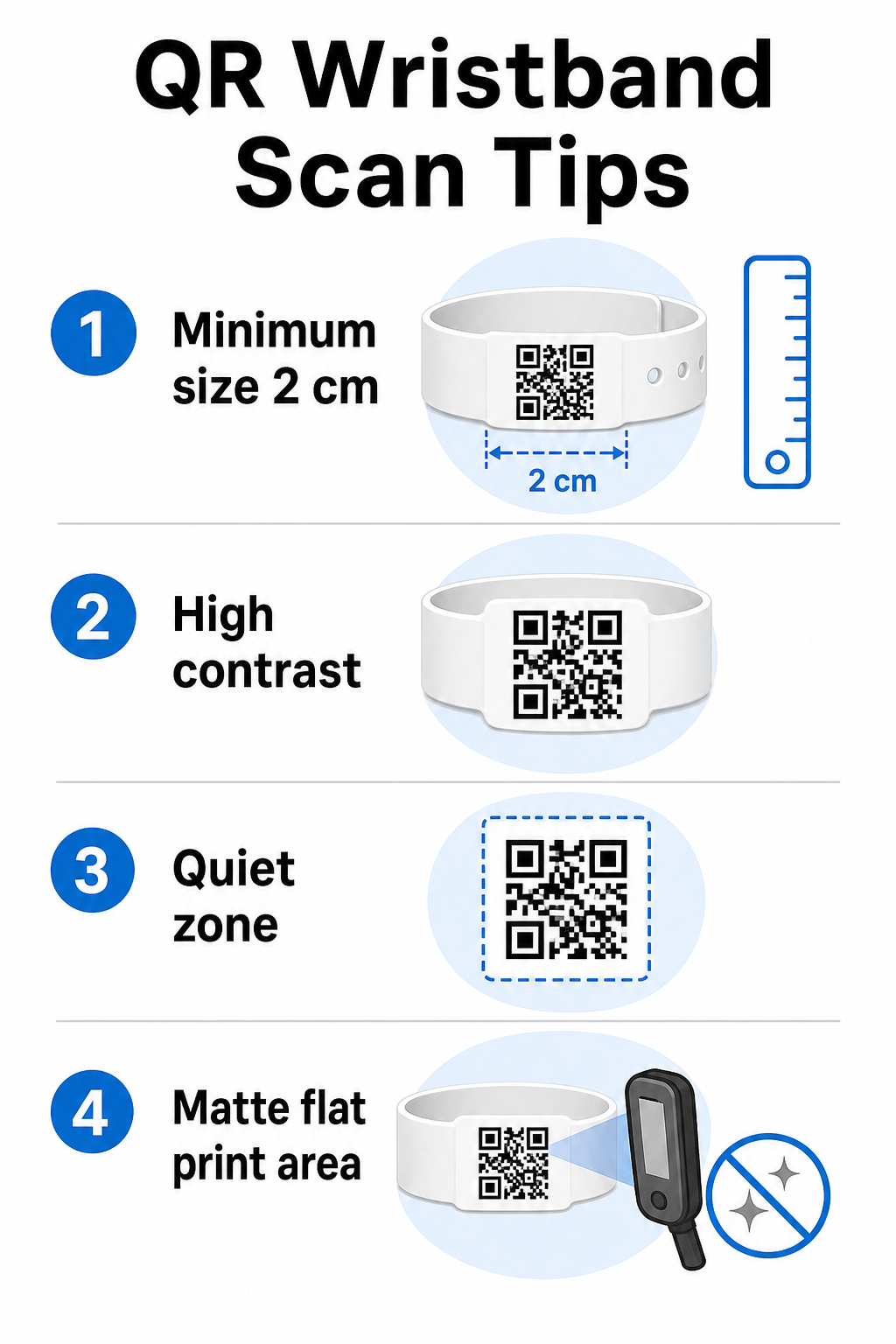
Standardregeln är att en QR-kods bredd bör vara minst 1 cm för varje 10 cm förväntat skanningsavstånd. För armband som skannas på armlängds avstånd med en handhållen enhet är en minsta bredd på 2 cm det praktiska golvet. Tunnare armband som inte tillförlitligt kan rymma denna storlek kommer att orsaka skanningsproblem. Se hela storleksguide för QR-koder för mått över olika användningsfall.
Färgkontrast
Hög kontrast mellan kodmodulerna och bakgrunden är avgörande. Mörka moduler på en ljus bakgrund – helst svart på vitt – ger skannrar den tydligaste signalen. Sikta på minst ett kontrastförhållande på 4:1. Inverterade designer med en ljus kod på en mörk bakgrund är generellt opålitliga och bör undvikas.
Tyst zon
Varje QR-kod kräver en tydlig vit kant runt sin omkrets, kallad en tyst zon. Denna marginal signalerar till skannern var koden börjar och slutar. Att ta bort den eller skriva ut över den är en av de vanligaste orsakerna till skanningsfel på armband där designutrymmet är begränsat.
Utskriftsupplösning och format
Exportera QR-koder i vektorformat (SVG eller EPS) eller högupplösta rasterfiler med minst 300 DPI vid den slutliga utskriftsstorleken. Att skala upp en lågupplöst bild skapar suddiga modulkanter som skannrar har svårt att läsa. För vägledning om hur man uppnår konsekvent utskriftskvalitet, täcker guide för bästa praxis för QR-kodläsbarhet den fullständiga tekniska checklistan.
Yta och finish
Armband bärs på en krökt yta, vilket introducerar distorsion. Skriv ut QR-koden på den plattaste delen av bandet och undvik glansiga eller reflekterande ytor över koden – bländning från evenemangsbelysning ovanifrån stör direkt smartphonekameror. En matt finish över kodområdet presterar konsekvent bättre än glansiga alternativ i evenemangsmiljöer.
Kodkomplexitet
Ju mer data som är kodad i en QR-kod, desto tätare och svårare att skanna blir den. Använd korta URL:er eller dynamiska koder som omdirigerar via en kompakt länk för att hålla koden visuellt enkel och snabb att skanna. Pageloots Länk QR-kodgenerator hanterar automatiskt URL-förkortning som en del av arbetsflödet för dynamiska koder.
Felkorrigering
QR-koder har inbyggd felkorrigering som håller dem skanningsbara även när en del av koden är skadad. Den högsta korrigeringsnivån tillåter återhämtning när upp till ungefär 30 % av kodområdet är skymt – relevant för armband som utsätts för slitage, kladd eller mindre nötning under ett flerdagarsevenemang. Om du lägger till en logotyp till koden, använd hög felkorrigering för att kompensera för det täckta området.
Generera QR-koder för armband
Genereringsprocessen följer ett enkelt arbetsflöde:
- Välj din QR-kodstyp. För inträde fungerar en länk eller evenemangs-QR-kod som pekar på ditt incheckningssystem bra. För kontaktdelning, använd en vCard-typ. För närvaroregistrering, länka till ett formulär.
- Använd dynamiska koder när innehållet kan ändras. Om ditt evenemang sträcker sig över flera dagar eller om den länkade destinationen kan behöva uppdateras, låter dynamiska koder dig göra ändringar från din instrumentpanel utan att skriva ut ett enda armband igen.
- Håll den kodade URL:en kort. Kortare URL:er minskar kodens densitet och förbättrar skanningshastigheten.
- Anpassa inom kontrastbegränsningar. Du kan lägga till din evenemangslogotyp och varumärkesfärger, men kontrollera att kontrasten förblir tillräcklig efter anpassningen.
- Ladda ner i utskriftsklart format. Använd SVG-, EPS- eller högupplösta PNG-filer – skala aldrig upp en liten JPEG.
- Testa före massutskrift. Skanna ditt korrektur på flera enheter, i svag belysning och på de skanningsavstånd som din personal faktiskt kommer att använda. Detta enda steg förhindrar de vanligaste evenemangsdagsfelen.
Bygg och spåra dina evenemangs-QR-koder Generera unika koder för varje deltagare, övervaka skanningsaktivitet och uppdatera länkat innehåll utan att skriva ut igen. Börja med QR-kodgenerator och utforska evenemangsspecifika alternativ på QR-kodgenerator för event.
Säkerhets- och integritetsöverväganden
QR-armband som lagrar eller länkar till personlig deltagarinformation medför dataskyddsansvar.
Kryptera känslig data. Om en armbandskod direkt kodar personlig information – såsom namn, biljettkategori eller åldersverifieringsstatus – bör den datan krypteras så att den inte kan läsas av obehöriga skannrar. Att använda dynamiska koder som pekar på en säker, autentiserad backend istället för att koda rådata i själva koden minskar denna risk avsevärt.
Använd HTTPS med validerade certifikat. All kommunikation mellan din skanningsapp och backend-valideringsservern bör ske över krypterade kanaler. Detta förhindrar avlyssning av skanningshändelser eller deltagardata under incheckningsprocessen. Guiden om skapa säkra QR-kod evenemangsbiljetter förklarar de tekniska lagren i detalj.
Begränsa åtkomsten till incheckningssystem. Personalens skanningsappar och instrumentpaneler bör kräva individuella inloggningsuppgifter snarare än delade lösenord. Detta begränsar exponeringen om en enhet tappas bort och gör det lättare att granska vem som skannade vad.
Tillämpa principer för inbyggt dataskydd (privacy-by-design). Samla endast in den data din verksamhet kräver. Om du använder skanningsanalys för flödesanalys av folkmassor, är aggregerad anonymiserad data tillräcklig och undviker integritetskonsekvenserna av att spåra identifierbara individer. Där personuppgifter behandlas, se till att deltagarna informeras och att dina processer följer tillämpliga bestämmelser.
Ge sammanhang vid skanningstillfället. Att låta deltagarna veta vad handledsbandets QR-kod gör – och vad som händer när personalen skannar den – bygger förtroende och minskar förvirring kring dataanvändning. För en bredare titt på att säkra åtkomstkontroll med dynamiska koder, guiden om dynamiska QR-koder för åtkomstkontroll täcker återkallelse, granskningsloggar och realtidshantering av behörigheter.
Använda skanningsanalys för att förbättra framtida evenemang
Dynamiska QR-koder genererar skanningsdata som sträcker sig långt bortom att räkna inträden. Med Pageloots analys kan du spåra när och var koder skannas, vilka zoner som hade mest aktivitet och hur deltagarflödet jämfördes med dina prognoser. Denna data hjälper dig att fatta välgrundade beslut om bemanning av entrépunkter, schemaläggning av sessioner och design av handledsbandsfunktioner för ditt nästa evenemang.
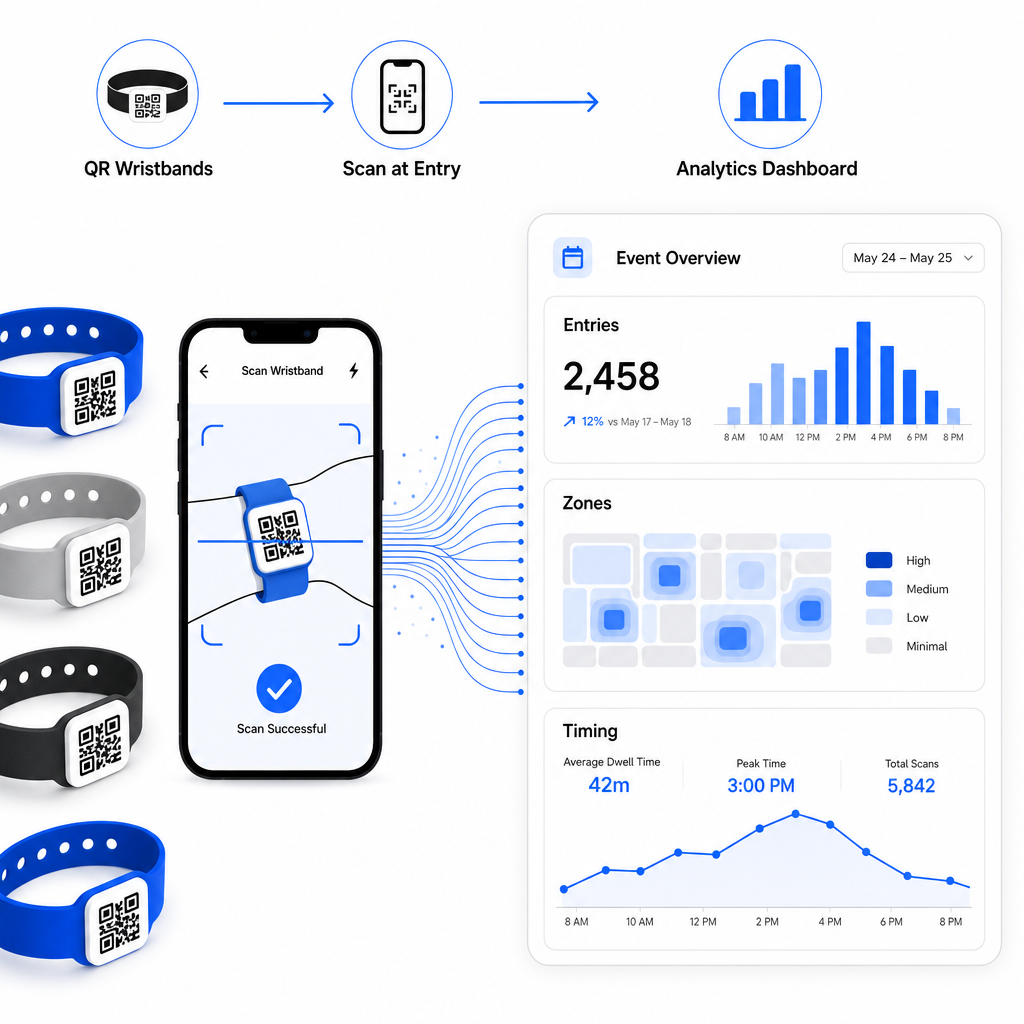
För en komplett genomgång av att bygga en QR-baserad incheckningsverksamhet, guiden om effektivisering av evenemangsincheckning med QR-koder täcker skanningslogistik, personalutbildning och realtidsövervakning av närvaro i detalj.
Ett välutformat QR-handledsband gör mer än att identifiera en deltagare – det kopplar en fysisk legitimation till ett levande digitalt system som du kontrollerar. Att få utskriftsspecifikationerna rätt, använda dynamiska koder för flexibilitet och skydda datan bakom varje skanning är de tre faktorer som avgör om ditt handledsbandsprogram fungerar smidigt på evenemangsdagen. Börja med ett testat bevis, inte en massutskrift, och bygg vidare därifrån.
Konfigurera dina handledsbands-QR-koder idag Skapa dynamiska, spårbara QR-koder för ditt nästa evenemang med QR-kodgenerator för event och hantera allt från en enda instrumentpanel.
Vanliga frågor
Det praktiska minimumet är 2 cm brett för närskanning. Som en allmän regel, tillåt minst 1 cm kodbredd för varje 10 cm förväntat skanningsavstånd. Att gå mindre ökar risken för skanningsfel, särskilt på böjda eller flexibla handledsbandytor.
Ja, om du använder dynamiska QR-koder. Dynamiska koder pekar på en kort omdirigerings-URL som du kontrollerar från en kontrollpanel. Att ändra destinationen – som att uppdatera en evenemangssida eller byta ut ett incheckningsformulär – träder i kraft omedelbart på alla tryckta armband utan några fysiska förändringar.
Undvik att koda råa personuppgifter såsom namn, biljett-ID eller uppgifter för åldersverifiering direkt i själva koden, eftersom vilken QR-skanner som helst kan läsa den. Istället, använd koden för att peka på ett säkert, autentiserat backend-system som kontrollerar vilken information som avslöjas och till vem. Detta tillvägagångssätt håller känsliga deltagardata borta från armbandets yta och minskar din exponering för obehörig åtkomst.