Vai jūsu pasākuma ieejas rindas virzās pārāk lēni, vai arī jūs zaudējat kontroli pār to, kam ir piekļuve kam? Izdrukāta aproce ar QR kodu atrisina abas problēmas, tieši savienojot fizisku akreditāciju ar jūsu digitālajām sistēmām. Šajā rokasgrāmatā ir paskaidrots, kā izstrādāt, ģenerēt un pārvaldīt QR kodu aproces, kas uzticami darbojas no iestatīšanas līdz pasākuma pēcanalīzei.
Ko patiesībā dara QR kodu aproces
QR kodu aproce ir fiziska aproce – auduma, vinila, silikona vai papīra – ar unikālu QR kodu, kas saistīts ar digitālu ierakstu vai galamērķi. Kad darbinieks to skenē, kods vai nu apstiprina apmeklētāja ieeju, apstiprina viņa piekļuves līmeni, vai arī iedarbina digitālu darbību, piemēram, profila atvēršanu vai apmeklējuma reģistrēšanu.
Galvenā atšķirība, ko vērts saprast, ir starp statiskie un Dinamisks QR kodiem. Statisks kods kodē savu galamērķi pastāvīgi – ja kaut kas mainās, jums ir jāpārprintē. Dinamisks QR kods norāda uz īsu pāradresācijas URL, ko varat atjaunināt jebkurā laikā no pārvaldības paneļa, nemainot uz aproces izdrukāto kodu. Pasākumiem, kur grafiki, zonas vai saistītais saturs var mainīties pirms pasākuma vai tā laikā, dinamiskie kodi sniedz ievērojami lielāku kontroli.
Izveidojiet dinamiskus QR kodus savam pasākumam Nepieciešams atjaunināt aproču galamērķus vai sekot līdzi skenēšanas aktivitātei reāllaikā? Izmantojiet Pasākuma QR koda ģenerators lai izveidotu dinamiskus kodus, ko varat pārvaldīt no viena paneļa.
Biežākie QR aproču lietošanas gadījumi
Ieeja un piekļuves kontrole
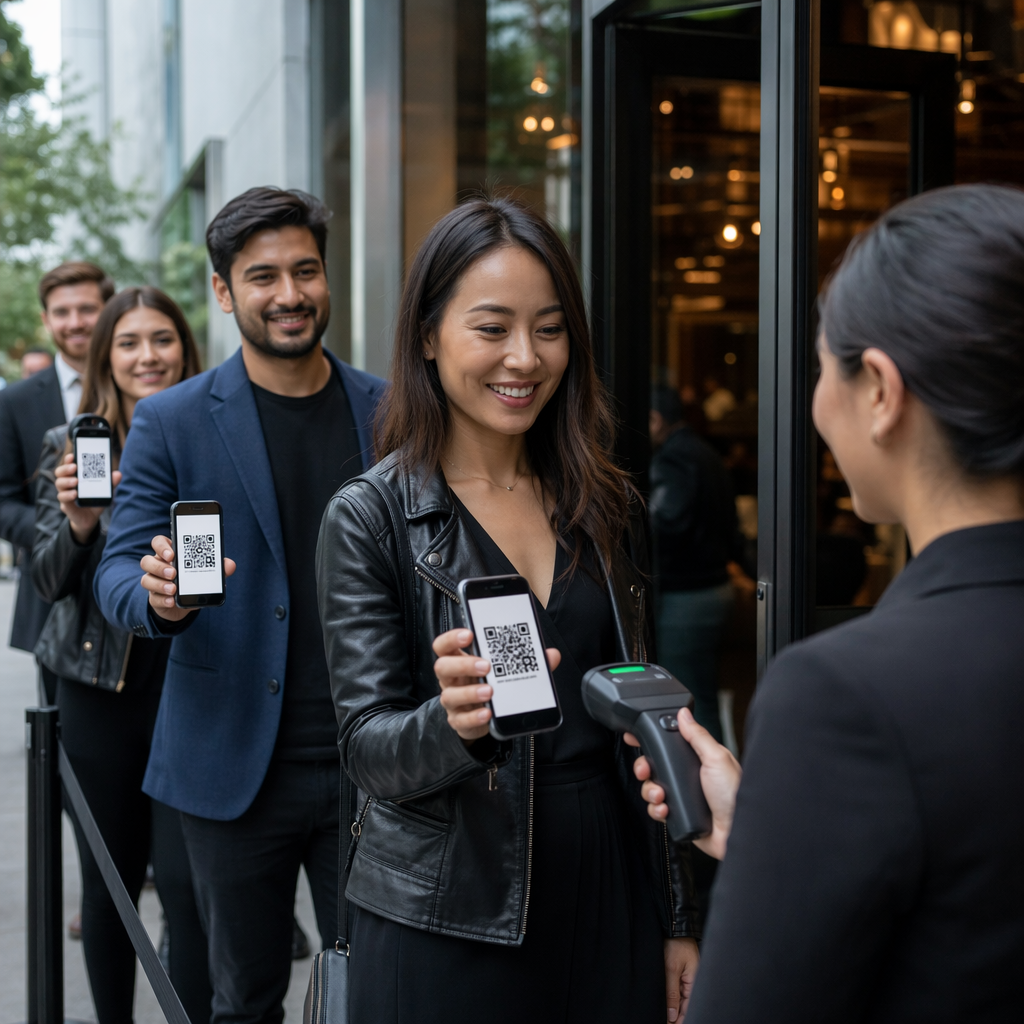
Visvienkāršākais pielietojums ir katras aproces izmantošana kā digitālās biļetes. Kad pasākuma aproces tiek drukātas ar unikāliem, sērijveida QR kodiem, katra no tām darbojas kā nenododama akreditācija. Darbinieks skenē kodu pie vārtiem, atzīmē to kā izmantotu un novērš atkārtotas ieiešanas mēģinājumus ar to pašu aproci. Šī pieeja novērš nepieciešamību pēc atsevišķām papīra biļetēm un samazina viltojumu risku.
Ja jūsu pasākumam ir vairākas piekļuves zonas – VIP zonas, aizkulisēs, vispārējā ieeja – mainīgi QR kodi ļauj katram apmeklētājam piešķirt konkrētu līmeni. Skenēšana katrā kontrolpunktā apstiprina, vai šī aproce dod piekļuvi attiecīgajai zonai, nodrošinot reāllaika kontroli pār pūļa plūsmu bez manuālas sarakstu pārbaudes. Lai dziļāk izpētītu, kā tas darbojas praksē, skatiet rokasgrāmatu par QR kodu izmantošanu biļetēs ieejas pārvaldībai.
Apmeklējuma uzskaite
Papildus ieejai pie vārtiem, QR aproces ļauj reģistrēt apmeklējuma datus vairākos punktos visā pasākuma laikā – sesiju telpās, darbnīcās vai sadarbības telpās. Manuālu reģistrācijas lapu vietā apmeklētāji skenē katrā vietā, un sistēma reģistrē, kurš apmeklēja ko un kad. Pageloot apmeklējuma QR kodu rīks atbalsta šo darbplūsmu, saistot kodus ar veidlapām vai reģistrācijas lapām, kas automātiski fiksē dalību.
Piekļuve pasākuma informācijai
Aproces QR kodam nav jāpilda tikai drošības funkcija. Saistot to ar galveno lapu, katram apmeklētājam tiek nodrošināta piekļuve pasākuma grafikam, runātāju biogrāfijām, norises vietas kartēm vai pēdējā brīža atjauninājumiem. Tā kā dinamiskos kodus var atjaunināt bez atkārtotas drukāšanas, jūs varat nosūtīt jaunu informāciju uz katru jau izplatīto aproci – tas ir noderīgi, ja mainās sesiju laiki vai telpa.
Tīklošana un kontaktu koplietošana
Profesionālās konferencēs QR aproces var kalpot arī kā digitālās vizītkartes. Aproces koda saistīšana ar vCard ļauj apmeklētājiem ātri skenējot kopīgot savus kontaktus, nevis apmainīties ar fiziskām kartēm. vCard QR koda ģenerators padara vienkāršu kontaktu kodu izveidi, kas saglabā vārdu, e-pastu, tālruņa numuru un uzņēmumu tieši skenera tālrunī.
Priekšrocības, izpirkšana un iesaiste
Aproces var arī nest funkcionālu vērtību, kas pārsniedz identifikāciju. Sērijveida kodi, kas saistīti ar apmeklētāju kontiem, var izsekot iepriekš ielādētiem dzērienu žetoniem, preču tiesībām vai lojalitātes priekšrocībām. Skenēšanas dati atklāj, kuras priekšrocības tika izmantotas un kad, sniedzot organizatoriem noderīgus uzvedības datus līdztekus operatīvajai funkcijai.
Dizaina prasības uzticamai skenēšanai
QR kodu aproce, kas nespēj skenēt reālos pasākuma apstākļos, rada berzi tieši nepareizajā brīdī. Vairāki fiziskā dizaina faktori nosaka, vai jūsu kodi darbosies uzticami.
Izmērs un skenēšanas attālums
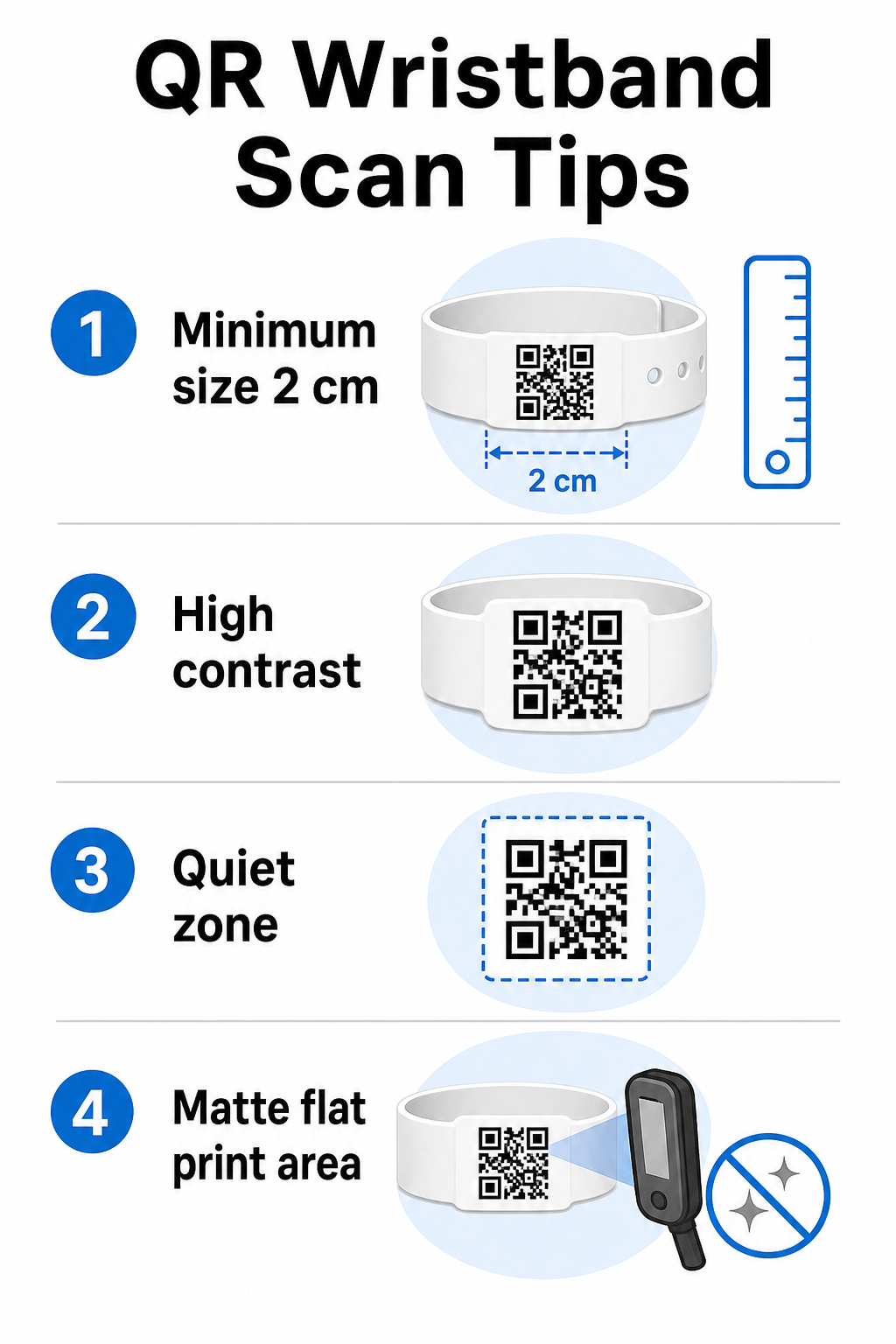
Standarta noteikums ir, ka QR koda platumam jābūt vismaz 1 cm uz katriem 10 cm paredzētā skenēšanas attāluma. Aproču gadījumā, kas tiek skenētas rokas stiepiena attālumā ar rokas ierīci, minimālais platums ir 2 cm. Plānākas aproces, kas nevar uzticami pielāgoties šim izmēram, radīs skenēšanas problēmas. Skatiet pilnu QR kodu izmēru ceļvedī mērījumiem dažādiem lietošanas gadījumiem.
Krāsu kontrasts
Augsts kontrasts starp koda moduļiem un fonu ir kritisks. Tumši moduļi uz gaiša fona – ideāli melns uz balta – nodrošina skeneriem skaidrāko signālu. Mērķējiet uz vismaz 4:1 kontrasta attiecību. Apgriezti dizaini ar gaišu kodu uz tumša fona parasti ir neuzticami un no tiem vajadzētu izvairīties.
Klusā zona
Katram QR kodam nepieciešama skaidra balta apmale ap tā perimetru, ko sauc par klusā zona. Šī mala signalizē skenerim, kur kods sākas un beidzas. Tās noņemšana vai apdrukāšana ir viens no visbiežākajiem skenēšanas kļūmju cēloņiem uz aprocēm, kur dizaina vieta ir ierobežota.
Drukas izšķirtspēja un formāts
Eksportējiet QR kodus vektora formātā (SVG vai EPS) vai augstas izšķirtspējas rastra failus vismaz 300 DPI galīgajā drukātajā izmērā. Zemas izšķirtspējas attēla palielināšana rada izplūdušas moduļu malas, ko skeneriem ir grūti nolasīt. Lai iegūtu norādījumus par konsekventas drukas kvalitātes nodrošināšanu, QR kodu lasāmības labākās prakses ceļvedis aptver pilnu tehnisko kontrolsarakstu.
Virsma un apdare
Aproces tiek nēsātas uz izliektas virsmas, kas rada kropļojumus. Drukājiet QR kodu uz aproces plakanākās vietas un izvairieties no spīdīgām vai atstarojošām apdarēm virs koda – atspīdums no virsgaismas pasākuma apgaismojuma tieši traucē viedtālruņu kamerām. Matēta apdare virs koda laukuma konsekventi pārspēj spīdīgās alternatīvas pasākumu vidē.
Koda sarežģītība
Jo vairāk datu ir kodēti QR kodā, jo blīvāks un grūtāk skenējams tas kļūst. Izmantojiet īsas URL adreses vai dinamiskos kodus, kas pāradresē caur kompaktu saiti, lai kods būtu vizuāli vienkāršs un ātri skenējams. Pageloot Saites QR koda ģenerators automātiski apstrādā URL saīsināšanu kā daļu no dinamiskā koda darbplūsmas.
Kļūdu labošana
QR kodiem ir iebūvēta kļūdu labošana, kas tos saglabā skenējamus pat tad, ja daļa koda ir bojāta. Augstākais labošanas līmenis ļauj atjaunot, ja līdz aptuveni 30% no koda laukuma ir aizsegts – attiecas uz aprocēm, kas vairāku dienu pasākumā pakļautas nodilumam, smērējumiem vai nelielai noberšanai. Ja kodam pievienojat logotipu, izmantojiet augstu kļūdu labošanu, lai kompensētu aizsegto laukumu.
QR kodu ģenerēšana aprocēm
Ģenerēšanas process seko vienkāršai darbplūsmai:
- Izvēlieties QR koda veidu. Ieejai labi darbojas saite vai pasākuma QR kods, kas norāda uz jūsu reģistrācijas sistēmu. Kontaktu koplietošanai izmantojiet vCard tipu. Apmeklējuma reģistrēšanai saiti uz veidlapu.
- Izmantojiet dinamiskos kodus, ja saturs var mainīties. Ja jūsu pasākums ilgst vairākas dienas vai saistītais galamērķis varētu būt jāatjaunina, dinamiskie kodi ļauj veikt izmaiņas no jūsu informācijas paneļa, nepārdrukājot nevienu aproci.
- Saglabājiet kodēto URL īsu. Īsākas URL adreses samazina koda blīvumu un uzlabo skenēšanas ātrumu.
- Pielāgojiet kontrasta ierobežojumu ietvaros. Jūs varat pievienot savu pasākuma logotipu un zīmola krāsas, bet pārbaudiet, vai kontrasts joprojām ir pietiekams pēc pielāgošanas.
- Lejupielādējiet drukāšanai gatavā formātā. Izmantojiet SVG, EPS vai augstas DPI PNG failus – nekad nepielāgojiet mazu JPEG failu.
- Pārbaudiet pirms masveida drukāšanas. Skenējiet savu paraugu vairākās ierīcēs, vājā apgaismojumā un skenēšanas attālumos, ko jūsu darbinieki faktiski izmantos. Šis viens solis novērš visbiežākās pasākuma dienas kļūmes.
Veidojiet un izsekojiet savus pasākuma QR kodus Ģenerējiet unikālus kodus katram apmeklētājam, uzraugiet skenēšanas aktivitāti un atjauniniet saistīto saturu, nepārdrukājot. Sāciet ar QR kodu ģenerators un izpētiet pasākumam specifiskas iespējas Pasākuma QR koda ģenerators.
Drošības un privātuma apsvērumi
QR aproces, kas glabā vai saista ar personīgu apmeklētāju informāciju, uzņemas datu aizsardzības pienākumus.
Šifrējiet sensitīvus datus. Ja aproces kods tieši kodē personīgu informāciju – piemēram, vārdu, biļetes kategoriju vai vecuma pārbaudes statusu – šiem datiem jābūt šifrētiem, lai tos nevarētu nolasīt neatļauti skeneri. Izmantojot dinamiskos kodus, kas norāda uz drošu, autentificētu aizmugursistēmu, nevis kodējot neapstrādātus datus pašā kodā, ievērojami samazina šo risku.
Izmantojiet HTTPS ar validētiem sertifikātiem. Visai saziņai starp jūsu skenēšanas lietotni un aizmugursistēmas validācijas serveri jānotiek pa šifrētiem kanāliem. Tas novērš skenēšanas notikumu vai apmeklētāju datu pārtveršanu reģistrācijas procesa laikā. Ceļvedis par 12. drošu QR kodu pasākumu biļešu izveidi detalizēti izskaidro iesaistītos tehniskos slāņus.
Ierobežojiet piekļuvi reģistrācijas sistēmām. Darbiniekiem paredzētām skenēšanas lietotnēm un informācijas paneļiem jāpieprasa individuāli pieteikšanās akreditācijas dati, nevis kopīgas paroles. Tas ierobežo risku, ja ierīce tiek pazaudēta, un atvieglo revīziju, lai noskaidrotu, kurš ko skenējis.
Piemērojiet privātuma pēc noklusējuma principus. Vāciet tikai datus, kas nepieciešami jūsu darbībai. Ja izmantojat skenēšanas analīzi pūļa plūsmas analīzei, pietiek ar apkopotiem anonimizētiem datiem, un tas novērš privātuma sekas, kas saistītas ar identificējamu personu izsekošanu. Ja tiek apstrādāti personas dati, nodrošiniet, lai apmeklētāji būtu informēti un jūsu procesi atbilstu piemērojamajiem noteikumiem.
Nodrošiniet kontekstu skenēšanas brīdī. Ļaujot apmeklētājiem zināt, ko dara aproces QR kods – un kas notiks, kad personāls to skenēs – veido uzticību un samazina neskaidrības par datu izmantošanu. Lai iegūtu plašāku ieskatu piekļuves kontroles nodrošināšanā ar dinamiskiem kodiem, ceļvedis par dinamiskie QR kodi piekļuves kontrolei aptver atsaukšanu, audita pēdas un reāllaika atļauju pārvaldību.
Skenēšanas analīzes izmantošana nākotnes pasākumu uzlabošanai
Dinamiskie QR kodi ģenerē skenēšanas datus, kas sniedzas tālu aiz ieejas skaitīšanas. Ar Pageloot analīzi jūs varat izsekot, kad un kur kodi tiek skenēti, kurās zonās bija vislielākā aktivitāte un kā apmeklētāju plūsma salīdzinājās ar jūsu prognozēm. Šie dati palīdz jums pieņemt apzinātus lēmumus par ieejas punktu personālu, sesiju plānošanu un aproces funkciju dizainu jūsu nākamajam pasākumam.
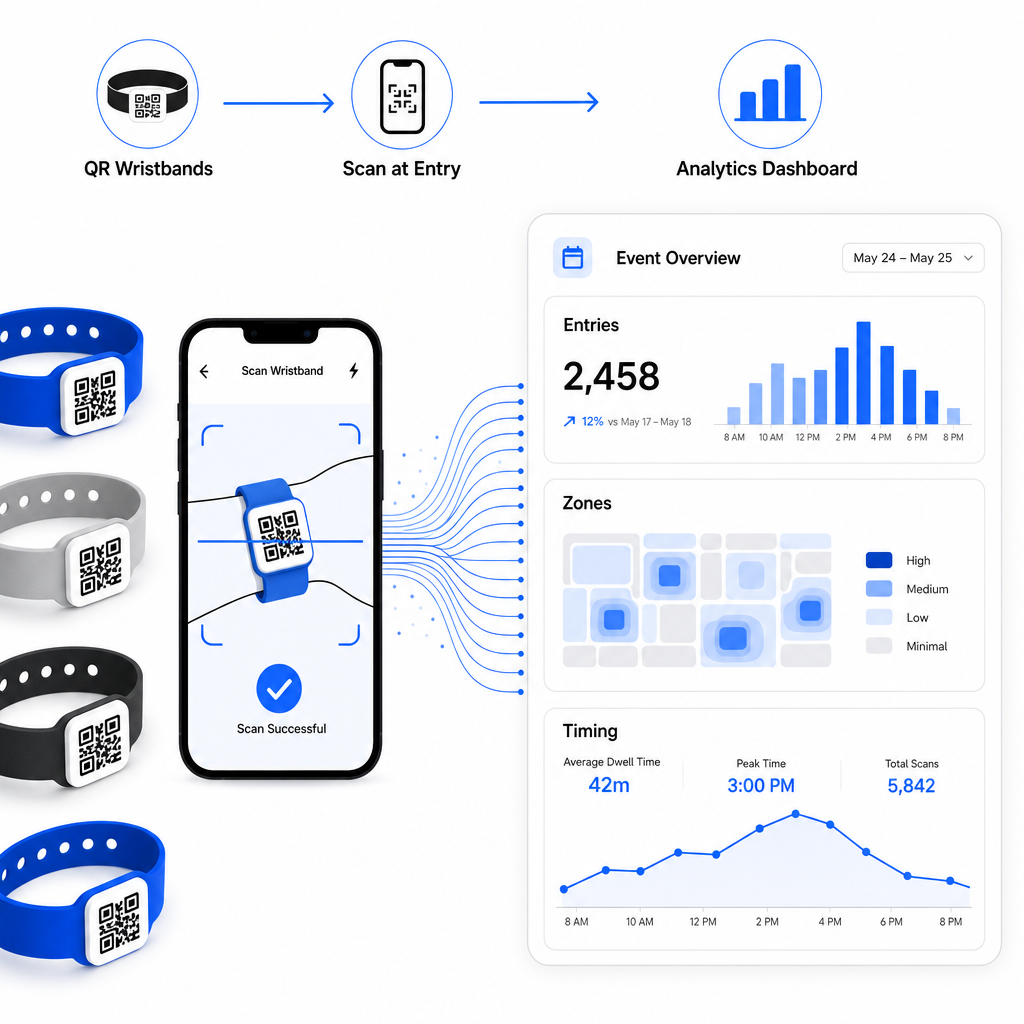
Lai iegūtu pilnīgu pārskatu par QR kodu balstītas reģistrācijas operācijas izveidi, ceļvedis par pasākumu reģistrācijas racionalizēšana ar QR kodiem detalizēti aptver skenēšanas loģistiku, personāla apmācību un reāllaika apmeklējumu uzraudzību.
Labi izstrādāta QR aproce dara vairāk nekā tikai identificē apmeklētāju – tā savieno fizisku akreditācijas apliecību ar tiešraides digitālo sistēmu, ko jūs kontrolējat. Pareizu drukas specifikāciju iegūšana, dinamisku kodu izmantošana elastībai un datu aizsardzība aiz katras skenēšanas ir trīs faktori, kas nosaka, vai jūsu aproču programma.
Iestatiet savus aproču QR kodus šodien Izveidojiet dinamiskus, izsekojamus QR kodus savam nākamajam pasākumam ar Pasākuma QR koda ģenerators un pārvaldiet visu no viena informācijas paneļa.
Biežāk uzdotie jautājumi
Praktiskais minimums ir 2 cm plats tuva diapazona skenēšanai. Kā vispārējs noteikums, atļaujiet vismaz 1 cm koda platuma uz katriem 10 cm paredzētā skenēšanas attāluma. Samazinot izmēru, palielinās skenēšanas kļūmju risks, īpaši uz izliektām vai elastīgām aproču virsmām.
Jā, ja jūs izmantojat dinamiskos QR kodus. Dinamiskie kodi norāda uz īsu novirzīšanas URL, ko jūs kontrolējat no informācijas paneļa. Galamērķa maiņa – piemēram, pasākuma grafika lapas atjaunināšana vai reģistrācijas veidlapas nomaiņa – stājas spēkā nekavējoties uz visām izdrukātajām aprocēm bez jebkādām fiziskām izmaiņām.
Izvairieties no neapstrādātu personas datu, piemēram, vārdu, biļešu ID vai vecuma pārbaudes informācijas, kodēšanas tieši pašā kodā, jo jebkurš QR skeneris to var nolasīt. Tā vietā izmantojiet kodu, lai norādītu uz drošu, autentificētu aizmugursistēmu, kas kontrolē, kāda informācija tiek atklāta un kam. Šī pieeja saglabā sensitīvus apmeklētāju datus prom no aproces virsmas un samazina jūsu pakļautību nesankcionētai piekļuvei.