Beveger køene ved arrangementet ditt seg for sakte, eller mister du oversikten over hvem som har tilgang til hva? Et trykt armbånd med en QR-kode løser begge problemer ved å koble en fysisk legitimasjon direkte til dine digitale systemer. Denne guiden forklarer hvordan du designer, genererer og administrerer QR-kode-armbånd som fungerer pålitelig fra oppsett til etter-arrangement-analyse.
Hva QR-kode-armbånd faktisk gjør
Et QR-kode-armbånd er et fysisk bånd – stoff, vinyl, silikon eller papir – trykt med en unik QR-kode som lenker til en digital post eller destinasjon. Når en ansatt skanner det, validerer koden enten en deltakers adgang, bekrefter deres tilgangsnivå, eller utløser en digital handling som å åpne en profil eller logge oppmøte.
Nøkkelen til å forstå er forskjellen mellom statisk og Dynamisk QR-koder. En statisk kode koder sin destinasjon permanent – hvis noe endres, må du skrive ut på nytt. En dynamisk QR-kode peker til en kort omdirigerings-URL som du kan oppdatere når som helst fra et administrasjonspanel, uten å endre den trykte koden på armbåndet. For arrangementer der tidsplaner, soner eller lenket innhold kan endres før eller under arrangementet, gir dynamiske koder deg betydelig mer kontroll.
Lag dynamiske QR-koder for arrangementet ditt Trenger du å oppdatere armbåndsdestinasjoner eller spore skanneaktivitet i sanntid? Bruk QR-kode generator for arrangement for å bygge dynamiske koder du kan administrere fra et enkelt dashbord.
Vanlige bruksområder for QR-armbånd
Adgang og inngangskontroll
Den mest direkte anvendelsen er å bruke hvert armbånd som en digital billett. Når arrangementsarmbånd trykkes med unike, serialiserte QR-koder, fungerer hvert enkelt som en ikke-overførbar legitimasjon. En ansatt skanner validerer koden ved porten, merker den som brukt, og forhindrer forsøk på gjeninntreden med samme bånd. Denne tilnærmingen fjerner behovet for separate papirbilletter og reduserer risikoen for forfalskninger.
Hvis arrangementet ditt har flere tilgangssoner – VIP-områder, backstage, generell adgang – lar variable QR-koder deg tildele hver deltaker til et spesifikt nivå. Skanning ved hvert kontrollpunkt bekrefter om armbåndet gir adgang til det området, noe som gir deg sanntidskontroll over publikumsflyten uten manuell listesjekk. For en dypere titt på hvordan dette fungerer i praksis, se guiden om bruk av QR-koder på billetter for inngangsstyring.
Fremmøte sporing
Utover portinngang lar QR-armbånd deg logge oppmøtedata på flere punkter gjennom et arrangement – sesjonsrom, workshops eller breakout-områder. I stedet for manuelle påmeldingslister skanner deltakerne på hvert sted, og systemet logger hvem som deltok på hva og når. Pageloots QR-kodeverktøy for oppmøte støtter denne arbeidsflyten ved å koble koder til skjemaer eller innsjekkingssider som fanger opp deltakelse automatisk.
Tilgang til arrangementsinformasjon
En armbånds-QR-kode trenger ikke bare å tjene en sikkerhetsfunksjon. Ved å koble den til en landingsside får hver deltaker on-demand tilgang til arrangementsplanen, foredragsholderbiografier, stedskart eller siste-minutt-oppdateringer. Fordi dynamiske koder kan oppdateres uten å skrive ut på nytt, kan du sende ny informasjon til hvert armbånd som allerede er distribuert – nyttig når sesjonstider endres eller et rom flyttes.
Nettverksbygging og kontaktdeling
På profesjonelle konferanser kan QR-armbånd fungere som digitale visittkort. Ved å koble en armbåndskode til et vCard kan deltakerne dele kontaktinformasjonen sin med en rask skanning i stedet for å utveksle fysiske kort. vCard QR-kode generator gjør det enkelt å lage kontaktkoder som lagrer navn, e-post, telefonnummer og selskap direkte på skannerens telefon.
Fordeler, innløsninger og engasjement
Armbånd kan også ha funksjonell verdi utover identifikasjon. Serialiserte koder koblet til deltakerkontoer kan spore forhåndslastede drikkebonger, vareberettigelser eller lojalitetsfordeler. Skannedata avslører hvilke fordeler som ble innløst og når, noe som gir arrangørene nyttige atferdsdata i tillegg til den operasjonelle funksjonen.
Designkrav for pålitelig skanning
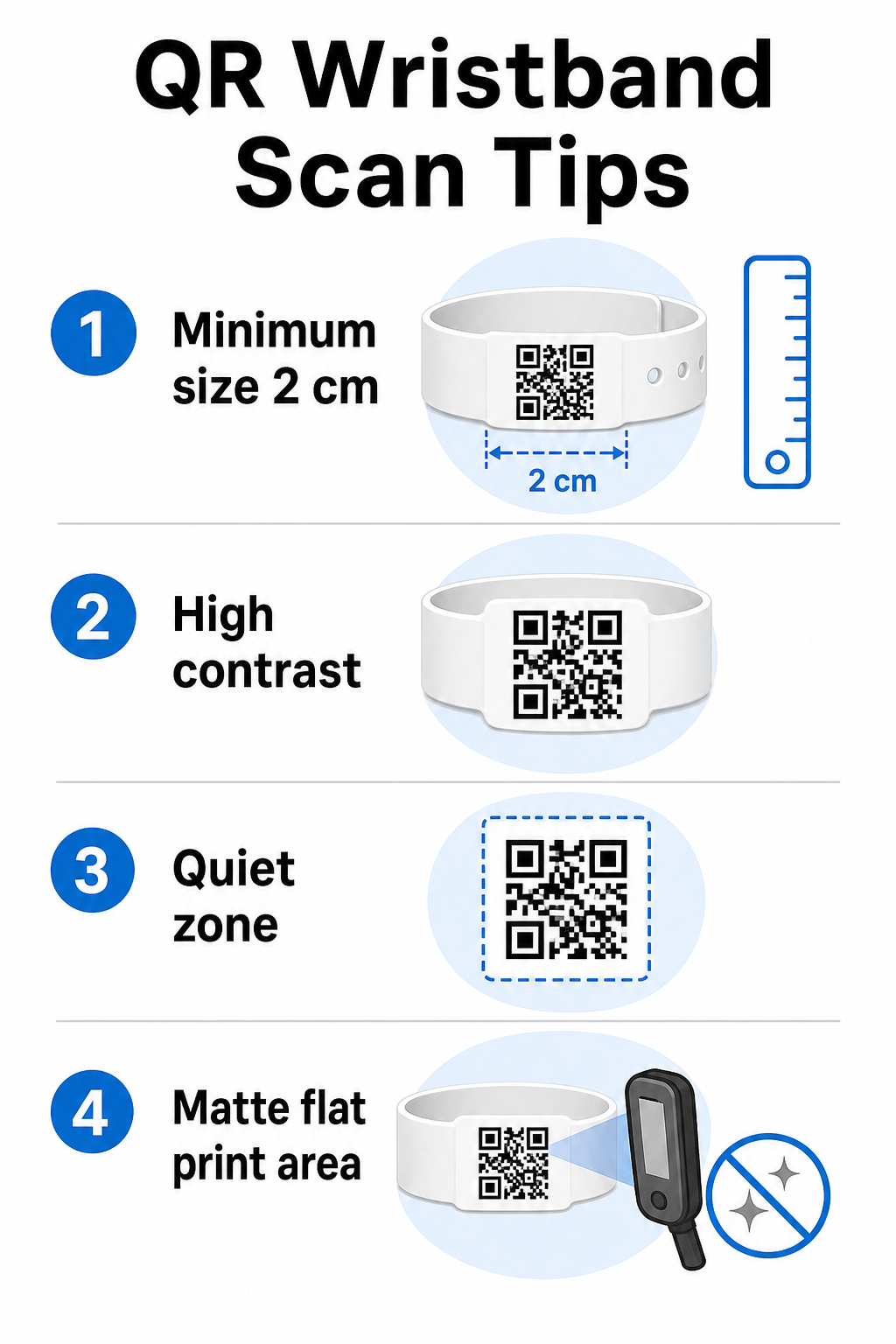
Et QR-kode-armbånd som ikke skanner under reelle arrangementsforhold, skaper friksjon akkurat i feil øyeblikk. Flere fysiske designfaktorer avgjør om kodene dine vil fungere pålitelig.
Størrelse og skanneavstand
Standardregelen er at en QR-kodes bredde skal være minst 1 cm for hver 10 cm forventet skanneavstand. For armbånd som skannes på armlengdes avstand av en håndholdt enhet, er en minimumsbredde på 2 cm det praktiske minimum. Tynnere armbånd som ikke pålitelig kan romme denne størrelsen, vil forårsake skanneproblemer. Se hele størrelsesguide for QR-koder for mål på tvers av ulike bruksområder.
Fargekontrast
Høy kontrast mellom kodemodulene og bakgrunnen er kritisk. Mørke moduler på en lys bakgrunn – ideelt sett svart på hvit – gir skannere det tydeligste signalet. Sikt på minst et 4:1 kontrastforhold. Inverterte design med en lys kode på en mørk bakgrunn er generelt upålitelige og bør unngås.
Rolig sone
Hver QR-kode krever en klar hvit kant rundt omkretsen, kalt en stille sone. Denne margen signaliserer til skanneren hvor koden begynner og slutter. Å fjerne den eller skrive ut over den er en av de vanligste årsakene til skannefeil på armbånd der designplassen er trang.
Utskriftsoppløsning og format
Eksporter QR-koder i vektorformat (SVG eller EPS) eller høyoppløselige rasterfiler med et minimum av 300 DPI ved den endelige utskriftsstørrelsen. Å skalere opp et lavoppløselig bilde skaper uskarpe modulkanter som skannere sliter med å lese. For veiledning om å oppnå konsistent utskriftskvalitet, dekker veiledningen for beste praksis for lesbarhet av QR-koder den fullstendige tekniske sjekklisten.
Overflate og finish
Armbånd bæres på en buet overflate, noe som introduserer forvrengning. Skriv ut QR-koden på det flateste området av båndet og unngå blanke eller reflekterende overflater over koden – gjenskinn fra takbelysning på arrangementet forstyrrer direkte smarttelefonkameraer. En matt finish over kodeområdet overgår konsekvent blanke alternativer i arrangementsmiljøer.
Kodekompleksitet
Jo mer data som er kodet i en QR-kode, jo tettere og vanskeligere å skanne blir den. Bruk korte URL-er eller dynamiske koder som omdirigerer via en kompakt lenke for å holde koden visuelt enkel og rask å skanne. Pageloot sin Lenke QR-kodegenerator håndterer automatisk URL-forkorting som en del av arbeidsflyten for dynamisk kode.
Feilretting
QR-koder har innebygd feilretting som holder dem skannbare selv når deler av koden er skadet. Det høyeste korreksjonsnivået tillater gjenoppretting når opptil omtrent 30% av kodeområdet er skjult – relevant for armbånd som opplever slitasje, flekker eller mindre skrubbsår over et flerdagers arrangement. Hvis du legger til en logo i koden, bruk høy feilretting for å kompensere for det dekkede området.
Generering av QR-koder for armbånd
Genereringsprosessen følger en enkel arbeidsflyt:
- Velg din QR-kodetype. For adgang fungerer en lenke eller arrangements-QR-kode som peker til innsjekkingssystemet ditt bra. For kontaktdeling, bruk en vCard-type. For oppmøtelogging, lenk til et skjema.
- Bruk dynamiske koder når innhold kan endres. Hvis arrangementet ditt strekker seg over flere dager eller den lenkede destinasjonen kan trenge oppdatering, lar dynamiske koder deg gjøre endringer fra dashbordet ditt uten å skrive ut et eneste armbånd på nytt.
- Hold den kodede URL-en kort. Kortere URL-er reduserer kodetettheten og forbedrer skannehastigheten.
- Tilpass innenfor kontrastbegrensninger. Du kan legge til arrangementets logo og merkevarefarger, men verifiser at kontrasten forblir tilstrekkelig etter tilpasning.
- Last ned i utskriftsklart format. Bruk SVG-, EPS- eller høyoppløselige PNG-filer – aldri skaler opp en liten JPEG.
- Test før masseutskrift. Skann prøven din på flere enheter, i dempet belysning, og på de skanneavstandene personalet ditt faktisk vil bruke. Dette ene trinnet forhindrer de vanligste feilene på arrangementsdagen.
Bygg og spor dine arrangements-QR-koder Generer unike koder for hver deltaker, overvåk skanneaktivitet, og oppdater lenket innhold uten å skrive ut på nytt. Start med QR-kodegenerator og utforsk arrangementsspesifikke alternativer på QR-kode generator for arrangement.
Sikkerhets- og personvernhensyn
QR-armbånd som lagrer eller lenker til personlig deltakerinformasjon medfører databeskyttelsesansvar.
Krypter sensitive data. Hvis en armbåndskode direkte koder personlig informasjon – som navn, billettkategori eller aldersverifiseringsstatus – bør disse dataene krypteres slik at de ikke kan leses av uautoriserte skannere. Bruk av dynamiske koder som peker til en sikker, autentisert backend i stedet for å kode rådata i selve koden, reduserer denne risikoen betydelig.
Bruk HTTPS med validerte sertifikater. All kommunikasjon mellom skanneappen din og backend-valideringsserveren bør kjøre over krypterte kanaler. Dette forhindrer avlytting av skannehendelser eller deltakerdata under innsjekkingsprosessen. Veiledningen om opprettelse av sikre QR-kode arrangementsbilletter forklarer de tekniske lagene involvert i detalj.
Begrens tilgang til innsjekkingssystemer. Personalrettede skanneapper og dashbord bør kreve individuelle påloggingslegitimasjoner i stedet for delte passord. Dette begrenser eksponeringen hvis en enhet mistes og gjør det enklere å revidere hvem som skannet hva.
Anvend personvern-som-standard-prinsipper. Samle kun inn dataene driften din krever. Hvis du bruker skanneanalyser for analyse av folkestrøm, er aggregerte anonymiserte data tilstrekkelig og unngår personvernimplikasjonene ved å spore identifiserbare individer. Der personopplysninger behandles, sørg for at deltakerne er informert og at prosessene dine overholder gjeldende forskrifter.
Gi kontekst ved skannepunktet. Å la deltakerne vite hva QR-koden på armbåndet gjør – og hva som vil skje når personalet skanner det – bygger tillit og reduserer forvirring om databruk. For en bredere titt på sikring av adgangskontroll med dynamiske koder, er guiden om dynamiske QR-koder for adgangskontroll dekker tilbakekalling, revisjonsspor og sanntids tillatelsesadministrasjon.
Bruke skanneanalyser for å forbedre fremtidige arrangementer
Dynamiske QR-koder genererer skannedata som strekker seg langt utover å telle innganger. Med Pageloots analyser kan du spore når og hvor koder skannes, hvilke soner som hadde mest aktivitet, og hvordan deltakerflyten sammenlignet med dine prognoser. Disse dataene hjelper deg med å ta informerte beslutninger om bemanning av inngangspunkter, sesjonsplanlegging og design av armbåndsfunksjoner for ditt neste arrangement.
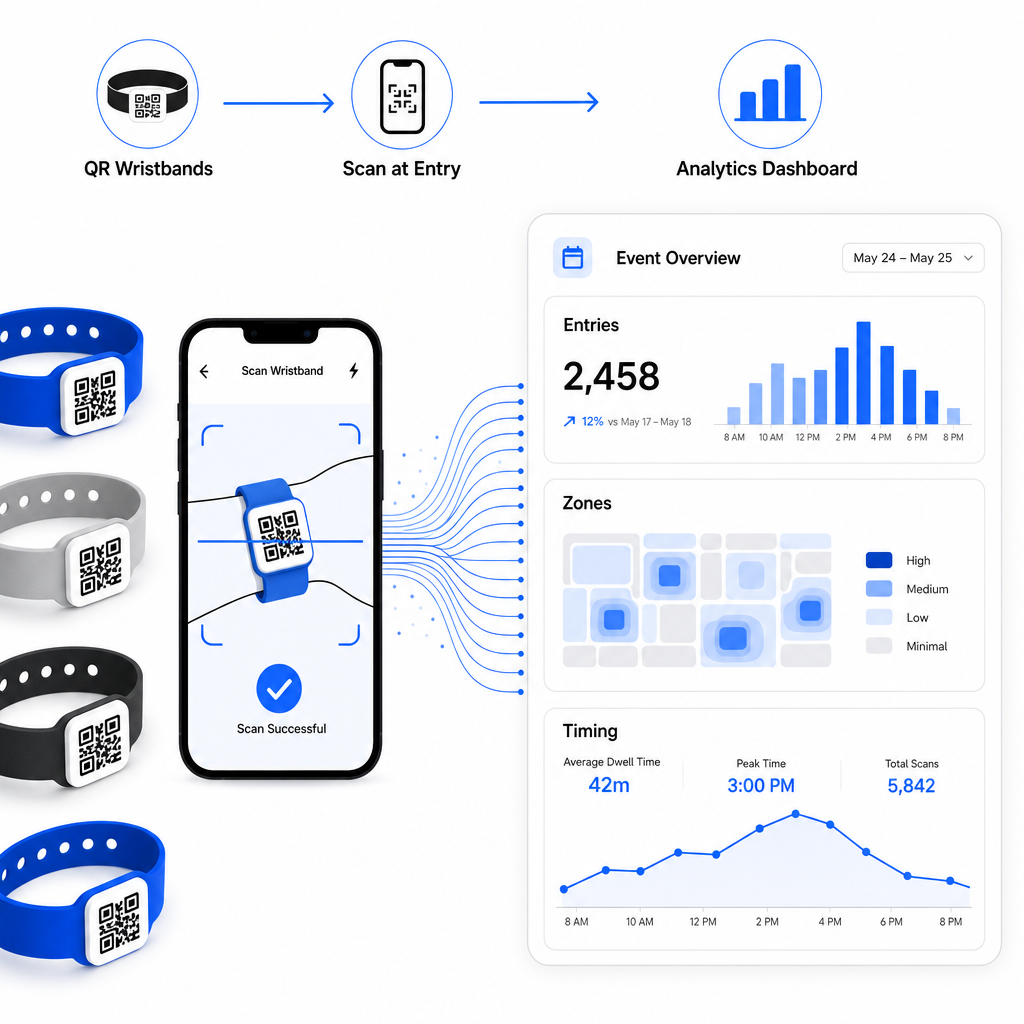
For en komplett gjennomgang av å bygge en QR-basert innsjekkingsoperasjon, er guiden om strømlinjeforme arrangementinnsjekking med QR-koder dekker skannelogistikk, personalopplæring og sanntids oppmøteovervåking i detalj.
Et godt designet QR-armbånd gjør mer enn å identifisere en deltaker – det kobler en fysisk legitimasjon til et levende digitalt system som du kontrollerer. Å få utskriftsspesifikasjonene riktig, bruke dynamiske koder for fleksibilitet og beskytte dataene bak hver skanning er de tre faktorene som avgjør om armbåndsprogrammet ditt fungerer knirkefritt på arrangementsdagen. Start med et testet bevis, ikke en masseutskrift, og bygg videre derfra.
Sett opp dine armbånds-QR-koder i dag Lag dynamiske, sporbare QR-koder for ditt neste arrangement med QR-kode generator for arrangement og administrer alt fra ett enkelt dashbord.
Ofte stilte spørsmål
Det praktiske minimumet er 2 cm bredt for nærområdeskanning. Som en generell regel, tillat minst 1 cm kodebredde for hver 10 cm forventet skanneavstand. Å gå mindre øker risikoen for skannefeil, spesielt på buede eller fleksible armbåndsoverflater.
Ja, hvis du bruker dynamiske QR-koder. Dynamiske koder peker til en kort omdirigerings-URL som du kontrollerer fra et dashbord. Å endre destinasjonen – som for eksempel å oppdatere en arrangementsside eller bytte ut et innsjekkingsskjema – trer i kraft umiddelbart på alle trykte armbånd uten fysiske endringer.
Unngå å kode rå personlige data som navn, billett-ID-er, eller detaljer for aldersverifisering direkte i koden selv, siden enhver QR-skanner kan lese den. I stedet, bruk koden til å peke til et sikkert, autentisert bakend-system som kontrollerer hvilken informasjon som avsløres og til hvem. Denne tilnærmingen holder sensitive deltakerdata vekk fra armbåndets overflate og reduserer din eksponering for uautorisert tilgang.