Liikkuvatko tapahtuman sisäänpääsyjonot liian hitaasti, vai oletko menettämässä käsityksen siitä, kenellä on pääsy mihin? Painettu QR-koodillinen ranneke ratkaisee molemmat ongelmat yhdistämällä fyysisen tunnisteen suoraan digitaalisiin järjestelmiisi. Tämä opas selittää, miten suunnitella, luoda ja hallita QR-koodirannekkeita, jotka toimivat luotettavasti asennuksesta tapahtuman jälkeiseen analyysiin.
Mitä QR-koodirannekkeet todella tekevät
QR-koodiranneke on fyysinen ranneke – kangas, vinyyli, silikoni tai paperi – johon on painettu ainutlaatuinen QR-koodi, joka linkittää digitaaliseen tietueeseen tai kohteeseen. Kun henkilökunnan jäsen skannaa sen, koodi joko vahvistaa osallistujan pääsyn, vahvistaa heidän pääsytasonsa tai laukaisee digitaalisen toiminnon, kuten profiilin avaamisen tai osallistumisen kirjaamisen.
Keskeinen ero, joka kannattaa ymmärtää, on ero staattinen ja Dynaaminen QR-koodit. Staattinen koodi koodaa kohteensa pysyvästi – jos jokin muuttuu, sinun on tulostettava uudelleen. Dynaaminen QR-koodi osoittaa lyhyeen uudelleenohjaus-URL-osoitteeseen, jonka voit päivittää milloin tahansa hallintapaneelista muuttamatta rannekkeeseen painettua koodia. Tapahtumissa, joissa aikataulut, alueet tai linkitetty sisältö voivat muuttua ennen tapahtumaa tai sen aikana, dynaamiset koodit antavat sinulle huomattavasti enemmän hallintaa.
Luo dynaamisia QR-koodeja tapahtumaasi varten Tarvitseeko sinun päivittää rannekkeiden kohteita tai seurata skannaustoimintaa reaaliajassa? Käytä Tapahtuman QR-koodi generaattori rakentaaksesi dynaamisia koodeja, joita voit hallita yhdestä hallintapaneelista.
QR-rannekkeiden yleiset käyttötapaukset
Sisäänpääsy ja kulunvalvonta
Suorin sovellus on käyttää jokaista ranneketta digitaalisena lippuna. Kun tapahtumaranteisiin painetaan ainutlaatuisia, sarjoitettuja QR-koodeja, jokainen niistä toimii ei-siirrettävänä tunnisteena. Henkilökunnan skanneri vahvistaa koodin portilla, merkitsee sen käytetyksi ja estää uudelleenpääsy-yritykset samalla rannekkeella. Tämä lähestymistapa poistaa erillisten paperilippujen tarpeen ja vähentää väärennösten riskiä.
Jos tapahtumassasi on useita pääsyalueita – VIP-alueet, backstage, yleinen sisäänpääsy – muuttuvat QR-koodit antavat sinun määrittää jokaisen osallistujan tiettyyn tasoon. Skannaus jokaisella tarkistuspisteellä vahvistaa, myöntääkö kyseinen ranneke pääsyn kyseiselle alueelle, antaen sinulle reaaliaikaisen hallinnan yleisön virtauksesta ilman manuaalista listantarkistusta. Syvemmän katsauksen siitä, miten tämä toimii käytännössä, löydät oppaasta QR-koodien käyttö lipuissa sisäänpääsyn hallintaan.
Läsnäoloseuranta
Portin sisäänpääsyn lisäksi QR-rannekkeet antavat sinun kirjata osallistumistietoja useissa pisteissä koko tapahtuman ajan – istuntosaleissa, työpajoissa tai breakout-tiloissa. Manuaalisten ilmoittautumislomakkeiden sijaan osallistujat skannaavat jokaisessa paikassa, ja järjestelmä kirjaa, kuka osallistui mihin ja milloin. Pagelootin läsnäolo-QR-koodityökalun tukee tätä työnkulkua linkittämällä koodit lomakkeisiin tai sisäänkirjautumissivuille, jotka tallentavat osallistumisen automaattisesti.
Pääsy tapahtumatietoihin
Rannekkeen QR-koodin ei tarvitse palvella vain turvallisuustoimintoa. Sen linkittäminen aloitussivulle antaa jokaiselle osallistujalle on-demand-pääsyn tapahtuman aikatauluun, puhujien esittelyihin, paikkakarttoihin tai viime hetken päivityksiin. Koska dynaamisia koodeja voidaan päivittää ilman uudelleenpainatusta, voit lähettää uutta tietoa jokaiseen jo jaettuun rannekkeeseen – hyödyllistä, kun istuntoajat muuttuvat tai huone vaihtuu.
Verkostoituminen ja yhteystietojen jakaminen
Ammattikonferensseissa QR-rannekkeet voivat toimia myös digitaalisina käyntikortteina. Rannekekoodin linkittäminen vCardiin antaa osallistujille mahdollisuuden jakaa yhteystietonsa nopealla skannauksella fyysisten korttien vaihtamisen sijaan. vCard QR-koodi: tee ilmainen yhteystieto-QR-koodi tekee yhteystietokoodien luomisesta helppoa, jotka tallentavat nimen, sähköpostin, puhelinnumeron ja yrityksen suoraan skannerin puhelimeen.
Edut, lunastukset ja sitoutuminen
Rannekkeilla voi olla myös toiminnallista arvoa tunnistamisen lisäksi. Sarjoitetut koodit, jotka on linkitetty osallistujatileihin, voivat seurata esiladattuja juomakuponkeja, tuoteoikeuksia tai kanta-asiakasetuja. Skannaustiedot paljastavat, mitkä edut lunastettiin ja milloin, antaen järjestäjille hyödyllistä käyttäytymistietoa operatiivisen toiminnon ohella.
Suunnitteluvaatimukset luotettavaan skannaukseen
QR-koodiranneke, joka ei skannaa todellisissa tapahtumaolosuhteissa, luo kitkaa juuri väärällä hetkellä. Useat fyysiset suunnittelutekijät määrittävät, toimivatko koodisi luotettavasti.
Koko ja skannausetäisyys
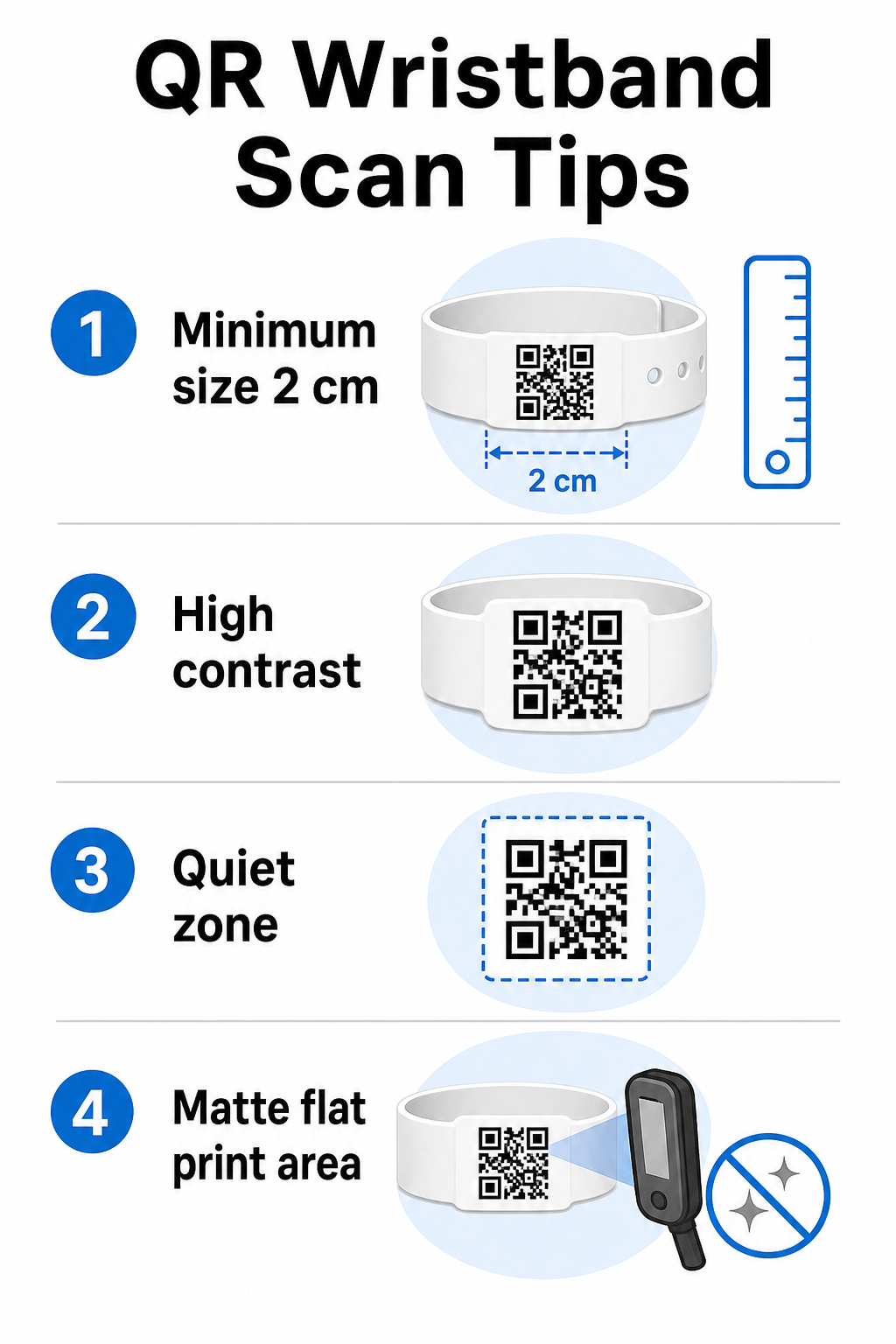
Vakiintunut sääntö on, että QR-koodin leveyden tulisi olla vähintään 1 cm jokaista 10 cm:n odotettua skannausetäisyyttä kohden. Rannekkeille, jotka skannataan käsivarren etäisyydeltä kädessä pidettävällä laitteella, vähintään 2 cm:n leveys on käytännöllinen alaraja. Ohuemmat rannekkeet, jotka eivät pysty luotettavasti mukautumaan tähän kokoon, aiheuttavat skannausongelmia. Katso koko QR-koodin kokooppaastamme mittaukset eri käyttötapauksissa.
Värikontrasti
Korkea kontrasti koodimoduulien ja taustan välillä on kriittinen. Tummat moduulit vaalealla taustalla – mieluiten musta valkoisella – antavat skannereille selkeimmän signaalin. Tavoittele vähintään 4:1 kontrastisuhdetta. Käänteiset mallit, joissa on vaalea koodi tummalla taustalla, ovat yleensä epäluotettavia ja niitä tulisi välttää.
Hiljainen alue
Jokainen QR-koodi vaatii selkeän valkoisen reunuksen ympärilleen, jota kutsutaan hiljaisen alueen. Tämä marginaali ilmoittaa skannerille, mistä koodi alkaa ja mihin se päättyy. Sen poistaminen tai sen päälle tulostaminen on yksi yleisimmistä skannausvirheiden syistä rannekkeissa, joissa suunnittelutila on rajallinen.
Tulostusresoluutio ja -muoto
Vie QR-koodit vektorimuodossa (SVG tai EPS) tai korkearesoluutioisina rasteritiedostoina vähintään 300 DPI lopullisessa tulostuskoossa. Matalaresoluutioisen kuvan skaalaaminen ylöspäin luo sumeita moduulireunoja, joita skannerien on vaikea lukea. Ohjeita tasaisen tulostuslaadun saavuttamiseen löytyy QR-koodin luettavuuden parhaiden käytäntöjen opas kattaa täyden teknisen tarkistuslistan.
Pinta ja viimeistely
Rannekkeita käytetään kaarevalla pinnalla, mikä aiheuttaa vääristymiä. Tulosta QR-koodi rannekkeen tasaisimmalle alueelle ja vältä kiiltäviä tai heijastavia pintoja koodin päällä – yläpuolisen tapahtumavalaistuksen häikäisy häiritsee suoraan älypuhelimen kameroita. Mattapinta koodialueen päällä päihittää jatkuvasti kiiltävät vaihtoehdot tapahtumaympäristöissä.
Koodin monimutkaisuus
Mitä enemmän dataa QR-koodiin on koodattu, sitä tiheämmäksi ja vaikeammaksi se muuttuu skannata. Käytä lyhyitä URL-osoitteita tai dynaamisia koodeja, jotka ohjaavat kompaktin linkin kautta, jotta koodi pysyy visuaalisesti yksinkertaisena ja nopeana skannata. Pagelootin Linkki QR-koodigeneraattori käsittelee URL-osoitteiden lyhentämisen automaattisesti osana dynaamisen koodin työnkulkua.
Virheenkorjaus
QR-koodeissa on sisäänrakennettu virheenkorjaus, joka pitää ne skannattavina, vaikka osa koodista olisi vaurioitunut. Korkein korjaustaso mahdollistaa palautuksen, kun jopa noin 30 % koodialueesta on peitetty – tämä on tärkeää rannekkeille, jotka kuluvat, tahriintuvat tai saavat pieniä naarmuja monipäiväisen tapahtuman aikana. Jos lisäät logon koodiin, käytä korkeaa virheenkorjausta peitetyn alueen kompensoimiseksi.
QR-koodien luominen rannekkeisiin
Luontiprosessi noudattaa suoraviivaista työnkulkua:
- Valitse QR-koodityyppisi. Sisäänpääsyyn linkki tai tapahtuman QR-koodi, joka osoittaa sisäänkirjautumisjärjestelmääsi, toimii hyvin. Yhteystietojen jakamiseen käytä vCard-tyyppiä. Osallistumisen kirjaamiseen linkitä lomakkeeseen.
- Käytä dynaamisia koodeja, kun sisältö voi muuttua. Jos tapahtumasi kestää useita päiviä tai linkitettyä kohdetta saattaa olla tarpeen päivittää, dynaamiset koodit antavat sinun tehdä muutoksia hallintapaneelista ilman yhdenkään rannekkeen uudelleentulostamista.
- Pidä koodattu URL-osoite lyhyenä. Lyhyemmät URL-osoitteet vähentävät koodin tiheyttä ja parantavat skannausnopeutta.
- Mukauta kontrastirajoitusten puitteissa. Voit lisätä tapahtumasi logon ja brändivärit, mutta varmista, että kontrasti pysyy riittävänä mukauttamisen jälkeen.
- Lataa tulostusvalmiissa muodossa. Käytä SVG-, EPS- tai korkean DPI:n PNG-tiedostoja – älä koskaan skaalaa pientä JPEG-tiedostoa.
- Testaa ennen massatulostusta. Skannaa vedoksesi useilla laitteilla, hämärässä valaistuksessa ja niillä skannausetäisyyksillä, joita henkilökuntasi todella käyttää. Tämä yksittäinen vaihe estää yleisimmät tapahtumapäivän virheet.
Rakenna ja seuraa tapahtumasi QR-koodeja Luo yksilölliset koodit jokaiselle osallistujalle, seuraa skannaustoimintaa ja päivitä linkitettyä sisältöä ilman uudelleentulostusta. Aloita QR-koodigeneraattori ja tutustu tapahtumakohtaisiin vaihtoehtoihin Tapahtuman QR-koodi generaattori.
Turvallisuus- ja yksityisyysnäkökohdat
QR-rannekkeet, jotka tallentavat tai linkittävät henkilökohtaisiin osallistujatietoihin, sisältävät tietosuojavastuita.
Salaa arkaluonteiset tiedot. Jos rannekoodi koodaa suoraan henkilökohtaisia tietoja – kuten nimen, lippukategorian tai iän vahvistustilan – tiedot tulisi salata, jotta luvattomat skannerit eivät voi lukea niitä. Dynaamisten koodien käyttö, jotka osoittavat turvalliseen, todennettuun taustajärjestelmään sen sijaan, että raakadata koodattaisiin itse koodiin, vähentää tätä riskiä merkittävästi.
Käytä HTTPS:ää validoitujen varmenteiden kanssa. Kaiken viestinnän skannaussovelluksesi ja taustajärjestelmän validointipalvelimen välillä tulisi kulkea salattujen kanavien kautta. Tämä estää skannaustapahtumien tai osallistujatietojen sieppauksen sisäänkirjautumisprosessin aikana. Opas aiheesta turvallisten QR-kooditapahtumalippujen luominen selittää yksityiskohtaisesti tekniset kerrokset.
Rajoita pääsyä sisäänkirjautumisjärjestelmiin. Henkilökunnan käyttämien skannaussovellusten ja hallintapaneelien tulisi vaatia yksilöllisiä kirjautumistietoja jaetun salasanan sijaan. Tämä rajoittaa altistumista, jos laite katoaa, ja helpottaa sen tarkastamista, kuka skannasi mitä.
Sovella tietosuojan periaatteita suunnittelussa. Kerää vain tiedot, joita toimintasi vaatii. Jos käytät skannausanalytiikkaa yleisövirran analysointiin, koottu anonyymi data on riittävää ja välttää tunnistettavien henkilöiden seurannan tietosuojavaikutukset. Jos henkilötietoja käsitellään, varmista, että osallistujat ovat tietoisia ja että prosessisi noudattavat sovellettavia säännöksiä.
Tarjoa kontekstia skannaushetkellä. Antamalla osallistujien tietää, mitä rannekkeen QR-koodi tekee – ja mitä tapahtuu, kun henkilökunta skannaa sen – rakentaa luottamusta ja vähentää sekaannusta tiedon käytöstä. Laajemman katsauksen saamiseksi kulunvalvonnan turvaamiseen dynaamisilla koodeilla, opas aiheesta dynaamisia QR-koodeja kulunvalvontaan kattaa peruutukset, tarkastusketjut ja reaaliaikaisen käyttöoikeuksien hallinnan.
Skannausanalytiikan käyttö tulevien tapahtumien parantamiseen
Dynaamiset QR-koodit tuottavat skannaustietoja, jotka ulottuvat paljon pidemmälle kuin pelkkä sisäänpääsyjen laskeminen. Pagelootin analytiikan avulla voit seurata, milloin ja missä koodeja skannataan, mitkä alueet olivat aktiivisimpia ja miten osallistujavirta vertautui ennusteisiisi. Nämä tiedot auttavat sinua tekemään tietoon perustuvia päätöksiä sisääntulopisteiden henkilöstöstä, istuntojen aikataulutuksesta ja rannekkeen ominaisuuksien suunnittelusta seuraavaa tapahtumaasi varten.
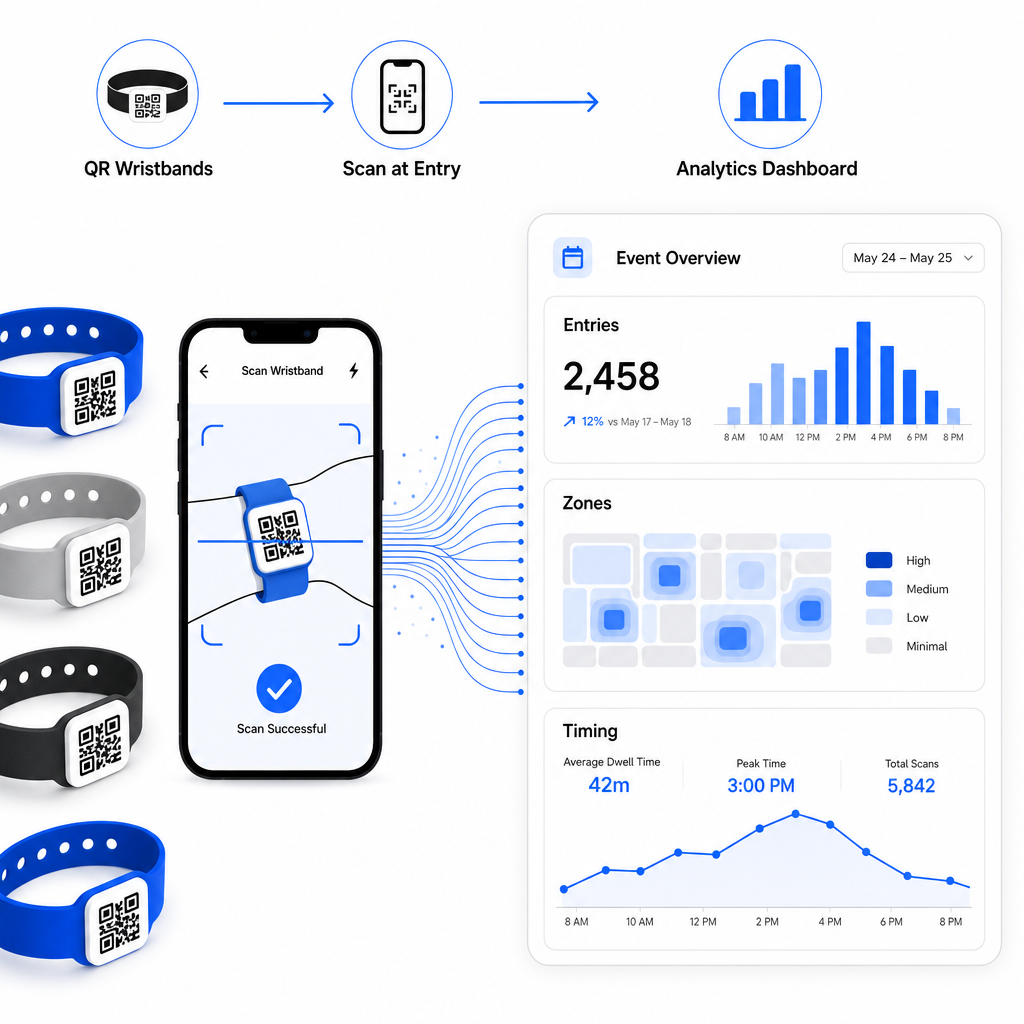
Täydellisen läpikäynnin saamiseksi QR-pohjaisen sisäänkirjautumisjärjestelmän rakentamisesta, opas aiheesta tapahtuman sisäänkirjautumisen tehostaminen QR-koodeilla kattaa skannauslogistiikan, henkilökunnan koulutuksen ja reaaliaikaisen läsnäolon seurannan yksityiskohtaisesti.
Hyvin suunniteltu QR-ranneke tekee enemmän kuin tunnistaa osallistujan – se yhdistää fyysisen tunnisteen hallitsemaasi reaaliaikaiseen digitaaliseen järjestelmään. Oikeiden tulostusmääritysten saaminen, dynaamisten koodien käyttö joustavuuden vuoksi ja kunkin skannauksen takana olevan tiedon suojaaminen ovat kolme tekijää, jotka määräävät, toimiiko rannekeohjelmasi sujuvasti tapahtumapäivänä. Aloita testatulla vedoksella, älä massatulostuksella, ja rakenna siitä eteenpäin.
Määritä rannekkeesi QR-koodit tänään Luo dynaamisia, seurattavia QR-koodeja seuraavaan tapahtumaasi Tapahtuman QR-koodi generaattori ja hallitse kaikkea yhdestä hallintapaneelista.
Usein kysytyt kysymykset
Käytännön minimi on 2 cm leveä lähiskannaukseen. Yleissääntönä varaa vähintään 1 cm koodin leveyttä jokaista 10 cm:n odotettua skannausetäisyyttä kohti. Pienemmäksi meneminen lisää skannausvirheiden riskiä, erityisesti kaarevilla tai joustavilla rannekespinnoilla.
Kyllä, jos käytät dynaamisia QR-koodeja. Dynaamiset koodit osoittavat lyhyeen uudelleenohjaus-URL-osoitteeseen, jota hallitset hallintapaneelista. Kohteen muuttaminen – kuten tapahtuman aikataulusivun päivittäminen tai sisäänkirjautumislomakkeen vaihtaminen – tulee voimaan välittömästi kaikissa painetuissa rannekkeissa ilman fyysisiä muutoksia.
Vältä raakojen henkilötietojen, kuten nimien, lipputunnusten tai iänvarmistustietojen, koodaamista suoraan itse koodiin, sillä mikä tahansa QR-lukija voi lukea sen. Sen sijaan käytä koodia osoittamaan turvalliseen, todennettuun taustajärjestelmään, joka hallitsee, mitä tietoja paljastetaan ja kenelle. Tämä lähestymistapa pitää arkaluonteiset osallistujatiedot poissa rannekkeen pinnasta ja vähentää altistumistasi luvattomalle pääsylle.