首页 > 使用案例 > How to Use QR Codes on Wristbands for Events and Identification
QR wristband scan

How to Use QR Codes on Wristbands for Events and Identification

Optimize event entry and attendance tracking with QR code wristbands. Learn best practices for design, scanning reliability, and managing secure dynamic codes.
Updated on 7 月 2, 2026
目录

Are your event entry lines moving too slowly, or are you losing track of who has access to what? A printed wristband with a QR code solves both problems by connecting a physical credential directly to your digital systems. This guide explains how to design, generate, and manage QR code wristbands that work reliably from setup through post-event analysis.

What QR Code Wristbands Actually Do

A QR code wristband is a physical band – fabric, vinyl, silicone, or paper – printed with a unique QR code that links to a digital record or destination. When a staff member scans it, the code either validates an attendee’s admission, confirms their access tier, or triggers a digital action like opening a profile or logging attendance.

The key distinction worth understanding is the difference between 静态动态的 QR codes. A static code encodes its destination permanently – if anything changes, you need to reprint. A dynamic QR code points to a short redirect URL that you can update at any time from a management dashboard, without changing the printed code on the wristband. For events where schedules, zones, or linked content may shift before or during the event, dynamic codes give you significantly more control.

Create Dynamic QR Codes for Your Event Need to update wristband destinations or track scan activity in real time? Use the 活动二维码生成器 to build dynamic codes you can manage from a single dashboard.

Common Use Cases for QR Wristbands

Admission and Entry Control

The most direct application is using each wristband as a digital ticket. When event wristbands are printed with unique, serialized QR codes, each one acts as a non-transferable credential. A staff scanner validates the code at the gate, marks it as used, and prevents re-entry attempts with the same band. This approach removes the need for separate paper tickets and reduces the risk of counterfeits.

If your event has multiple access zones – VIP areas, backstage, general admission – variable QR codes let you assign each attendee to a specific tier. Scanning at each checkpoint confirms whether that wristband grants entry to that area, giving you real-time control over crowd flow without manual list-checking. For a deeper look at how this works in practice, see the guide on using QR codes on tickets for entry management.

出勤跟踪

Beyond gate entry, QR wristbands let you log attendance data at multiple points throughout an event – session rooms, workshops, or breakout spaces. Instead of manual sign-in sheets, attendees scan at each location and the system logs who attended what and when. Pageloot’s attendance QR code tool supports this workflow by linking codes to forms or check-in pages that capture participation automatically.

Access to Event Information

A wristband QR code does not have to serve only a security function. Linking it to a landing page gives every attendee on-demand access to the event schedule, speaker bios, venue maps, or last-minute updates. Because dynamic codes can be updated without reprinting, you can push new information to every wristband already distributed – useful when session times change or a room moves.

Networking and Contact Sharing

At professional conferences, QR wristbands can double as digital business cards. Linking a wristband code to a vCard lets attendees share their contact details with a quick scan rather than exchanging physical cards. The vCard QR 码生成器 makes it straightforward to create contact codes that store a name, email, phone number, and company directly to the scanner’s phone.

Perks, Redemptions, and Engagement

Wristbands can also carry functional value beyond identification. Serialized codes linked to attendee accounts can track pre-loaded drink tokens, merchandise entitlements, or loyalty perks. Scan data reveals which benefits were redeemed and when, giving organizers useful behavioral data alongside the operational function.

Design Requirements for Reliable Scanning

A QR code wristband that fails to scan under real event conditions creates friction at exactly the wrong moment. Several physical design factors determine whether your codes will perform reliably.

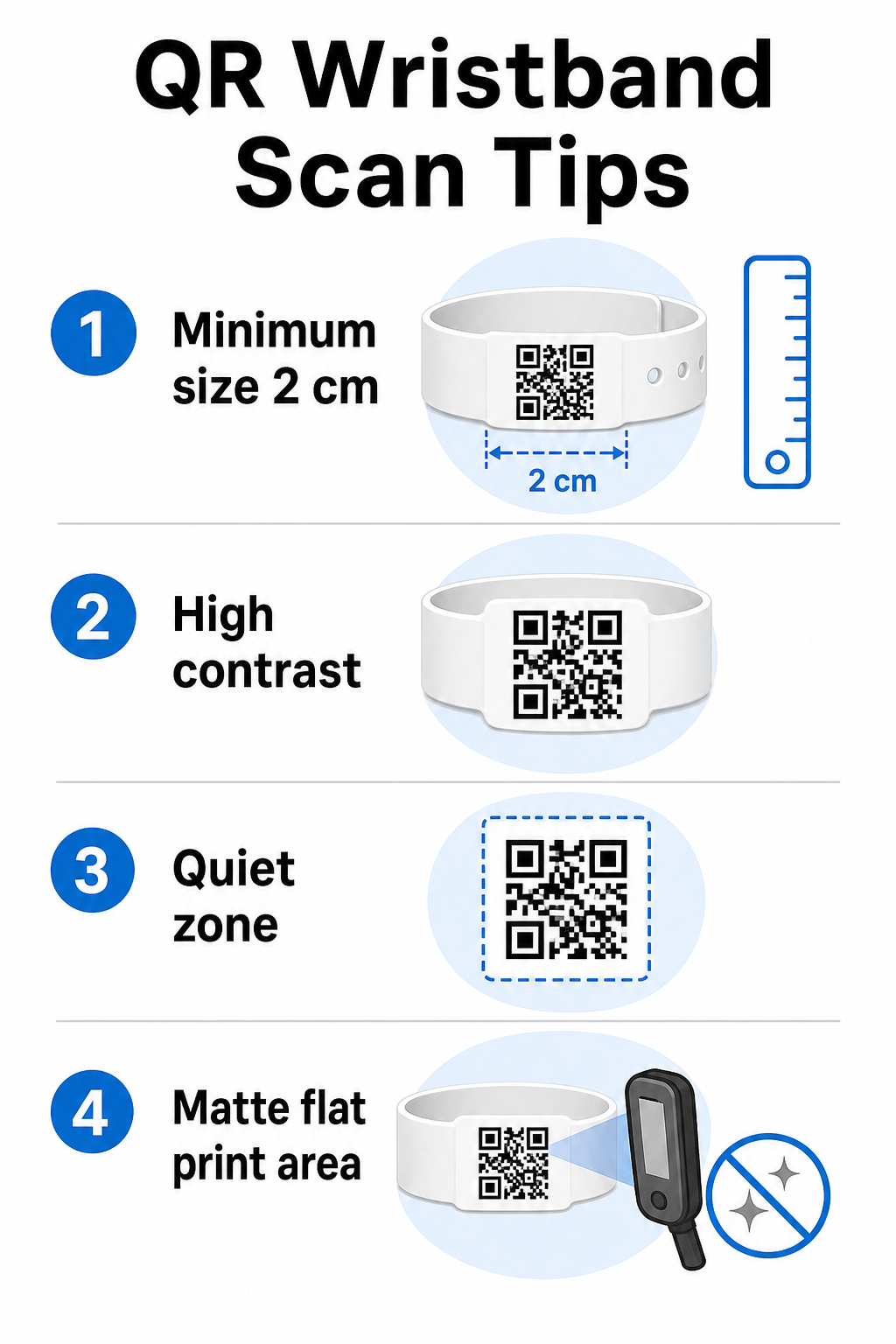
Wristband design tips

尺寸和扫描距离

The standard rule is that a QR code’s width should be at least 1 cm for every 10 cm of expected scanning distance. For wristbands scanned at arm’s length by a handheld device, a minimum width of 2 cm is the practical floor. Thinner wristbands that cannot accommodate this size reliably will cause scanning problems. See the full 二维码尺寸指南 for measurements across different use cases.

色彩对比

High contrast between the code modules and the background is critical. Dark modules on a light background – ideally black on white – give scanners the clearest signal. Aim for at least a 4:1 contrast ratio. Inverted designs with a light code on a dark background are generally unreliable and should be avoided.

安静区域

Every QR code requires a clear white border around its perimeter, called a 静区. This margin signals to the scanner where the code begins and ends. Removing it or printing over it is one of the most common causes of scan failure on wristbands where design space is tight.

Print Resolution and Format

Export QR codes in vector format (SVG or EPS) or high-resolution raster files at a minimum of 300 DPI at the final printed size. Scaling up a low-resolution image creates blurry module edges that scanners struggle to read. For guidance on achieving consistent print quality, the QR code readability best practices guide covers the full technical checklist.

Surface and Finish

Wristbands are worn on a curved surface, which introduces distortion. Print the QR code on the flattest area of the band and avoid glossy or reflective finishes over the code – glare from overhead event lighting directly interferes with smartphone cameras. A matte finish over the code area consistently outperforms glossy alternatives in event environments.

Code Complexity

The more data encoded in a QR code, the denser and harder to scan it becomes. Use short URLs or dynamic codes that redirect through a compact link to keep the code visually simple and fast to scan. Pageloot’s 链接二维码生成器 automatically handles URL shortening as part of the dynamic code workflow.

纠错

QR codes have built-in error correction that keeps them scannable even when part of the code is damaged. The highest correction level allows recovery when up to roughly 30% of the code area is obscured – relevant for wristbands that experience wear, smudging, or minor abrasion over a multi-day event. If you are adding a logo to the code, use high error correction to compensate for the covered area.

Generating QR Codes for Wristbands

The generation process follows a straightforward workflow:

  • Choose your QR code type. For admissions, a link or event QR code pointing to your check-in system works well. For contact sharing, use a vCard type. For attendance logging, link to a form.
  • Use dynamic codes when content may change. If your event spans multiple days or the linked destination might need updating, dynamic codes let you make changes from your dashboard without reprinting a single wristband.
  • Keep the encoded URL short. Shorter URLs reduce code density and improve scan speed.
  • Customize within contrast constraints. You can add your event logo and brand colors, but verify that contrast remains sufficient after customization.
  • Download in print-ready format. Use SVG, EPS, or high-DPI PNG files – never scale up a small JPEG.
  • Test before bulk printing. Scan your proof on multiple devices, in dim lighting, and at the scanning distances your staff will actually use. This single step prevents the most common event-day failures.

Build and Track Your Event QR Codes Generate unique codes for each attendee, monitor scan activity, and update linked content without reprinting. Start with the 二维码生成器 and explore event-specific options at the 活动二维码生成器.

安全和隐私注意事项

QR wristbands that store or link to personal attendee information carry data protection responsibilities.

Encrypt sensitive data. If a wristband code directly encodes personal information – such as name, ticket category, or age verification status – that data should be encrypted so it cannot be read by unauthorized scanners. Using dynamic codes that point to a secure, authenticated backend rather than encoding raw data in the code itself reduces this risk significantly.

Use HTTPS with validated certificates. All communication between your scanning app and the backend validation server should run over encrypted channels. This prevents interception of scan events or attendee data during the check-in process. The guide on creating secure QR code event tickets explains the technical layers involved in detail.

Limit access to check-in systems. Staff-facing scanning apps and dashboards should require individual login credentials rather than shared passwords. This limits exposure if a device is lost and makes it easier to audit who scanned what.

Apply privacy-by-design principles. Collect only the data your operation requires. If you are using scan analytics for crowd flow analysis, aggregate anonymized data is sufficient and avoids the privacy implications of tracking identifiable individuals. Where personal data is processed, ensure attendees are informed and that your processes comply with applicable regulations.

Provide context at the point of scanning. Letting attendees know what the wristband QR code does – and what will happen when staff scan it – builds trust and reduces confusion about data use. For a broader look at securing access control with dynamic codes, the guide on 用于访问控制的动态二维码 covers revocation, audit trails, and real-time permissions management.

Using Scan Analytics to Improve Future Events

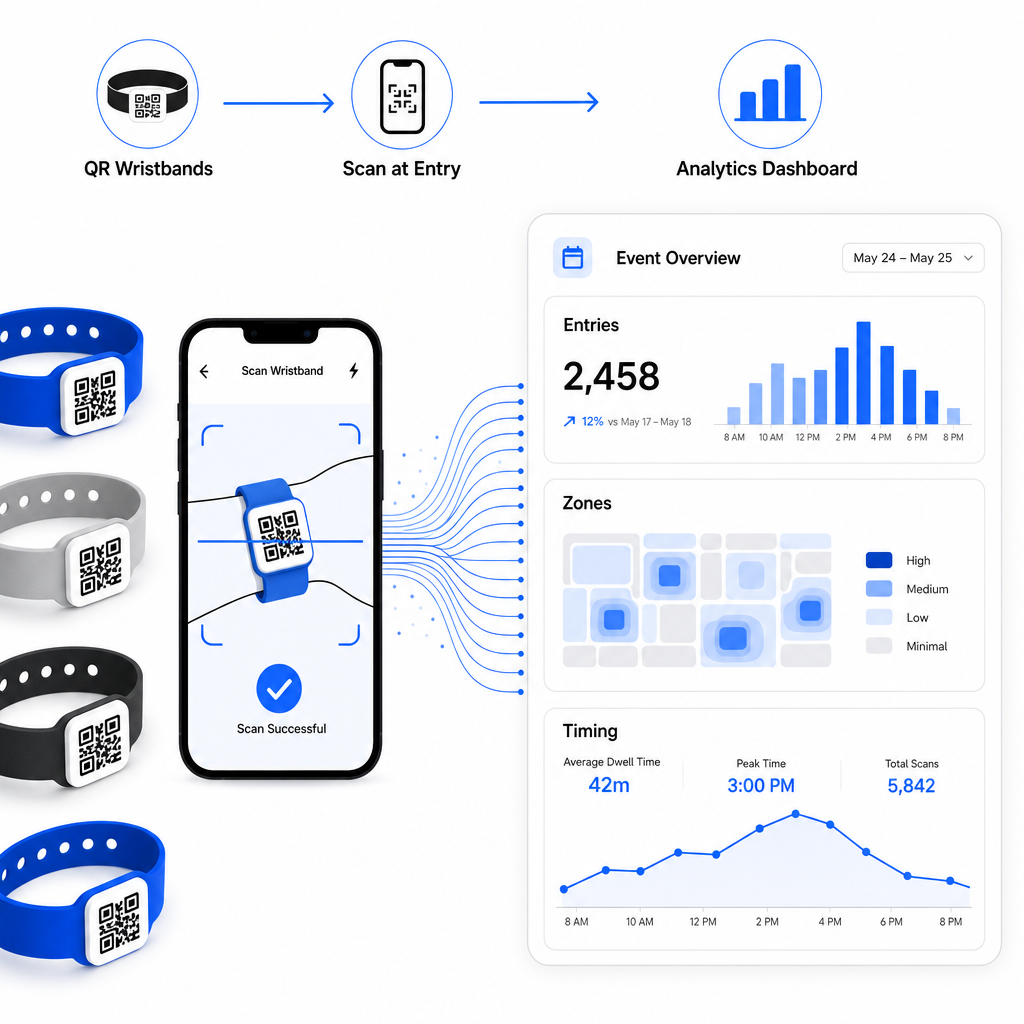
Dynamic QR codes generate scan data that extends well beyond counting entries. With Pageloot’s analytics, you can track when and where codes are scanned, which zones saw the most activity, and how attendee flow compared to your projections. This data helps you make informed decisions about entry point staffing, session scheduling, and wristband feature design for your next event.

Event scan analytics

For a complete walkthrough of building a QR-based check-in operation, the guide on streamlining event check-in with QR codes covers scanning logistics, staff training, and real-time attendance monitoring in detail.

A well-designed QR wristband does more than identify an attendee – it connects a physical credential to a live digital system that you control. Getting the print specifications right, using dynamic codes for flexibility, and protecting the data behind each scan are the three factors that determine whether your wristband program works smoothly on event day. Start with a tested proof, not a bulk print run, and build from there.

Set Up Your Wristband QR Codes Today Create dynamic, trackable QR codes for your next event with the 活动二维码生成器 and manage everything from a single dashboard.

常见问题

What is the minimum size a QR code should be on a wristband?

The practical minimum is 2 cm wide for close-range scanning. As a general rule, allow at least 1 cm of code width for every 10 cm of expected scanning distance. Going smaller increases the risk of scan failures, especially on curved or flexible wristband surfaces.

Can I update the linked content on printed wristbands without reprinting them?

Yes, if you use dynamic QR codes. Dynamic codes point to a short redirect URL that you control from a dashboard. Changing the destination – such as updating an event schedule page or swapping a check-in form – takes effect immediately on all printed wristbands without any physical changes.

What information should I avoid encoding directly in a wristband QR code?

Avoid encoding raw personal data such as names, ticket IDs, or age verification details directly in the code itself, since any QR scanner can read it. Instead, use the code to point to a secure, authenticated backend system that controls what information is revealed and to whom. This approach keeps sensitive attendee data off the wristband surface and reduces your exposure to unauthorized access.

关于作者

Siim Kostabi 是 Pageloot 的内容主管,负责撰写关于我们创新型二维码生成器服务的文章。凭借五年多来在二维码领域积累的深厚专业知识,Siim 是该领域的专家。他致力于利用二维码技术简化和增强数字交互,并取得了显著的成果。.

类别
了解更多关于
客户扫描支付二维码
的QR码 付款
扫描 Dropbox 二维码
的QR码 投寄箱
QR QR码的#1解决方案

如果您需要在线创建QR码,则可以 制作二维码 就在这里免费!
Pageloot是 #1转到解决方案 创建和扫描QR码。

BL-0301

博客生成器

受到超过 20,000 个品牌的信赖,可获得更多销售、评论和关注者。

客户徽标
受到顶级品牌的信赖
评分为 4.8(共 5)

4.86 / 5 星评级

雨果·劳伦特
雨果·劳伦特
餐馆老板
有史以来最容易和最可靠的QR码生成器。PDF文件可以立即上传。我们的餐厅菜单现在是数字化的。
卢卡斯-詹森
卢卡斯-詹森
房地产开发商
这是一个很好的工具,二维码带你到你想要的地方。我们只使用位置二维码,但有许多有用的功能。
艾玛-莫雷蒂
艾玛-莫雷蒂
零售产品
易于使用和快速。它工作得很好,创造了一个完美的图像,所以员工可以下载我的vCard。
雨果·劳伦特
雨果·劳伦特
餐馆老板
有史以来最容易和最可靠的QR码生成器。PDF文件可以立即上传。我们的餐厅菜单现在是数字化的。
卢卡斯-詹森
卢卡斯-詹森
房地产开发商
这是一个很好的工具,二维码带你到你想要的地方。我们只使用位置二维码,但有许多有用的功能。
艾玛-莫雷蒂
艾玛-莫雷蒂
零售产品
易于使用和快速。它工作得很好,创造了一个完美的图像,所以员工可以下载我的vCard。
查看更多QR码
打印运输标签
运输标签 条码
Reader scanning QR code
的QR码 出版商
将一切转化为数字体验 不到3分钟。

免费试用 14 天。

无需信用卡。

首次购买可享受 30% 折扣

使用代码:

分享您的 MP3 文件

注册以创建 PDF QR 码

上传和显示你需要的一切。

  • 音频文件
  • 播客
  • 音乐

注册即可享 14 天免费试用。.
试用期结束后,二维码将失效。.

注册以创建音频 mp3 二维码

使用边框获得更多扫描

注册以向您的二维码添加更多框架

呼叫行动框架帮助您的客户与QR码轻松互动。试试吧!

注册即可享 14 天免费试用。.
试用期结束后,二维码将失效。.

注册以向您的二维码添加更多框架

使用形状添加更多样式

注册以创建更多形状

二维码不一定是方形的。试着改变它以适应你的品牌形象。

注册即可享 14 天免费试用。.
试用期结束后,二维码将失效。.

注册以创建更多形状

为您的二维码添加徽标

注册以将您的徽标添加到二维码中

通过在二维码上添加你的标志和品牌,使你的二维码脱颖而出。

注册即可享 14 天免费试用。.
试用期结束后,二维码将失效。.

注册以将您的徽标添加到二维码中

智能应用商店重定向

注册以创建应用商店二维码

将您的应用程序链接添加到我们的智能应用程序商店QR码。用户会根据他们的设备被重新定向。

注册即可享 14 天免费试用。.
试用期结束后,二维码将失效。.

注册以创建应用商店二维码

将图片上传到二维码

注册以创建图像二维码

轻松分享你的图像。在几秒钟内动态地改变任何图像。

注册即可享 14 天免费试用。.
试用期结束后,二维码将失效。.

注册以创建图像二维码

分享您的 PDF 文件

注册以创建 PDF QR 码

上传和显示你需要的一切。

  • 菜单和价格表
  • 使用说明
  • 任何文件

注册即可享 14 天免费试用。.
试用期结束后,二维码将失效。.

注册以创建 PDF QR 码

稍后编辑,无需打印

注册即可编辑您的二维码,无需再次打印

动态QR码让你改变你的QR码的内容,而不需要打印新的QR码。

注册即可享 14 天免费试用。.
试用期结束后,二维码将失效。.

注册即可编辑您的二维码,无需再次打印

何时?何地?追踪您的二维码扫描

注册以追踪您的二维码

发现你的哪些二维码收到了最多的扫描,以及什么最能让你的客户兴奋。

注册即可享 14 天免费试用。.
试用期结束后,二维码将失效。.

注册以追踪您的二维码

提供可打印文件

注册以创建 PDF 和 SVG 等矢量二维码

.EPS, .PDF, .SVG

想下载高清分辨率的QR码吗?获得矢量或像素格式,可随时打印。

注册即可享 14 天免费试用。.
试用期结束后,二维码将失效。.

注册以创建 PDF 和 SVG 等矢量二维码

请等待。您的二维码是 正在加载... 正在加载...

打造专属

注册以保存您的二维码以供日后使用

通过创建具有不同颜色、标识和行动呼吁框架的出色的QR码,获得更多的扫描。

注册即可享 14 天免费试用。.
试用期结束后,二维码将失效。.

注册以保存您的二维码以供日后使用