Ar jūsų renginio įėjimo eilės juda per lėtai, ar prarandate sekimą, kas turi prieigą prie ko? Atspausdinta apyrankė su QR kodu išsprendžia abi problemas, tiesiogiai sujungdama fizinį leidimą su jūsų skaitmeninėmis sistemomis. Šis vadovas paaiškina, kaip sukurti, generuoti ir valdyti QR kodo apyrankes, kurios patikimai veikia nuo nustatymo iki po renginio analizės.
Ką iš tikrųjų daro QR kodo apyrankės
QR kodo apyrankė yra fizinė juosta – audinio, vinilo, silikono ar popieriaus – atspausdinta su unikaliu QR kodu, kuris susieja su skaitmeniniu įrašu ar paskirties vieta. Kai darbuotojas ją nuskaito, kodas patvirtina dalyvio įėjimą, patvirtina jo prieigos lygį arba suaktyvina skaitmeninį veiksmą, pvz., profilio atidarymą ar dalyvavimo registravimą.
Pagrindinis skirtumas, kurį verta suprasti, yra skirtumas tarp statiniai ir Dinaminis QR kodų. Statinis kodas užkoduoja savo paskirties vietą visam laikui – jei kas nors pasikeičia, reikia perspausdinti. Dinaminis QR kodas nukreipia į trumpą peradresavimo URL, kurį galite bet kada atnaujinti iš valdymo pulto, nekeisdami atspausdinto kodo ant apyrankės. Renginiams, kuriuose tvarkaraščiai, zonos ar susietas turinys gali keistis prieš renginį ar jo metu, dinaminiai kodai suteikia žymiai daugiau kontrolės.
Kurkite dinaminius QR kodus savo renginiui Reikia atnaujinti apyrankių paskirties vietas arba stebėti nuskaitymo veiklą realiuoju laiku? Naudokite Renginių QR kodų generatorius norėdami sukurti dinaminius kodus, kuriuos galite valdyti iš vieno valdymo pulto.
Dažni QR apyrankių naudojimo atvejai
Įėjimas ir patekimo kontrolė
Tiesioginis pritaikymas yra kiekvienos apyrankės naudojimas kaip skaitmeninio bilieto. Kai renginio apyrankės spausdinamos su unikaliais, serijiniais QR kodais, kiekviena iš jų veikia kaip neperduodamas leidimas. Darbuotojo skaitytuvas patvirtina kodą prie vartų, pažymi jį kaip panaudotą ir neleidžia pakartotinai įeiti su ta pačia juosta. Šis metodas pašalina atskirų popierinių bilietų poreikį ir sumažina padirbinių riziką.
Jei jūsų renginys turi kelias prieigos zonas – VIP zonas, užkulisius, bendrą įėjimą – kintamieji QR kodai leidžia priskirti kiekvieną dalyvį konkrečiam lygiui. Nuskaitymas kiekviename kontrolės punkte patvirtina, ar ta apyrankė suteikia įėjimą į tą zoną, suteikdamas jums realaus laiko kontrolę minios srautui be rankinio sąrašų tikrinimo. Norėdami giliau pažvelgti, kaip tai veikia praktikoje, žr. vadovą apie QR kodų naudojimą bilietuose įėjimo valdymui.
Lankomumo stebėjimas
Be įėjimo pro vartus, QR apyrankės leidžia registruoti dalyvavimo duomenis keliuose renginio taškuose – sesijų kambariuose, seminaruose ar pertraukų erdvėse. Vietoj rankinių registracijos lapų, dalyviai nuskaito kiekvienoje vietoje, o sistema registruoja, kas, ką ir kada lankė. Pageloot lankomumo QR kodo įrankis palaiko šį darbo eigą, susiejant kodus su formomis ar registracijos puslapiais, kurie automatiškai fiksuoja dalyvavimą.
Prieiga prie renginio informacijos
Apyrankės QR kodas neturi atlikti tik saugumo funkcijos. Susiejus jį su nukreipimo puslapiu, kiekvienas dalyvis gauna prieigą prie renginio tvarkaraščio, pranešėjų biografijų, vietos žemėlapių ar paskutinės minutės atnaujinimų. Kadangi dinaminiai kodai gali būti atnaujinami be perspausdinimo, galite siųsti naują informaciją į kiekvieną jau išplatintą apyrankę – tai naudinga, kai keičiasi sesijų laikai arba persikelia kambarys.
Tinklų kūrimas ir kontaktų dalijimasis
Profesinėse konferencijose QR apyrankės gali veikti kaip skaitmeninės vizitinės kortelės. Susiejus apyrankės kodą su vCard, dalyviai gali pasidalinti savo kontaktiniais duomenimis greitu nuskaitymu, o ne keistis fizinėmis kortelėmis. vCard QR kodo generatorius leidžia lengvai sukurti kontaktinius kodus, kurie tiesiogiai išsaugo vardą, el. paštą, telefono numerį ir įmonę skaitytuvo telefone.
Privalumai, išpirkimai ir įsitraukimas
Apyrankės taip pat gali turėti funkcinę vertę, ne tik identifikavimą. Serijiniai kodai, susieti su dalyvių paskyromis, gali sekti iš anksto įkeltus gėrimų žetonus, prekių teises ar lojalumo privalumus. Nuskaitymo duomenys atskleidžia, kokios naudos buvo išpirktos ir kada, suteikdami organizatoriams naudingų elgesio duomenų kartu su operacine funkcija.
Dizaino reikalavimai patikimam nuskaitymui
QR kodo apyrankė, kuri nenuskaitoma realiomis renginio sąlygomis, sukelia trintį būtent netinkamu momentu. Keletas fizinių dizaino veiksnių lemia, ar jūsų kodai veiks patikimai.
Dydis ir nuskaitymo atstumas
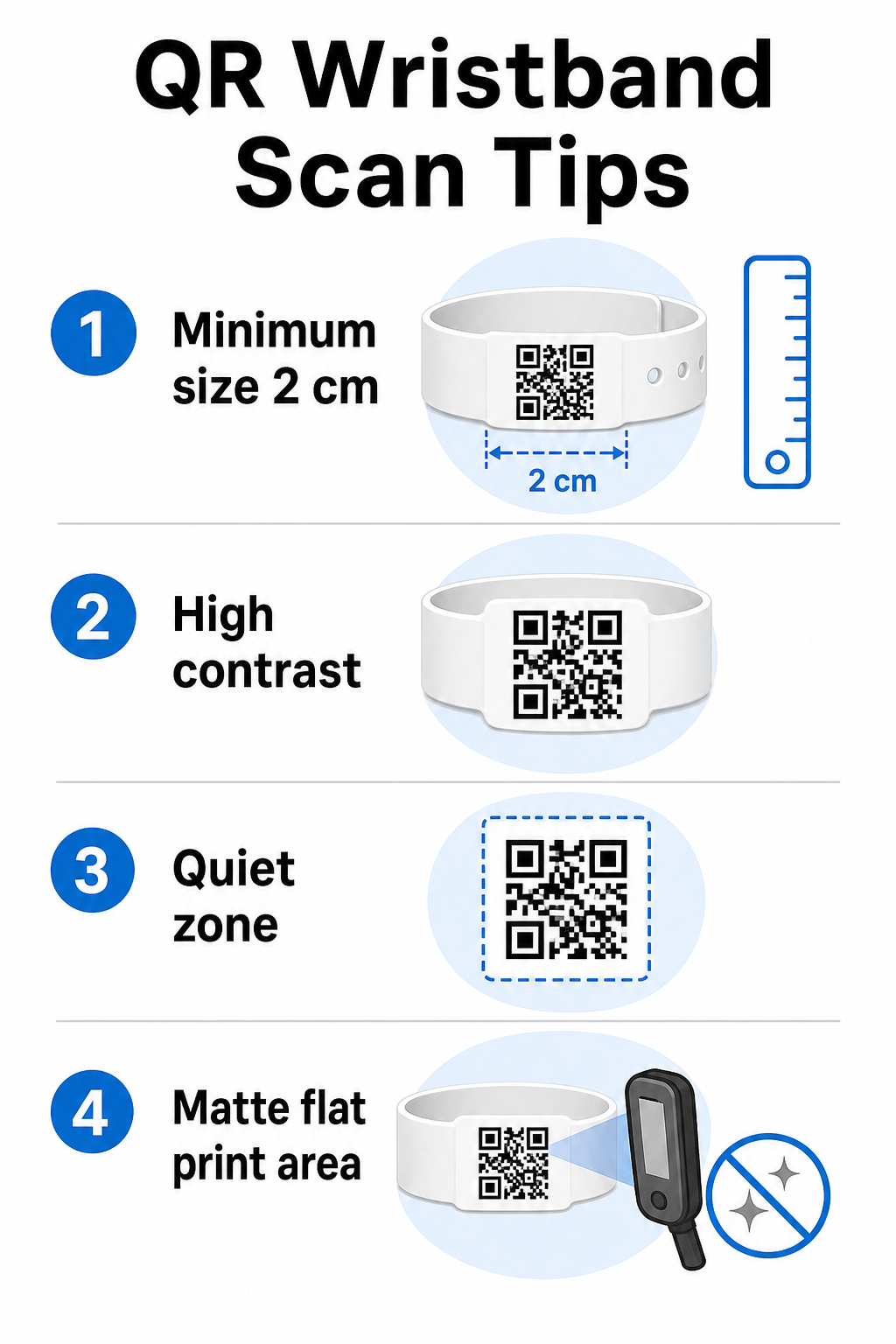
Standartinė taisyklė yra, kad QR kodo plotis turėtų būti bent 1 cm kiekvieniems 10 cm numatomo nuskaitymo atstumo. Apyrankėms, nuskaitomoms iš rankos atstumo rankiniu įrenginiu, minimalus 2 cm plotis yra praktinis minimumas. Plonesnės apyrankės, kurios negali patikimai atitikti šio dydžio, sukels nuskaitymo problemų. Žr. visą QR kodo dydžio vadove matavimus įvairiems naudojimo atvejams.
Spalvų kontrastas
Aukštas kontrastas tarp kodo modulių ir fono yra kritiškai svarbus. Tamsūs moduliai šviesiame fone – idealiai juodi ant balto – suteikia skaitytuvams aiškiausią signalą. Siekite bent 4:1 kontrasto santykio. Invertuoti dizainai su šviesiu kodu tamsiame fone paprastai yra nepatikimi ir jų reikėtų vengti.
Rami zona
Kiekvienam QR kodui reikalingas aiškus baltas apvadas aplink jo perimetrą, vadinamas ramioji zona. Ši paraštė signalizuoja skaitytuvui, kur kodas prasideda ir baigiasi. Jos pašalinimas arba spausdinimas ant jos yra viena dažniausių nuskaitymo gedimų priežasčių ant apyrankių, kur dizaino erdvė yra ribota.
Spausdinimo raiška ir formatas
Eksportuokite QR kodus vektoriniu formatu (SVG arba EPS) arba didelės raiškos rastrinius failus, kurių minimali raiška yra 300 DPI galutiniame spausdinimo dydyje. Padidinus mažos raiškos vaizdą, atsiranda neryškūs modulio kraštai, kuriuos skaitytuvams sunku perskaityti. Norėdami gauti patarimų, kaip pasiekti nuoseklią spausdinimo kokybę, QR kodo skaitomumo geriausios praktikos vadovas apima visą techninį kontrolinį sąrašą.
Paviršius ir apdaila
Apyrankės dėvimos ant išlenkto paviršiaus, o tai sukelia iškraipymus. Spausdinkite QR kodą ant plokščiausios juostos srities ir venkite blizgių ar atspindinčių dangų ant kodo – atspindžiai nuo viršutinio renginio apšvietimo tiesiogiai trukdo išmaniųjų telefonų kameroms. Matinė danga ant kodo srities nuosekliai pranašesnė už blizgias alternatyvas renginių aplinkoje.
Kodo sudėtingumas
Kuo daugiau duomenų užkoduota QR kode, tuo jis tampa tankesnis ir sunkiau nuskaitomas. Naudokite trumpus URL arba dinaminius kodus, kurie nukreipia per kompaktišką nuorodą, kad kodas būtų vizualiai paprastas ir greitai nuskaitomas. „Pageloot“ Nuorodos QR kodo generatorius automatiškai tvarko URL trumpinimą kaip dinaminio kodo darbo eigos dalį.
Klaidų taisymas
QR kodai turi įmontuotą klaidų taisymą, kuris leidžia juos nuskaityti net tada, kai dalis kodo yra pažeista. Aukščiausias taisymo lygis leidžia atkurti, kai uždengta iki maždaug 30% kodo srities – tai svarbu apyrankėms, kurios patiria nusidėvėjimą, išsitepimą ar nedidelį dilimą per kelių dienų renginį. Jei prie kodo pridedate logotipą, naudokite aukštą klaidų taisymą, kad kompensuotumėte uždengtą sritį.
QR kodų generavimas apyrankėms
Generavimo procesas vyksta pagal paprastą darbo eigą:
- Pasirinkite savo QR kodo tipą. Įėjimui puikiai tinka nuoroda arba renginio QR kodas, nukreipiantis į jūsų registracijos sistemą. Kontaktų dalijimuisi naudokite vCard tipą. Lankomumo registravimui susiekite su forma.
- Naudokite dinaminius kodus, kai turinys gali keistis. Jei jūsų renginys trunka kelias dienas arba susietą paskirties vietą gali reikėti atnaujinti, dinaminiai kodai leidžia atlikti pakeitimus iš savo prietaisų skydelio, neperspausdinant nė vienos apyrankės.
- Laikykite užkoduotą URL trumpą. Trumpesni URL sumažina kodo tankį ir pagerina nuskaitymo greitį.
- Tinkinkite atsižvelgdami į kontrasto apribojimus. Galite pridėti savo renginio logotipą ir prekės ženklo spalvas, tačiau patikrinkite, ar kontrastas išlieka pakankamas po tinkinimo.
- Atsisiųskite spausdinimui paruoštu formatu. Naudokite SVG, EPS arba didelės DPI raiškos PNG failus – niekada nedidinkite mažo JPEG.
- Išbandykite prieš masinį spausdinimą. Nuskaitykite savo pavyzdį keliais įrenginiais, prastame apšvietime ir tokiais nuskaitymo atstumais, kokius iš tikrųjų naudos jūsų darbuotojai. Šis vienas žingsnis apsaugo nuo dažniausių renginio dienos gedimų.
Kurkite ir stebėkite savo renginio QR kodus Generuokite unikalius kodus kiekvienam dalyviui, stebėkite nuskaitymo veiklą ir atnaujinkite susietą turinį be perspausdinimo. Pradėkite nuo QR kodo generatorius ir išnagrinėkite renginiui skirtas parinktis Renginių QR kodų generatorius.
Saugumo ir privatumo aspektai
QR apyrankės, kurios saugo arba susieja su asmenine dalyvių informacija, prisiima duomenų apsaugos atsakomybę.
Šifruokite jautrius duomenis. Jei apyrankės kodas tiesiogiai užkoduoja asmeninę informaciją – tokią kaip vardas, bilieto kategorija ar amžiaus patvirtinimo statusas – tie duomenys turėtų būti užšifruoti, kad jų negalėtų perskaityti neįgalioti skaitytuvai. Naudojant dinaminius kodus, kurie nukreipia į saugią, autentifikuotą galinę sistemą, o ne užkoduojant neapdorotus duomenis pačiame kode, ši rizika žymiai sumažėja.
Naudokite HTTPS su patvirtintais sertifikatais. Visas ryšys tarp jūsų nuskaitymo programos ir galinio patvirtinimo serverio turėtų vykti šifruotais kanalais. Tai apsaugo nuo nuskaitymo įvykių ar dalyvių duomenų perėmimo registracijos proceso metu. Vadovas apie 12. saugų QR kodų renginių bilietų kūrimą išsamiai paaiškina susijusius techninius sluoksnius.
Apribokite prieigą prie registracijos sistemų. Darbuotojams skirtos nuskaitymo programos ir prietaisų skydeliai turėtų reikalauti individualių prisijungimo duomenų, o ne bendrų slaptažodžių. Tai sumažina riziką, jei įrenginys pametamas, ir palengvina audito atlikimą, kas ką nuskenavo.
Taikykite privatumo pagal numatytuosius nustatymus principus. Rinkite tik duomenis, kurių reikalauja jūsų operacija. Jei naudojate nuskaitymo analizę minios srauto analizei, pakanka apibendrintų anonimizuotų duomenų, ir tai padeda išvengti privatumo pasekmių, susijusių su identifikuojamų asmenų sekimu. Kai tvarkomi asmens duomenys, užtikrinkite, kad dalyviai būtų informuoti ir kad jūsų procesai atitiktų taikomus reglamentus.
Pateikite kontekstą nuskaitymo vietoje. Leidus dalyviams žinoti, ką daro apyrankės QR kodas – ir kas nutiks, kai personalas jį nuskaitys – ugdo pasitikėjimą ir sumažina painiavą dėl duomenų naudojimo. Norėdami plačiau susipažinti su prieigos kontrolės užtikrinimu dinaminiais kodais, vadovas apie dinaminiai QR kodai prieigos kontrolei apima atšaukimą, audito žurnalus ir leidimų valdymą realiuoju laiku.
Nuskaitymo analizės naudojimas būsimiems renginiams tobulinti
Dinaminiai QR kodai generuoja nuskaitymo duomenis, kurie gerokai viršija įrašų skaičiavimą. Naudodami Pageloot analizę, galite stebėti, kada ir kur kodai buvo nuskaityti, kuriose zonose buvo didžiausias aktyvumas ir kaip dalyvių srautas atitiko jūsų prognozes. Šie duomenys padeda priimti pagrįstus sprendimus dėl įėjimo punktų personalo, sesijų planavimo ir apyrankės funkcijų dizaino jūsų kitam renginiui.
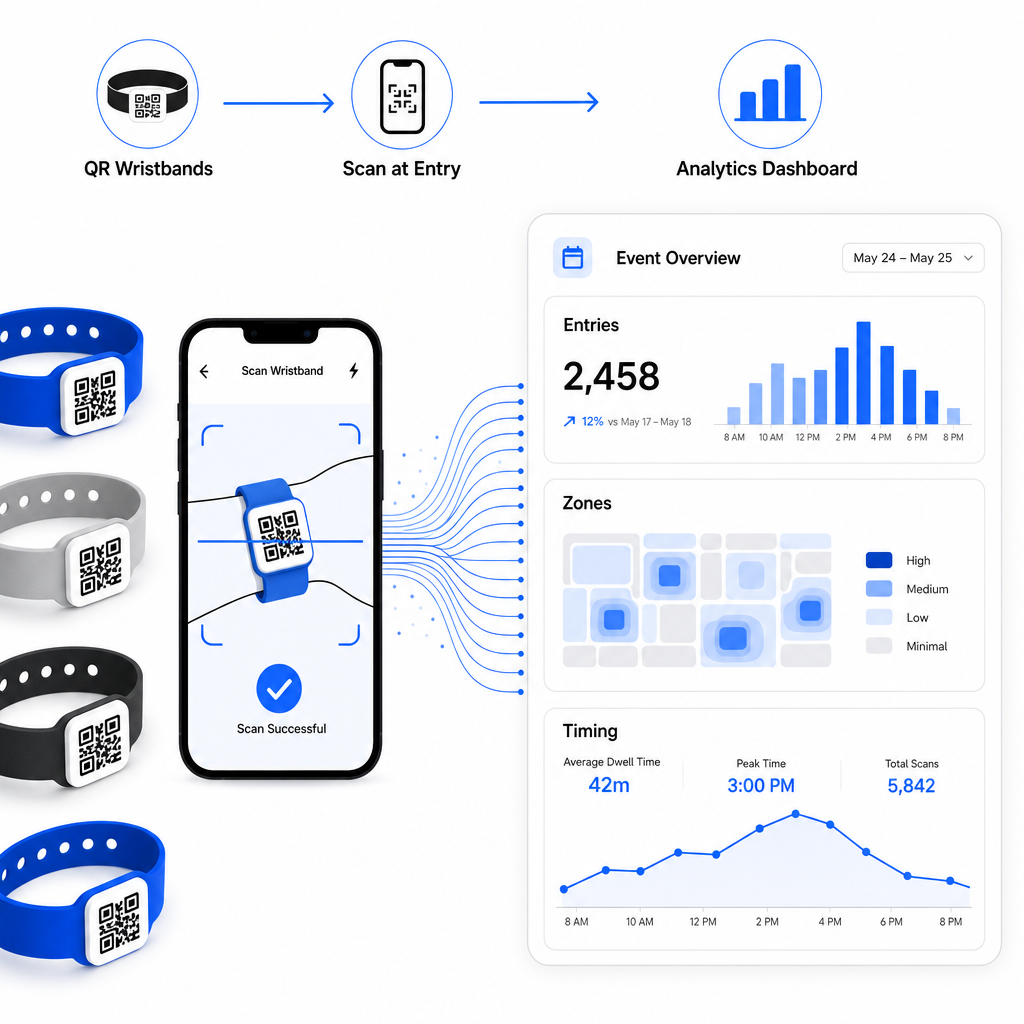
Norėdami išsamiai susipažinti su QR pagrindu veikiančios registracijos operacijos kūrimu, vadovas apie renginių registracijos supaprastinimas naudojant QR kodus išsamiai apima nuskaitymo logistiką, personalo mokymą ir lankomumo stebėjimą realiuoju laiku.
Gerai suprojektuota QR apyrankė ne tik identifikuoja dalyvį – ji sujungia fizinį kredencialą su gyva skaitmenine sistema, kurią jūs kontroliuojate. Teisingas spausdinimo specifikacijų nustatymas, dinaminių kodų naudojimas lankstumui ir duomenų apsauga už kiekvieno nuskaitymo yra trys veiksniai, lemiantys, ar jūsų apyrankių programa sklandžiai veiks renginio dieną. Pradėkite nuo išbandyto pavyzdžio, o ne masinio spausdinimo, ir kurkite nuo to.
Nustatykite savo apyrankės QR kodus šiandien Sukurkite dinaminius, sekamus QR kodus savo kitam renginiui su Renginių QR kodų generatorius ir valdykite viską iš vieno prietaisų skydelio.
Dažniausiai užduodami klausimai
Praktinis minimumas yra 2 cm pločio artimo nuotolio skenavimui. Kaip bendra taisyklė, leiskite bent 1 cm kodo pločio kiekvieniems 10 cm numatomo skenavimo atstumo. Mažesnis dydis padidina skenavimo nesėkmių riziką, ypač ant išlenktų ar lanksčių apyrankių paviršių.
Taip, jei naudojate dinaminius QR kodus. Dinaminiai kodai nukreipia į trumpą nukreipimo URL, kurį valdote iš valdymo pulto. Pakeitus paskirties vietą – pavyzdžiui, atnaujinant renginio tvarkaraščio puslapį arba pakeičiant registracijos formą – įsigalioja nedelsiant visuose atspausdintuose apyrankėse be jokių fizinių pakeitimų.
Venkite koduoti neapdorotus asmens duomenis, tokius kaip vardai, bilietų ID arba amžiaus patvirtinimo duomenys, tiesiogiai pačiame kode, kadangi bet kuris QR skaitytuvas gali jį perskaityti. Vietoj to, naudokite kodą, kad nukreiptumėte į saugią, autentifikuotą galinę sistemą, kuri kontroliuoja, kokia informacija atskleidžiama ir kam. Šis metodas apsaugo jautrius dalyvių duomenis nuo apyrankės paviršiaus ir sumažina jūsų pažeidžiamumą neteisėtai prieigai.