Bewegen sich Ihre Einlassschlangen zu langsam, oder verlieren Sie den Überblick darüber, wer Zugang zu was hat? Ein bedrucktes Armband mit einem QR-Code löst beide Probleme, indem es einen physischen Berechtigungsnachweis direkt mit Ihren digitalen Systemen verbindet. Dieser Leitfaden erklärt, wie Sie QR-Code-Armbänder entwerfen, generieren und verwalten, die vom Aufbau bis zur Nachanalyse der Veranstaltung zuverlässig funktionieren.
Was QR-Code-Armbänder tatsächlich leisten
Ein QR-Code-Armband ist ein physisches Band – aus Stoff, Vinyl, Silikon oder Papier –, das mit einem einzigartigen QR-Code bedruckt ist, der auf einen digitalen Datensatz oder ein Ziel verweist. Wenn ein Mitarbeiter es scannt, validiert der Code entweder den Eintritt eines Teilnehmers, bestätigt dessen Zugangsstufe oder löst eine digitale Aktion aus, wie das Öffnen eines Profils oder das Erfassen der Anwesenheit.
Der wesentliche Unterschied, den es zu verstehen gilt, ist der zwischen statisch und Dynamisch QR-Codes. Ein statischer Code kodiert sein Ziel dauerhaft – wenn sich etwas ändert, müssen Sie neu drucken. Ein dynamischer QR-Code verweist auf eine kurze Weiterleitungs-URL, die Sie jederzeit von einem Management-Dashboard aus aktualisieren können, ohne den gedruckten Code auf dem Armband zu ändern. Für Veranstaltungen, bei denen sich Zeitpläne, Zonen oder verknüpfte Inhalte vor oder während der Veranstaltung ändern können, bieten dynamische Codes deutlich mehr Kontrolle.
Dynamische QR-Codes für Ihre Veranstaltung erstellen Müssen Sie Armbandziele aktualisieren oder die Scan-Aktivität in Echtzeit verfolgen? Nutzen Sie den QR-Code für Veranstaltungen erstellen um dynamische Codes zu erstellen, die Sie von einem einzigen Dashboard aus verwalten können.
Häufige Anwendungsfälle für QR-Armbänder
Zutritts- und Einlasskontrolle
Die direkteste Anwendung ist die Nutzung jedes Armbands als digitales Ticket. Wenn Veranstaltungsarmbänder mit einzigartigen, serialisierten QR-Codes bedruckt werden, fungiert jedes als nicht übertragbarer Berechtigungsnachweis. Ein Mitarbeiter-Scanner validiert den Code am Tor, markiert ihn als verwendet und verhindert erneute Zutrittsversuche mit demselben Band. Dieser Ansatz eliminiert die Notwendigkeit separater Papiertickets und reduziert das Risiko von Fälschungen.
Wenn Ihre Veranstaltung mehrere Zugangszonen hat – VIP-Bereiche, Backstage, allgemeiner Eintritt – ermöglichen variable QR-Codes, jeden Teilnehmer einer bestimmten Stufe zuzuordnen. Das Scannen an jedem Kontrollpunkt bestätigt, ob das Armband den Zutritt zu diesem Bereich gewährt, und gibt Ihnen Echtzeitkontrolle über den Besucherstrom ohne manuelle Listenprüfung. Für einen tieferen Einblick in die praktische Funktionsweise siehe den Leitfaden zu Verwendung von QR-Codes auf Tickets für das Einlassmanagement.
Verfolgung von Anwesenheiten
Über den Toreintritt hinaus ermöglichen QR-Armbänder die Erfassung von Anwesenheitsdaten an mehreren Punkten während einer Veranstaltung – in Sitzungsräumen, Workshops oder Breakout-Bereichen. Anstatt manueller Anwesenheitslisten scannen die Teilnehmer an jedem Ort, und das System protokolliert, wer wann woran teilgenommen hat. Pageloots Tool für Anwesenheits-QR-Codes unterstützt diesen Workflow, indem es Codes mit Formularen oder Check-in-Seiten verknüpft, die die Teilnahme automatisch erfassen.
Zugang zu Veranstaltungsinformationen
Ein Armband-QR-Code muss nicht nur eine Sicherheitsfunktion erfüllen. Die Verknüpfung mit einer Landingpage ermöglicht jedem Teilnehmer bei Bedarf Zugriff auf den Veranstaltungsplan, Sprecherbiografien, Lagepläne oder Last-Minute-Updates. Da dynamische Codes ohne Neudruck aktualisiert werden können, können Sie neue Informationen an jedes bereits verteilte Armband senden – nützlich, wenn sich Sitzungszeiten ändern oder ein Raum verlegt wird.
Networking und Kontaktfreigabe
Auf Fachkonferenzen können QR-Armbänder als digitale Visitenkarten dienen. Die Verknüpfung eines Armbandcodes mit einer vCard ermöglicht es den Teilnehmern, ihre Kontaktdaten mit einem schnellen Scan zu teilen, anstatt physische Karten auszutauschen. Der vCard QR-Code Generator macht es einfach, Kontaktcodes zu erstellen, die einen Namen, eine E-Mail-Adresse, eine Telefonnummer und ein Unternehmen direkt auf dem Telefon des Scanners speichern.
Vorteile, Einlösungen und Engagement
Armbänder können auch einen funktionalen Wert über die Identifikation hinaus tragen. Serialisierte Codes, die mit Teilnehmerkonten verknüpft sind, können vorab geladene Getränkegutscheine, Warenberechtigungen oder Treuevorteile verfolgen. Scan-Daten zeigen, welche Vorteile wann eingelöst wurden, und liefern den Organisatoren nützliche Verhaltensdaten neben der operativen Funktion.
Designanforderungen für zuverlässiges Scannen
Ein QR-Code-Armband, das unter realen Veranstaltungsbedingungen nicht scannt, erzeugt genau im falschen Moment Reibung. Mehrere physische Designfaktoren bestimmen, ob Ihre Codes zuverlässig funktionieren.
Größe und Scan-Abstand
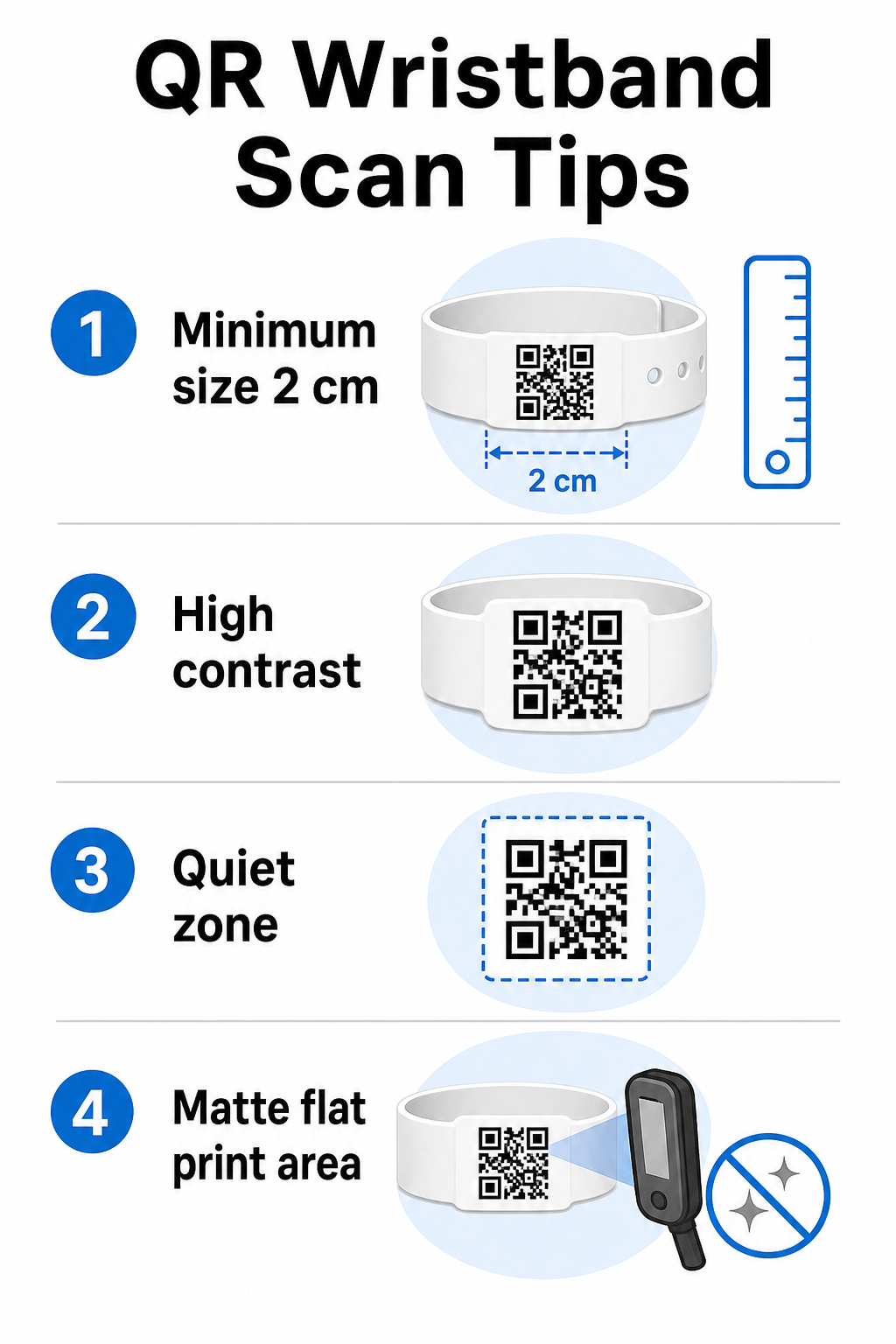
Die Standardregel besagt, dass die Breite eines QR-Codes mindestens 1 cm pro 10 cm erwarteter Scan-Distanz betragen sollte. Für Armbänder, die aus Armlänge mit einem Handgerät gescannt werden, ist eine Mindestbreite von 2 cm die praktische Untergrenze. Dünnere Armbänder, die diese Größe nicht zuverlässig aufnehmen können, verursachen Scan-Probleme. Siehe den vollständigen Leitfaden zur QR-Code-Größe für Messungen über verschiedene Anwendungsfälle hinweg.
Farbkontrast
Hoher Kontrast zwischen den Codemodulen und dem Hintergrund ist entscheidend. Dunkle Module auf hellem Hintergrund – idealerweise Schwarz auf Weiß – geben Scannern das klarste Signal. Streben Sie ein Kontrastverhältnis von mindestens 4:1 an. Invertierte Designs mit hellem Code auf dunklem Hintergrund sind im Allgemeinen unzuverlässig und sollten vermieden werden.
Ruhige Zone
Ruhezone. Dieser Rand signalisiert dem Scanner, wo der Code beginnt und endet. Das Entfernen oder Überdrucken ist eine der häufigsten Ursachen für Scanfehler bei Armbändern, bei denen der Gestaltungsraum begrenzt ist. Ruhezone. Druckauflösung und Format.
Exportieren Sie QR-Codes im Vektorformat (SVG oder EPS) oder als hochauflösende Rasterdateien mit mindestens
300 DPI 300 DPI in der endgültigen Druckgröße. Das Hochskalieren eines niedrig aufgelösten Bildes erzeugt unscharfe Modulkanten, die Scanner nur schwer lesen können. Für Anleitungen zur Erzielung einer konsistenten Druckqualität, die Leitfaden für bewährte Verfahren zur Lesbarkeit von QR-Codes Leitfaden zur QR-Code-Druckqualität.
deckt die vollständige technische Checkliste ab.
Oberfläche und Veredelung.
Armbänder werden auf einer gekrümmten Oberfläche getragen, was zu Verzerrungen führt. Drucken Sie den QR-Code auf den flachsten Bereich des Bandes und vermeiden Sie glänzende oder reflektierende Oberflächen über dem Code – Blendung durch die Eventbeleuchtung von oben stört direkt die Smartphone-Kameras. Eine matte Oberfläche über dem Codebereich übertrifft in Eventumgebungen durchweg glänzende Alternativen.
Code-Komplexität Link QR-Code-Generator Je mehr Daten in einem QR-Code kodiert sind, desto dichter und schwieriger zu scannen wird er. Verwenden Sie kurze URLs oder dynamische Codes, die über einen kompakten Link umleiten, um den Code visuell einfach und schnell scannbar zu halten. Pageloot’s.
Fehlerkorrektur
Dynamischer QR-Code-Generator.
übernimmt automatisch die URL-Kürzung als Teil des Workflows für dynamische Codes.
QR-Codes verfügen über eine integrierte Fehlerkorrektur, die sie auch dann scannbar hält, wenn ein Teil des Codes beschädigt ist. Die höchste Korrekturstufe ermöglicht die Wiederherstellung, wenn bis zu etwa 30 % des Codebereichs verdeckt sind – relevant für Armbänder, die über ein mehrtägiges Event hinweg Abnutzung, Verschmierung oder leichte Abrieb erfahren. Wenn Sie ein Logo zum Code hinzufügen, verwenden Sie eine hohe Fehlerkorrektur, um den abgedeckten Bereich zu kompensieren.
- Wählen Sie Ihren QR-Code-Typ. QR-Codes für Armbänder generieren.
- Der Generierungsprozess folgt einem einfachen Workflow:. Für den Einlass funktioniert ein Link oder Event-QR-Code, der auf Ihr Check-in-System verweist, gut. Für die Kontaktfreigabe verwenden Sie einen vCard-Typ. Für die Anwesenheitserfassung verlinken Sie zu einem Formular.
- Verwenden Sie dynamische Codes, wenn sich der Inhalt ändern kann. Wenn Ihr Event mehrere Tage dauert oder das verlinkte Ziel aktualisiert werden muss, ermöglichen Ihnen dynamische Codes, Änderungen von Ihrem Dashboard aus vorzunehmen, ohne ein einziges Armband neu drucken zu müssen.
- Halten Sie die kodierte URL kurz. Kürzere URLs reduzieren die Codedichte und verbessern die Scangeschwindigkeit.
- Anpassen innerhalb der Kontrastbeschränkungen. Sie können Ihr Event-Logo und Ihre Markenfarben hinzufügen, aber überprüfen Sie, ob der Kontrast nach der Anpassung ausreichend bleibt.
- Im druckfertigen Format herunterladen. Verwenden Sie SVG-, EPS- oder hochauflösende PNG-Dateien – skalieren Sie niemals ein kleines JPEG hoch.
Vor dem Massendruck testen. Scannen Sie Ihren Probedruck auf mehreren Geräten, bei schwacher Beleuchtung und in den Scanabständen, die Ihr Personal tatsächlich verwenden wird. Dieser einzelne Schritt verhindert die häufigsten Ausfälle am Eventtag. QR-Code-Generator Ihre Event-QR-Codes erstellen und verfolgen QR-Code für Veranstaltungen erstellen.
Sicherheits- und Datenschutzüberlegungen
Generieren Sie einzigartige Codes für jeden Teilnehmer, überwachen Sie die Scan-Aktivität und aktualisieren Sie verlinkte Inhalte ohne Neudruck. Beginnen Sie mit dem.
Pageloot QR-Code-Generator. und erkunden Sie eventspezifische Optionen unter dem.
Event-QR-Code-Lösung. QR-Armbänder, die persönliche Teilnehmerinformationen speichern oder verlinken, tragen Datenschutzverantwortung. 12. Erstellen sicherer QR-Code-Event-Tickets Sensible Daten verschlüsseln.
Wenn ein Armbandcode persönliche Informationen – wie Name, Ticketkategorie oder Altersverifizierungsstatus – direkt kodiert, sollten diese Daten verschlüsselt werden, damit sie nicht von unbefugten Scannern gelesen werden können. Die Verwendung dynamischer Codes, die auf ein sicheres, authentifiziertes Backend verweisen, anstatt Rohdaten direkt im Code zu kodieren, reduziert dieses Risiko erheblich. HTTPS mit validierten Zertifikaten verwenden.
Die gesamte Kommunikation zwischen Ihrer Scan-App und dem Backend-Validierungsserver sollte über verschlüsselte Kanäle erfolgen. Dies verhindert das Abfangen von Scan-Ereignissen oder Teilnehmerdaten während des Check-in-Prozesses. Der Leitfaden zu. Sammeln Sie nur die Daten, die Ihr Betrieb benötigt. Wenn Sie Scan-Analysen zur Analyse des Besucherflusses verwenden, sind aggregierte anonymisierte Daten ausreichend und vermeiden die Datenschutzimplikationen der Verfolgung identifizierbarer Personen. Wo personenbezogene Daten verarbeitet werden, stellen Sie sicher, dass die Teilnehmer informiert sind und dass Ihre Prozesse den anwendbaren Vorschriften entsprechen.
Bieten Sie Kontext am Scan-Punkt. Die Teilnehmer darüber zu informieren, was der QR-Code des Armbands tut – und was passiert, wenn das Personal ihn scannt – schafft Vertrauen und reduziert Verwirrung über die Datennutzung. Für einen umfassenderen Blick auf die Sicherung der Zugangskontrolle mit dynamischen Codes, der Leitfaden zu dynamische QR-Codes zur Zugangskontrolle behandelt Widerruf, Audit-Trails und Echtzeit-Berechtigungsverwaltung.
Scan-Analysen zur Verbesserung zukünftiger Veranstaltungen nutzen
Dynamische QR-Codes generieren Scan-Daten, die weit über das Zählen von Einträgen hinausgehen. Mit den Analysen von Pageloot können Sie verfolgen, wann und wo Codes gescannt werden, welche Zonen die meiste Aktivität aufwiesen und wie der Besucherfluss im Vergleich zu Ihren Prognosen war. Diese Daten helfen Ihnen, fundierte Entscheidungen über die Besetzung von Einlasspunkten, die Sitzungsplanung und das Design der Armbandfunktionen für Ihre nächste Veranstaltung zu treffen.
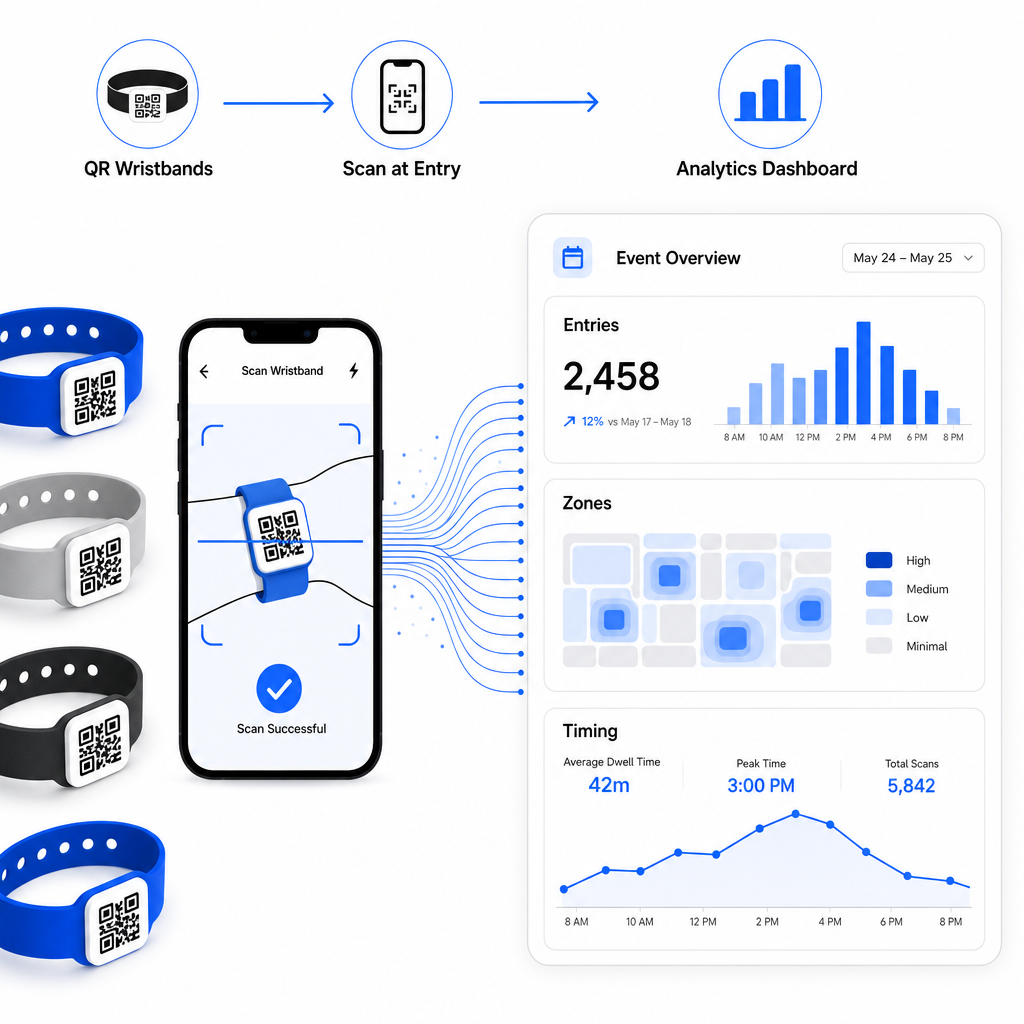
Für eine vollständige Anleitung zum Aufbau eines QR-basierten Check-in-Betriebs, der Leitfaden zu Optimierung des Event-Check-ins mit QR-Codes behandelt Scan-Logistik, Personalschulung und Echtzeit-Anwesenheitsüberwachung im Detail.
Ein gut gestaltetes QR-Armband identifiziert nicht nur einen Teilnehmer – es verbindet einen physischen Ausweis mit einem Live-Digitalsystem, das Sie kontrollieren. Die richtigen Druckspezifikationen zu erhalten, dynamische Codes für Flexibilität zu verwenden und die Daten hinter jedem Scan zu schützen, sind die drei Faktoren, die bestimmen, ob Ihr Armbandprogramm am Veranstaltungstag reibungslos funktioniert. Beginnen Sie mit einem getesteten Nachweis, nicht mit einem Massendruck, und bauen Sie darauf auf.
Richten Sie Ihre Armband-QR-Codes noch heute ein Erstellen Sie dynamische, verfolgbare QR-Codes für Ihre nächste Veranstaltung mit dem QR-Code für Veranstaltungen erstellen und verwalten Sie alles von einem einzigen Dashboard aus.
Häufig gestellte Fragen
Das praktische Minimum ist 2 cm breit für Nahbereichsscans. Als Faustregel gilt: Planen Sie mindestens 1 cm Codebreite für alle 10 cm erwarteter Scannabstand ein. Eine geringere Größe erhöht das Risiko von Scanfehlern, insbesondere auf gekrümmten oder flexiblen Armbandoberflächen.
Ja, wenn Sie dynamische QR-Codes verwenden. Dynamische Codes verweisen auf eine kurze Weiterleitungs-URL, die Sie von einem Dashboard aus steuern. Das Ändern des Ziels – wie das Aktualisieren einer Veranstaltungsplanseite oder das Austauschen eines Check-in-Formulars – wird sofort auf allen gedruckten Armbändern wirksam, ohne dass physische Änderungen erforderlich sind.
Vermeiden Sie es, rohe persönliche Daten wie Namen, Ticket-IDs oder Details zur Altersverifikation direkt im Code selbst zu kodieren, da jeder QR-Scanner sie lesen kann. Verwenden Sie stattdessen den Code, um auf ein sicheres, authentifiziertes Backend-System zu verweisen, das kontrolliert, welche Informationen wem offengelegt werden. Dieser Ansatz hält sensible Teilnehmerdaten von der Oberfläche des Armbands fern und reduziert Ihr Risiko für unbefugten Zugriff.