> 사용 사례 > How to Use QR Codes on Wristbands for Events and Identification
QR wristband scan

How to Use QR Codes on Wristbands for Events and Identification

Optimize event entry and attendance tracking with QR code wristbands. Learn best practices for design, scanning reliability, and managing secure dynamic codes.
Updated on 7월 2, 2026
목차

Are your event entry lines moving too slowly, or are you losing track of who has access to what? A printed wristband with a QR code solves both problems by connecting a physical credential directly to your digital systems. This guide explains how to design, generate, and manage QR code wristbands that work reliably from setup through post-event analysis.

What QR Code Wristbands Actually Do

A QR code wristband is a physical band – fabric, vinyl, silicone, or paper – printed with a unique QR code that links to a digital record or destination. When a staff member scans it, the code either validates an attendee’s admission, confirms their access tier, or triggers a digital action like opening a profile or logging attendance.

The key distinction worth understanding is the difference between 정적동적 QR codes. A static code encodes its destination permanently – if anything changes, you need to reprint. A dynamic QR code points to a short redirect URL that you can update at any time from a management dashboard, without changing the printed code on the wristband. For events where schedules, zones, or linked content may shift before or during the event, dynamic codes give you significantly more control.

Create Dynamic QR Codes for Your Event Need to update wristband destinations or track scan activity in real time? Use the 이벤트 QR코드 생성기 to build dynamic codes you can manage from a single dashboard.

Common Use Cases for QR Wristbands

Admission and Entry Control

The most direct application is using each wristband as a digital ticket. When event wristbands are printed with unique, serialized QR codes, each one acts as a non-transferable credential. A staff scanner validates the code at the gate, marks it as used, and prevents re-entry attempts with the same band. This approach removes the need for separate paper tickets and reduces the risk of counterfeits.

If your event has multiple access zones – VIP areas, backstage, general admission – variable QR codes let you assign each attendee to a specific tier. Scanning at each checkpoint confirms whether that wristband grants entry to that area, giving you real-time control over crowd flow without manual list-checking. For a deeper look at how this works in practice, see the guide on using QR codes on tickets for entry management.

출석 추적

Beyond gate entry, QR wristbands let you log attendance data at multiple points throughout an event – session rooms, workshops, or breakout spaces. Instead of manual sign-in sheets, attendees scan at each location and the system logs who attended what and when. Pageloot’s attendance QR code tool supports this workflow by linking codes to forms or check-in pages that capture participation automatically.

Access to Event Information

A wristband QR code does not have to serve only a security function. Linking it to a landing page gives every attendee on-demand access to the event schedule, speaker bios, venue maps, or last-minute updates. Because dynamic codes can be updated without reprinting, you can push new information to every wristband already distributed – useful when session times change or a room moves.

Networking and Contact Sharing

At professional conferences, QR wristbands can double as digital business cards. Linking a wristband code to a vCard lets attendees share their contact details with a quick scan rather than exchanging physical cards. The vCard QR 코드 생성기 makes it straightforward to create contact codes that store a name, email, phone number, and company directly to the scanner’s phone.

Perks, Redemptions, and Engagement

Wristbands can also carry functional value beyond identification. Serialized codes linked to attendee accounts can track pre-loaded drink tokens, merchandise entitlements, or loyalty perks. Scan data reveals which benefits were redeemed and when, giving organizers useful behavioral data alongside the operational function.

Design Requirements for Reliable Scanning

A QR code wristband that fails to scan under real event conditions creates friction at exactly the wrong moment. Several physical design factors determine whether your codes will perform reliably.

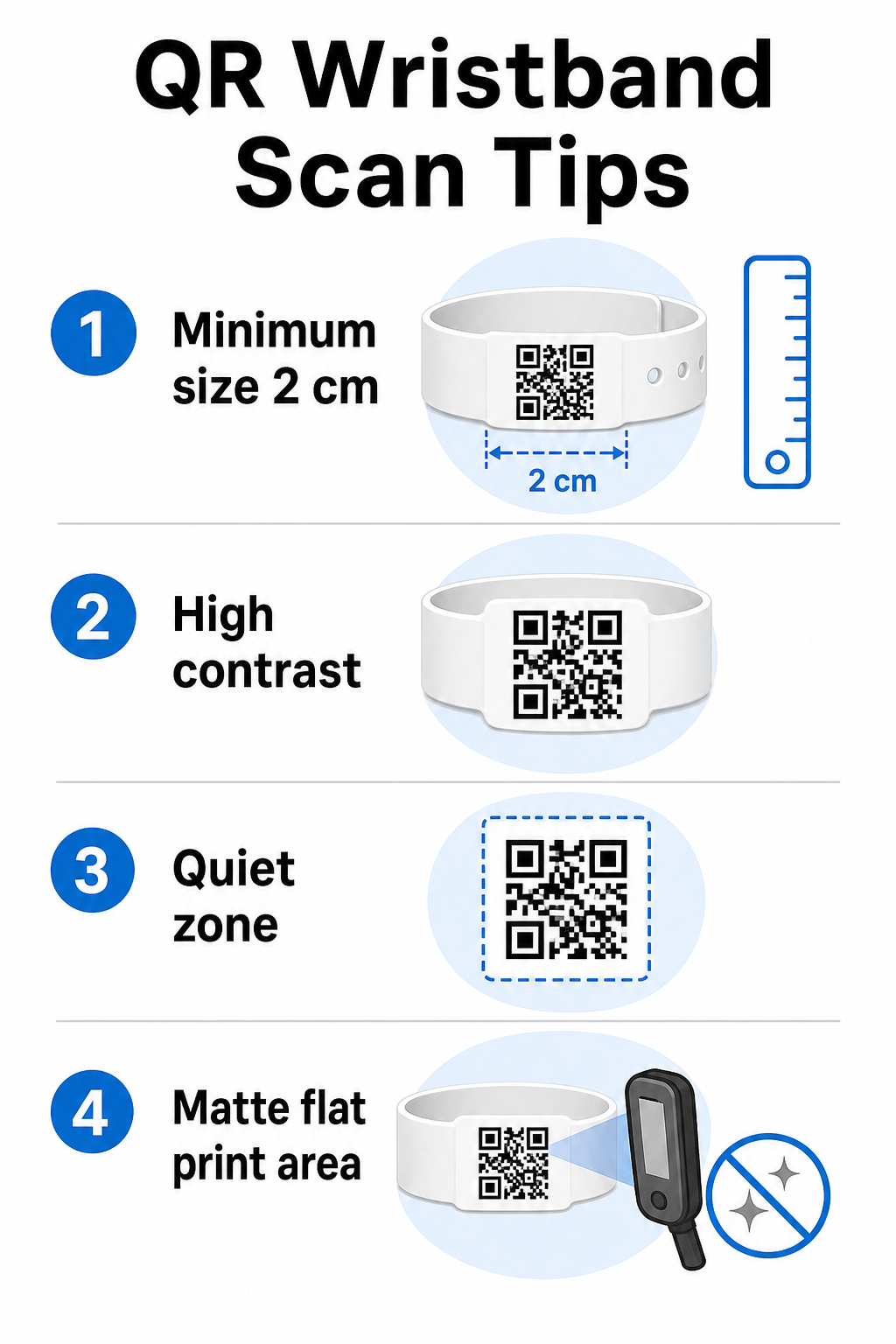
Wristband design tips

크기 및 스캔 거리

The standard rule is that a QR code’s width should be at least 1 cm for every 10 cm of expected scanning distance. For wristbands scanned at arm’s length by a handheld device, a minimum width of 2 cm is the practical floor. Thinner wristbands that cannot accommodate this size reliably will cause scanning problems. See the full QR 코드 크기 가이드 for measurements across different use cases.

색상 대비

High contrast between the code modules and the background is critical. Dark modules on a light background – ideally black on white – give scanners the clearest signal. Aim for at least a 4:1 contrast ratio. Inverted designs with a light code on a dark background are generally unreliable and should be avoided.

조용한 영역

Every QR code requires a clear white border around its perimeter, called a 콰이어트 존. This margin signals to the scanner where the code begins and ends. Removing it or printing over it is one of the most common causes of scan failure on wristbands where design space is tight.

Print Resolution and Format

Export QR codes in vector format (SVG or EPS) or high-resolution raster files at a minimum of 300 DPI at the final printed size. Scaling up a low-resolution image creates blurry module edges that scanners struggle to read. For guidance on achieving consistent print quality, the QR code readability best practices guide covers the full technical checklist.

Surface and Finish

Wristbands are worn on a curved surface, which introduces distortion. Print the QR code on the flattest area of the band and avoid glossy or reflective finishes over the code – glare from overhead event lighting directly interferes with smartphone cameras. A matte finish over the code area consistently outperforms glossy alternatives in event environments.

Code Complexity

The more data encoded in a QR code, the denser and harder to scan it becomes. Use short URLs or dynamic codes that redirect through a compact link to keep the code visually simple and fast to scan. Pageloot’s 링크 QR 코드 생성기 automatically handles URL shortening as part of the dynamic code workflow.

오류 수정

QR codes have built-in error correction that keeps them scannable even when part of the code is damaged. The highest correction level allows recovery when up to roughly 30% of the code area is obscured – relevant for wristbands that experience wear, smudging, or minor abrasion over a multi-day event. If you are adding a logo to the code, use high error correction to compensate for the covered area.

Generating QR Codes for Wristbands

The generation process follows a straightforward workflow:

  • Choose your QR code type. For admissions, a link or event QR code pointing to your check-in system works well. For contact sharing, use a vCard type. For attendance logging, link to a form.
  • Use dynamic codes when content may change. If your event spans multiple days or the linked destination might need updating, dynamic codes let you make changes from your dashboard without reprinting a single wristband.
  • Keep the encoded URL short. Shorter URLs reduce code density and improve scan speed.
  • Customize within contrast constraints. You can add your event logo and brand colors, but verify that contrast remains sufficient after customization.
  • Download in print-ready format. Use SVG, EPS, or high-DPI PNG files – never scale up a small JPEG.
  • Test before bulk printing. Scan your proof on multiple devices, in dim lighting, and at the scanning distances your staff will actually use. This single step prevents the most common event-day failures.

Build and Track Your Event QR Codes Generate unique codes for each attendee, monitor scan activity, and update linked content without reprinting. Start with the QR 코드 생성기 and explore event-specific options at the 이벤트 QR코드 생성기.

보안 및 개인 정보 보호 고려 사항

QR wristbands that store or link to personal attendee information carry data protection responsibilities.

Encrypt sensitive data. If a wristband code directly encodes personal information – such as name, ticket category, or age verification status – that data should be encrypted so it cannot be read by unauthorized scanners. Using dynamic codes that point to a secure, authenticated backend rather than encoding raw data in the code itself reduces this risk significantly.

Use HTTPS with validated certificates. All communication between your scanning app and the backend validation server should run over encrypted channels. This prevents interception of scan events or attendee data during the check-in process. The guide on creating secure QR code event tickets explains the technical layers involved in detail.

Limit access to check-in systems. Staff-facing scanning apps and dashboards should require individual login credentials rather than shared passwords. This limits exposure if a device is lost and makes it easier to audit who scanned what.

Apply privacy-by-design principles. Collect only the data your operation requires. If you are using scan analytics for crowd flow analysis, aggregate anonymized data is sufficient and avoids the privacy implications of tracking identifiable individuals. Where personal data is processed, ensure attendees are informed and that your processes comply with applicable regulations.

Provide context at the point of scanning. Letting attendees know what the wristband QR code does – and what will happen when staff scan it – builds trust and reduces confusion about data use. For a broader look at securing access control with dynamic codes, the guide on 접근 제어를 위한 동적 QR 코드 covers revocation, audit trails, and real-time permissions management.

Using Scan Analytics to Improve Future Events

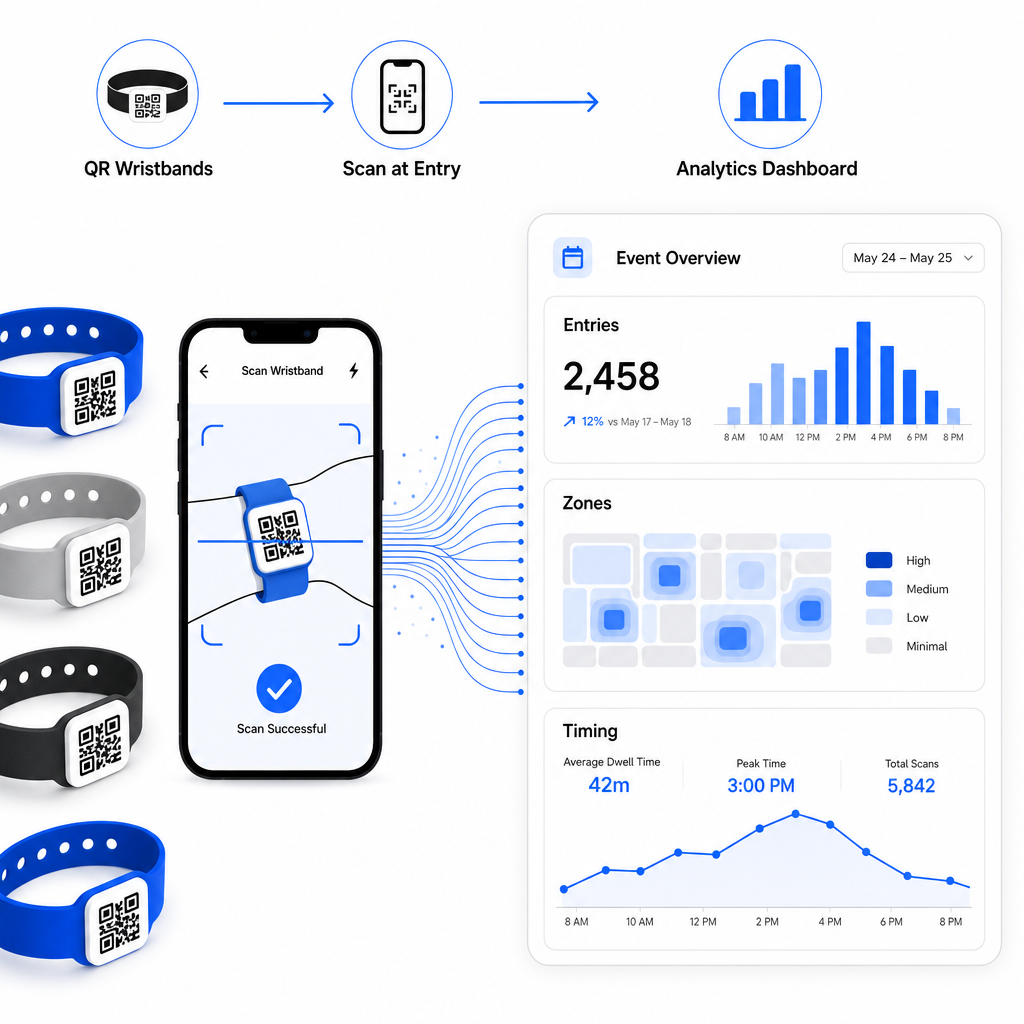
Dynamic QR codes generate scan data that extends well beyond counting entries. With Pageloot’s analytics, you can track when and where codes are scanned, which zones saw the most activity, and how attendee flow compared to your projections. This data helps you make informed decisions about entry point staffing, session scheduling, and wristband feature design for your next event.

Event scan analytics

For a complete walkthrough of building a QR-based check-in operation, the guide on streamlining event check-in with QR codes covers scanning logistics, staff training, and real-time attendance monitoring in detail.

A well-designed QR wristband does more than identify an attendee – it connects a physical credential to a live digital system that you control. Getting the print specifications right, using dynamic codes for flexibility, and protecting the data behind each scan are the three factors that determine whether your wristband program works smoothly on event day. Start with a tested proof, not a bulk print run, and build from there.

Set Up Your Wristband QR Codes Today Create dynamic, trackable QR codes for your next event with the 이벤트 QR코드 생성기 and manage everything from a single dashboard.

자주 묻는 질문

What is the minimum size a QR code should be on a wristband?

The practical minimum is 2 cm wide for close-range scanning. As a general rule, allow at least 1 cm of code width for every 10 cm of expected scanning distance. Going smaller increases the risk of scan failures, especially on curved or flexible wristband surfaces.

Can I update the linked content on printed wristbands without reprinting them?

Yes, if you use dynamic QR codes. Dynamic codes point to a short redirect URL that you control from a dashboard. Changing the destination – such as updating an event schedule page or swapping a check-in form – takes effect immediately on all printed wristbands without any physical changes.

What information should I avoid encoding directly in a wristband QR code?

Avoid encoding raw personal data such as names, ticket IDs, or age verification details directly in the code itself, since any QR scanner can read it. Instead, use the code to point to a secure, authenticated backend system that controls what information is revealed and to whom. This approach keeps sensitive attendee data off the wristband surface and reduces your exposure to unauthorized access.

작성자 정보

시임 코스타비는 페이지루트의 콘텐츠 책임자입니다. 그는 페이지루트의 혁신적인 QR 코드 생성 서비스에 대한 글을 쓰고 있습니다. 5년 이상 QR 코드 분야에서 쌓아온 깊이 있는 전문 지식을 바탕으로, 시임은 이 분야의 전문가로 인정받고 있습니다. 그는 QR 기술을 활용하여 디지털 상호작용을 간소화하고 향상시키는 데 크게 기여하고 있습니다.

범주
에 대해 자세히 알아보기
이메일 서명 QR 스캔
QR 코드 만들기 이메일 서명

온라인으로 QR 코드를 생성해야하는 경우 QR 코드 만들기 무료로 여기!
Pageloot는 #1 Go-To 솔루션 QR 코드를 만들고 스캔합니다.

BL-0301

블로그 세대

20,000개 이상의 브랜드로부터 신뢰를 받아 더 많은 매출, 리뷰, 팔로워를 확보했습니다.

클라이언트 로고
최고 브랜드의 신뢰
5 중 4.8 평가

4.86 / 5 별점

휴고 로랑
휴고 로랑
레스토랑 주인
가장 쉽고 안정적인 QR 코드 생성기. PDF 파일을 즉시 업로드할 수 있습니다. 이제 레스토랑 메뉴가 디지털화되었습니다.
루카스 얀센
루카스 얀센
부동산 개발사
이것은 훌륭한 도구이며 QR 코드를 사용하면 원하는 곳으로 이동할 수 있습니다. 우리는 위치 QR 코드만 사용하지만 유용한 기능이 너무 많습니다.
엠마 모레티
엠마 모레티
소매 제품
사용하기 쉽고 빠릅니다. 그것은 훌륭하게 작동하고 완벽한 이미지를 생성하므로 직원들이 내 vCard를 다운로드할 수 있습니다.
휴고 로랑
휴고 로랑
레스토랑 주인
가장 쉽고 안정적인 QR 코드 생성기. PDF 파일을 즉시 업로드할 수 있습니다. 이제 레스토랑 메뉴가 디지털화되었습니다.
루카스 얀센
루카스 얀센
부동산 개발사
이것은 훌륭한 도구이며 QR 코드를 사용하면 원하는 곳으로 이동할 수 있습니다. 우리는 위치 QR 코드만 사용하지만 유용한 기능이 너무 많습니다.
엠마 모레티
엠마 모레티
소매 제품
사용하기 쉽고 빠릅니다. 그것은 훌륭하게 작동하고 완벽한 이미지를 생성하므로 직원들이 내 vCard를 다운로드할 수 있습니다.
더 많은 QR 코드보기
QR 코드를 스캔하는 고객
마케팅을 위해 전환
무엇이든 디지털 경험으로 전환하세요 3분 이내에.

14일 무료 체험.

신용카드는 필요 없습니다.

첫 구매 시 30% 할인

코드를 사용하세요:

MP3 파일 공유

PDF QR 코드를 생성하려면 가입하세요

필요한 모든 것을 업로드하고 표시합니다.

  • 오디오 파일
  • 팟캐스트
  • 음악

가입 시 14일 무료 체험.
체험 기간 후 QR 코드 만료.

오디오 mp3 QR 코드를 생성하려면 가입하세요

프레임으로 더 많은 스캔 확보

QR 코드에 더 많은 프레임을 추가하려면 가입하세요

클릭 유도 문안 프레임은 고객이 QR 코드와 쉽게 상호 작용할 수 있도록 도와줍니다. 사용해 보세요!

가입 시 14일 무료 체험.
체험 기간 후 QR 코드 만료.

QR 코드에 더 많은 프레임을 추가하려면 가입하세요

도형으로 더 많은 스타일 추가

더 많은 도형을 만들려면 가입하세요

QR 코드는 정사각형일 필요가 없습니다. 브랜드 이미지에 맞게 전환해 보세요.

가입 시 14일 무료 체험.
체험 기간 후 QR 코드 만료.

더 많은 도형을 만들려면 가입하세요

QR 코드에 로고 추가

QR 코드에 로고를 추가하려면 가입하세요

로고와 브랜드를 추가하여 QR 코드를 돋보이게 만드세요.

가입 시 14일 무료 체험.
체험 기간 후 QR 코드 만료.

QR 코드에 로고를 추가하려면 가입하세요

스마트 앱 스토어 리디렉션

앱 스토어 QR 코드를 생성하려면 가입하세요

스마트 앱 스토어 QR 코드에 앱 링크를 추가하세요. 사용자는 장치에 따라 리디렉션됩니다.

가입 시 14일 무료 체험.
체험 기간 후 QR 코드 만료.

앱 스토어 QR 코드를 생성하려면 가입하세요

QR 코드에 이미지 업로드

이미지 QR 코드를 생성하려면 가입하세요

이미지를 쉽게 공유하세요. 몇 초 안에 동적으로 이미지를 변경하십시오.

가입 시 14일 무료 체험.
체험 기간 후 QR 코드 만료.

이미지 QR 코드를 생성하려면 가입하세요

PDF 파일 공유

PDF QR 코드를 생성하려면 가입하세요

필요한 모든 것을 업로드하고 표시합니다.

  • 메뉴 및 가격표
  • 명령
  • 모든 문서

가입 시 14일 무료 체험.
체험 기간 후 QR 코드 만료.

PDF QR 코드를 생성하려면 가입하세요

인쇄 없이 나중에 편집

다시 인쇄하지 않고 QR 코드를 편집하려면 가입하세요

동적 QR 코드를 사용하면 새 QR 코드를 인쇄하지 않고도 QR 코드의 내용을 변경할 수 있습니다.

가입 시 14일 무료 체험.
체험 기간 후 QR 코드 만료.

다시 인쇄하지 않고 QR 코드를 편집하려면 가입하세요

언제? 어디서? QR 코드 스캔 추적

QR 코드를 추적하려면 가입하세요

어떤 QR 코드가 가장 많이 스캔되고 무엇이 고객을 가장 흥분시키는지 알아보십시오.

가입 시 14일 무료 체험.
체험 기간 후 QR 코드 만료.

QR 코드를 추적하려면 가입하세요

인쇄 준비 파일 제공

PDF 및 SVG와 같은 벡터 QR 코드를 생성하려면 가입하세요.

.EPS, .PDF, .SVG

HD 해상도로 QR 코드를 다운로드하고 싶으신가요? 인쇄할 준비가 된 벡터 또는 픽셀 형식을 가져옵니다.

가입 시 14일 무료 체험.
체험 기간 후 QR 코드 만료.

PDF 및 SVG와 같은 벡터 QR 코드를 생성하려면 가입하세요.

기다리세요. 귀하의 QR 코드는 로드 중... 로드 중...

나만의 것으로 만들기

나중을 위해 QR 코드를 저장하려면 가입하세요.

다양한 색상, 로고 및 클릭 유도문안 프레임으로 멋진 QR 코드를 만들어 더 많은 스캔을 받으세요.

가입 시 14일 무료 체험.
체험 기간 후 QR 코드 만료.

나중을 위해 QR 코드를 저장하려면 가입하세요.