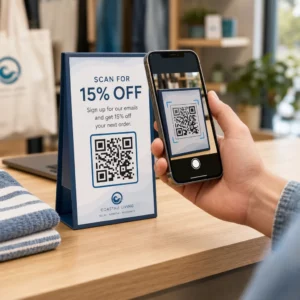
Etkinlik giriş kuyruklarınız çok mu yavaş ilerliyor, yoksa kimin neye erişimi olduğunu mu takip edemiyorsunuz? QR kodlu basılı bir bileklik, fiziksel bir kimlik bilgisini doğrudan dijital sistemlerinize bağlayarak her iki sorunu da çözer. Bu kılavuz, kurulumdan etkinlik sonrası analize kadar güvenilir bir şekilde çalışan QR kodlu bileklikleri nasıl tasarlayacağınızı, oluşturacağınızı ve yöneteceğinizi açıklar.
QR Kodlu Bileklikler Gerçekte Ne İşe Yarar
QR kodlu bir bileklik, dijital bir kayda veya hedefe bağlanan benzersiz bir QR koduyla basılmış fiziksel bir banttır – kumaş, vinil, silikon veya kağıt. Bir personel taradığında, kod ya bir katılımcının girişini doğrular, erişim seviyesini onaylar ya da bir profil açma veya katılımı kaydetme gibi dijital bir eylemi tetikler.
Anlaşılması gereken temel ayrım, arasındaki farktır statik ve Dinamik QR kodları. Statik bir kod, hedefini kalıcı olarak kodlar – herhangi bir şey değişirse, yeniden basmanız gerekir. Dinamik bir QR kodu, bir yönetim panosundan istediğiniz zaman güncelleyebileceğiniz kısa bir yönlendirme URL'sine işaret eder ve bileklikteki basılı kodu değiştirmenize gerek kalmaz. Programların, bölgelerin veya bağlantılı içeriğin etkinlik öncesinde veya sırasında değişebileceği etkinlikler için dinamik kodlar size önemli ölçüde daha fazla kontrol sağlar.
Etkinliğiniz İçin Dinamik QR Kodları Oluşturun Bileklik hedeflerini güncellemeniz veya tarama etkinliğini gerçek zamanlı olarak takip etmeniz mi gerekiyor? Şunu kullanın: Etkinlik QR Kod Oluşturucu tek bir panodan yönetebileceğiniz dinamik kodlar oluşturmak için.
QR Bileklikler İçin Yaygın Kullanım Durumları
Giriş ve Erişim Kontrolü
En doğrudan uygulama, her bilekliği dijital bir bilet olarak kullanmaktır. Etkinlik bileklikleri benzersiz, seri numaralı QR kodlarıyla basıldığında, her biri devredilemez bir kimlik bilgisi görevi görür. Bir personel tarayıcısı kodu kapıda doğrular, kullanıldı olarak işaretler ve aynı bantla yeniden giriş denemelerini engeller. Bu yaklaşım, ayrı kağıt bilet ihtiyacını ortadan kaldırır ve sahtecilik riskini azaltır.
Etkinliğinizde birden fazla erişim bölgesi varsa – VIP alanları, sahne arkası, genel giriş – değişken QR kodları her katılımcıyı belirli bir seviyeye atamanıza olanak tanır. Her kontrol noktasında tarama, o bilekliğin o alana giriş izni verip vermediğini doğrular ve manuel liste kontrolü yapmadan kalabalık akışı üzerinde gerçek zamanlı kontrol sağlar. Bunun pratikte nasıl çalıştığına daha yakından bakmak için, şu kılavuza bakın: giriş yönetimi için biletlerde QR kodları kullanma.
Katılım Takibi
Kapı girişinin ötesinde, QR bileklikler bir etkinlik boyunca birden fazla noktada – oturum odaları, atölye çalışmaları veya ara verme alanları – katılım verilerini kaydetmenize olanak tanır. Manuel imza listeleri yerine, katılımcılar her konumda tarama yapar ve sistem kimin neye ve ne zaman katıldığını kaydeder. Pageloot'un katılım QR kod aracı kodları, katılımı otomatik olarak yakalayan formlara veya check-in sayfalarına bağlayarak bu iş akışını destekler.
Etkinlik Bilgilerine Erişim
Bir bileklik QR kodu sadece bir güvenlik işlevi görmek zorunda değildir. Onu bir açılış sayfasına bağlamak, her katılımcıya etkinlik programına, konuşmacı biyografilerine, mekan haritalarına veya son dakika güncellemelerine isteğe bağlı erişim sağlar. Dinamik kodlar yeniden basılmadan güncellenebildiği için, zaten dağıtılmış her bilekliğe yeni bilgiler gönderebilirsiniz – oturum saatleri değiştiğinde veya bir oda taşındığında kullanışlıdır.
Ağ Kurma ve İletişim Paylaşımı
Profesyonel konferanslarda, QR bileklikler dijital kartvizit olarak da işlev görebilir. Bir bileklik kodunu bir vCard'a bağlamak, katılımcıların fiziksel kart alışverişi yapmak yerine hızlı bir tarama ile iletişim bilgilerini paylaşmalarına olanak tanır. Bu vCard QR Kod Oluşturucu bir ad, e-posta, telefon numarası ve şirket bilgilerini doğrudan tarayıcının telefonuna kaydeden iletişim kodları oluşturmayı kolaylaştırır.
Avantajlar, Kullanımlar ve Katılım
Bileklikler, kimlik doğrulamanın ötesinde işlevsel değer de taşıyabilir. Katılımcı hesaplarına bağlı seri numaralı kodlar, önceden yüklenmiş içecek jetonlarını, ürün haklarını veya sadakat avantajlarını takip edebilir. Tarama verileri, hangi avantajların ne zaman kullanıldığını ortaya koyar ve organizatörlere operasyonel işlevin yanı sıra faydalı davranışsal veriler sağlar.
Güvenilir Tarama İçin Tasarım Gereksinimleri
Gerçek etkinlik koşullarında taranamayan bir QR kodlu bileklik, tam da yanlış zamanda sürtünme yaratır. Birkaç fiziksel tasarım faktörü, kodlarınızın güvenilir bir şekilde çalışıp çalışmayacağını belirler.
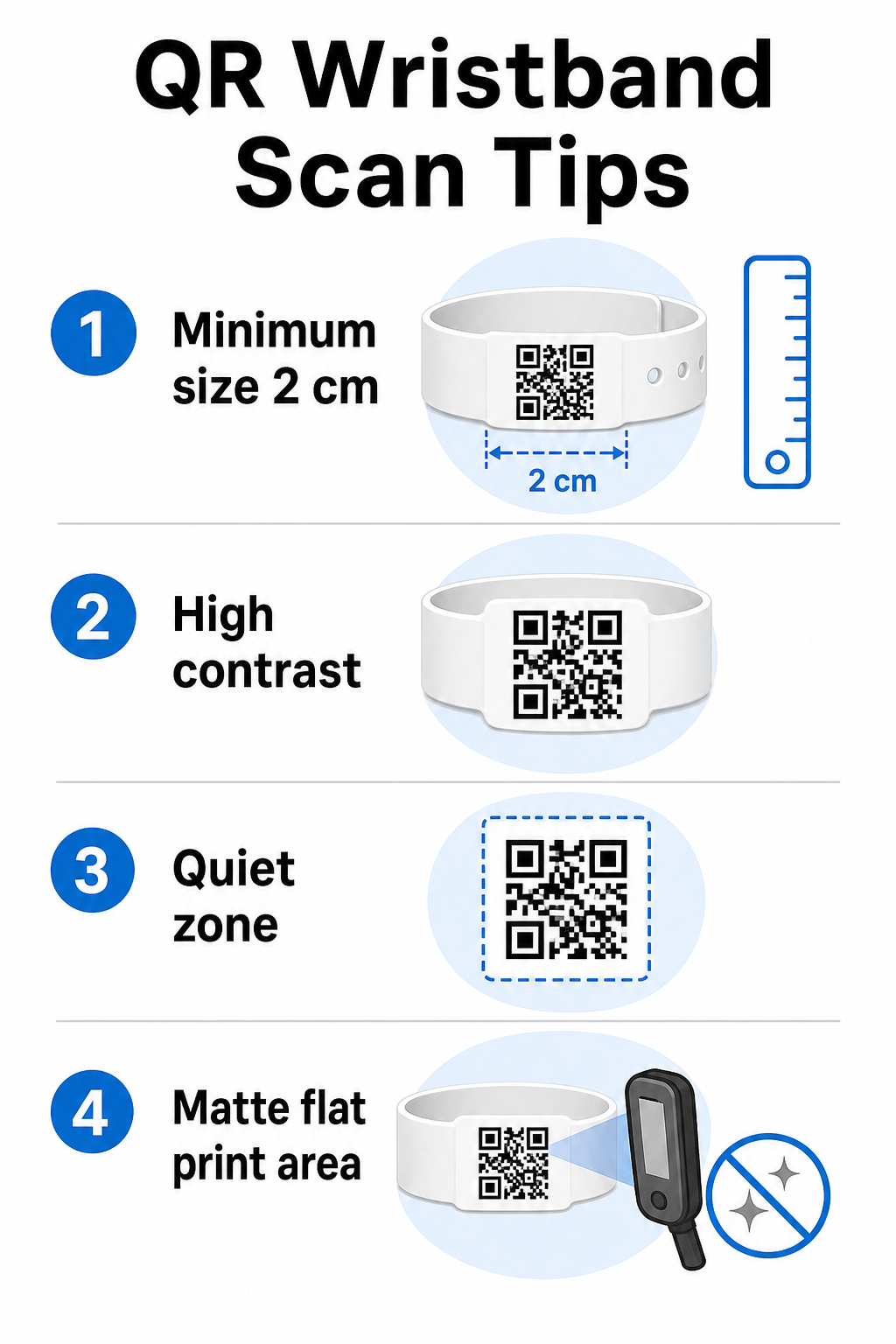
Boyut ve Tarama Mesafesi
Standart kural, bir QR kodunun genişliğinin en az beklenen her 10 cm tarama mesafesi için 1 cm. olmalıdır. El cihazıyla kol mesafesinden taranan bileklikler için, minimum 2 cm genişlik pratik bir alt sınırdır. Bu boyutu güvenilir bir şekilde barındıramayan daha ince bileklikler tarama sorunlarına neden olacaktır. Tamamına bakın: QR kodu boyut kılavuzu farklı kullanım durumlarındaki ölçümler için.
Renk Kontrastı
Kod modülleri ile arka plan arasındaki yüksek kontrast kritiktir. Açık bir arka plan üzerindeki koyu modüller – ideal olarak beyaz üzerinde siyah – tarayıcılara en net sinyali verir. En az 4:1 kontrast oranını hedefleyin. Koyu bir arka plan üzerinde açık bir kod içeren ters tasarımlar genellikle güvenilmezdir ve kaçınılmalıdır.
Sessiz bölge
Her QR kodu, çevresinde net bir beyaz kenarlık gerektirir, buna sessiz alan. denir. Bu kenar boşluğu, tarayıcıya kodun nerede başlayıp bittiğini bildirir. Bunu kaldırmak veya üzerine baskı yapmak, tasarım alanının dar olduğu bilekliklerde tarama hatasının en yaygın nedenlerinden biridir.
Baskı Çözünürlüğü ve Formatı
QR kodlarını vektör formatında (SVG veya EPS) veya minimum 300 DPI nihai baskı boyutunda yüksek çözünürlüklü raster dosyalar olarak dışa aktarın. Düşük çözünürlüklü bir görüntüyü büyütmek, tarayıcıların okumakta zorlandığı bulanık modül kenarları oluşturur. Tutarlı baskı kalitesi elde etme konusunda rehberlik için, QR kodu okunabilirlik en iyi uygulamalar kılavuzu tam teknik kontrol listesini kapsar.
Yüzey ve Bitiş
Bileklikler, bozulmaya neden olan kavisli bir yüzeyde takılır. QR kodunu bandın en düz alanına yazdırın ve kodun üzerinde parlak veya yansıtıcı yüzeylerden kaçının – yukarıdan gelen etkinlik aydınlatmasından kaynaklanan parlama, akıllı telefon kameralarıyla doğrudan etkileşime girer. Kod alanının üzerindeki mat bir yüzey, etkinlik ortamlarında parlak alternatiflerden sürekli olarak daha iyi performans gösterir.
Kod Karmaşıklığı
Bir QR kodunda ne kadar çok veri kodlanırsa, o kadar yoğun ve taranması zor hale gelir. Kodu görsel olarak basit ve hızlı taranabilir tutmak için kısa URL'ler veya kompakt bir bağlantı aracılığıyla yönlendiren dinamik kodlar kullanın. Pageloot'un Bağlantı QR Kod Oluşturucu dinamik kod iş akışının bir parçası olarak URL kısaltmayı otomatik olarak yönetir.
Hata Düzeltme
QR kodları, kodun bir kısmı hasar gördüğünde bile taranabilir kalmasını sağlayan yerleşik hata düzeltmesine sahiptir. En yüksek düzeltme seviyesi, kod alanının yaklaşık 'una kadarının gizlendiği durumlarda kurtarmaya izin verir – bu, çok günlük bir etkinlik boyunca aşınma, lekelenme veya küçük sürtünme yaşayan bileklikler için önemlidir. Koda bir logo ekliyorsanız, kapalı alanı telafi etmek için yüksek hata düzeltmesi kullanın.
Bileklikler İçin QR Kodları Oluşturma
Oluşturma süreci basit bir iş akışını takip eder:
- QR kod türünüzü seçin. Girişler için, check-in sisteminize işaret eden bir bağlantı veya etkinlik QR kodu iyi çalışır. Kişi paylaşımı için bir vCard türü kullanın. Katılım kaydı için bir forma bağlantı verin.
- İçerik değişebileceğinde dinamik kodlar kullanın. Etkinliğiniz birden fazla güne yayılıyorsa veya bağlantılı hedefin güncellenmesi gerekebiliyorsa, dinamik kodlar tek bir bilekliği yeniden yazdırmadan kontrol panelinizden değişiklik yapmanızı sağlar.
- Kodlanmış URL'yi kısa tutun. Daha kısa URL'ler kod yoğunluğunu azaltır ve tarama hızını artırır.
- Kontrast kısıtlamaları dahilinde özelleştirin. Etkinlik logonuzu ve marka renklerinizi ekleyebilirsiniz, ancak özelleştirmeden sonra kontrastın yeterli kaldığını doğrulayın.
- Baskıya hazır formatta indirin. SVG, EPS veya yüksek DPI PNG dosyaları kullanın – asla küçük bir JPEG'i büyütmeyin.
- Toplu baskıdan önce test edin. Kanıtınızı birden fazla cihazda, loş ışıkta ve personelinizin gerçekten kullanacağı tarama mesafelerinde tarayın. Bu tek adım, en yaygın etkinlik günü hatalarını önler.
Etkinlik QR Kodlarınızı Oluşturun ve Takip Edin Her katılımcı için benzersiz kodlar oluşturun, tarama etkinliğini izleyin ve bağlantılı içeriği yeniden yazdırmadan güncelleyin. Şununla başlayın: QR Kod Oluşturucu ve etkinlik özelindeki seçenekleri şurada keşfedin: Etkinlik QR Kod Oluşturucu.
Güvenlik ve Gizlilik Hususları
Kişisel katılımcı bilgilerini depolayan veya bunlara bağlantı veren QR bileklikleri, veri koruma sorumlulukları taşır.
Hassas verileri şifreleyin. Bir bileklik kodu doğrudan kişisel bilgileri (ad, bilet kategorisi veya yaş doğrulama durumu gibi) kodluyorsa, bu veriler yetkisiz tarayıcılar tarafından okunamayacak şekilde şifrelenmelidir. Ham veriyi kodun kendisine kodlamak yerine güvenli, kimliği doğrulanmış bir arka uca işaret eden dinamik kodlar kullanmak bu riski önemli ölçüde azaltır.
Doğrulanmış sertifikalarla HTTPS kullanın. Tarama uygulamanız ile arka uç doğrulama sunucusu arasındaki tüm iletişim şifreli kanallar üzerinden çalışmalıdır. Bu, check-in işlemi sırasında tarama olaylarının veya katılımcı verilerinin ele geçirilmesini önler. Şuradaki rehber: güvenli QR kodlu etkinlik biletleri oluşturma ilgili teknik katmanları ayrıntılı olarak açıklar.
Check-in sistemlerine erişimi sınırlayın. Personele yönelik tarama uygulamaları ve kontrol panelleri, paylaşılan parolalar yerine bireysel oturum açma kimlik bilgilerini gerektirmelidir. Bu, bir cihazın kaybolması durumunda maruz kalmayı sınırlar ve kimin neyi taradığını denetlemeyi kolaylaştırır.
Tasarımla gizlilik ilkelerini uygulayın. Operasyonunuzun gerektirdiği verileri toplayın. Kalabalık akış analizi için tarama analizi kullanıyorsanız, toplu anonimleştirilmiş veriler yeterlidir ve tanımlanabilir kişileri izlemenin gizlilik etkilerinden kaçınır. Kişisel verilerin işlendiği durumlarda, katılımcıların bilgilendirildiğinden ve süreçlerinizin geçerli düzenlemelere uygun olduğundan emin olun.
Tarama noktasında bağlam sağlayın. Katılımcılara bileklik QR kodunun ne işe yaradığını – ve personel taradığında ne olacağını – bildirmek güven oluşturur ve veri kullanımıyla ilgili kafa karışıklığını azaltır. Dinamik kodlarla erişim kontrolünü güvence altına almaya daha geniş bir bakış için, rehber erişim kontrolü için dinamik QR kodları iptal, denetim izleri ve gerçek zamanlı izin yönetimini kapsar.
Gelecekteki Etkinlikleri İyileştirmek İçin Tarama Analizi Kullanımı
Dinamik QR kodları, girişleri saymanın çok ötesine geçen tarama verileri üretir. Pageloot'un analiziyle, kodların ne zaman ve nerede tarandığını, hangi bölgelerin en çok aktivite gördüğünü ve katılımcı akışının tahminlerinizle nasıl karşılaştırıldığını takip edebilirsiniz. Bu veriler, bir sonraki etkinliğiniz için giriş noktası personel alımı, oturum planlaması ve bileklik özellik tasarımı hakkında bilinçli kararlar vermenize yardımcı olur.
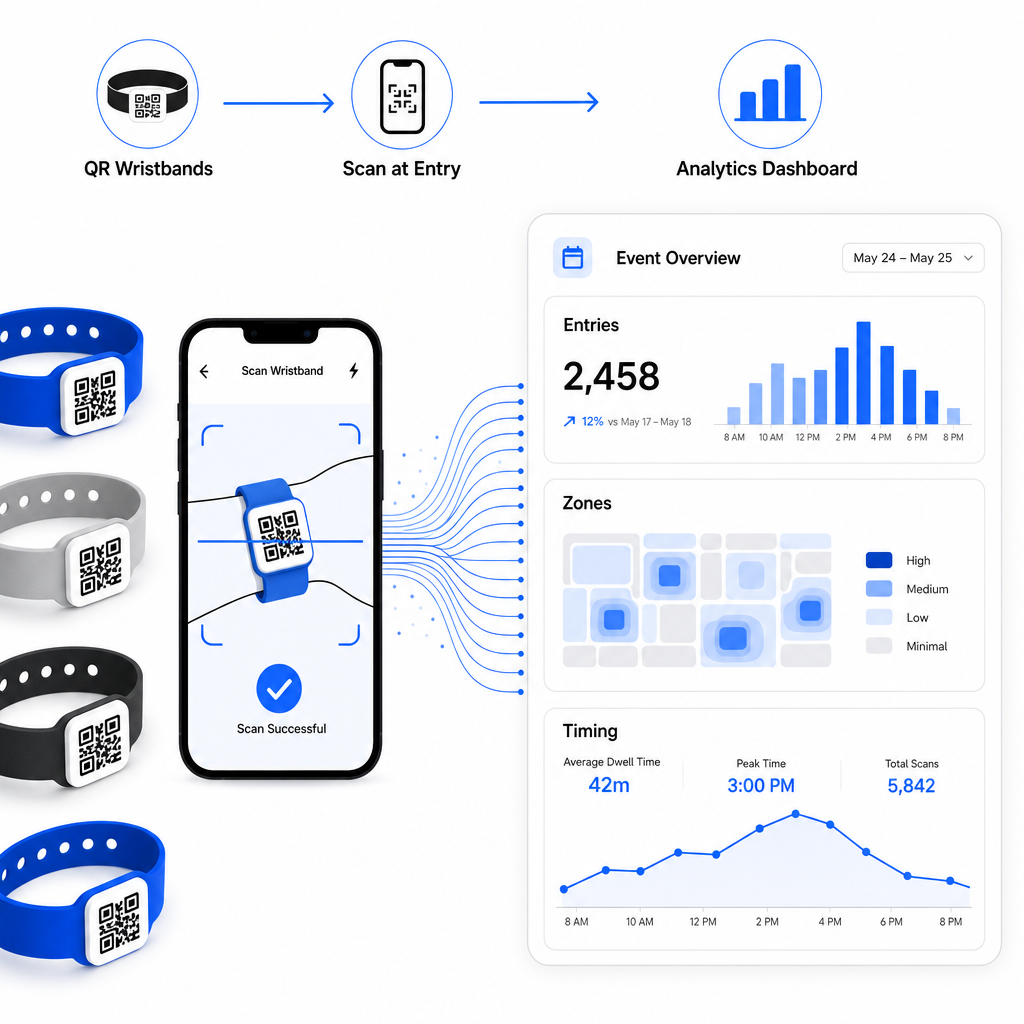
QR tabanlı bir check-in operasyonu oluşturmaya ilişkin eksiksiz bir rehber için, QR kodlarıyla etkinlik check-in'ini kolaylaştırma tarama lojistiğini, personel eğitimini ve gerçek zamanlı katılım izlemeyi ayrıntılı olarak kapsar.
İyi tasarlanmış bir QR bileklik, bir katılımcıyı tanımlamaktan daha fazlasını yapar – fiziksel bir kimlik bilgisini kontrol ettiğiniz canlı bir dijital sisteme bağlar. Baskı özelliklerini doğru ayarlamak, esneklik için dinamik kodlar kullanmak ve her taramanın arkasındaki verileri korumak, bileklik programınızın etkinlik gününde sorunsuz çalışıp çalışmadığını belirleyen üç faktördür. Toplu bir baskı yerine test edilmiş bir kanıtla başlayın ve oradan ilerleyin.
Bileklik QR Kodlarınızı Bugün Kurun Bir sonraki etkinliğiniz için dinamik, izlenebilir QR kodları oluşturun Etkinlik QR Kod Oluşturucu ve her şeyi tek bir panodan yönetin.
Sıkça sorulan sorular
Pratik minimum, yakın mesafeli tarama için 2 cm genişliğindedir. Genel bir kural olarak, beklenen her 10 cm tarama mesafesi için en az 1 cm'lik kod genişliği ayırın. Daha küçük boyutlara inmek, özellikle kavisli veya esnek bileklik yüzeylerinde tarama hataları riskini artırır.
Evet, dinamik QR kodları kullanırsanız. Dinamik kodlar, bir kontrol panelinden kontrol ettiğiniz kısa bir yönlendirme URL'sine işaret eder. Hedefi değiştirmek – örneğin bir etkinlik programı sayfasını güncellemek veya bir giriş formunu değiştirmek gibi – basılı tüm bilekliklerde herhangi bir fiziksel değişiklik olmaksızın anında yürürlüğe girer.
Adlar, bilet kimlikleri veya yaş doğrulama ayrıntıları gibi ham kişisel verileri doğrudan kodun kendisinde kodlamaktan kaçının, çünkü herhangi bir QR tarayıcı onu okuyabilir. Bunun yerine, hangi bilginin kime açıklandığını kontrol eden güvenli, kimliği doğrulanmış bir arka uç sistemine işaret etmek için kodu kullanın. Bu yaklaşım, hassas katılımcı verilerini bileklik yüzeyinden uzak tutar ve yetkisiz erişime maruz kalmanızı azaltır.