Kreću li se redovi za ulazak na vaš događaj presporo ili gubite trag o tome tko ima pristup čemu? Tiskana narukvica s QR kodom rješava oba problema povezivanjem fizičke vjerodajnice izravno s vašim digitalnim sustavima. Ovaj vodič objašnjava kako dizajnirati, generirati i upravljati QR kod narukvicama koje pouzdano funkcioniraju od postavljanja do analize nakon događaja.
Što zapravo rade QR kod narukvice
QR kod narukvica je fizička narukvica – od tkanine, vinila, silikona ili papira – tiskana s jedinstvenim QR kodom koji povezuje s digitalnim zapisom ili odredištem. Kada je član osoblja skenira, kod ili potvrđuje ulazak posjetitelja, potvrđuje njihovu razinu pristupa ili pokreće digitalnu radnju poput otvaranja profila ili bilježenja prisutnosti.
Ključna razlika koju vrijedi razumjeti je razlika između statični i Dinamički QR kodova. Statički kod trajno kodira svoje odredište – ako se nešto promijeni, morate ponovno tiskati. Dinamički QR kod upućuje na kratki URL za preusmjeravanje koji možete ažurirati u bilo kojem trenutku s upravljačke ploče, bez promjene tiskanog koda na narukvici. Za događaje gdje se rasporedi, zone ili povezani sadržaj mogu mijenjati prije ili tijekom događaja, dinamički kodovi daju vam znatno više kontrole.
Stvorite dinamičke QR kodove za svoj događaj Trebate ažurirati odredišta narukvica ili pratiti aktivnost skeniranja u stvarnom vremenu? Koristite QR kod generator za događaje za izradu dinamičkih kodova kojima možete upravljati s jedne nadzorne ploče.
Uobičajeni slučajevi upotrebe QR narukvica
Ulaz i kontrola pristupa
Najizravnija primjena je korištenje svake narukvice kao digitalne ulaznice. Kada se narukvice za događaje tiskaju s jedinstvenim, serijskim QR kodovima, svaka djeluje kao neprenosiva vjerodajnica. Skener osoblja provjerava kod na ulazu, označava ga kao korištenog i sprječava pokušaje ponovnog ulaska s istom narukvicom. Ovaj pristup uklanja potrebu za zasebnim papirnatim ulaznicama i smanjuje rizik od krivotvorina.
Ako vaš događaj ima više pristupnih zona – VIP područja, backstage, opći ulaz – varijabilni QR kodovi omogućuju vam dodjeljivanje svakog posjetitelja određenoj razini. Skeniranje na svakoj kontrolnoj točki potvrđuje dopušta li ta narukvica ulazak u to područje, dajući vam kontrolu nad protokom gužve u stvarnom vremenu bez ručne provjere popisa. Za detaljniji uvid u to kako ovo funkcionira u praksi, pogledajte vodič o korištenju QR kodova na ulaznicama za upravljanje ulaskom.
Praćenje posjećenosti
Osim ulaska na vrata, QR narukvice omogućuju vam bilježenje podataka o prisutnosti na više točaka tijekom događaja – u dvoranama za sesije, radionicama ili prostorima za grupni rad. Umjesto ručnih lista za prijavu, posjetitelji skeniraju na svakoj lokaciji, a sustav bilježi tko je prisustvovao čemu i kada. Pagelootov 15. za QR kod za prisutnost podržava ovaj tijek rada povezivanjem kodova s obrascima ili stranicama za prijavu koje automatski bilježe sudjelovanje.
Pristup informacijama o događaju
QR kod narukvice ne mora služiti samo sigurnosnoj funkciji. Povezivanje s odredišnom stranicom daje svakom posjetitelju pristup rasporedu događaja, biografijama govornika, mapama mjesta ili last-minute ažuriranjima na zahtjev. Budući da se dinamički kodovi mogu ažurirati bez ponovnog tiskanja, možete poslati nove informacije na svaku već distribuiranu narukvicu – korisno kada se vremena sesija promijene ili se soba premjesti.
Umrežavanje i dijeljenje kontakata
Na profesionalnim konferencijama, QR narukvice mogu služiti i kao digitalne posjetnice. Povezivanje koda narukvice s vCardom omogućuje posjetiteljima da podijele svoje kontakt podatke brzim skeniranjem umjesto razmjene fizičkih kartica. vCard QR kod generator olakšava stvaranje kontaktnih kodova koji pohranjuju ime, e-poštu, telefonski broj i tvrtku izravno na telefon skenera.
Pogodnosti, iskorištavanje i angažman
Narukvice mogu imati i funkcionalnu vrijednost izvan identifikacije. Serijski kodovi povezani s računima posjetitelja mogu pratiti unaprijed učitane tokene za piće, prava na robu ili pogodnosti vjernosti. Podaci o skeniranju otkrivaju koje su pogodnosti iskorištene i kada, dajući organizatorima korisne bihevioralne podatke uz operativnu funkciju.
Zahtjevi dizajna za pouzdano skeniranje
QR kod narukvica koja se ne uspije skenirati u stvarnim uvjetima događaja stvara trenje u potpuno pogrešnom trenutku. Nekoliko fizičkih faktora dizajna određuje hoće li vaši kodovi pouzdano funkcionirati.
Veličina i udaljenost skeniranja
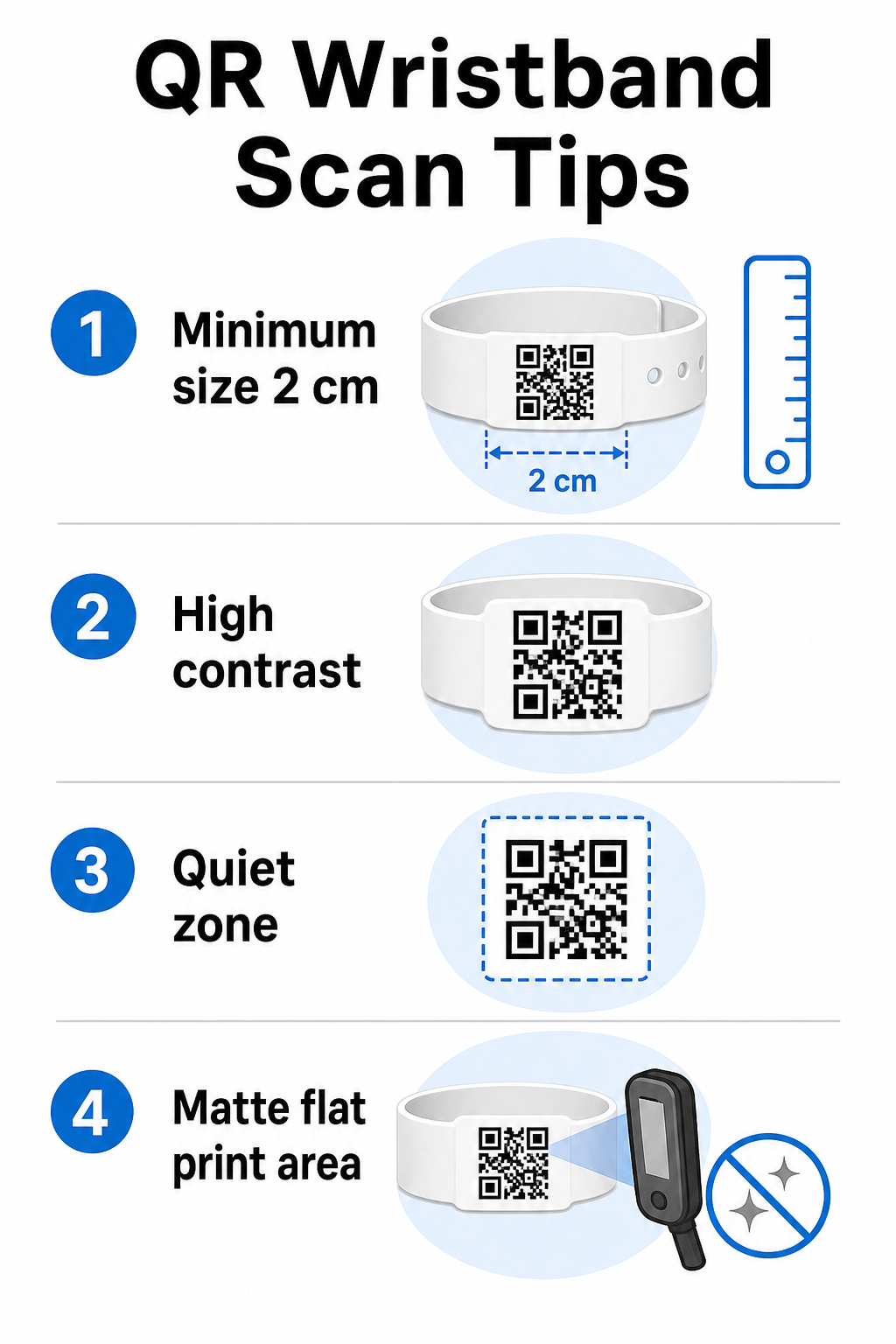
Standardno pravilo je da širina QR koda treba biti najmanje 1 cm za svakih 10 cm očekivane udaljenosti skeniranja. Za narukvice skenirane na duljini ruke ručnim uređajem, minimalna širina od 2 cm je praktični minimum. Tanji narukvice koje ne mogu pouzdano primiti ovu veličinu uzrokovat će probleme sa skeniranjem. Pogledajte cijeli vodiču za veličinu QR koda za mjerenja u različitim slučajevima upotrebe.
Kontrast boja
Visoki kontrast između modula koda i pozadine je ključan. Tamni moduli na svijetloj pozadini – idealno crni na bijeloj – daju skenerima najjasniji signal. Ciljajte na omjer kontrasta od najmanje 4:1. Inverzni dizajni sa svijetlim kodom na tamnoj pozadini općenito su nepouzdani i treba ih izbjegavati.
Mirna zona
Svaki QR kod zahtijeva jasan bijeli rub oko svog perimetra, nazvan tihu zonu. Ova margina signalizira skeneru gdje kod počinje i završava. Uklanjanje ili ispis preko nje jedan je od najčešćih uzroka neuspjeha skeniranja na narukvicama gdje je prostor za dizajn ograničen.
Rezolucija ispisa i format
Izvezite QR kodove u vektorskom formatu (SVG ili EPS) ili rasterskim datotekama visoke rezolucije s minimalno 300 DPI na konačnoj ispisanoj veličini. Povećavanje slike niske rezolucije stvara mutne rubove modula koje skeneri teško čitaju. Za smjernice o postizanju dosljedne kvalitete ispisa, vodič za najbolje prakse čitljivosti QR kodova pokriva cijeli tehnički kontrolni popis.
Površina i završna obrada
Narukvice se nose na zakrivljenoj površini, što uvodi izobličenje. Ispišite QR kod na najravnijem dijelu narukvice i izbjegavajte sjajne ili reflektirajuće završne obrade preko koda – odsjaj od gornje rasvjete događaja izravno ometa kamere pametnih telefona. Mat završna obrada preko područja koda dosljedno nadmašuje sjajne alternative u okruženjima događaja.
Složenost koda
Što je više podataka kodirano u QR kodu, to postaje gušći i teži za skeniranje. Koristite kratke URL-ove ili dinamičke kodove koji preusmjeravaju putem kompaktne veze kako bi kod bio vizualno jednostavan i brz za skeniranje. Pagelootov Generator QR kodova za linkove automatski obrađuje skraćivanje URL-ova kao dio radnog toka dinamičkog koda.
Ispravljanje pogrešaka
QR kodovi imaju ugrađenu korekciju pogrešaka koja ih održava skeniranim čak i kada je dio koda oštećen. Najviša razina korekcije omogućuje oporavak kada je do otprilike 30% područja koda zaklonjeno – relevantno za narukvice koje doživljavaju trošenje, mrlje ili manju abraziju tijekom višednevnog događaja. Ako dodajete logotip kodu, koristite visoku korekciju pogrešaka kako biste nadoknadili pokriveno područje.
Generiranje QR kodova za narukvice
Proces generiranja slijedi jednostavan radni tok:
- Odaberite vrstu QR koda. Za ulaznice, veza ili QR kod događaja koji upućuje na vaš sustav prijave dobro funkcionira. Za dijeljenje kontakata, koristite vCard tip. Za bilježenje prisutnosti, povežite se s obrascem.
- Koristite dinamičke kodove kada se sadržaj može promijeniti. Ako vaš događaj traje više dana ili povezano odredište možda treba ažurirati, dinamički kodovi omogućuju vam da izvršite promjene s vaše nadzorne ploče bez ponovnog ispisa niti jedne narukvice.
- Neka kodirani URL bude kratak. Kraći URL-ovi smanjuju gustoću koda i poboljšavaju brzinu skeniranja.
- Prilagodite unutar ograničenja kontrasta. Možete dodati logotip svog događaja i boje marke, ali provjerite je li kontrast dovoljan nakon prilagodbe.
- Preuzmite u formatu spremnom za ispis. Koristite SVG, EPS ili PNG datoteke visoke DPI rezolucije – nikada ne povećavajte mali JPEG.
- Testirajte prije masovnog ispisa. Skenirajte svoj dokaz na više uređaja, pri slabom osvjetljenju i na udaljenostima skeniranja koje će vaše osoblje stvarno koristiti. Ovaj pojedinačni korak sprječava najčešće kvarove na dan događaja.
Izgradite i pratite svoje QR kodove događaja Generirajte jedinstvene kodove za svakog sudionika, pratite aktivnost skeniranja i ažurirajte povezani sadržaj bez ponovnog ispisa. Započnite s Generator QR kodova i istražite opcije specifične za događaj na QR kod generator za događaje.
Razmatranja sigurnosti i privatnosti
QR narukvice koje pohranjuju ili povezuju osobne podatke sudionika nose odgovornosti za zaštitu podataka.
Šifrirajte osjetljive podatke. Ako kod narukvice izravno kodira osobne podatke – kao što su ime, kategorija ulaznice ili status provjere dobi – ti podaci trebaju biti šifrirani kako ih ne bi mogli pročitati neovlašteni skeneri. Korištenje dinamičkih kodova koji upućuju na siguran, autentificiran pozadinski sustav umjesto kodiranja sirovih podataka u samom kodu značajno smanjuje ovaj rizik.
Koristite HTTPS s validiranim certifikatima. Sva komunikacija između vaše aplikacije za skeniranje i pozadinskog poslužitelja za validaciju trebala bi se odvijati preko šifriranih kanala. To sprječava presretanje događaja skeniranja ili podataka sudionika tijekom procesa prijave. Vodič o izradi sigurnih QR kod ulaznica za događaje detaljno objašnjava uključene tehničke slojeve.
Ograničite pristup sustavima prijave. Aplikacije za skeniranje i nadzorne ploče namijenjene osoblju trebale bi zahtijevati individualne vjerodajnice za prijavu, a ne zajedničke lozinke. To ograničava izloženost u slučaju gubitka uređaja i olakšava reviziju tko je što skenirao.
Primijenite načela privatnosti po dizajnu. Prikupljajte samo podatke koje vaša operacija zahtijeva. Ako koristite analitiku skeniranja za analizu protoka gužve, agregirani anonimizirani podaci su dovoljni i izbjegavaju implikacije privatnosti praćenja prepoznatljivih pojedinaca. Tamo gdje se obrađuju osobni podaci, osigurajte da su posjetitelji informirani i da vaši procesi udovoljavaju primjenjivim propisima.
Pružite kontekst na mjestu skeniranja. Obavještavanje posjetitelja što QR kod narukvice radi – i što će se dogoditi kada ga osoblje skenira – gradi povjerenje i smanjuje zabunu oko upotrebe podataka. Za širi pogled na osiguravanje kontrole pristupa dinamičkim kodovima, vodič o dinamičke QR kodove za kontrolu pristupa pokriva opoziv, revizijske tragove i upravljanje dozvolama u stvarnom vremenu.
Korištenje analitike skeniranja za poboljšanje budućih događaja
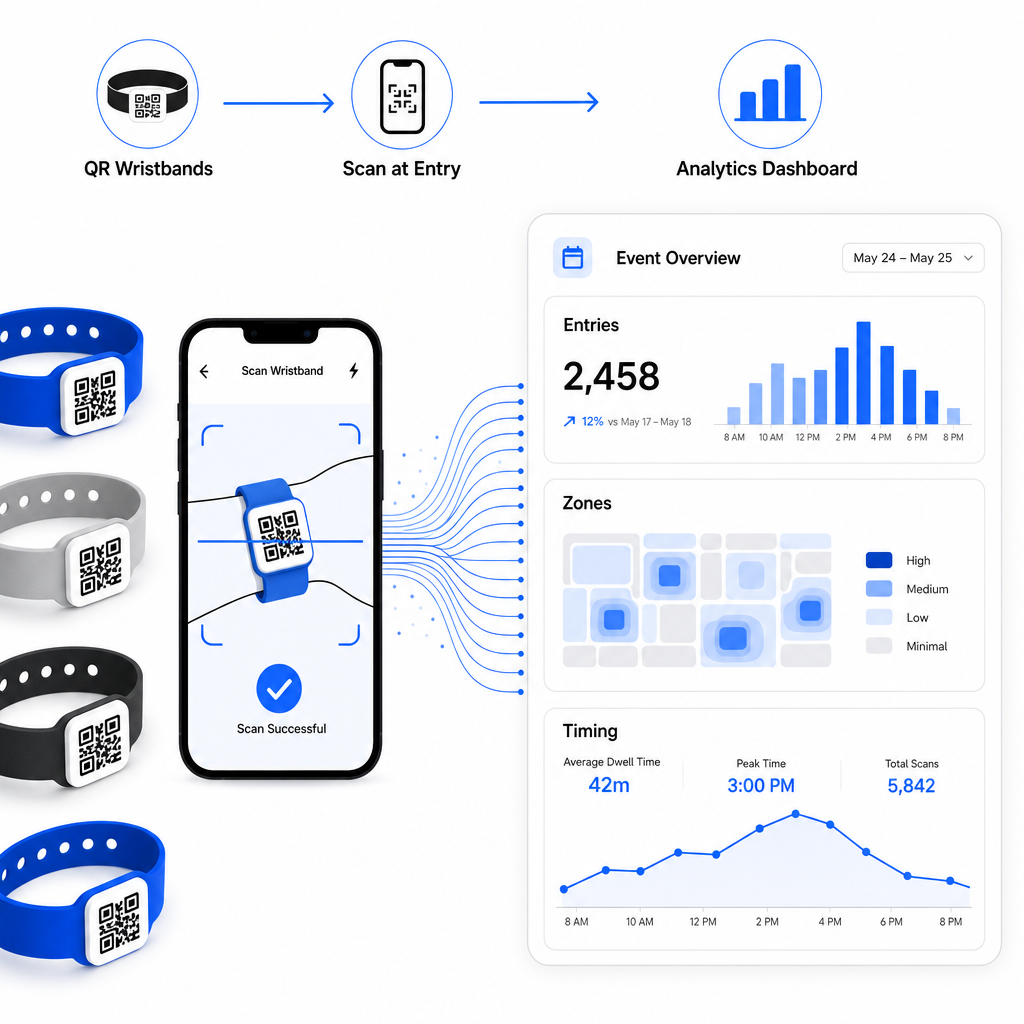
Dinamički QR kodovi generiraju podatke o skeniranju koji se protežu daleko izvan brojanja ulaza. Uz Pagelootovu analitiku, možete pratiti kada i gdje su kodovi skenirani, koje su zone imale najviše aktivnosti i kako se protok posjetitelja usporedio s vašim projekcijama. Ovi podaci pomažu vam donositi informirane odluke o osoblju na ulaznim točkama, rasporedu sesija i dizajnu značajki narukvica za vaš sljedeći događaj.
Za potpuni pregled izgradnje operacije prijave temeljene na QR kodovima, vodič o pojednostavljivanju prijave za događaje s QR kodovima detaljno pokriva logistiku skeniranja, obuku osoblja i praćenje prisutnosti u stvarnom vremenu.
Dobro dizajnirana QR narukvica čini više od identificiranja posjetitelja – ona povezuje fizičku vjerodajnicu sa živim digitalnim sustavom koji vi kontrolirate. Ispravno postavljanje specifikacija ispisa, korištenje dinamičkih kodova za fleksibilnost i zaštita podataka iza svakog skeniranja tri su faktora koji određuju hoće li vaš program narukvica funkcionirati glatko na dan događaja. Započnite s testiranim dokazom, a ne masovnim ispisom, i gradite od toga.
Postavite svoje QR kodove za narukvice danas Stvorite dinamičke QR kodove koji se mogu pratiti za vaš sljedeći događaj s QR kod generator za događaje i upravljajte svime s jedne nadzorne ploče.
Često postavljana pitanja
Praktični minimum je 2 cm širine za skeniranje izbliza. Kao opće pravilo, dopustite barem 1 cm širine koda za svakih 10 cm očekivane udaljenosti skeniranja. Smanjivanje povećava rizik od neuspjeha skeniranja, posebno na zakrivljenim ili fleksibilnim površinama narukvica.
Da, ako koristite dinamičke QR kodove. Dinamički kodovi upućuju na kratki URL za preusmjeravanje koji kontrolirate s nadzorne ploče. Promjena odredišta – kao što je ažuriranje stranice s rasporedom događaja ili zamjena obrasca za prijavu – stupa na snagu odmah na svim ispisanim narukvicama bez ikakvih fizičkih promjena.
Izbjegavajte kodiranje sirovih osobnih podataka kao što su imena, ID-ovi ulaznica ili podaci za provjeru dobi izravno u samom kodu, budući da ga svaki QR skener može pročitati. Umjesto toga, koristite kod za upućivanje na siguran, autentificiran pozadinski sustav koji kontrolira koje se informacije otkrivaju i kome. Ovaj pristup drži osjetljive podatke o sudionicima podalje od površine narukvice i smanjuje vašu izloženost neovlaštenom pristupu.