Твърде бавно ли се движат опашките за влизане на вашето събитие или губите представа кой до какво има достъп? Отпечатана гривна с QR код решава и двата проблема, като свързва физическо удостоверение директно с вашите дигитални системи. Това ръководство обяснява как да проектирате, генерирате и управлявате QR код гривни, които работят надеждно от настройката до анализа след събитието.
Какво всъщност правят QR код гривните
QR код гривната е физическа лента – платнена, винилова, силиконова или хартиена – отпечатана с уникален QR код, който води до цифров запис или дестинация. Когато служител я сканира, кодът или потвърждава допускането на посетител, потвърждава нивото му на достъп, или задейства цифрово действие като отваряне на профил или регистриране на присъствие.
Ключовото разграничение, което си струва да се разбере, е разликата между статични и Динамичен QR кодове. Статичният код кодира своята дестинация за постоянно – ако нещо се промени, трябва да препечатате. Динамичният QR код сочи към кратък URL адрес за пренасочване, който можете да актуализирате по всяко време от табло за управление, без да променяте отпечатания код на гривната. За събития, където графици, зони или свързано съдържание могат да се променят преди или по време на събитието, динамичните кодове ви дават значително повече контрол.
Създайте динамични QR кодове за вашето събитие Трябва ли да актуализирате дестинациите на гривните или да проследявате активността на сканиране в реално време? Използвайте QR код за събитие за да изградите динамични кодове, които можете да управлявате от едно табло за управление.
Често срещани случаи на употреба на QR гривни
Достъп и контрол на входа
Най-прякото приложение е използването на всяка гривна като цифров билет. Когато гривните за събития са отпечатани с уникални, серийни QR кодове, всяка от тях действа като непрехвърляемо удостоверение. Скенер на персонала валидира кода на входа, маркира го като използван и предотвратява опити за повторно влизане със същата лента. Този подход премахва необходимостта от отделни хартиени билети и намалява риска от фалшификати.
Ако вашето събитие има множество зони за достъп – VIP зони, зад кулисите, общ достъп – променливите QR кодове ви позволяват да присвоите всеки посетител към конкретно ниво. Сканирането на всяка контролна точка потвърждава дали тази гривна дава достъп до тази зона, като ви дава контрол в реално време върху потока от хора без ръчна проверка на списъци. За по-задълбочен поглед върху това как работи на практика, вижте ръководството за използване на QR кодове на билети за управление на входа.
Проследяване на посещаемостта
Освен входа на портата, QR гривните ви позволяват да регистрирате данни за присъствие на множество точки по време на събитие – заседателни зали, семинари или пространства за пробив. Вместо ръчни листове за записване, посетителите сканират на всяко място и системата регистрира кой е присъствал на какво и кога. Pageloot’s QR код за присъствие поддържа този работен процес, като свързва кодове с формуляри или страници за регистрация, които автоматично улавят участието.
Достъп до информация за събитието
QR кодът на гривната не трябва да служи само за функция за сигурност. Свързването му с целева страница дава на всеки посетител достъп при поискване до графика на събитието, биографии на лектори, карти на мястото или актуализации в последния момент. Тъй като динамичните кодове могат да бъдат актуализирани без препечатване, можете да изпращате нова информация до всяка вече раздадена гривна – полезно, когато времената на сесиите се променят или стая се премести.
Мрежова връзка и споделяне на контакти
На професионални конференции QR гривните могат да служат и като цифрови визитки. Свързването на код на гривна с vCard позволява на посетителите да споделят своите данни за контакт с бързо сканиране, вместо да обменят физически карти. The vCard QR код генератор прави лесно създаването на кодове за контакти, които съхраняват име, имейл, телефонен номер и компания директно в телефона на скенера.
Екстри, изкупувания и ангажираност
Гривните могат да носят и функционална стойност извън идентификацията. Серийни кодове, свързани с акаунти на посетители, могат да проследяват предварително заредени жетони за напитки, права за стоки или бонуси за лоялност. Данните от сканирането разкриват кои предимства са били изкупени и кога, като дават на организаторите полезни данни за поведението, наред с оперативната функция.
Изисквания за дизайн за надеждно сканиране
QR код гривна, която не успее да сканира при реални условия на събитие, създава триене точно в неподходящия момент. Няколко физически фактора на дизайна определят дали вашите кодове ще работят надеждно.
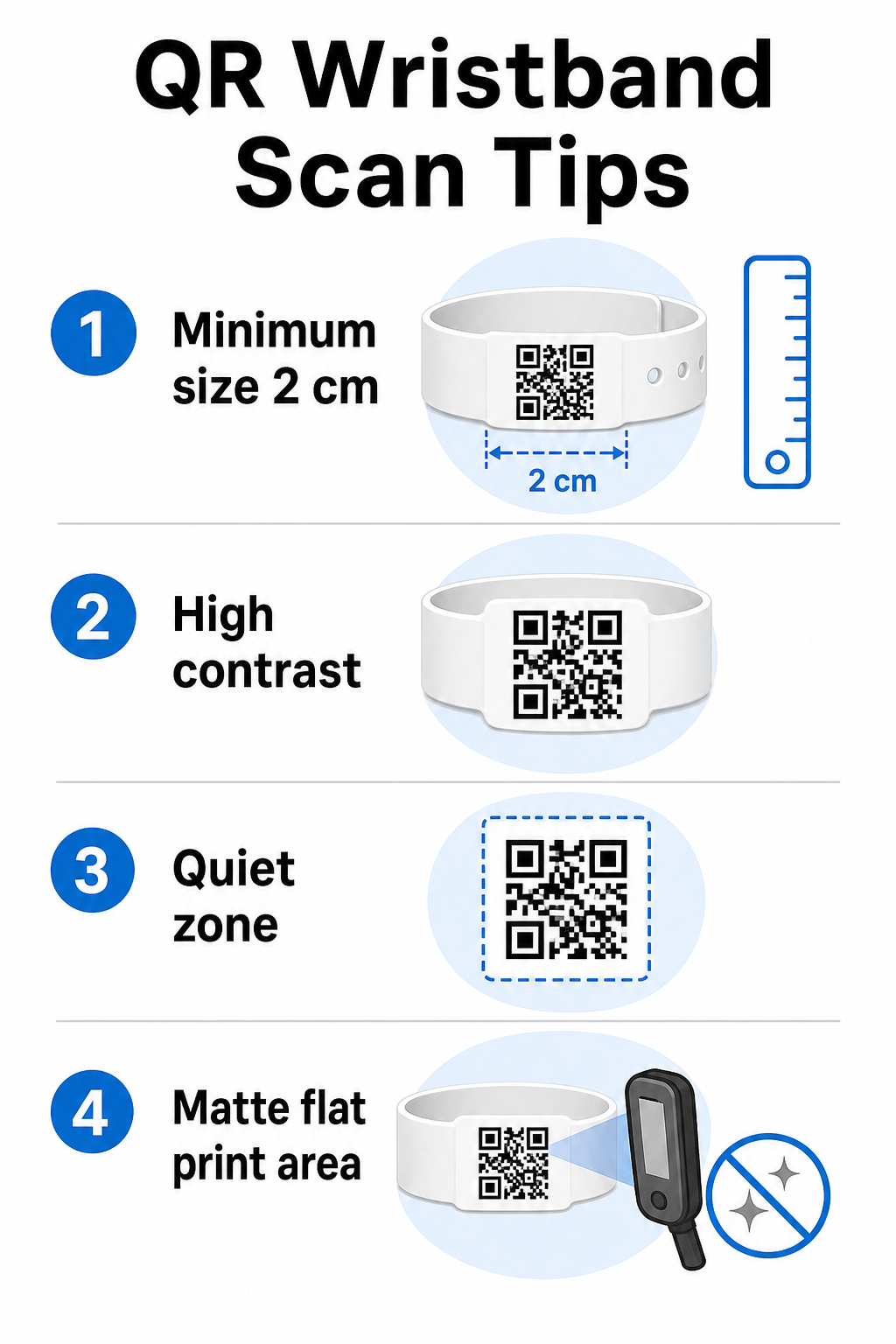
Размер и разстояние за сканиране
Стандартното правило е, че ширината на QR кода трябва да бъде поне 1 см за всеки 10 см очаквано разстояние за сканиране. За гривни, сканирани на една ръка разстояние от ръчно устройство, минимална ширина от 2 см е практическият минимум. По-тънките гривни, които не могат надеждно да поемат този размер, ще причинят проблеми при сканирането. Вижте пълния ръководство за размер на QR код за измервания в различни случаи на употреба.
Контраст на цветовете
Висок контраст между модулите на кода и фона е от решаващо значение. Тъмни модули на светъл фон – в идеалния случай черно на бяло – дават на скенерите най-ясния сигнал. Стремете се към съотношение на контраст най-малко 4:1. Инвертираните дизайни със светъл код на тъмен фон обикновено са ненадеждни и трябва да се избягват.
Тиха зона
Всеки QR код изисква ясна бяла рамка около периметъра си, наречена тиха зона. Това поле сигнализира на скенера къде започва и свършва кодът. Премахването му или отпечатването върху него е една от най-честите причини за неуспешно сканиране на гривни, където пространството за дизайн е ограничено.
Разделителна способност и формат на печат
Експортирайте QR кодове във векторен формат (SVG или EPS) или растерни файлове с висока разделителна способност при минимум 300 DPI при крайния отпечатан размер. Увеличаването на изображение с ниска разделителна способност създава размазани ръбове на модулите, които скенерите трудно разчитат. За насоки относно постигането на постоянно качество на печат, ръководство за най-добри практики за четливост на QR кодове обхваща пълния технически контролен списък.
Повърхност и покритие
Гривните се носят върху извита повърхност, което въвежда изкривяване. Отпечатайте QR кода върху най-равната част на гривната и избягвайте лъскави или отразяващи покрития върху кода – отблясъците от горното осветление на събитието пряко пречат на камерите на смартфоните. Матовото покритие върху областта на кода постоянно превъзхожда лъскавите алтернативи в среда на събития.
Сложност на кода
Колкото повече данни са кодирани в QR код, толкова по-плътен и по-труден за сканиране става той. Използвайте кратки URL адреси или динамични кодове, които пренасочват чрез компактна връзка, за да запазите кода визуално прост и бърз за сканиране. Pageloot’s Генератор на QR кодове за връзки автоматично обработва съкращаването на URL адреси като част от работния процес на динамичния код.
Корекция на грешки
QR кодовете имат вградена корекция на грешки, която ги поддържа сканируеми, дори когато част от кода е повредена. Най-високото ниво на корекция позволява възстановяване, когато до приблизително 30% от областта на кода е затъмнена – от значение за гривни, които претърпяват износване, зацапване или леко протриване по време на многодневно събитие. Ако добавяте лого към кода, използвайте висока корекция на грешки, за да компенсирате покритата област.
Генериране на QR кодове за гривни
Процесът на генериране следва прост работен процес:
- Изберете типа на вашия QR код. За допускане, връзка или QR код на събитие, сочещ към вашата система за регистрация, работи добре. За споделяне на контакти използвайте тип vCard. За регистриране на присъствие, свържете към формуляр.
- Използвайте динамични кодове, когато съдържанието може да се промени. Ако вашето събитие обхваща няколко дни или свързаната дестинация може да се нуждае от актуализация, динамичните кодове ви позволяват да правите промени от вашето табло за управление, без да препечатвате нито една гривна.
- Дръжте кодирания URL адрес кратък. По-късите URL адреси намаляват плътността на кода и подобряват скоростта на сканиране.
- Персонализирайте в рамките на ограниченията за контраст. Можете да добавите логото на вашето събитие и цветовете на марката, но проверете дали контрастът остава достатъчен след персонализиране.
- Изтеглете в готов за печат формат. Използвайте SVG, EPS или PNG файлове с висока DPI – никога не увеличавайте малък JPEG.
- Тествайте преди масов печат. Сканирайте вашата проба на множество устройства, при слабо осветление и на разстоянията за сканиране, които персоналът ви действително ще използва. Тази единствена стъпка предотвратява най-честите повреди в деня на събитието.
Изградете и проследете вашите QR кодове за събития Генерирайте уникални кодове за всеки посетител, наблюдавайте активността на сканиране и актуализирайте свързаното съдържание без препечатване. Започнете с Генератор на QR кодове и проучете специфични за събитието опции на QR код за събитие.
Съображения за сигурност и поверителност
QR гривните, които съхраняват или свързват лична информация за посетители, носят отговорности за защита на данните.
Шифровайте чувствителни данни. Ако код на гривна директно кодира лична информация – като име, категория билет или статус на проверка на възрастта – тези данни трябва да бъдат шифровани, така че да не могат да бъдат прочетени от неоторизирани скенери. Използването на динамични кодове, които сочат към защитен, удостоверен бекенд, вместо да кодират сурови данни в самия код, значително намалява този риск.
Използвайте HTTPS с валидирани сертификати. Цялата комуникация между вашето приложение за сканиране и сървъра за валидиране на бекенда трябва да се осъществява по криптирани канали. Това предотвратява прихващане на събития за сканиране или данни за посетители по време на процеса на регистрация. Ръководството за създаване на сигурни QR код билети за събития обяснява подробно включените технически слоеве.
Ограничете достъпа до системите за регистрация. Приложенията за сканиране и таблата за управление, предназначени за персонала, трябва да изискват индивидуални данни за вход, а не споделени пароли. Това ограничава излагането на риск, ако устройство бъде изгубено, и улеснява одита кой какво е сканирал.
Прилагайте принципите на поверителност по дизайн. Събирайте само данните, които вашата операция изисква. Ако използвате анализи на сканирания за анализ на потока от хора, обобщени анонимизирани данни са достатъчни и избягват последиците за поверителността от проследяване на идентифицируеми лица. Когато се обработват лични данни, уверете се, че присъстващите са информирани и че вашите процеси отговарят на приложимите разпоредби.
Осигурете контекст в точката на сканиране. Информирането на присъстващите какво прави QR кодът на гривната – и какво ще се случи, когато персоналът го сканира – изгражда доверие и намалява объркването относно използването на данни. За по-широк поглед върху осигуряването на контрол на достъпа с динамични кодове, ръководството за динамични QR кодове за контрол на достъпа обхваща отмяна, одитни следи и управление на разрешения в реално време.
Използване на анализи на сканирания за подобряване на бъдещи събития
Динамичните QR кодове генерират данни от сканиране, които надхвърлят броя на влизанията. С анализите на Pageloot можете да проследявате кога и къде са сканирани кодовете, кои зони са имали най-голяма активност и как потокът от присъстващи се е сравнил с вашите прогнози. Тези данни ви помагат да вземате информирани решения относно персонала на входните точки, планирането на сесиите и дизайна на функциите на гривните за следващото ви събитие.
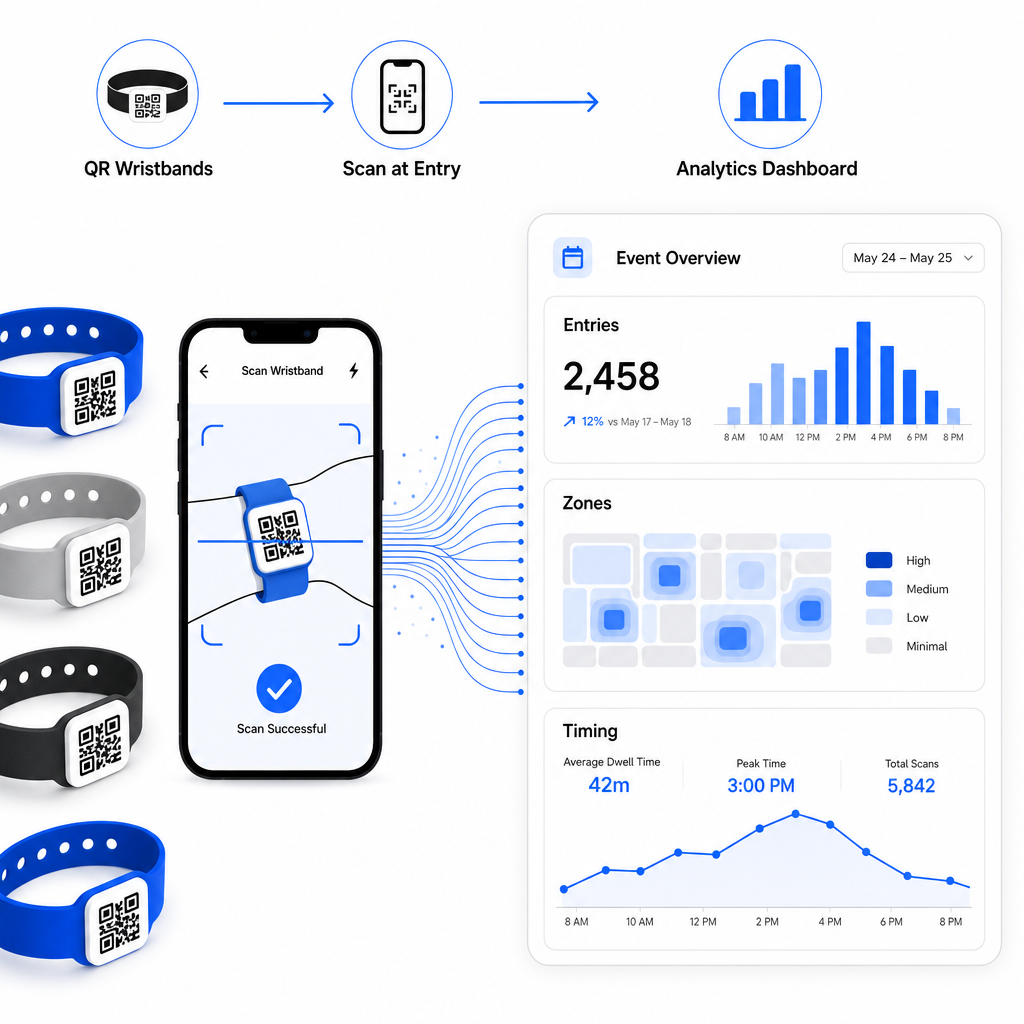
За пълно ръководство за изграждане на операция за регистрация, базирана на QR, ръководството за оптимизиране на регистрацията за събития с QR кодове обхваща подробно логистиката на сканирането, обучението на персонала и мониторинга на присъствието в реално време.
Добре проектираната QR гривна прави повече от идентифициране на присъстващ – тя свързва физическо удостоверение с жива цифрова система, която контролирате. Правилното определяне на спецификациите за печат, използването на динамични кодове за гъвкавост и защитата на данните зад всяко сканиране са трите фактора, които определят дали вашата програма за гривни работи гладко в деня на събитието. Започнете с тествано доказателство, а не с масов печат, и надграждайте оттам.
Настройте вашите QR кодове за гривни днес Създайте динамични, проследими QR кодове за следващото си събитие с QR код за събитие и управлявайте всичко от едно табло.
Често задавани въпроси
Практическият минимум е 2 см широк за сканиране от близко разстояние. Като общо правило, осигурете поне 1 см ширина на кода за всеки 10 см очаквано разстояние за сканиране. Намаляването на размера увеличава риска от неуспешни сканирания, особено върху извити или гъвкави повърхности на гривни.
Да, ако използвате динамични QR кодове. Динамичните кодове сочат към кратък URL адрес за пренасочване, който контролирате от табло за управление. Промяната на дестинацията – като актуализиране на страница с график на събитие или размяна на формуляр за регистрация – влиза в сила незабавно на всички отпечатани гривни без никакви физически промени.
Избягвайте кодирането на сурови лични данни като имена, идентификатори на билети или данни за проверка на възрастта директно в самия код, тъй като всеки QR скенер може да го прочете. Вместо това, използвайте кода, за да сочи към сигурна, удостоверена бекенд система, която контролира каква информация се разкрива и на кого. Този подход държи чувствителните данни на присъстващите извън повърхността на гривната и намалява излагането ви на неоторизиран достъп.