Kas teie ürituse sisenemisjärjekorrad liiguvad liiga aeglaselt või kaotate ülevaate, kellel on millele ligipääs? Trükitud QR-koodiga käepael lahendab mõlemad probleemid, ühendades füüsilise mandaadi otse teie digitaalsete süsteemidega. See juhend selgitab, kuidas kujundada, genereerida ja hallata QR-koodiga käepaelu, mis töötavad usaldusväärselt alates seadistamisest kuni üritusejärgse analüüsini.
Mida QR-koodiga käepaelad tegelikult teevad
QR-koodiga käepael on füüsiline pael – kangast, vinüülist, silikoonist või paberist – millele on trükitud unikaalne QR-kood, mis lingib digitaalsele kirjele või sihtkohale. Kui töötaja seda skannib, siis kood kas valideerib osaleja sissepääsu, kinnitab tema ligipääsutaseme või käivitab digitaalse toimingu, näiteks profiili avamise või osalemise registreerimise.
Peamine eristus, mida tasub mõista, on erinevus staatiline ja Dünaamiline QR-koodid. Staatiline kood kodeerib oma sihtkoha püsivalt – kui midagi muutub, peate uuesti trükkima. Dünaamiline QR-kood osutab lühikesele ümbersuunamise URL-ile, mida saate igal ajal halduspaneelilt värskendada, muutmata käepaelal olevat trükitud koodi. Ürituste puhul, kus ajakavad, tsoonid või lingitud sisu võivad enne üritust või selle ajal muutuda, annavad dünaamilised koodid teile oluliselt rohkem kontrolli.
Looge oma ürituse jaoks dünaamilisi QR-koode Kas peate värskendama käepaelade sihtkohti või jälgima skannimistegevust reaalajas? Kasutage Ürituse QR koodi loomine dünaamiliste koodide loomiseks, mida saate hallata ühest juhtpaneelist.
QR-käepaelade levinud kasutusjuhud
Sissepääsu ja ligipääsu kontroll
Kõige otsesem rakendus on iga käepaela kasutamine digitaalse piletina. Kui ürituse käepaeladele on trükitud unikaalsed, järjestatud QR-koodid, toimib igaüks neist mitteülekantava mandaadina. Töötaja skanner valideerib koodi väravas, märgib selle kasutatuks ja takistab sama paelaga korduvsisenemise katseid. See lähenemine kaotab vajaduse eraldi paberpiletite järele ja vähendab võltsingute riski.
Kui teie üritusel on mitu ligipääsutsooni – VIP-alad, lava taga, üldine sissepääs – võimaldavad muutuvad QR-koodid määrata igale osalejale kindla taseme. Skannimine igas kontrollpunktis kinnitab, kas see käepael annab sissepääsu sellesse piirkonda, andes teile reaalajas kontrolli rahvahulga liikumise üle ilma käsitsi nimekirjade kontrollimiseta. Sügavama ülevaate saamiseks, kuidas see praktikas töötab, vaadake juhendit teemal QR-koodide kasutamine piletitel sissepääsu haldamiseks.
Osalemise jälgimine
Lisaks väravasisenevale sissepääsule võimaldavad QR-käepaelad teil registreerida osalemise andmeid mitmes punktis kogu ürituse vältel – sessiooniruumides, töötubades või arutelualadel. Käsitsi registreerimislehtede asemel skannivad osalejad igas asukohas ja süsteem logib, kes millest ja millal osa võttis. Pagelooti kohaloleku QR-koodi tööriist toetab seda töövoogu, linkides koodid vormidele või registreerimislehtedele, mis jäädvustavad osalemise automaatselt.
Ligipääs ürituse infole
Käepaela QR-kood ei pea täitma ainult turvafunktsiooni. Selle linkimine sihtlehele annab igale osalejale nõudmisel ligipääsu ürituse ajakavale, esinejate elulugudele, toimumiskoha kaartidele või viimase hetke uuendustele. Kuna dünaamilisi koode saab värskendada ilma uuesti trükkimata, saate saata uut teavet igale juba jagatud käepaelale – kasulik, kui sessioonide ajad muutuvad või ruum vahetub.
Võrgustike loomine ja kontaktide jagamine
Professionaalsetel konverentsidel võivad QR-käepaelad toimida ka digitaalsete visiitkaartidena. Käepaela koodi linkimine vCardile võimaldab osalejatel jagada oma kontaktandmeid kiire skannimisega, mitte füüsiliste kaartide vahetamisega. See vCard QR-koodi generaator muudab kontaktkoodide loomise lihtsaks, mis salvestavad nime, e-posti, telefoninumbri ja ettevõtte otse skanneri telefoni.
Soodustused, lunastused ja kaasamine
Käepaelad võivad kanda ka funktsionaalset väärtust lisaks identifitseerimisele. Osalejate kontodega seotud järjestatud koodid saavad jälgida eelnevalt laetud joogimärke, kaubaõigusi või lojaalsussoodustusi. Skannimisandmed näitavad, millised soodustused lunastati ja millal, andes korraldajatele kasulikke käitumuslikke andmeid lisaks operatiivsele funktsioonile.
Kujundusnõuded usaldusväärseks skannimiseks
QR-koodiga käepael, mis ei skaneeru reaalsetes üritustingimustes, tekitab hõõrdumist täpselt valel hetkel. Mitmed füüsilised disainifaktorid määravad, kas teie koodid toimivad usaldusväärselt.
Suurus ja skaneerimiskaugus
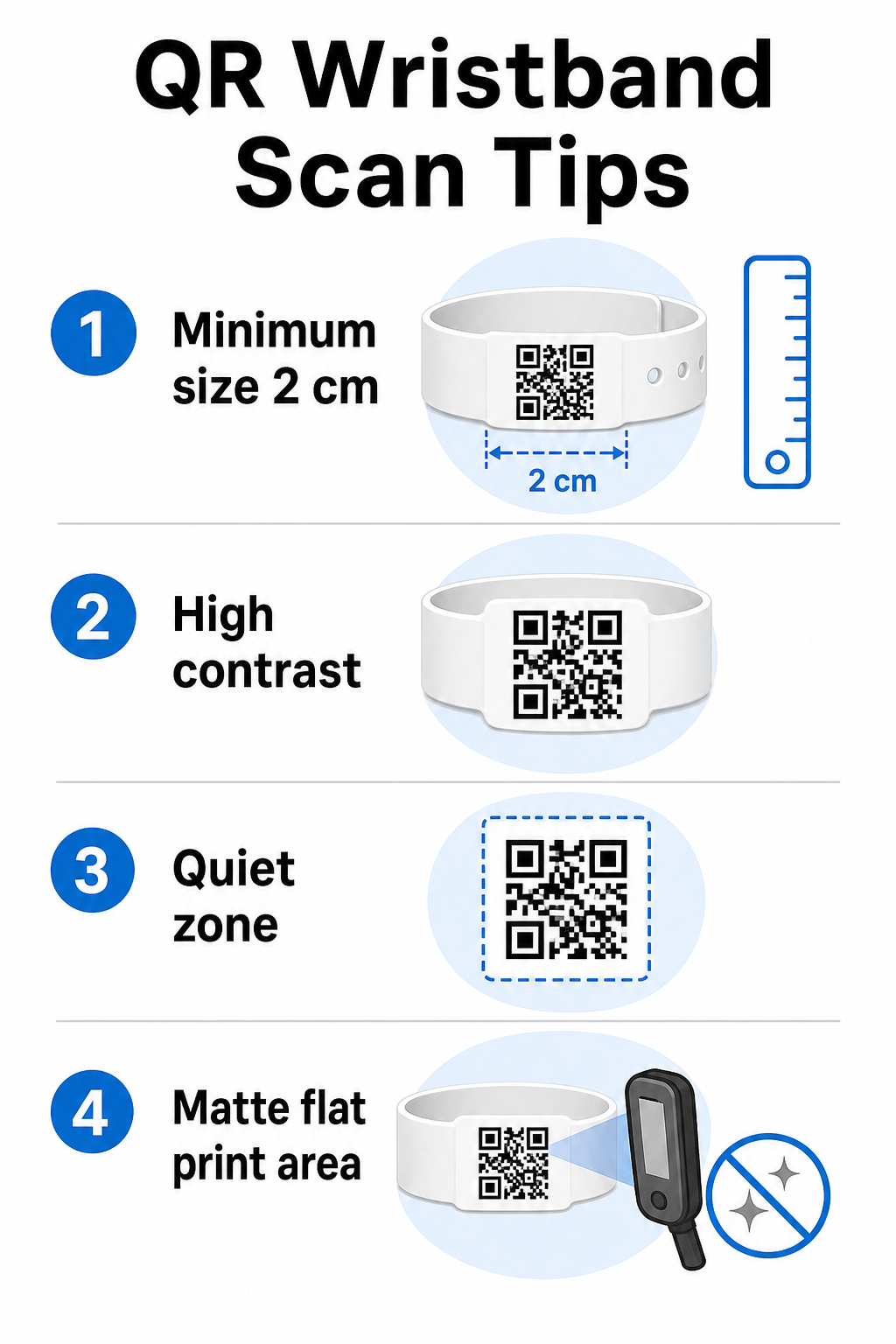
Standardreegel on, et QR-koodi laius peaks olema vähemalt 1 cm iga 10 cm oodatava skannimiskauguse kohta. Käepaelade puhul, mida skannitakse käeulatuses pihuseadmega, on praktiline miinimumlaius 2 cm. Õhemad käepaelad, mis seda suurust usaldusväärselt mahutada ei suuda, põhjustavad skannimisprobleeme. Vaata täielikku QR-koodi suuruse juhendist mõõtmete kohta erinevate kasutusjuhtude lõikes.
Värvikontrast
Kõrge kontrast koodimoodulite ja tausta vahel on kriitiline. Tumedad moodulid heledal taustal – ideaalis must valgel – annavad skanneritele kõige selgema signaali. Püüdke saavutada vähemalt 4:1 kontrastsussuhe. Pööratud kujundused heleda koodiga tumedal taustal on üldiselt ebausaldusväärsed ja neid tuleks vältida.
Vaikne tsoon
Iga QR-kood nõuab selget valget äärist ümber oma perimeetri, mida nimetatakse vaikne tsoon. See veeris annab skannerile märku, kus kood algab ja lõpeb. Selle eemaldamine või sellele printimine on üks levinumaid skannimisvigade põhjuseid käepaeladel, kus disainiruum on piiratud.
Prindiresolutsioon ja formaat
Eksportige QR-koodid vektorformaadis (SVG või EPS) või kõrge resolutsiooniga rasterfailidena vähemalt 300 DPI lõplikul prinditud suurusel. Madala resolutsiooniga pildi suurendamine tekitab hägusaid mooduliservi, mida skanneritel on raske lugeda. Järjepideva prindikvaliteedi saavutamise juhiste saamiseks hõlmab QR-koodi loetavuse parimate tavade juhend kogu tehnilist kontrollnimekirja.
Pind ja viimistlus
Käepaelu kantakse kumerdatud pinnal, mis tekitab moonutusi. Printige QR-kood paela kõige lamedamale alale ja vältige läikivaid või peegeldavaid viimistlusi koodi kohal – ürituse laevalgustuse pimestamine segab otseselt nutitelefonide kaameraid. Matt viimistlus koodiala kohal edestab ürituse keskkondades järjepidevalt läikivaid alternatiive.
Koodi keerukus
Mida rohkem andmeid QR-koodi on kodeeritud, seda tihedamaks ja raskemini skannitavaks see muutub. Kasutage lühikesi URL-e või dünaamilisi koode, mis suunavad ümber kompaktse lingi kaudu, et hoida kood visuaalselt lihtsana ja kiiresti skannitavana. Pagelooti Lingi QR-koodi generaator käsitleb automaatselt URL-i lühendamist dünaamilise koodi töövoo osana.
Veaparandus
QR-koodidel on sisseehitatud veaparandus, mis hoiab need skannitavana isegi siis, kui osa koodist on kahjustatud. Kõrgeim parandustase võimaldab taastamist, kui kuni umbes 30% koodialast on varjatud – oluline käepaelade puhul, mis kogevad kulumist, määrdumist või väikest hõõrdumist mitmepäevase ürituse jooksul. Kui lisate koodile logo, kasutage kõrget veaparandust kaetud ala kompenseerimiseks.
QR-koodide genereerimine käepaelade jaoks
Genereerimisprotsess järgib lihtsat töövoogu:
- Vali oma QR-koodi tüüp. Sissepääsuks töötab hästi link või ürituse QR-kood, mis viitab teie sisseregistreerimissüsteemile. Kontaktide jagamiseks kasutage vCard tüüpi. Kohaloleku logimiseks linkige vormile.
- Kasutage dünaamilisi koode, kui sisu võib muutuda. Kui teie üritus kestab mitu päeva või lingitud sihtkoht võib vajada uuendamist, võimaldavad dünaamilised koodid teil teha muudatusi oma armatuurlaualt ilma ühtegi käepaela uuesti printimata.
- Hoidke kodeeritud URL lühike. Lühemad URL-id vähendavad koodi tihedust ja parandavad skannimiskiirust.
- Kohandage kontrastsuse piirangute piires. Saate lisada oma ürituse logo ja brändivärvid, kuid veenduge, et kontrast jääb piisavaks pärast kohandamist.
- Laadige alla prindivalmis formaadis. Kasutage SVG, EPS või kõrge DPI-ga PNG faile – ärge kunagi suurendage väikest JPEG-i.
- Testige enne hulgitrükki. Skannige oma tõendit mitmel seadmel, hämaras valguses ja skannimiskaugustel, mida teie töötajad tegelikult kasutavad. See üks samm hoiab ära kõige levinumad üritusepäeva vead.
Looge ja jälgige oma ürituse QR-koode Genereerige igale osalejale unikaalsed koodid, jälgige skannimistegevust ja värskendage lingitud sisu ilma uuesti printimata. Alustage QR-koodi generaator ja uurige üritusepõhiseid valikuid aadressil Ürituse QR koodi loomine.
Turvalisuse ja privaatsuse kaalutlused
QR-käepaelad, mis salvestavad või lingivad isiklikku osalejateavet, kaasnevad andmekaitsekohustused.
Krüpteerige tundlikud andmed. Kui käepaela kood kodeerib otse isiklikku teavet – nagu nimi, piletikategooria või vanusekontrolli staatus –, tuleks need andmed krüpteerida, et volitamata skannerid neid lugeda ei saaks. Kasutades dünaamilisi koode, mis viitavad turvalisele, autentitud taustasüsteemile, selle asemel, et kodeerida toorandmeid koodi endasse, vähendab see riski oluliselt.
Kasutage HTTPS-i valideeritud sertifikaatidega. Kogu suhtlus teie skannimisrakenduse ja taustasüsteemi valideerimisserveri vahel peaks toimuma krüpteeritud kanalite kaudu. See hoiab ära skannimissündmuste või osalejate andmete pealtkuulamise sisseregistreerimisprotsessi ajal. Juhend turvaliste QR-koodiga üritusepiletite loomine selgitab üksikasjalikult kaasatud tehnilisi kihte.
Piirake juurdepääsu sisseregistreerimissüsteemidele. Töötajatele mõeldud skannimisrakendused ja armatuurlauad peaksid nõudma individuaalseid sisselogimismandaate, jagatud paroolide asemel. See piirab kokkupuudet, kui seade kaob, ja muudab lihtsamaks auditeerida, kes mida skannis.
Rakendage privaatsuse-disaini põhimõtteid. Koguge ainult andmeid, mida teie tegevus nõuab. Kui kasutate skaneerimisanalüütikat rahvahulga liikumise analüüsimiseks, piisab anonüümsetest koondandmetest ja see väldib tuvastatavate isikute jälgimisega kaasnevaid privaatsusprobleeme. Kui töödeldakse isikuandmeid, veenduge, et osalejaid teavitatakse ja et teie protsessid vastavad kohaldatavatele eeskirjadele.
Andke konteksti skaneerimiskohas. Osalejatele teada andmine, mida käepaela QR-kood teeb – ja mis juhtub, kui personal seda skaneerib – loob usaldust ja vähendab segadust andmete kasutamise osas. Laiema ülevaate saamiseks juurdepääsukontrolli tagamisest dünaamiliste koodidega, juhend dünaamilised QR-koodid juurdepääsu kontrollimiseks käsitleb tühistamist, auditijälgi ja reaalajas lubade haldamist.
Skaneerimisanalüütika kasutamine tulevaste sündmuste parandamiseks
Dünaamilised QR-koodid genereerivad skaneerimisandmeid, mis ulatuvad kaugemale sissekannete loendamisest. Pagelooti analüütikaga saate jälgida, millal ja kus koode skaneeriti, millistes tsoonides oli kõige rohkem tegevust ja kuidas osalejate voog võrreldes teie prognoosidega. Need andmed aitavad teil teha teadlikke otsuseid sissepääsupunktide personali, sessioonide ajakava ja käepaela funktsioonide disaini kohta teie järgmisel üritusel.
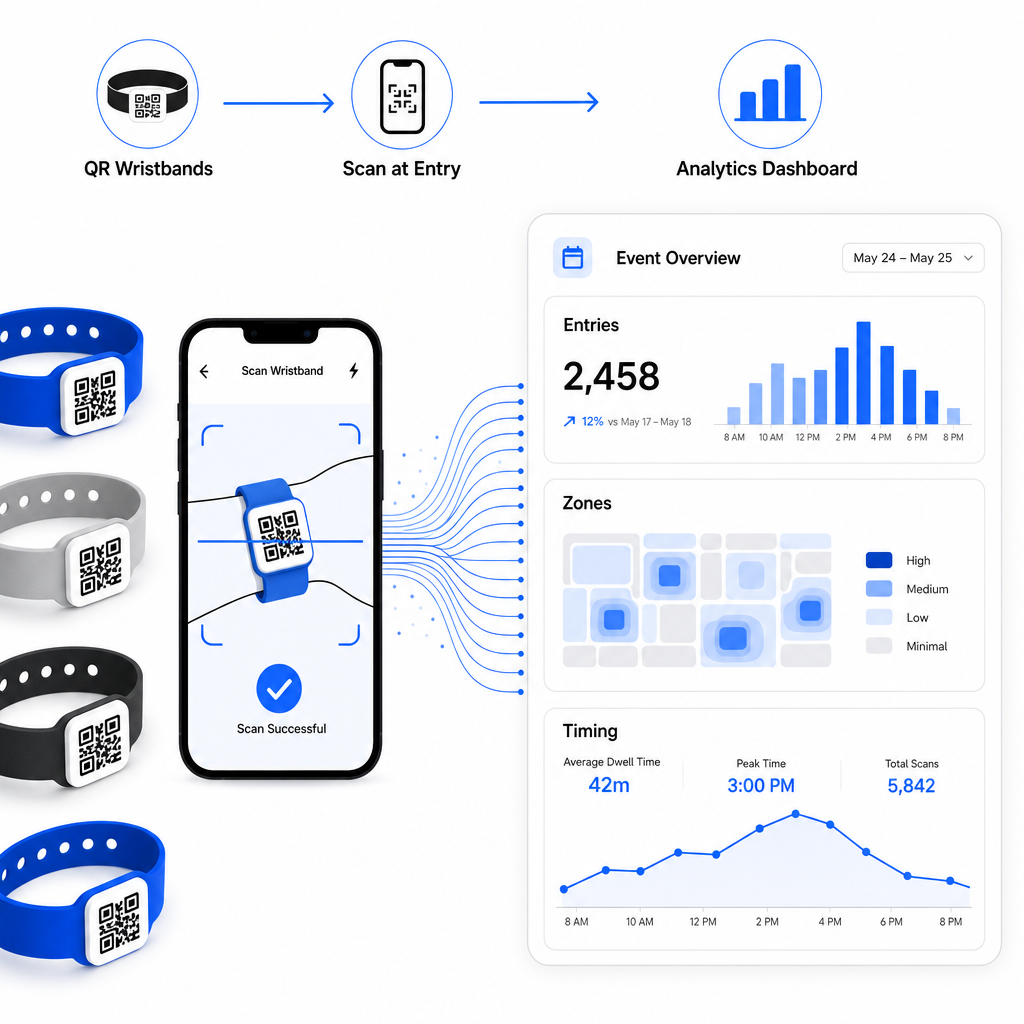
Täieliku ülevaate saamiseks QR-põhise registreerimisoperatsiooni loomisest, juhend ürituse registreerimise sujuvamaks muutmine QR-koodidega käsitleb üksikasjalikult skaneerimislogistikat, personali koolitust ja reaalajas osalemise jälgimist.
Hästi disainitud QR-käepael teeb rohkem kui tuvastab osaleja – see ühendab füüsilise mandaadi elava digitaalse süsteemiga, mida te kontrollite. Õigete trükispetsifikatsioonide saamine, dünaamiliste koodide kasutamine paindlikkuse tagamiseks ja iga skaneeringu taga olevate andmete kaitsmine on kolm tegurit, mis määravad, kas teie käepaela programm töötab ürituse päeval sujuvalt. Alustage testitud tõendiga, mitte hulgitrükiga, ja ehitage sealt edasi.
Seadistage oma käepaela QR-koodid täna Looge oma järgmise ürituse jaoks dünaamilised, jälgitavad QR-koodid koos Ürituse QR koodi loomine ja hallake kõike ühest juhtpaneelist.
Korduma kippuvad küsimused
Praktiline miinimum on 2 cm lai lähiskaneerimiseks. Üldreeglina lubage vähemalt 1 cm koodilaiust iga 10 cm oodatava skaneerimiskauguse kohta. Väiksemaks minnes suureneb skaneerimisvigade risk, eriti kumerate või painduvate randmepaelte pindadel.
Jah, kui te kasutate dünaamilisi QR-koode. Dünaamilised koodid viitavad lühikesele ümbersuunamise URL-ile, mida te kontrollite juhtpaneelilt. Sihtkoha muutmine – näiteks sündmuse ajakava lehe värskendamine või registreerimisvormi vahetamine – jõustub koheselt kõikidel trükitud käepaeladel ilma füüsiliste muudatusteta.
Vältige toorete isikuandmete, nagu nimed, piletite ID-d või vanusekontrolli üksikasjad, otse koodi endasse kodeerimist, kuna iga QR-skanner saab seda lugeda. Selle asemel kasutage koodi, et viidata turvalisele, autentitud taustasüsteemile, mis kontrollib, millist teavet avaldatakse ja kellele. See lähenemine hoiab tundlikud osalejate andmed randmepaela pinnalt eemal ja vähendab teie kokkupuudet volitamata juurdepääsuga.