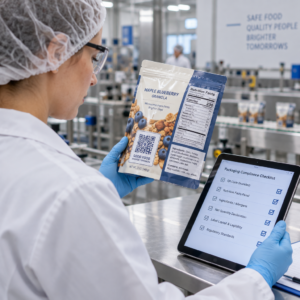
Är dina direktreklamvykort ospårade när de lämnar tryckeriet? Utan en mätbar länk mellan din fysiska post och digitala resultat spenderar du budget utan möjlighet att bevisa ROI. Denna guide täcker hur man effektivt lägger till QR-koder på vykort – från design och storlek till att spåra kampanjprestanda i realtid.
Varför QR-koder hör hemma på direktreklamvykort
Direktreklam har alltid stått inför ett ihållande problem: att mäta respons. Du skickar tusentals utskick och förlitar dig på anekdotisk bevisföring eller kuponginlösen för att gissa vad som fungerade.
QR-koder löser detta. U.S. Postal Service erkänner QR-koder som ett direkt sätt att koppla postmottagare till digitalt innehåll som främjar deras kundresa – och har till och med erbjudit portorabatter till avsändare som inkluderar skanningsbara tvådimensionella streckkoder på sina utskick. Bland organisationer som spårar direktreklamrespons använder 82% online-spårningsmetoder som utnyttjar QR-koder, specifika URL:er eller en annan digital mekanism.
Fallet är tydligt: om du skickar vykort utan en QR-kod lämnar du både engagemang och mätbar data outnyttjad.
Välja rätt typ av QR-kod för vykort
Innan du genererar din kod, bestäm om du behöver en statiska eller Dynamisk QR-kod – valet har betydande konsekvenser för hur din kampanj körs.
Statiska QR-koder kodar permanent en URL i själva kodmönstret. När de väl är utskrivna kan destinationen inte ändras. De fungerar bra för tidlöst innehåll som aldrig behöver uppdateras, såsom en permanent produktlista eller ett företags kontaktsida.
Dynamiska QR-koder pekar på en kort omdirigeringslänk som du kontrollerar. Den tryckta koden förblir densamma, men du kan uppdatera destinations-URL:en när som helst – även efter att vykorten redan ligger i mottagarnas brevlådor. Dynamiska koder låser också upp fullständig skanningsanalys, inklusive antal skanningar, tidpunkt för skanning, geografisk plats och enhetstyp.
För de flesta vykortskampanjer är dynamiska koder det rätta valet. Om ditt erbjudande ändras mitt i kampanjen kan du omdirigera skannrar till en ny landningssida utan att trycka om. Om en vykortversion presterar bättre än en annan, kommer din analys att visa dig exakt varför.
Spåra varje skanning från din vykortskampanj Använd Dynamisk QR-kodgenerator för att skapa en spårbar kod som du kan uppdatera när som helst – ingen omtryckning krävs. Få tillgång till en fullständig analyspanel för skanningar från det ögonblick dina vykort når brevlådorna.
Vad du ska länka din vykort-QR-kod till
Destinationen är lika viktig som själva koden. Skanningen ska kännas omedelbart givande, inte förvirrande. Välj en destination baserat på ditt kampanjmål:
- A kampanjlandningssida anpassad till vykortets specifika erbjudande eller meddelande
- A formulär för insamling av leads för att samla in namn, e-postadresser eller offertförfrågningar från intresserade mottagare
- A produkt- eller tjänstesida som leder mottagarna till det du säljer utan extra navigering
- A video eller demo som låter djupare berättande göra jobbet som ett vykortformat inte fullt ut kan rymma
- A kontakt- eller bokningssida som ger mottagarna ett omedelbart sätt att boka ett samtal eller möte
- A PDF-nedladdning dela en broschyr, meny eller katalog med mer detaljer än vad ett vykort tillåter
Oavsett vad du länkar till, se till att destinationen är mobiloptimerad. Vykortsmottagare skannar med sina telefoner, och en sida som inte visas bra på mobilen kommer att förlora dem omedelbart. Samma princip gäller när lägga till QR-koder på flygblad och broschyrer – destinationsupplevelsen är lika viktig som själva koden.
Storleksanpassa din QR-kod för vykortstryck
Att få rätt storlek är avgörande. En QR-kod som är för liten kommer inte att skannas tillförlitligt. Pageloot rekommenderar en minsta tryckta storlek på 0,8 × 0,8 tum (2 × 2 cm) för skanning på nära håll, till exempel när någon håller vykortet på armlängds avstånd.
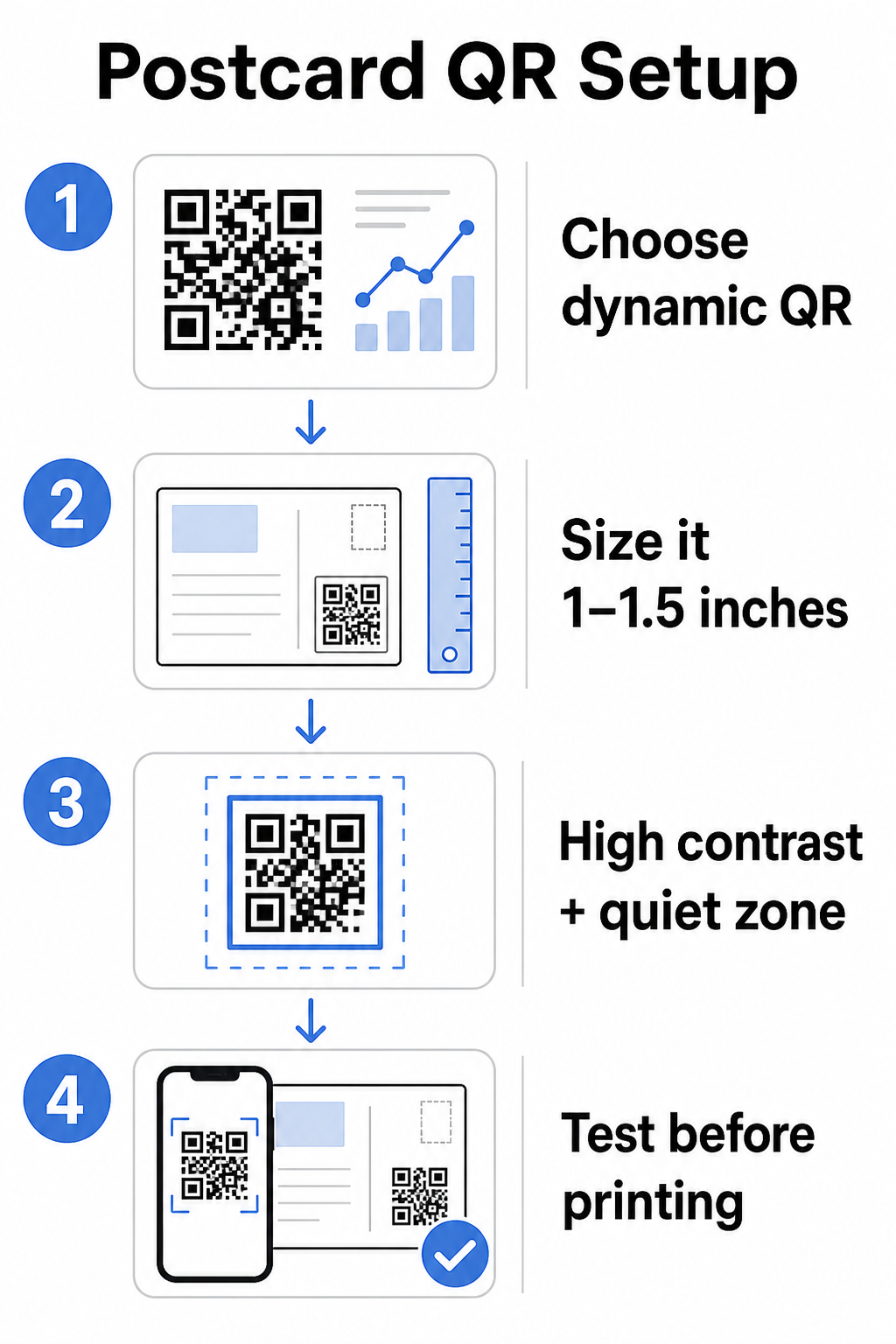
För vykort, som vanligtvis hålls på cirka 10–20 tum från telefonkameran, tillämpa 10:1 skanningsavstånd-till-storlek-förhållande: QR-kodens bredd bör vara ungefär en tiondel av det förväntade skanningsavståndet. En mottagare som skannar från 12 tums avstånd behöver en kod som är minst 1,2 tum bred.
I praktiken, sikta på en QR-kod mellan 1 och 1,5 tum (25–38 mm) på ett standardvykort. Detta rymmer bekvämt typiska skanningsavstånd samtidigt som det lämnar tillräckligt med utrymme för resten av din design. För detaljerad vägledning över andra format, se riktlinjer för storleksanpassning av QR-koder för tryckt material.
Designriktlinjer för skanningsbara QR-koder på vykort
Kontrast och färg
Skannrar fungerar genom att upptäcka kontrasten mellan mörka moduler och en ljus bakgrund. Hög kontrast är icke förhandlingsbar. Svart på vitt ger den mest tillförlitliga skanningen och är det säkraste standardalternativet. Anpassade färger kan fungera – och att bibehålla hög kontrast med varumärkesfärger kan meningsfullt öka engagemanget – men du behöver bevara tillräcklig kontrast mellan förgrund och bakgrund, med ett minimiförhållande på minst 3:1 och helst 4:1 eller högre. Fullständig vägledning om att para ihop färger effektivt finns i bästa praxis för färgkontrast i QR-koder guide.
Undvik dessa vanliga fallgropar:
- Ljusa moduler på en ljus bakgrund
- Toningar som skapar ojämn kontrast över koden
- Invertera koden (ljust mönster på mörk bakgrund) – vissa skannrar misslyckas med omvända färgscheman
Den tysta zonen
De tyst zon är den tydliga vita kanten som omger QR-kodmönstret. Enligt ISO/IEC 18004-standarder måste den vara minst fyra moduler bred på alla sidor. På ett vykort innebär detta att lämna ungefär en kvarts tum (0,25 tum) fritt utrymme runt koden och inte placera text, bilder eller designelement direkt intill den. Denna buffert hjälper skannrar att känna igen var koden börjar och slutar – utan den kan även en väl utformad kod misslyckas med att skanna tillförlitligt.
Lägga till en logotyp
Att lägga till din varumärkeslogotyp i mitten av QR-koden gör den mer igenkännbar och pålitlig på ett vykort. Om du bäddar in en logotyp, använd en högre felkorrigeringsnivå (Q eller H) för att bibehålla skanningsbarheten, och håll logotypen till högst 30% av kodens totala yta. Du kan skapa en varumärkeskod med hjälp av QR-kodgenerator med logotyp.
Utskriftskvalitet
Exportera din QR-kod som en vektorfil (SVG eller PDF) snarare än en lågupplöst JPEG innan du skickar till skrivaren. Vektorformat bevarar skarpa modulkanter vid alla utskriftsstorlekar. Begär minst 300 DPI från din tryckleverantör och använd en matt yta där det är möjligt – glansiga vykort kan ge bländning som stör skanningen under starkt ljus.
Var du ska placera QR-koden på ditt vykort
Placeringen påverkar hur många mottagare som faktiskt skannar. Följ dessa principer:
- Placera koden på meddelandesidan, inte adressidan – det är här mottagarna tillbringar tid med att läsa
- Placera den vid en naturlig läs-slutpunkt, såsom det nedre högra hörnet eller strax under din huvudsakliga uppmaning till handling, så att den visas efter att mottagaren har tagit till sig ditt meddelande
- Omge den med en tydlig uppmaning till handling – fraser som “Skanna för ditt exklusiva erbjudande” eller “Skanna för att boka din tid” berättar för mottagarna exakt vad de ska göra och vad de kommer att få
- Ge den andrum – träng inte ihop koden med andra designelement; den tysta zonen måste förbli fri på alla sidor
En QR-kod utan en uppmaning till handling är en missad möjlighet. Mottagare som inte förstår varför de ska skanna kommer helt enkelt inte att göra det.
Lägga till UTM-parametrar för kampanjspårning
Dynamiska QR-koder ger dig skanningsdata. Men för att koppla dessa skanningar till din bredare marknadsföringsanalys – inklusive vad mottagare gör efter att de landar på din sida – behöver du UTM-parametrar bifogat till din destinations-URL.
UTM-parametrar är korta taggar som läggs till en URL som berättar för Google Analytics var trafiken kom ifrån. Standardparametrarna är:
| Parameter | Vad den spårar | Exempelvärde |
|---|---|---|
| `utm_source` | Var trafiken kom ifrån | `direct-mail` |
| `utm_medium` | Marknadsföringskanalen | `postcard` |
| `utm_campaign` | Det specifika kampanjnamnet | `summer-sale-2025` |
| `utm_content` | Vilken vykortversion | `version-a` |
En komplett taggad URL ser ut så här:
`https://yoursite.com/offer?utm`source=direct-mail&utmmedium=postcard&utm_campaign=summer-sale-2025`
Bygg din URL med Googles Campaign URL Builder, klistra sedan in den taggade URL:en i din dynamiska QR-kods destination. I GA4 kan du granska denna trafik under Rapporter > Förvärv > Trafikförvärv, där sessionskälla, sessionsmedium och sessionskampanj kommer att återspegla dina UTM-värden. Detta låter dig tillskriva webbplatssessioner, formulärkompletteringar och köp direkt tillbaka till specifika vykortskampanjer – vilket sluter cirkeln mellan tryckt och digital prestanda.
Testa innan du trycker
Skicka aldrig vykort till tryck utan att först skanna den slutliga QR-koden. Testa den på flera enheter – både iOS och Android – och under olika ljusförhållanden. Bekräfta att:
- Koden skannar snabbt och tillförlitligt vid första försöket
- Destinations-URL:en laddas korrekt och är mobiloptimerad
- Omdirigeringar för dynamiska koder löser sig till rätt sida
- Koden skannar fortfarande efter att din slutliga vykortdesign har applicerats, särskilt om färger eller en logotypöverlagring lades till
Om du trycker en testomgång, skanna det fysiska korrekturet under de förhållanden som mottagarna sannolikt kommer att uppleva – typisk inomhusbelysning, hållen på armlängds avstånd. Detta fångar upp problem med tryckkvaliteten innan de påverkar hela din upplaga. Den bästa praxis för läsbarhet av QR-koder guiden täcker en komplett checklista för testning före tryck.
Spårning och optimering efter utskick
När dina vykort är i omlopp är din kampanj bara i sin linda. Dynamiska QR-koder ger skanningsdata i realtid, vilket låter dig övervaka:
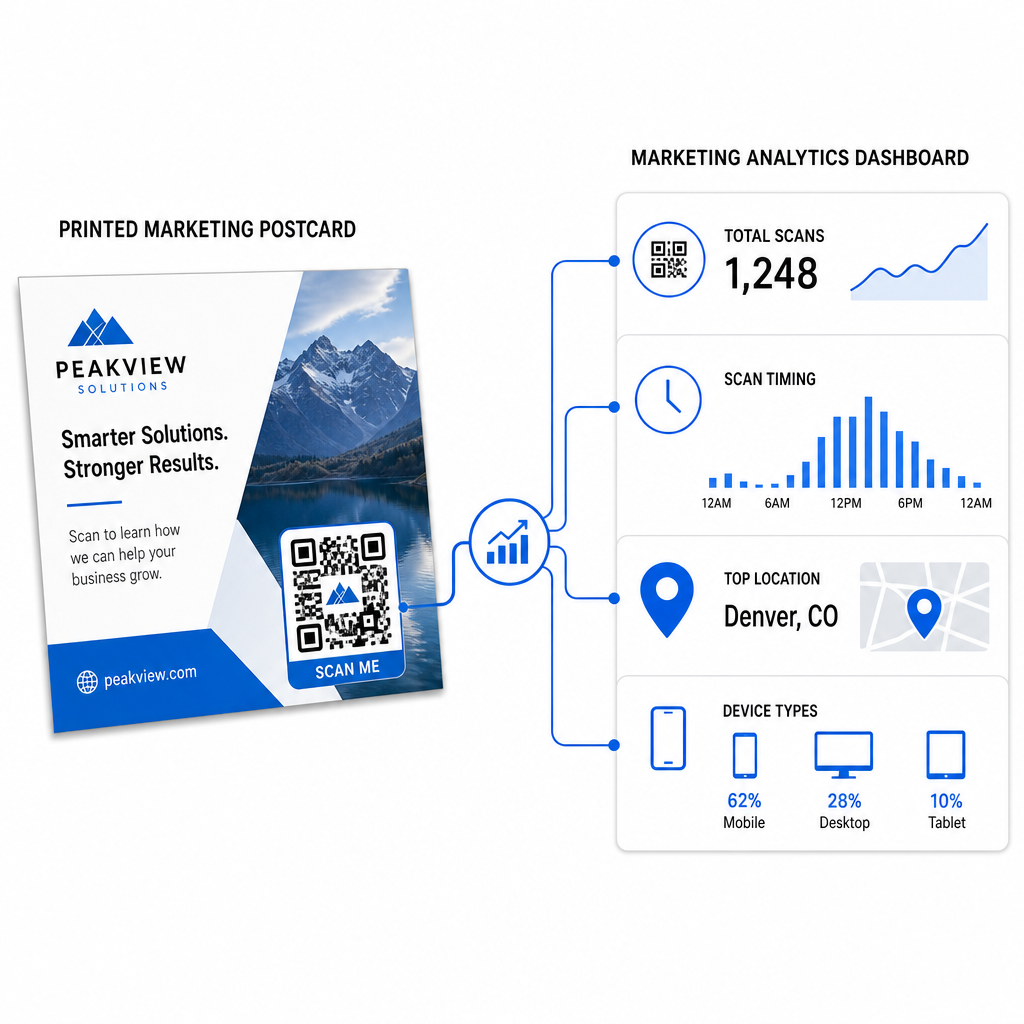
- Totalt antal skanningar och unika användare – hur många mottagare som engagerade sig, och hur många som skannade mer än en gång
- Skanningstidpunkt – vilka dagar och tider som drev mest aktivitet efter utskicket
- Geografisk fördelning – vilka postnummer eller regioner som svarade starkast
- Enhetstyp – om mottagarna skannade på iOS eller Android, vilket kan informera beslut om mobila landningssidor
Använd denna data för att förfina framtida utskick. Om ett visst område visade höga skanningsfrekvenser, öka volymen där nästa gång. Om skanningarna nådde sin topp på dag tre efter leverans, tajma din e-postuppföljning därefter.
För kampanjer med flera versioner – där du testar olika erbjudanden, designer eller uppmaningar till handling – tilldela varje vykortversion sin egen dynamiska QR-kod. Skanningsanalysen kommer att visa dig vilken version som drev mer engagemang utan att enbart vänta på konverteringsdata.
Börja mäta din direktreklamsprestanda De Pageloot QR-kodgenerator låter dig skapa, anpassa och hantera QR-koder för direktreklamkampanjer – med inbyggd analys och möjligheten att uppdatera destinationer utan omtryckning.
Vanliga misstag att undvika
Länka till en hemsida istället för en kampanjsida. En hemsida får mottagaren att göra extra arbete för att hitta erbjudandet som nämns på vykortet. Varje extra steg minskar konverteringarna.
Använda en statisk QR-kod för ett tidsbegränsat erbjudande. Om erbjudandet löper ut eller URL:en ändras, kommer en statisk kod att peka på en trasig eller irrelevant sida utan möjlighet att åtgärda det efter tryckning.
Att göra QR-koden för liten. Allt under 0,8 × 0,8 tum är riskabelt, särskilt om vykortets design är rörig eller om koden använder anpassade färger.
Att hoppa över uppmaningen till handling. En ensam QR-kod på ett vykort ger mottagarna ingen anledning att skanna. Berätta för dem vad de kommer att få.
Att inte testa på den fysiska tryckta biten. Digitala korrektur förutsäger inte alltid hur en kod kommer att skannas efter att ha gått igenom en kommersiell skrivare. Verifiera alltid på den faktiska utskriften.
Samma kärnprinciper gäller över olika tryckformat – den guiden för QR-koder på flygblad täcker hur man anpassar dessa metoder för andra direktrespons-material.
Ett vykort med en väl utförd QR-kod gör två saker samtidigt: det ger mottagarna ett omedelbart, friktionsfritt sätt att agera på ditt erbjudande, och det ger dig mätbar data om hur din kampanj faktiskt presterar. Kombinationen av en dynamisk QR-kod, en mobiloptimerad destination, UTM-taggade URL:er och skanningsanalys sluter cirkeln mellan offline-tryck och digitala resultat.
Börja med att generera en dynamisk QR-kod genom den Pageloot Dynamisk QR-kodgenerator, storleksanpassa den korrekt för ditt vykortformat, applicera högkontrast-branding, skriv en tydlig uppmaning till handling, och testa på ett fysiskt korrektur innan hela tryckningen. Från det ögonblick mottagarna börjar skanna, kommer din instrumentpanel att visa dig exakt vad som fungerar.
Vanliga frågor
Sikta på åtminstone 0,8 × 0,8 tum (2 × 2 cm) som ett absolut minimum, men för typiska skanningsavstånd för vykort på 10–20 tum är en storlek mellan 1 och 1,5 tum (25–38 mm) mer tillförlitlig. Tillämpa 10:1-regeln: gör kodens bredd ungefär en tiondel av det förväntade skanningsavståndet.
Ja, men bara om du använde en dynamisk QR-kod innan utskrift. Dynamiska QR-koder pekar på en omdirigeringslänk som du kontrollerar, så du kan uppdatera destinations-URL:en när som helst utan att skriva ut igen. Statiska QR-koder kodar permanent destinationen och kan inte ändras i efterhand.
Använd en dynamisk QR-kod från en plattform som Pageloot, som tillhandahåller inbyggd analys som visar totala skanningar, unika användare, skanningstidpunkt, geografisk plats och enhetstyp. För djupare attribuering i Google Analytics, lägg till UTM-parametrar (utmsource, utmmedium, utm_campaign) till din destinations-URL innan du genererar koden – skanningar kommer då att visas som spårbara sessioner i din GA4 Trafikanskaffningsrapport.