Levererar dina marknadsföringskampanjer samma budskap till alla, oavsett vem de är eller var de hittade dig? Generisk uppsökande verksamhet slösar bort budget och frustrerar kunder. Denna guide visar dig hur du använder QR-koder för att leverera riktade, spårbara upplevelser som matchar din målgrupps sammanhang och avsikt.
Varför personalisering beror på att koppla samman fysiska och digitala beröringspunkter
Personlig marknadsföring har gått från att vara en "bra att ha" till en affärsprioritet. Forskning från Contentful visar att 89 % av marknadsföringsbeslutsfattare anser personalisering vara avgörande för framgång under de kommande tre åren, och 80 % av företagen rapporterar ökad konsumentutgifter – i genomsnitt 38 % mer – när upplevelser är personaliserade. Samtidigt säger 77 % av kunderna att de känner sig frustrerade av irrelevanta kampanjmeddelanden.
Utmaningen är att de flesta personaliseringsverktyg fungerar i rent digitala miljöer. E-postplattformar segmenterar efter öppningsbeteende. Annonsnätverk riktar sig efter webbhistorik. Men vad händer när din kund håller en produkt i en butik, deltar i ett liveevenemang eller läser ett direktutskick? Det är där klyftan mellan fysiskt och digitalt öppnar sig – och där QR-koder sluter den.
En QR-kod tryckt på en flygblad, förpackning eller display fungerar som en bro. Skanna den, och kunden hamnar omedelbart på en digital upplevelse som du har designat specifikt för dem. Nyckeln är att se till att upplevelsen återspeglar vem de är, var de kom ifrån och vad de sannolikt vill ha härnäst.
Förstå segmentering innan du personaliserar
Effektiv personalisering börjar med segmentering – att identifiera grupper av kunder som delar relevanta egenskaper så att du kan tala till varje grupp på olika sätt. Segmentering bygger vanligtvis på beteendemässiga, demografiska, geografiska, psykografiska och teknografiska kriterier. Den viktiga principen är att segmentering bör komma före personalisering: den berättar för dig om och hur du ska marknadsföra till en kund från första början, sedan formar personaliseringen budskapet.
I QR-kodstermer innebär segmentering att skapa olika koder för olika målgrupper, kampanjkontexter eller fysiska platser – och sedan peka varje kod till innehåll som är skräddarsytt för det segmentet. Så här ser det ut i praktiken:
- Efter målgruppstyp: Ett detaljhandelsmärke placerar separata QR-koder på skyltar i butik och i direktutskick. Kunder som skannar i butik hamnar på en sida för lojalitetsbelöningar; mottagare av direktutskick hamnar på en rabatt för första köpet.
- Efter plats: En regional kampanj använder distinkta QR-koder för varje stad. Varje kod länkar till en landningssida som refererar till lokala kampanjer, närliggande butiksplatser eller regionspecifika erbjudanden.
- Efter kanal: Ett evenemangsföretag använder en QR-kod på biljetter och en annan på inlägg i sociala medier. Biljettversionen länkar till ett personligt deltagarschema; sociala medier-versionen länkar till en offentlig evenemangssida.
- Efter kundstadium: Ett SaaS-företag trycker QR-koder i välkomstpaket för nya kunder och förnyelsemeddelanden för befintliga. Var och en länkar till helt olika introduktions- eller uppgraderingsinnehåll.
Ju tydligare du definierar dina segment innan du bygger dina koder, desto mer relevant blir varje skanningsupplevelse.
Dynamiska QR-koder: Grunden för personliga kampanjer
Alla QR-koder stöder inte personalisering lika bra. Statiska QR-koder kodar en fast URL som aldrig kan ändras. När de väl är utskrivna är de låsta – och de ger ingen skanningsdata överhuvudtaget. Det gör dem olämpliga för kampanjer där du vill justera innehåll, köra tester eller mäta resultat.
Dynamiska QR-koder fungerar annorlunda. Koden i sig pekar på en kort omdirigeringslänk som hanteras via din QR-kodplattform. Du kan uppdatera den destinationen när som helst – även efter att koden har skrivits ut och distribuerats – utan att generera eller skriva ut något nytt. Detta omdirigeringslager är också det som möjliggör spårning: varje skanning passerar genom plattformen och loggar data innan användaren skickas till sin destination.
För personliga kampanjer ger dynamiska koder dig fyra kritiska funktioner:
| Funktion | Varför det är viktigt för personalisering |
|---|---|
| Redigerbar destination | Uppdatera innehåll på landningssidor för varje segment utan att trycka om material |
| Skanningsspårning | Veta hur många personer från varje segment som engagerade sig, och när |
| Plats- och enhetsdata | Förstå geografiska mönster och optimera för mobilupplevelse |
| A/B-testning | Testa olika landningssidor för samma målgruppssegment |
För en djupare titt på när man ska använda varje kodtyp, att välja rätt QR-kod för din kampanj täcker avvägningarna i detalj. Den korta versionen: om din kampanj involverar personalisering, spårning eller något innehåll du kanske vill uppdatera, är dynamiska koder det rätta valet. Du kan också utforska 5 fördelarna med dynamiska QR-koder för marknadsföring för en fylligare bild av vad de möjliggör.
Börja spåra din personliga kampanj Skapa dynamiska QR-koder för varje målgruppssegment och övervaka skanningsdata i realtid. Prova Dynamisk QR-kodgenerator och få tillgång till fullständig analys från din instrumentpanel.
Bygga segmenterade QR-kodkampanjer steg för steg
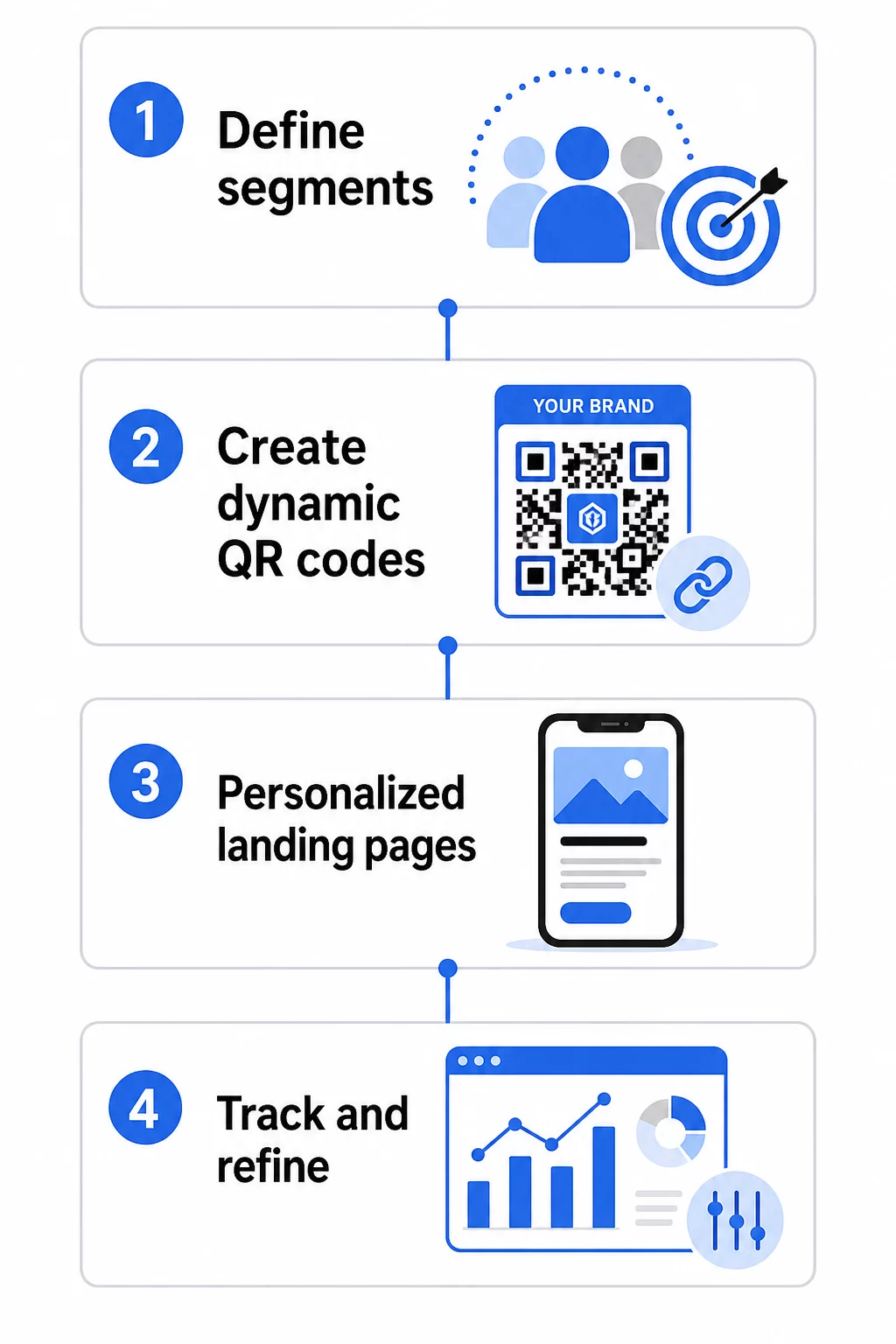
1. Definiera dina segment och mål
Börja med din målgrupp innan du rör några verktyg. Vilka kundgrupper försöker du nå? Vilken åtgärd vill du att varje grupp ska vidta? Dina kampanjmål bör vara specifika och mätbara – till exempel, “öka inlösenfrekvensen för direktreklamserbjudanden till inaktiva kunder med 20 %,” inte bara “öka engagemanget.”
När du känner till dina segment och mål, planera en separat QR-kod och landningssida för varje meningsfull kombination. En kampanj som riktar sig till tre kundsegment över två fysiska placeringar kan behöva sex distinkta koder.
2. Skapa unika koder för varje segment
Använd en plattform som Pageloot QR-kodgenerator, generera en separat dynamisk kod för varje segment. Ge varje kod ett tydligt internt namn som identifierar segmentet, kampanjen och placeringen – denna disciplin lönar sig när du analyserar resultat över dussintals koder.
Om din kampanj använder tryckt material, anpassa varje kods utseende för att passa designen. QR-koder med logotyper och varumärkesfärger förstärker förtroendet och signalerar att skanningen är avsiktlig, inte tillfällig. Varumärkesmärkta QR-koder sticker också ut visuellt i röriga miljöer, vilket direkt påverkar om någon stannar för att skanna.
3. Bygg personliga landningssidor för varje segment
QR-koden är bara så värdefull som den upplevelse den leder till. En förstagångsbesökare som landar på din hemsida efter att ha skannat ett direktreklamutskick är inte en personlig upplevelse – det är en missad möjlighet.
Varje segment bör landa på en sida som:
- Bekräftar sammanhanget (“Välkommen, [Stad] shoppare” eller “Exklusivt erbjudande för lojalitetsmedlemmar”)
- Presenterar ett tydligt, segmentrelevant erbjudande eller meddelande
- Inkluderar en enda, fokuserad uppmaning till handling
- Laddar snabbt och fungerar bra på mobilen
Eftersom de flesta QR-skanningar sker på smartphones är mobiloptimering icke förhandlingsbar. Testa varje landningssida på både iOS och Android innan lansering.
4. Lägg till UTM-parametrar för fullständig analysintegration
Dynamiska QR-koder ger inbyggd skanningsdata – antal, tidsstämplar, enhetstyper och platser. Men du kan lägga till ännu djupare insikt genom att lägga till UTM-parametrar till dina landningssidors URL:er. Detta kopplar QR-skanningstrafik till Google Analytics, vilket låter dig mäta beteende efter skanning som tid på sidan, avvisningsfrekvens och konverteringshändelser tillsammans med din skanningsdata.
En UTM-taggad URL för en direktreklamkampanj riktad mot tidigare kunder i Chicago kan se ut som:
“`
https://yoursite.com/reactivate?utmsource=directmailchicago&utmmedium=qrkod&utmcampaign=reactivation_q3
“`
För en detaljerad genomgång av UTM-inställningar och Google Analytics-integration, se UTM-parametrar för QR-koder: Google Analytics-tips.
5. Placera koder strategiskt för varje segment
Var en QR-kod visas påverkar vem som skannar den och i vilket sammanhang. Matcha placeringen med ditt segments beteende:
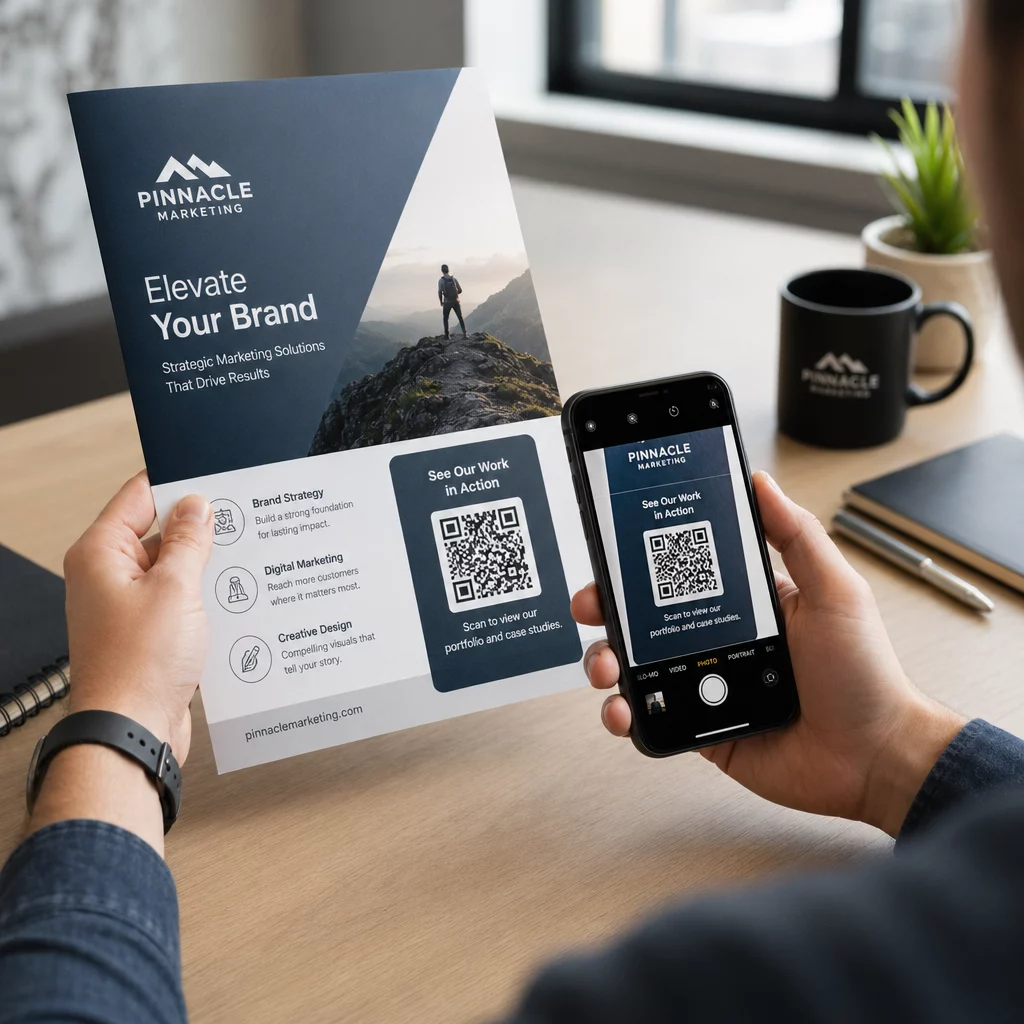
- Direktreklam: Inkludera koden tydligt nära erbjudandet, med en kort instruktion som “Skanna för din exklusiva rabatt.” Mottagare av direktreklam har tillräckligt med tid för att engagera sig medvetet.
- Produktförpackningar: Lägg till koder på etiketter, tackkort eller leveransbilagor för att återengagera kunder efter köp.
- Skyltning i butik: Placera koder i ögonhöjd nära relevant produkt eller avdelning. Lägg till en synlig CTA så att kunder förstår vad de får.
- Evenemang och konferenser: Använd QR-koder på märken, biljetter eller tryckta scheman för att dirigera deltagare till personligt innehåll som sessionsdetaljer eller talarbiografier.
- Klistermärken och taggar: För mindre fysiska kontaktpunkter kan en välplacerad kod med en tydlig CTA driva engagemang från en publik som redan håller i din produkt.
De Checklista för QR-kodsmarknadsföring i småföretag täcker ytterligare överväganden gällande placering och installation om du lanserar din första kampanj.
Använda QR-koddata för att förfina dina segment
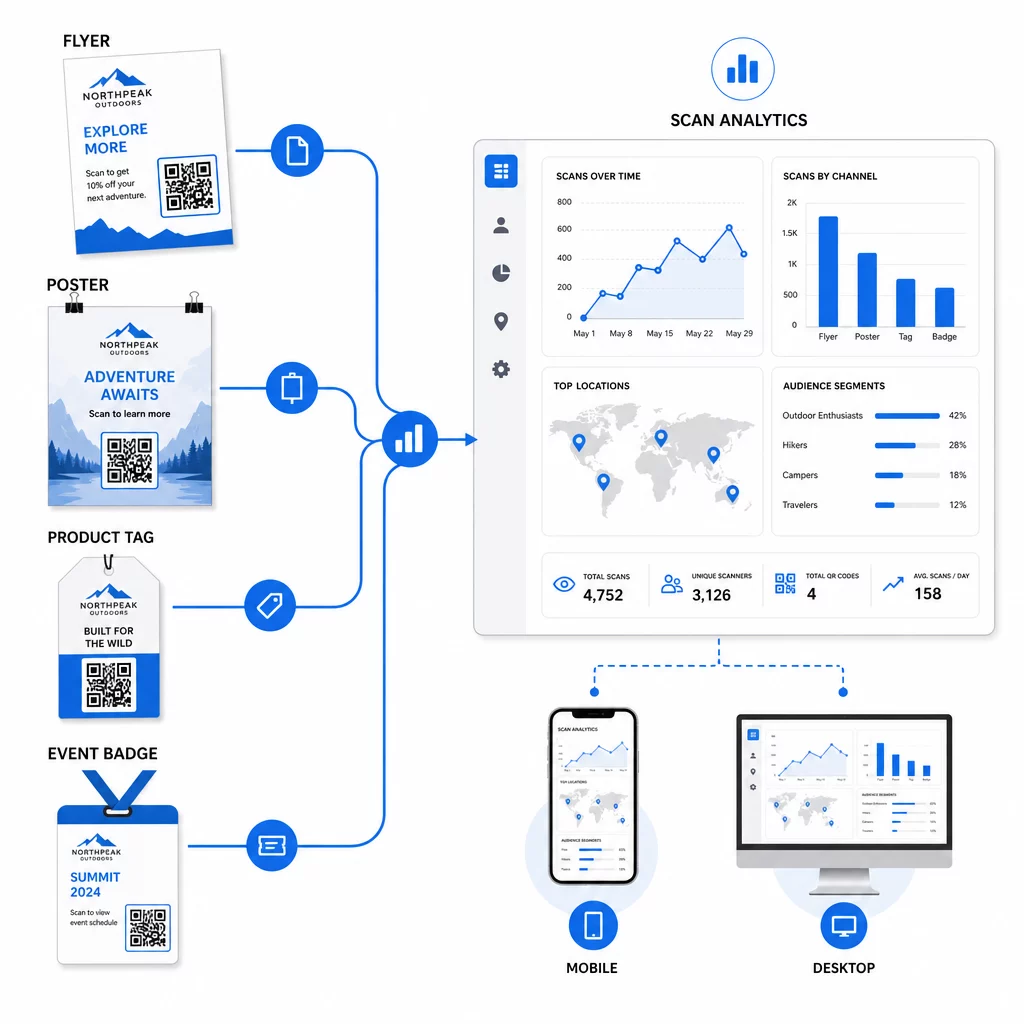
Datan som dina dynamiska QR-koder genererar är i sig en personaliseringstillgång. Varje skanning ger dig en signal om vem som svarade på vilket meddelande, när och varifrån. Med tiden bygger detta en tydligare bild av vilka segment som är mest responsiva och vilka placeringar som driver den mest kvalificerade trafiken.
Nyckeltal att övervaka per segment:
- Antal skanningar och unika skanningar: Indikerar total räckvidd och om samma personer återkommer
- Skanningstidsmönster: Visar när varje segment är mest aktivt, användbart för att tajma uppföljningskommunikation
- Geografisk fördelning: Visar om din kampanj når de avsedda regionerna – användbart för att spåra QR-kodkampanjer per region och justera lokala utgifter
- Enhetstyp: Om ett segment lutar kraftigt mot en viss enhet kan du optimera landningssidans upplevelse för den plattformen
- Konverteringar efter skanning: Spåras via UTM-parametrar i Google Analytics, detta berättar vilka segment- och placeringskombinationer som faktiskt driver de resultat du bryr dig om
För en strukturerad metod för att testa olika variabler inom ett segment, se guide för A/B-testning av QR-kodkampanjer. Dynamiska koder är särskilt väl lämpade för A/B-testning eftersom du kan byta landningssidans destinationer utan att röra den tryckta koden.
Du kan också använda skanningsplats- och enhetsdata som indata för djupare personalisering – till exempel genom att omdirigera skannrar från olika städer till regionspecifika landningssidor, eller justera innehåll baserat på om enheten är iOS eller Android. Den guide till QR-koder för datadriven personalisering täcker dessa tekniker i detalj.
Se vilka segment som engagerar mest Använd Dynamisk QR-kodgenerator för att skapa separata spårbara koder för varje målgruppssegment och jämföra prestanda över placeringar i en enda instrumentpanel.
Integritetsöverväganden för personliga QR-kampanjer
QR-koder samlar in förstapartsdata – information som genereras av din publiks egen interaktion med ditt material. Detta är alltmer värdefullt då tredjepartsspårningsmetoder möter regleringspress och konsumentgranskning. Datalagring via QR-koder medför dock fortfarande skyldigheter.
USA:s integritetslagstiftning är fragmenterad över federala sektorspecifika stadgar och en växande mängd omfattande statliga integritetslagar, varav många reglerar hur personlig information samlas in och används för marknadsföring. Bästa praxis är att vara transparent med vilken data dina QR-koder samlar in och varför.
Praktiska steg för att upprätthålla efterlevnad:
- Visa ett kort meddelande nära varje QR-kod eller på den första landningssidan som förklarar vilken data som spåras (t.ex. skanningsplats, enhetstyp)
- Tillhandahåll en länk till din integritetspolicy på alla sidor som samlar in personlig information
- Undvik att passivt samla in personligt identifierbar information utan att informera om det
- Använd insamlad data endast för de syften du har kommunicerat till användarna
Transparens bygger också förtroende för skanning. Över 80% av amerikanska QR-kodsanvändare säger att de anser QR-koder vara säkra, men en tydlig CTA och igenkännbar varumärkesdesign bidrar mycket till att lugna alla som tvekar.
Vanliga personaliseringstaktiker per kanal
| Kanal | Personaliseringstaktik | QR-kodens roll |
|---|---|---|
| Direktreklam | Unik kod per mottagarsegment med personligt erbjudande | Länkar till segmentspecifik landningssida |
| Produktförpackningar | Återengagemang efter köp baserat på produkttyp | Länkar till instruktionsinnehåll, merförsäljning eller begäran om recension |
| Skyltning i butiken | Platsbaserade kampanjer | Länkar till lokala erbjudanden eller närmaste servicesida |
| Evenemang | Deltagartyp (talare, sponsor, allmän) | Länkar till rollspecifika scheman eller innehåll |
| Annonser i sociala medier | Målgruppsintresse eller retargeting-segment | Länkar till innehåll som matchar annonsmaterialet |
Var och en av dessa användningsfall drar nytta av samma underliggande tillvägagångssätt: en unik dynamisk kod per segment, var och en som pekar mot en riktad destination, var och en spårad oberoende så att du kan mäta resultat och iterera.
För en bredare titt på hur QR-koder passar in i din övergripande marknadsföringsverktygslåda, den Pageloot funktionsöversikt täcker hela utbudet av QR-kodtyper och funktioner som är tillgängliga för kampanjanvändning.
Att omsätta det i praktiken
Personliga QR-kodkampanjer kräver inte komplex infrastruktur – de kräver tydlighet kring dina segment, disciplin i att skapa separata koder för varje, och en plattform som ger dig spårningsdata för att agera på vad du lär dig. Börja med en kampanj, två eller tre segment, och ett tydligt konverteringsmål. Använd skanningsdata för att förstå vad som fungerar, och skala sedan upp tillvägagångssättet över fler kanaler och målgrupper.
De länk-QR-kodgenerator är en bra utgångspunkt om du kopplar segment till specifika URL:er. När du är redo för full spårning, uppdatering och kampanjhantering, den Dynamisk QR-kodgenerator ger dig flexibiliteten att köra, justera och mäta personliga kampanjer utan att trycka om ett enda material.
Vanliga frågor
En statisk QR-kod kodar en fast URL som inte kan ändras efter skapandet och ger inga skanningsdata. En dynamisk QR-kod pekar på en omdirigeringslänk som du kan uppdatera när som helst, och den loggar skanningsstatistik inklusive antal, plats, enhetstyp och tidsstämpel. För personlig marknadsföring – där du behöver spåra prestanda per segment och potentiellt uppdatera landningssidor – är dynamiska koder det lämpliga valet.
Du behöver en unik QR-kod för varje meningsfull kombination av målgruppssegment och placering. Till exempel, om du riktar dig till tre kundgrupper över två fysiska material, skulle du skapa sex koder. Med hjälp av en plattform som Pageloot kan du hantera alla från en enda instrumentpanel, vilket gör spårning och uppdatering enkel även för större kampanjer.
Lägg till UTM-parametrar till destinations-URL:en innan du kodar den till din QR-kod. Använd beskrivande värden för utmsource (t.ex. “directmailnyc”), ett konsekvent utmmedium (t.ex. “qr_code”) och ett kampanjnamn som identifierar den specifika kampanjen. När användare skannar och landar på din sida registrerar Google Analytics sessionen under dessa parametrar, vilket låter dig mäta trafik, engagemang och konverteringar per segment. Dynamiska QR-koder gör detta särskilt flexibelt eftersom du kan uppdatera den UTM-taggade URL:en utan att skriva ut koden igen.