¿Sus campañas de marketing están entregando el mismo mensaje a todos, sin importar quiénes sean o dónde lo encontraron? El alcance genérico desperdicia presupuesto y frustra a los clientes. Esta guía le muestra cómo usar códigos QR para ofrecer experiencias dirigidas y rastreables que coincidan con el contexto y la intención de su audiencia.
Por qué la personalización depende de conectar puntos de contacto físicos y digitales
El marketing personalizado ha pasado de ser un "deseable" a una prioridad empresarial. Una investigación de Contentful muestra que el 89% de los responsables de la toma de decisiones de marketing consideran la personalización esencial para el éxito en los próximos tres años, y el 80% de las empresas informan un aumento del gasto del consumidor – un promedio del 38% más – cuando las experiencias son personalizadas. Mientras tanto, el 77% de los clientes dicen sentirse frustrados por las notificaciones promocionales irrelevantes.
El desafío es que la mayoría de las herramientas de personalización funcionan en entornos puramente digitales. Las plataformas de correo electrónico segmentan por comportamiento de apertura. Las redes publicitarias segmentan por historial de navegación. Pero, ¿qué sucede cuando su cliente tiene un producto en una tienda, asiste a un evento en vivo o lee un folleto de correo directo? Ahí es donde se abre la brecha físico-digital, y donde los códigos QR la cierran.
Un código QR impreso en un folleto, paquete o exhibición actúa como un puente. Escanéelo, y el cliente aterriza instantáneamente en una experiencia digital que usted ha diseñado específicamente para ellos. La clave es asegurarse de que esa experiencia refleje quiénes son, de dónde vienen y qué es probable que quieran a continuación.
Entendiendo la segmentación antes de personalizar
La personalización efectiva comienza con la segmentación – identificando grupos de clientes que comparten características relevantes para que pueda dirigirse a cada grupo de manera diferente. La segmentación típicamente se basa en criterios conductuales, demográficos, geográficos, psicográficos y tecnográficos. El principio importante es que la segmentación debe preceder a la personalización: le dice si y cómo comercializar a un cliente en primer lugar, luego la personalización da forma al mensaje.
En términos de códigos QR, la segmentación significa crear diferentes códigos para diferentes grupos de audiencia, contextos de campaña o ubicaciones físicas – y luego dirigir cada código a contenido adaptado para ese segmento. Así es como se aplica en la práctica:
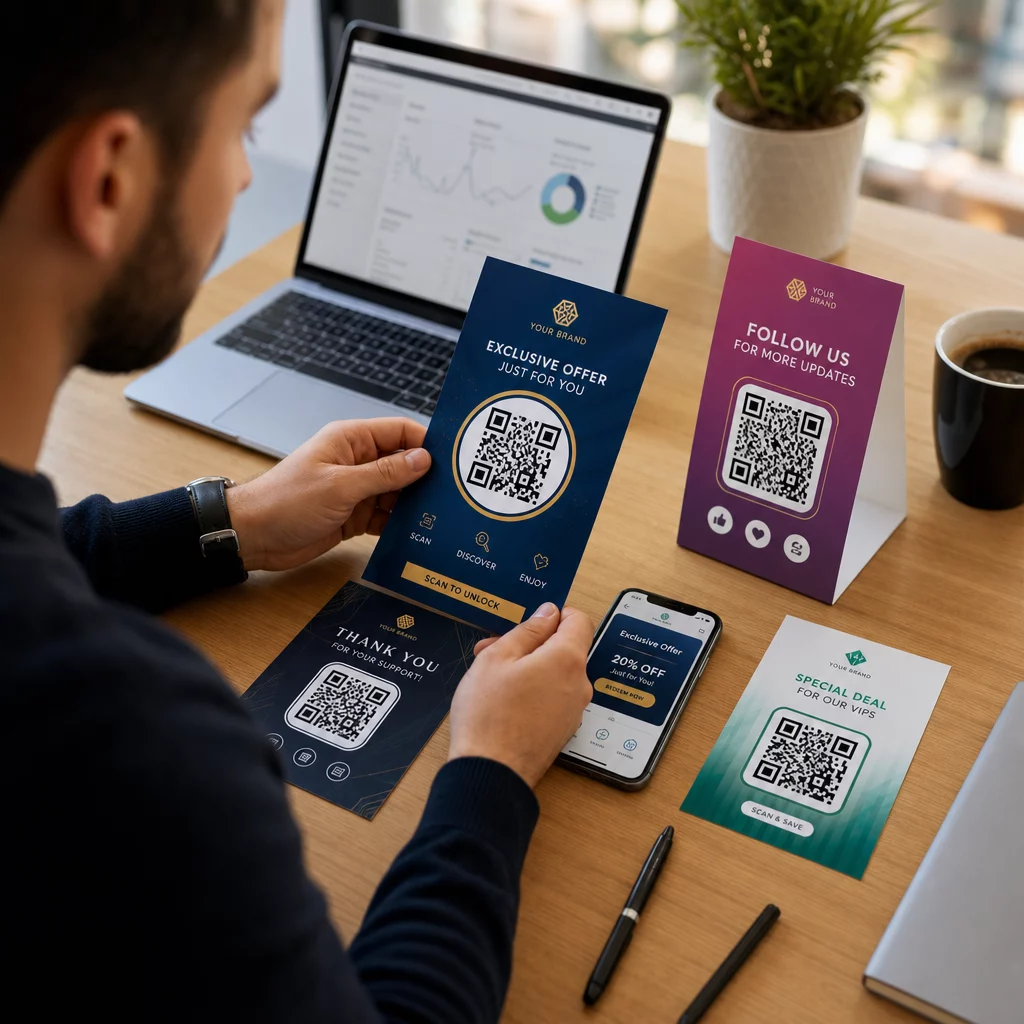
- Por tipo de audiencia: Una marca minorista coloca códigos QR separados en la señalización de la tienda y en el correo directo. Los escáneres en la tienda aterrizan en una página de recompensas de lealtad; los destinatarios del correo directo aterrizan en un descuento por primera compra.
- Por ubicación: Una campaña regional utiliza códigos QR distintos para cada ciudad. Cada código enlaza a una página de destino que hace referencia a promociones locales, ubicaciones de tiendas cercanas u ofertas específicas de la región.
- Por canal: Una empresa de eventos utiliza un código QR en las entradas y otro en las publicaciones de redes sociales. La versión del boleto enlaza a un horario personalizado del asistente; la versión social enlaza a una página de evento público.
- Por etapa del cliente: Una empresa SaaS imprime códigos QR en paquetes de bienvenida para nuevos clientes y avisos de renovación para los existentes. Cada uno enlaza a contenido de incorporación o actualización completamente diferente.
Cuanto más claramente defina sus segmentos antes de construir sus códigos, más relevante se volverá cada experiencia de escaneo.
Códigos QR Dinámicos: La Base de las Campañas Personalizadas
No todos los códigos QR admiten la personalización por igual. Los códigos QR estáticos codifican una URL fija que nunca puede cambiar. Una vez impresos, están bloqueados y no proporcionan ningún dato de escaneo. Eso los hace inadecuados para cualquier campaña en la que desee ajustar contenido, realizar pruebas o medir resultados.
Códigos QR dinámicos funcionan de manera diferente. El código en sí apunta a un enlace de redirección corto gestionado a través de su plataforma de códigos QR. Puede actualizar ese destino en cualquier momento, incluso después de que el código esté impreso y distribuido, sin generar ni reimprimir nada. Esta capa de redirección es también lo que permite el seguimiento: cada escaneo pasa por la plataforma, registrando datos antes de enviar al usuario a su destino.
Para campañas personalizadas, los códigos dinámicos le brindan cuatro capacidades críticas:
| Capacidad | Por qué es importante para la personalización |
|---|---|
| Destino editable | Actualizar el contenido de la página de destino para cada segmento sin reimprimir materiales |
| Seguimiento de escaneo | Saber cuántas personas de cada segmento interactuaron y cuándo |
| Datos de ubicación y dispositivo | Comprender patrones geográficos y optimizar para la experiencia móvil |
| Pruebas A/B | Probar diferentes páginas de destino para el mismo segmento de audiencia |
Para una mirada más profunda sobre cuándo usar cada tipo de código, elegir el código QR adecuado para su campaña cubre las ventajas y desventajas en detalle. La versión corta: si su campaña implica personalización, seguimiento o cualquier contenido que desee actualizar, los códigos dinámicos son la elección correcta. También puede explorar el 5 beneficios de los códigos QR dinámicos para marketing para una imagen más completa de lo que hacen posible.
Empieza a rastrear tu campaña personalizada Crea códigos QR dinámicos para cada segmento de audiencia y monitorea los datos de escaneo en tiempo real. Prueba el Generador de códigos QR dinámicos y accede a análisis completos desde tu panel de control.
Creación de campañas de códigos QR segmentadas paso a paso
1. Define tus segmentos y objetivos
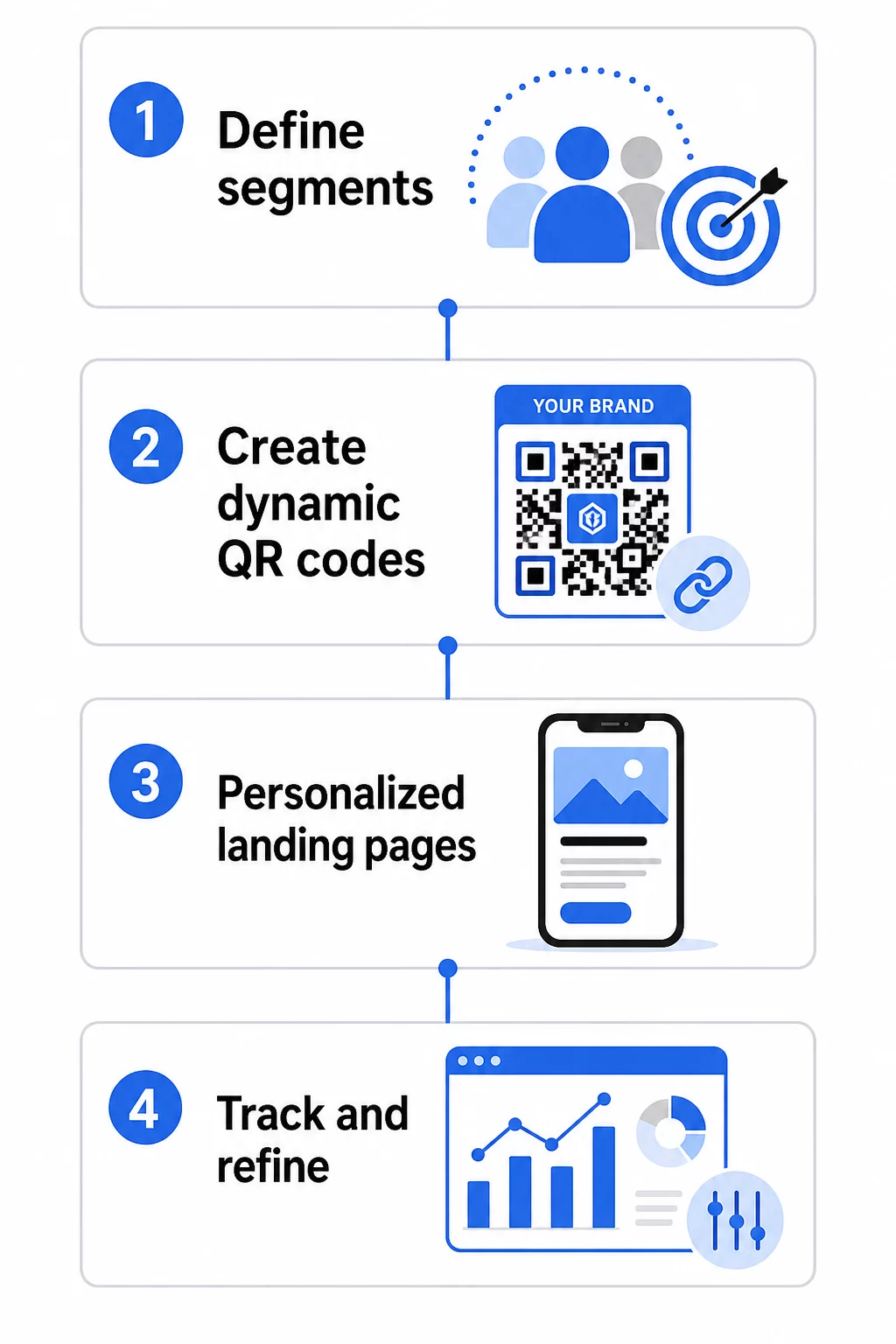
Comienza con tu audiencia antes de tocar cualquier herramienta. ¿A qué grupos de clientes intentas llegar? ¿Qué acción quieres que realice cada grupo? Los objetivos de tu campaña deben ser específicos y medibles, por ejemplo, “aumentar la tasa de canje de ofertas de correo directo a clientes inactivos en un 20%”, no solo “impulsar el compromiso”.”
Una vez que conozcas tus segmentos y objetivos, planifica un código QR y una página de destino separados para cada combinación significativa. Una campaña dirigida a tres segmentos de clientes en dos ubicaciones físicas podría necesitar seis códigos distintos.
2. Crea códigos únicos para cada segmento
Usando una plataforma como el generador de códigos QR de Pageloot, genera un código dinámico separado para cada segmento. Dale a cada código un nombre interno claro que identifique el segmento, la campaña y la ubicación; esta disciplina vale la pena cuando analizas los resultados de docenas de códigos.
Si tu campaña utiliza materiales impresos, personaliza la apariencia de cada código para que se ajuste al diseño. Códigos QR con logotipos y colores de marca refuerzan la confianza y señalan que el escaneo es intencional, no incidental. Los códigos QR de marca también destacan visualmente en entornos saturados, lo que afecta directamente si alguien se detiene a escanear.
3. Crea páginas de destino personalizadas para cada segmento
El código QR solo es tan valioso como la experiencia a la que conduce. Un visitante primerizo que aterriza en tu página de inicio después de escanear una pieza de correo directo no es una experiencia personalizada, es una oportunidad perdida.
Cada segmento debe aterrizar en una página que:
- Reconoce el contexto (“Bienvenidos, compradores de [Ciudad]” u “Oferta exclusiva para miembros de lealtad”)
- Presenta una oferta o mensaje claro y relevante para el segmento
- Incluye una única y enfocada llamada a la acción
- Carga rápidamente y funciona bien en dispositivos móviles
Dado que la mayoría de los escaneos de códigos QR ocurren en teléfonos inteligentes, la optimización móvil no es negociable. Prueba cada página de destino tanto en iOS como en Android antes de su lanzamiento.
4. Añade parámetros UTM para una integración completa de análisis
Los códigos QR dinámicos proporcionan datos de escaneo nativos: recuentos, marcas de tiempo, tipos de dispositivos y ubicaciones. Pero puedes añadir una capa de información aún más profunda al agregar parámetros UTM a las URL de tus páginas de destino. Esto conecta el tráfico de escaneo de QR con Google Analytics, permitiéndote medir el comportamiento posterior al escaneo, como el tiempo en la página, la tasa de rebote y los eventos de conversión junto con tus datos de escaneo.
Una URL con etiquetas UTM para una campaña de correo directo dirigida a clientes inactivos en Chicago podría verse así:
“`
https://yoursite.com/reactivate?utmsource=directmailchicago&utmmedio=qrcódigo&utmcampaign=reactivation_q3
“`
Para una explicación detallada de la configuración de UTM y la integración con Google Analytics, consulta Parámetros UTM para códigos QR: consejos de Google Analytics.
5. Coloca los códigos estratégicamente para cada segmento
Dónde aparece un código QR influye en quién lo escanea y en qué contexto. Adapta la ubicación al comportamiento de tu segmento:
- Correo directo: Incluya el código de forma destacada cerca de la oferta, con una breve instrucción como “Escanee para obtener su descuento exclusivo”. Los destinatarios de correo directo tienen tiempo suficiente para interactuar deliberadamente.
- Empaques de productos: Agregue códigos a etiquetas, tarjetas de agradecimiento o insertos de envío para volver a interactuar con los clientes después de la compra.
- Señalización en tienda: Coloque los códigos a la altura de los ojos cerca del producto o departamento relevante. Agregue una CTA visible para que los compradores entiendan lo que obtendrán.
- Eventos y conferencias: Utilice códigos QR en credenciales, entradas o programas impresos para dirigir a los asistentes a contenido personalizado como detalles de sesiones o biografías de oradores.
- Pegatinas y etiquetas: Para puntos de contacto físicos más pequeños, un código bien ubicado con una CTA clara puede impulsar la interacción de una audiencia que ya tiene su producto.
El Lista de marketing con códigos QR para pequeñas empresas cubre consideraciones adicionales de ubicación y configuración si está lanzando su primera campaña.
Uso de datos de códigos QR para refinar sus segmentos
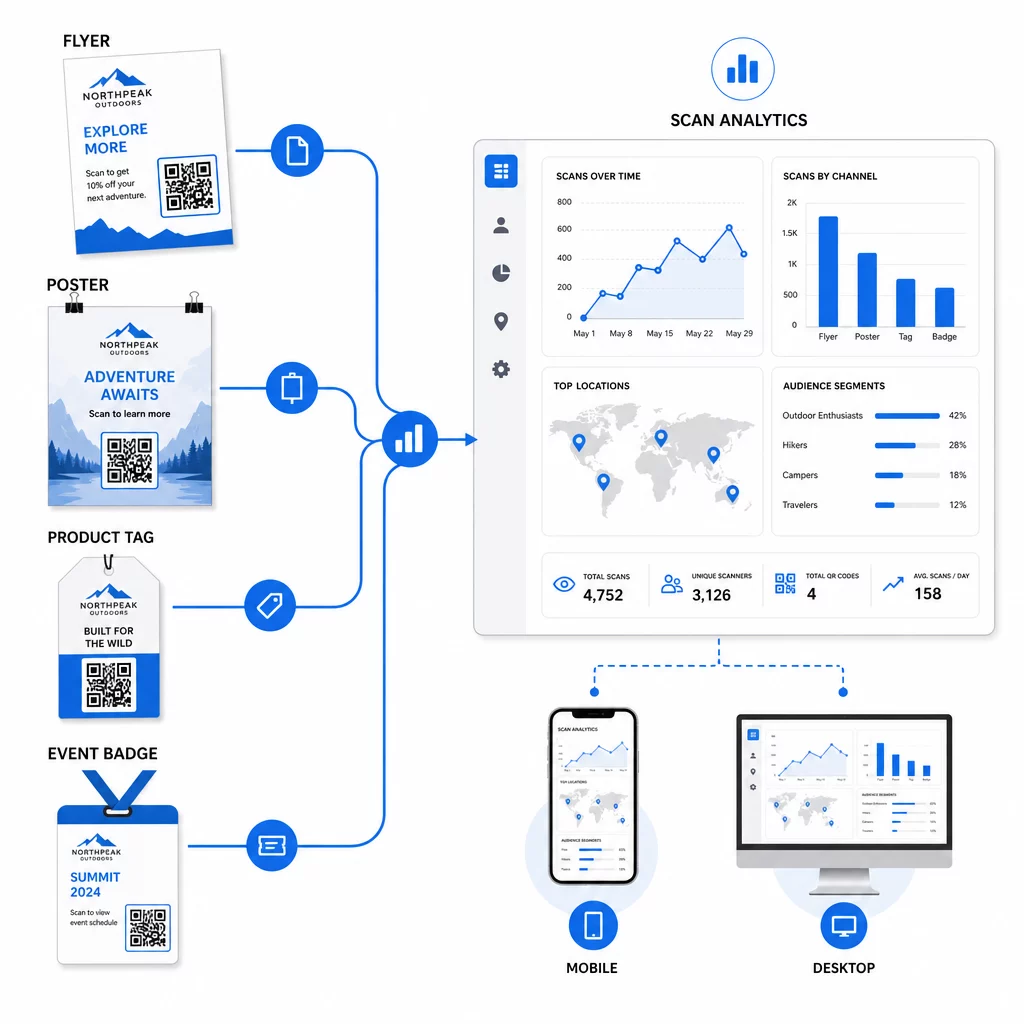
Los datos que generan sus códigos QR dinámicos son en sí mismos un activo de personalización. Cada escaneo le da una señal sobre quién respondió a qué mensaje, cuándo y desde dónde. Con el tiempo, esto construye una imagen más clara de qué segmentos son más receptivos y qué ubicaciones están generando el tráfico más calificado.
Métricas clave a monitorear por segmento:
- Recuento de escaneos y escaneos únicos: Indica el alcance general y si las mismas personas están regresando
- Patrones de tiempo de escaneo: Revela cuándo cada segmento está más activo, útil para programar la comunicación de seguimiento
- Distribución geográfica: Muestra si tu campaña está llegando a las regiones previstas – útil para rastrear campañas de códigos QR por región y ajustar el gasto local
- Tipo de dispositivo: Si un segmento se inclina fuertemente hacia un dispositivo particular, puedes optimizar la experiencia de la página de destino para esa plataforma
- Conversiones post-escaneo: Rastreado a través de parámetros UTM en Google Analytics, esto te indica qué combinaciones de segmento y ubicación están realmente impulsando los resultados que te interesan
Para un enfoque estructurado para probar diferentes variables dentro de un segmento, consulta la guía para las pruebas A/B de campañas con códigos QR. Los códigos dinámicos son particularmente adecuados para las pruebas A/B porque puedes intercambiar los destinos de las páginas de destino sin tocar el código impreso.
También puedes usar la ubicación de escaneo y los datos del dispositivo como entradas para una personalización más profunda – por ejemplo, redirigir a los escáneres de diferentes ciudades a páginas de destino específicas de la región, o ajustar el contenido según si el dispositivo es iOS o Android. La guía de códigos QR para la personalización basada en datos cubre estas técnicas en detalle.
Consulta Qué Segmentos Están Interactuando Más Use el Generador de códigos QR dinámicos para crear códigos rastreables separados para cada segmento de audiencia y comparar el rendimiento entre ubicaciones en un solo panel.
Consideraciones de privacidad para campañas de QR personalizadas
Los códigos QR recopilan datos de origen (información generada por la propia interacción de su audiencia con sus materiales). Esto es cada vez más valioso a medida que los métodos de seguimiento de terceros enfrentan presión regulatoria y escrutinio del consumidor. Sin embargo, la recopilación de datos a través de códigos QR aún conlleva obligaciones.
La ley de privacidad de EE. UU. está fragmentada entre estatutos federales específicos del sector y un creciente conjunto de leyes estatales de privacidad integrales, muchas de las cuales rigen cómo se recopila y utiliza la información personal para marketing. La mejor práctica es ser transparente sobre qué datos recopilan sus códigos QR y por qué.
Pasos prácticos para mantener el cumplimiento:
- Muestre un aviso breve cerca de cada código QR o en la página de destino inicial explicando qué datos se rastrean (por ejemplo, ubicación de escaneo, tipo de dispositivo)
- Proporcione un enlace a su política de privacidad en cualquier página que recopile información personal
- Evite recopilar información de identificación personal de forma pasiva sin divulgación
- Utilice los datos que recopila solo para los fines que ha comunicado a los usuarios
La transparencia también genera confianza en el escaneo. Más del 80% de los usuarios de códigos QR con sede en EE. UU. dicen que consideran que los códigos QR son seguros, pero una CTA clara y un diseño de marca reconocible contribuyen en gran medida a tranquilizar a cualquiera que dude.
Tácticas comunes de personalización por canal
| Canal | Táctica de personalización | Función del código QR |
|---|---|---|
| Correo directo | Código único por segmento de destinatarios con oferta personalizada | Enlaces a página de destino específica del segmento |
| Embalaje del producto | Reactivación post-compra por tipo de producto | Enlaces a contenido instructivo, venta adicional o solicitud de reseña |
| Señalización en la tienda | Promociones basadas en la ubicación | Enlaces a ofertas locales o a la página de servicio más cercana |
| Eventos | Tipo de asistente (ponente, patrocinador, general) | Enlaces a horarios o contenido específicos del rol |
| Anuncios en redes sociales | Interés de la audiencia o segmento de retargeting | Enlaces a contenido que coincida con la creatividad del anuncio |
Cada uno de estos casos de uso se beneficia del mismo enfoque subyacente: un código dinámico único por segmento, cada uno apuntando a un destino específico, cada uno rastreado de forma independiente para que pueda medir los resultados e iterar.
Para una visión más amplia de cómo los códigos QR encajan en su conjunto de herramientas de marketing general, el Descripción general de las funciones de Pageloot cubre toda la gama de tipos y capacidades de códigos QR disponibles para el uso en campañas.
Poniéndolo en práctica
Las campañas personalizadas de códigos QR no requieren una infraestructura compleja, sino claridad sobre sus segmentos, disciplina para crear códigos separados para cada uno y una plataforma que le proporcione los datos de seguimiento para actuar sobre lo que aprenda. Comience con una campaña, dos o tres segmentos y un objetivo de conversión claro. Utilice los datos de escaneo para comprender qué funciona y luego escale el enfoque a más canales y grupos de audiencia.
El generador de códigos QR de enlaces es un buen punto de partida si está conectando segmentos a URL específicas. Cuando esté listo para el seguimiento completo, la actualización y la gestión de campañas, el Generador de códigos QR dinámicos le brinda la flexibilidad de ejecutar, ajustar y medir campañas personalizadas sin reimprimir un solo material.
Preguntas frecuentes
Un código QR estático codifica una URL fija que no se puede cambiar después de su creación y no proporciona datos de escaneo. Un código QR dinámico apunta a un enlace de redirección que puedes actualizar en cualquier momento, y registra métricas de escaneo incluyendo el recuento, la ubicación, el tipo de dispositivo y la marca de tiempo. Para marketing personalizado – donde necesitas rastrear el rendimiento por segmento y potencialmente actualizar las páginas de destino – los códigos dinámicos son la elección apropiada.
Necesita un código QR único para cada combinación significativa de segmento de audiencia y ubicación. Por ejemplo, si se dirige a tres grupos de clientes a través de dos materiales físicos, crearía seis códigos. Utilizando una plataforma como Pageloot, puede gestionarlos todos desde un único panel de control, lo que facilita el seguimiento y la actualización incluso para campañas más grandes.
Agregue parámetros UTM a la URL de destino antes de codificarla en su código QR. Utilice valores descriptivos para utmsource (por ejemplo, “directmailnyc”), un utmmedium consistente (por ejemplo, “qr_code”) y un nombre de campaña que identifique la campaña específica. Una vez que los usuarios escanean y llegan a su página, Google Analytics registra la sesión bajo esos parámetros, lo que le permite medir el tráfico, la interacción y las conversiones por segmento. Los códigos QR dinámicos hacen que esto sea especialmente flexible porque puede actualizar la URL con etiquetas UTM sin reimprimir el código.